Page 199 of 608
199
LC200_OM_OM60P24U_(U)
4-2. Driving procedures
4
Driving
Automatic transmission
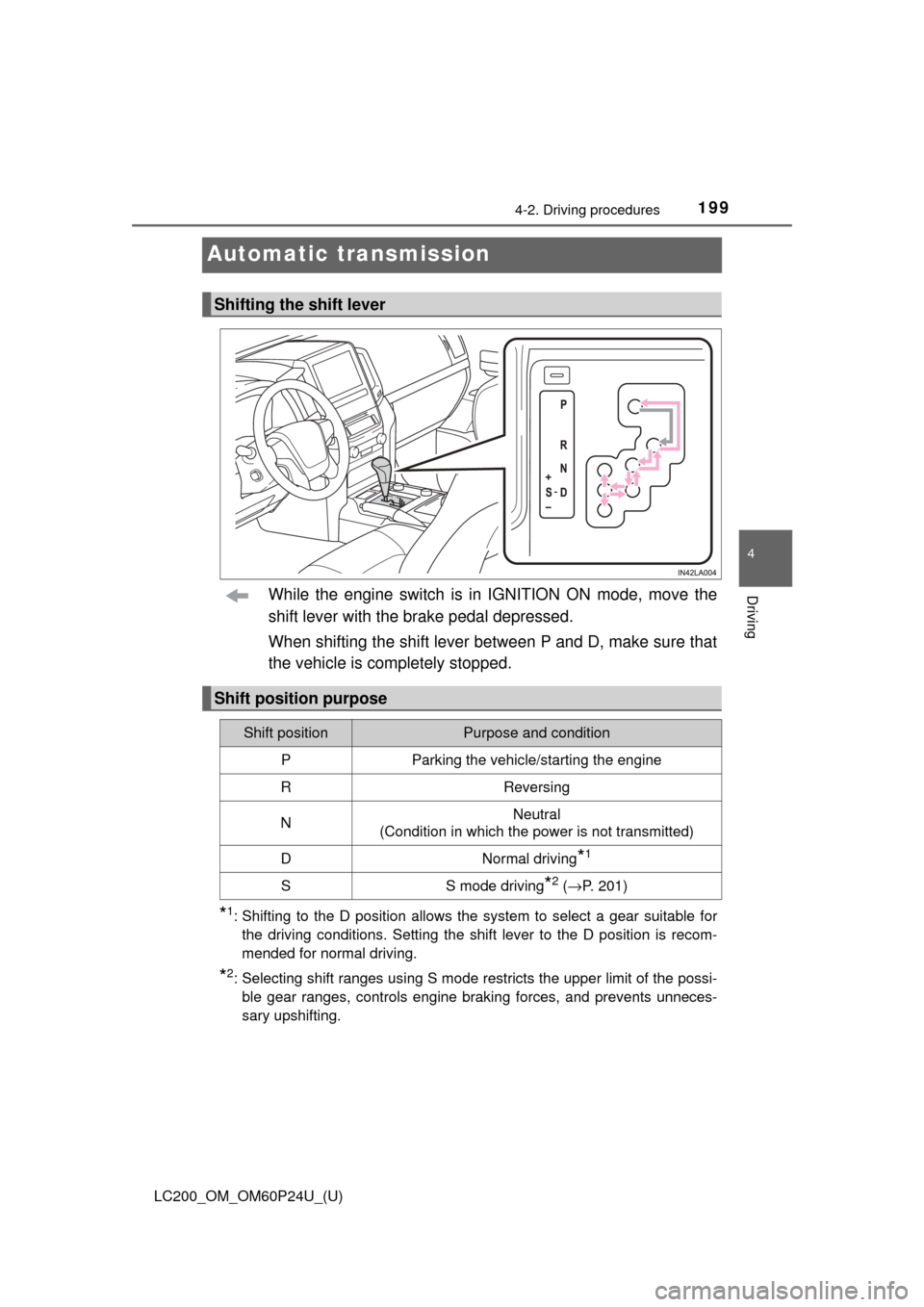
While the engine switch is in IGNITION ON mode, move the
shift lever with the brake pedal depressed.
When shifting the shift lever between P and D, make sure that
the vehicle is completely stopped.
*1: Shifting to the D position allows the system to select a gear suitable forthe driving conditions. Setting the shift lever to the D position is recom-
mended for normal driving.
*2: Selecting shift ranges using S mode restricts the upper limit of the possi-ble gear ranges, controls engine braking forces, and prevents unneces-
sary upshifting.
Shifting the shift lever
Shift position purpose
Shift positionPurpose and condition
PParking the vehicle/starting the engine
RReversing
NNeutral
(Condition in which the power is not transmitted)
DNormal driving*1
SS mode driving*2 ( → P. 201)
Page 202 of 608

202
LC200_OM_OM60P24U_(U)
4-2. Driving procedures
■Driving on a downhill
On declines, there may be case where the vehicle shifts down automatically
to obtain engine braking. As a result of the downshifting, the engine speed
may increase.
■ Second start mode au tomatic deactivation
Second start mode is automatically deactivated if the engine is turned off after
driving in second start mode.
■ S mode
When the shift range is 7 or lower, holding the shift lever toward “+” sets the
shift range to 8.
■ AI-SHIFT
AI-SHIFT automatically selects the suitable gear according to driver perfor-
mance and driving conditions.
AI-SHIFT automatically operates when the shift lever is in the D position.
(Shifting the shift lever to the S position cancels the function.)
■ When driving with cruise control or dynamic radar cruise control acti-
vated
Even when performing the following actions with the intent of enabling engine
braking, engine braking will not activate because cruise control or radar
cruise control will not be canceled.
● While driving in S mode, downshifting to 7, 6, 5 or 4. ( →P. 258, 270)
● When switching the driving mode to power mode while driving in D positio\
n.
(→P. 200)
■ Shift lock system
The shift lock system is a system to prevent accidental operation of the shift
lever in starting.
The shift lever can be shifted from P only when the engine switch is in IGNI-
TION ON mode and the brake pedal is being depressed.
Page 203 of 608
LC200_OM_OM60P24U_(U)
2034-2. Driving procedures
4
Driving
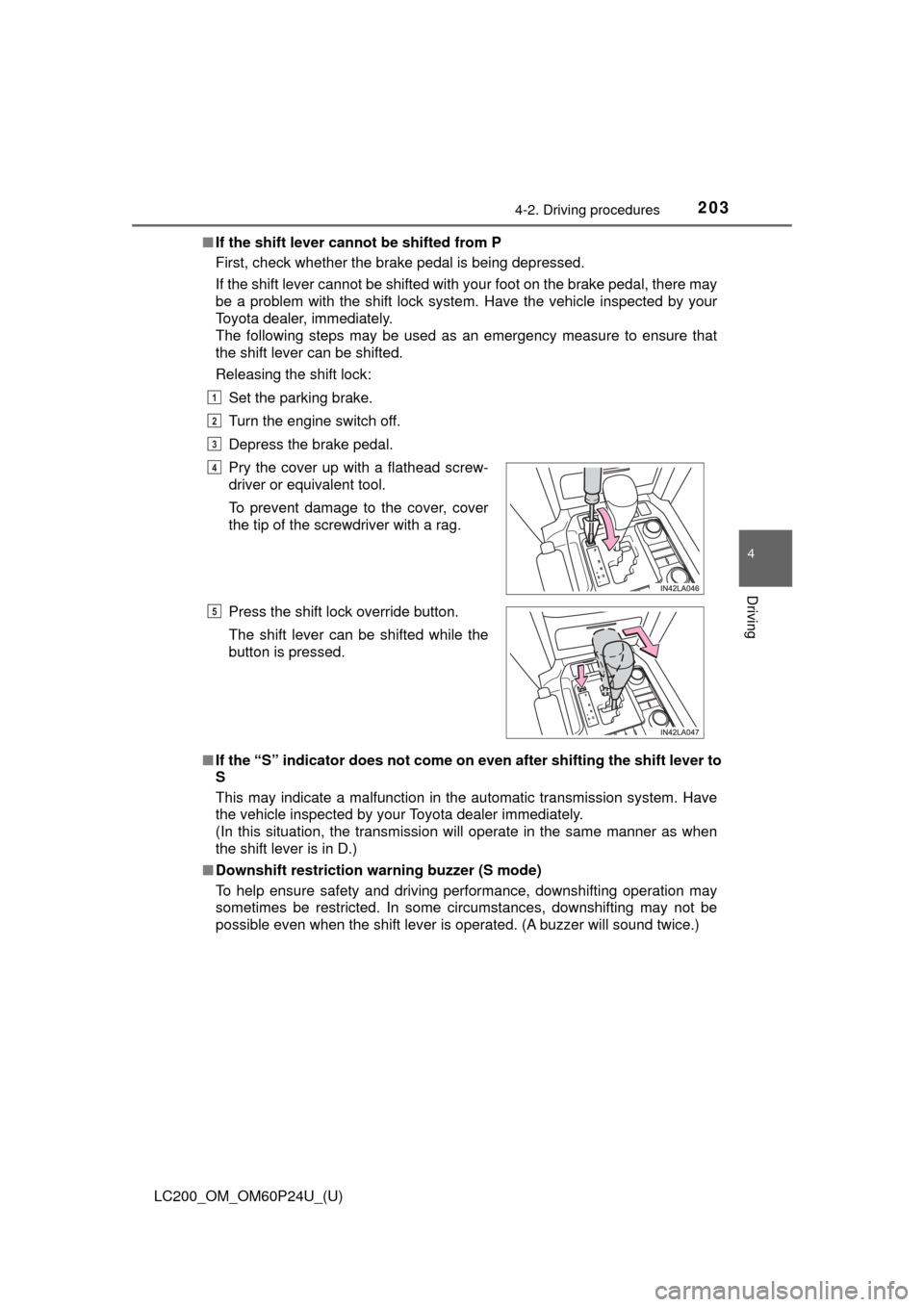
■If the shift lever canno t be shifted from P
First, check whether the brake pedal is being depressed.
If the shift lever cannot be shifted with your foot on the brake pedal, there may
be a problem with the shift lock system. Have the vehicle inspected by y\
our
Toyota dealer, immediately.
The following steps may be used as an emergency measure to ensure that
the shift lever can be shifted.
Releasing the shift lock:
Set the parking brake.
Turn the engine switch off.
Depress the brake pedal.
■ If the “S” indicator does not come on even after shifting the shift lever to
S
This may indicate a malfunction in the automatic transmission system. Have
the vehicle inspected by your Toyota dealer immediately.
(In this situation, the transmission will operate in the same manner as when
the shift lever is in D.)
■ Downshift restriction warning buzzer (S mode)
To help ensure safety and driving performance, downshifting operation may
sometimes be restricted. In some circumstances, downshifting may not be
possible even when the shift lever is operated. (A buzzer will sound twice.)Pry the cover up with a flathead screw-
driver or equivalent tool.
To prevent damage to the cover, cover
the tip of the screwdriver with a rag.
Press the shift lock override button.
The shift lever can be shifted while the
button is pressed.
1
2
3
4
5
Page 204 of 608
204
LC200_OM_OM60P24U_(U)
4-2. Driving procedures
WARNING
■When driving on slippery road surfaces
Do not accelerate or shift gears suddenly.
Sudden changes in engine braking may cause the vehicle to spin or skid,
resulting in an accident.
■ To prevent an accident when releasing the shift lock
Before pressing the shift lock override button, make sure to set the parking
brake and depress the brake pedal.
If the accelerator pedal is accidentally depressed instead of the brake pedal
when the shift lock override button is pressed and the shift lever is shifted
out of P, the vehicle may suddenly start, possibly leading to an accident
resulting in death or serious injury.
Page 206 of 608
206
LC200_OM_OM60P24U_(U)
4-2. Driving procedures
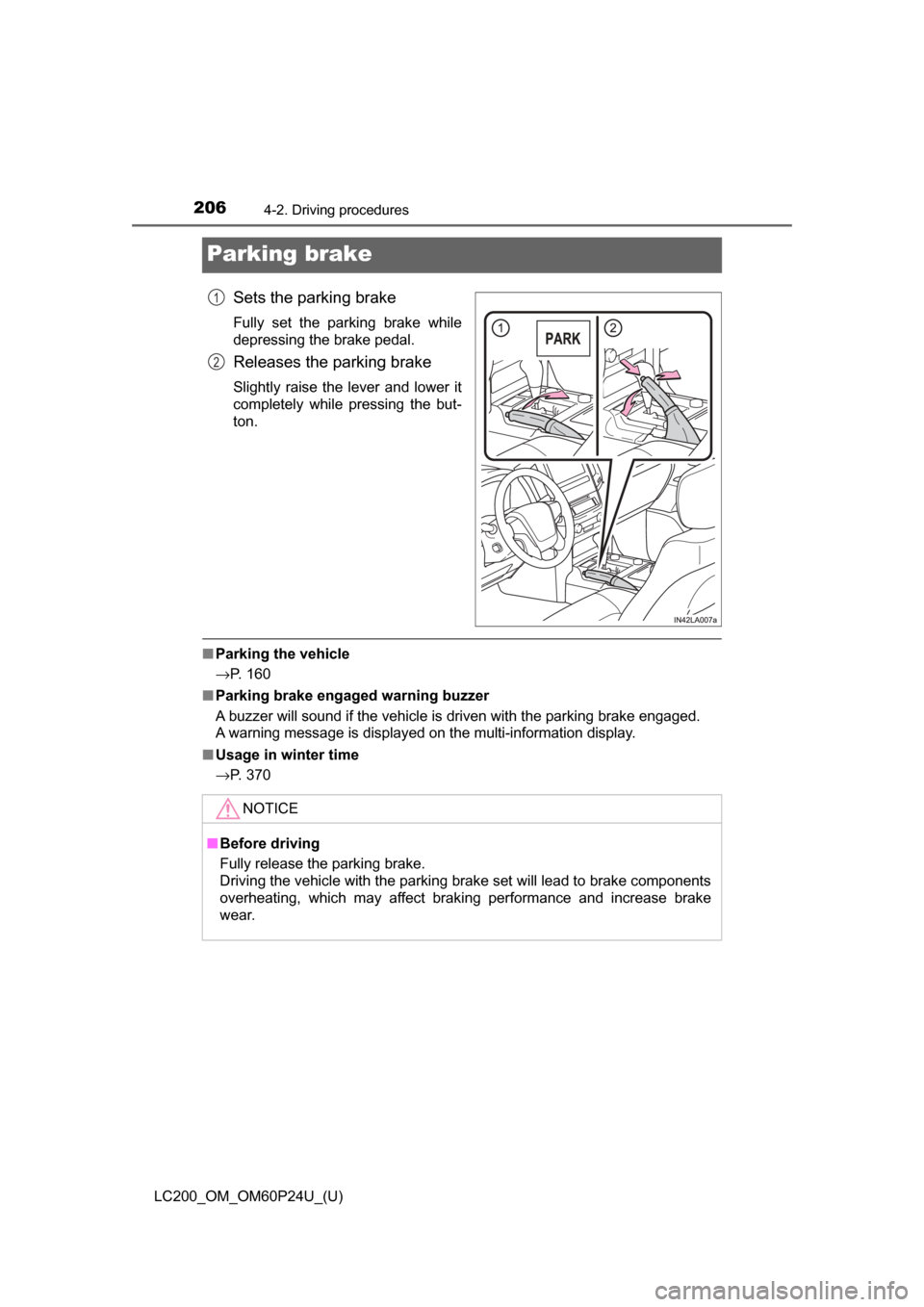
Parking brake
Sets the parking brake
Fully set the parking brake while
depressing the brake pedal.
Releases the parking brake
Slightly raise the lever and lower it
completely while pressing the but-
ton.
■Parking the vehicle
→P. 160
■ Parking brake engaged warning buzzer
A buzzer will sound if the vehicle is driven with the parking brake engaged.
A warning message is displayed on the multi-information display.
■ Usage in winter time
→P. 370
1
2
NOTICE
■Before driving
Fully release the parking brake.
Driving the vehicle with the parking brake set will lead to brake components
overheating, which may affect braking performance and increase brake
wear.
Page 209 of 608
LC200_OM_OM60P24U_(U)
2094-3. Operating the lights and wipers
4
Driving
■Daytime running light system
●To make your vehicle more visible to other drivers during daytime driving,
the daytime running lights turn on automatically whenever the engine is
started and the parking brake is released. (Illuminate dimmer than the head-
lights.) Daytime running lights are not designed for use at night.
For the U.S.A.: Daytime running lights can be turned off by operating the
switch.
● Compared to turning on the headlights, the daytime running light system
offers greater durability and consumes less electricity, so it can help improve
fuel economy.
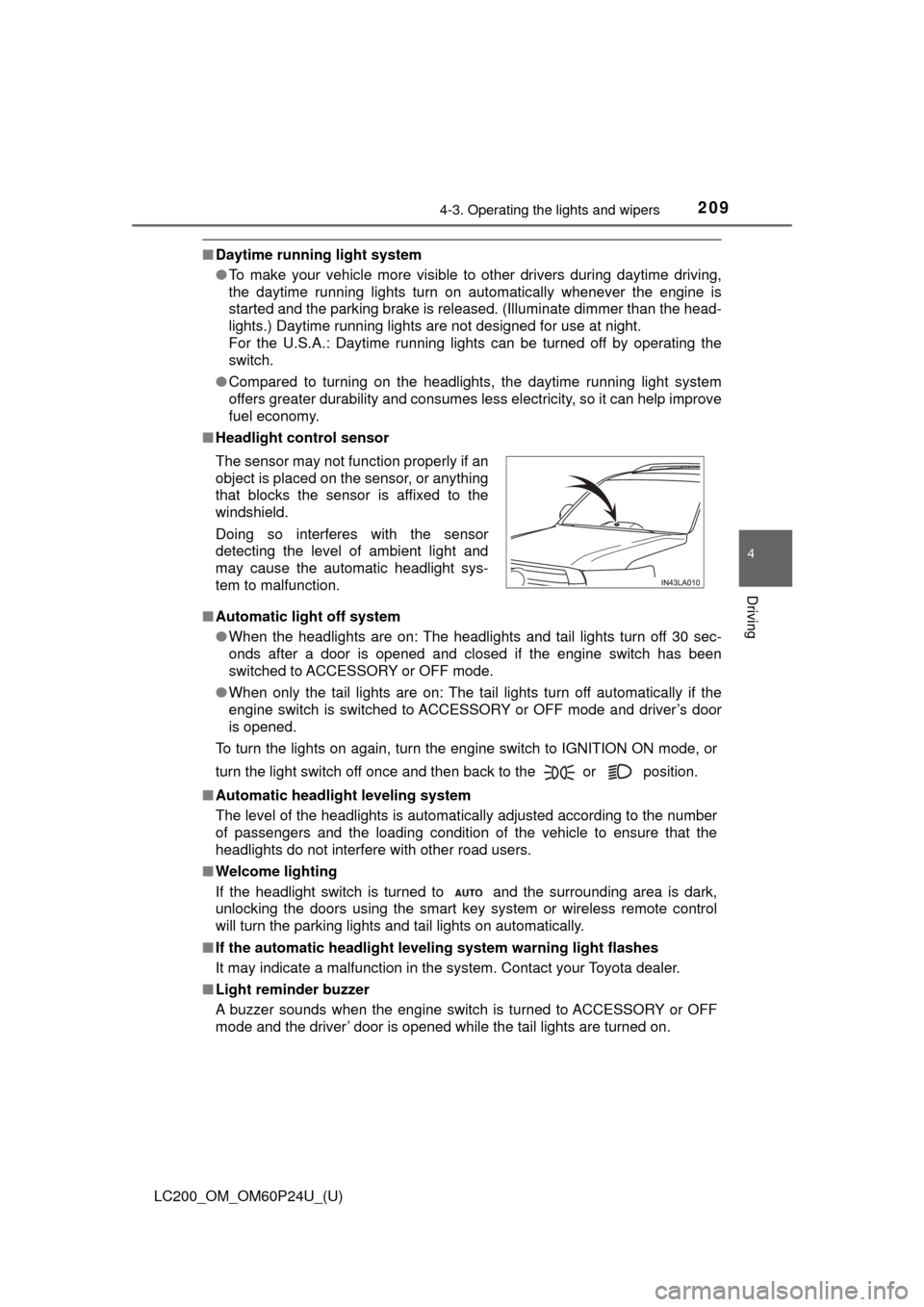
■ Headlight control sensor
■ Automatic light off system
●When the headlights are on: The headlights and tail lights turn off 30 sec-
onds after a door is opened and closed if the engine switch has been
switched to ACCESSORY or OFF mode.
● When only the tail lights are on: The tail lights turn off automatically if the
engine switch is switched to ACCESSORY or OFF mode and driver’s door
is opened.
To turn the lights on again, turn the engine switch to IGNITION ON mode, or
turn the light switch off once and then back to the or position.
■ Automatic headlight leveling system
The level of the headlights is automatically adjusted according to the n\
umber
of passengers and the loading condition of the vehicle to ensure that the
headlights do not interfere with other road users.
■ Welcome lighting
If the headlight switch is turned to and the surrounding area is dark,
unlocking the doors using the smart key system or wireless remote control
will turn the parking lights and tail lights on automatically.
■ If the automatic headlight level ing system warning light flashes
It may indicate a malfunction in the system. Contact your Toyota dealer.
■ Light reminder buzzer
A buzzer sounds when the engine switch is turned to ACCESSORY or OFF
mode and the driver’ door is opened while the tail lights are turned on. The sensor may not function properly if an
object is placed on the sensor, or anything
that blocks the sensor is affixed to the
windshield.
Doing so interferes with the sensor
detecting the level of ambient light and
may cause the automatic headlight sys-
tem to malfunction.
Page 229 of 608

LC200_OM_OM60P24U_(U)
2294-5. Using the driving support systems
4
Driving
The pre-collision system is equipp ed with a sophisticated computer
that will record cert ain data, such as:
• Accelerator status
• Brake status
• Vehicle speed
• Operation status of the pre-collision system functions
• Information (such as the distanc e and relative speed between your
vehicle and the vehicle ahead or other objects)
• Images from the camera sensor (available only when the pre-colli-
sion braking function or the pre-collision brake assist function was
operating)
The pre-collision system does not record conversations, sounds or
images of the inside of the vehicle.
● Data usage
Toyota may use the data recorded in this computer to diagnose
malfunctions, conduct research and development, and improve
quality.
Toyota will not disclose the recor ded data to a third party except:
• With the consent of the vehicle owner or with the consent of the lessee if the vehicle is leased
• In response to an official request by the police, a court of law or a
government agency
• For use by Toyota in a lawsuit
• For research purposes where the data is not tied to a specific vehicle or vehicle owner
● Recorded images can be erased using a specialized device.
The image recording function can be disabled. However, if the func-
tion is disabled, data from when the pre-collision system operates
will not be available.
Vehicle data recording
Page 235 of 608
235
LC200_OM_OM60P24U_(U)
4-5. Using the driving support systems
4
Driving
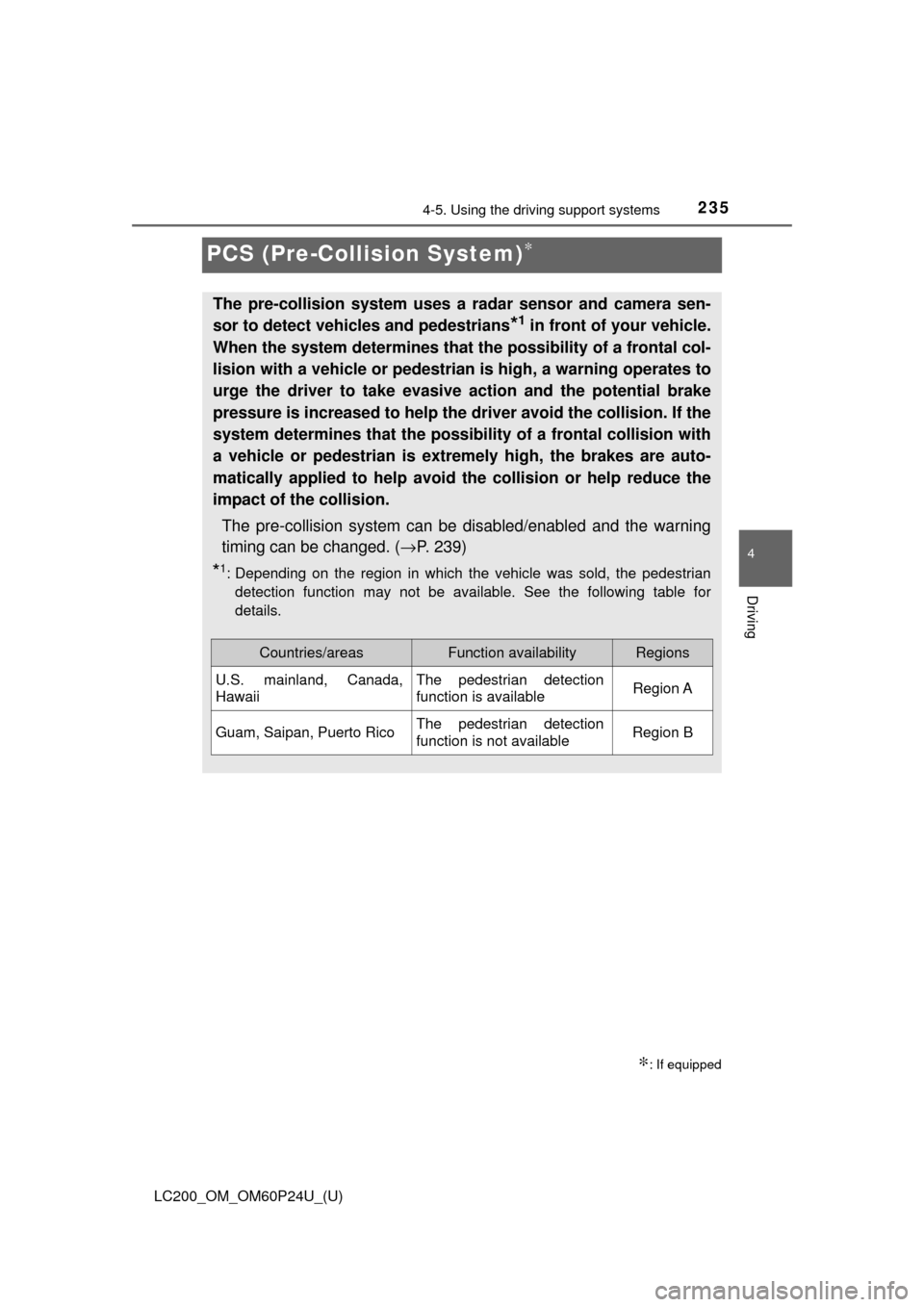
PCS (Pre-Collision System)∗
∗: If equipped
The pre-collision system uses a radar sensor and camera sen-
sor to detect vehicles and pedestrians
*1 in front of your vehicle.
When the system determines that the possibility of a frontal col-
lision with a vehicle or pedestrian is high, a warning operates to
urge the driver to take evasive action and the potential brake
pressure is increased to help the dr iver avoid the collision. If the
system determines that the possibi lity of a frontal collision with
a vehicle or pedestrian is extremely high, the brakes are auto-
matically applied to help avoid the collision or help reduce the
impact of the collision.
The pre-collision system can be disabled/enabled and the warning
timing can be changed. ( →P. 239)
*1: Depending on the region in which the vehicle was sold, the pedestrian
detection function may not be available. See the following table for
details.
Countries/areasFunction availabilityRegions
U.S. mainland, Canada,
HawaiiThe pedestrian detection
function is availableRegion A
Guam, Saipan, Puerto RicoThe pedestrian detection
function is not availableRegion B