Page 306 of 732
3064-5. Using the driving support systems
HIGHLANDER_U (OM0E017U)
WARNING
■When the Stop & Start system is operating
● Depress the brake pedal and apply the parking brake when necessary
while the engine is stopped by the Stop & Start system (while the Stop &
Start indicator is on).
● Do not allow anyone to leave the vehicle while the engine is stopped by
the Stop & Start system (while the Stop & Start indicator is on).
An accident may occur due to the automatic engine start function.
● Ensure that the engine is not stopped by the Stop & Start system while t\
he
vehicle is in a poorly ventilated area. The engine may restart due to the
automatic engine start function, causing exhaust gases to collect and
enter the vehicle, possibly resulting in death or a serious health hazar\
d.
NOTICE
■To ensure the system operates correctly
If any of the following situations occur, the Stop & Start system may not
operate correctly. Have your vehicle inspected by Toyota dealer.
● While the driver's seat belt is fa stened, the driver's and front passenger's
seat belt reminder light flashes.
● Even though the driver's seat belt is not fastened, the driver's and front
passenger's seat belt reminder light does not illuminate.
● Even though the driver's door is closed, the open door warning is dis-
played on the multi-information display or the interior light is illuminated
when door linked illumination is enabled ( →P. 458).
● Even though the driver's door is open, the open door warning is not dis-
played on the multi-information display or the interior light does not illumi-
nate when door linked illumination is enabled ( →P. 458).
Page 315 of 732
3154-5. Using the driving support systems
4
Driving
HIGHLANDER_U (OM0E017U)
WARNING
●In low temperatures, the screen may darken or the image may become
faint. The image could distort when the vehicle is moving, or you may
become unable to see the image on the screen. Be sure to check direct
visually and with the mirrors all around the vehicle before proceeding.
● If the tire sizes are changed, the position of the fixed guide lines displayed
on the screen may change.
● The camera uses a special lens. The distances between objects and
pedestrians that appear in the image displayed on the screen will differ
from the actual distances. ( →P. 310)
NOTICE
■How to use the camera
● The rear view monitor system may not operate properly in the following
cases.
• If the back of the vehicle is hit, the position and mounting angle of the
camera may change.
• As the camera has a water proof construction, do not detach, disassem- ble or modify it. This may cause incorrect operation.
• When cleaning the camera lens, flush the camera with a large quantity
of water and wipe it with a soft and wet cloth. Strongly rubbing the cam-
era lens may cause the camera lens to be scratched and unable to
transmit a clear image.
• Do not allow organic solvent, car wax, window cleaner or glass coat to adhere to the camera. If this happens, wipe it off as soon as possible.
• If the temperature changes rapidly, such as when hot water is poured
on the vehicle in cold weather, the system may not operate normally.
• When washing the vehicle, do not apply intensive bursts of water to the camera or camera area. Doing so may result in the camera malfunc-
tioning.
• When the camera is used under fluorescent lights, sodium light or mer- cury light etc., the lights and the illuminated areas may appear to flic\
ker.
● Do not expose the camera to strong impact as this could cause a malfunc-
tion. If this happens, have the vehicle inspected by your Toyota dealer as
soon as possible.
Page 318 of 732
3184-5. Using the driving support systems
HIGHLANDER_U (OM0E017U)
Press “<” or “>” of the meter contro l switches, select .
Press “ ∧” or “ ∨” of the meter control switches, select “BSM”.
■ Outside rear view mirror indicator visibility
In strong sunlight, the outside rear view mirror indicator may be difficult to
see.
■ Hearing the RCTA buzzer
The RCTA buzzer may be difficult to hear over loud noises, such as if the
audio system volume is high.
■ When there is a malfunction in the Blind Spot Monitor
If a system malfunction is detected due to any of the following, a warning
message will be displayed: ( →P. 591)
● A sensor is malfunctioning
● A sensor is dirty or covered with snow or a sticker
● The outside temperature is extremely high or low
● Sensor voltage is abnormal
● A sensor is misaligned
Turning the BSM function/RCTA function on/off
1
2
Page 320 of 732

3204-5. Using the driving support systems
HIGHLANDER_U (OM0E017U)
WARNING
■Handling the radar sensor
Blind Spot Monitor sensors are installed behind the left and right sides of the
rear bumper respectively. Observe the following to ensure the Blind Spot
Monitor can function correctly.
● Do not subject a sensor or its surrounding area on the rear bumper to a
strong impact.
If a sensor is moved even slightly off position, the system may malfunction
and vehicles may not be detected correctly.
In the following situations, have your vehicle inspected by your Toyota
dealer.
• A sensor or its surrounding area is subject to a strong impact.
• If the surrounding area of a sensor is scratched or dented, or part of
them has become disconnected.
● Do not disassemble the sensor.
● Do not attach stickers to the sensor or surrounding area on the rear
bumper.
● Do not modify the sensor or surrounding area on the rear bumper.
● Do not paint the rear bumper any color other than an official Toyota color.
●Keep the sensors and the surrounding
areas on the rear bumper clean at all
times.
If a sensor or its surrounding area on
the rear bumper is dirty or covered with
snow, the Blind Spot Monitor may not
operate and a warning message ( →P.
591) will be displayed. In this situation,
clear off the dirt or snow and drive the
vehicle with the operation conditions of
the BSM function ( →P. 322) satisfied for
approximately 10 minutes. If the warn-
ing message does not disappear, have
the vehicle inspected by your Toyota
dealer.
Page 336 of 732
3364-5. Using the driving support systems
HIGHLANDER_U (OM0E017U)
WARNING
■TRAC/VSC may not operate effectively when
Directional control and power may not be achievable while driving on slip-
pery road surfaces, even if the TRAC/VSC system is operating.
Drive the vehicle carefully in conditions where stability and power may be
lost.
■ Hill- start assist control does not operate effectively when
● Do not overly rely on hill-start assist control. Hill-start assist control may
not operate effectively on steep inclines and roads covered with ice.
● Unlike the parking brake, hill-start assist control is not intended to hold the
vehicle stationary for an extended period of time. Do not attempt to use
hill-start assist control to hold the vehicle on an incline, as doing so may
lead to an accident.
■ When the VSC is activated
The slip indicator light flashes. Always drive carefully. Reckless driving may
cause an accident. Exercise particular care when the indicator light flashes.
■ When the TRAC/VSC syst ems are turned off
Be especially careful and drive at a speed appropriate to the road condi-
tions. As these are the systems to help ensure vehicle stability and driving
force, do not turn the TRAC/VSC systems off unless necessary.
Trailer Sway Control is part of the VSC system and will not operate if VSC
turned off or experiences a malfunction.
■ Replacing tires
Make sure that all tires are of the specified size, brand, tread pattern and
total load capacity. In addition, make sure that the tires are inflated to the
recommended tire inflation pressure level.
The ABS, TRAC and VSC systems will not function correctly if different tires
are installed on the vehicle.
Contact your Toyota dealer for further information when replacing tires or
wheels.
■ Handling of tires and the suspension
Using tires with any kind of problem or modifying the suspension will affect
the driving assist systems, and may cause a system to malfunction.
Page 460 of 732
460
HIGHLANDER_U (OM0E017U)
6-3. Using the storage features
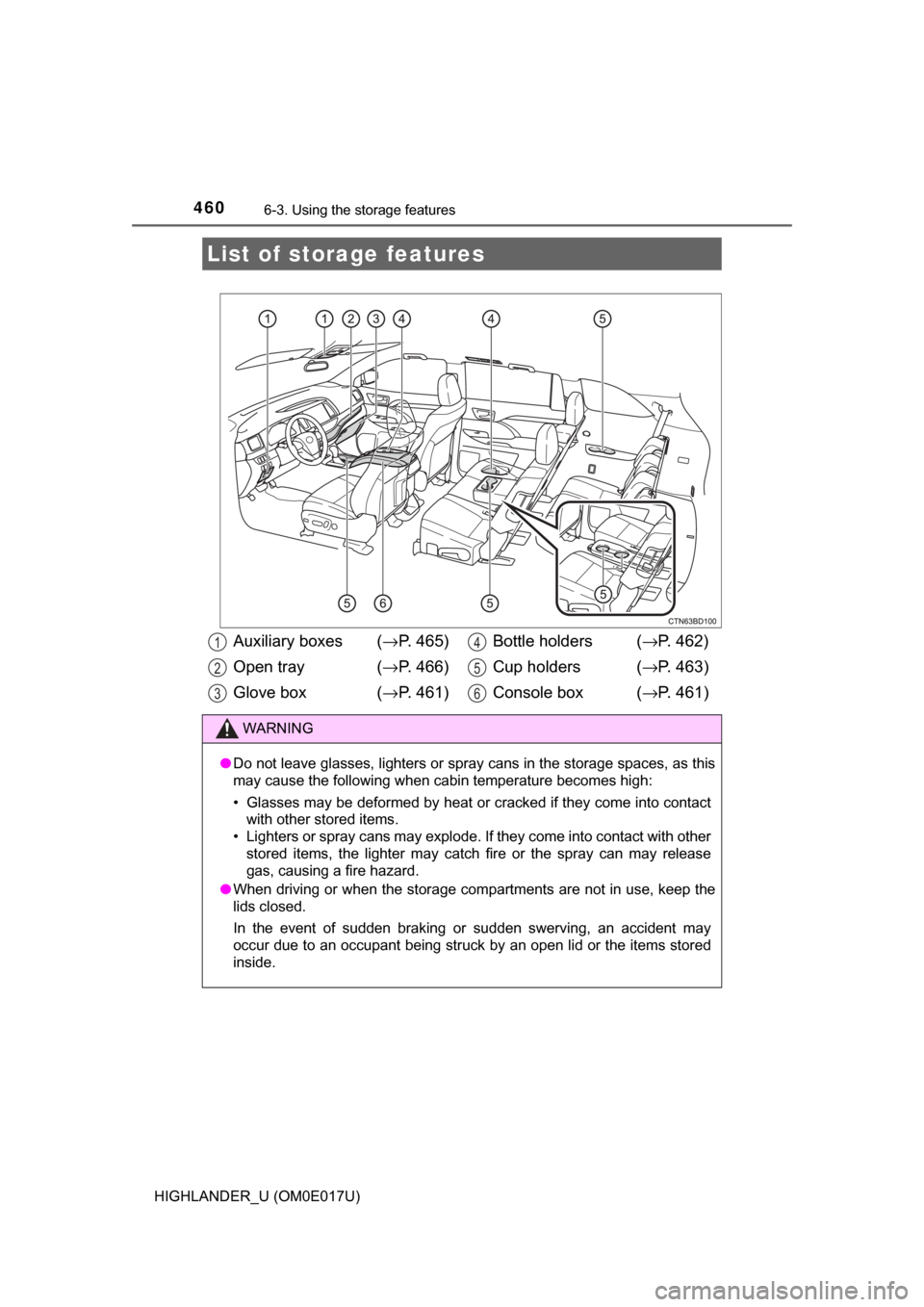
List of storage features
Auxiliary boxes ( →P. 465)
Open tray ( →P. 466)
Glove box ( →P. 461) Bottle holders (
→P. 462)
Cup holders ( →P. 463)
Console box ( →P. 461)
WARNING
●Do not leave glasses, lighters or spray cans in the storage spaces, as t\
his
may cause the following when cabin temperature becomes high:
• Glasses may be deformed by heat or cracked if they come into contact
with other stored items.
• Lighters or spray cans may explode. If they come into contact with other
stored items, the lighter may catch fire or the spray can may release
gas, causing a fire hazard.
● When driving or when the storage com partments are not in use, keep the
lids closed.
In the event of sudden braking or sudden swerving, an accident may
occur due to an occupant being struck by an open lid or the items stored
inside.
1
2
3
4
5
6
Page 486 of 732

4866-4. Using the other interior features
HIGHLANDER_U (OM0E017U)
Press and hold the 2 outside but-
tons for 10 seconds until the
HomeLink
® indicator light
changes from continuously lit
(orange) to rapidly flashing
(green).
If you sell your vehicle, be sure to
erase the programs stored in the
HomeLink
® memory.
■ Programs stored in the HomeLink® memory
● The registered codes are not erased even if the battery cable is discon-
nected.
● If learning failed when registering a different code to a HomeLink
® button
that already has a code registered to it, the already registered code is not
erased.
■ Before programming
●Install a new battery in the transmitter.
● The battery side of the transmitter must be pointed away from the Home-
Link
.
■ Certification for the garage door opener
This device complies with FCC rules part 15 and Industry Canada RSS-210.
Operation is subject to the following two conditions: (1) This device may not
cause harmful interference, and (2) This device must accept any interference
that may be received including interference that may cause undesired opera-
tion.
WARNING:
The transmitter has been tested and complies with FCC and IC rules.
Changes or modifications not expressly approved by the party responsible for
compliance could void the user’s authority to operate the device.
The term “IC:” before the certification/registration number only signifies that
Industry Canada technical specifications were met.
Erasing the entire HomeLink® memory (all three programs)
Page 526 of 732
5267-3. Do-it-yourself maintenance
HIGHLANDER_U (OM0E017U)■
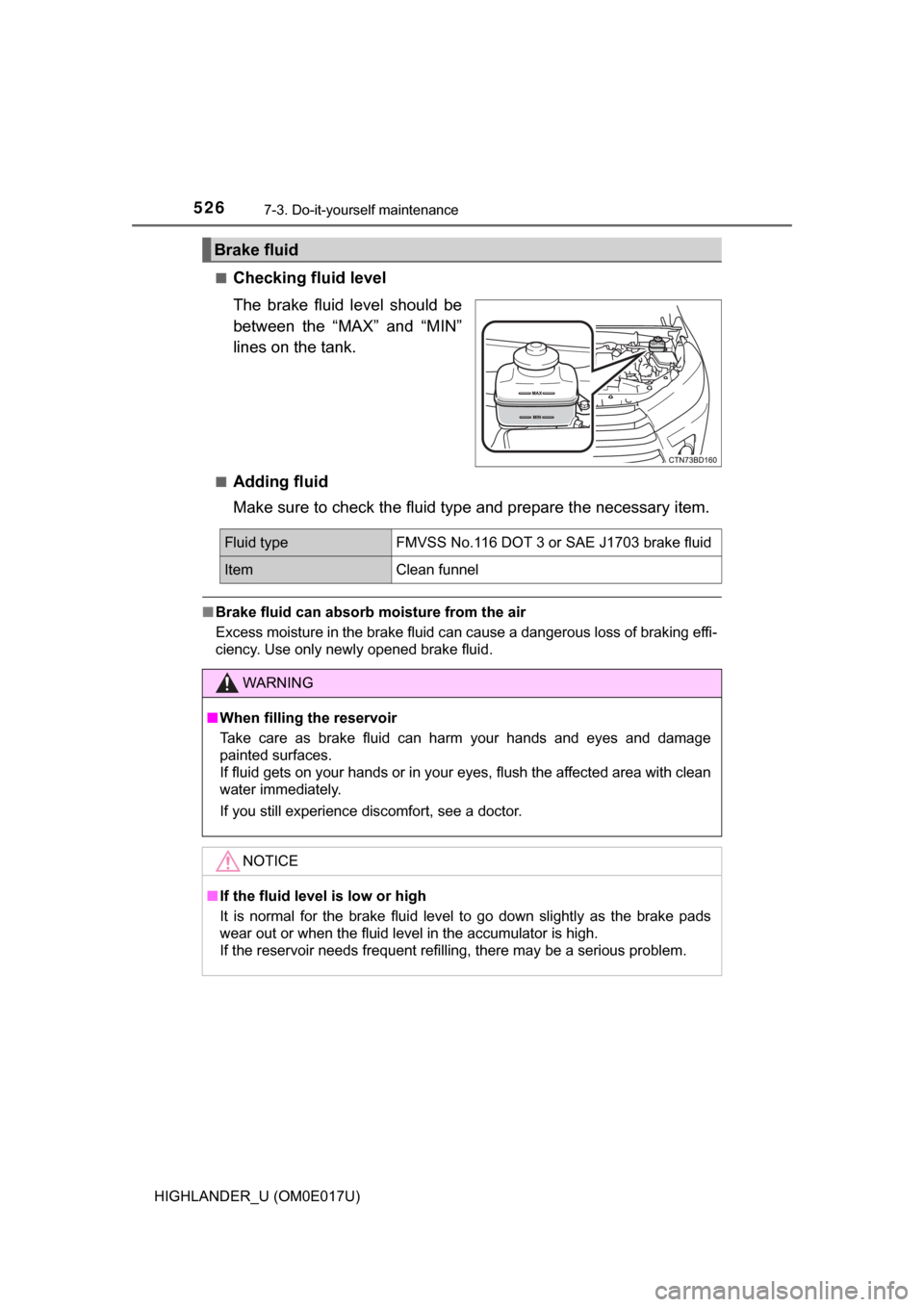
Checking fluid level
The brake fluid level should be
between the “MAX” and “MIN”
lines on the tank.
■Adding fluid
Make sure to check the fluid ty
pe and prepare the necessary item.
■Brake fluid can absorb moisture from the air
Excess moisture in the brake fluid can cause a dangerous loss of braking effi-
ciency. Use only newly opened brake fluid.
Brake fluid
Fluid typeFMVSS No.116 DOT 3 or SAE J1703 brake fluid
ItemClean funnel
WARNING
■When filling the reservoir
Take care as brake fluid can harm your hands and eyes and damage
painted surfaces.
If fluid gets on your hands or in your eyes, flush the affected area with clean
water immediately.
If you still experience discomfort, see a doctor.
NOTICE
■If the fluid level is low or high
It is normal for the brake fluid level to go down slightly as the brake pads
wear out or when the fluid level in the accumulator is high.
If the reservoir needs frequent refilling, there may be a serious problem.