Page 348 of 732
348
HIGHLANDER_U (OM0E017U)5-1. Basic Operations
Audio system types ........... 350
Entune Audio .................... 351
Steering wheel audio switches .......................... 354
AUX Port/USB Port ........... 355
Basic audio operations ....................... 356
5-2. Setup Setup menu....................... 358
General settings ................ 359
Audio settings ................... 360
Display settings ................. 361
Voice settings.................... 362
5-3. Using Entune Audio Selecting the audio source ............................. 363
List screen operation......... 364
Optimal use of Entune Audio............................... 366
5-4. Using the radio Radio operation................. 367
5-5. Playing an audio CD and MP3/WMA/AAC discs
CD player operation .......... 369
5Audio system
Page 354 of 732
3545-1. Basic Operations
HIGHLANDER_U (OM0E017U)
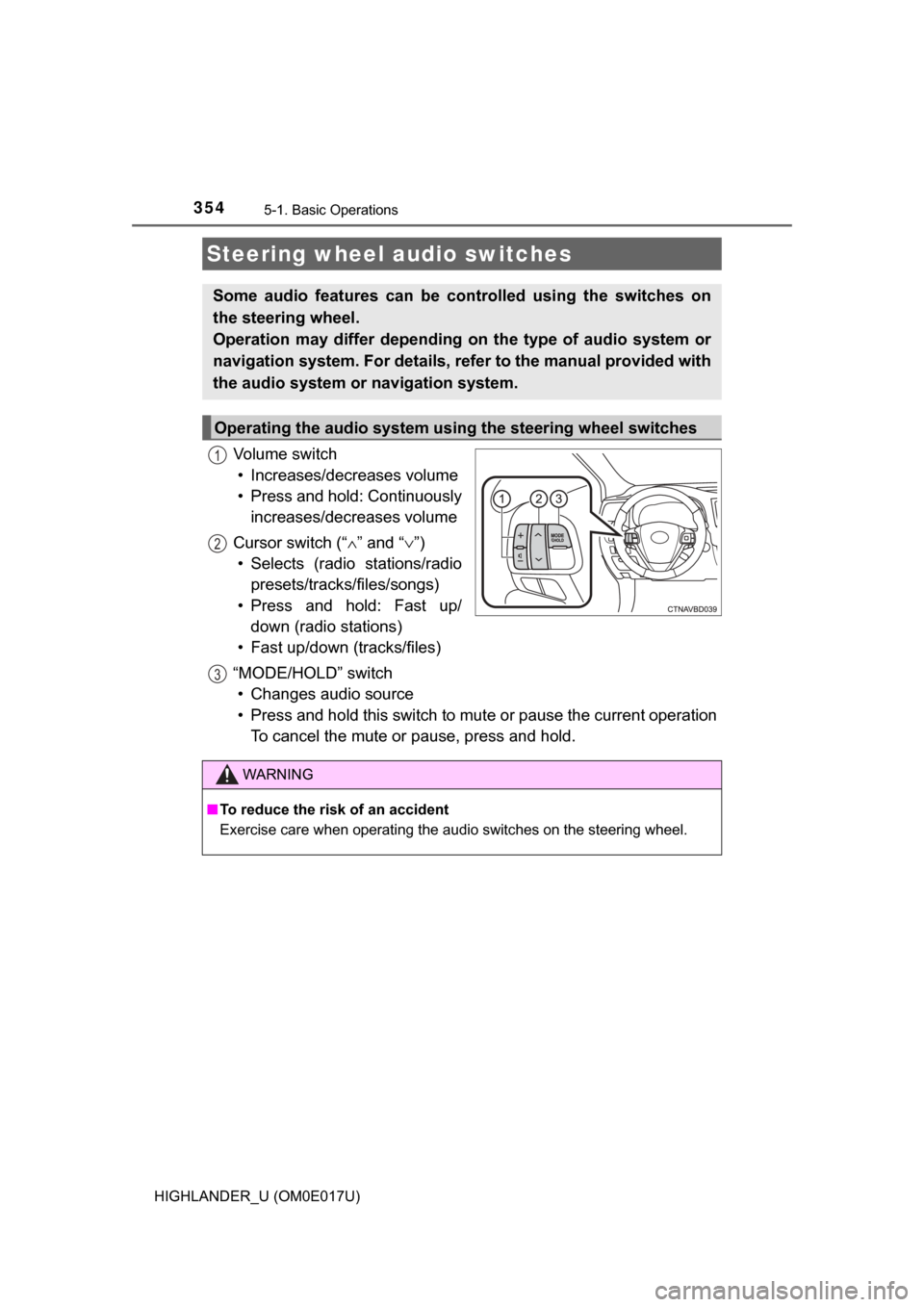
Vo l u m e s w i t c h• Increases/decreases volume
• Press and hold: Continuously increases/decreases volume
Cursor switch (“ ∧” and “∨ ”)
• Selects (radio stations/radio presets/tracks/files/songs)
• Press and hold: Fast up/ down (radio stations)
• Fast up/down (tracks/files)
“MODE/HOLD” switch • Changes audio source
• Press and hold this switch to mute or pause the current operation To cancel the mute or pause, press and hold.
Steering wheel audio switches
Some audio features can be c ontrolled using the switches on
the steering wheel.
Operation may differ depending on the type of audio system or
navigation system. For details, refer to the manual provided with
the audio system or navigation system.
Operating the audio system using the steering wheel switches
1
12
3
WARNING
■ To reduce the risk of an accident
Exercise care when operating the audio switches on the steering wheel.
Page 356 of 732
3565-1. Basic Operations
HIGHLANDER_U (OM0E017U)
Basic audio operations
Basic audio operations and functions common to each mode are
explained in this section.
Operating Entune Audio
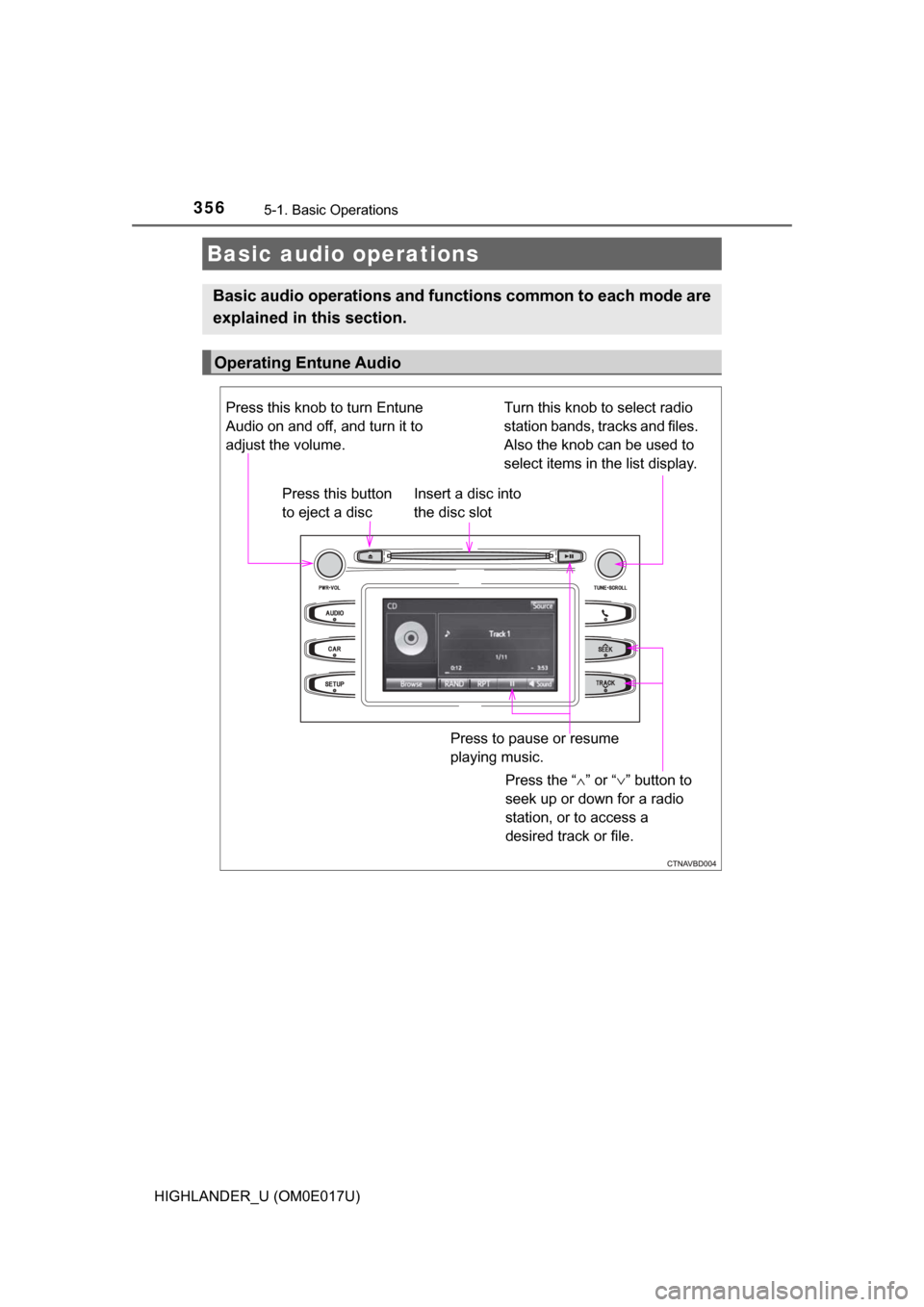
Press the “ ∧” or “ ∨” button to
seek up or down for a radio
station, or to access a
desired track or file.
Press this knob to turn Entune
Audio on and off, and turn it to
adjust the volume.
Press this button
to eject a disc
Press to pause or resume
playing music.
Insert a disc into
the disc slot
Turn this knob to select radio
station bands, tracks and files.
Also the knob can be used to
select items in the list display.
Page 360 of 732
3605-2. Setup
HIGHLANDER_U (OM0E017U)
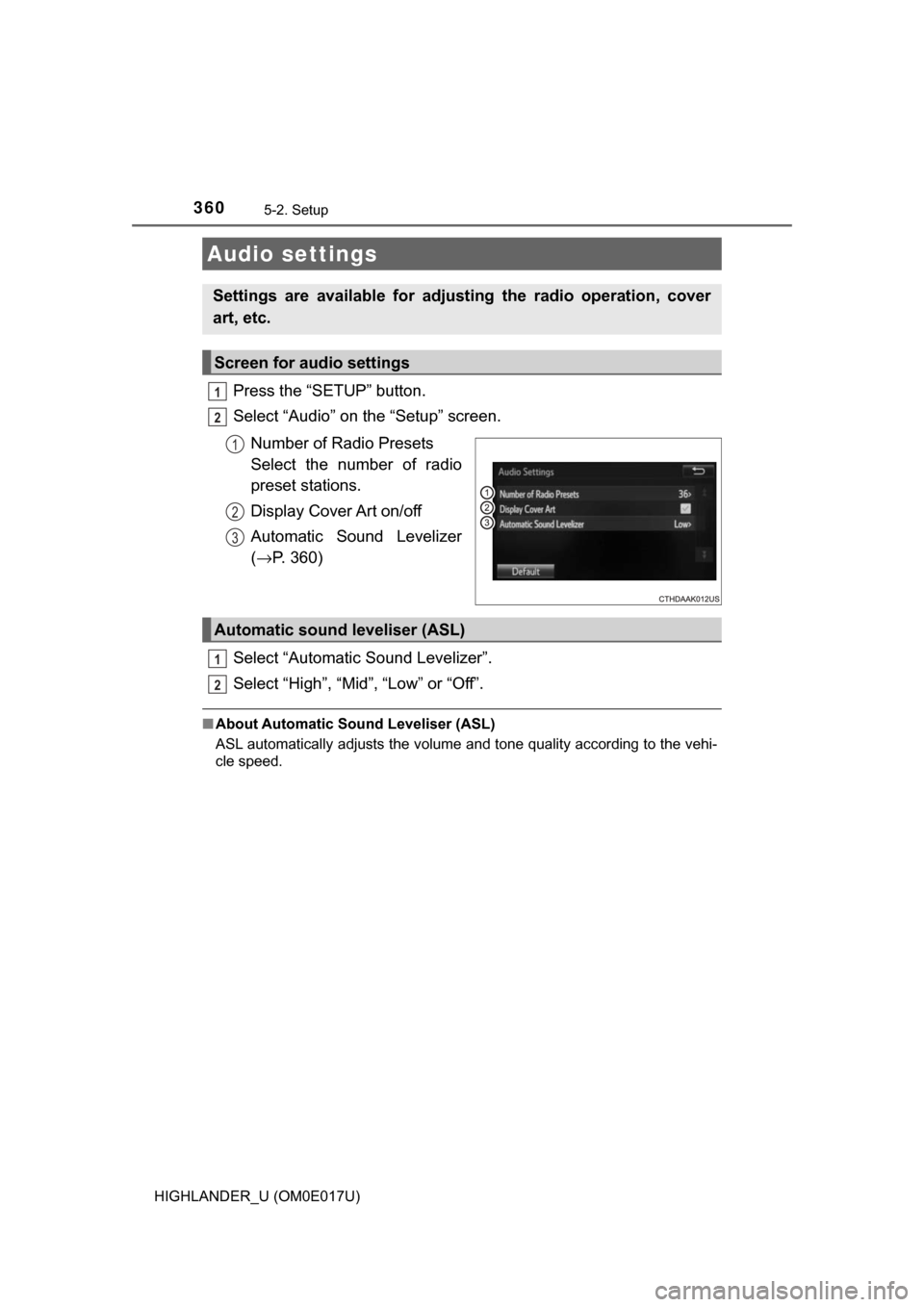
Press the “SETUP” button.
Select “Audio” on the “Setup” screen.Number of Radio Presets
Select the number of radio
preset stations.
Display Cover Art on/off
Automatic Sound Levelizer
(→ P. 360)
Select “Automatic Sound Levelizer”.
Select “High”, “Mid”, “Low” or “Off”.
■ About Automatic Sou nd Leveliser (ASL)
ASL automatically adjusts the volume and tone quality according to the vehi-
cle speed.
Audio settings
Settings are available for adjusting the radio operation, cover
art, etc.
Screen for audio settings
1
2
1
2
3
Automatic sound leveliser (ASL)
1
2
Page 363 of 732
363
5
Audio system
HIGHLANDER_U (OM0E017U)
5-3. Using Entune Audio
Press the “AUDIO” button to display the audio source selection
screen.
If the audio source selection screen is not displayed, press the “AUDIO”
button again.
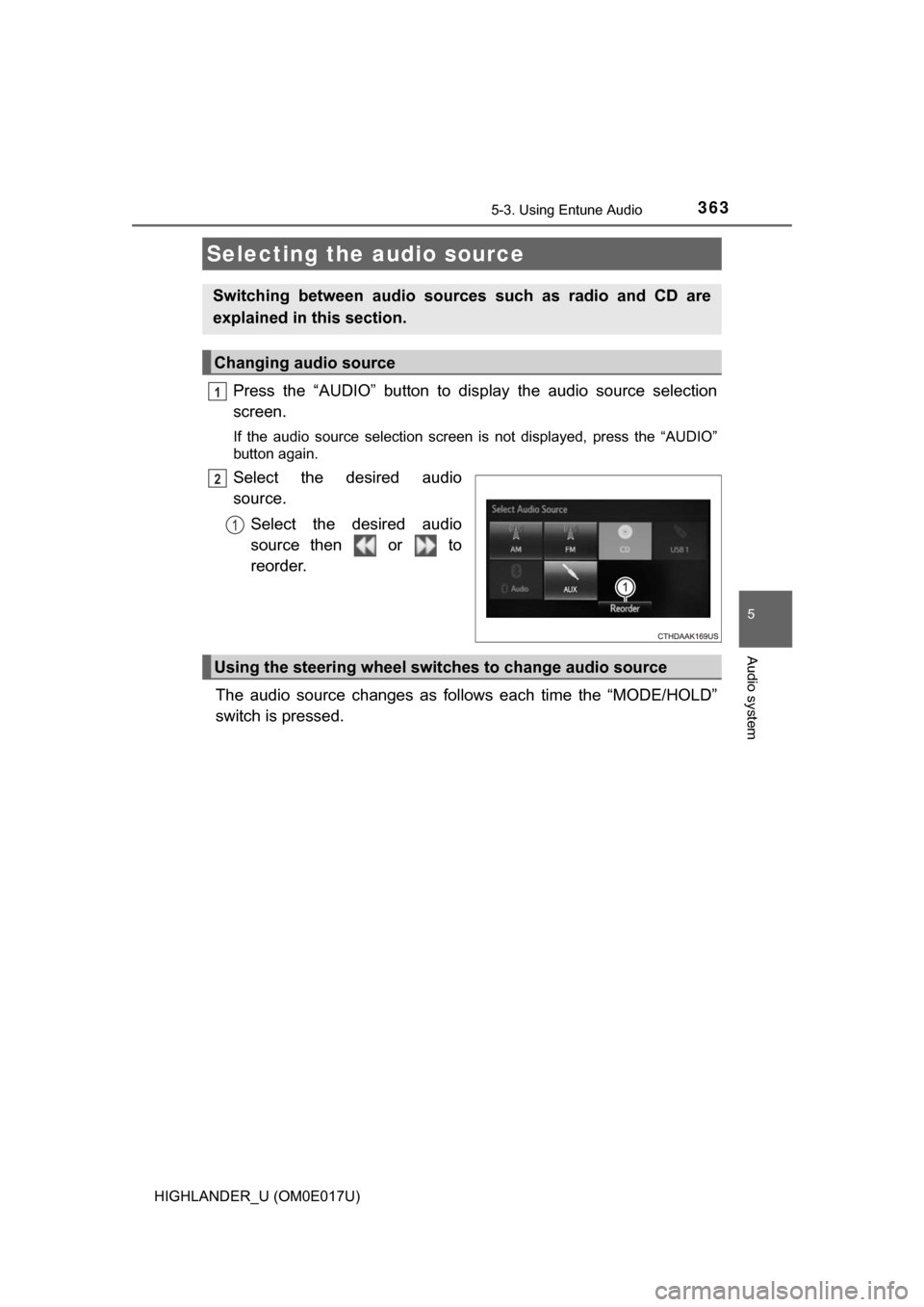
Select the desired audio
source.
Select the desired audio
source then or to
reorder.
The audio source changes as follows each time the “MODE/HOLD”
switch is pressed.
Selecting the audio source
Switching between audio sources such as radio and CD are
explained in this section.
Changing audio source
1
2
1
Using the steering wheel switches to change audio source
Page 367 of 732
367
5
Audio system
HIGHLANDER_U (OM0E017U)
5-4. Using the radio
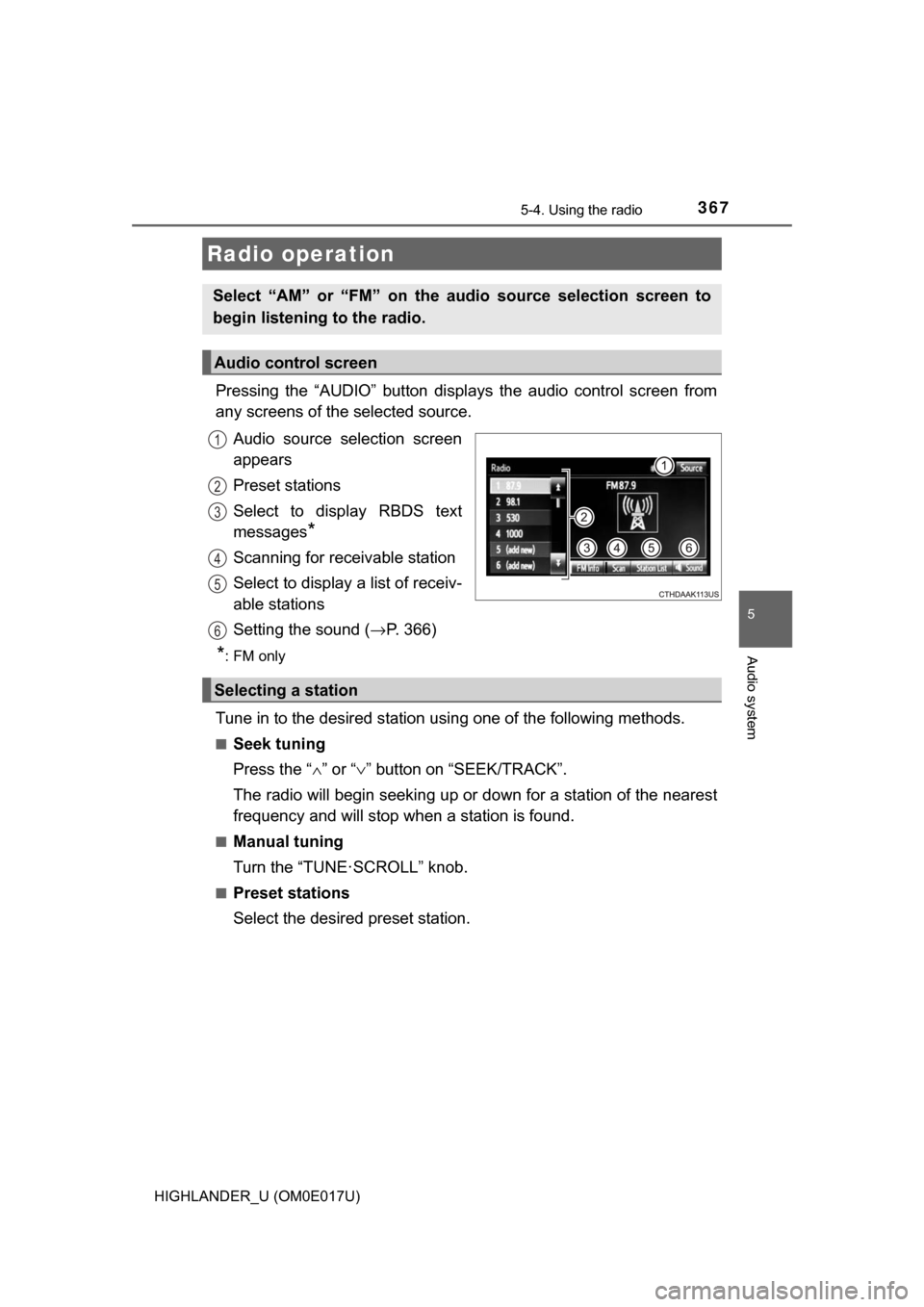
Pressing the “AUDIO” button displays the audio control screen from
any screens of the selected source.
Audio source selection screen
appears
Preset stations
Select to display RBDS text
messages
*
Scanning for receivable station
Select to display a list of receiv-
able stations
Setting the sound ( →P. 366)
*:FM only
Tune in to the desired station us ing one of the following methods.
■Seek tuning
Press the “∧” or “ ∨” button on “SEEK/TRACK”.
The radio will begin seeking up or down for a station of the nearest
frequency and will stop when a station is found.
■Manual tuning
Turn the “TUNE·SCROLL” knob.
■Preset stations
Select the desired preset station.
Radio operation
Select “AM” or “FM” on the audio source selection screen to
begin listening to the radio.
Audio control screen
1
2
3
4
5
Selecting a station
6
Page 368 of 732
3685-4. Using the radio
HIGHLANDER_U (OM0E017U)
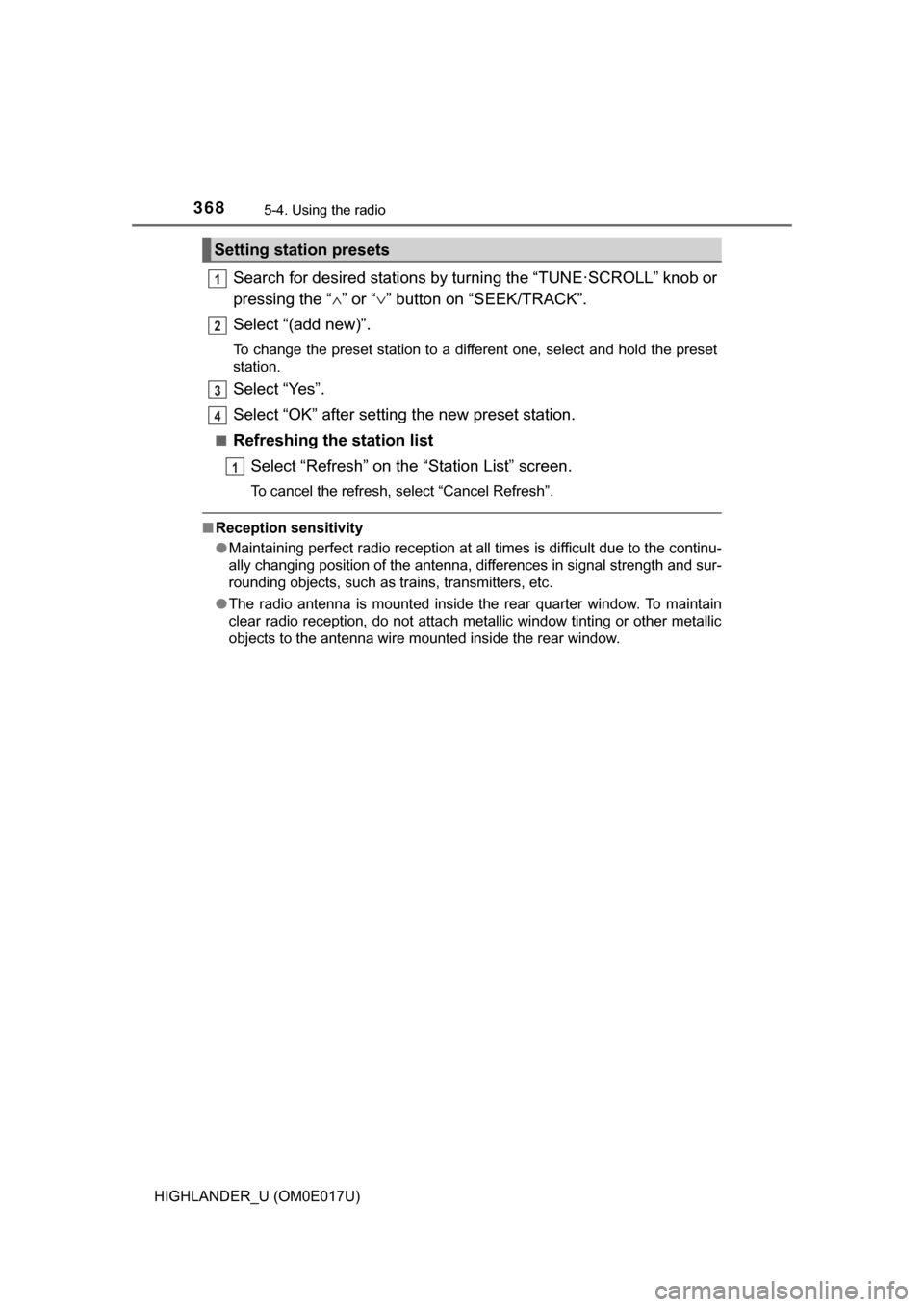
Search for desired stations by turning the “TUNE·SCROLL” knob or
pressing the “∧” or “ ∨” button on “SEEK/TRACK”.
Select “(add new)”.
To change the preset station to a different one, select and hold the preset
station.
Select “Yes”.
Select “OK” after setting the new preset station.
■Refreshing the station list Select “Refresh” on the “Station List” screen.
To cancel the refresh, select “Cancel Refresh”.
■Reception sensitivity
●Maintaining perfect radio reception at all times is difficult due to the continu-
ally changing position of the antenna, differences in signal strength and sur-
rounding objects, such as trains, transmitters, etc.
● The radio antenna is mounted inside the rear quarter window. To maintain
clear radio reception, do not attach metallic window tinting or other metallic
objects to the antenna wire mounted inside the rear window.
Setting station presets
1
2
3
4
1
Page 385 of 732

3855-7. Connecting Bluetooth®
5
Audio system
HIGHLANDER_U (OM0E017U)■
Certifications for the Bluetooth
(caution)
FCC ID: AJDK068
• This device complies with Part 15 of FCC Rules and Industry Canadalicence-exempt RSS standard(s). Operation is subject to the following
two conditions: (1) this device may not cause interference, and (2) this
device must accept any interference, including interference that may
cause undesired operation of this device.
• RF Exposure Compliance: This equipment complies with FCC/IC radia- tion exposure limits set forth for an uncontrolled environment and meets\
the FCC radio frequency (RF) Exposure Guidelines and RSS-102 of the
IC radio frequency (RF) Exposure rules. This equipment has very low lev-
els of RF energy that it deemed to comply without maximum permissive
exposure evaluation (MPE). But it is desirable that it should be installed
and operated keeping the radiator at least 20 cm or more away from per-
son's body.
• Co-location: This transmitter must not be co-located or operated in con- junction with any other antenna or transmitter.
• Information to User - Alteration or modifications carried out without appro-
priate authorization may invalidate the user's right to operate the equip-
ment.
IC ID: 775E-K068
• This device complies with Part 15 of FCC Rules and Industry Canada’s licence-exempt RSSs. Operation is subject to the following two condi-
tions: (1) This device may not cause interference; and (2) This device
must accept any interference, including interference that may cause
undesired operation of the device.
Le présent appareil est conforme aux la partie 15 des règles de la\
FCC et
CNR d'lndustrie Canada applicables aux appareils radio exempts de
licence. L'exploitation est autorisée aux deux conditions suivantes: (1)
l'appareil ne doit pas produire de brouill age; (2) l'utilisateur de l'appareil
doit accepter tout brouillage radioél ectrique subi, même si le brouillage
est susceptible d'en compromettre le fonctionnement.
• This equipment complies with FCC/IC radiation exposure limits set forth for an uncontrolled environment and meets the FCC radio frequency (RF)
Exposure Guidelines and RSS-102 of the IC radio frequency (RF) Expo-
sure rules. This equipment has very low levels of RF energy that it
deemed to comply without maximum permissive exposure evaluation
(MPE). But it is desirable that it should be installed and operated keeping
the radiator at least 20 cm or more away from person's body.
Cet équipement est conforme aux limites d'exposition aux rayonnements
énoncées pour un environnement non contrôlé et respecte les règles les
radioélectriques (RF) de la FCC lignes directrices d'exposition et d'expo-
sition aux fréquences radioélectriques (RF) CNR-102 de I'IC. Cet équipe-
ment émet une énergie RF très faible qui est considérée conforme sans
évaluation de l’exposition maximale autorisée. Cependant, cet équipe-
ment doit être installé et utilisé en gardant une distance de 2\
0 cm ou plus
entre le dispositif rayonnant et le corps.