Page 349 of 732

349
5Audio system
HIGHLANDER_U (OM0E017U)5-6. Using an external device
Listening to an iPod .......... 375
Listening to a USB memory device................ 379
Using the AUX port ........... 383
5-7. Connecting Bluetooth
®
Preparations to use wireless
communication ................ 384
Registering a Bluetooth
®
audio player for the
first time .......................... 388
Registering a Bluetooth
®
phone for the
first time .......................... 389
Registering a Bluetooth
®
device.............................. 390
Connecting a Bluetooth
®
device.............................. 392
Displaying a Bluetooth
®
device details .................. 394
Detailed Bluetooth
®
system settings ............... 395
5-8. Bluetooth
® Audio
Listening to Bluetooth®
Audio ............................... 396 5-9. Bluetooth
® phone
Using a Bluetooth®
Phone ............................. 397
Making a call ..................... 399
Receiving a call ................. 402
Speaking on the phone .............................. 403
Bluetooth
® phone
message function ............ 406
Using the steering wheel switches ................ 410
Bluetooth
® phone
settings ........................... 411
Contact/Call History Settings ........................... 412
What to do if... (Troubleshooting) ............ 421
5-10. Bluetooth
®
Bluetooth®......................... 425
5-11. Using the voice command system
Voice command system ............................ 429
Page 350 of 732
350
HIGHLANDER_U (OM0E017U)
5-1. Basic Operations
Entune Audio
→ P. 3 5 1
Entune Audio Plus/Entune Premium Audio
For vehicles with Entune Premium Audio or Entune Audio Plus, refer
to the “NAVIGATION AND MULTIMEDIA SYSTEM OWNER’S MAN-
UAL”.
■ Using cellular phones
Interference may be heard through the audio system's speakers if a cellular
phone is being used inside or close to the vehicle while the audio system is
operating.
■ About Bluetooth
®
The Bluetooth wordmark and logo are owned by Bluetooth SIG. and permis-
sion has been granted to use the trademark of the licensee Panasonic
Corporation. Other trademarks and trade names are owned by various differ-
ent owners.
Audio system types
NOTICE
■To prevent battery discharge
Do not leave the audio system on longer than necessary when the engine is
off.
■ To avoid damaging the audio system
Take care not to spill drinks or other fluids on the audio system.
Page 351 of 732
3515-1. Basic Operations
5
Audio system
HIGHLANDER_U (OM0E017U)
Entune Audio∗
∗: If equipped
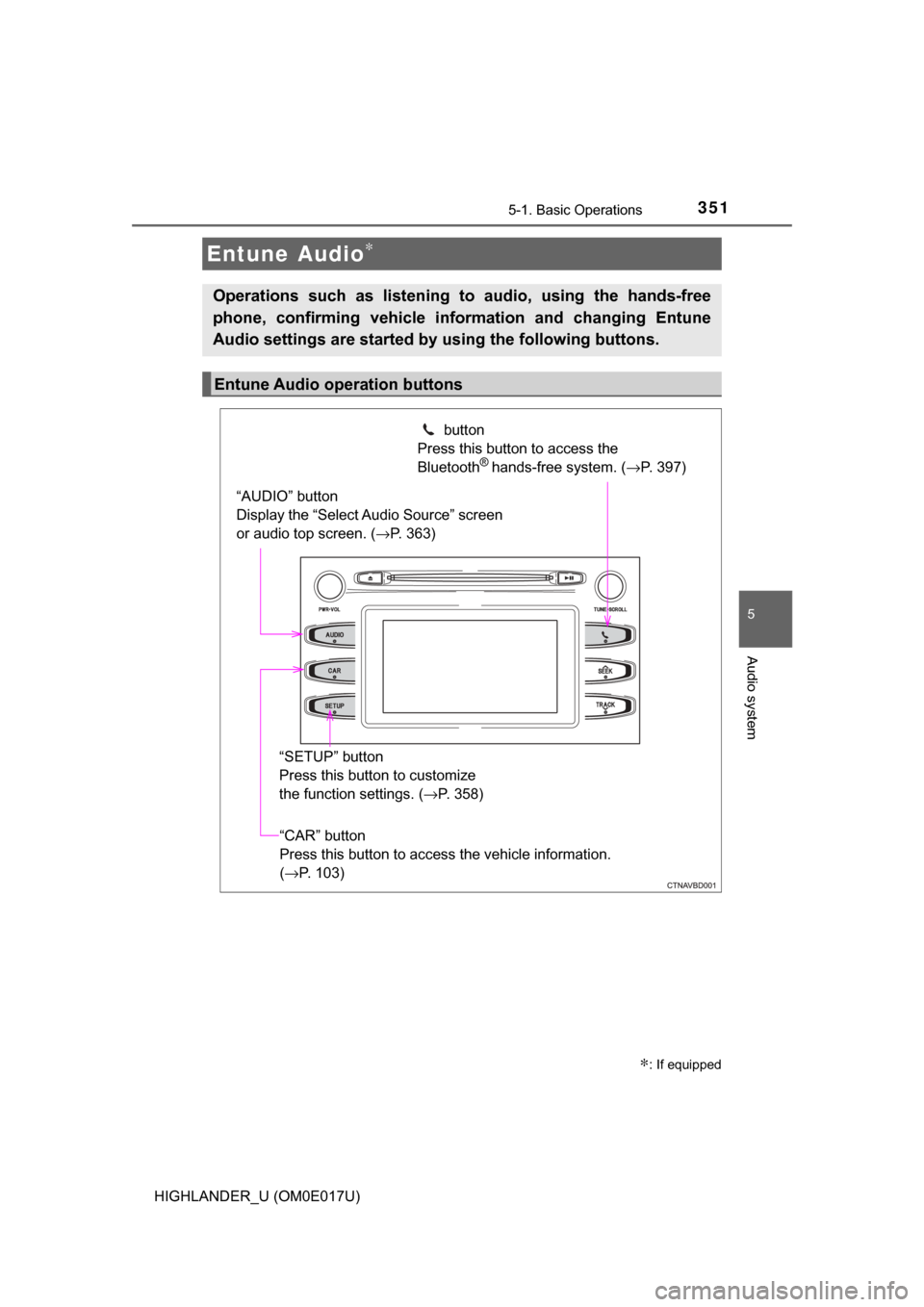
Operations such as listening to audio, using the hands-free
phone, confirming vehicle information and changing Entune
Audio settings are started by using the following buttons.
Entune Audio operation buttons
“AUDIO” button
Display the “Select Audio Source” screen
or audio top screen. (→P. 363) button
Press this button to access the
Bluetooth
® hands-free system. ( →P. 397)
“CAR” button
Press this button to access the vehicle information.
(→P. 103)
“SETUP” button
Press this button to customize
the function settings. (
→P. 358)
Page 357 of 732
3575-1. Basic Operations
5
Audio system
HIGHLANDER_U (OM0E017U)
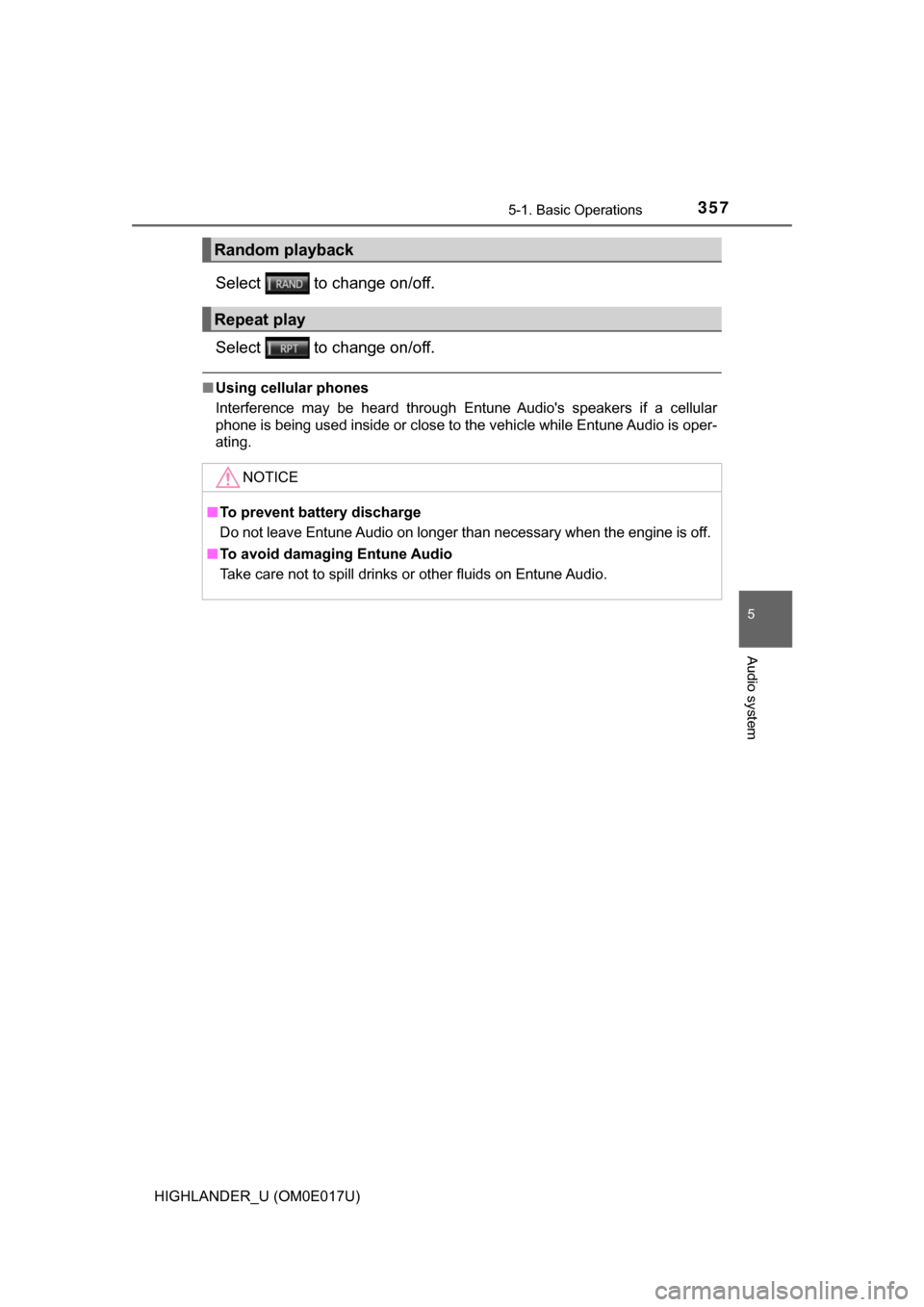
Select to change on/off.
Select to change on/off.
■Using cellular phones
Interference may be heard through Entune Audio's speakers if a cellular
phone is being used inside or close to the vehicle while Entune Audio is oper-
ating.
Random playback
Repeat play
NOTICE
■To prevent battery discharge
Do not leave Entune Audio on longer than necessary when the engine is off.
■ To avoid damaging Entune Audio
Take care not to spill drinks or other fluids on Entune Audio.
Page 358 of 732
358
HIGHLANDER_U (OM0E017U)
5-2. Setup
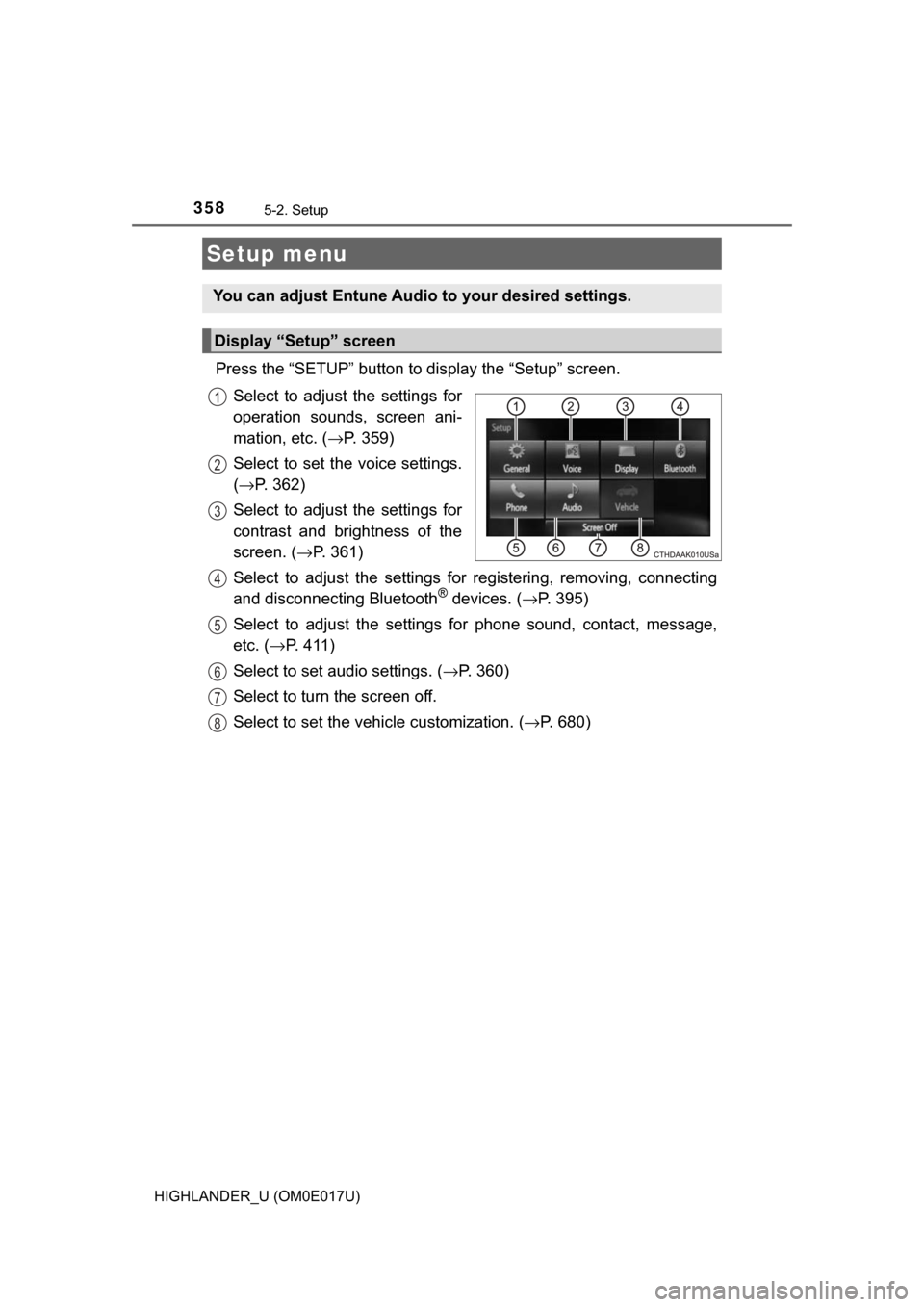
Press the “SETUP” button to display the “Setup” screen.Select to adjust the settings for
operation sounds, screen ani-
mation, etc. ( →P. 359)
Select to set the voice settings.
( → P. 362)
Select to adjust the settings for
contrast and brightness of the
screen. ( →P. 361)
Select to adjust the settings for registering, removing, connecting
and disconnecting Bluetooth
® devices. ( →P. 395)
Select to adjust the settings for phone sound, contact, message,
etc. ( →P. 4 1 1 )
Select to set audio settings. ( →P. 360)
Select to turn the screen off.
Select to set the vehicle customization. ( →P. 680)
Setup menu
You can adjust Entune Audio to your desired settings.
Display “Setup” screen
1
2
3
4
5
6
7
8
Page 359 of 732

3595-2. Setup
5
Audio system
HIGHLANDER_U (OM0E017U)
Press the “SETUP” button.
Select “General” on the “Setup”
screen.“English”, “Français” or
“Español” can be selected.
On/off can be selected to
sound beeps.
Select to change the screen
color.
Select to change the key-
board layout.
Select to change the capaci-
tive touch button sensor sen-
sitivity.
The animation effect for the screen can be set to on/off.
Select to delete personal data ( →P. 359)
Select to update program versions. For details, contact your
Toyota dealer.
Select to display the software info rmation. Notices related to third
party software used in this produc t are enlisted. (This includes
instructions for obta ining such software, where applicable.)
■To return to the default volume settings
Select “Default”, and then “Yes”.
Select “Delete Personal Data” on the “General Settings” screen.
Select “Delete”.
Check carefully beforehand, as data cannot be retrieved once deleted.
A confirmation screen will be displayed. Select “Yes”.
The following personal data will be deleted or changed to its default
settings.
• General settings
• Audio settings
• Phone settings
General settings
Settings are available for adjusting the operation sounds,
screen animation, etc.
Screen for general settings
1
2
1
2
3
4
5
Delete personal data
6
7
8
9
1
2
3
Page 376 of 732

■About iPod
●“Made for iPod”, “Made for iPhone” and “Made for iPad”\
mean that an elec-
tronic accessory has been designed to")
3765-6. Using an external device
HIGHLANDER_U (OM0E017U)
■About iPod
●“Made for iPod”, “Made for iPhone” and “Made for iPad”\
mean that an elec-
tronic accessory has been designed to connect specifically to iPod or
iPhone, or iPad, respectively, and has been certified by the developer to
meet Apple performance standards.
● Apple is not responsible for the operation of this device or its compliance
with safety and regulatory standards. Please note that the use of this acces-
sory with iPod, iPhone or iPad may affect wireless performance.
● iPad, iPhone, iPod, iPod classic, iPod nano, and iPod touch are trademarks
of Apple Inc., registered in the U.S. and other countries. Lightning is a trade-
mark of Apple Inc.
■ iPod cover art
●Depending on the iPod and songs in the iPod, iPod cover art may be dis-
played.
● This function can be changed to on/off. ( →P. 360)
● It may take time to display iPod cover art, and the iPod may not be operated
while the cover art display is in process.
● Only iPod cover art that is saved in JPEG format can be displayed.
■ iPod functions
●When an iPod is connected and the audio source is changed to iPod mode,
the iPod will resume play from the same point in which it was last used.
● Depending on the iPod that is connected to the system, certain functions
may not be available. If a function is unavailable due to a malfunction (as
opposed to a system specification), disconnecting the device and recon-
necting it may resolve the problem.
● While connected to the system, the iPod cannot be operated with its own
controls. It is necessary to use the controls of the vehicle's Entune Audio
instead.
● When the battery level of an iPod is very low, the iPod may not operate. If
so, charge the iPod before use.
● Compatible models ( →P. 378)
Page 378 of 732

3785-6. Using an external device
HIGHLANDER_U (OM0E017U)■
Compatible models
The following iPod
®, iPod nano®, iPod classic®, iPod touch® and iPhone®
devices can be used with this system.
●Made for
• iPod touch (5th generation)
• iPod touch (4th generation)
• iPod touch (3rd generation)
• iPod touch (2nd generation)
• iPod touch (1st generation)
• iPod classic
• iPod with video
• iPod nano (7th generation)
• iPod nano (6th generation)
• iPod nano (5th generation)
• iPod nano (4th generation)
• iPod nano (3rd generation)
• iPod nano (2nd generation)
• iPod nano (1st generation)
• iPhone 5s
• iPhone 5c
• iPhone 5
• iPhone 4s
• iPhone 4
• iPhone 3GS
• iPhone 3G
• iPhone
Depending on differences between models or software versions etc., some
models might be incompatible with this system.
WARNING
■ While driving
Do not connect an iPod or operate the controls.
NOTICE
■To prevent damage to the iPod or its terminals
● Do not leave the iPod in the vehicle. The temperature inside the vehicle
may become high, resulting in damage to the iPod.
● Do not push down on or apply unnecessary pressure to the iPod while it is
connected.
● Do not insert foreign objects into the port.