Page 83 of 732

831-2. Theft deterrent system
1
For safety and security
HIGHLANDER_U (OM0E017U)
Do one of the following to deactivate or stop the alarms:
● Unlock the doors.
● Vehicles without a smart key system: Turn the engine switch to the
“ACC” or “ON” position, or start the engine. (The alarm will be deac-
tivated or stopped after a few seconds.)
● Vehicles with a smart key system: Turn the engine switch to
ACCESSORY or IGNITION ON mode, or start the engine. (The
alarm will be deactivated or stopped after a few seconds.)
● Open the glass hatch (if equipped) using the entry function (vehi-
cles with smart key system).
■System maintenance
The vehicle has a maintenance-free type alarm system.
■ Items to check before locking the vehicle
To prevent unexpected triggering of the alarm and vehicle theft, make sure of
the following:
●Nobody is in the vehicle.
● The windows and the following openings are closed before the alarm is set.
• The glass hatch (if equipped)
• The moon roof (if equipped)
• The panoramic moon roof (if equipped)
● No valuables or other personal items are left in the vehicle.
Deactivating or stopping the alarm
Page 84 of 732
841-2. Theft deterrent system
HIGHLANDER_U (OM0E017U)■
Triggering of the alarm
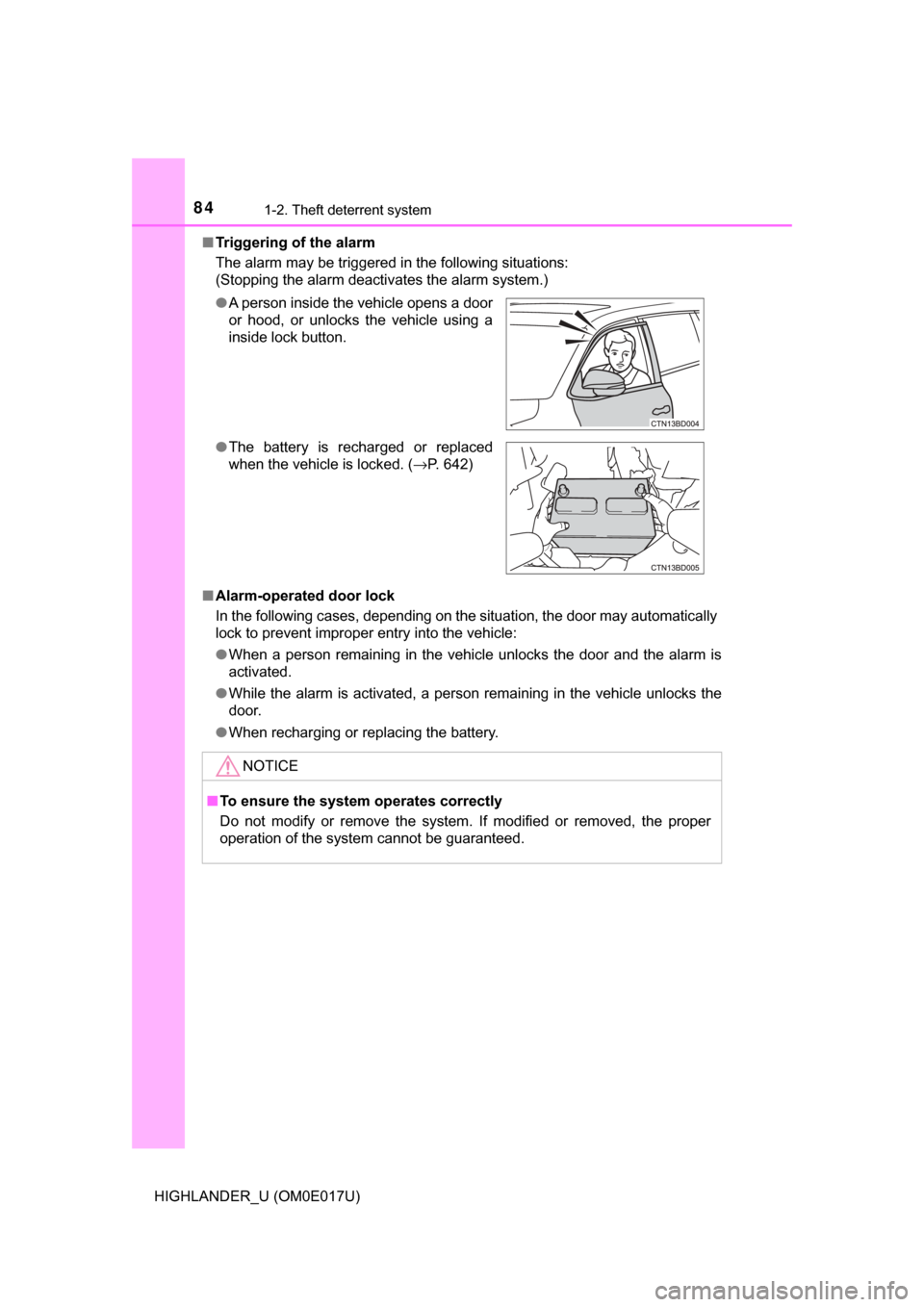
The alarm may be triggered in the following situations:
(Stopping the alarm deactivates the alarm system.)
■ Alarm-operated door lock
In the following cases, depending on the situation, the door may automatically
lock to prevent improper entry into the vehicle:
● When a person remaining in the vehicle unlocks the door and the alarm is
activated.
● While the alarm is activated, a person remaining in the vehicle unlocks the
door.
● When recharging or replacing the battery.
●
A person inside the vehicle opens a door
or hood, or unlocks the vehicle using a
inside lock button.
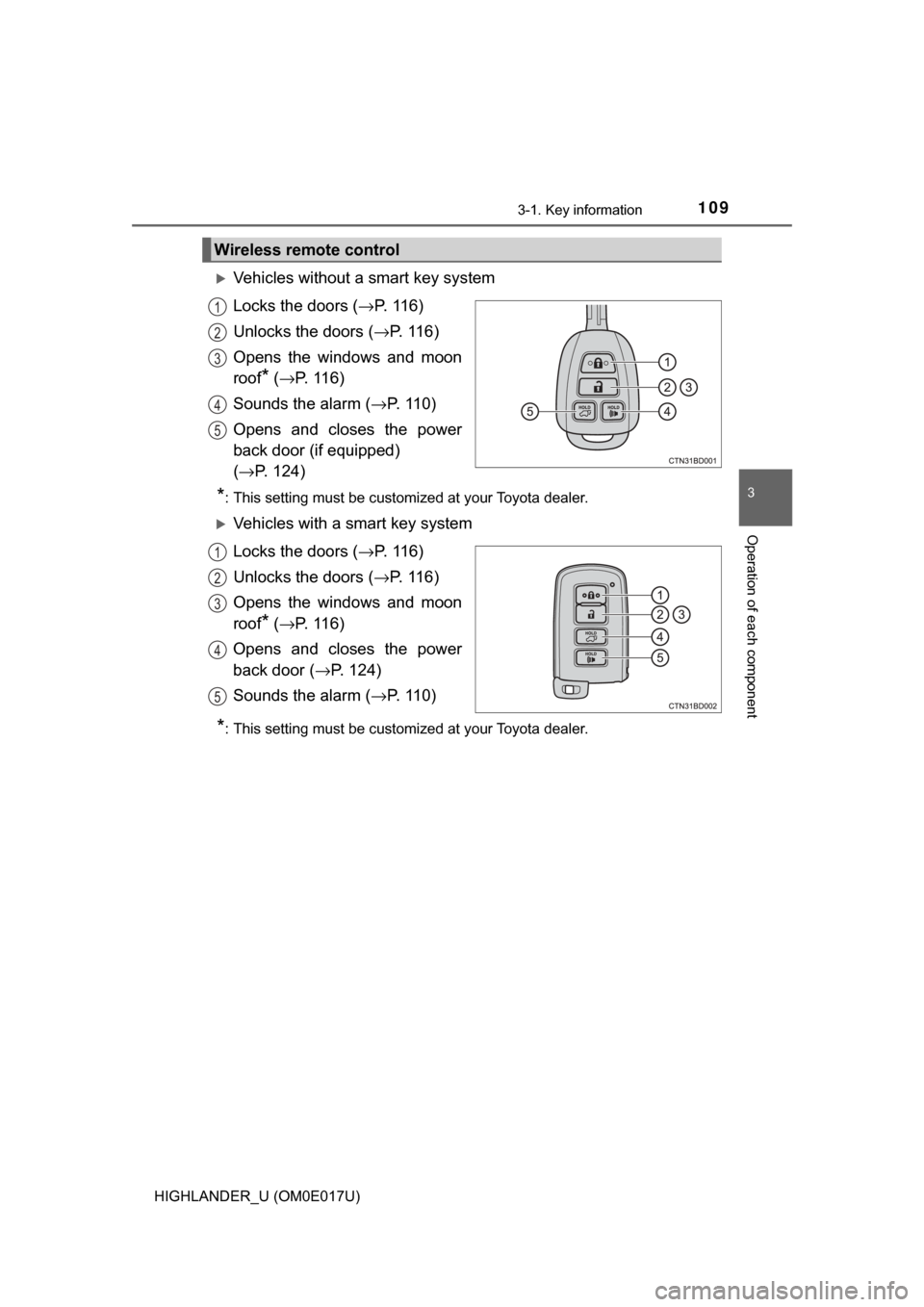
● The battery is recharged or replaced
when the vehicle is locked. ( →P. 642)
NOTICE
■To ensure the system operates correctly
Do not modify or remove the system. If modified or removed, the proper
operation of the system cannot be guaranteed.
Page 107 of 732
107
3
Operation of
each component
HIGHLANDER_U (OM0E017U) 3-1. Key information
Keys .................................. 108
3-2. Opening, closing and locking the doors
Side doors ......................... 115
Back door .......................... 123
Glass hatch ....................... 136
Smart key system ............. 141
3-3. Adjusting the seats Front seats ........................ 149
Rear seats......................... 151
Driving position memory ... 158
Head restraints.................. 162
3-4. Adjusting the steering wheel and mirrors
Steering wheel .................. 166
Inside rear view mirror .............................. 168
Outside rear view mirrors ............................. 170
3-5. Opening and closing the windows
Power windows ................. 172
Moon roof .......................... 176
Panoramic moon roof .................................. 180
Page 109 of 732
1093-1. Key information
3
Operation of each component
HIGHLANDER_U (OM0E017U)
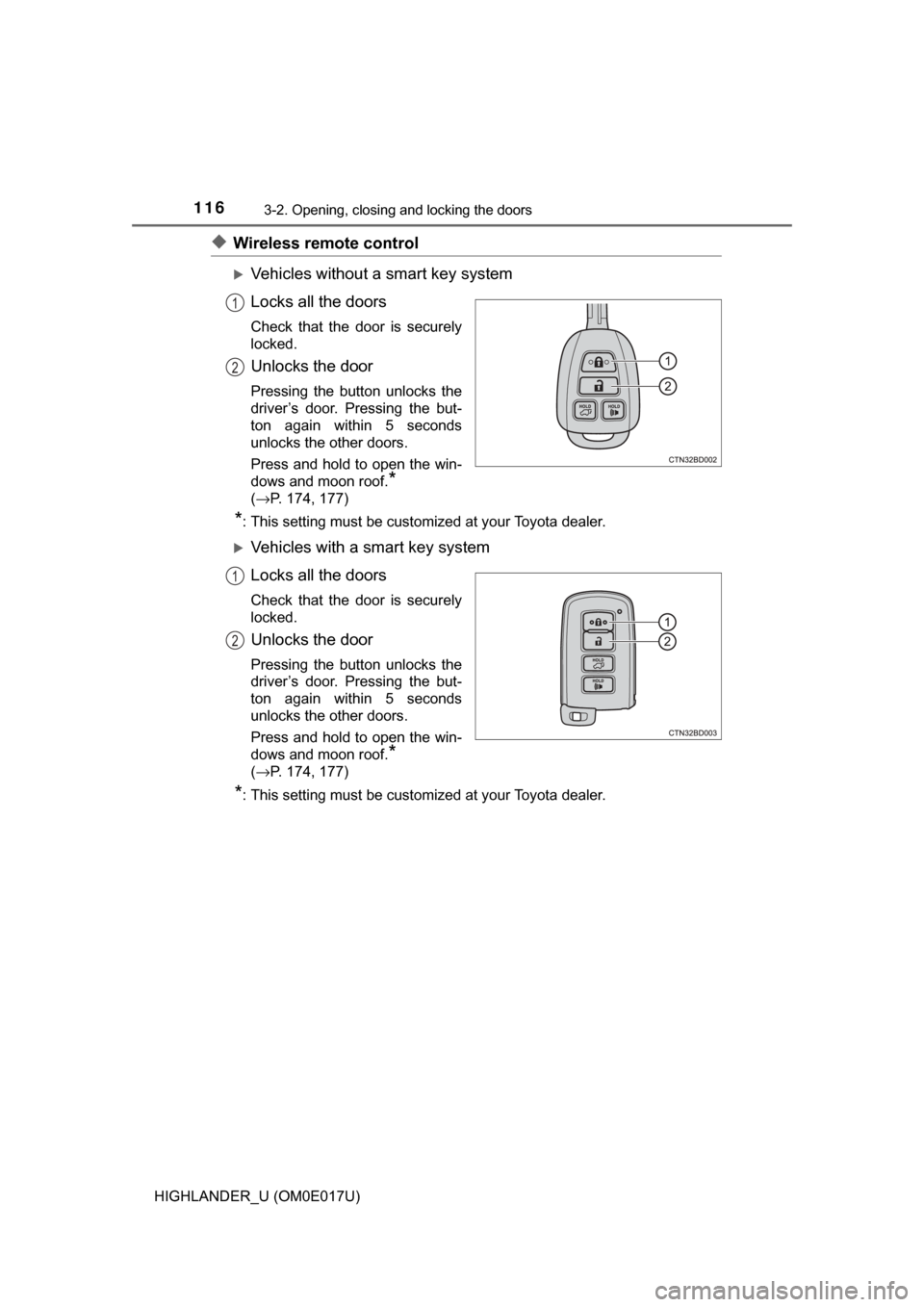
Vehicles without a smart key system
Locks the doors (→P. 116)
Unlocks the doors ( →P. 116)
Opens the windows and moon
roof
* ( → P. 11 6 )
Sounds the alarm ( →P. 110)
Opens and closes the power
back door (if equipped)
( → P. 124)
*: This setting must be customized at your Toyota dealer.
Vehicles with a smart key system
Locks the doors (→ P. 116)
Unlocks the doors ( →P. 116)
Opens the windows and moon
roof
* ( → P. 11 6 )
Opens and closes the power
back door (→ P. 124)
Sounds the alarm ( →P. 110)
*: This setting must be customized at your Toyota dealer.
Wireless remote control
1
2
3
4
5
1
2
3
4
5
Page 115 of 732
115
3
Operation of each component
HIGHLANDER_U (OM0E017U)
3-2. Opening, closing and locking the doors
◆Entry function (vehicles with a smart key system)
Carry the electronic key to enable this function.
Front doors
Grip the driver’s door handle
to unlock the door. Grip the
passenger's door handle to
unlock all the doors.
*
Make sure to touch the sensor
on the back of the handle.
The doors cannot be unlocked
for 3 seconds after the doors are
locked.
*: The door unlock settings can be changed. (→P. 121)
Touch the lock sensor (indentation on the upper part of the door
handle) to lock all the doors.
Check that the door is securely locked.
Back door
Press the unlock button to
unlock all the doors.
The doors cannot be unlocked
for 3 seconds after the doors are
locked.
Press the lock button to lock
all the doors.
Check that the door is securely
locked.
Side doors
Unlocking and locking the doors from the outside
1
2
1
2
Page 116 of 732
1163-2. Opening, closing and locking the doors
HIGHLANDER_U (OM0E017U)
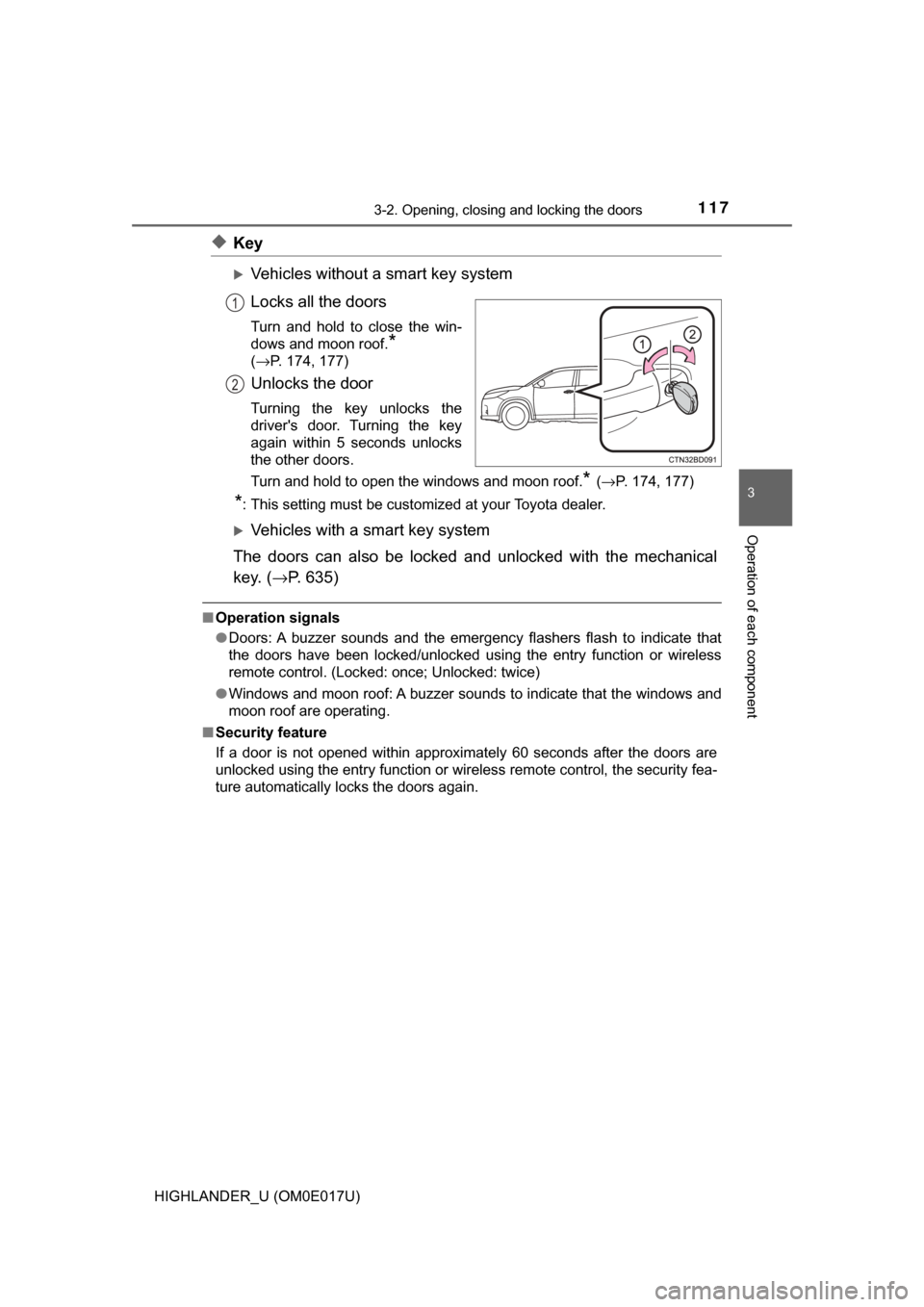
◆Wireless remote control
Vehicles without a smart key system
Locks all the doors
Check that the door is securely
locked.
Unlocks the door
Pressing the button unlocks the
driver’s door. Pressing the but-
ton again within 5 seconds
unlocks the other doors.
Press and hold to open the win-
dows and moon roof.
*
(→P. 174, 177)
*: This setting must be customized at your Toyota dealer.
Vehicles with a smart key system
Locks all the doors
Check that the door is securely
locked.
Unlocks the door
Pressing the button unlocks the
driver’s door. Pressing the but-
ton again within 5 seconds
unlocks the other doors.
Press and hold to open the win-
dows and moon roof.
*
(→P. 174, 177)
*: This setting must be customized at your Toyota dealer.
1
2
1
2
Page 117 of 732
1173-2. Opening, closing and locking the doors
3
Operation of each component
HIGHLANDER_U (OM0E017U)
◆Key
Vehicles without a smart key system
Locks all the doors
Turn and hold to close the win-
dows and moon roof.
*
(→P. 174, 177)
Unlocks the door
Turning the key unlocks the
driver's door. Turning the key
again within 5 seconds unlocks
the other doors.
Turn and hold to open the windows and moon roof.
* (→ P. 174, 177)
*: This setting must be customized at your Toyota dealer.
Vehicles with a smart key system
The doors can also be locked and unlocked with the mechanical
key. ( →P. 635)
■Operation signals
●Doors: A buzzer sounds and the emergency flashers flash to indicate that
the doors have been locked/unlocked using the entry function or wireless
remote control. (Locked: once; Unlocked: twice)
● Windows and moon roof: A buzzer sounds to indicate that the windows and
moon roof are operating.
■ Security feature
If a door is not opened within approximately 60 seconds after the doors are
unlocked using the entry function or wireless remote control, the security fea-
ture automatically locks the doors again.
1
2
Page 118 of 732

1183-2. Opening, closing and locking the doors
HIGHLANDER_U (OM0E017U)■
When the door ca nnot be locked by the lock sen sor on the upper part of
the front door handle (vehicles with a smart key system)
■ Door lock buzzer (vehicles with a smart key system)
If an attempt to lock the doors using the entry function or wireless remote
control is made when a door is not fully closed, a buzzer will sound continu-
ously for 5 seconds. Fully close the door to stop the buzzer, and lock the
doors again.
■ Wireless reservation lock (vehicles without a smart key system)
If a door is not fully closed and the wireless remote control is used to lock the
doors, the doors other than the open door will be locked. The open door will
be locked after it is fully closed.
■ Power back door reservat ion lock (vehicles with a power back door)
Vehicles without a smart key system
If the wireless remote control is used to lock the doors while the power back
door is closing with all side doors fully closed, the side doors are locked. The
back door will be locked when it is fully closed.
Vehicles with a smart key system
If the wireless remote control is used to lock the doors while the power back
door is closing with all side doors fully closed, a buzzer will sound and the
emergency flashers will flash to indicate that the reservation lock is activated.
At this time the side doors are locked. The back door will be locked when it is
fully closed.
■ Alarm (if equipped)
Locking the doors will set the alarm system. ( →P. 82)
■ If the smart key system or the wireless remote control does not operate
properly
Vehicles with a smart key system: Use the mechanical key to lock and unlock
the doors. ( →P. 635)
Replace the key battery with a new one if it is depleted. ( →P. 549)
If the door will not lock even when the top-
side sensor area is touched, try touching
both the topside and underside sensor
areas at the same time.