Page 2 of 505

TABLE OF CONTENTSIndex
86_EE (OM18071E)
2
1-1. Key informationKeys ...................................... 32
1-2. Opening, closing and locking the doors and
trunk
Smart entry & start system ........................ 35
Wireless remote control ........ 52
Doors .................................... 57
Trunk..................................... 60
1-3. Adjustable components (seats, mirrors, steering
wheel)
Front seats ............................ 66
Rear seats ............................ 69
Head restraints ..................... 71
Seat belts .............................. 73
Steering wheel ...................... 80
Anti-glare inside rear view mirror .................................. 81
Outside rear view mirrors...... 82
1-4. Opening and closing the windows
Power windows ..................... 85
1-5. Refueling Opening the fuel tank cap ..... 89 1-6. Theft deterrent system
Engine immobilizer system................................ 93
Double locking system ....... 102
1-7. Safety information Correct driving posture ....... 104
SRS airbag (Supplemental Restraint
System airbag) ................. 106
Child restraint systems ....... 136
Installing child restraints ..... 145
Airbag manual on-off system.............................. 155
2-1. Driving procedures Driving the vehicle .............. 160
Engine (ignition) switch (vehicles with a
smart entry &
start system) .................... 174
Engine (ignition) switch (vehicles without a
smart entry &
start system) .................... 183
Automatic transmission ...... 186
Manual Transmission ......... 193
Turn signal lever................. 197
Parking brake ..................... 198
Horn ................................... 199
1Before driving
2When driving
Page 14 of 505
86_EE (OM18071E)
14
BB
Paddle shift switches ∗ P. 189, 191
Engine (ignition) switch (vehicles
without a smart entry & start
system)
P. 183
Cruise control switch ∗
P. 241
Pictorial index
Instrument panel
(Left-hand drive vehicles)
Meter control switches ∗ P. 216
Horn
SRS driver airbag P. 199
P. 106
Audio remote control
switches
∗ P. 285
Page 22 of 505
86_EE (OM18071E)
22
Pictorial index
Instrument panel
(Right-hand drive vehicles)
BB
Paddle shift switches ∗ P. 189, 191
Engine (ignition) switch (vehicles
without a smart entry & start
system)
P. 183
Cruise control switch ∗
P. 241
Meter control switches ∗ P. 216
Horn
SRS driver airbag P. 199
P. 106
Audio remote control
switches
∗ P. 285
Page 31 of 505

1Before driving
31
86_EE (OM18071E)
1-1. Key informationKeys.................................... 32
1-2. Opening, closing and locking the doors and
trunk
Smart entry & start system ...................... 35
Wireless remote control ...... 52
Doors .................................. 57
Trunk .................................. 60
1-3. Adjustable components (seats, mirrors, steering
wheel)
Front seats.......................... 66
Rear seats .......................... 69
Head restraints ................... 71
Seat belts............................ 73
Steering wheel .................... 80
Anti-glare inside rear view mirror ................................ 81
Outside rear view mirrors .............................. 82 1-4. Opening and closing the
windows
Power windows ................... 85
1-5. Refueling Opening the fuel tank cap .................................... 89
1-6. Theft deterrent system Engine immobilizer system .............................. 93
Double locking system ...... 102
1-7. Safety information Correct driving posture ..... 104
SRS airbag (Supplemental Restraint
System airbag) ............... 106
Child restraint systems ..... 136
Installing child restraints ......................... 145
Airbag manual on-off system ............................ 155
Page 32 of 505
32
86_EE (OM18071E)
1-1. Key information
Keys
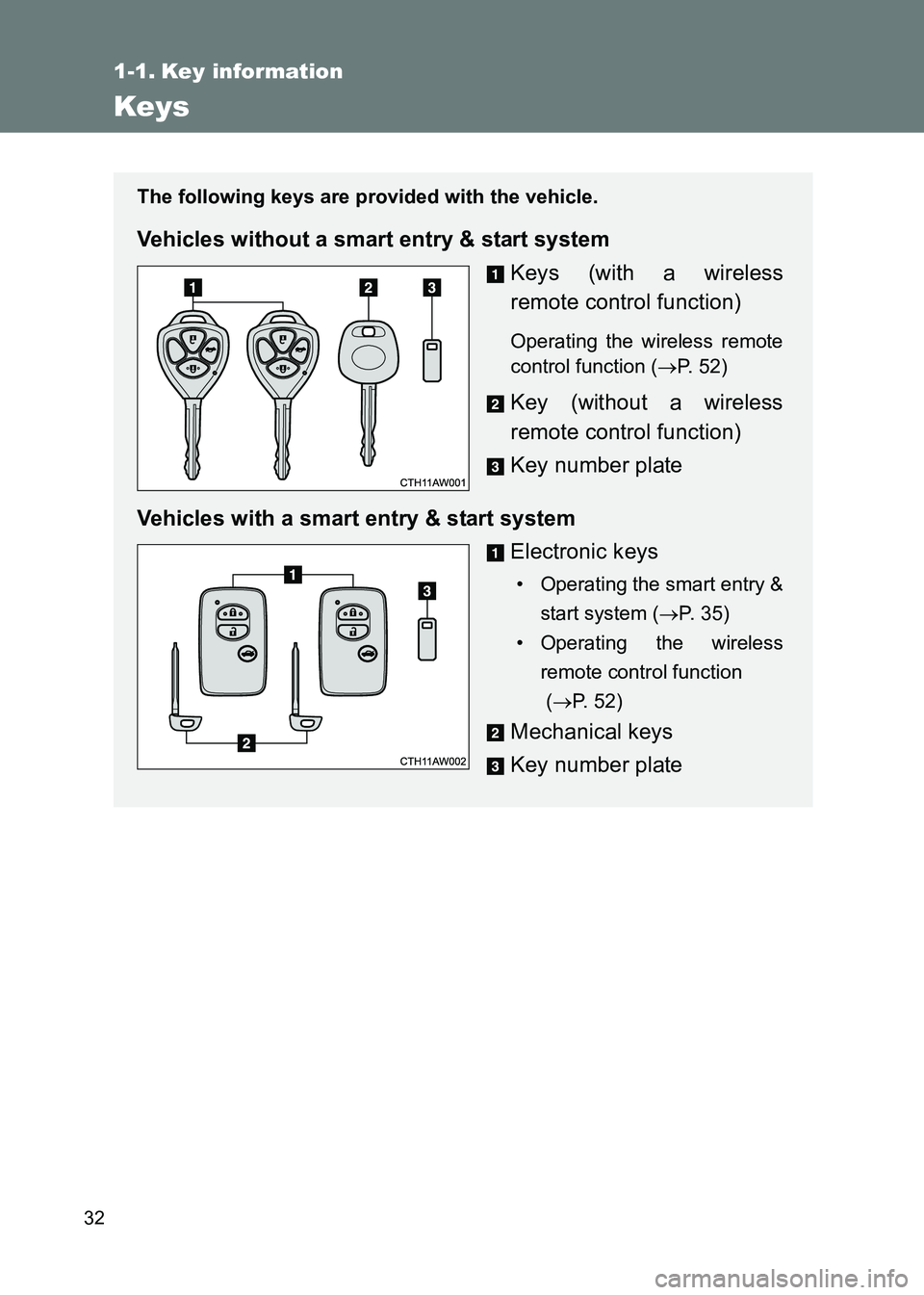
The following keys are provided with the vehicle.
Vehicles without a smart entry & start systemKeys (with a wireless
remote control function)
Operating the wireless remote
control function (→P. 52)
Key (without a wireless
remote control function)
Key number plate
Vehicles with a smart entry & start system Electronic keys
• Operating the smart entry &start system ( →P. 35)
• Operating the wireless remote control function
(→ P. 5 2 )
Mechanical keys
Key number plate
Page 33 of 505
33
1-1. Key information
1
Before driving
86_EE (OM18071E)
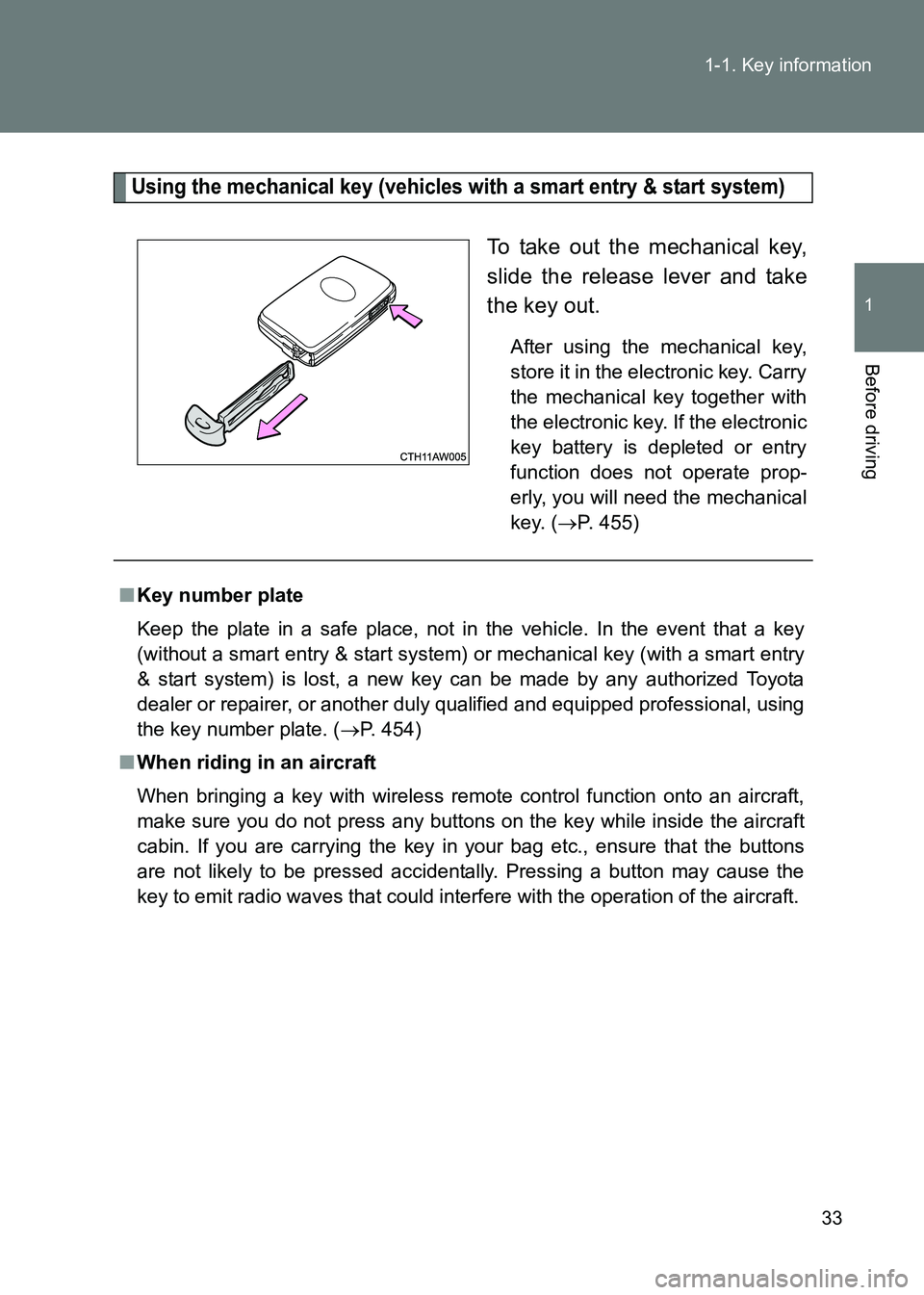
Using the mechanical key (vehicles
with a smart entry & start system)
To take out the mechanical key,
slide the release lever and take
the key out.
After using the mechanical key,
store it in the electronic key. Carry
the mechanical key together with
the electronic key. If the electronic
key battery is depleted or entry
function does not operate prop-
erly, you will need the mechanical
key. (→P. 455)
■Key number plate
Keep the plate in a safe place, not in the vehicle. In the event that a key
(without a smart entry & start system) or mechanical key (with a smart entry
& start system) is lost, a new key can be made by any authorized Toyota
dealer or repairer, or another duly qualified and equipped professional, using
the key number plate. ( →P. 454)
■ When riding in an aircraft
When bringing a key with wireless remote control function onto an aircraft,
make sure you do not press any buttons on the key while inside the aircraft
cabin. If you are carrying the key in your bag etc., ensure that the buttons
are not likely to be pressed accidentally. Pressing a button may cause the
key to emit radio waves that could interfere with the operation of the aircraft.
Page 40 of 505

40
1-2. Opening, closing and locking the doors and trunk
86_EE (OM18071E)
■
Security feature
If a door is not opened within approximately 30 seconds after the vehicle is
unlocked, the security feature automatically locks the vehicle again. (How-
ever, depending on the location of the electronic key, the key may be
detected as being in the vehicle. In this case, the vehicle may be unlocked.)
■ Battery-saving function
The battery-saving function will be activated in order to prevent the elec-
tronic key battery and the vehicle battery from being discharged while the
vehicle is not in operation for a long time.
●In the following situations, the smart entry & start system may take some
time to unlock the doors.
• The electronic key has been left in an area of approximately 2 m (6 ft.)
of the outside of the vehicle for 10 minutes or longer.
• The smart entry & start system has not been used for 5 days or longer.
● If the smart entry & start system has not been used for 14 days or longer,
the doors cannot be unlocked at any doors except the driver’s door.
In this case, take hold of the driver’s door handle, or use the wireless
remote control or the mechanical key, to unlock the doors.
AlarmSituationCorrection procedure
Interior alarm
sounds continu-
ously The “ENGINE START
STOP” switch was turned
to ACCESSORY mode
while the driver’s door was
open (or the driver’s door
was opened while the
“ENGINE START STOP”
switch was in ACCES-
SORY mode). Turn the “ENGINE
START STOP” switch
off and close the
driver’s door.
Page 41 of 505
41
1-2. Opening, closing and locking the doors and trunk
1
Before driving
86_EE (OM18071E)
■
Conditions affecting operation
The smart entry & start system uses weak radio waves. In the following situ-
ations, the communication between the electronic key and the vehicle may
be affected, preventing the smart entry & start system, wireless remote con-
trol and engine immobilizer system from operating properly.
(Way of coping →P. 455)
● When the electronic key battery is depleted
● Near a TV tower, electric power plant, gas station, radio station, large dis-
play, airport or other facility that generates strong radio waves or electri-
cal noise
● When the electronic key is in contact with, or is covered by the following
metallic objects
• Cards to which aluminum foil is attached
• Cigarette boxes that have aluminum foil inside
• Metallic wallets or bags
• Coins
• Hand warmers made of metal
• Media such as CDs and DVDs
● When other wireless key (that emit radio waves) is being used nearby
● When carrying the electronic key together with the following devices that
emit radio waves
• A portable radio, cellular phone, cordless phone or other wireless com-
munication device
• Another vehicle's electronic key or a wireless key that emits radio waves
• Personal computers or personal digital assistants (PDAs)
• Digital audio players
• Portable game systems
● If window tint with a metallic content or metallic objects are attached to
the rear window
● When the electronic key is placed near a battery charger or electronic
devices