Page 360 of 505
360
4-3. Do-it-yourself maintenance
86_EE (OM18071E)
Wireless remote control/electronic key batter y
Replace the battery with a new one if it is depleted.
■You will need the following items:
●Flathead screwdriver
● Lithium battery CR2016 (vehicles without a smart entry & start
system), or CR1632 (vehicles with a smart entry & start sys-
tem)
■ Replacing the battery (vehicles without a smart entry & start
system)
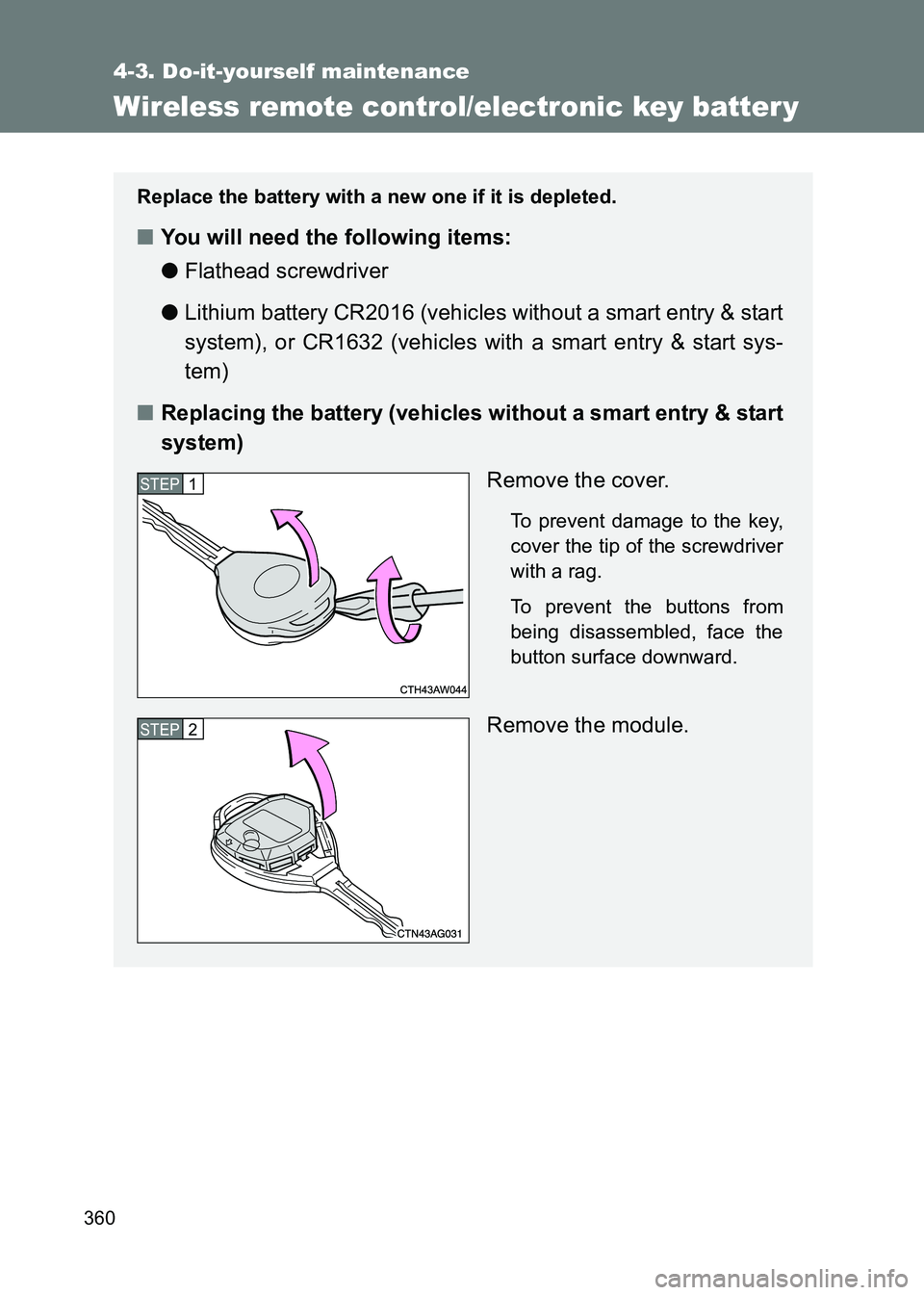
Remove the cover.
To prevent damage to the key,
cover the tip of the screwdriver
with a rag.
To prevent the buttons from
being disassembled, face the
button surface downward.
Remove the module.
STEP1
STEP2
Page 361 of 505
361
4-3. Do-it-yourself maintenance
4
Maintenance and care
86_EE (OM18071E)
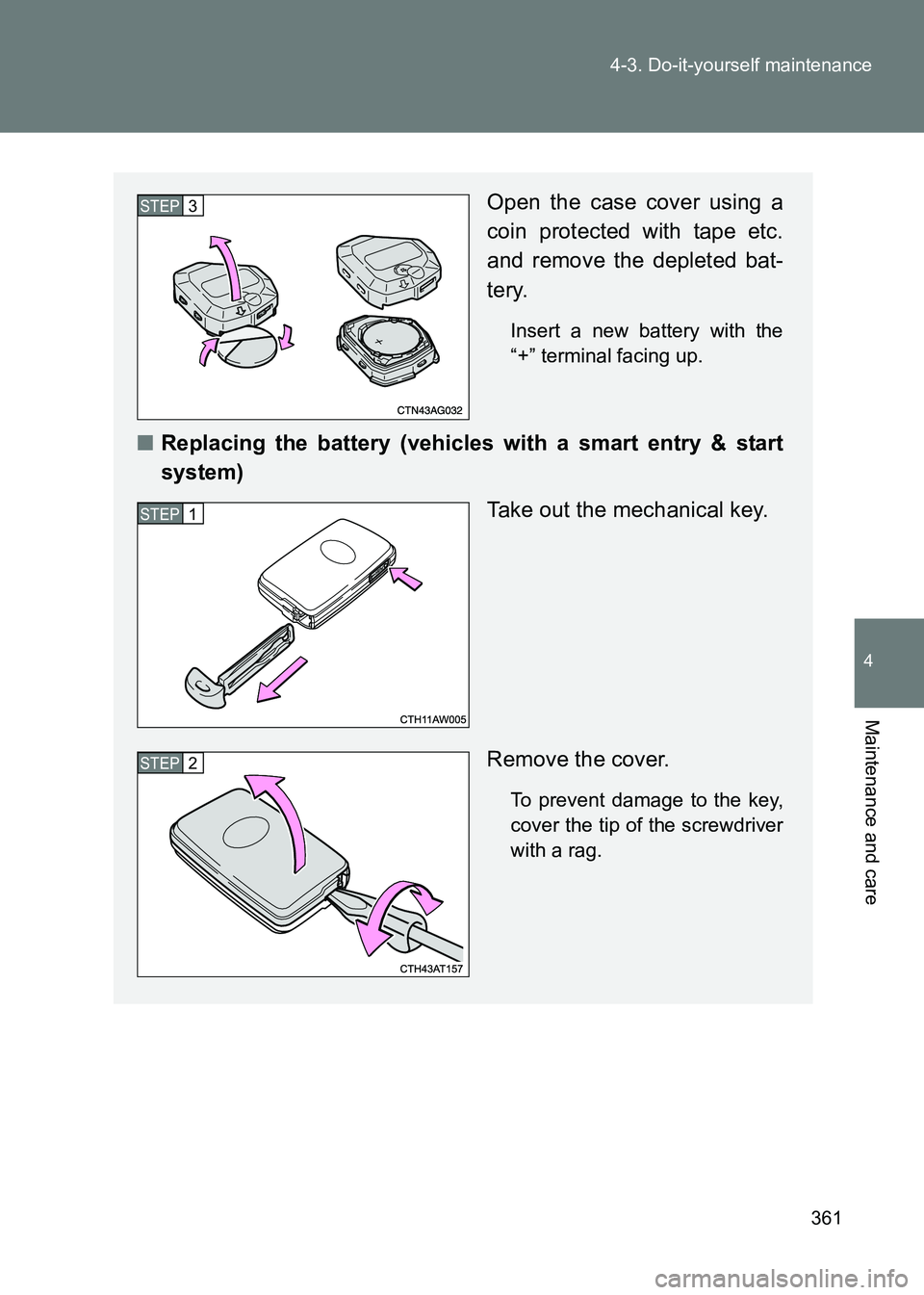
Open the case cover using a
coin protected with tape etc.
and remove the depleted bat-
tery.
Insert a new battery with the
“+” terminal facing up.
■
Replacing the battery (vehicles with a smart entry & start
system)
Take out the mechanical key.
Remove the cover.
To prevent damage to the key,
cover the tip of the screwdriver
with a rag.
STEP3
STEP1
STEP2
Page 362 of 505

362
4-3. Do-it-yourself maintenance
86_EE (OM18071E)
■
Use a CR2016 (vehicles without a smart entry & start system) or
CR1632 (vehicles with a smart entry & start system) lithium battery
●Batteries can be purchased at any authorized Toyota dealer or repairer,
or another duly qualified and equipped prof essional, local electrical appli-
ance shops or camera stores.
● Replace only with the same or equivalent type recommended by the
manufacturer.
● Dispose of used batteries according to local laws.
■ If the key battery is depleted
The following symptoms may occur:
●The smart entry & start system (if equipped) and wireless remote control
will not function properly.
● The operational range will be reduced.
■ When putting the module back (vehicles without a smart entry & start
system)
Remove the depleted battery.
Insert a new battery with the
“+” terminal facing up.
STEP3
Insert the module from directly above.
Inserting it on an angle may prevent the
key buttons from operating properly.
Page 383 of 505

5When trouble arises
383
86_EE (OM18071E)
5-1. Essential informationEmergency flashers .......... 384
If your vehicle needs to be towed ..................... 385
If you think something is wrong .............................. 393
Fuel pump shut off system ............................ 394
5-2. Steps to take in an emergency
If a warning light turns on or a warning buzzer
sounds... ......................... 395
If a warning message is displayed ........................ 404
If you have a flat tire (vehicles with
an emergency tire
puncture repair kit).......... 422
If you have a flat tire (vehicles with a spare
tire)
.................................. 438
If the engine will not start ................................ 450 If the shift lever cannot be
shifted from P ................. 453
If you lose your keys ......... 454
If the electronic key does not operate properly
................ 455
If the battery is discharged ...................... 459
If your vehicle overheats ........................ 464
If the vehicle becomes stuck ............................... 467
If your vehicle has to be stopped in an
emergency
........................ 469
Page 418 of 505
418
5-2. Steps to take in an emergency
86_EE (OM18071E)
Power was
turned off due to
the automatic
power off func-
tion.Next time
when
starting
the
engine,
increase
the engine
speed
slightly
and main-
tain that
level for
approxi-
mately 5
minutes to
recharge
the bat-
tery.
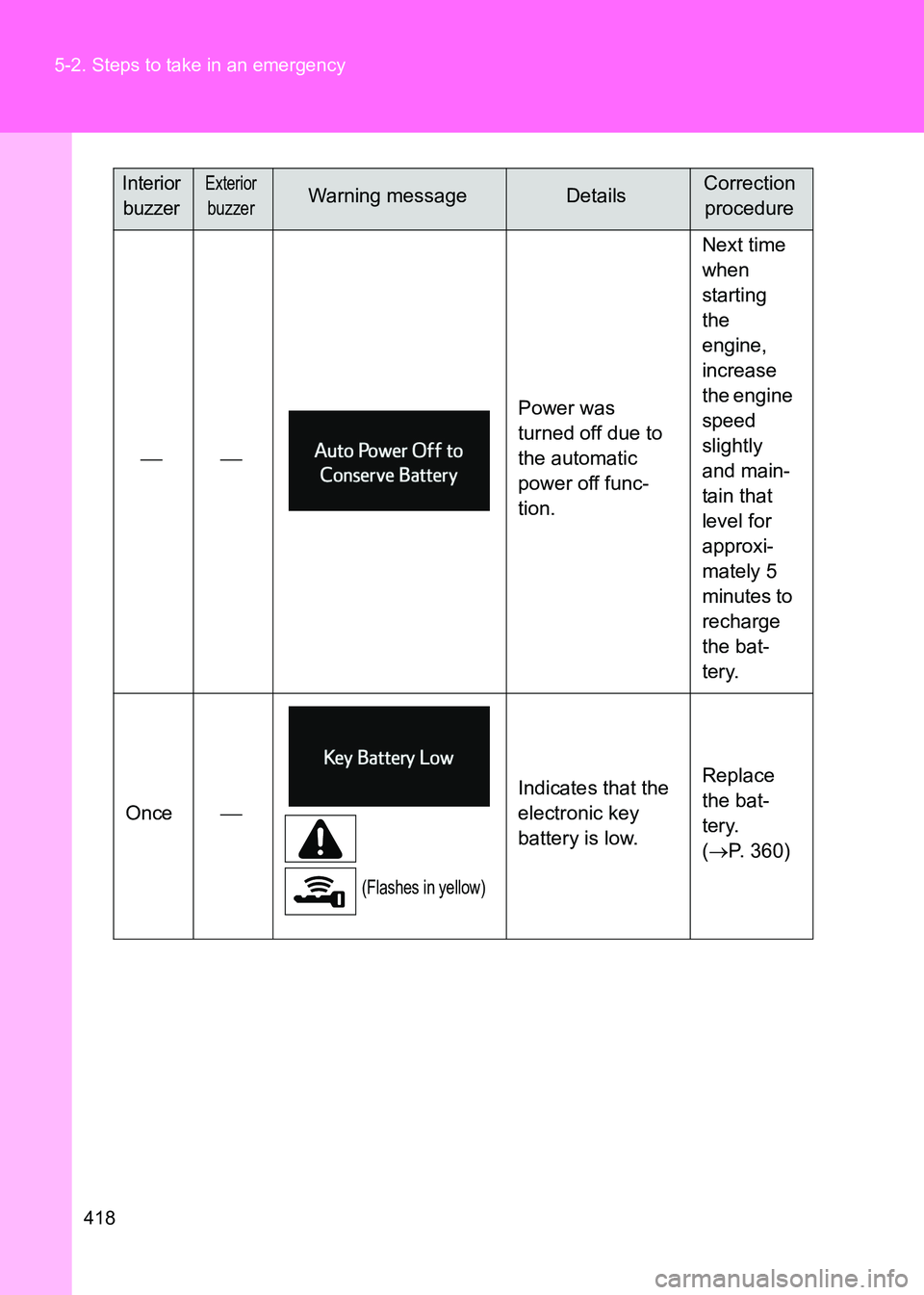
Once
(Flashes in yellow)
Indicates that the
electronic key
battery is low. Replace
the bat-
tery.
(
→ P. 360)
Interior
buzzerExterior
buzzerWarning messageDetailsCorrection procedure
Page 455 of 505
5
455
5-2. Steps to take in an emergency
When trouble arises
86_EE (OM18071E)
If the electronic key does not operate properly (vehicles with a smart entr y & start system)
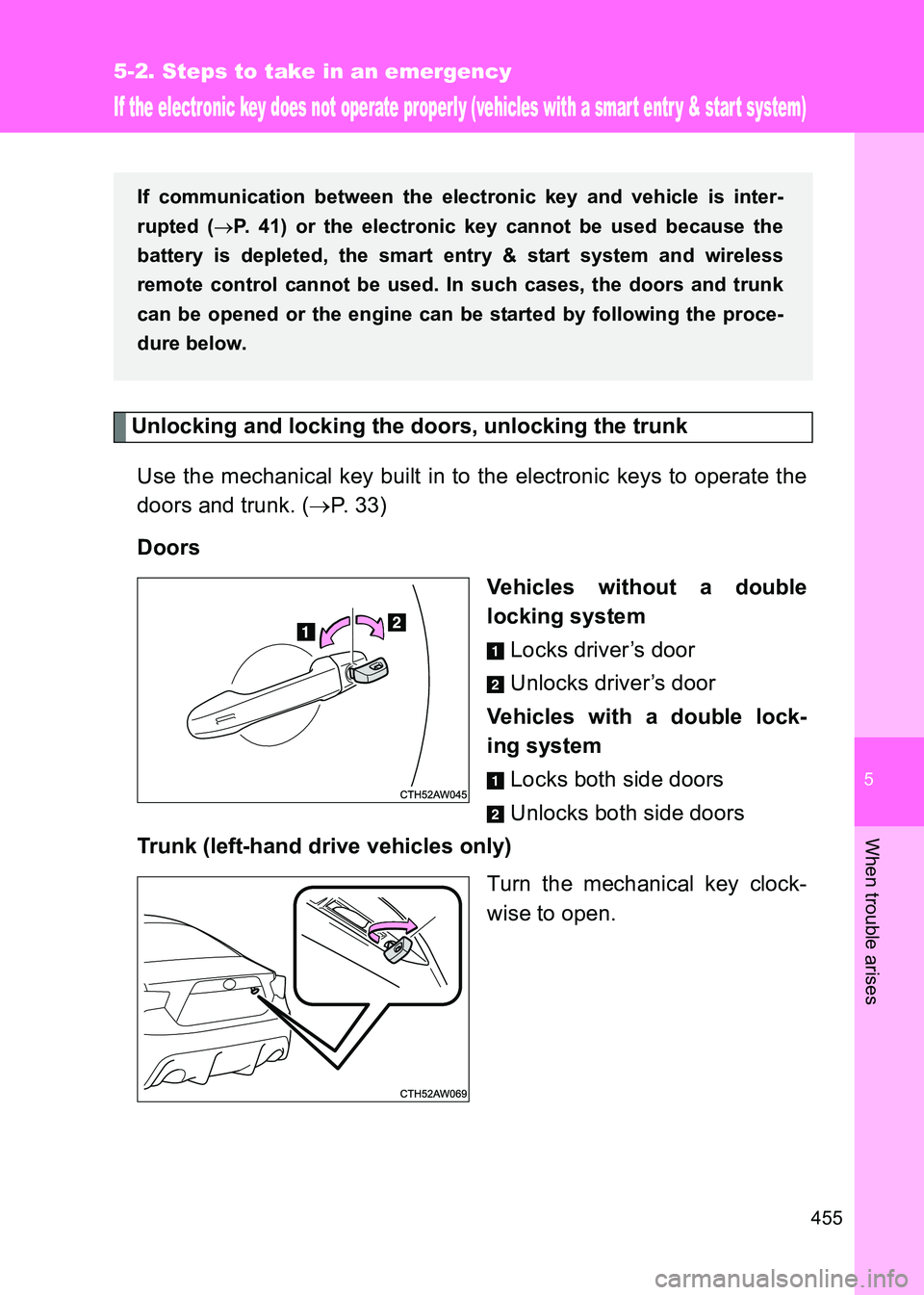
Unlocking and locking the doors, unlocking the trunkUse the mechanical key built in to the electronic keys to operate the
doors and trunk. ( →P. 33)
Doors Vehicles without a double
locking systemLocks driver’s door
Unlocks driver’s door
Vehicles with a double lock-
ing system Locks both side doors
Unlocks both side doors
Trunk (left-hand drive vehicles only)
Turn the mechanical key clock-
wise to open.
If communication between the electronic key and vehicle is inter-
rupted (→P. 41) or the electronic key cannot be used because the
battery is depleted, the smart entry & start system and wireless
remote control cannot be used. In such cases, the doors and trunk
can be opened or the engine can be started by following the proce-
dure below.
Page 458 of 505
458
5-2. Steps to take in an emergency
86_EE (OM18071E)
■
Stopping the engine
Vehicles with an automatic transmission: Shift the shift lever to P and press
the “ENGINE START STOP” switch as you normally do when stopping the
engine.
Vehicles with a manual transmission: Sh ift the shift lever to N and press the
“ENGINE START STOP” switch as you normally do when stopping the
engine.
■ Replacing the key battery
As the above procedure is a temporary measure, it is recommended that the
electronic key battery be replaced immediately when the battery depletes.
( → P. 360)
■ Changing “ENGINE START STOP” switch modes
Vehicles with an automatic transmission
Release the brake pedal and press the “ENGINE START STOP” switch in
above.The engine does not start and modes will be changed each
time the switch is pressed. ( →P. 177)
Vehicles with a manual transmission
Release the clutch pedal and press the “ENGINE START STOP” switch in above.The engine does not start and modes will be changed each
time the switch is pressed. ( →P. 177)
■ If the doors cannot be locked or unlocked by the smart entry & start
system
Lock and unlock the doors by the mechanical key or wireless remote control.
STEP 3
STEP 3
Page 461 of 505

5
461
5-2. Steps to take in an emergency
When trouble arises
86_EE (OM18071E)
■
Starting the engine when the battery is discharged
The engine cannot be started by push-starting.
■ Avoiding a discharged battery
●Turn off the headlights and the air c onditioning system while the engine is
off.
● Turn off any unnecessary electrical components when the vehicle is run-
ning at a low speed for an extended period, such as in heavy traffic, etc.
■ Charging the battery
The electricity stored in the battery will discharge gradually even when the
vehicle is not in use, due to natural discharge and the draining effects of cer-
tain electrical appliances. If the vehicle is left for a long time, the battery may
discharge, and the engine may be unable to start. (The battery recharges
automatically during driving.)
■ Precautions when the battery is discharged (vehicles with a smart
entry & start system)
●In some cases, it may not be possible to unlock the doors using the smart
entry & start system when the battery is discharged. Use the wireless
remote control or the mechanical key to lock or unlock the doors.
● The engine may not start on the first attempt after the battery has
recharged but will start normally after the second attempt. This is not a
malfunction.
Once the vehicle’s engine has started, remove the jumper
cables in the exact reverse order in which they were con-
nected.
Once the engine starts, have the vehicle checked at any autho-
rized Toyota dealer or repairer, or another duly qualified and
equipped professional as soon as possible.STEP 5