2017 TOYOTA COROLLA brake
[x] Cancel search: brakePage 194 of 612
1944-2. Driving procedures
COROLLA_TMMMS_TMMC_U (OM02494U)
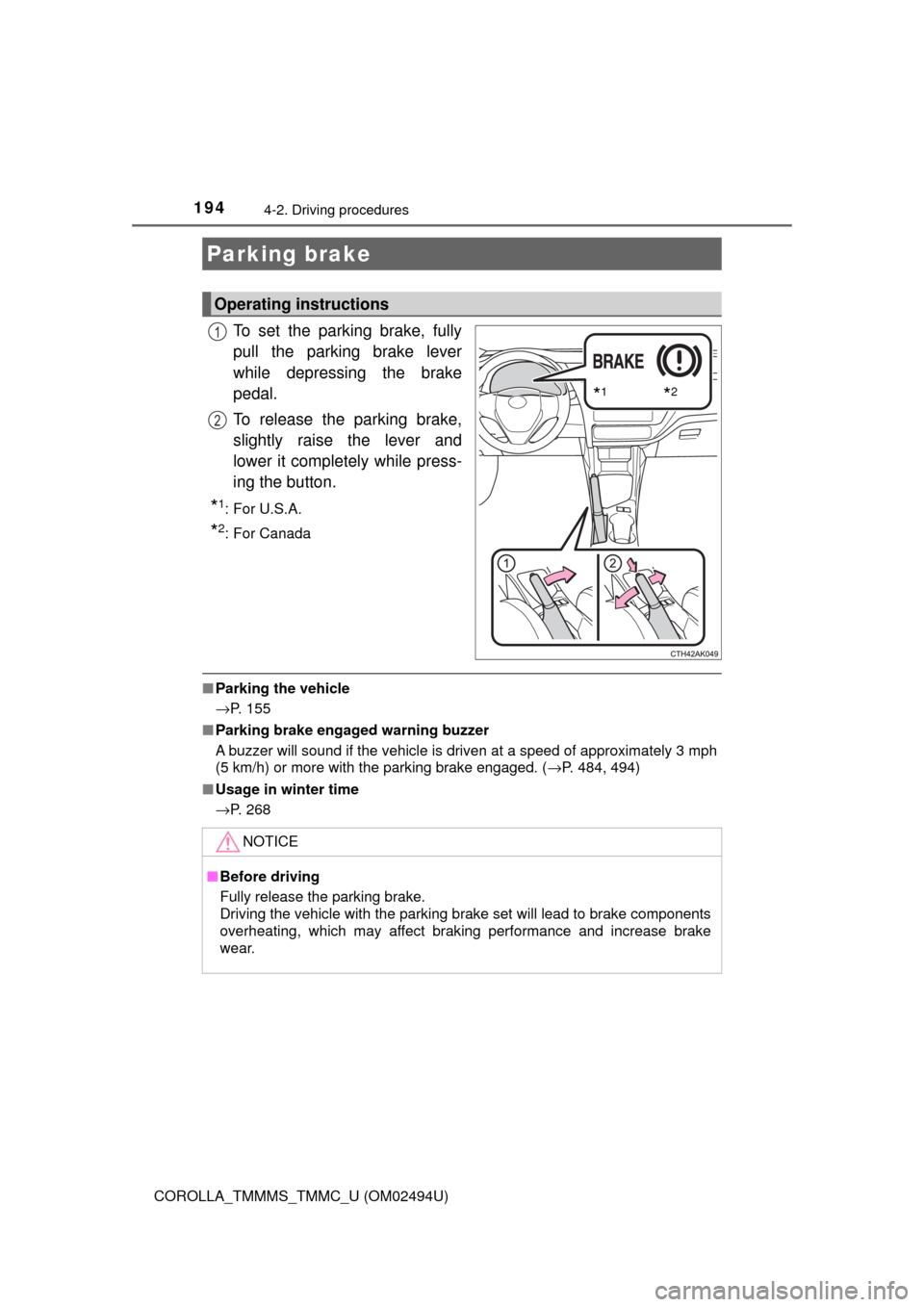
To set the parking brake, fully
pull the parking brake lever
while depressing the brake
pedal.
To release the parking brake,
slightly raise the lever and
lower it completely while press-
ing the button.
*1:For U.S.A.
*2: For Canada
■Parking the vehicle
→P. 155
■Parking brake engaged warning buzzer
A buzzer will sound if the vehicle is driven at a speed of approximately 3 mph
(5 km/h) or more with the parking brake engaged. (→P. 484, 494)
■Usage in winter time
→P. 268
Parking brake
Operating instructions
*1*2
1
2
NOTICE
■Before driving
Fully release the parking brake.
Driving the vehicle with the parking brake set will lead to brake components
overheating, which may affect braking performance and increase brake
wear.
Page 197 of 612

1974-3. Operating the lights and wipers
4
Driving
COROLLA_TMMMS_TMMC_U (OM02494U)
With the headlights on, push
the lever away from you to turn
on the high beams.
Pull the lever toward you to the
center position to turn the high
beams off.
Pull the lever toward you and
release it to flash the high
beams once.
You can flash the high beams with the headlights on or off.
■Daytime running light system
●To make your vehicle more visible to other drivers during daytime driving,
the daytime running lights turn on automatically whenever the engine is
started and the parking brake is released with the headlight switch in the
“ ”, “ ”, or “AUTO” position. (Illuminate darker than headlight low
beams.
*) Daytime running lights are not designed for use at night.
For the U.S.A.: Daytime running lights can be turned off by operating the
switch.
*: Vehicles with daytime running lights that are integrated into the head-
lights
●Compared to turning on the headlights, the daytime running light system
offers greater durability and consumes less electricity, so it can help improve
fuel economy.
■Headlight control sensor
Turning on the high beam headlights
1
2
The sensor may not function properly if an
object is placed on the sensor, or anything
that blocks the sensor is affixed to the
windshield.
Doing so interferes with the sensor
detecting the level of ambient light and
may cause the automatic headlight sys-
tem to malfunction.
Page 210 of 612

2104-5. Using the driving support systems
COROLLA_TMMMS_TMMC_U (OM02494U)
The pre-collision system is equipped with a sophisticated computer
that will record certain data, such as:
• Accelerator status
• Brake status
• Vehicle speed
• Operation status of the pre-collision system functions
• Information (such as the distance and relative speed between your
vehicle and the vehicle ahead or other objects)
• Image information from the camera sensor (available only when the
pre-collision braking function was operating)
The pre-collision system does not record conversations or other
sounds and does not record images of the inside of the vehicle.
●Data usage
Toyota may use the data recorded in this computer to diagnose
malfunctions, conduct research and development, and improve
quality.
Toyota will not disclose the recorded data to a third party except:
• With the consent of the vehicle owner or with the consent of the
lessee if the vehicle is leased
• In response to an official request by the police, a court of law or a
government agency
• For use by Toyota in a lawsuit
• For research purposes where the data is not tied to a specific
vehicle or vehicle owner
●Recorded image information can be erased using a specialized
device.
The image information recording function can be disabled. How-
ever, if the function is disabled, data from when the pre-collision
system operates will not be available.
Vehicle data recording
Page 216 of 612
2164-5. Using the driving support systems
COROLLA_TMMMS_TMMC_U (OM02494U)
PCS (Pre-Collision System)
The pre-collision system uses a radar sensor and camera sen-
sor to detect vehicles and pedestrians
*1 in front of your vehicle.
When the system determines that the possibility of a frontal col-
lision with a vehicle or pedestrian is high, a warning operates to
urge the driver to take evasive action and the potential brake
pressure is increased to help the driver avoid the collision. If the
system determines that the possibility of a frontal collision with
a vehicle or pedestrian is extremely high, the brakes are auto-
matically applied to help avoid the collision or help reduce the
impact of the collision.
The pre-collision system can be disabled/enabled and the warning
timing can be changed. (→P. 220)
*1: Depending on the region in which the vehicle was sold, the pedestrian
detection function may not be available. Contact your Toyota dealer for
details.
Page 217 of 612

2174-5. Using the driving support systems
4
Driving
COROLLA_TMMMS_TMMC_U (OM02494U)
◆Pre-collision warning
When the system determines
that the possibility of a frontal
collision is high, a buzzer will
sound and a warning message
will be displayed on the multi-
information display to urge the
driver to take evasive action.
◆Pre-collision brake assist
When the system determines that the possibility of a frontal colli-
sion is high, the system applies greater braking force in relation to
how strongly the brake pedal is depressed.
◆Pre-collision braking
When the system determines that the possibility of a frontal colli-
sion is high, the system warns the driver. If the system determines
that the possibility of a collision is extremely high, the brakes are
automatically applied to help avoid the collision or reduce the colli-
sion speed.
Page 218 of 612

2184-5. Using the driving support systems
COROLLA_TMMMS_TMMC_U (OM02494U)
WARNING
■Limitations of the pre-collision system
●The driver is solely responsible for safe driving. Always drive safely, taking
care to observe your surroundings.
Do not use the pre-collision system instead of normal braking operations
under any circumstances. This system will not prevent collisions or lessen
collision damage or injury in every situation. Do not overly rely on this sys-
tem. Failure to do so may lead to an accident, resulting in death or serious
injury.
●Although this system is designed to help avoid a collision or help reduce
the impact of the collision, its effectiveness may change according to vari-
ous conditions, therefore the system may not always be able to achieve
the same level of performance.
Read the following conditions carefully. Do not overly rely on this system
and always drive carefully.
• Conditions under which the system may operate even if there is no pos-
sibility of a collision: →P. 223
• Conditions under which the system may not operate properly: →P. 226
●Do not attempt to test the operation of the pre-collision system yourself, as
the system may not operate properly, possibly leading to an accident.
■Pre-collision braking
●When the pre-collision braking function is operating, a large amount of
braking force will be applied.
●If the vehicle is stopped by the operation of the pre-collision braking func-
tion, the pre-collision braking function operation will be canceled after
approximately 2 seconds. Depress the brake pedal as necessary.
●The pre-collision braking function may not operate if certain operations are
performed by the driver. If the accelerator pedal is being depressed
strongly or the steering wheel is being turned, the system may determine
that the driver is taking evasive action and possibly prevent the pre-colli-
sion braking function from operating.
●In some situations, while the pre-collision braking function is operating,
operation of the function may be canceled if the accelerator pedal is
depressed strongly or the steering wheel is turned and the system deter-
mines that the driver is taking evasive action.
●If the brake pedal is being depressed, the system may determine that the
driver is taking evasive action and possibly delay the operation timing of
the pre-collision braking function.
Page 221 of 612

2214-5. Using the driving support systems
4
Driving
COROLLA_TMMMS_TMMC_U (OM02494U)
■Operational conditions
Availability of the pedestrian detection function depends on the region in
which the vehicle was sold.
Read the following for details:
Region A
(The pedestrian detection function is available)
The pre-collision system is enabled and the system determines that the pos-
sibility of a frontal collision with a vehicle or pedestrian is high.
Each function is operational at the following speeds:
●Pre-collision warning:
• Vehicle speed is between approximately 7 and 110 mph (10 and 180 km/h).
(For detecting a pedestrian, vehicle speed is between approximately 7 and
50 mph [10 and 80 km/h].)
• The relative speed between your vehicle and the vehicle or pedestrian
ahead is approximately 7 mph (10 km/h) or more.
●Pre-collision brake assist:
• Vehicle speed is between approximately 19 and 110 mph (30 and 180 km/h).
(For detecting a pedestrian, vehicle speed is between approximately 19 and
50 mph [30 and 80 km/h].)
• The relative speed between your vehicle and the vehicle or pedestrian
ahead is approximately 19 mph (30 km/h) or more.
●Pre-collision braking:
• Vehicle speed is between approximately 7 and 110 mph (10 and 180
km/h). (For detecting a pedestrian, vehicle speed is between approxi-
mately 7 and 50 mph [10 and 80 km/h].)
• The relative speed between your vehicle and the vehicle or pedestrian
ahead is approximately 7 mph (10 km/h) or more.
The system may not operate in the following situations:
●If a battery terminal has been disconnected and reconnected and then the
vehicle has not been driven for a certain amount of time
●If the shift lever is in R
●If VSC is disabled (only the pre-collision warning function will be opera-
tional)
●If the PCS (Pre-Collision System) warning light is flashing or illuminated
RegionsFunction availability
Region AThe pedestrian detection function is available
Region BThe pedestrian detection function is not available
Page 222 of 612

2224-5. Using the driving support systems
COROLLA_TMMMS_TMMC_U (OM02494U)
Region B
(The pedestrian detection function is not available)
The pre-collision system is enabled and the system determines that the pos-
sibility of a frontal collision with a vehicle is high.
Each function is operational at the following speeds:
●Pre-collision warning:
• Vehicle speed is between approximately 10 and 110 mph (15 and 180
km/h).
• The relative speed between your vehicle and the vehicle ahead is
approximately 7 mph (10 km/h) or more.
●Pre-collision brake assist:
• Vehicle speed is between approximately 19 and 110 mph (30 and 180
km/h).
• The relative speed between your vehicle and the vehicle ahead is
approximately 19 mph (30 km/h) or more.
●Pre-collision braking:
• Vehicle speed is between approximately 10 and 110 mph (15 and 180
km/h).
• The relative speed between your vehicle and the vehicle ahead is
approximately 7 mph (10 km/h) or more.
The system may not operate in the following situations:
●If a battery terminal has been disconnected and reconnected and then the
vehicle has not been driven for a certain amount of time
●If the shift lever is in R
●If VSC is disabled (only the pre-collision warning function will be opera-
tional)
●If the PCS (Pre-Collision System) warning light is flashing or illuminated