2017 TOYOTA COROLLA ECO mode
[x] Cancel search: ECO modePage 184 of 612
1844-2. Driving procedures
COROLLA_TMMMS_TMMC_U (OM02494U)
*: To improve fuel efficiency and reduce noises, set the shift lever in D for
normal driving.
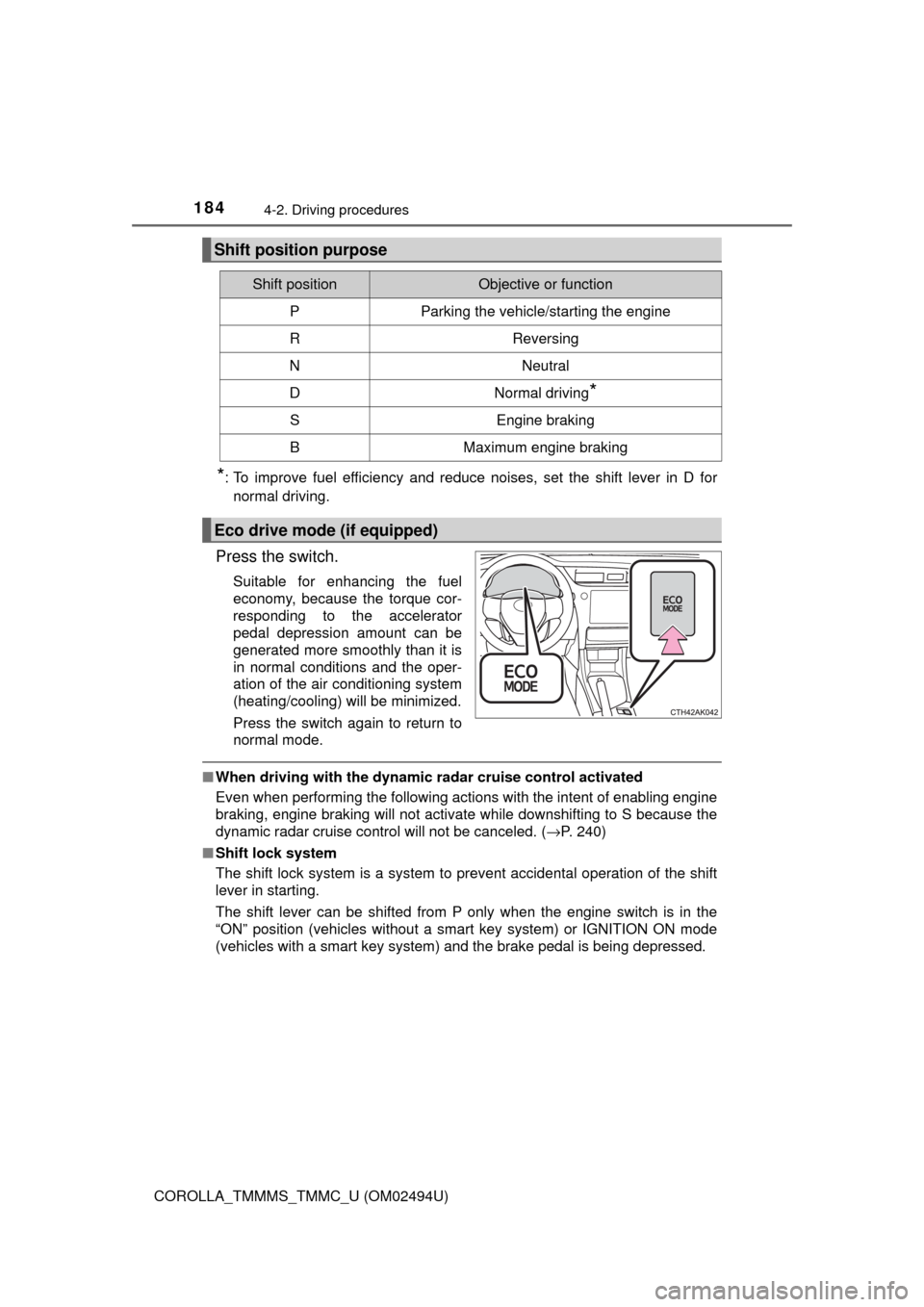
Press the switch.
Suitable for enhancing the fuel
economy, because the torque cor-
responding to the accelerator
pedal depression amount can be
generated more smoothly than it is
in normal conditions and the oper-
ation of the air conditioning system
(heating/cooling) will be minimized.
Press the switch again to return to
normal mode.
■When driving with the dynamic radar cruise control activated
Even when performing the following actions with the intent of enabling engine
braking, engine braking will not activate while downshifting to S because the
dynamic radar
cruise control will not be canceled. (→P. 240)
■Shift lock system
The shift lock system is a system to prevent accidental operation of the shift
lever in starting.
The shift lever can be shifted from P only when the engine switch is in the
“ON” position (vehicles without a smart key system) or IGNITION ON mode
(vehicles with a smart key system) and the brake pedal is being depressed.
Shift position purpose
Shift positionObjective or function
PParking the vehicle/starting the engine
RReversing
NNeutral
DNormal driving*
SEngine braking
BMaximum engine braking
Eco drive mode (if equipped)
Page 203 of 612

2034-3. Operating the lights and wipers
4
Driving
COROLLA_TMMMS_TMMC_U (OM02494U)• When driving in inclement weather (heavy rain, snow, fog, sandstorms,
etc.)
• When the windshield is obscured by fog, mist, ice, dirt, etc.
• When the windshield is cracked or damaged
• When the camera sensor is deformed or dirty
• When the temperature of the camera sensor is extremely high
• When the surrounding brightness level is equal to that of headlights, tail
lights or fog lights
• When headlights or tail lights of vehicles ahead are turned off, dirty,
changing color, or not aimed properly
• When the vehicle is hit by water, snow, dust, etc. from a preceding vehi-
cle
• When driving through an area of intermittently changing brightness and
darkness
• When frequently and repeatedly driving ascending/descending roads, or
roads with rough, bumpy or uneven surfaces (such as stone-paved
roads, gravel roads, etc.)
• When frequently and repeatedly taking curves or driving on a winding
road
• When there is a highly reflective object ahead of the vehicle, such as a
sign or mirror
• When the back of a preceding vehicle is highly reflective, such as a con-
tainer on a truck
• When the vehicle's headlights are damaged or dirty, or are not aimed
properly
• When the vehicle is listing or titling due to a flat tire, a trailer being towed,
etc.
• When the headlights are changed between the high beams and low
beams repeatedly in an abnormal manner
• When the driver believes that the high beams may be flashing or dazzling
pedestrians or other drivers
■Temporarily lowering sensor sensitivity
The sensitivity of the sensor can be temporarily lowered.
Turn the engine switch off while the following conditions are met.
• The headlight switch is in .
• The headlight switch lever is in the high beam position.
Turn the engine switch to the “ON” position (vehicles without a smart key
system) or IGNITION ON mode (vehicles with a smart key system).
Within 30 seconds after , repeat pulling the headlight switch lever to the
original position then pushing it to the high beam position quickly 10 times,
then leave the lever in the high beam position.
If the sensitivity is changed, the Automatic High Beam indicator will turn on
and off 3 times.
Automatic High Beam (headlights) may turn on even the vehicle is stopped.
1
2
32
4
Page 205 of 612

2054-3. Operating the lights and wipers
4
Driving
COROLLA_TMMMS_TMMC_U (OM02494U)
Washer/wiper dual operation
Wipers will automatically operate a
couple of times after the washer
squirts.
■The windshield wiper and washer can be operated when
Vehicles without a smart key system
The engine switch is in the “ON” position.
Vehicles with a smart key system
The engine switch is in IGNITION ON mode.
■If no windshield washer fluid sprays
Check that the washer nozzles are not blocked if there is washer fluid in the
windshield washer fluid reservoir.
7
WARNING
■Caution regarding the use of washer fluid
When it is cold, do not use the washer fluid until the windshield becomes
warm. The fluid may freeze on the windshield and cause low visibility. This
may lead to an accident, resulting in death or serious injury.
NOTICE
■When the windshield is dry
Do not use the wipers, as they may damage the windshield.
■When the washer fluid tank is empty
Do not operate the switch continually as the washer fluid pump may over-
heat.
■When a nozzle becomes blocked
In this case, contact your Toyota dealer.
Do not try to clear it with a pin or other object. The nozzle will be damaged.
Page 244 of 612
2444-5. Using the driving support systems
COROLLA_TMMMS_TMMC_U (OM02494U)
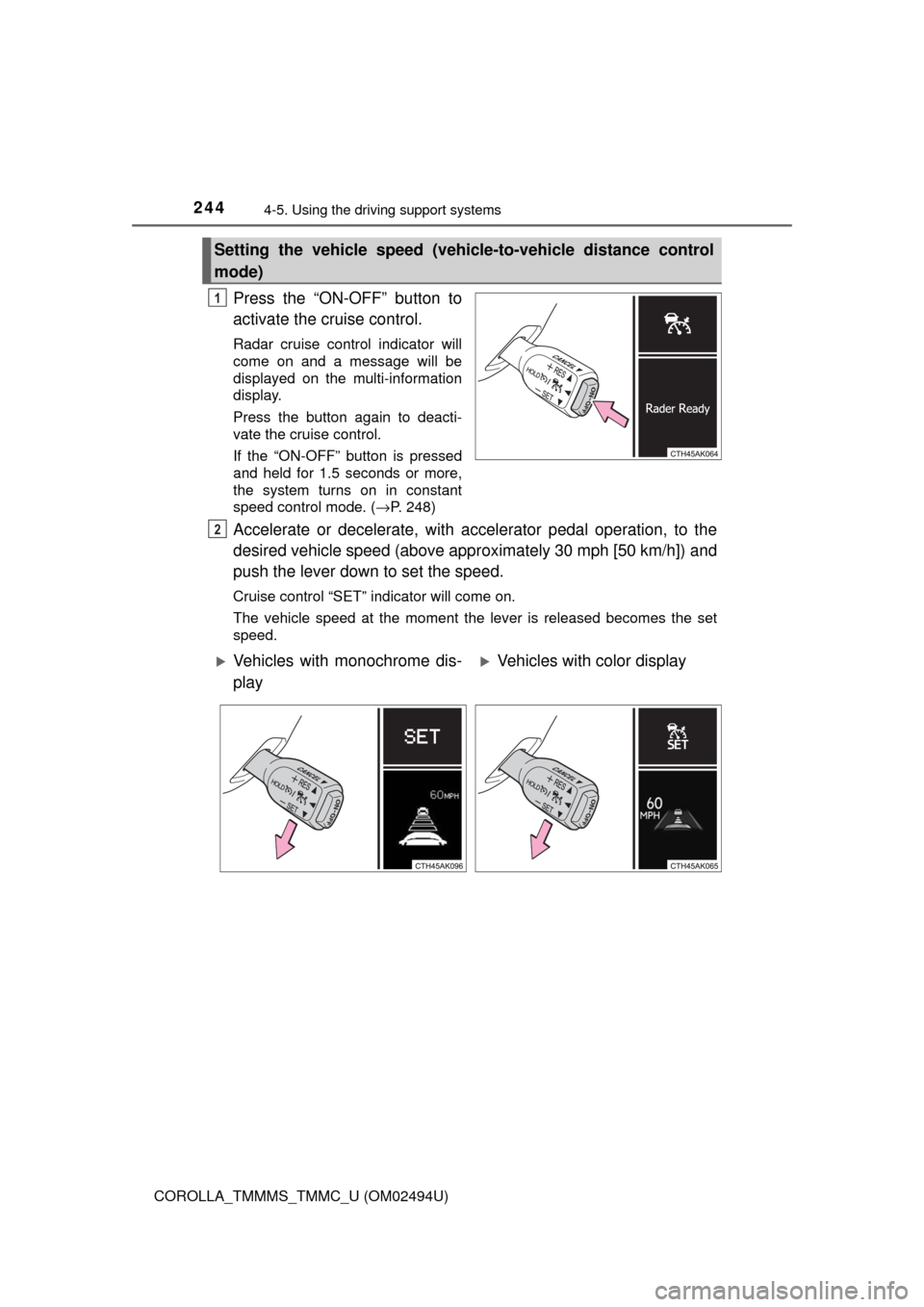
Press the “ON-OFF” button to
activate the cruise control.
Radar cruise control indicator will
come on and a message will be
displayed on the multi-information
display.
Press the button again to deacti-
vate the cruise control.
If the “ON-OFF” button is pressed
and held for 1.5 seconds or more,
the system turns on in constant
speed control mode. (→P. 248)
Accelerate or decelerate, with accelerator pedal operation, to the
desired vehicle speed (above approximately 30 mph [50 km/h]) and
push the lever down to set the speed.
Cruise control “SET” indicator will come on.
The vehicle speed at the moment the lever is released becomes the set
speed.
Setting the vehicle speed (vehicle-to-vehicle distance control
mode)
1
2
Vehicles with monochrome dis-
playVehicles with color display
Page 247 of 612
2474-5. Using the driving support systems
4
Driving
COROLLA_TMMMS_TMMC_U (OM02494U)
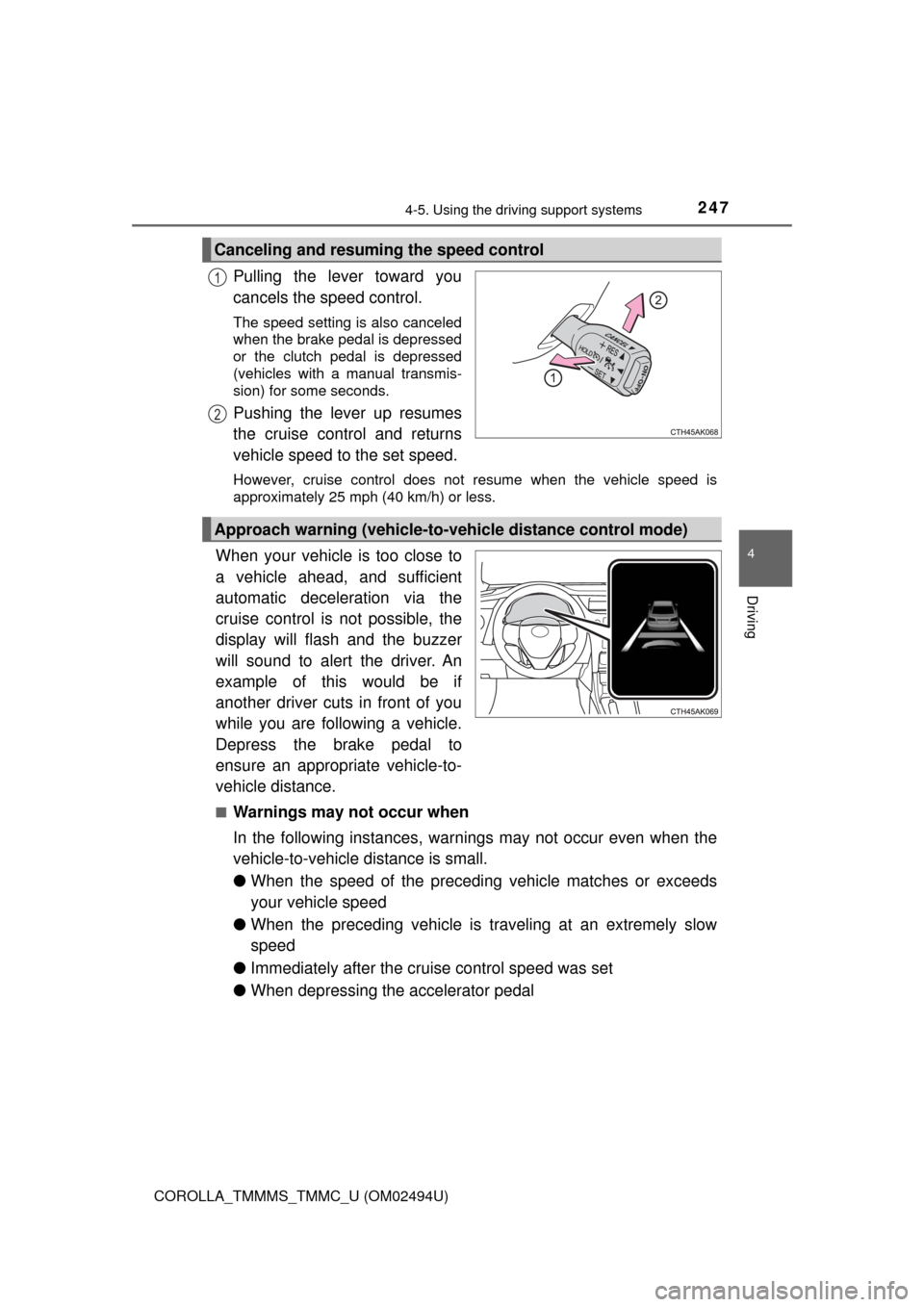
Pulling the lever toward you
cancels the speed control.
The speed setting is also canceled
when the brake pedal is depressed
or the clutch pedal is depressed
(vehicles with a manual transmis-
sion) for some seconds.
Pushing the lever up resumes
the cruise control and returns
vehicle speed to the set speed.
However, cruise control does not resume when the vehicle speed is
approximately 25 mph (40 km/h) or less.
When your vehicle is too close to
a vehicle ahead, and sufficient
automatic deceleration via the
cruise control is not possible, the
display will flash and the buzzer
will sound to alert the driver. An
example of this would be if
another driver cuts in front of you
while you are following a vehicle.
Depress the brake pedal to
ensure an appropriate vehicle-to-
vehicle distance.
■Warnings may not occur when
In the following instances, warnings may not occur even when the
vehicle-to-vehicle distance is small.
●When the speed of the preceding vehicle matches or exceeds
your vehicle speed
●When the preceding vehicle is traveling at an extremely slow
speed
●Immediately after the cruise control speed was set
●When depressing the accelerator pedal
Canceling and resuming the speed control
1
2
Approach warning (vehicle-to-vehicle distance control mode)
Page 248 of 612

2484-5. Using the driving support systems
COROLLA_TMMMS_TMMC_U (OM02494U)
When constant speed control mode is selected, your vehicle will main-
tain a set speed without controlling the vehicle-to-vehicle distance.
Select this mode only when vehicle-to-vehicle distance control mode
does not function correctly due to a dirty radar sensor, etc.
With the cruise control off,
press and hold the “ON-OFF”
button for 1.5 seconds or more.
Immediately after the “ON-OFF”
button is pressed, the radar cruise
control indicator will come on.
Afterwards, it switches to the cruise
control indicator.
Switching to constant speed con-
trol mode is only possible when
operating the lever with the cruise
control off.
Accelerate or decelerate, with accelerator pedal operation, to the
desired vehicle speed (above approximately 30 mph [50 km/h]) and
push the lever down to set the speed.
Cruise control “SET” indicator will come on.
The vehicle speed at the moment the lever is released becomes the set
speed.
Adjusting the speed setting: →P. 245
Canceling and resuming the speed setting: →P. 247
Selecting constant speed control mode
1
2
Vehicles with monochrome dis-
playVehicles with color display
Page 297 of 612

2975-5. Playing an audio CD and MP3/WMA/AAC discs
5
Audio system
COROLLA_TMMMS_TMMC_U (OM02494U)●AAC file compatibility
• Compatible standards
MPEG4/AAC-LC
• Compatible sampling frequencies
11.025/12/16/22.05/24/32/44.1/48 (kHz)
• Compatible bit rates
16-320 (kbps)
Compatible channel modes: 1ch and 2ch
●Compatible media
Media that can be used for MP3, WMA and AAC playback are CD-Rs and
CD-RWs.
Playback in some instances may not be possible if the CD-R or CD-RW is
not finalized. Playback may not be possible or the audio may jump if the
disc is scratched or marked with fingerprints.
●Compatible disc formats
The following disc formats can be used.
• Disc formats: CD-ROM Mode 1 and Mode 2
CD-ROM XA Mode 2, Form 1 and Form 2
• File formats: ISO9660 Level 1, Level 2, (Romeo, Joliet)
UDF (2.01 or lower)
MP3, WMA and AAC files written in any format other than those listed
above may not play correctly, and their file names and folder names may
not be displayed correctly.
Items related to standards and limitations are as follows.
• Maximum directory hierarchy: 8 levels (including the root)
• Maximum length of folder names/file names: 32 characters
• Maximum number of folders: 192 (including the root)
• Maximum number of files per disc: 255
●File names
The only files that can be recognized as MP3/WMA/AAC and played are
those with the extension .mp3, .wma or .m4a.
●Discs containing multi-session recordings
As Entune Audio is compatible with multi session discs, it is possible to play
discs that contain MP3, WMA and AAC files. However, only the first session
can be played.
Page 302 of 612

3025-6. Using an external device
COROLLA_TMMMS_TMMC_U (OM02494U)
■About iPod
●“Made for iPod”, “Made for iPhone” and “Made for iPad” mean that an elec-
tronic accessory has been designed to connect specifically to iPod or
iPhone, or iPad, respectively, and has been certified by the developer to
meet Apple performance standards.
●Apple is not responsible for the operation of this device or its compliance
with safety and regulatory standards. Please note that the use of this acces-
sory with iPod, iPhone or iPad may affect wireless performance.
●iPad, iPhone, iPod, iPod classic, iPod nano, and iPod touch are trademarks
of Apple Inc., registered in the U.S. and other countries. Lightning is a trade-
mark of Apple Inc.
■iPod cover art
●Depending on the iPod and songs in the iPod, iPod cover art may be dis-
played.
●This function can be changed to on/off. (→P. 285)
●It may take time to display iPod cover art, and the iPod may not be operated
while the cover art display is in process.
●Only iPod cover art that is saved in JPEG format can be displayed.
■iPod functions
●When an iPod is connected and the audio source is changed to iPod mode,
the iPod will resume play from the same point in which it was last used.
●Depending on the iPod that is connected to the system, certain functions
may not be available. If a function is unavailable due to a malfunction (as
opposed to a system specification), disconnecting the device and recon-
necting it may resolve the problem.
●While connected to the system, the iPod cannot be operated with its own
controls. It is necessary to use the controls of the vehicle's Entune Audio
instead.
●When the battery level of an iPod is very low, the iPod may not operate. If
so, charge the iPod before use.
●Compatible models (→P. 304)