2017 TOYOTA COROLLA tow
[x] Cancel search: towPage 172 of 612
1724-1. Before driving
COROLLA_TMMMS_TMMC_U (OM02494U)
NOTICE
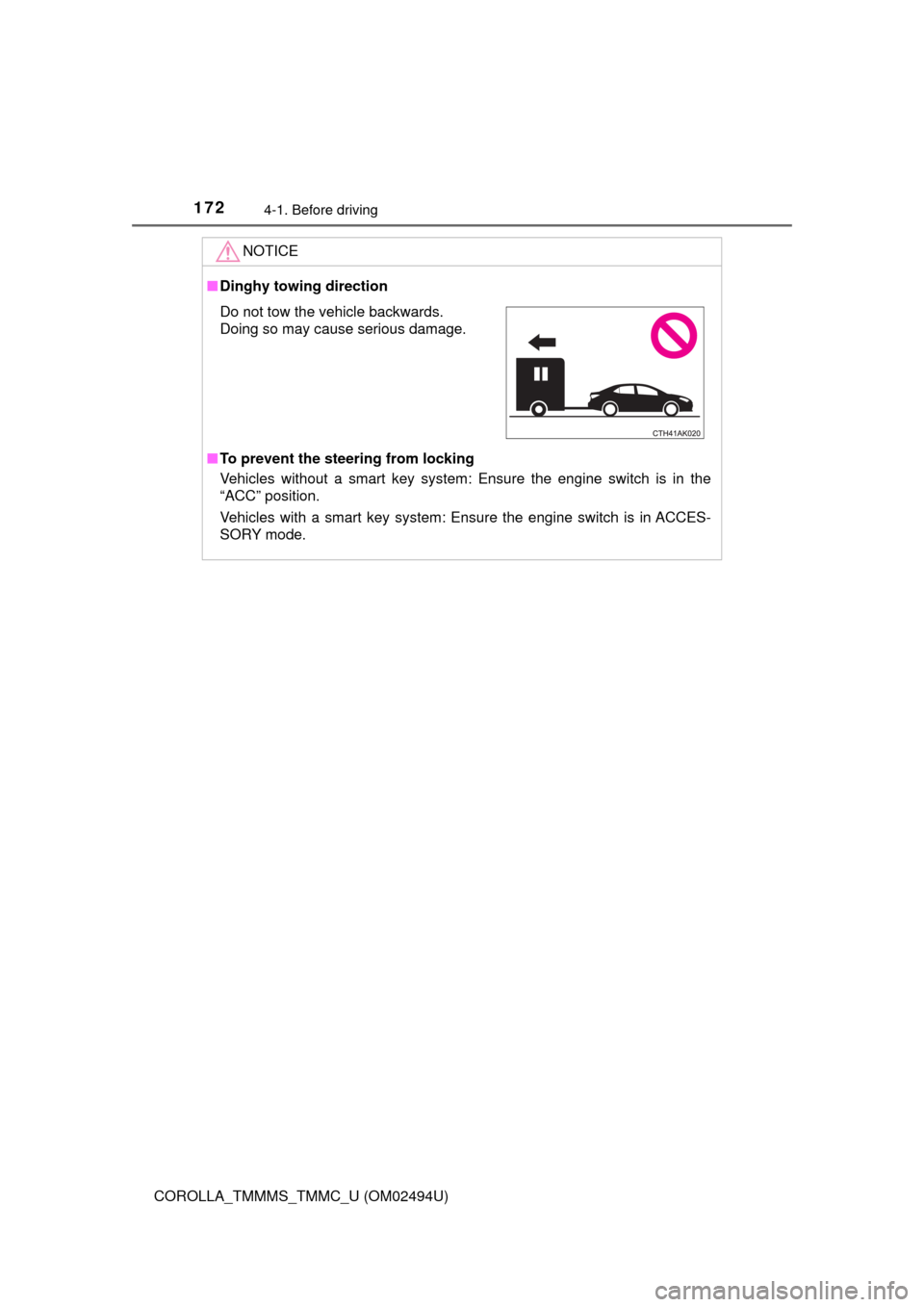
■Dinghy towing direction
■To prevent the steering from locking
Vehicles without a smart key system: Ensure the engine switch is in the
“ACC” position.
Vehicles with a smart key system: Ensure the engine switch is in ACCES-
SORY mode.
Do not tow the vehicle backwards.
Doing so may cause serious damage.
Page 197 of 612

1974-3. Operating the lights and wipers
4
Driving
COROLLA_TMMMS_TMMC_U (OM02494U)
With the headlights on, push
the lever away from you to turn
on the high beams.
Pull the lever toward you to the
center position to turn the high
beams off.
Pull the lever toward you and
release it to flash the high
beams once.
You can flash the high beams with the headlights on or off.
■Daytime running light system
●To make your vehicle more visible to other drivers during daytime driving,
the daytime running lights turn on automatically whenever the engine is
started and the parking brake is released with the headlight switch in the
“ ”, “ ”, or “AUTO” position. (Illuminate darker than headlight low
beams.
*) Daytime running lights are not designed for use at night.
For the U.S.A.: Daytime running lights can be turned off by operating the
switch.
*: Vehicles with daytime running lights that are integrated into the head-
lights
●Compared to turning on the headlights, the daytime running light system
offers greater durability and consumes less electricity, so it can help improve
fuel economy.
■Headlight control sensor
Turning on the high beam headlights
1
2
The sensor may not function properly if an
object is placed on the sensor, or anything
that blocks the sensor is affixed to the
windshield.
Doing so interferes with the sensor
detecting the level of ambient light and
may cause the automatic headlight sys-
tem to malfunction.
Page 203 of 612

2034-3. Operating the lights and wipers
4
Driving
COROLLA_TMMMS_TMMC_U (OM02494U)• When driving in inclement weather (heavy rain, snow, fog, sandstorms,
etc.)
• When the windshield is obscured by fog, mist, ice, dirt, etc.
• When the windshield is cracked or damaged
• When the camera sensor is deformed or dirty
• When the temperature of the camera sensor is extremely high
• When the surrounding brightness level is equal to that of headlights, tail
lights or fog lights
• When headlights or tail lights of vehicles ahead are turned off, dirty,
changing color, or not aimed properly
• When the vehicle is hit by water, snow, dust, etc. from a preceding vehi-
cle
• When driving through an area of intermittently changing brightness and
darkness
• When frequently and repeatedly driving ascending/descending roads, or
roads with rough, bumpy or uneven surfaces (such as stone-paved
roads, gravel roads, etc.)
• When frequently and repeatedly taking curves or driving on a winding
road
• When there is a highly reflective object ahead of the vehicle, such as a
sign or mirror
• When the back of a preceding vehicle is highly reflective, such as a con-
tainer on a truck
• When the vehicle's headlights are damaged or dirty, or are not aimed
properly
• When the vehicle is listing or titling due to a flat tire, a trailer being towed,
etc.
• When the headlights are changed between the high beams and low
beams repeatedly in an abnormal manner
• When the driver believes that the high beams may be flashing or dazzling
pedestrians or other drivers
■Temporarily lowering sensor sensitivity
The sensitivity of the sensor can be temporarily lowered.
Turn the engine switch off while the following conditions are met.
• The headlight switch is in .
• The headlight switch lever is in the high beam position.
Turn the engine switch to the “ON” position (vehicles without a smart key
system) or IGNITION ON mode (vehicles with a smart key system).
Within 30 seconds after , repeat pulling the headlight switch lever to the
original position then pushing it to the high beam position quickly 10 times,
then leave the lever in the high beam position.
If the sensitivity is changed, the Automatic High Beam indicator will turn on
and off 3 times.
Automatic High Beam (headlights) may turn on even the vehicle is stopped.
1
2
32
4
Page 219 of 612

2194-5. Using the driving support systems
4
Driving
COROLLA_TMMMS_TMMC_U (OM02494U)
WARNING
■When to disable the pre-collision system
In the following situations, disable the system, as it may not operate prop-
erly, possibly leading to an accident resulting in death or serious injury:
●When the vehicle is being towed
●When your vehicle is towing another vehicle
●When transporting the vehicle via truck, boat, train or similar means of
transportation
●When the vehicle is raised on a lift with the engine running and the tires
are allowed to rotate freely
●When inspecting the vehicle using a drum tester such as a chassis dyna-
mometer or speedometer tester, or when using an on vehicle wheel bal-
ancer
●When a strong impact is applied to the front bumper or front grille, due to
an accident or other reasons
●If the vehicle cannot be driven in a stable manner, such as when the vehi-
cle has been in an accident or is malfunctioning
●When the vehicle is driven in a sporty manner or off-road
●When the tires are not properly inflated
●When the tires are very worn
●When tires of a size other than specified are installed
●When tire chains are installed
●When a compact spare tire or an emergency tire puncture repair kit is used
●If equipment (snow plow, etc.) that may obstruct the radar sensor or cam-
era sensor is temporarily installed to the vehicle
Page 225 of 612
2254-5. Using the driving support systems
4
Driving
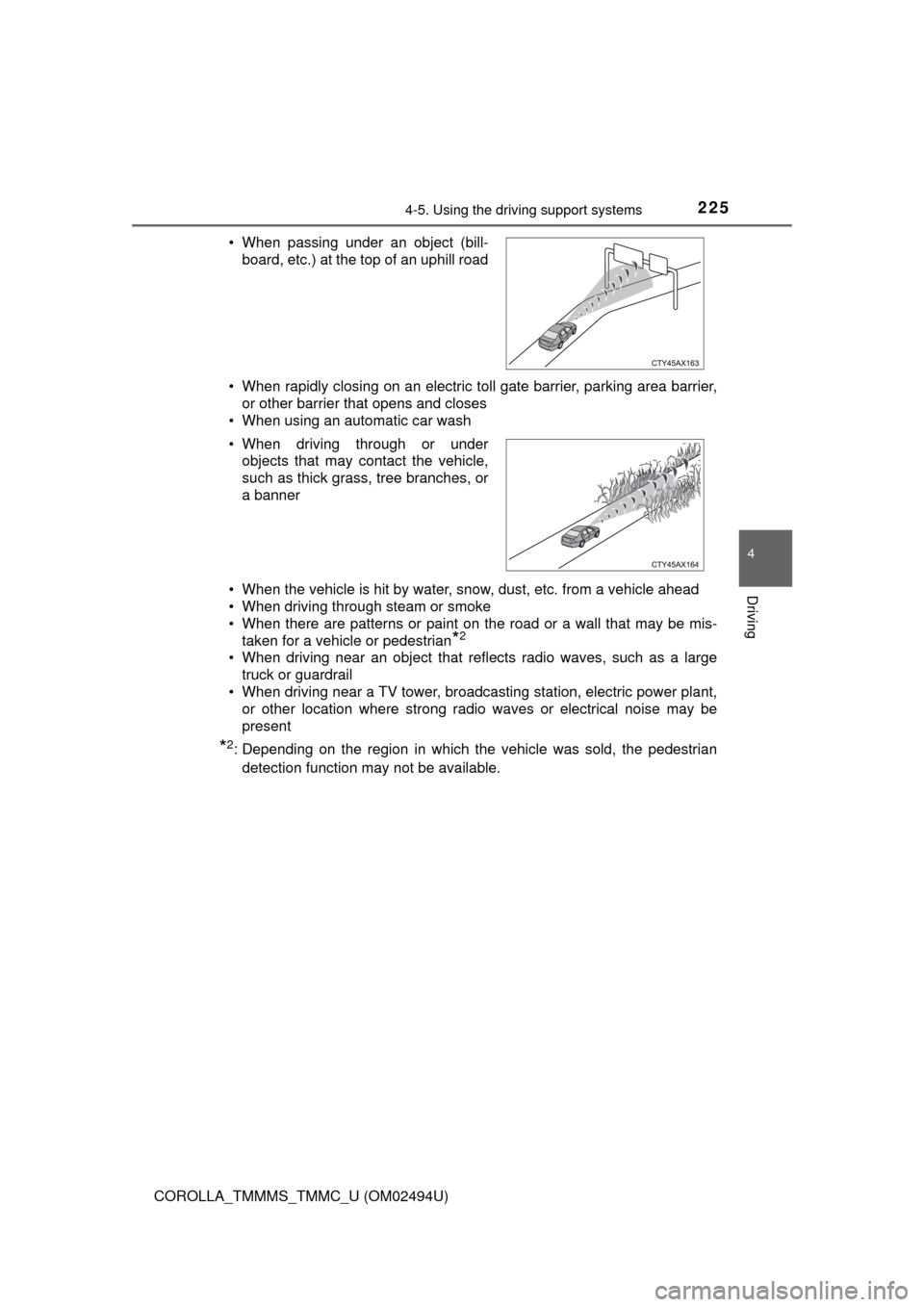
COROLLA_TMMMS_TMMC_U (OM02494U)• When rapidly closing on an electric toll gate barrier, parking area barrier,
or other barrier that opens and closes
• When using an automatic car wash
• When the vehicle is hit by water, snow, dust, etc. from a vehicle ahead
• When driving through steam or smoke
• When there are patterns or paint on the road or a wall that may be mis-
taken for a vehicle or pedestrian
*2
• When driving near an object that reflects radio waves, such as a large
truck or guardrail
• When driving near a TV tower, broadcasting station, electric power plant,
or other location where strong radio waves or electrical noise may be
present
*2: Depending on the region in which the vehicle was sold, the pedestrian
detection function may not be available. • When passing under an object (bill-
board, etc.) at the top of an uphill road
• When driving through or under
objects that may contact the vehicle,
such as thick grass, tree branches, or
a banner
Page 232 of 612

2324-5. Using the driving support systems
COROLLA_TMMMS_TMMC_U (OM02494U)
WARNING
■Before using LDA system
Do not rely solely upon the LDA system. LDA is not a system which auto-
matically drives the vehicle or reduces the amount of attention that must be
paid to the area in front of the vehicle. The driver must always assume full
responsibility for driving safely by always paying careful attention to the sur-
rounding conditions and operate the steering wheel to correct the path of
the vehicle. Also, make sure to take adequate breaks when fatigued, such
as from driving for a long period of time.
Failure to perform appropriate driving operations and pay careful attention
may lead to an accident, resulting in death or serious injury.
■To avoid operating LDA by mistake
When not using the LDA system, use the LDA switch to turn the system off.
■Situations unsuitable for LDA
Do not use the LDA system in the following situations.
The system may not operate properly and lead to an accident, resulting in
death or serious injury.
●A spare tire, tire chains, etc., are equipped.
●When the tires have been excessively worn, or when the tire inflation pres-
sure is low.
●Tires which differ by structure, manufacturer, brand or tread pattern are
used.
●Objects or patterns that could be mistaken for white (yellow) lines are
present on the side of the road (guardrails, curbs, reflective poles, etc.).
●Vehicle is driven on a snow-covered road.
●White (yellow) lines are difficult to see due to rain, snow, fog, dust, etc.
●Asphalt repair marks, white (yellow) line marks, etc., are present due to
road repair.
●Vehicle is driven in a temporary lane or restricted lane due to construction
work.
●Vehicle is driven on a road surface which is slippery due to rainy weather,
fallen snow, freezing, etc.
●Vehicle is driven in traffic lanes other than on highways and freeways.
●Vehicle is driven in a construction zone.
●During emergency towing
Page 242 of 612

2424-5. Using the driving support systems
COROLLA_TMMMS_TMMC_U (OM02494U)
WARNING
■Situations unsuitable for dynamic radar cruise control
Do not use dynamic radar cruise control in any of the following situations.
Doing so may result in inappropriate speed control and could cause an acci-
dent resulting in death or serious injury.
●Roads where there are pedestrians, cyclers, etc.
●In heavy traffic
●On roads with sharp bends
●On winding roads
●On slippery roads, such as those covered with rain, ice or snow
●On steep downhills, or where there are sudden changes between sharp up
and down gradients
Vehicle speed may exceed the set speed when driving down a steep hill.
●At entrances to freeways and highways
●When weather conditions are bad enough that they may prevent the sen-
sors from detecting correctly (fog, snow, sandstorm, heavy rain, etc.)
●When there is rain, snow, etc. on the front surface of the radar sensor or
camera sensor
●In traffic conditions that require frequent repeated acceleration and decel-
eration
●During emergency towing
●When an approach warning buzzer is heard often
Page 247 of 612
2474-5. Using the driving support systems
4
Driving
COROLLA_TMMMS_TMMC_U (OM02494U)
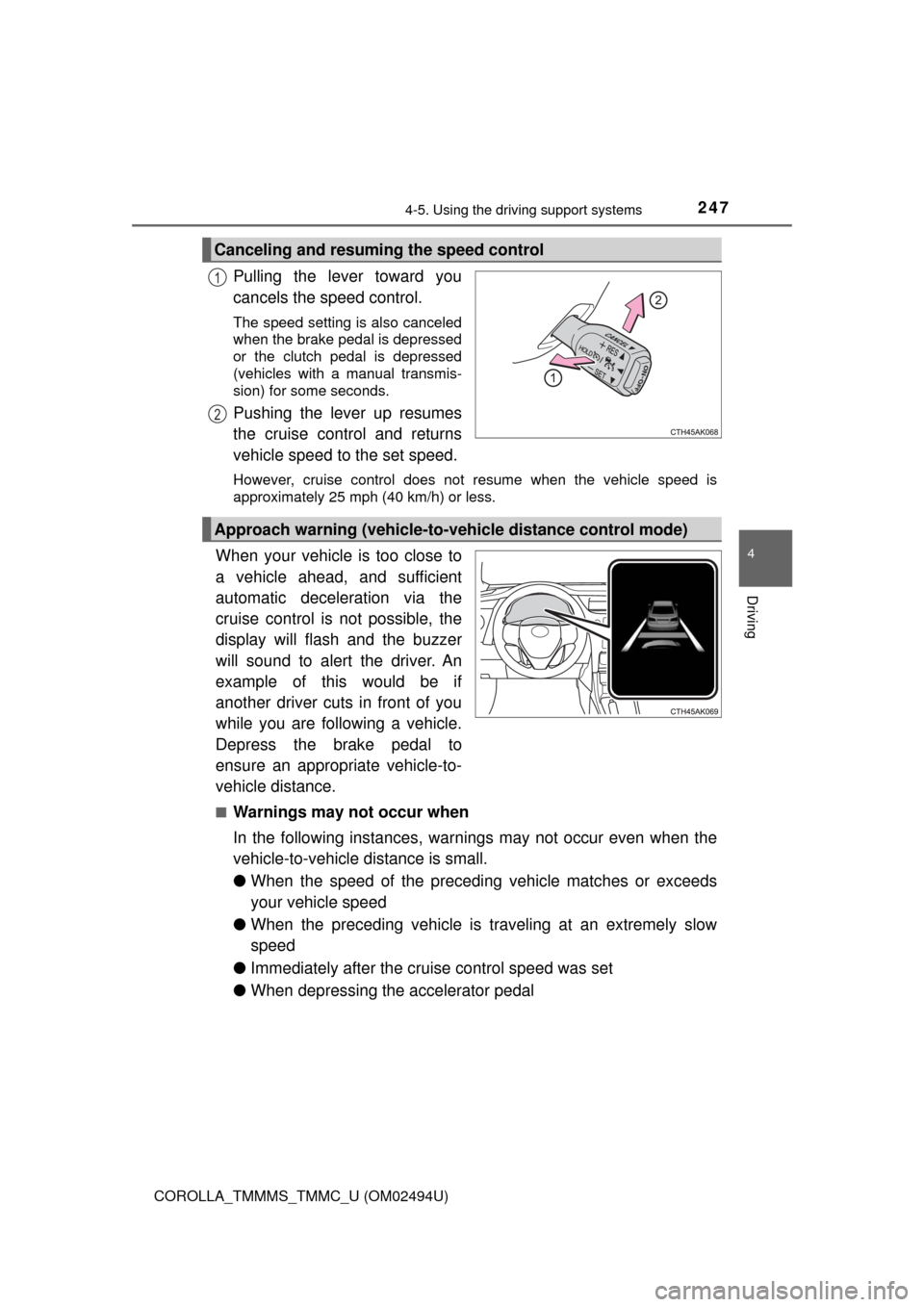
Pulling the lever toward you
cancels the speed control.
The speed setting is also canceled
when the brake pedal is depressed
or the clutch pedal is depressed
(vehicles with a manual transmis-
sion) for some seconds.
Pushing the lever up resumes
the cruise control and returns
vehicle speed to the set speed.
However, cruise control does not resume when the vehicle speed is
approximately 25 mph (40 km/h) or less.
When your vehicle is too close to
a vehicle ahead, and sufficient
automatic deceleration via the
cruise control is not possible, the
display will flash and the buzzer
will sound to alert the driver. An
example of this would be if
another driver cuts in front of you
while you are following a vehicle.
Depress the brake pedal to
ensure an appropriate vehicle-to-
vehicle distance.
■Warnings may not occur when
In the following instances, warnings may not occur even when the
vehicle-to-vehicle distance is small.
●When the speed of the preceding vehicle matches or exceeds
your vehicle speed
●When the preceding vehicle is traveling at an extremely slow
speed
●Immediately after the cruise control speed was set
●When depressing the accelerator pedal
Canceling and resuming the speed control
1
2
Approach warning (vehicle-to-vehicle distance control mode)