Page 95 of 612

952. Instrument cluster
2
Instrument cluster
COROLLA_TMMMS_TMMC_U (OM02494U)■
Changing the settings
Select using the meter control switch.
Select an item and then set it with the center button.
■Customizable items
●LDA (Lane Departure Alert with steering control)
→P. 2 3 0
●LDA (Lane Departure Alert with steering control) vehicle
sway warning
→P. 2 3 1
●PCS (Pre-Collision System)
→P. 2 1 6
●Language
Select to change the language displayed on the multi-information
display.
●Units
Select to change the unit of measure displayed on the multi-infor-
mation display.
●Drive information 1/Drive information 2
Select to select up to 2 items that will be displayed on a Drive
information screen.
●Eco driving indicator light
Select to activate/deactivate the Eco Driving Indicator Light.
(
→P. 101)
●Pop-up display
Select to set the following pop-up displays, which may appear in
some situations, on/off.
• Route guidance display of the navigation system-linked sys-
tem (if equipped)
• Incoming call display of the hands-free phone system
●Accent color
Select to change the accent colors on the screen, such as the
cursor color.
Settings display
1
2
Page 96 of 612

962. Instrument cluster
COROLLA_TMMMS_TMMC_U (OM02494U)
●Maintenance system (U.S.A.)
Select to reset the message after the required maintenance is
performed. (
→P. 419)
●Initialization
Registered or changed meter settings will be deleted or returned
to their default setting.
■Pop-up display
In some situations, such as when a switch operation is performed, a pop-up
display, such as the operating dynamic radar cruise control switch, will be
temporarily displayed on the multi-information display.
The pop-up display function can be set on/off.
■Setting display automatic cancelation
In the following situations, a setting display in which the settings can be
changed through the meter control switches will automatically be turned off.
●When a warning message appears while the setting display is displayed
●When the vehicle begins to move while the setting display is displayed
■Liquid crystal display
Small spots or light spots may appear on the display. This phenomenon is
characteristic of liquid crystal displays, and there is no problem continuing to
use the display.
Page 187 of 612

1874-2. Driving procedures
4
Driving
COROLLA_TMMMS_TMMC_U (OM02494U)
*1: To improve fuel efficiency and reduce noises, set the shift lever in D for
normal driving.
*2: Selecting gear step using the M position achieves suitable engine braking
forces by operating the shift lever.
Press the switch.
For powerful acceleration and driv-
ing in mountainous regions.
Press the switch again to return to
normal mode.
To drive in temporary gear steps selection mode, operate the “-” and
“+” paddle shift switches. The gear steps can then be selected by
operating the “-” and “+” paddle shift switches. By selecting gear step
using paddle shift switches, you can control engine braking forces.
Upshifting
Downshifting
The selected gear step, from D1 to
D7, will be displayed in the meter.
To return to normal D position driv-
ing, the “+” paddle shift switch must
be held down for a period of time.
Shift position purpose
Shift positionObjective or function
PParking the vehicle/starting the engine
RReversing
NNeutral
DNormal driving*1
M7-speed sport sequential shiftmatic mode driving*2
(→P. 188)
Sport mode
Temporarily engaged gear steps selection mode in the D posi-
tion
1
2
Page 188 of 612

1884-2. Driving procedures
COROLLA_TMMMS_TMMC_U (OM02494U)
To enter 7-speed sport sequential shiftmatic mode, shift the shift lever
to M. Gear steps can then be selected by operating the shift lever or
paddle shift switches, allowing you to drive in the gear step of your
choosing.
Upshifting
Downshifting
The gear changes once every time
the shift lever is operated.
The selected gear step, from M1 to
M7, will be displayed in the meter.
However, even when in the M position, the gear steps will be auto-
matically changed if the engine speed is too high, or too low.
■Gear step functions
●You can choose from 7 levels of engine braking force.
●A lower gear step will provide greater engine braking force than a higher
gear step, and the engine speed will also increase.
■If the “M” indicator flashes or a buzzer beeps after shifting the shift lever
to M
This may indicate a malfunction in the continuously variable transmission
system. Have the vehicle inspected by your Toyota dealer immediately.
(In this situation, the transmission will operate in the same manner as when
the shift lever is in D.)
■When the vehicle comes to a stop with the shift lever in the M position
●The transmission will automatically downshift to M1 once the vehicle is
stopped.
●After a stop, the vehicle will start off in M1.
●When the vehicle is stopped, the transmission is set at M1.
Changing gear steps in the M position
1
2
Page 219 of 612
2194-5. Using the driving support systems
4
Driving
COROLLA_TMMMS_TMMC_U (OM02494U)
WARNING
■When to disable the pre-collision system
In the following situations, disable the system, as it may not operate prop-
erly, possibly leading to an accident resulting in death or serious injury:
●When the vehicle is being towed
●When your vehicle is towing another vehicle
●When transporting the vehicle via truck, boat, train or similar means of
transportation
●When the vehicle is raised on a lift with the engine running and the tires
are allowed to rotate freely
●When inspecting the vehicle using a drum tester such as a chassis dyna-
mometer or speedometer tester, or when using an on vehicle wheel bal-
ancer
●When a strong impact is applied to the front bumper or front grille, due to
an accident or other reasons
●If the vehicle cannot be driven in a stable manner, such as when the vehi-
cle has been in an accident or is malfunctioning
●When the vehicle is driven in a sporty manner or off-road
●When the tires are not properly inflated
●When the tires are very worn
●When tires of a size other than specified are installed
●When tire chains are installed
●When a compact spare tire or an emergency tire puncture repair kit is used
●If equipment (snow plow, etc.) that may obstruct the radar sensor or cam-
era sensor is temporarily installed to the vehicle
Page 270 of 612
2704-6. Driving tips
COROLLA_TMMMS_TMMC_U (OM02494U)
Vehicles with 15-inch tires
Use the tire chains of correct size and type.
Use SAE Class “S” type radial tire chains except radial cable chains or
V-bar type chains.
Vehicles with 16-inch and 17-inch tires
Use the correct tire chain size when mounting the snow chains.
Chain size is regulated for each tire size.
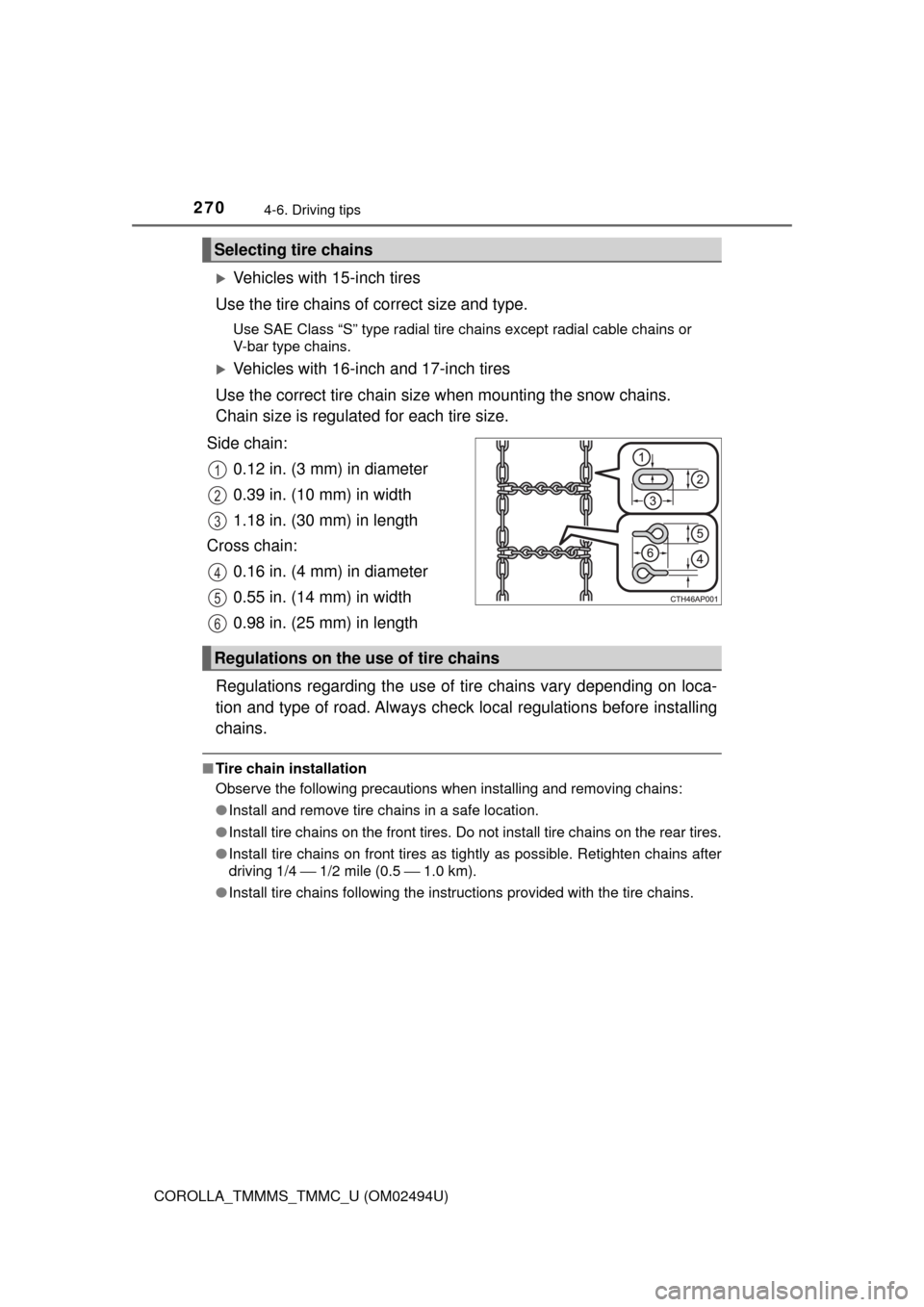
Side chain:
0.12 in. (3 mm) in diameter
0.39 in. (10 mm) in width
1.18 in. (30 mm) in length
Cross chain:
0.16 in. (4 mm) in diameter
0.55 in. (14 mm) in width
0.98 in. (25 mm) in length
Regulations regarding the use of tire chains vary depending on loca-
tion and type of road. Always check local regulations before installing
chains.
■Tire chain installation
Observe the following precautions when installing and removing chains:
●Install and remove tire chains in a safe location.
●Install tire chains on the front tires. Do not install tire chains on the rear tires.
●Install tire chains on front tires as tightly as possible. Retighten chains after
driving 1/4 ⎯ 1/2 mile (0.5 ⎯ 1.0 km).
●Install tire chains following the instructions provided with the tire chains.
Selecting tire chains
1
2
3
4
5
6
Regulations on the use of tire chains
Page 299 of 612
2995-5. Playing an audio CD and MP3/WMA/AAC discs
5
Audio system
COROLLA_TMMMS_TMMC_U (OM02494U)
NOTICE
■Discs and adapters that cannot be used
Do not use the following types of CDs.
Also, do not use 3 in. (8 cm) CD adapters, Dual Discs or printable discs.
Doing so may damage the CD player and/or the CD insert/eject function.
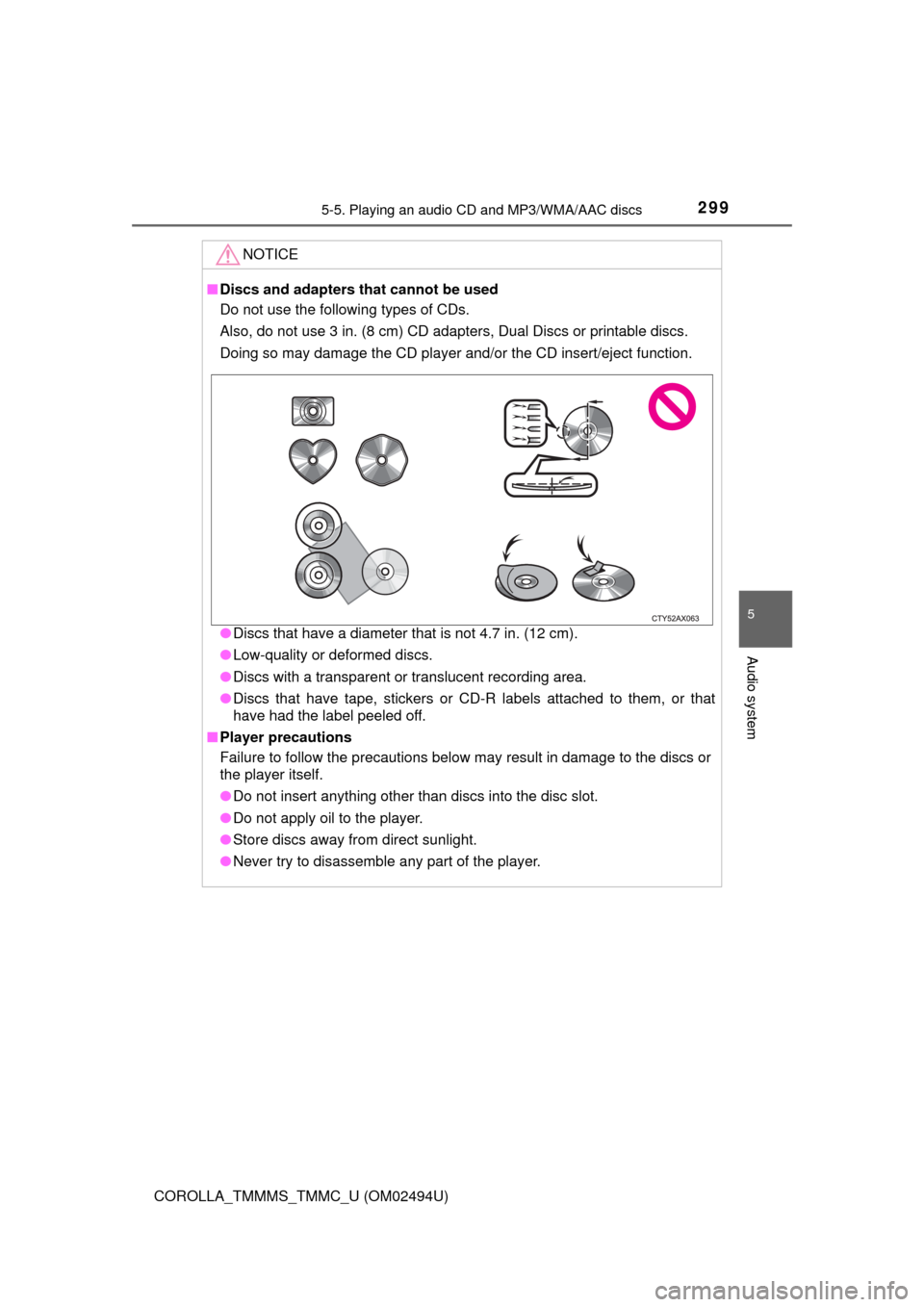
●Discs that have a diameter that is not 4.7 in. (12 cm).
●Low-quality or deformed discs.
●Discs with a transparent or translucent recording area.
●Discs that have tape, stickers or CD-R labels attached to them, or that
have had the label peeled off.
■Player precautions
Failure to follow the precautions below may result in damage to the discs or
the player itself.
●Do not insert anything other than discs into the disc slot.
●Do not apply oil to the player.
●Store discs away from direct sunlight.
●Never try to disassemble any part of the player.
Page 419 of 612

4197-2. Maintenance
7
Maintenance and care
COROLLA_TMMMS_TMMC_U (OM02494U)
■Repair and replacement
It is recommended that genuine Toyota parts be used for repairs to ensure
performance of each system. If non-Toyota parts are used in replacement or if
a repair shop other than a Toyota dealer performs repairs, confirm the war-
ranty coverage.
■Resetting the message indicating maintenance is required (U.S.A. only)
After the required maintenance is performed according to the maintenance
schedule, please reset the message.
To reset the message, follow the procedure described below:
Vehicles with monochrome display
Vehicles without a smart key system: Turn the engine switch to the “LOCK”
position with the trip meter A reading shown. (→P. 79)
Vehicles with a smart key system: Turn the engine switch off with the trip
meter A reading shown. (→P. 79)
Vehicles without a smart key system:
While pressing the display change button (→P. 79), turn the engine switch
to the “ON” position (do not start the engine because reset mode will be
canceled).
Vehicles with a smart key system:
While pressing the display change button (→P. 79), turn the engine switch
to the IGNITION ON mode (do not start the engine because otherwise the
reset mode will be canceled).
Continue to press and hold the button until the trip meter displays “000000”.
Vehicles with color display
While the engine is running, switch the multi-information display to the “Set-
tings” screen. (→P. 95)
Select “Reset Scheduled Maint. Data” on the “Settings” screen.
Select “Yes” when “Reset Data?” is displayed on the multi-information dis-
play.
“The Data Has Been Reset” will be displayed when the reset procedure has
been completed.
■Allow inspection and repairs to be performed by a Toyota dealer
●Toyota technicians are well-trained specialists and are kept up to date with
the latest service information. They are well informed about the operations
of all systems on your vehicle.
●Keep a copy of the repair order. It proves that the maintenance that has
been performed is under warranty coverage. If any problem should arise
while your vehicle is under warranty, your Toyota dealer will promptly take
care of it.
1
2
3
1
2
3