Page 236 of 612
2364-5. Using the driving support systems
COROLLA_TMMMS_TMMC_U (OM02494U)
■Operation conditions of each function
●Lane departure alert function
This function operates when all of the following conditions are met.
• LDA is turned on.
• Vehicle speed is approximately 32 mph (50 km/h) or more.
• System recognizes white (yellow) lines.
• Width of traffic lane is approximately 9.8 ft. (3 m) or more.
• Turn signal lever is not operated.
• Vehicle is driven on a straight road or around a gentle curve with a radius
of more than approximately 492 ft. (150 m).
• No system malfunctions are detected. (→P. 484)
●Steering control function
This function operates when all of the following conditions are met in addi-
tion to the operation conditions for the lane departure alert function.
• Setting for the steering control function is set to on. (→P. 95)
• Vehicle is not accelerated or decelerated by a fixed amount or more.
• Steering wheel is not operated with a steering force level suitable for
changing lanes.
• ABS, VSC, TRAC and PCS (Pre-Collision System) are not operating.
• TRAC or VSC is not turned off.
●Vehicle sway warning
This function operates when all of the following conditions are met.
• Setting for the vehicle sway warning function is set to on. (→P. 95)
• Vehicle speed is approximately 32 mph (50 km/h) or more.
• Width of traffic lane is approximately 9.8 ft. (3 m) or more.
• No system malfunctions are detected. (→P. 484)
Page 293 of 612
2935-4. Using the radio
5
Audio system
COROLLA_TMMMS_TMMC_U (OM02494U)
Search for desired stations by turning the “TUNE·SCROLL” knob or
pressing the “>” or “<” button on “SEEK·TRACK”.
Select “(add new)”.
To change the preset station to a different one, select and hold the preset
station.
Select “Yes”.
Select “OK” after setting the new preset station.
■Refreshing the station list
Select “Refresh” on the “Station List” screen.
To cancel the refresh, select “Cancel Refresh”.
■Reception sensitivity
●Maintaining perfect radio reception at all times is difficult due to the continu-
ally changing position of the antenna, differences in signal strength and sur-
rounding objects, such as trains, transmitters, etc.
●The radio antenna is mounted inside the rear window. To maintain clear
radio reception, do not attach metallic window tinting or other metallic
objects to the antenna wire mounted inside the rear window.
Setting station presets
1
2
3
4
1
Page 321 of 612
3215-7. Connecting Bluetooth®
5
Audio system
COROLLA_TMMMS_TMMC_U (OM02494U)
■Reconnecting a Bluetooth® phone
If the system cannot connect due to poor signal strength with the engine
switch in the “ACC” or “ON” position (vehicles without smart key system) or
ACCESSORY or IGNITION ON mode (vehicles with smart key system), the
system will automatically attempt to reconnect.
If the system is attempting to connect to a Bluetooth
® phone and the
Bluetooth® phone is turned off and then back on, the system will attempt to
reconnect.
Page 404 of 612
4046-4. Other interior features
COROLLA_TMMMS_TMMC_U (OM02494U)■
Reprogramming a single HomeLink® button
When the following procedure is performed, buttons which already
have devices registered to them can be overwritten:
With one hand, press and hold the desired HomeLink
® button.
When the HomeLink
® indicator starts flashing orange, continue
to hold the HomeLink® button and perform “Programming Home-
Link®” (it takes 20 seconds for the HomeLink® indicator to
start flashing).
Press the appropriate HomeLink
® button. The HomeLink® indicator
light should turn on.
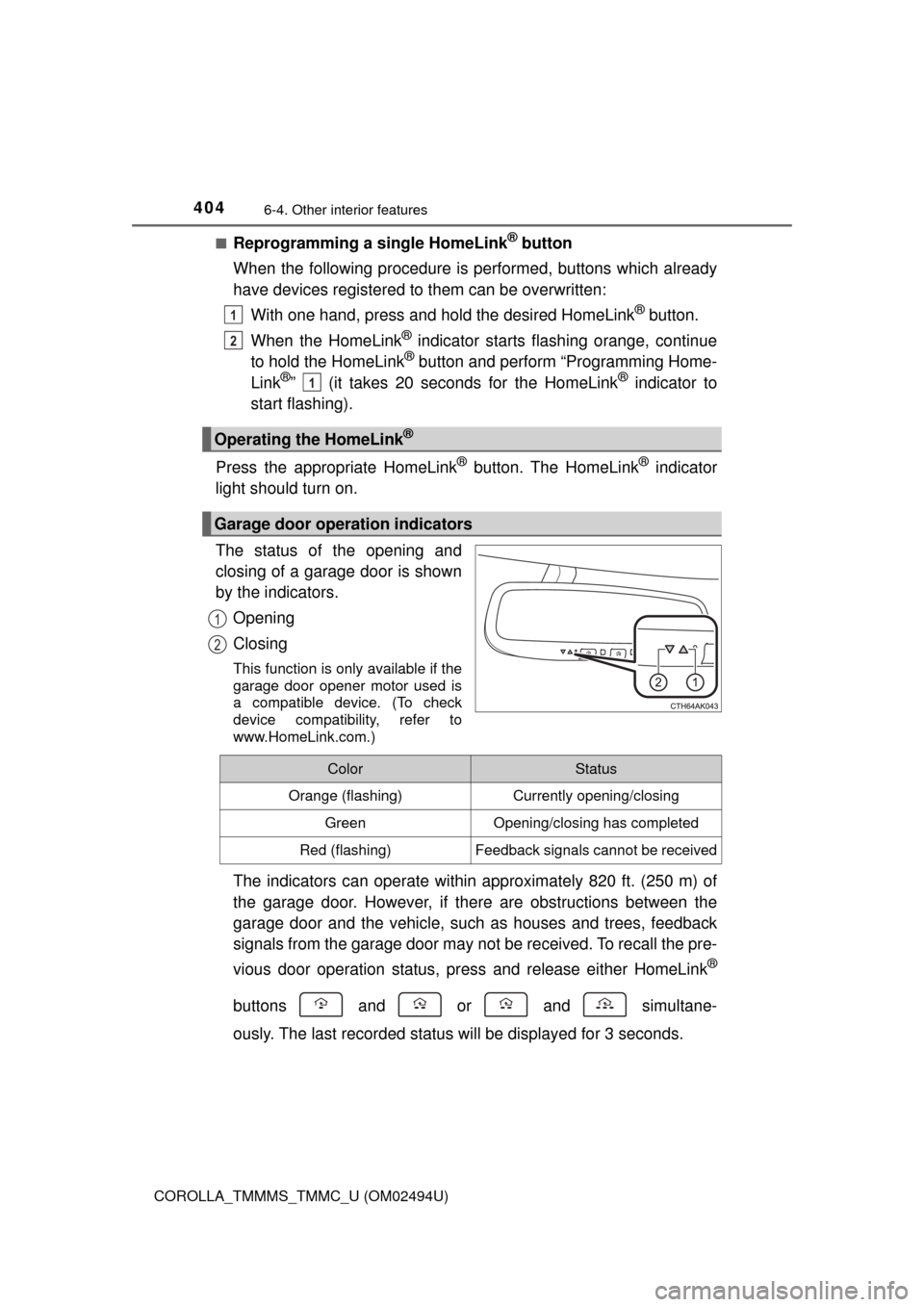
The status of the opening and
closing of a garage door is shown
by the indicators.
Opening
Closing
This function is only available if the
garage door opener motor used is
a compatible device. (To check
device compatibility, refer to
www.HomeLink.com.)
The indicators can operate within approximately 820 ft. (250 m) of
the garage door. However, if there are obstructions between the
garage door and the vehicle, such as houses and trees, feedback
signals from the garage door may not be received. To recall the pre-
vious door operation status, press and release either HomeLink
®
buttons and or and simultane-
ously. The last recorded status will be displayed for 3 seconds.
Operating the HomeLink®
Garage door operation indicators
1
2
1
1
2
ColorStatus
Orange (flashing)Currently opening/closing
GreenOpening/closing has completed
Red (flashing)Feedback signals cannot be received
Page 465 of 612
4657-3. Do-it-yourself maintenance
7
Maintenance and care
COROLLA_TMMMS_TMMC_U (OM02494U)
Check the wattage of the light bulb to be replaced. (→P. 551)
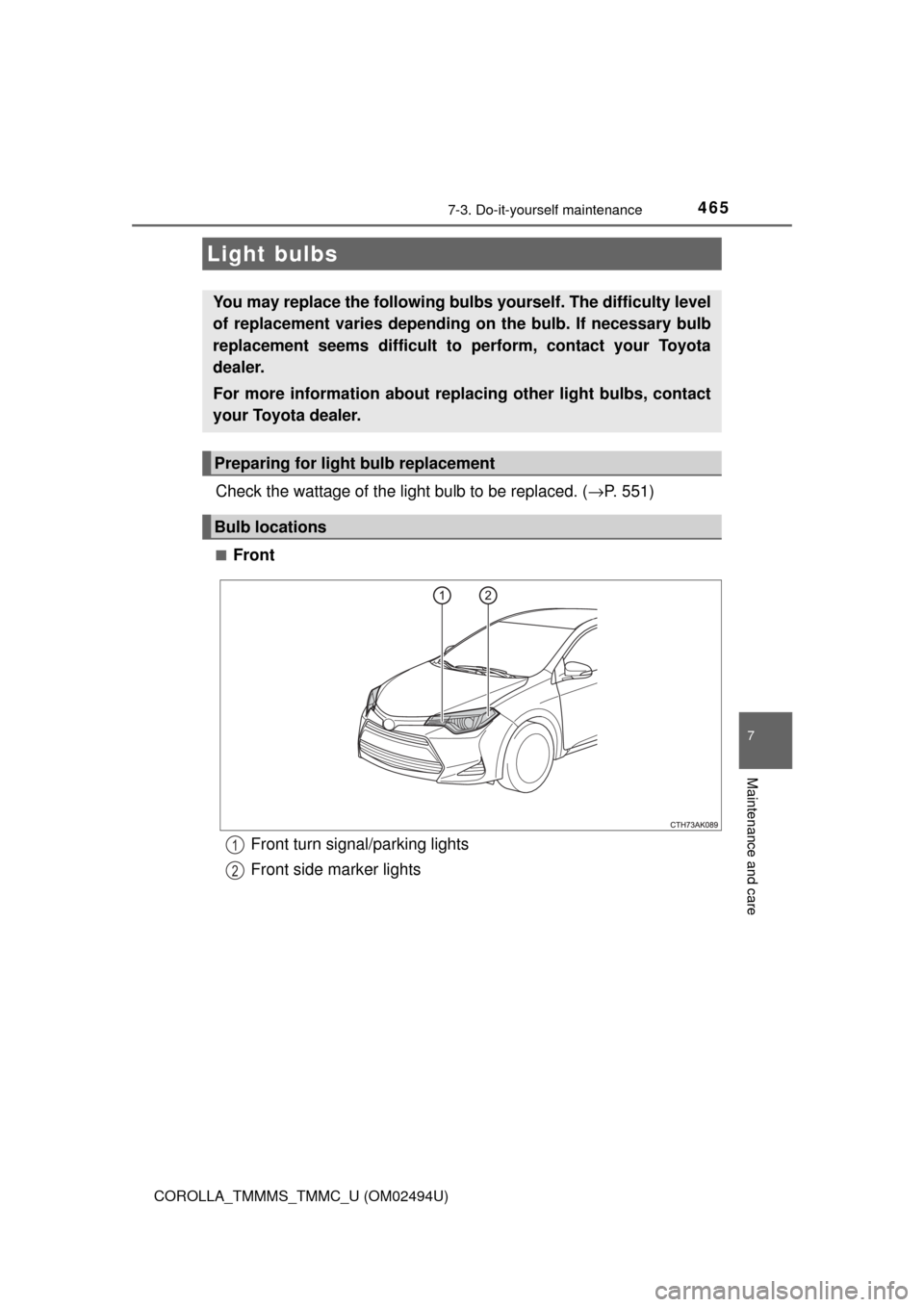
■Front
Light bulbs
You may replace the following bulbs yourself. The difficulty level
of replacement varies depending on the bulb. If necessary bulb
replacement seems difficult to perform, contact your Toyota
dealer.
For more information about replacing other light bulbs, contact
your Toyota dealer.
Preparing for light bulb replacement
Bulb locations
Front turn signal/parking lights
Front side marker lights1
2
Page 466 of 612
4667-3. Do-it-yourself maintenance
COROLLA_TMMMS_TMMC_U (OM02494U)■
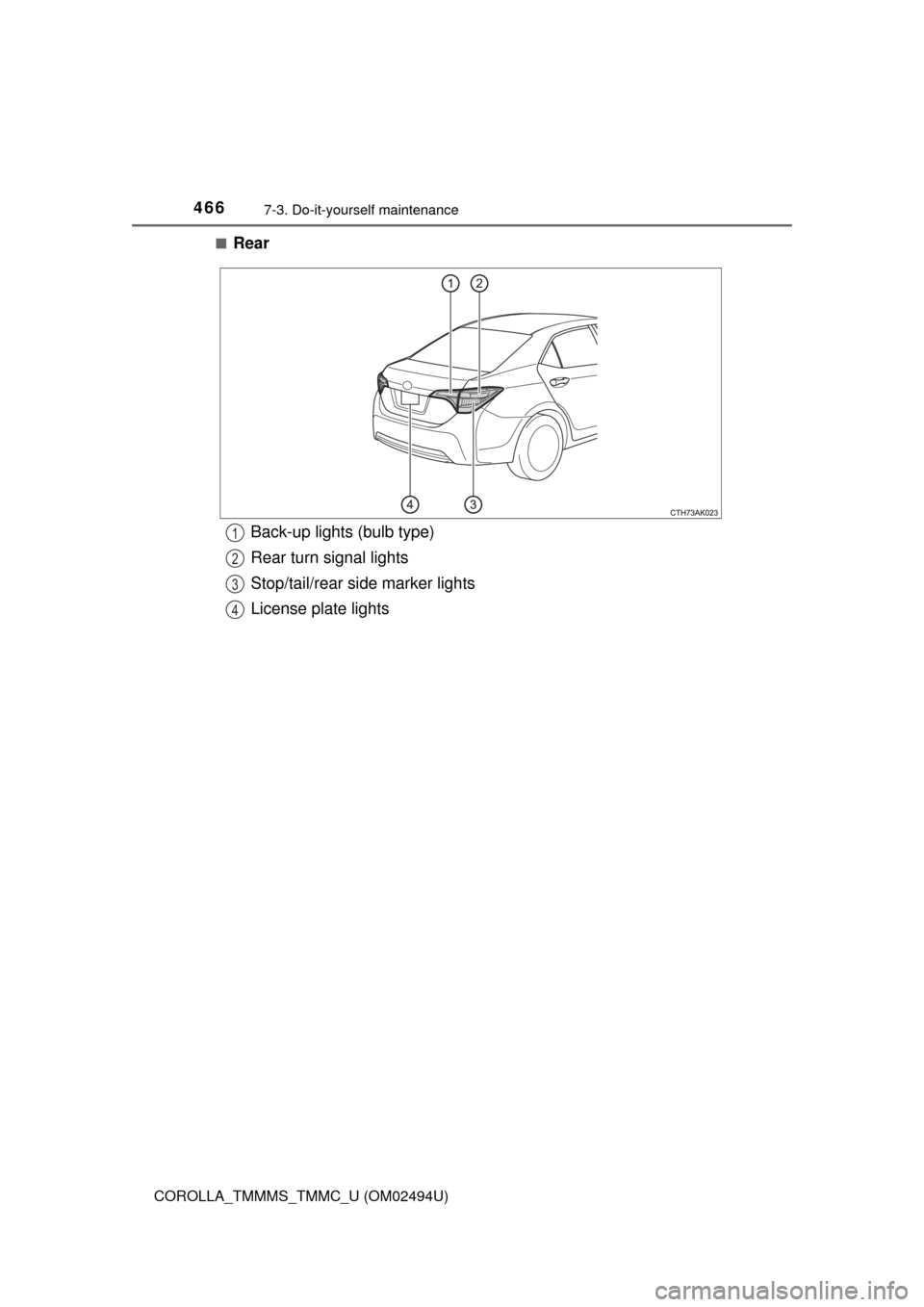
Rear
Back-up lights (bulb type)
Rear turn signal lights
Stop/tail/rear side marker lights
License plate lights1
2
3
4
Page 468 of 612
4687-3. Do-it-yourself maintenance
COROLLA_TMMMS_TMMC_U (OM02494U)■
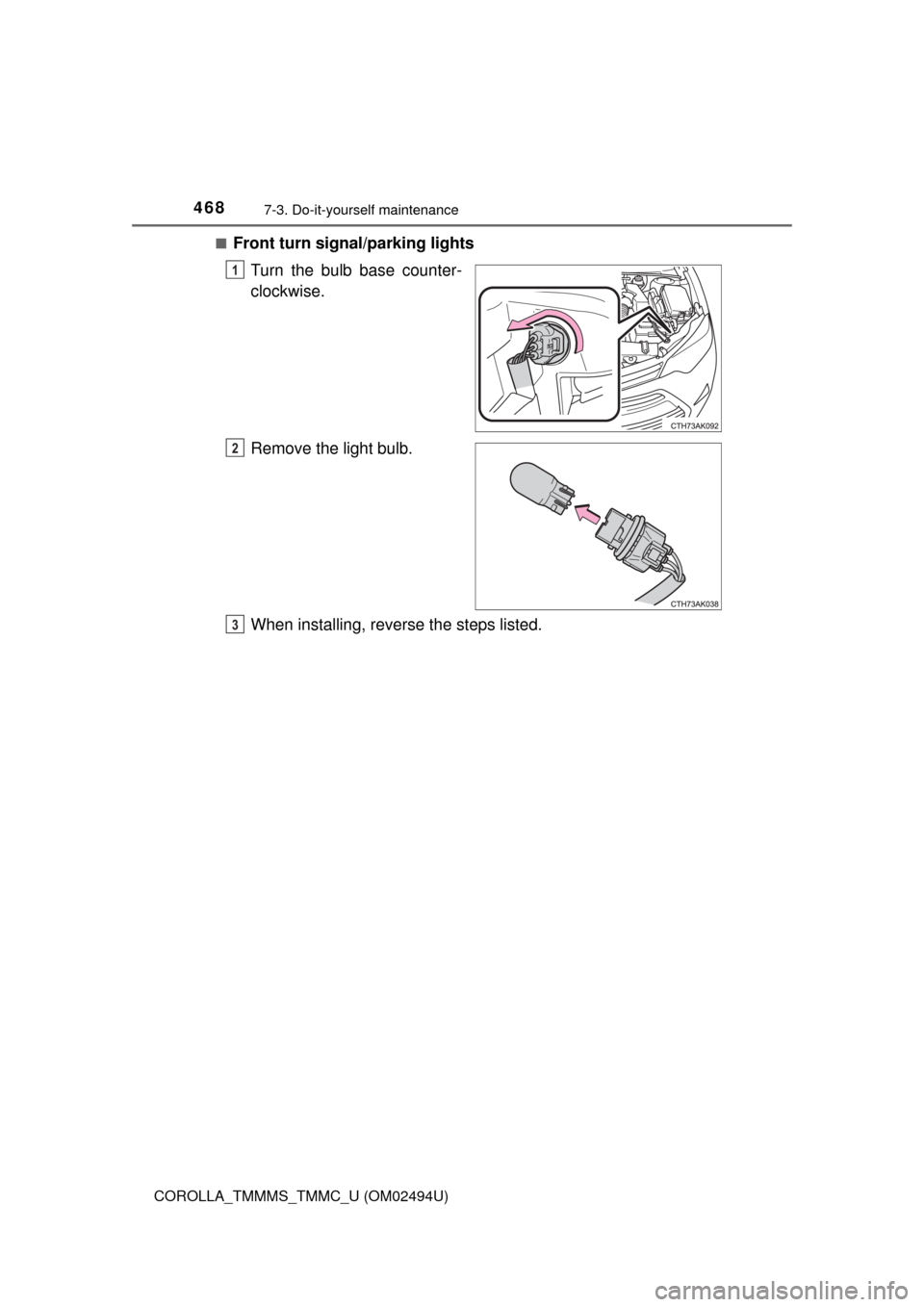
Front turn signal/parking lights
Turn the bulb base counter-
clockwise.
Remove the light bulb.
When installing, reverse the steps listed.
1
2
3
Page 469 of 612
4697-3. Do-it-yourself maintenance
7
Maintenance and care
COROLLA_TMMMS_TMMC_U (OM02494U)■
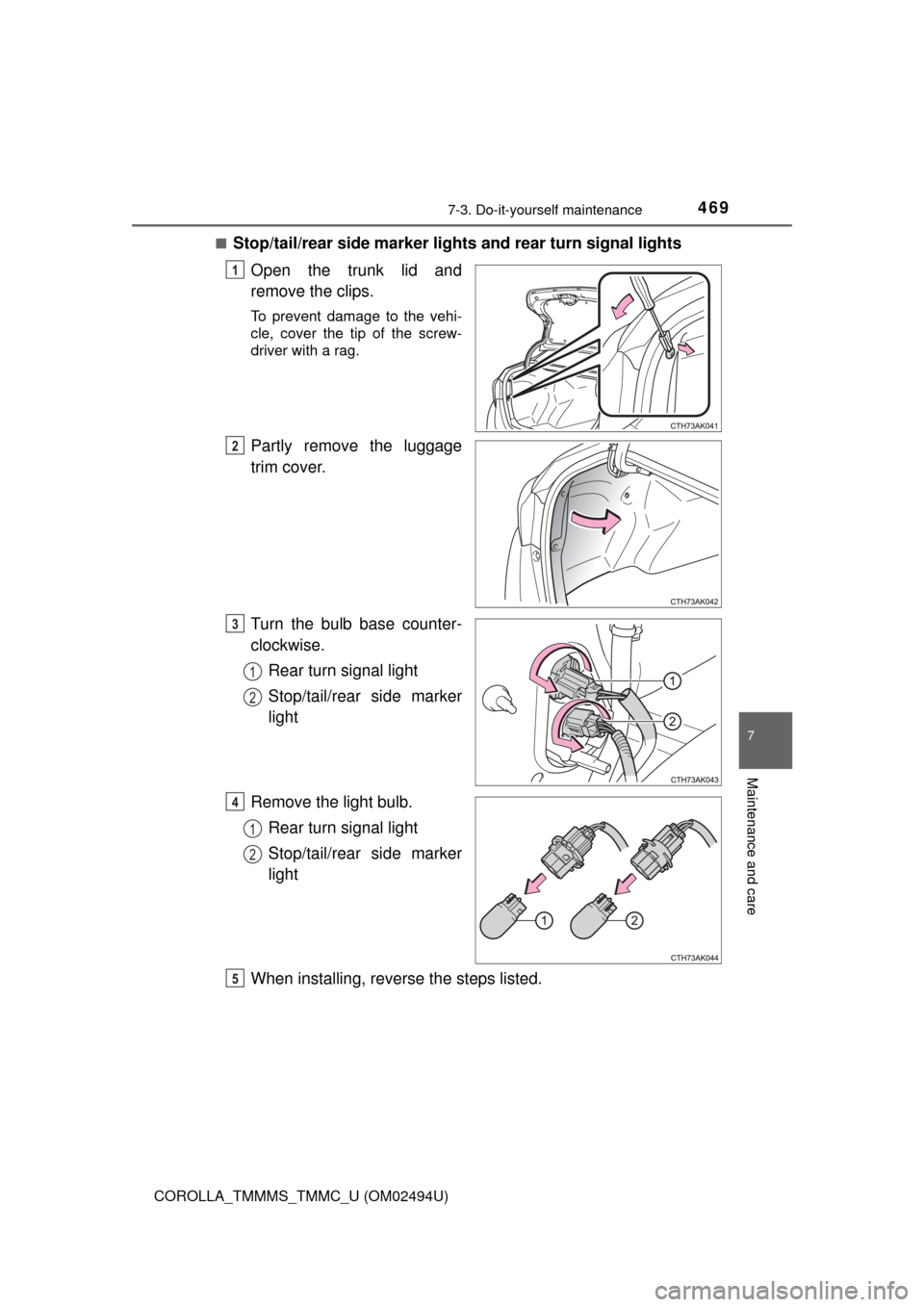
Stop/tail/rear side marker lights and rear turn signal lights
Open the trunk lid and
remove the clips.
To prevent damage to the vehi-
cle, cover the tip of the screw-
driver with a rag.
Partly remove the luggage
trim cover.
Turn the bulb base counter-
clockwise.
Rear turn signal light
Stop/tail/rear side marker
light
Remove the light bulb.
Rear turn signal light
Stop/tail/rear side marker
light
When installing, reverse the steps listed.
1
2
3
1
2
4
1
2
5