Page 117 of 612

1173-2. Opening, closing and locking the doors
3
Operation of each component
COROLLA_TMMMS_TMMC_U (OM02494U)
■Switching the door unlock function (vehicles with a smart key system)
It is possible to set which doors the entry function unlocks using the wireless
remote control.
Turn the engine switch off.
When the indicator light on the key surface is not on, press and hold ,
or for approximately 5 seconds while pressing and holding
.
The setting changes each time an operation is performed, as shown below.
(When changing the setting continuously, release the buttons, wait for at least
5 seconds, and repeat step .)
Vehicles with an alarm: To prevent unintended triggering of the alarm, unlock
the doors using the wireless remote control and open and close a door once
after the settings have been changed. (If a door is not opened within 60 sec-
onds after is pressed, the doors will be locked again and the alarm will
automatically be set.)
In case that the alarm is triggered, immediately stop the alarm. (→P. 70)
1
2
2
Multi-information displayUnlocking
functionBeepMonochrome
displayColor display
Holding the
driver’s door
handle unlocks
only the driver’s
door.
Exterior:
Beeps 3 times
Interior: Pings
once
Holding the front
passenger’s
door handle
unlocks all the
doors.
Holding either
front door han-
dle unlocks all
the doors.Exterior:
Beeps twice
Interior: Pings
once
Page 118 of 612
1183-2. Opening, closing and locking the doors
COROLLA_TMMMS_TMMC_U (OM02494U)■Conditions affecting the operation of the smart key system or wireless
remote control (with a wireless remote control function)
Vehicles without a smart key system
The wireless remote control function may not operate normally in the follow-
ing situations:
●When the wireless key battery is depleted
●Near a TV tower, radio station, electric power plant, airport or other facility
that generates strong radio waves
●When carrying a portable radio, cellular phone or other wireless communi-
cation devices
●When multiple wireless keys are in the vicinity
●When the wireless key is in contact with, or is covered by a metallic object
●When a wireless key (that emits radio waves) is being used nearby
●When the wireless key has been left near an electrical appliance such as a
personal computer
●If window tint with a metallic content or metallic objects are attached to the
rear window
Vehicles with a smart key system
→P. 127
■Customization
Settings (e.g. unlocking function using a key) can be changed.
(Customizable features: →P. 568)
WARNING
■To prevent an accident
Observe the following precautions while driving the vehicle.
Failure to do so may result in a door opening and an occupant falling out,
resulting in death or serious injury.
●Always use a seat belt.
●Always lock all the doors.
●Ensure that all doors are properly closed.
●Do not pull the inside handle of the doors while driving.
The doors may be opened and the passengers are thrown out of the vehi-
cle and it may result in serious injury or death.
Be especially careful for the front doors, as the doors may be opened
even if the inside lock buttons are in locked position.
●Set the rear door child-protector locks when children are seated in the rear
seats.
Page 124 of 612
1243-2. Opening, closing and locking the doors
COROLLA_TMMMS_TMMC_U (OM02494U)
●Locks and unlocks the doors (→P. 1 1 0 )
●Opens the trunk (→P. 1 1 9 )
●Starts the engine (→P. 176)
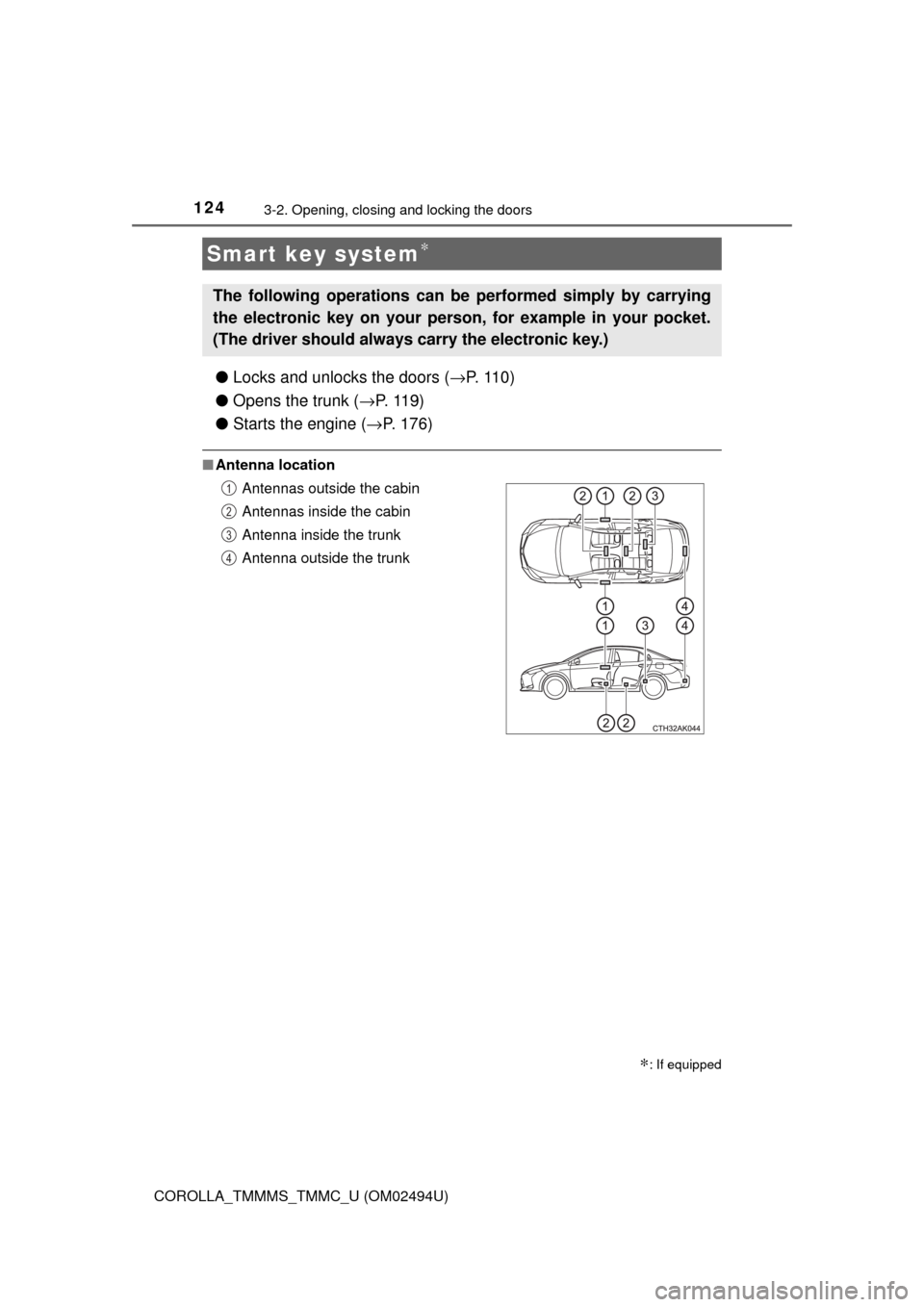
■Antenna location
Smart key system∗
∗: If equipped
The following operations can be performed simply by carrying
the electronic key on your person, for example in your pocket.
(The driver should always carry the electronic key.)
Antennas outside the cabin
Antennas inside the cabin
Antenna inside the trunk
Antenna outside the trunk1
2
3
4
Page 197 of 612

1974-3. Operating the lights and wipers
4
Driving
COROLLA_TMMMS_TMMC_U (OM02494U)
With the headlights on, push
the lever away from you to turn
on the high beams.
Pull the lever toward you to the
center position to turn the high
beams off.
Pull the lever toward you and
release it to flash the high
beams once.
You can flash the high beams with the headlights on or off.
■Daytime running light system
●To make your vehicle more visible to other drivers during daytime driving,
the daytime running lights turn on automatically whenever the engine is
started and the parking brake is released with the headlight switch in the
“ ”, “ ”, or “AUTO” position. (Illuminate darker than headlight low
beams.
*) Daytime running lights are not designed for use at night.
For the U.S.A.: Daytime running lights can be turned off by operating the
switch.
*: Vehicles with daytime running lights that are integrated into the head-
lights
●Compared to turning on the headlights, the daytime running light system
offers greater durability and consumes less electricity, so it can help improve
fuel economy.
■Headlight control sensor
Turning on the high beam headlights
1
2
The sensor may not function properly if an
object is placed on the sensor, or anything
that blocks the sensor is affixed to the
windshield.
Doing so interferes with the sensor
detecting the level of ambient light and
may cause the automatic headlight sys-
tem to malfunction.
Page 400 of 612
4006-4. Other interior features
COROLLA_TMMMS_TMMC_U (OM02494U)
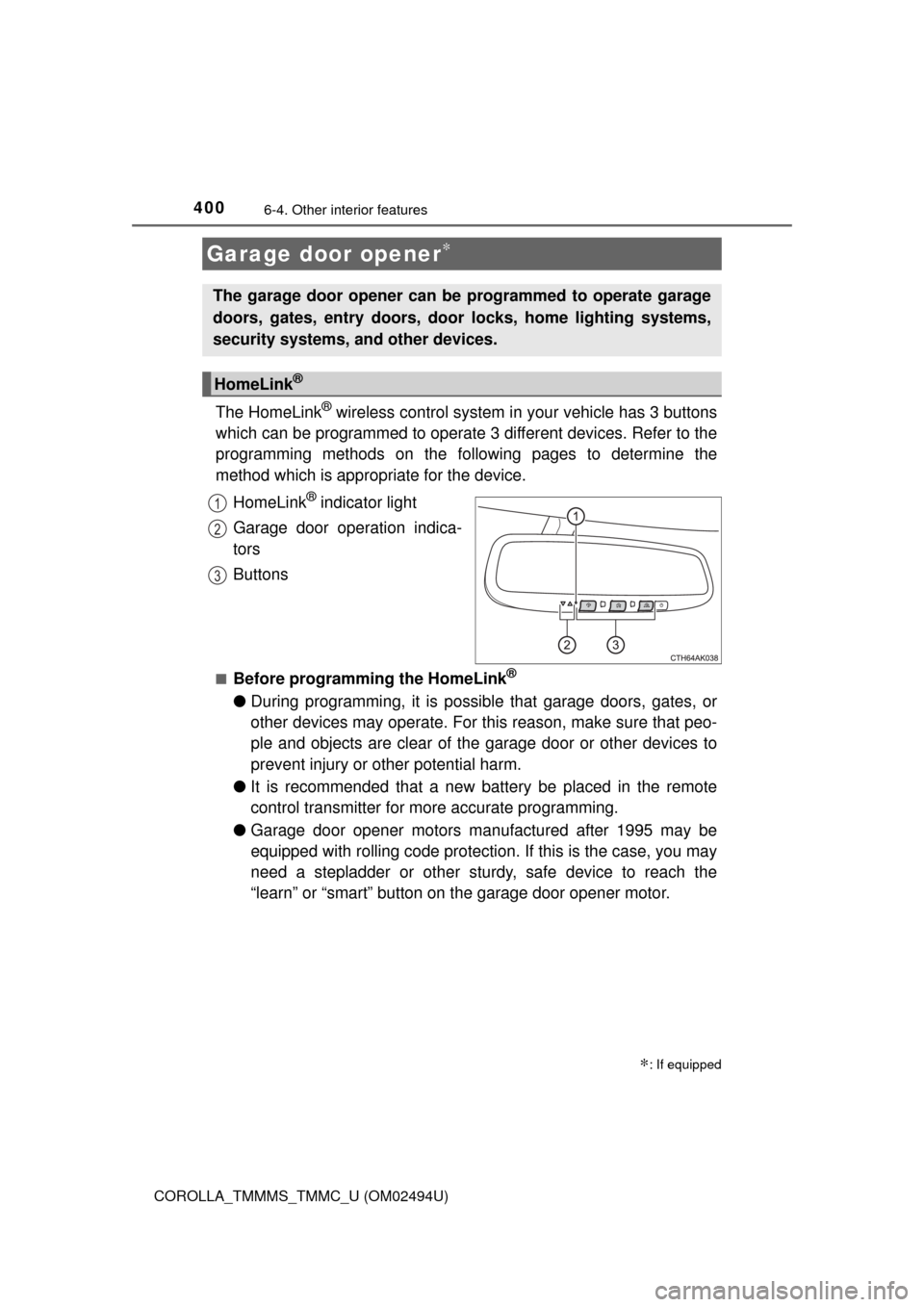
The HomeLink® wireless control system in your vehicle has 3 buttons
which can be programmed to operate 3 different devices. Refer to the
programming methods on the following pages to determine the
method which is appropriate for the device.
HomeLink
® indicator light
Garage door operation indica-
tors
Buttons
■Before programming the HomeLink®
●During programming, it is possible that garage doors, gates, or
other devices may operate. For this reason, make sure that peo-
ple and objects are clear of the garage door or other devices to
prevent injury or other potential harm.
●It is recommended that a new battery be placed in the remote
control transmitter for more accurate programming.
●Garage door opener motors manufactured after 1995 may be
equipped with rolling code protection. If this is the case, you may
need a stepladder or other sturdy, safe device to reach the
“learn” or “smart” button on the garage door opener motor.
Garage door opener∗
∗: If equipped
The garage door opener can be programmed to operate garage
doors, gates, entry doors, door locks, home lighting systems,
security systems, and other devices.
HomeLink®
1
2
3
Page 527 of 612
5278-2. Steps to take in an emergency
8
When trouble arises
COROLLA_TMMMS_TMMC_U (OM02494U)
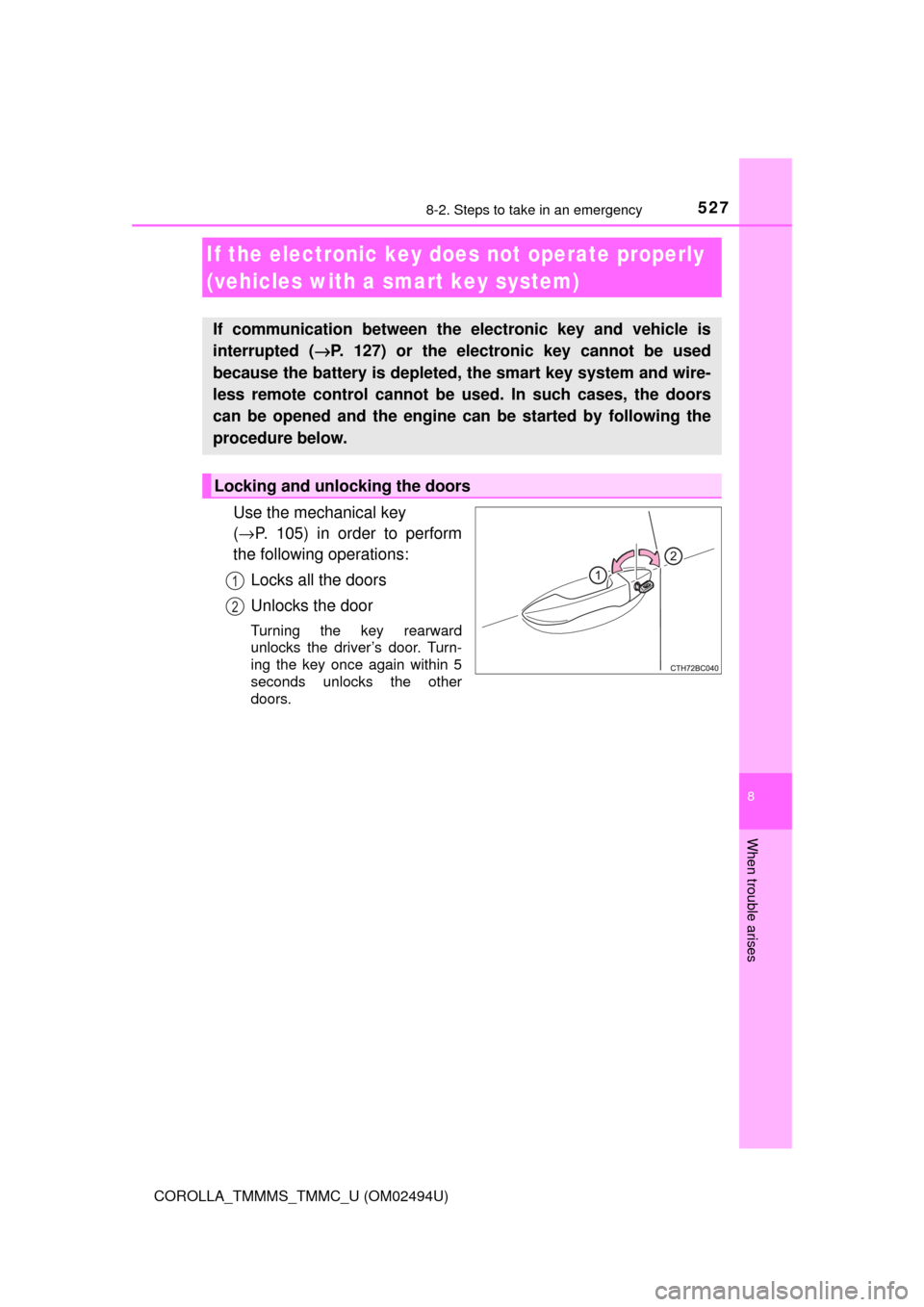
Use the mechanical key
(→P. 105) in order to perform
the following operations:
Locks all the doors
Unlocks the door
Turning the key rearward
unlocks the driver’s door. Turn-
ing the key once again within 5
seconds unlocks the other
doors.
If the electronic key does not operate properly
(vehicles with a smart key system)
If communication between the electronic key and vehicle is
interrupted (→P. 127) or the electronic key cannot be used
because the battery is depleted, the smart key system and wire-
less remote control cannot be used. In such cases, the doors
can be opened and the engine can be started by following the
procedure below.
Locking and unlocking the doors
1
2
Page 571 of 612
5719-2. Customization
9
Vehicle specifications
COROLLA_TMMMS_TMMC_U (OM02494U)■
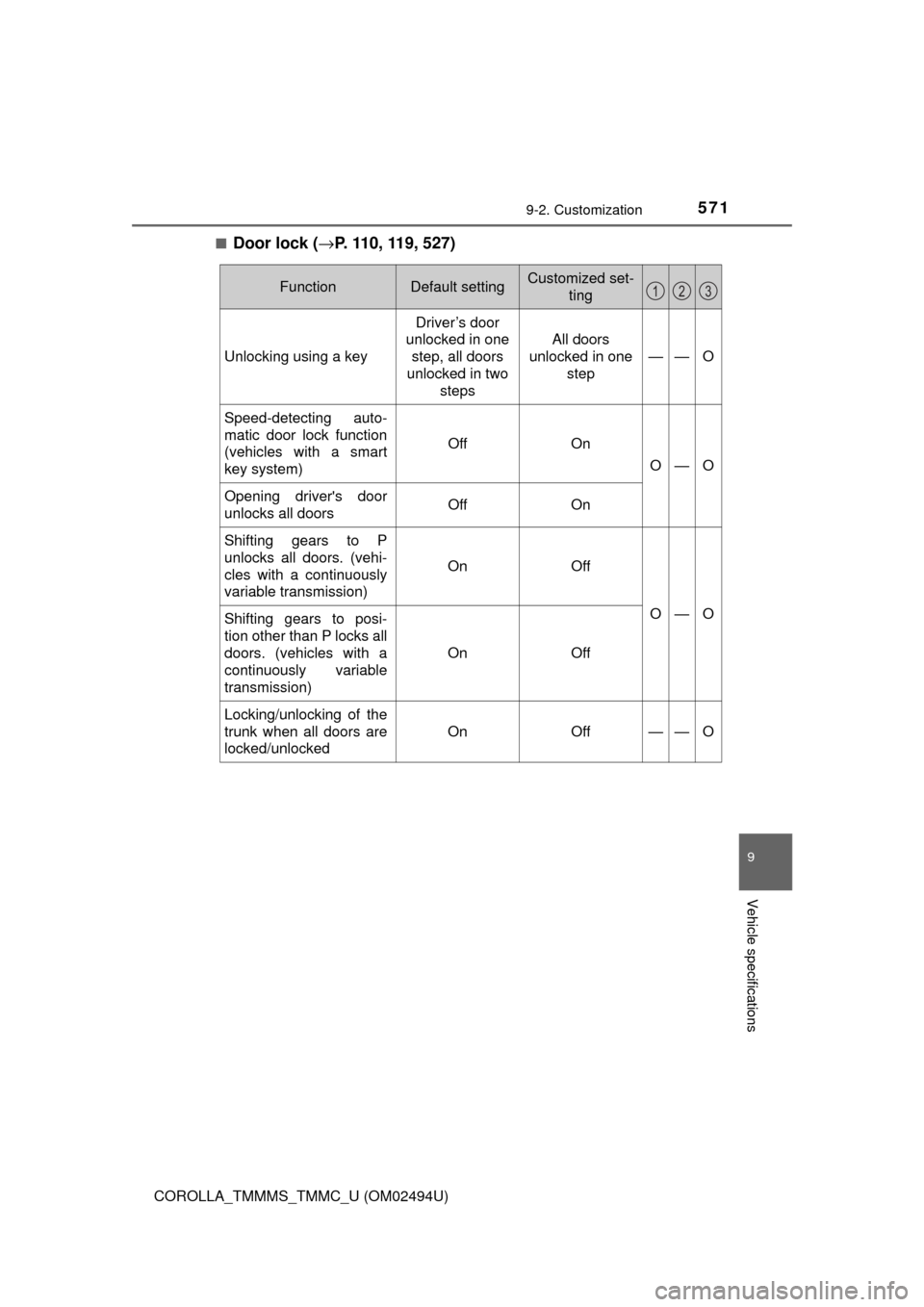
Door lock (→P. 110, 119, 527)
FunctionDefault settingCustomized set-
ting
Unlocking using a key
Driver’s door
unlocked in one
step, all doors
unlocked in two
steps
All doors
unlocked in one
step
——O
Speed-detecting auto-
matic door lock function
(vehicles with a smart
key system)
OffOn
O—O
Opening driver's door
unlocks all doorsOffOn
Shifting gears to P
unlocks all doors. (vehi-
cles with a continuously
variable transmission)
OnOff
O—OShifting gears to posi-
tion other than P locks all
doors. (vehicles with a
continuously variable
transmission)
OnOff
Locking/unlocking of the
trunk when all doors are
locked/unlocked
OnOff——O
123