Page 189 of 612
1894-2. Driving procedures
4
Driving
COROLLA_TMMMS_TMMC_U (OM02494U)■When driving with the dynamic radar cruise control activated
Even when performing the following actions with the intent of enabling engine
braking, engine braking will not activate because the dynamic radar cruise
control will not be canceled.
●While driving in D or 7-speed sport sequential shiftmatic mode, downshifting
to 6, 5 or 4. (→P. 188)
●When switching the driving mode to sport mode while driving in D position.
(→P. 187)
■Downshifting restrictions warning buzzer
To help ensure safety and driving performance, downshifting operation may
sometimes be restricted. In some circumstances, downshifting may not be
possible even when the shift lever is operated. (A buzzer will sound twice.)
■Sport mode automatic deactivation
Sport mode is automatically deactivated if the engine switch is turned off after
driving in sport mode.
■Shift lock system
The shift lock system is a system to prevent accidental operation of the shift
lever in starting.
The shift lever can be shifted from P only when the engine switch is in the
“ON” position (vehicles without a smart key system) or IGNITION ON mode
(vehicles with a smart key system) and the brake pedal is being depressed.
Page 209 of 612
209
4
Driving
COROLLA_TMMMS_TMMC_U (OM02494U)
4-5. Using the driving support systems
◆PCS (Pre-Collision System)
→P. 2 1 6
◆LDA (Lane Departure Alert with steering control)
→P. 2 3 0
◆Automatic High Beam
→P. 2 0 0
◆Dynamic radar cruise control
→P. 2 4 0
Toyota Safety Sense P
The Toyota Safety Sense P consists of the following drive assist
systems and contributes to a safe and comfortable driving expe-
rience:
WARNING
■Toyota Safety Sense P
The Toyota Safety Sense P is designed to operate under the assumption
that the driver will drive safely, and is designed to help reduce the impact to
the occupants and the vehicle in the case of a collision or assist the driver in
normal driving conditions.
As there is a limit to the degree of recognition accuracy and control perfor-
mance that this system can provide, do not overly rely on this system. The
driver is always responsible for paying attention to the vehicle's surround-
ings and driving safely.
Page 240 of 612
2404-5. Using the driving support systems
COROLLA_TMMMS_TMMC_U (OM02494U)
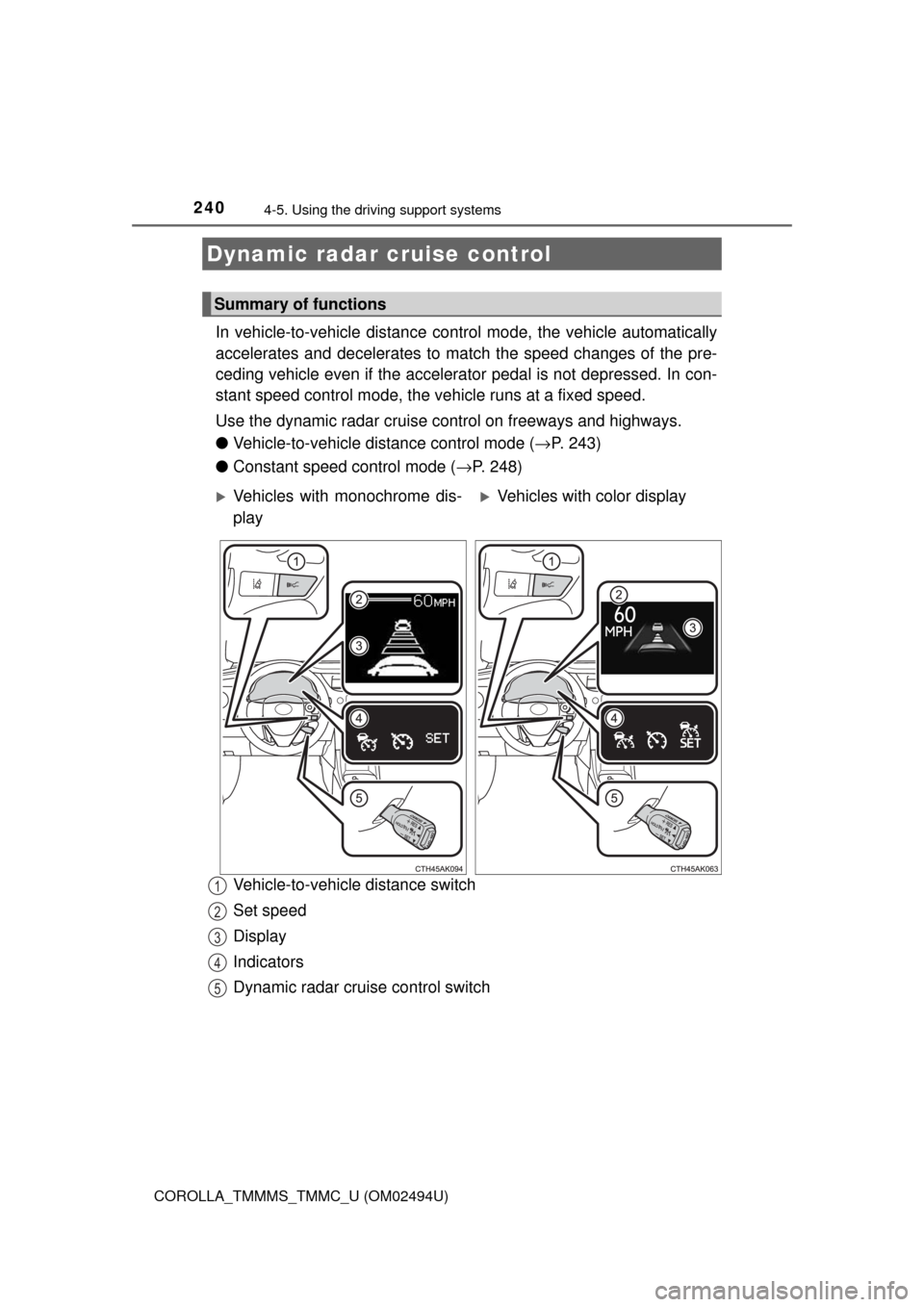
In vehicle-to-vehicle distance control mode, the vehicle automatically
accelerates and decelerates to match the speed changes of the pre-
ceding vehicle even if the accelerator pedal is not depressed. In con-
stant speed control mode, the vehicle runs at a fixed speed.
Use the dynamic radar cruise control on freeways and highways.
●Vehicle-to-vehicle distance control mode (→P. 243)
●Constant speed control mode (→P. 248)
Vehicle-to-vehicle distance switch
Set speed
Display
Indicators
Dynamic radar cruise control switch
Dynamic radar cruise control
Summary of functions
Vehicles with monochrome dis-
playVehicles with color display
1
2
3
4
5
Page 241 of 612
2414-5. Using the driving support systems
4
Driving
COROLLA_TMMMS_TMMC_U (OM02494U)
WARNING
■Before using dynamic radar cruise control
Driving safely is the sole responsibility of the driver. Do not rely solely on the
system, and drive safely by always paying careful attention to your sur-
roundings.
The dynamic radar cruise control provides driving assistance to reduce the
driver's burden. However, there are limitations to the assistance provided.
Even when the system is functioning normally, the condition of the preced-
ing vehicle as detected by the system may differ from the condition
observed by the driver. Therefore, the driver must always remain alert,
assess the danger of each situation and drive safely. Relying on this system
or assuming the system ensures safety while driving can lead to an acci-
dent, resulting in death or serious injury.
■Cautions regarding the driving assist systems
Observe the following precautions, as there are limitations to the assistance
provided by the system.
Failure to do so may cause an accident resulting in death or serious injury.
●Assisting the driver to measure following distance
The dynamic radar cruise control is only intended to help the driver in
determining the following distance between the driver’s own vehicle and a
designated vehicle traveling ahead. It is not a mechanism that allows care-
less or inattentive driving, and it is not a system that can assist the driver in
low-visibility conditions. It is still necessary for driver to pay close attention
to the vehicle’s surroundings.
●Assisting the driver to judge proper following distance
The dynamic radar cruise control determines whether the following dis-
tance between the driver’s own vehicle and a designated vehicle traveling
ahead is within a set range. It is not capable of making any other type of
judgement. Therefore, it is absolutely necessary for the driver to remain
vigilant and to determine whether or not there is a possibility of danger in
any given situation.
●Assisting the driver to operate the vehicle
The dynamic radar cruise control has limited capability to prevent or avoid
a collision with a vehicle traveling ahead. Therefore, if there is ever any
danger, the driver must take immediate and direct control of the vehicle
and act appropriately in order to ensure the safety of all involved.
■To avoid inadvertent dynamic radar cruise control activation
Switch the dynamic radar cruise control off using the “ON-OFF” button
when not in use.
Page 242 of 612

2424-5. Using the driving support systems
COROLLA_TMMMS_TMMC_U (OM02494U)
WARNING
■Situations unsuitable for dynamic radar cruise control
Do not use dynamic radar cruise control in any of the following situations.
Doing so may result in inappropriate speed control and could cause an acci-
dent resulting in death or serious injury.
●Roads where there are pedestrians, cyclers, etc.
●In heavy traffic
●On roads with sharp bends
●On winding roads
●On slippery roads, such as those covered with rain, ice or snow
●On steep downhills, or where there are sudden changes between sharp up
and down gradients
Vehicle speed may exceed the set speed when driving down a steep hill.
●At entrances to freeways and highways
●When weather conditions are bad enough that they may prevent the sen-
sors from detecting correctly (fog, snow, sandstorm, heavy rain, etc.)
●When there is rain, snow, etc. on the front surface of the radar sensor or
camera sensor
●In traffic conditions that require frequent repeated acceleration and decel-
eration
●During emergency towing
●When an approach warning buzzer is heard often
Page 244 of 612
2444-5. Using the driving support systems
COROLLA_TMMMS_TMMC_U (OM02494U)
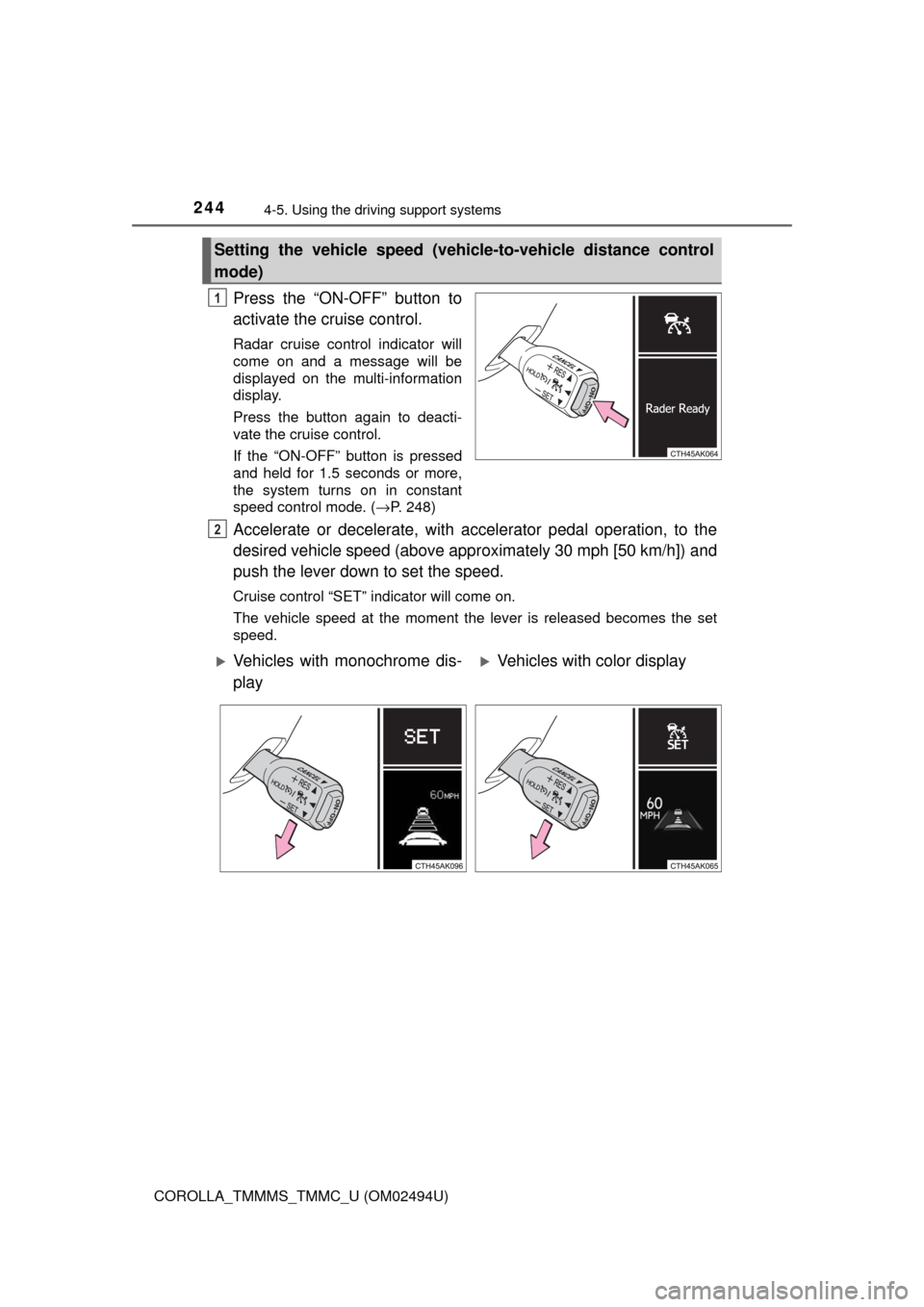
Press the “ON-OFF” button to
activate the cruise control.
Radar cruise control indicator will
come on and a message will be
displayed on the multi-information
display.
Press the button again to deacti-
vate the cruise control.
If the “ON-OFF” button is pressed
and held for 1.5 seconds or more,
the system turns on in constant
speed control mode. (→P. 248)
Accelerate or decelerate, with accelerator pedal operation, to the
desired vehicle speed (above approximately 30 mph [50 km/h]) and
push the lever down to set the speed.
Cruise control “SET” indicator will come on.
The vehicle speed at the moment the lever is released becomes the set
speed.
Setting the vehicle speed (vehicle-to-vehicle distance control
mode)
1
2
Vehicles with monochrome dis-
playVehicles with color display
Page 247 of 612
2474-5. Using the driving support systems
4
Driving
COROLLA_TMMMS_TMMC_U (OM02494U)
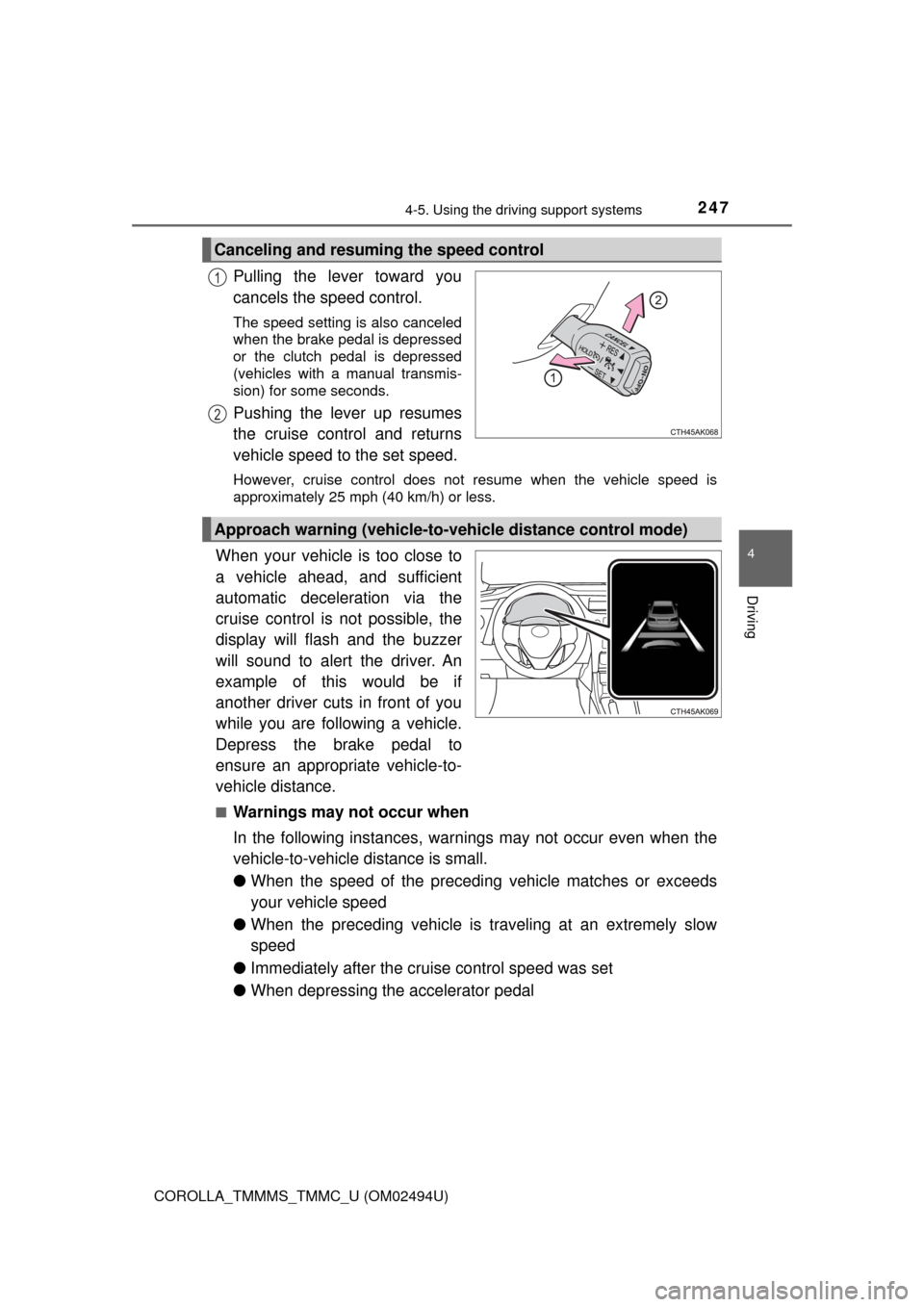
Pulling the lever toward you
cancels the speed control.
The speed setting is also canceled
when the brake pedal is depressed
or the clutch pedal is depressed
(vehicles with a manual transmis-
sion) for some seconds.
Pushing the lever up resumes
the cruise control and returns
vehicle speed to the set speed.
However, cruise control does not resume when the vehicle speed is
approximately 25 mph (40 km/h) or less.
When your vehicle is too close to
a vehicle ahead, and sufficient
automatic deceleration via the
cruise control is not possible, the
display will flash and the buzzer
will sound to alert the driver. An
example of this would be if
another driver cuts in front of you
while you are following a vehicle.
Depress the brake pedal to
ensure an appropriate vehicle-to-
vehicle distance.
■Warnings may not occur when
In the following instances, warnings may not occur even when the
vehicle-to-vehicle distance is small.
●When the speed of the preceding vehicle matches or exceeds
your vehicle speed
●When the preceding vehicle is traveling at an extremely slow
speed
●Immediately after the cruise control speed was set
●When depressing the accelerator pedal
Canceling and resuming the speed control
1
2
Approach warning (vehicle-to-vehicle distance control mode)
Page 248 of 612

2484-5. Using the driving support systems
COROLLA_TMMMS_TMMC_U (OM02494U)
When constant speed control mode is selected, your vehicle will main-
tain a set speed without controlling the vehicle-to-vehicle distance.
Select this mode only when vehicle-to-vehicle distance control mode
does not function correctly due to a dirty radar sensor, etc.
With the cruise control off,
press and hold the “ON-OFF”
button for 1.5 seconds or more.
Immediately after the “ON-OFF”
button is pressed, the radar cruise
control indicator will come on.
Afterwards, it switches to the cruise
control indicator.
Switching to constant speed con-
trol mode is only possible when
operating the lever with the cruise
control off.
Accelerate or decelerate, with accelerator pedal operation, to the
desired vehicle speed (above approximately 30 mph [50 km/h]) and
push the lever down to set the speed.
Cruise control “SET” indicator will come on.
The vehicle speed at the moment the lever is released becomes the set
speed.
Adjusting the speed setting: →P. 245
Canceling and resuming the speed setting: →P. 247
Selecting constant speed control mode
1
2
Vehicles with monochrome dis-
playVehicles with color display