Page 277 of 612
2775-1. Basic Operations
5
Audio system
COROLLA_TMMMS_TMMC_U (OM02494U)
Entune Audio∗
∗: If equipped
With Entune Audio
Operations such as listening to audio, using the hands-free
phone and changing Entune Audio settings are started by using
the following buttons.
With Entune Audio Plus
Owners of this system should refer to the “NAVIGATION AND
MULTIMEDIA SYSTEM OWNER'S MANUAL”.
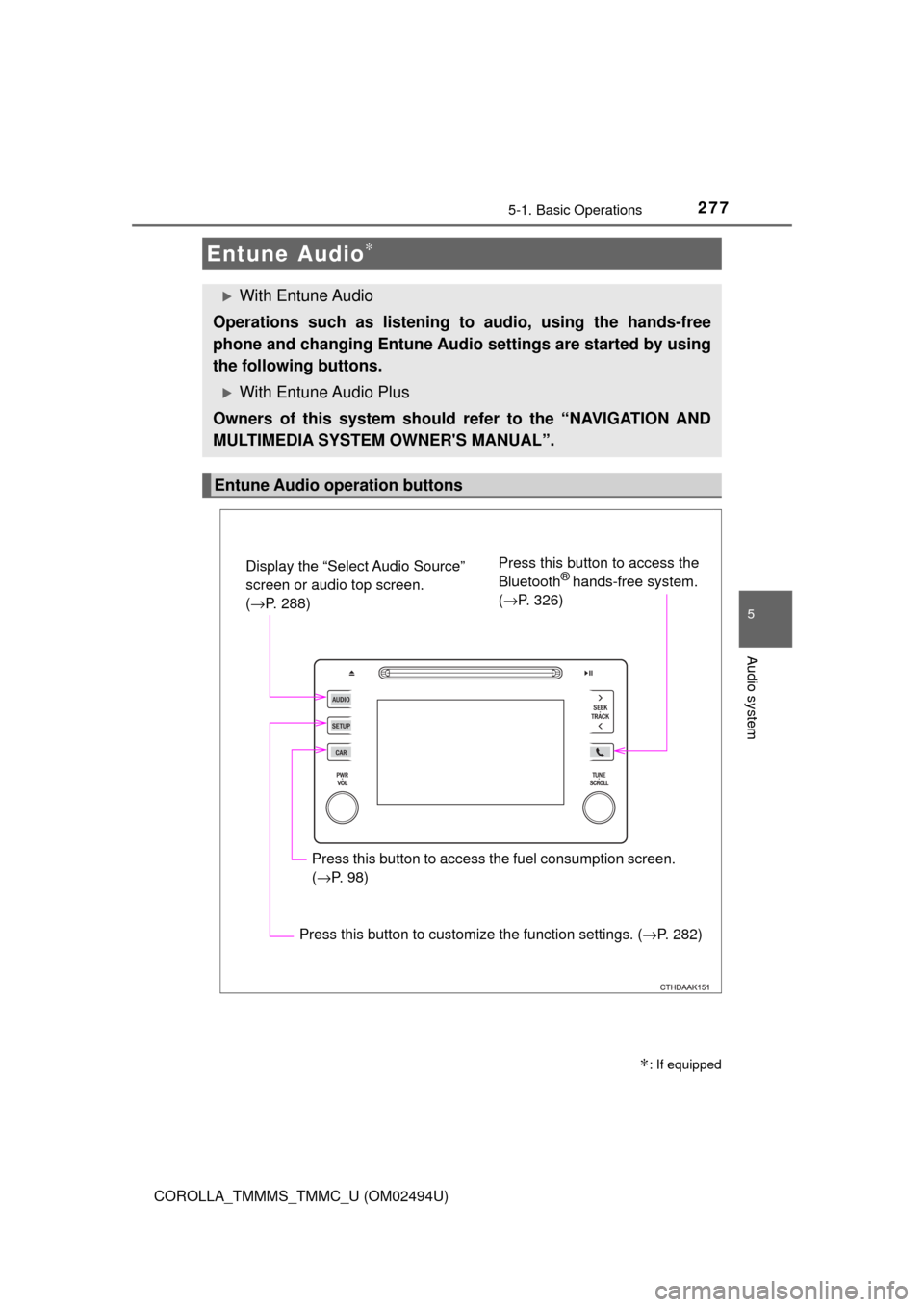
Entune Audio operation buttons
Display the “Select Audio Source”
screen or audio top screen.
(→P. 288)Press this button to access the
Bluetooth® hands-free system.
(→P. 326)
Press this button to access the fuel consumption screen.
(→P. 98)
Press this button to customize the function settings. (→P. 282)
Page 279 of 612
2795-1. Basic Operations
5
Audio system
COROLLA_TMMMS_TMMC_U (OM02494U)
NOTICE
■To avoid damaging the touch screen
●To prevent damaging the screen, lightly touch the screen buttons with your
finger.
●Do not use objects other than your finger to touch the screen.
●Wipe off fingerprints using a glass cleaning cloth. Do not use chemical
cleaners to clean the screen, as they may damage the touch screen.
Page 289 of 612
2895-3. Using Entune Audio
5
Audio system
COROLLA_TMMMS_TMMC_U (OM02494U)
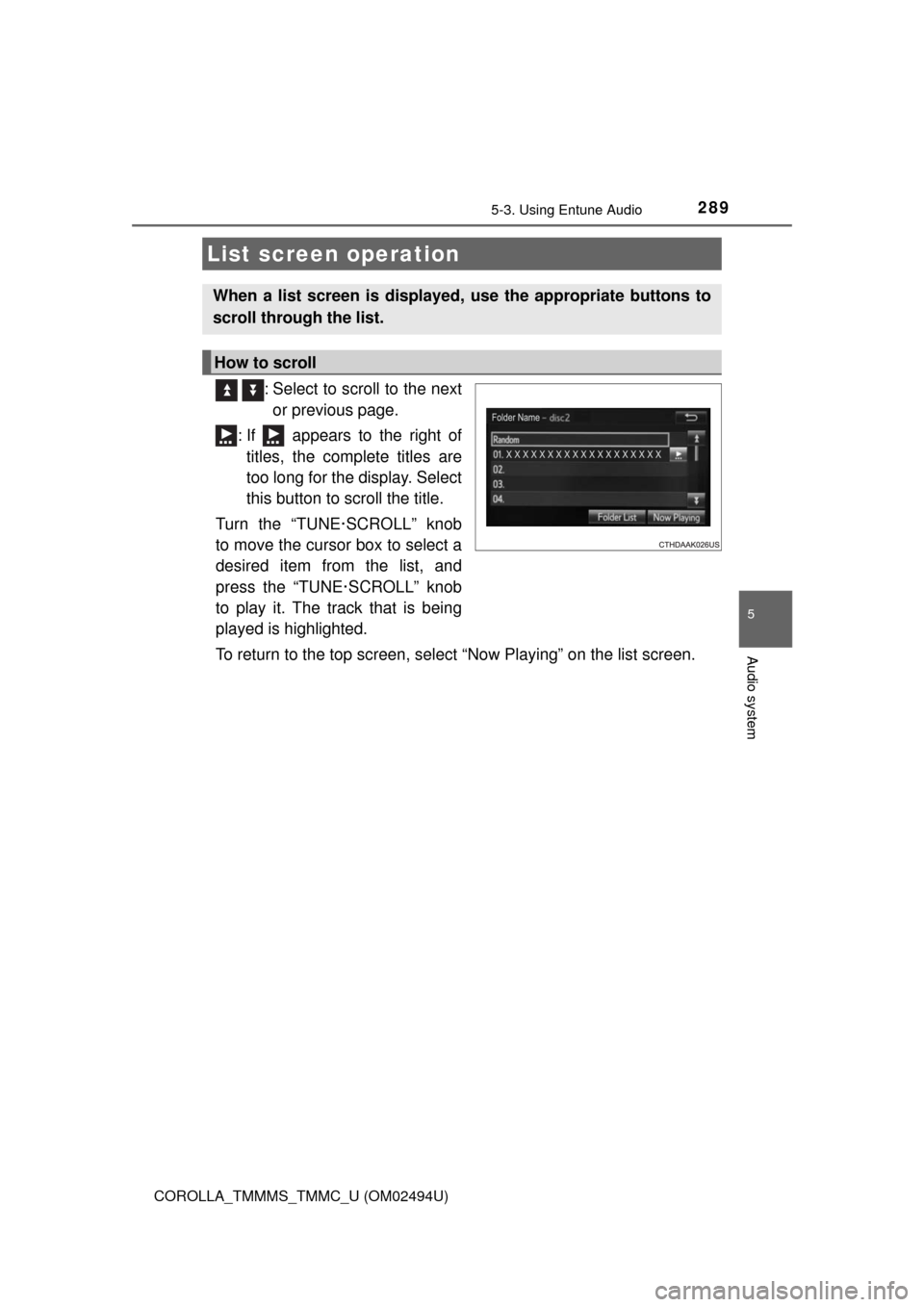
: Select to scroll to the next
or previous page.
: If appears to the right of
titles, the complete titles are
too long for the display. Select
this button to scroll the title.
Turn the “TUNE·SCROLL” knob
to move the cursor box to select a
desired item from the list, and
press the “TUNE·SCROLL” knob
to play it. The track that is being
played is highlighted.
To return to the top screen, select “Now Playing” on the list screen.
List screen operation
When a list screen is displayed, use the appropriate buttons to
scroll through the list.
How to scroll
Page 400 of 612
4006-4. Other interior features
COROLLA_TMMMS_TMMC_U (OM02494U)
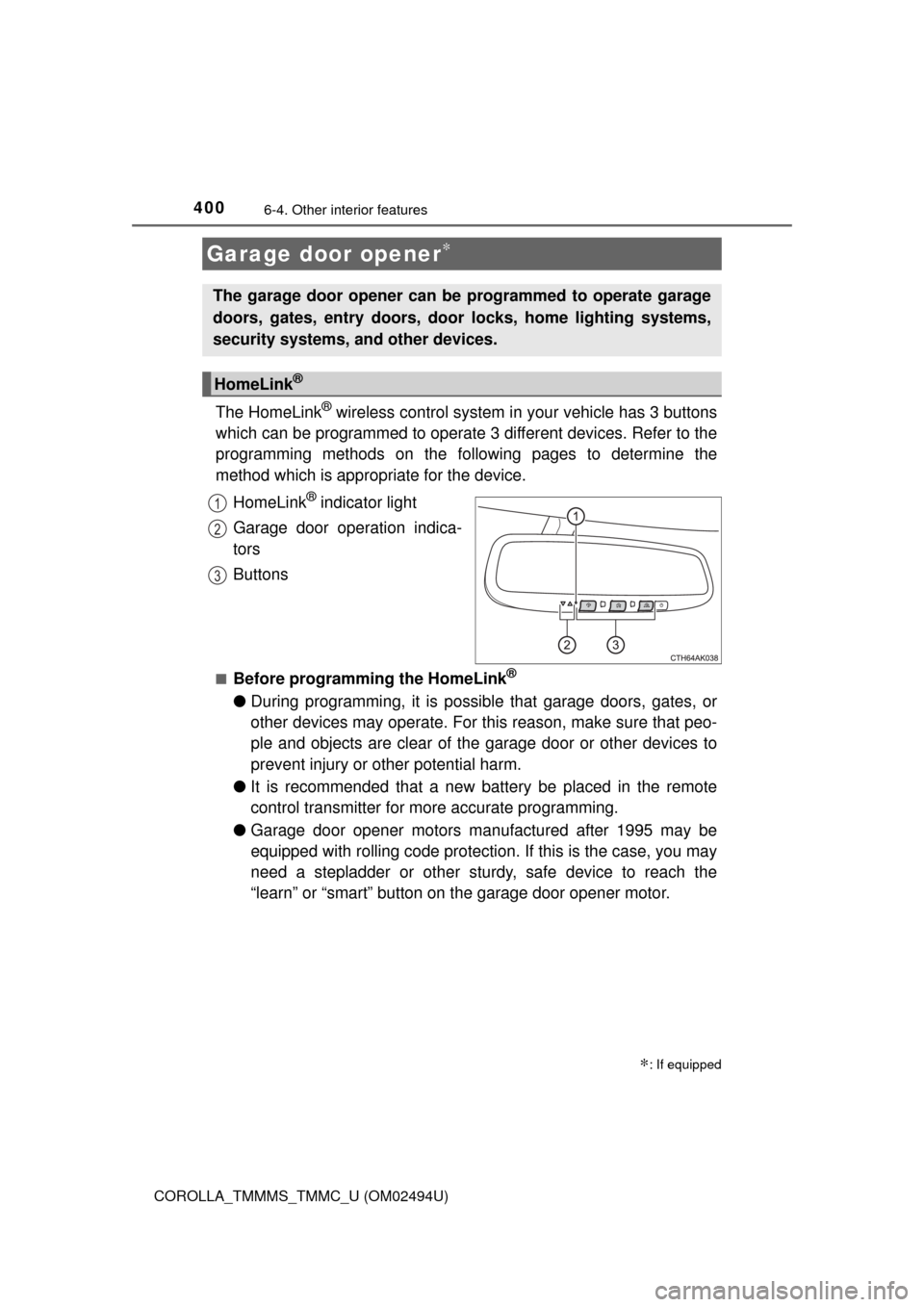
The HomeLink® wireless control system in your vehicle has 3 buttons
which can be programmed to operate 3 different devices. Refer to the
programming methods on the following pages to determine the
method which is appropriate for the device.
HomeLink
® indicator light
Garage door operation indica-
tors
Buttons
■Before programming the HomeLink®
●During programming, it is possible that garage doors, gates, or
other devices may operate. For this reason, make sure that peo-
ple and objects are clear of the garage door or other devices to
prevent injury or other potential harm.
●It is recommended that a new battery be placed in the remote
control transmitter for more accurate programming.
●Garage door opener motors manufactured after 1995 may be
equipped with rolling code protection. If this is the case, you may
need a stepladder or other sturdy, safe device to reach the
“learn” or “smart” button on the garage door opener motor.
Garage door opener∗
∗: If equipped
The garage door opener can be programmed to operate garage
doors, gates, entry doors, door locks, home lighting systems,
security systems, and other devices.
HomeLink®
1
2
3
Page 401 of 612
4016-4. Other interior features
6
Interior features
COROLLA_TMMMS_TMMC_U (OM02494U)■
Programming the HomeLink®
Press and release the HomeLink® button you want to program
and check that the HomeLink® indicator light flashes orange.
Perform within 60 seconds of , or the indicator light will stop flash-
ing and programming will not be able to be completed.
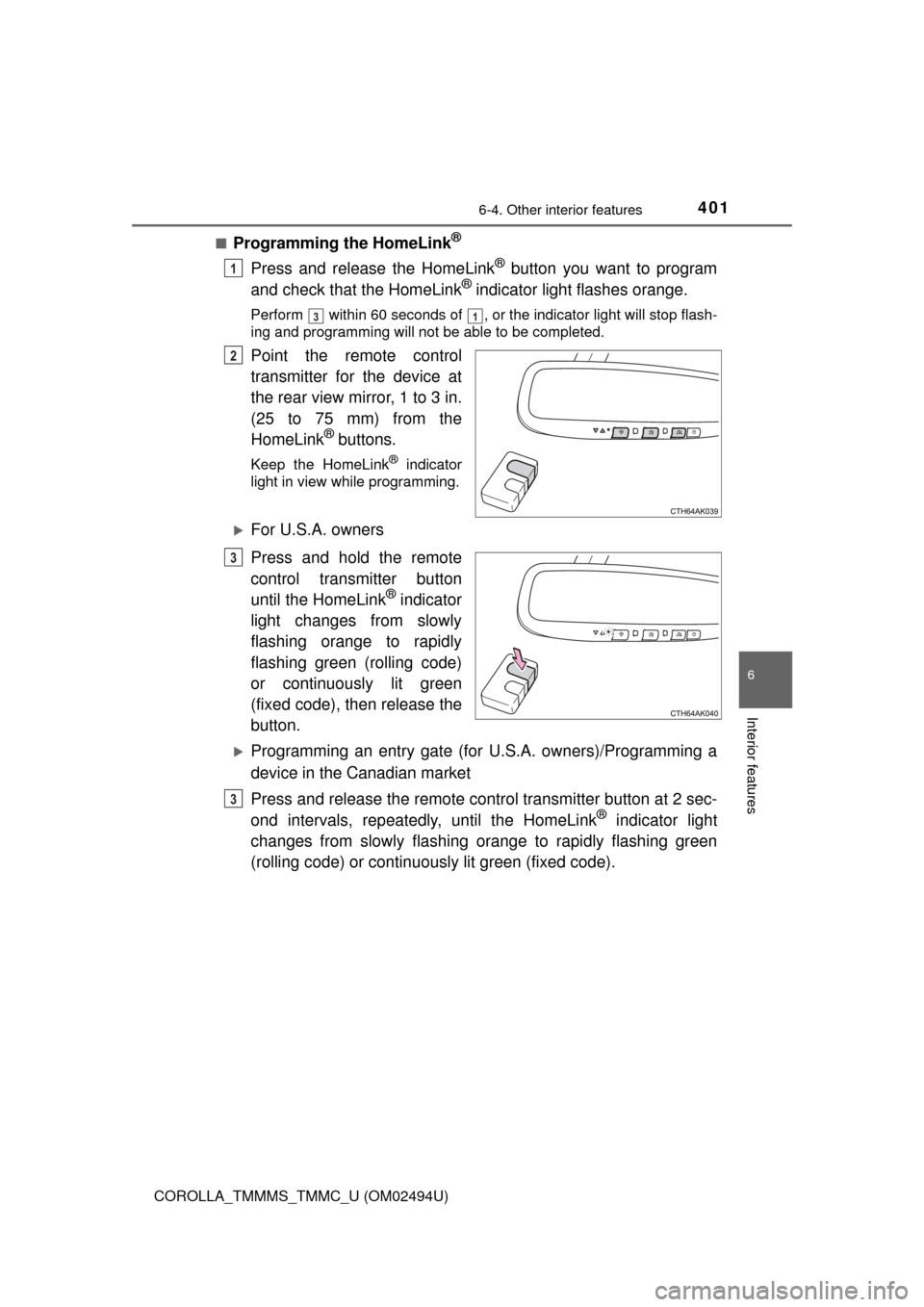
Point the remote control
transmitter for the device at
the rear view mirror, 1 to 3 in.
(25 to 75 mm) from the
HomeLink
® buttons.
Keep the HomeLink® indicator
light in view while programming.
For U.S.A. owners
Press and hold the remote
control transmitter button
until the HomeLink
® indicator
light changes from slowly
flashing orange to rapidly
flashing green (rolling code)
or continuously lit green
(fixed code), then release the
button.
Programming an entry gate (for U.S.A. owners)/Programming a
device in the Canadian market
Press and release the remote control transmitter button at 2 sec-
ond intervals, repeatedly, until the HomeLink
® indicator light
changes from slowly flashing orange to rapidly flashing green
(rolling code) or continuously lit green (fixed code).
1
31
2
3
3
Page 402 of 612
4026-4. Other interior features
COROLLA_TMMMS_TMMC_U (OM02494U)
Test the HomeLink® operation by pressing the newly pro-
grammed button and observing the indicator light:
●Device with fixed code: If the indicator light is solid/continuous,
programming has been completed and your garage door or other
device should operate when the HomeLink
® button is pressed
and released.
●Device with rolling code: If the indicator light flashes rapidly, your
garage door opener motor (or other device) is equipped with a
rolling code. Complete the programming process by firmly press-
ing and holding the programmed HomeLink
® button for 2 sec-
onds and then release the button.
●If the garage door or other device does not operate, proceed to
“Programming a rolling code system”.
Repeat the steps above to program another device for any of the
remaining HomeLink
® buttons.
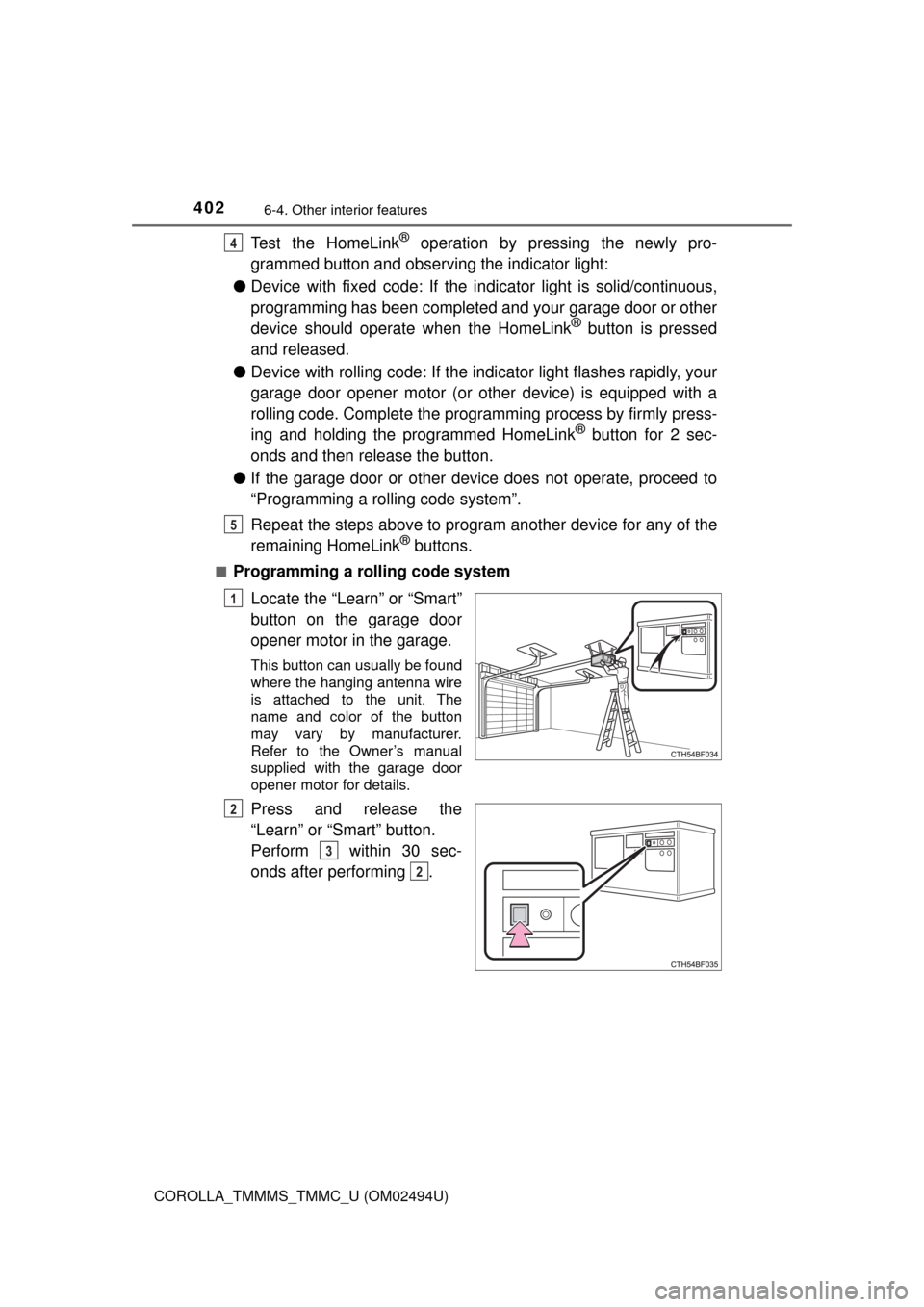
■Programming a rolling code system
Locate the “Learn” or “Smart”
button on the garage door
opener motor in the garage.
This button can usually be found
where the hanging antenna wire
is attached to the unit. The
name and color of the button
may vary by manufacturer.
Refer to the Owner’s manual
supplied with the garage door
opener motor for details.
Press and release the
“Learn” or “Smart” button.
Perform within 30 sec-
onds after performing .
4
5
1
2
3
2
Page 404 of 612
4046-4. Other interior features
COROLLA_TMMMS_TMMC_U (OM02494U)■
Reprogramming a single HomeLink® button
When the following procedure is performed, buttons which already
have devices registered to them can be overwritten:
With one hand, press and hold the desired HomeLink
® button.
When the HomeLink
® indicator starts flashing orange, continue
to hold the HomeLink® button and perform “Programming Home-
Link®” (it takes 20 seconds for the HomeLink® indicator to
start flashing).
Press the appropriate HomeLink
® button. The HomeLink® indicator
light should turn on.
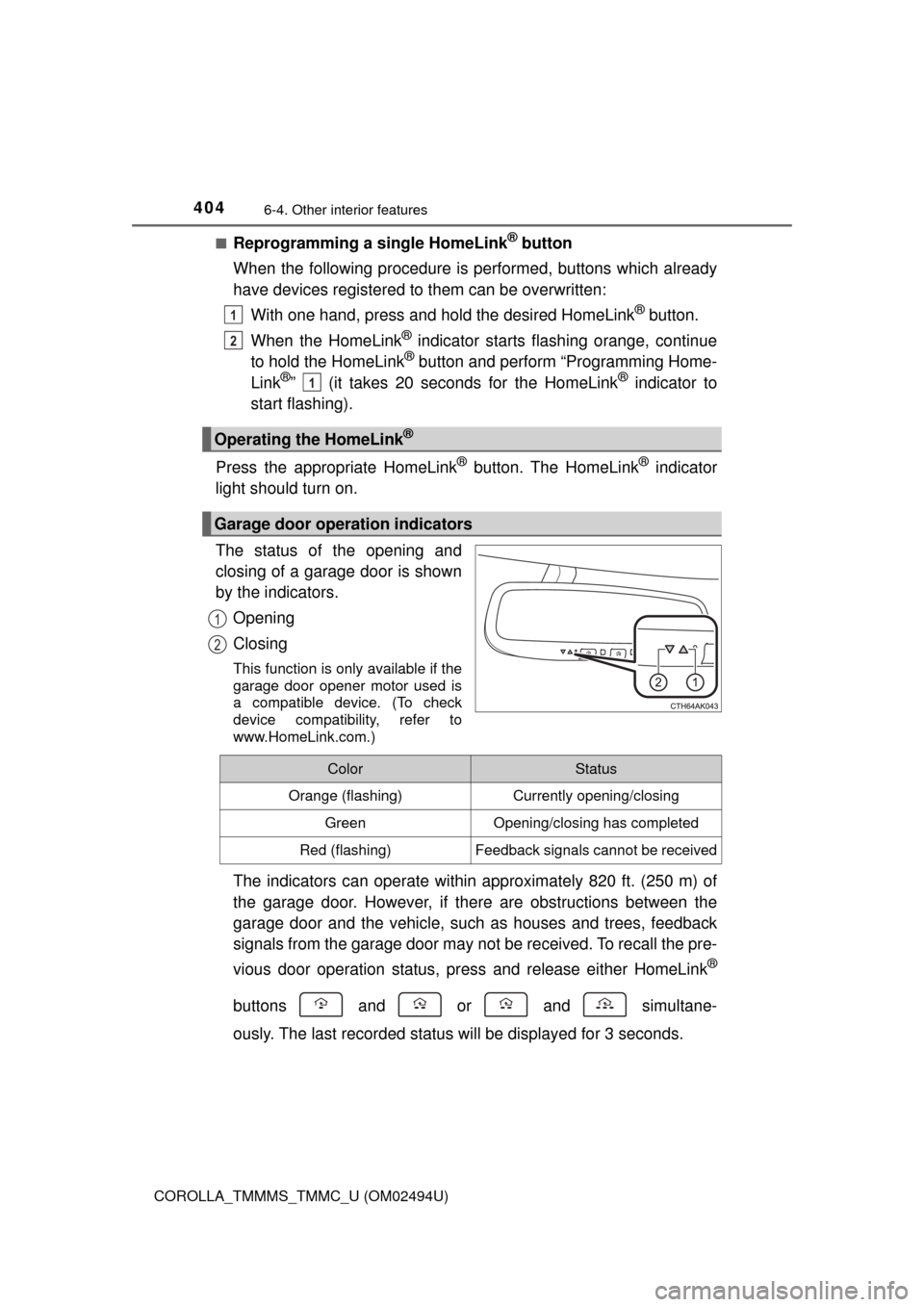
The status of the opening and
closing of a garage door is shown
by the indicators.
Opening
Closing
This function is only available if the
garage door opener motor used is
a compatible device. (To check
device compatibility, refer to
www.HomeLink.com.)
The indicators can operate within approximately 820 ft. (250 m) of
the garage door. However, if there are obstructions between the
garage door and the vehicle, such as houses and trees, feedback
signals from the garage door may not be received. To recall the pre-
vious door operation status, press and release either HomeLink
®
buttons and or and simultane-
ously. The last recorded status will be displayed for 3 seconds.
Operating the HomeLink®
Garage door operation indicators
1
2
1
1
2
ColorStatus
Orange (flashing)Currently opening/closing
GreenOpening/closing has completed
Red (flashing)Feedback signals cannot be received
Page 406 of 612
4066-4. Other interior features
COROLLA_TMMMS_TMMC_U (OM02494U)■When support is necessary
Visit on the web at www.homelink.com or call 1-800-355-3515.
WARNING
■When programming a garage door or other remote control device
The garage door or other device may operate, so ensure people and
objects are out of danger to prevent potential harm.
■Conforming to federal safety standards
Do not use the HomeLink
® compatible transceiver with any garage door
opener or device that lacks safety stop and reverse features as required by
federal safety standards. This includes any garage door that cannot detect
an interfering object. A door or device without these features increases the
risk of death or serious injury.
■When operating or programming HomeLink
®
Never allow a child to operate or play with the HomeLink® buttons.