Page 98 of 612
982. Instrument cluster
COROLLA_TMMMS_TMMC_U (OM02494U)
Entune Audio, Entune Audio Plus
or Entune Premium Audio
Entune Audio
Press the “CAR” button.
If the “Past Record” screen is dis-
played, select “Trip Information”.
Entune Audio Plus or Entune Premium Audio
Press the “APPS” button.
Touch “Eco” on the “Apps”
screen.
If the “Past Record” screen is dis-
played, select “Trip Information”.
Fuel consumption information
Fuel consumption information can be displayed on Entune
Audio, Entune Audio Plus and/or Entune Premium Audio.
Trip information
1
2
Page 100 of 612

1002. Instrument cluster
COROLLA_TMMMS_TMMC_U (OM02494U)■
Past record
Entune Audio
Press the “CAR” button.
If the “Trip Information” screen is displayed, select “Past Record”.
Entune Audio Plus or Entune Premium Audio
Press the “APPS” button.
Touch “Eco” on the “Apps” screen.
If the “Trip Information” screen is displayed, select “Past Record”.
Previous fuel economy
record
Current fuel economy
Best recorded fuel econ-
omy
Update the past record
data
Reset the past record data
“Trip Information” screen appears
Average recorded fuel economy
These images are examples only, and may vary slightly from actual
conditions.
■Resetting the data
Selecting “Clear” on the “Trip Information” screen will reset the consumption
data.
Selecting “Clear” on the “Past Record” screen will reset the past record data.
■Updating the past record data
Selecting “Update” on the “Past Record” screen will update the past record
data.
■Cruising range
Displays the estimated maximum distance that can be driven with the quan-
tity of fuel remaining.
This distance is computed based on your average fuel consumption.
As a result, the actual distance that can be driven may differ from that dis-
played.
1
2
1
2
3
4
5
6
7
Page 109 of 612
1093-1. Key information
3
Operation of each component
COROLLA_TMMMS_TMMC_U (OM02494U)
NOTICE
■To prevent key damage
●Do not drop the keys, subject them to strong shocks or bend them.
●Do not expose the keys to high temperatures for long periods of time.
●Do not get the keys wet or wash them in an ultrasonic washer etc.
●Do not attach metallic or magnetic materials to the keys or place the keys
close to such materials.
●Do not disassemble the keys.
●Do not attach a sticker or anything else to the surface of the electronic key
and key (with a wireless remote control function).
●Vehicles with a smart key system: Do not place the keys near objects that
produce magnetic fields, such as TVs, audio systems and induction cook-
ers, or medical electrical equipment, such as low-frequency therapy equip-
ment.
■Carrying the electronic key on your person (vehicles with a smart key
system)
Carry the electronic key 3.9 in. (10 cm) or more away from electric appli-
ances that are turned on. Radio waves emitted from electric appliances
within 3.9 in. (10 cm) of the electronic key may interfere with the key, caus-
ing the key to not function properly.
■In case of a smart key system malfunction or other key-related prob-
lems (vehicles with a smart key system)
Take your vehicle with all the electronic keys provided with your vehicle to
your Toyota dealer.
■When an electronic key is lost (vehicles with a smart key system)
If the electronic key remains lost, the risk of vehicle theft increases signifi-
cantly. Visit your Toyota dealer immediately with all remaining electronic
keys that was provided with your vehicle.
Page 127 of 612

1273-2. Opening, closing and locking the doors
3
Operation of each component
COROLLA_TMMMS_TMMC_U (OM02494U)■Conditions affecting operation
The smart key system uses weak radio waves. In the following situations, the
communication between the electronic key and the vehicle may be affected,
preventing the smart key system, wireless remote control and engine immobi-
lizer system from operating properly. (Ways of coping: →P. 527)
●When the electronic key battery is depleted
●Near a TV tower, electric power plant, gas station, radio station, large dis-
play, airport or other facility that generates strong radio waves or electrical
noise
●When carrying a portable radio, cellular phone, cordless phone or other
wireless communication device
●When the electronic key is in contact with, or is covered by the following
metallic objects
• Cards to which aluminum foil is attached
• Cigarette boxes that have aluminum foil inside
• Metallic wallets or bags
• Coins
• Hand warmers made of metal
• Media such as CDs and DVDs
●When other wireless keys (that emit radio waves) are being used nearby
●When carrying the electronic key together with the following devices that
emit radio waves
• Another vehicle’s electronic key or a wireless key that emits radio waves
• Personal computers or personal digital assistants (PDAs)
• Digital audio players
• Portable game systems
●If window tint with a metallic content or metallic objects are attached to the
rear window
●When the electronic key is placed near a battery charger or electronic
devices
Page 171 of 612
1714-1. Before driving
4
Driving
COROLLA_TMMMS_TMMC_U (OM02494U)
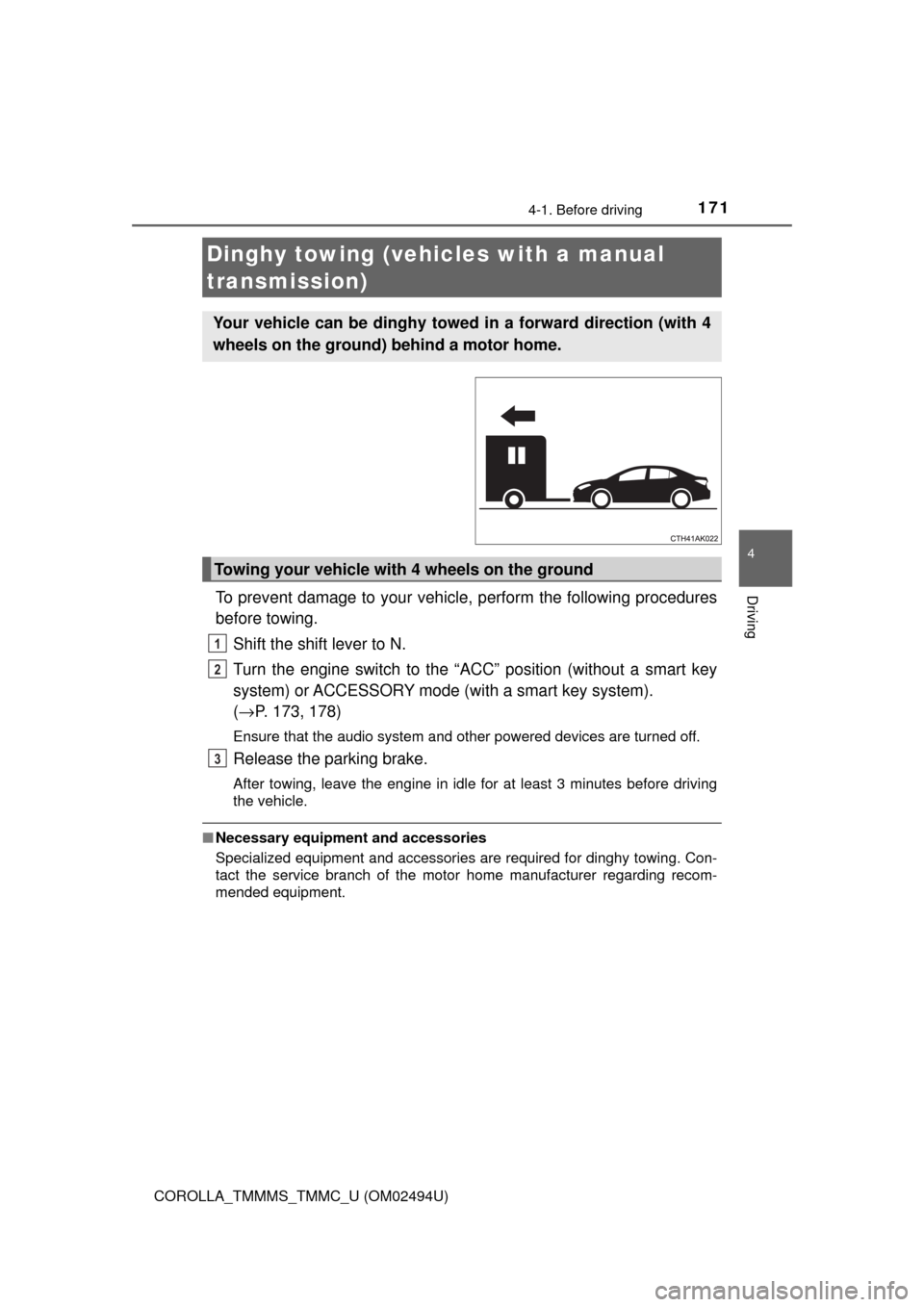
To prevent damage to your vehicle, perform the following procedures
before towing.
Shift the shift lever to N.
Turn the engine switch to the “ACC” position (without a smart key
system) or ACCESSORY mode (with a smart key system).
(→P. 173, 178)
Ensure that the audio system and other powered devices are turned off.
Release the parking brake.
After towing, leave the engine in idle for at least 3 minutes before driving
the vehicle.
■Necessary equipment and accessories
Specialized equipment and accessories are required for dinghy towing. Con-
tact the service branch of the motor home manufacturer regarding recom-
mended equipment.
Dinghy towing (vehicles with a manual
transmission)
Your vehicle can be dinghy towed in a forward direction (with 4
wheels on the ground) behind a motor home.
Towing your vehicle with 4 wheels on the ground
1
2
3
Page 173 of 612
173
4
Driving
COROLLA_TMMMS_TMMC_U (OM02494U)
4-2. Driving procedures
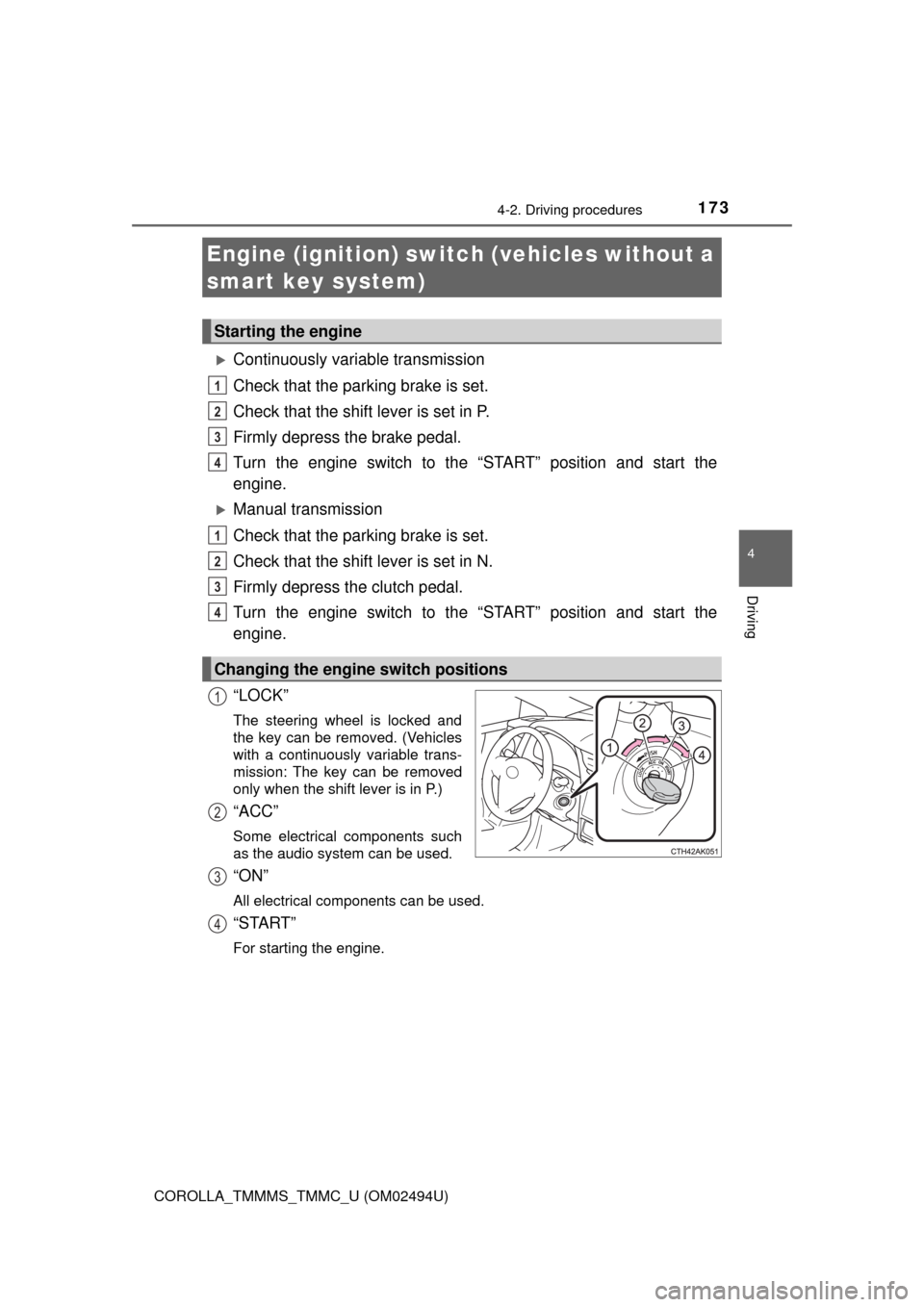
Continuously variable transmission
Check that the parking brake is set.
Check that the shift lever is set in P.
Firmly depress the brake pedal.
Turn the engine switch to the “START” position and start the
engine.
Manual transmission
Check that the parking brake is set.
Check that the shift lever is set in N.
Firmly depress the clutch pedal.
Turn the engine switch to the “START” position and start the
engine.
“LOCK”
The steering wheel is locked and
the key can be removed. (Vehicles
with a continuously variable trans-
mission: The key can be removed
only when the shift lever is in P.)
“ACC”
Some electrical components such
as the audio system can be used.
“ON”
All electrical components can be used.
“START”
For starting the engine.
Engine (ignition) switch (vehicles without a
smart key system)
Starting the engine
Changing the engine switch positions
1
2
3
4
1
2
3
4
1
2
3
4
Page 178 of 612
1784-2. Driving procedures
COROLLA_TMMMS_TMMC_U (OM02494U)
Modes can be changed by pressing the engine switch with the brake
pedal (continuously variable transmission) or clutch pedal (manual
transmission) released. (The mode changes each time the switch is
pressed.)
Off
*
The emergency flashers can be
used.
The multi-information display will
not be displayed.
ACCESSORY mode
Some electrical components such
as the audio system can be used.
“Power On” will be displayed on
the multi-information display.
IGNITION ON mode
All electrical components can be
used.
“Power On” will be displayed on the multi-information display.
*: Vehicles with a continuously variable transmission: If the shift lever is in a
position other than P when turning off the engine, the engine switch will be
turned to ACCESSORY mode, not to off.
Changing engine switch modes
Page 237 of 612

2374-5. Using the driving support systems
4
Driving
COROLLA_TMMMS_TMMC_U (OM02494U)■Temporary cancellation of functions
When operation conditions are no longer met, a function may be temporarily
canceled. However, when the operation conditions are met again, operation
of the function is automatically restored. (→P. 236)
■Steering control function
Depending on the vehicle speed, lane departure situation, road conditions,
etc., the operation of the functions may not be recognized or the functions
may not operate.
■Lane departure alert function
The warning buzzer may be difficult to hear due to external noise, audio play-
back, etc.
■Hands off steering wheel alert
When the system determines that the driver has removed their hands from
the steering wheel while the steering control function is operating, a warning
message is displayed on the multi-information display and the buzzer
sounds.
■White (yellow) lines are only on one side of road
The LDA system will not operate for the side on which white (yellow) lines
could not be recognized.