Page 466 of 568
4668-2. Steps to take in an emergency
CAMRY_U (OM33C64U)
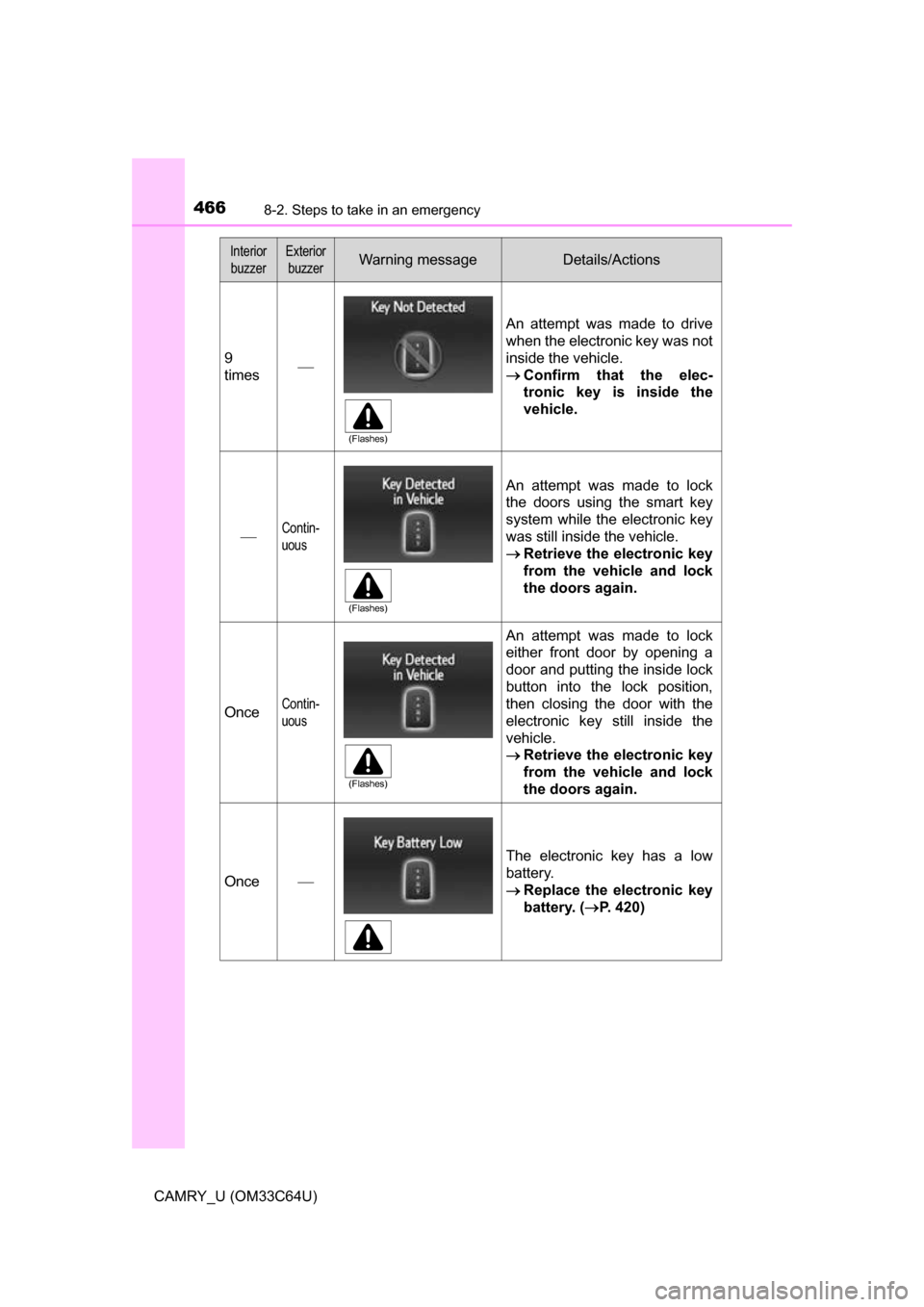
9
times
An attempt was made to drive
when the electronic key was not
inside the vehicle.
Confirm that the elec-
tronic key is inside the
vehicle.
Contin-
uous
An attempt was made to lock
the doors using the smart key
system while the electronic key
was still inside the vehicle.
Retrieve the electronic key
from the vehicle and lock
the doors again.
OnceContin-
uous
An attempt was made to lock
either front door by opening a
door and putting the inside lock
button into the lock position,
then closing the door with the
electronic key still inside the
vehicle.
Retrieve the electronic key
from the vehicle and lock
the doors again.
Once
The electronic key has a low
battery.
Replace the electronic key
battery. ( P. 420)
Interior
buzzerExterior buzzerWarning messageDetails/Actions
(Flashes)
(Flashes)
(Flashes)
Page 467 of 568
4678-2. Steps to take in an emergency
8
When trouble arises
CAMRY_U (OM33C64U)
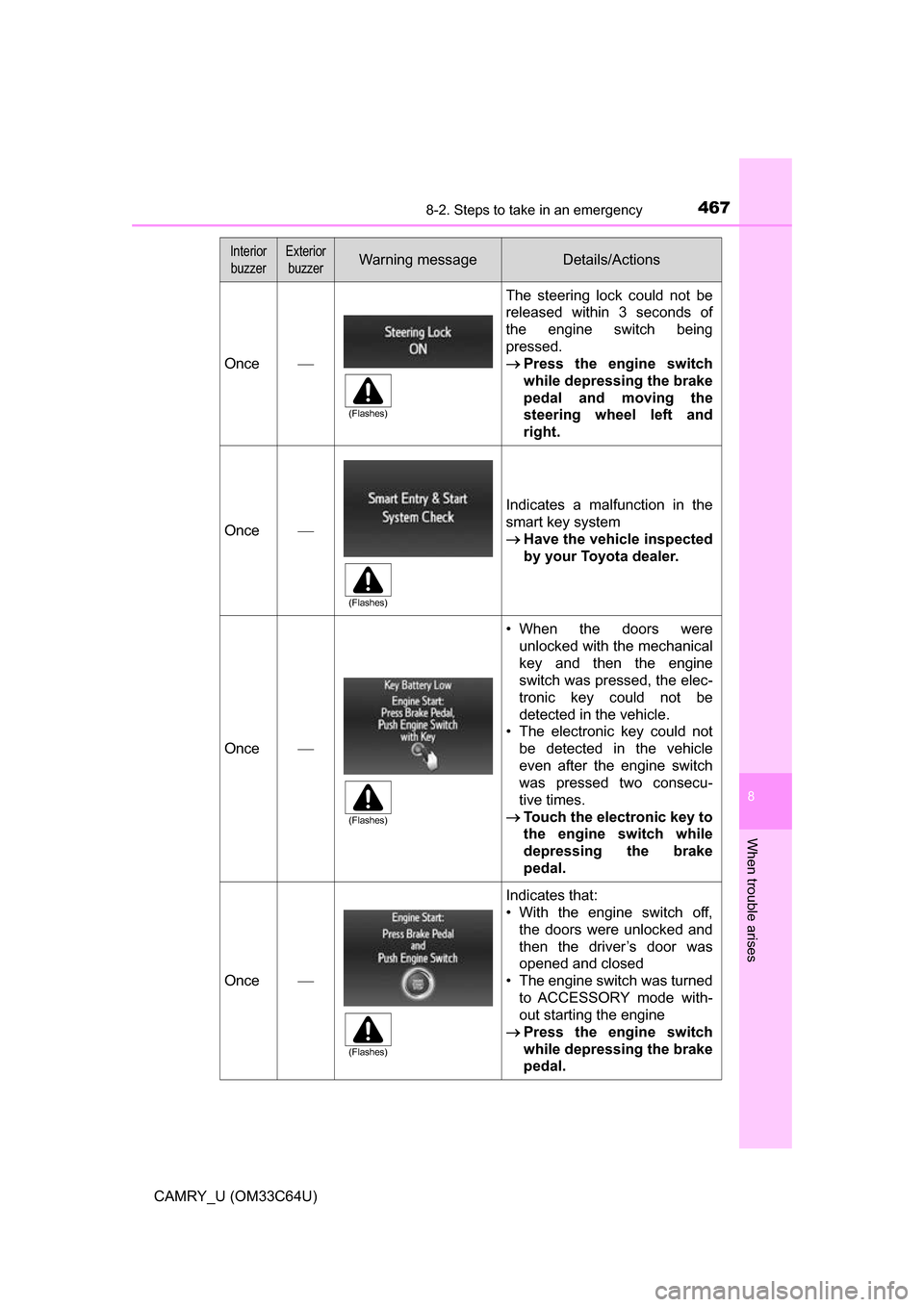
Once
The steering lock could not be
released within 3 seconds of
the engine switch being
pressed.
Press the engine switch
while depressing the brake
pedal and moving the
steering wheel left and
right.
Once
Indicates a malfunction in the
smart key system
Have the vehicle inspected
by your Toyota dealer.
Once
• When the doors were
unlocked with the mechanical
key and then the engine
switch was pressed, the elec-
tronic key could not be
detected in the vehicle.
• The electronic key could not
be detected in the vehicle
even after the engine switch
was pressed two consecu-
tive times.
Touch the electronic key to
the engine switch while
depressing the brake
pedal.
Once
Indicates that:
• With the engine switch off,
the doors were unlocked and
then the driver’s door was
opened and closed
• The engine switch was turned
to ACCESSORY mode with-
out starting the engine
Press the engine switch
while depressing the brake
pedal.
Interior
buzzerExterior buzzerWarning messageDetails/Actions
(Flashes)
(Flashes)
(Flashes)
(Flashes)
Page 483 of 568
4838-2. Steps to take in an emergency
8
When trouble arises
CAMRY_U (OM33C64U)
One of the following may be the cause of the problem:
●One or both of the battery terminals may be disconnected.
● The battery may be discharged. ( P. 488)
● There may be a malfunction in the steering lock system (vehicles
with a smart key system).
Contact your Toyota dealer if the problem cannot be repaired, or if repair
procedures are unknown.
When the engine does not start, the following steps can be used as an
interim measure to start the engine if the engine switch is functioning
normally:
Set the parking brake.
Shift the shift lever to P.
Turn the engine switch to ACCESSORY mode.
Press and hold the engine switch for about 15 seconds while
depressing the brake pedal firmly.
Even if the engine can be started using the above steps, the system
may be malfunctioning. Have the ve hicle inspected by your Toyota
dealer.
The starter motor does not turn over, the interior lights and head-
lights do not turn on, or the horn does not sound.
Emergency start function (vehicles with a smart key system)
1
2
3
4
Page 484 of 568
4848-2. Steps to take in an emergency
CAMRY_U (OM33C64U)
Set the parking brake.
Vehicles without a smart key system: Turn the engine switch to the
“ACC” position.
Vehicles with a smart key system: Turn the engine switch to
ACCESSORY mode.
Depress the brake pedal.
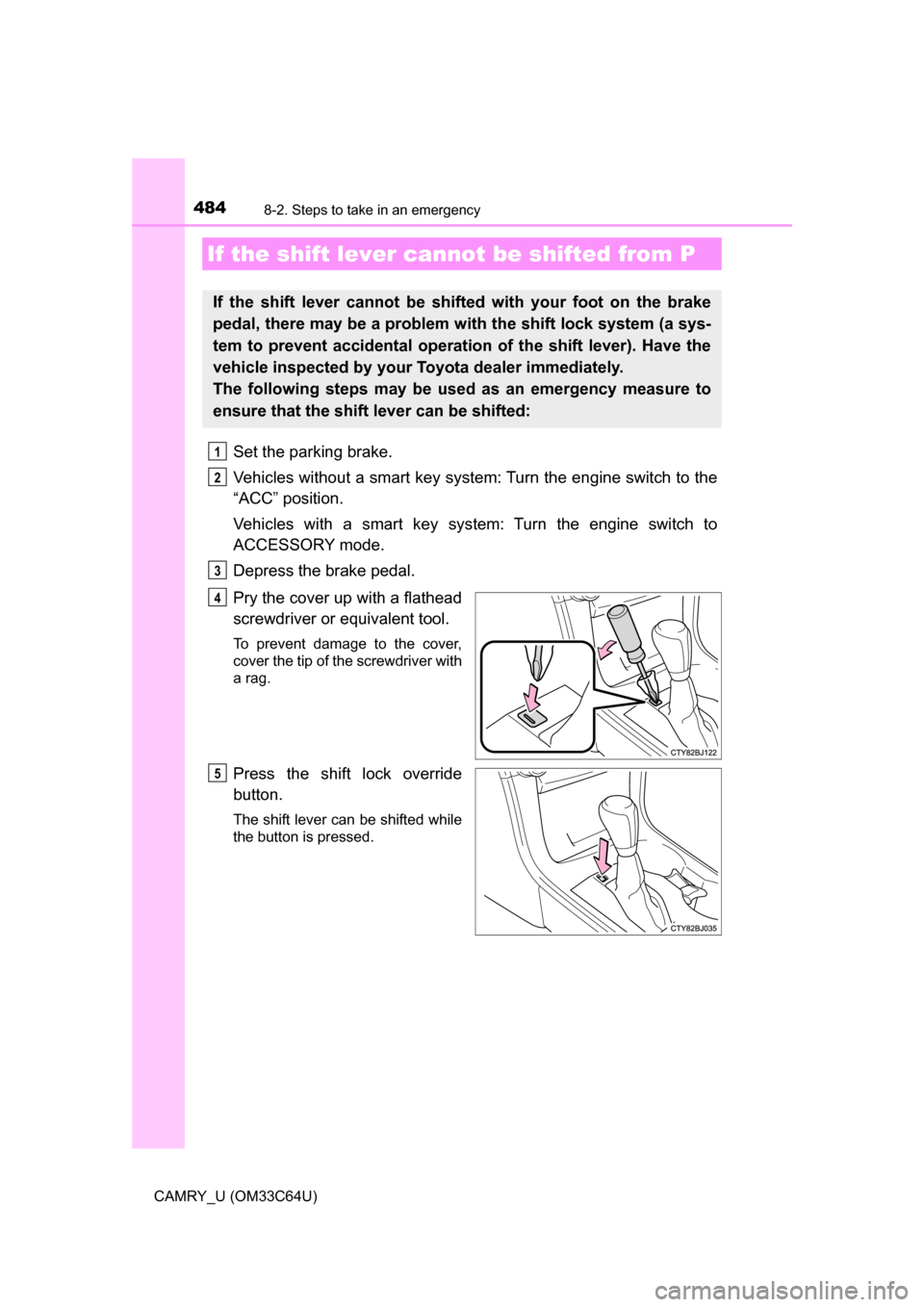
Pry the cover up with a flathead
screwdriver or equivalent tool.
To prevent damage to the cover,
cover the tip of the screwdriver with
a rag.
Press the shift lock override
button.
The shift lever can be shifted while
the button is pressed.
If the shift lever cannot be shifted from P
If the shift lever cannot be shifted with your foot on the brake
pedal, there may be a problem with the shift lock system (a sys-
tem to prevent accidental operation of the shift lever). Have the
vehicle inspected by your Toyota dealer immediately.
The following steps may be used as an emergency measure to
ensure that the shift lever can be shifted:
1
2
3
4
5
Page 485 of 568
4858-2. Steps to take in an emergency
8
When trouble arises
CAMRY_U (OM33C64U)
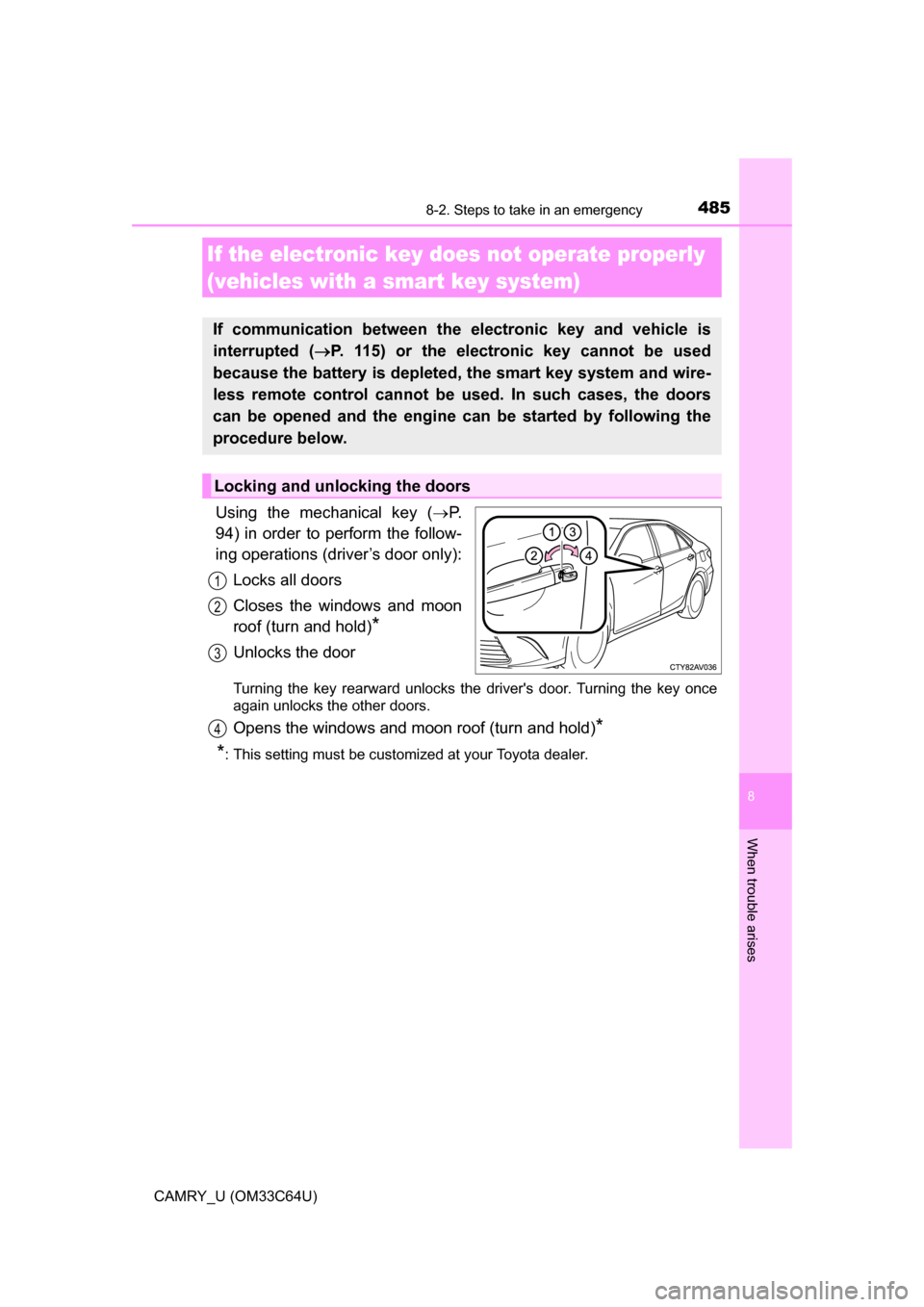
Using the mechanical key (P.
94) in order to perform the follow-
ing operations (driver’s door only):
Locks all doors
Closes the windows and moon
roof (turn and hold)
*
Unlocks the door
Turning the key rearward unlocks the driver's door. Turning the key once
again unlocks the other doors.
Opens the windows and moon roof (turn and hold)*
*
: This setting must be customized at your Toyota dealer.
If the electronic key does not operate properly
(vehicles with a smart key system)
If communication between the electronic key and vehicle is
interrupted ( P. 115) or the electronic key cannot be used
because the battery is depleted, the smart key system and wire-
less remote control cannot be used. In such cases, the doors
can be opened and the engine ca n be started by following the
procedure below.
Locking and unlocking the doors
1
2
3
4
Page 488 of 568
4888-2. Steps to take in an emergency
CAMRY_U (OM33C64U)
If you have a set of jumper (or booster) cables and a second vehicle
with a 12-volt battery, you can jump start your vehicle by following the
steps below.
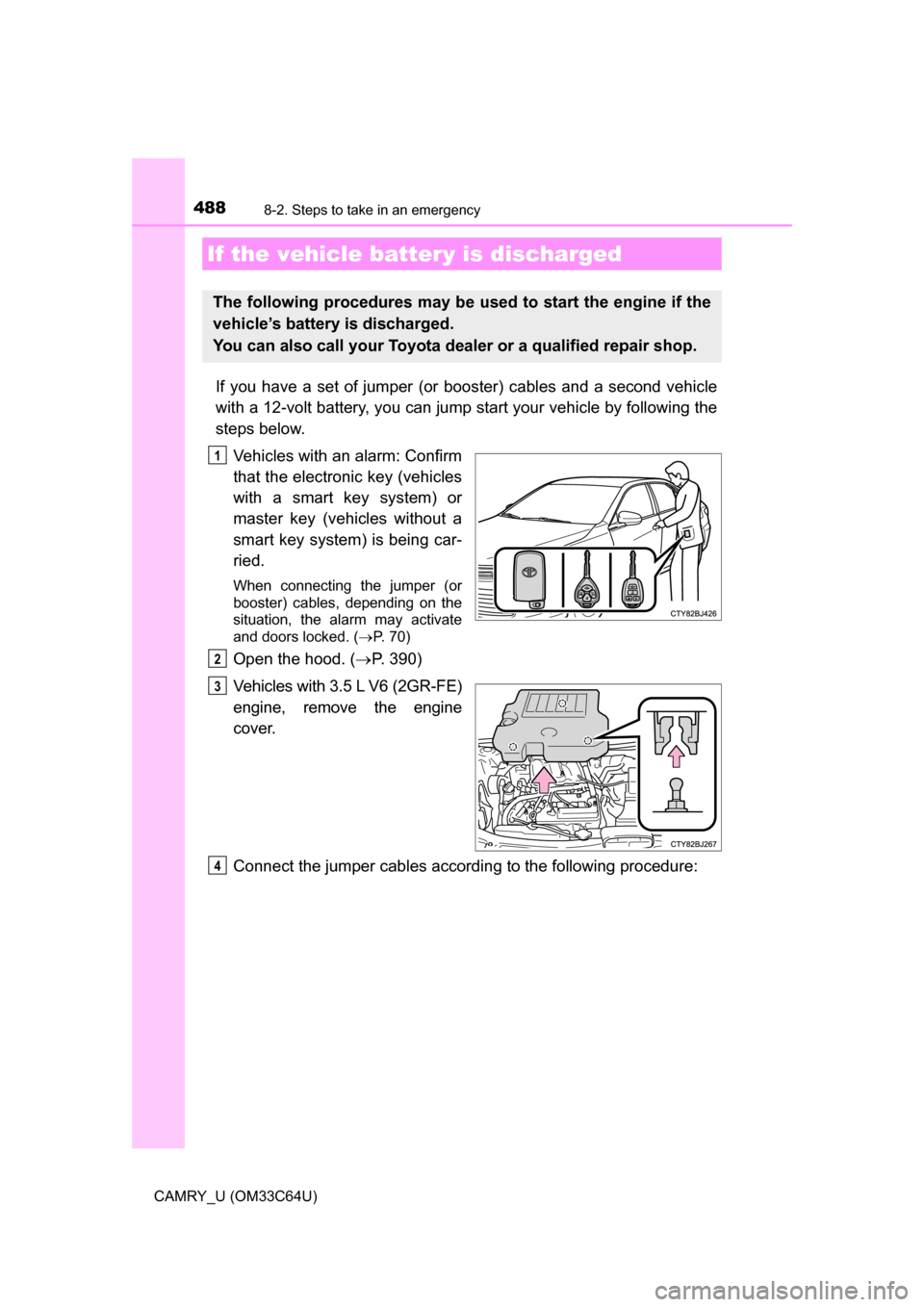
Vehicles with an alarm: Confirm
that the electronic key (vehicles
with a smart key system) or
master key (vehicles without a
smart key system) is being car-
ried.
When connecting the jumper (or
booster) cables, depending on the
situation, the alarm may activate
and doors locked. ( P. 70)
Open the hood. ( P. 390)
Vehicles with 3.5 L V6 (2GR-FE)
engine, remove the engine
cover.
Connect the jumper cables according to the following procedure:
If the vehicle bat tery is discharged
The following procedures may be used to start the engine if the
vehicle’s battery is discharged.
You can also call your Toyota de aler or a qualified repair shop.
1
2
3
4
Page 490 of 568
4908-2. Steps to take in an emergency
CAMRY_U (OM33C64U)
Start the engine of the second vehicle. Increase the engine speed
slightly and maintain at that level for approximately 5 minutes to
recharge the batter y of your vehicle.
Vehicles with a smart key system: Open and close any of the doors
of your vehicle with the engine switch off.
Vehicles without a smart key system:
Maintain the engine speed of the second vehicle and turn the
engine switch to the “ON” position, then start the vehicle's engine.
Vehicles with a smart key system:
Maintain the engine speed of the second vehicle and turn the
engine switch to IGNITION ON mode, then start the vehicle's
engine.
Once the vehicle’s engine has star ted, remove the jumper cables in
the exact reverse order from which they were connected.
Once the engine starts, have the v ehicle inspected at your Toyota
dealer as soon as possible.
■ Starting the engine when the battery is discharged
The engine cannot be started by push-starting.
■ To prevent battery discharge
●Turn off the headlights and the audio system while the engine is off.
● Turn off any unnecessary electrical components when the vehicle is running
at a low speed for an extended period, such as in heavy traffic.
■ Charging the battery
The electricity stored in the battery will discharge gradually even when the
vehicle is not in use, due to natural discharge and the draining effects of cer-
tain electrical appliances. If the vehicle is left for a long time, the battery may
discharge, and the engine may be unable to start. (The battery recharges
automatically during driving.)
■ When recharging or replacing the battery
●Vehicles with a smart key system: In some cases, it may not be possible to
unlock the doors using the smart key system when the battery is dis-
charged. Use the wireless remote control or the mechanical key to lock or
unlock the doors.
● Vehicles with a smart key system: The engine may not start on the first
attempt after the battery has recharged but will start normally after the sec-
ond attempt. This is not a malfunction.
5
6
7
8
Page 499 of 568
4999-1. Specifications
9
Vehicle specifications
CAMRY_U (OM33C64U)■
Vehicle identification number
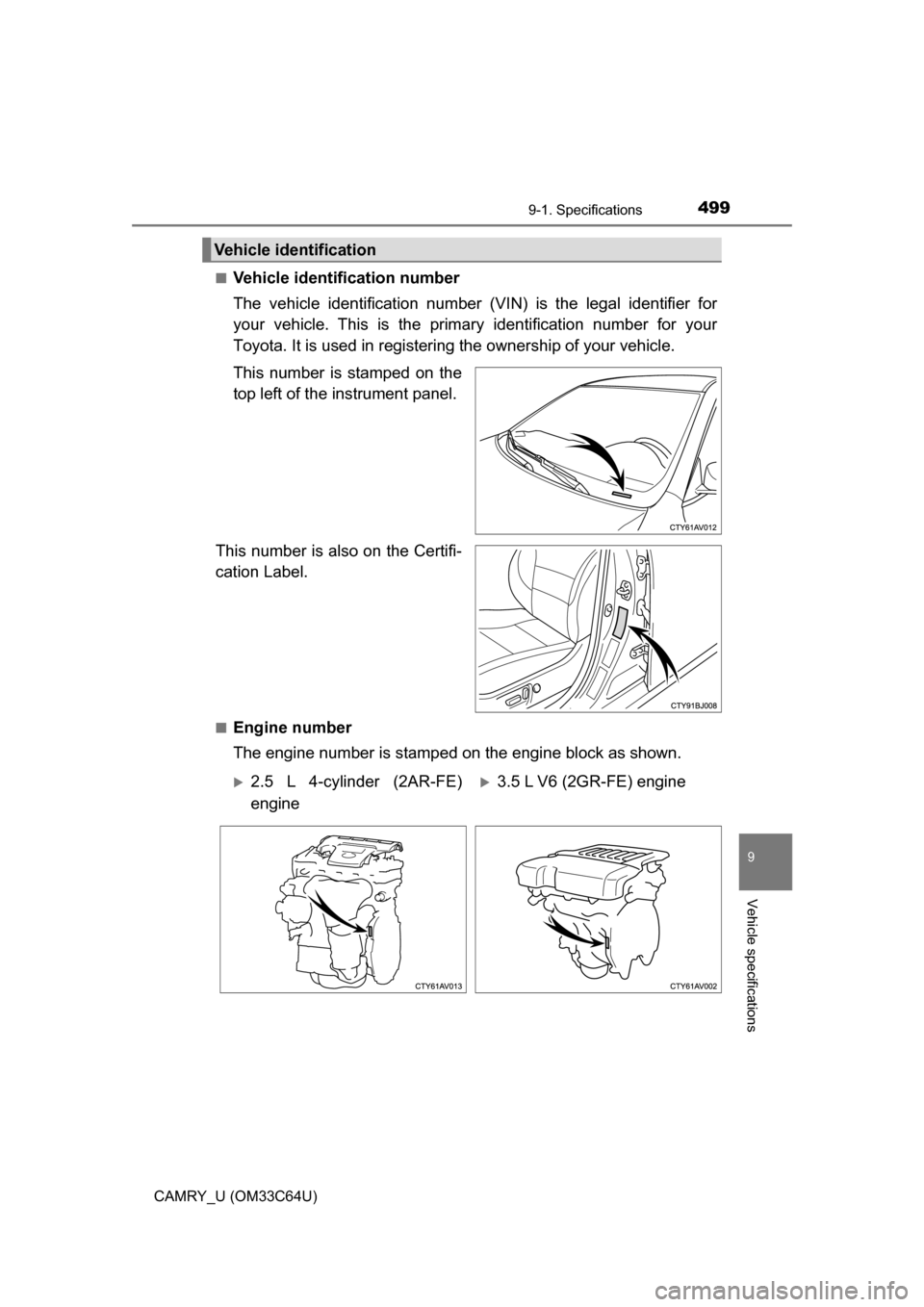
The vehicle identification number (VIN) is the legal identifier for
your vehicle. This is the primary identification number for your
Toyota. It is used in registering the ownership of your vehicle.
This number is stamped on the
top left of the instrument panel.
This number is also on the Certifi-
cation Label.
■Engine number
The engine number is stampe d on the engine block as shown.
Vehicle identification
2.5 L 4-cylinder (2AR-FE)
engine3.5 L V6 (2GR-FE) engine