Page 390 of 664
3905-7. “SET UP” menu
AURIS Touring Sports_EE (12L13E)
Select “Ringtone volume” using the “” and
“SETUP/ENTER” buttons. (P. 377)
Change the ringtone volume.
To decrease the volume: Press the “
To increase the volume: Press the “TUNE>” button.
To set the volume, press “Back”.
Select “Ringtone” using the “” and “SETUP/
ENTER” buttons. (P. 377)
Using the “” button, select a ringtone (1 - 3).
To set the selected ringtone, press “Back”.
Select “Transfer history” using the “” and
“SETUP/ENTER” buttons and press “Yes”.
■Phone number
Up to 1000 names can be stored.
■Call history
Up to 10 numbers can be stored in each of the outgoing, incoming and
missed call history memories.
■Limitation of number of digits
A phone number that exceeds 24 digits cannot be registered.
Setting ringtone volume
Setting ringtone
Transferring call histories
1
2
1
2
AURIS Touring Sports_OM_Europe_OM12L13E.book 390 ページ 2016年6月27日 月曜日 午後5時21分
Page 394 of 664
394
AURIS Touring Sports_EE (12L13E)
5-9. Bluetooth® Phone
Select “Phonebook” using the “” and “SETUP/
ENTER” buttons.
Select the desired name using the “” and
“SETUP/ENTER” buttons and press the off-hook switch.
By pressing “Add S. Dial” and then one of the speed dial but-
tons while the desired name is selected, the selected item can be reg-
istered as a speed dial.
Press “A-Z” to display the registered names in alphabetical
order of the initial.
Select “Speed dials” using the “” and “SETUP/
ENTER” buttons.
Press the desired preset button and press the off-hook switch.
To delete a registered speed dial, after selecting the desired preset
button press “Delete” and then press “Yes”.
Select “Dial by number” using the “” and
“SETUP/ENTER” buttons.
Enter the phone number and press the off-hook switch.
Making a phone call
To enter the “PHONE” or “TEL” mode, press the off-hook switch.
Dialing by selecting a name
Speed dialing
Dialing by entering the number
1
2
1
2
1
2
AURIS Touring Sports_OM_Europe_OM12L13E.book 394 ページ 2016年6月27日 月曜日 午後5時21分
Page 395 of 664
3955-9. Bluetooth® Phone
AURIS Touring Sports_EE (12L13E)
5
Audio system
Select “All calls”, “Missed calls”, “Incoming calls” or “Outgoing calls”
using the “” and “SETUP/ENTER” buttons.
Select the desired number using the “” and
“SETUP/ENTER” buttons and press the off-hook switch.
The following operations can be performed:
●Registering a number as a speed dial
Press “Add S. Dial” and then press the desired preset but-
ton.
●Deleting the selected number
Press “Delete” and press “Yes”.
Dialing from call histories
1
2
AURIS Touring Sports_OM_Europe_OM12L13E.book 395 ページ 2016年6月27日 月曜日 午後5時21分
Page 397 of 664
3975-9. Bluetooth® Phone
AURIS Touring Sports_EE (12L13E)
5
Audio system
A call can be transferred between the cellular phone and system while
dialing, receiving a call, or during a call. Use one of the following
methods:
a. Operate the cellular phone.
Refer to the manual that comes with the cellular phone for the operation of
the phone.
b. Press * “Phone”.
*: This operation can be performed only when transferring a call from the cel-
lular phone to the system during a call.
Press “Mute”.
Press “0 - 9” and use the “” and “SETUP/
ENTER” buttons to input the desired digits.
• To send the input digits, press “Send”.
• When finished, press “Wait” to return to the previous screen.
Change the call volume using the “VOL-” or “VOL+” button.
To decrease the volume: Press the “VOL-” button.
To increase the volume: Press the “VOL+” button.
Speaking on the phone
Transferring a call
Muting your voice
Inputting digits
Setting call volume
AURIS Touring Sports_OM_Europe_OM12L13E.book 397 ページ 2016年6月27日 月曜日 午後5時21分
Page 441 of 664
4416-3. Using the storage features
AURIS Touring Sports_EE (12L13E)
6
Interior features
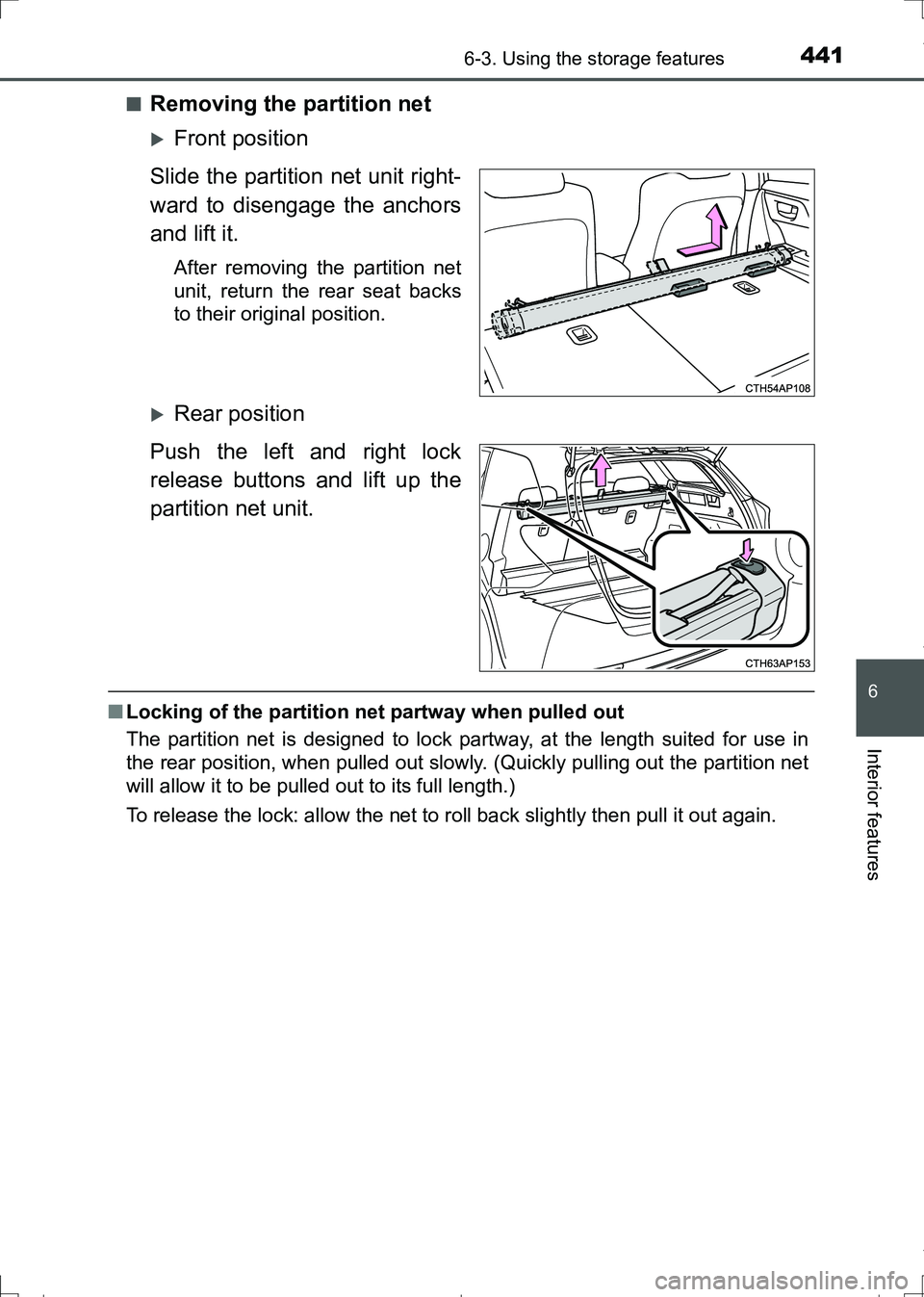
■Removing the partition net
Front position
Slide the partition net unit right-
ward to disengage the anchors
and lift it.
After removing the partition net
unit, return the rear seat backs
to their original position.
Rear position
Push the left and right lock
release buttons and lift up the
partition net unit.
■Locking of the partition net partway when pulled out
The partition net is designed to lock partway, at the length suited for use in
the rear position, when pulled out slowly. (Quickly pulling out the partition net
will allow it to be pulled out to its full length.)
To release the lock: allow the net to roll back slightly then pull it out again.
AURIS Touring Sports_OM_Europe_OM12L13E.book 441 ページ 2016年6月27日 月曜日 午後5時21分
Page 444 of 664

4446-4. Other interior features
AURIS Touring Sports_EE (12L13E)
The clock can be adjusted by pressing the buttons.
Adjusts the hours
Adjusts the minutes
●Vehicles without a smart entry & start system:
The clock is displayed when the engine switch is in the “ACC” or “ON” posi-
tion.
Vehicles with a smart entry & start system:
The clock is displayed when the engine switch is in ACCESSORY or IGNI-
TION ON mode.
●When the battery terminals are disconnected and reconnected, the clock
will automatically be set to 1:00.
The ashtray can be installed in a
cup holder. (P. 428)
Clock
1
2
Portable ashtray (if equipped)
WARNING
●When not in use, keep the ashtray closed.
Injuries may result in the event of sudden braking, sudden swerving or an
accident.
●To prevent fire, fully extinguish matches and cigarettes before putting them
in the ashtray, then make sure the ashtray is fully closed.
●To prevent fire, do not place paper or any other type of flammable object in
the ashtray.
AURIS Touring Sports_OM_Europe_OM12L13E.book 444 ページ 2016年6月27日 月曜日 午後5時21分
Page:
< prev 1-8 9-16 17-24