Page 4 of 428

TABLE OF CONTENTS Index
44-3. Do-it-yourself
maintenance
Do-it-yourself service
precautions ...................... 250
Hood................................... 253
Positioning a floor jack ....... 255
Engine compartment .......... 257
Tires ................................... 270
Tire inflation pressure......... 277
Wheels ............................... 281
Air conditioning filter ........... 284
Wireless remote control
key battery ....................... 287
Checking and replacing
fuses ................................ 290
Light bulbs .......................... 298
5-1. Essential information
Emergency flashers ........... 306
If your vehicle needs to be
towed ............................... 307
If you think something is
wrong ............................... 315
Fuel pump shut off
system .............................. 316 5-2. Steps to take in an
emergency
If a warning light turns
on or a warning buzzer
sounds... .......................... 317
If you have a flat tire ........... 327
If the engine will not
start .................................. 338
If the shift lever cannot be
shifted from P ................... 339
If you lose your keys ........... 340
If the battery is
discharged ........................ 341
If your vehicle overheats..... 345
If the vehicle becomes
stuck ................................. 348
If your vehicle has to be
stopped in an
emergency........................ 350
6-1. Specifications
Maintenance data
(fuel, oil level, etc.) ........... 354
Fuel information .................. 366
Tire information................... 370
6-2. Customization
Customizable features ........ 3835
When trouble arises 6
Vehicle specifications
Page 25 of 428

251-2. Opening, closing and locking the doors and trunk
1
Before driving ■ Vehicle finder function
■ Security feature
If a door is not opened within approximately 60 seconds after the vehicle is
unlocked, the security feature automatically locks the vehicle again.
■ Conditions affecting operation
The wireless remote control function may not operate normally in the follow-
ing situations:
● When the wireless key battery is depleted
● Near a TV tower, electric power plant, gas station, radio station, large dis-
play, airport or other facility that generates strong radio waves or electri-
cal noise
● When carrying a portable radio, cellular phone or other wireless commu-
nication devices
● When the wireless key is in contact with, or is covered by a metallic
object
● When other wireless key (that emit radio waves) is being used nearby
● If window tint with a metallic content or metallic objects are attached to
the rear window When the function is set, a buzzer
(sounds once) and the emergency flash-
ers (flash 3 times) are used to inform the
driver of the vehicle’s location.
Press 3 times within 5 seconds
while within a circumference of approxi-
mately 30 ft. (10 m) from of the vehicle.
However, if the interval between the 3
presses is short, the system may not be
activated. This setting must be custom-
ized at your Toyota dealer.
Page 26 of 428

261-2. Opening, closing and locking the doors and trunk
■ Key battery depletion
If the wireless remote control function does not operate, the battery may be
depleted. Replace the battery when necessary. ( → P. 287)
■ When the wireless remote control battery is fully depleted
→ P. 287
■ Customization that can be conf igured at your Toyota dealer
Settings (e.g. wireless remote control system) can be changed.
(Customizable features → P. 383)
■ Certification for wireless remote control
For vehicles sold in the U.S.A.
FCC ID: HYQ23AAC FCC ID: HYQ12BEL
NOTE:
This device complies with part 15 of the FCC Rules. Operation is subject to
the following two conditions: (1) This device may not cause harmful interfer-
ence, and (2) this device must accept any interference received, including
interference that may cause undesired operation.
FCC WARNING:
Changes or modifications not expressly approved by the party responsible
for compliance could void the user's authority to operate the equipment.
For vehicles sold in Canada
NOTE:
This device complies with Industry Canada’s licence-exempt RSSs. Opera-
tion is subject to the following two conditions: (1) This device may not cause
interference; and (2) This device must accept any interference, including
interference that may cause undesired operation of the device.
NOTE:
Le présent appareil est conforme aux CNR d’Industrie Canada applicables
aux appareils radio exempts de licence. L’exploitation est autorisée aux
deux conditions suivantes: (1) l’appareil ne doit pas produire de brouillage;
(2) l’utilisateur de l’appareil doit accept er tout brouillage radioélectrique subi,
même si le brouillage est susceptible d’en compromettre le fonctionnement.
Page 143 of 428

1432-1. Driving procedures
2
When driving ■ Turning the key from “ACC” to “LOCK”
Shift the shift lever to N (manual transmission) or P (automatic
transmission). ( → P. 145, 152)
■ If the engine does not start
The engine immobilizer system may not have been deactivated. ( → P. 61)
Contact your Toyota dealer.
■ When the steering lock cannot be released
■ Key reminder function
A buzzer sounds if the driver’s door is opened while the engine switch is in
the “LOCK” or “ACC” position to remind you to remove the key.
■ Immediately after reconnecting the battery terminals due to replacing
the battery and so forth
The engine may not start. If this occurs, turn the engine switch to the “ON”
position, and start the engine after waiting at least 10 seconds. Idling may be
unstable immediately after the engine starts, however, this is not a malfunc-
tion. STEP 1
Push in the key and turn to the “LOCK”
position.STEP 2
When starting the engine, the engine
switch may seem stuck in the “LOCK”
position. To free it, turn the key while turn-
ing the steering wheel slightly left and
right.
Page 235 of 428
Maintenance and care
4
2354-1. Maintenance and care
Cleaning and protecting
the vehicle exterior......... 236
Cleaning and protecting
the vehicle interior.......... 240
4-2. Maintenance
Maintenance
requirements .................. 244
General maintenance....... 246
Emission inspection and
maintenance (I/M)
programs........................ 249 4-3. Do-it-yourself
maintenance
Do-it-yourself service
precautions .................... 250
Hood ................................ 253
Positioning a floor
jack ................................ 255
Engine compartment ........ 257
Tires ................................. 270
Tire inflation pressure ...... 277
Wheels ............................. 281
Air conditioning filter......... 284
Wireless remote control
key battery ..................... 287
Checking and replacing
fuses .............................. 290
Light bulbs........................ 298
Page 287 of 428
2874-3. Do-it-yourself maintenance
4
Maintenance and care
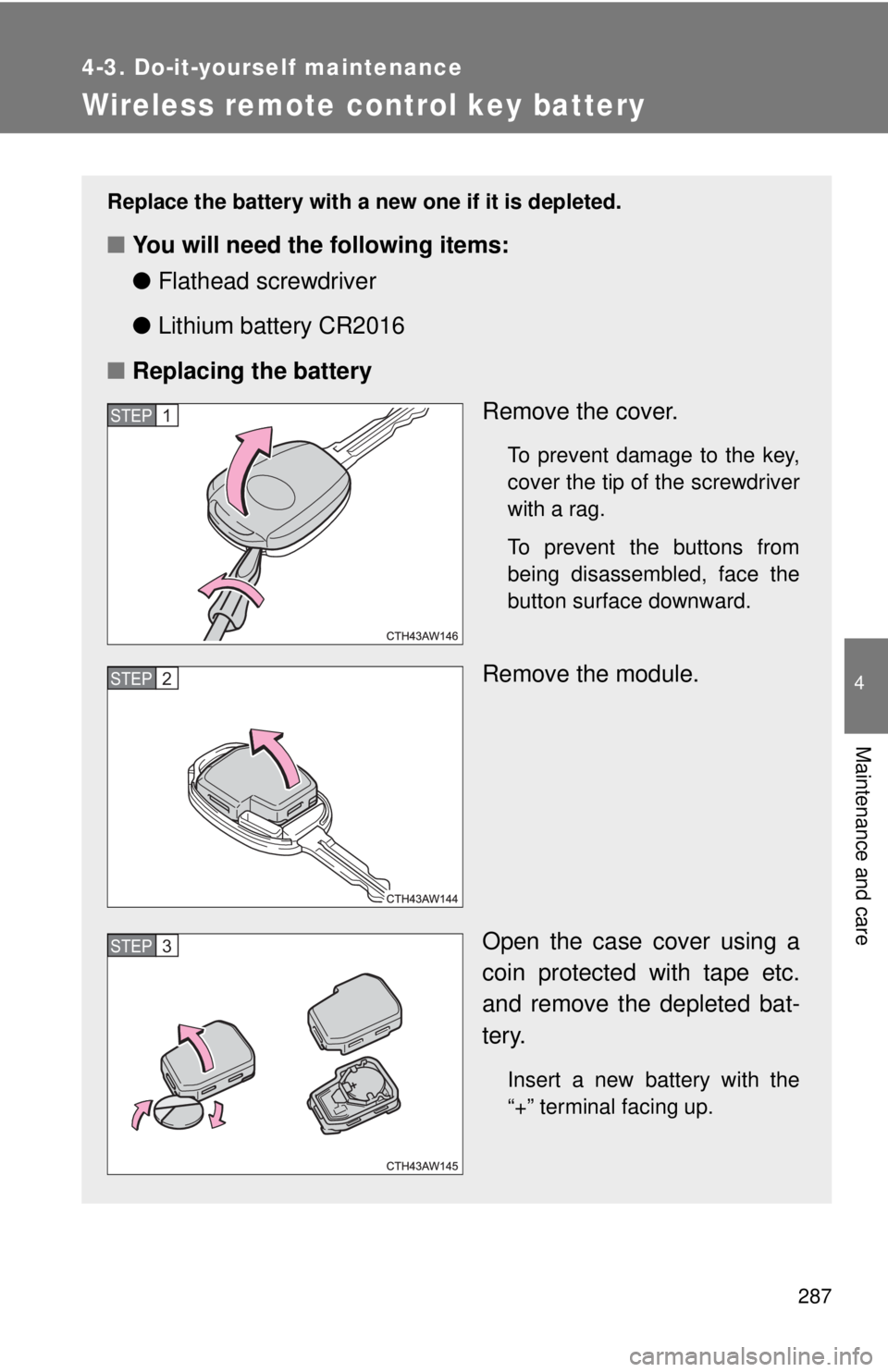
Wireless remote control key battery Replace the battery with a new one if it is depleted.
■ You will need the following items:
● Flathead screwdriver
● Lithium battery CR2016
■ Replacing the battery
Remove the cover. To prevent damage to the key,
cover the tip of the screwdriver
with a rag.
To prevent the buttons from
being disassembled, face the
button surface downward.
Remove the module.
Open the case cover using a
coin protected with tape etc.
and remove the depleted bat-
tery.
Insert a new battery with the
“+” terminal facing up.STEP 1
STEP 2
STEP 3
Page 288 of 428
2884-3. Do-it-yourself maintenance
■ Use a CR2016 lithium battery
● Batteries can be purchased at your Toyota dealer, local electrical appli-
ance shops or camera stores.
● Replace only with the same or equivalent type recommended by the
manufacturer.
● Dispose of used batteries according to local laws.
■ If the key battery is depleted
The following symptoms may occur:
● The wireless remote control will not function properly.
● The operational range will be reduced.
■ When putting the module back
WARNING■ Removed battery and other parts
These parts are small and if swallowed by a child, they can cause choking.
Keep away from children. Failure to do so could result in death or serious
injury. Insert the module from directly above.
Inserting it on an angle may prevent the
key buttons from operating properly.
Page 305 of 428
When trouble arises
5
3055-1. Essential information
Emergency flashers ......... 306
If your vehicle needs
to be towed .................... 307
If you think something
is wrong ......................... 315
Fuel pump shut off
system ........................... 316 5-2. Steps to take in an
emergency
If a warning light turns
on or a warning
buzzer sounds... ............ 317
If you have a flat tire......... 327
If the engine will not
start ................................ 338
If the shift lever cannot be
shifted from P................. 339
If you lose your keys ........ 340
If the battery is
discharged ..................... 341
If your vehicle
overheats ....................... 345
If the vehicle becomes
stuck .............................. 348
If your vehicle has to be
stopped in an
emergency ..................... 350