Page 3 of 528

3
1
8 7
6
5
4
3
2
9
4RUNNER (U)_(OM35B37U)4-1. Before driving
Driving the vehicle ............. 160
Cargo and luggage............ 170
Vehicle load limits ............. 175
Trailer towing..................... 176
Dinghy towing.................... 192
4-2. Driving procedures Engine (ignition) switch (vehicles without a
smart key system) ........... 193
Engine (ignition) switch (vehicles with a
smart key system) ........... 196
Automatic transmission ..... 201
Turn signal lever................ 206
Parking brake .................... 207
4-3. Operating the lights and wipers
Headlight switch ................ 208
Fog light switch ................. 214
Windshield wipers and washer ............................ 216
Rear window wiper and washer ............................ 219
4-4. Refueling Opening the fuel tank cap .................................. 222 4-5. Using the driving
support systems
Cruise control .................... 225
Intuitive parking assist ....... 229
Four-wheel drive system (part-time 4WD
models)............................ 235
Four-wheel drive system (full-time 4WD
models)............................ 239
Active traction control system ............................. 243
AUTO LSD system ............ 245
Rear differential lock system ............................. 247
Downhill assist control system ............................. 250
Crawl Control ..................... 253
Multi-terrain Select............. 256
Driving assist systems ....... 263
4-6. Driving tips Winter driving tips .............. 272
Off-road precautions .......... 276
4Driving
Page 19 of 528
19Pictorial index
4RUNNER (U)_(OM35B37U)AUX port
*2/USB port*2
Seat heater/ven
tilator switches*1. . . . . . . . . . . . . . . . . . . . . P. 295
Power outlets . . . . . . . . . . . . . . . . . . . . . . . . . . . . . . . . . . . . . P. 320
Front-wheel drive control lever
*1. . . . . . . . . . . . . . . . . . . . . P. 235
Front-wheel drive control switch
*1 . . . . . . . . . . . . . . . . . . . P. 235
Four-wheel drive control switch
*1. . . . . . . . . . . . . . . . . . . . P. 239
Seat heater switches
*1 . . . . . . . . . . . . . . . . . . . . . . . . . . . . . P. 295
Power back window switch . . . . . . . . . . . . . . . . . . . . . . . . . P. 150
*1: If equipped
*2: Refer to “NAVIGATION AND MULTIMEDIA SYSTEM OWNER’S MANUAL”.
1
2
3
4
5
6
7
Page 77 of 528
772. Instrument cluster
2
Instrument cluster
4RUNNER (U)_(OM35B37U)
Warning lights inform the driver of malfunctions in the indicated vehi-
cle’s systems.
Warning lights
*1
(U.S.A.)
Brake system warning
light ( →P. 417)*2
Cruise control indicator
light (→P. 418)
*1
(Canada)
Brake system warning
light (→P. 417)*1
Slip indicator ( →P. 418)
*1
Charging system warn-
ing light (→P. 417)*3
(if equipped)
Four-wheel drive indica-
tor light (→P. 418)
*1
(U.S.A.)
Malfunction indicator
lamp (→P. 417)*3
(if equipped)
Low speed four-wheel
drive indicator light
(→P. 419)
*1
(Canada)
Malfunction indicator
lamp ( →P. 417)*3
(if equipped)
Rear differential lock
indicator light ( →P. 418)
*1
SRS warning light
(→P. 418)*3
(if equipped)
Center differential lock
indicator light ( →P. 419)
*1
(U.S.A.)
ABS warning light
(→P. 418)*4
(if equipped)
Multi-terrain Select indi-
cator light ( →P. 419)
*1
(Canada)
ABS warning light
(→P. 418)
(if equipped)
Smart key system warn-
ing light ( →P. 420)
Page 79 of 528
792. Instrument cluster
2
Instrument cluster
4RUNNER (U)_(OM35B37U)
The indicators inform the driver of the operating state of the vehicle’s
various systems.
Indicators
Turn signal indicator
( →P. 206)*1, 2 Slip indicator ( →P. 264)
(U.S.A.)
Headlight indicator
(→P. 208)*1VSC OFF indicator
(→P. 265)
(Canada)
Tail light indicator
(→P. 208) *1, 4“AIR BAG ON/OFF” indi-
cator ( →P. 46)
Headlight high beam
indicator ( →P. 2 1 1 ) Cruise control set indica-
tor (
→P. 225)
Front fog light indicator
( →P. 214)
(if equipped)
Four-wheel drive indica-
tor ( →P. 235)
*4
Security indicator
(→P. 70, 72)*1
(if equipped)
Downhill assist control
system indicator
(→P. 250)
*1, 3Eco Driving Indicator
Light ( →P. 87)
(if equipped)
Low speed four-wheel
drive indicator
(→P. 235, 239)
*1“TRAC OFF” indicator
(→P. 265)
(if equipped)
Rear differential lock
indicator ( →P. 247)
Cruise control indicator
( →P. 225)
(if equipped)
Center differential lock
indicator ( →P. 239)
Page 159 of 528

159
Driving4
4RUNNER (U)_(OM35B37U)4-1. Before driving
Driving the vehicle ............. 160
Cargo and luggage ........... 170
Vehicle load limits ............. 175
Trailer towing..................... 176
Dinghy towing ................... 192
4-2. Driving procedures Engine (ignition) switch (vehicles without a
smart key system) ........... 193
Engine (ignition) switch (vehicles with a
smart key system) ........... 196
Automatic transmission ..... 201
Turn signal lever................ 206
Parking brake .................... 207
4-3. Operating the lights and wipers
Headlight switch ................ 208
Fog light switch ................. 214
Windshield wipers and washer ............................ 216
Rear window wiper and washer ............................ 219 4-4. Refueling
Opening the fuel tank cap .................................. 222
4-5. Using the driving support systems
Cruise control .................... 225
Intuitive parking assist....... 229
Four-wheel drive system (part-time 4WD
models) ........................... 235
Four-wheel drive system (full-time 4WD
models) ........................... 239
Active traction control system ............................ 243
AUTO LSD system............ 245
Rear differential lock system ............................ 247
Downhill assist control system ............................ 250
Crawl Control .................... 253
Multi-terrain Select ............ 256
Driving assist systems ...... 263
4-6. Driving tips Winter driving tips ............. 272
Off-road precautions ......... 276
Page 227 of 528

2274-5. Using the driving support systems
4
Driving
4RUNNER (U)_(OM35B37U)
■Cruise control can be set when
●The shift lever is in D or range 4 or higher of S has been selected.
● Vehicle speed is above approximately 25 mph (40 km/h).
■ Accelerating after setting the vehicle speed
●The vehicle can be accelerated normally. After acceleration, the set speed
resumes.
● Even without canceling the cruise control, the set speed can be increased
by first accelerating the vehicle to the desired speed and then pushing the
lever down to set the new speed.
■ Automatic cruise co ntrol cancelation
Cruise control will stop maintaining the vehicle speed in any of the following
situations.
● Actual vehicle speed falls more than approximately 10 mph (16 km/h) below
the preset vehicle speed.
At this time, the memorized set speed is not retained.
● Actual vehicle speed is below approximately 25 mph (40 km/h).
● VSC is activated.
● The operation cannot be switched for 5 seconds or more after operating the
front-wheel drive control switch (par t-time 4WD models) or the four-wheel
drive control switch (full-time 4WD models).
■ If the cruise control indicator light flashes
Press the “ON-OFF” button once to deactivate the system, and then press
the button again to reactivate the system.
If the cruise control speed cannot be set or if the cruise control cancels imme-
diately after being activated, there may be a malfunction in the cruise control
system. Have the vehicle inspected by your Toyota dealer.
Page 235 of 528
2354-5. Using the driving support systems
4
Driving
4RUNNER (U)_(OM35B37U)
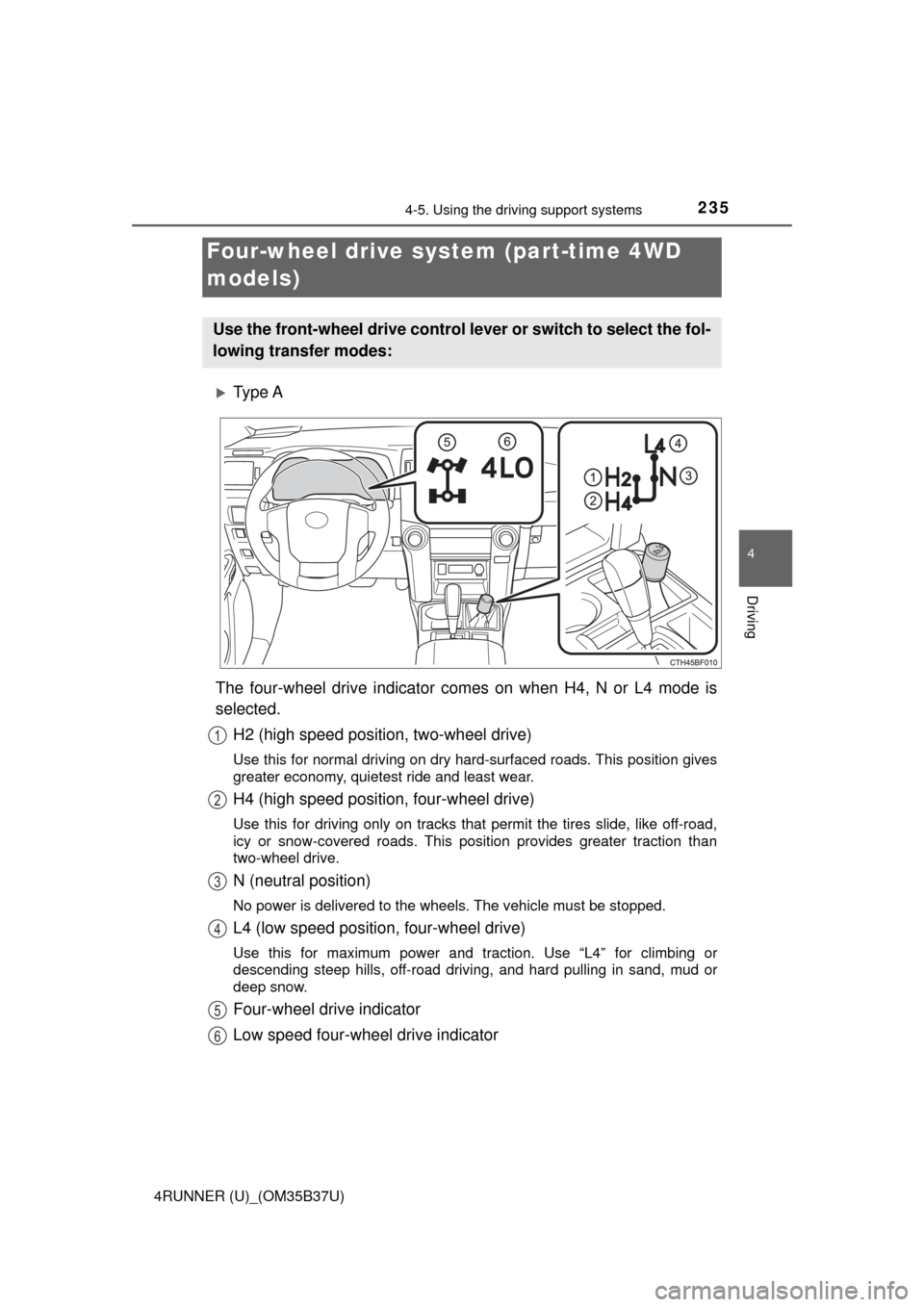
Ty p e A
The four-wheel drive indicator comes on when H4, N or L4 mode is
selected. H2 (high speed position, two-wheel drive)
Use this for normal driving on dry hard-surfaced roads. This position gives
greater economy, quietest ride and least wear.
H4 (high speed position, four-wheel drive)
Use this for driving only on tracks that permit the tires slide, like off-road,
icy or snow-covered roads. This position provides greater traction than
two-wheel drive.
N (neutral position)
No power is delivered to the wheels. The vehicle must be stopped.
L4 (low speed position, four-wheel drive)
Use this for maximum power and traction. Use “L4” for climbing or
descending steep hills, off-road driving, and hard pulling in sand, mud or
deep snow.
Four-wheel drive indicator
Low speed four-wheel drive indicator
Four-wheel drive system (part-time 4WD
models)
Use the front-wheel drive control lever or switch to select the fol-
lowing transfer modes:
1
2
3
4
5
6
Page 236 of 528
2364-5. Using the driving support systems
4RUNNER (U)_(OM35B37U)
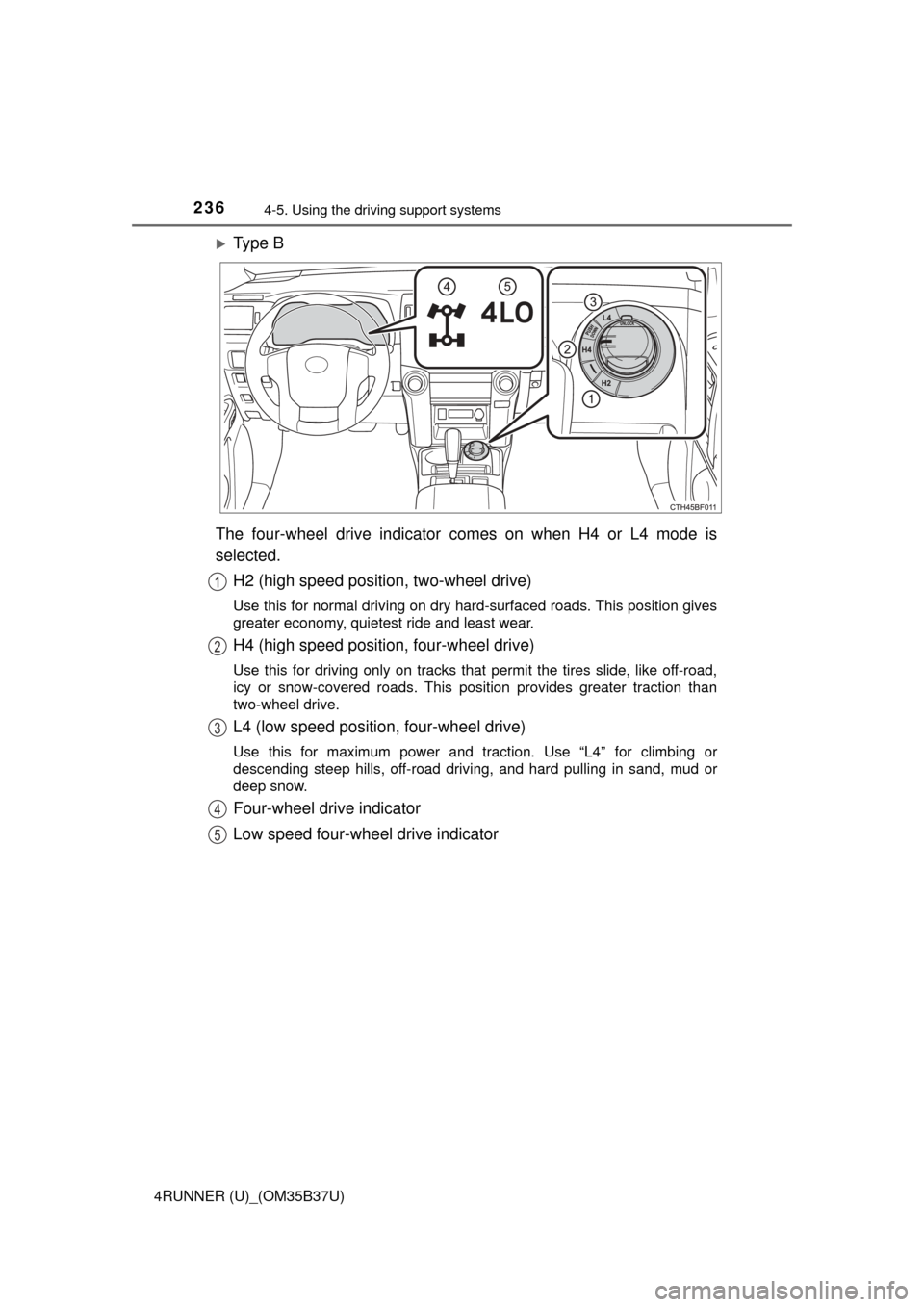
Ty p e B
The four-wheel drive indicator comes on when H4 or L4 mode is
selected. H2 (high speed position, two-wheel drive)
Use this for normal driving on dry hard-surfaced roads. This position gives
greater economy, quietest ride and least wear.
H4 (high speed position, four-wheel drive)
Use this for driving only on tracks that permit the tires slide, like off-road,
icy or snow-covered roads. This position provides greater traction than
two-wheel drive.
L4 (low speed position, four-wheel drive)
Use this for maximum power and traction. Use “L4” for climbing or
descending steep hills, off-road driving, and hard pulling in sand, mud or
deep snow.
Four-wheel drive indicator
Low speed four-wheel drive indicator
1
2
3
4
5