Page 79 of 528
792. Instrument cluster
2
Instrument cluster
4RUNNER (U)_(OM35B37U)
The indicators inform the driver of the operating state of the vehicle’s
various systems.
Indicators
Turn signal indicator
( →P. 206)*1, 2 Slip indicator ( →P. 264)
(U.S.A.)
Headlight indicator
(→P. 208)*1VSC OFF indicator
(→P. 265)
(Canada)
Tail light indicator
(→P. 208) *1, 4“AIR BAG ON/OFF” indi-
cator ( →P. 46)
Headlight high beam
indicator ( →P. 2 1 1 ) Cruise control set indica-
tor (
→P. 225)
Front fog light indicator
( →P. 214)
(if equipped)
Four-wheel drive indica-
tor ( →P. 235)
*4
Security indicator
(→P. 70, 72)*1
(if equipped)
Downhill assist control
system indicator
(→P. 250)
*1, 3Eco Driving Indicator
Light ( →P. 87)
(if equipped)
Low speed four-wheel
drive indicator
(→P. 235, 239)
*1“TRAC OFF” indicator
(→P. 265)
(if equipped)
Rear differential lock
indicator ( →P. 247)
Cruise control indicator
( →P. 225)
(if equipped)
Center differential lock
indicator ( →P. 239)
Page 89 of 528
89
Operation of
each component
3
4RUNNER (U)_(OM35B37U) 3-1. Key information
Keys .................................... 90
Side doors ........................... 97
3-2. Opening, closing and locking the doors
Smart key system ............. 104
Automatic running boards ............................. 112
Back door .......................... 115
3-3. Adjusting the seats Front seats ........................ 120
Rear seats......................... 123
Driving position memory ........................... 133
Head restraints.................. 137
3-4. Adjusting the steering wheel and mirrors
Steering wheel .................. 140
Inside rear view mirror ...... 142
Outside rear view mirrors ............................. 144
3-5. Opening, closing the windows and
moon roof
Power windows ................. 146
Power back window .......... 150
Moon roof .......................... 154
Page 91 of 528
913-1. Key information
3
Operation of each component
4RUNNER (U)_(OM35B37U)
Vehicles without a smart key systemLocks all the doors ( →P. 9 7 )
Sounds the alarm
(press and hold) ( →P. 9 2 )
Unlocks all the doors
( → P. 9 7 )
Pressing the button unlocks the
driver’s door. Pressing the but-
ton again within 3 seconds
unlocks the other doors.
Opens the windows and
moon roof (press and hold)
*
*
: This setting must be customized
at your Toyota dealer.
Vehicles with a smart key system
Locks all the doors ( →P. 9 7 )
Unlocks all the doors
( → P. 97)
Pressing the button unlocks the
driver’s door. Pressing the but-
ton again within 3 seconds
unlocks the other doors.
Opens the windows and
moon roof (press and hold)
*
Sounds the alarm
(press and hold) ( →P. 9 2 )
*: This setting must be customized
at your Toyota dealer.
Wireless remote control (if equipped)
1
2
3
4
1
2
3
4
Page 92 of 528

923-1. Key information
4RUNNER (U)_(OM35B37U)
To take out the mechanical key,
push the release button and take
the key out.
The mechanical key can only be
inserted in one direction, as the
key only has grooves on one side.
If the key cannot be inserted in a
lock cylinder, turn it over and re-
attempt to insert it.
After using the mechanical key, store it in the electronic key. Carry the
mechanical key together with the electronic key. If the electronic key bat-
tery is depleted or the entry function does not operate properly, you will
need the mechanical key. (→P. 451)
■Panic mode
Vehicles without a smart key system
Vehicles with a smart key system
■ When required to leave the vehicle’s key with a parking attendant
Lock the glove box as circumstances demand. ( →P. 301)
Vehicles without a smart key system: Carry the master key for your own use
and provide the attendant with the valet key.
Vehicles with a smart key system: Remove the mechanical key for your own
use and provide the attendant with the electronic key only.
Using the mechanical key (vehic les with a smart key system)
When is pressed for longer than
about one second, an alarm will sound
intermittently and the vehicle lights will
flash to deter any person from trying to
break into or damage your vehicle.
To stop the alarm, press any button on the
wireless remote control.
When is pressed for longer than
about one second, an alarm will sound
intermittently and the vehicle lights will
flash to deter any person from trying to
break into or damage your vehicle.
To stop the alarm, press any button on the
electronic key.
Page 94 of 528

943-1. Key information
4RUNNER (U)_(OM35B37U)■
Key battery depletion
Vehicles with a smart key system
● The standard battery life is 1 to 2 years.
● If the battery becomes low, an alarm will sound in the cabin when the engine
stops. ( →P. 431)
● As the electronic key always receives radio waves, the battery will become
depleted even if the electronic key is not used. The following symptoms indi-
cate that the electronic key battery may be depleted. Replace the battery
when necessary. ( →P. 383)
• The smart key system or the wireless remote control does not operate.
• The detection area becomes smaller.
• The LED indicator on the key surface does not turn on.
● To avoid serious deterioration, do not leave the electronic key within 3 ft. (1
m) of the following electrical appl iances that produce a magnetic field:
•TVs
• Personal computers
• Cellular phones, cordless phones and battery chargers
• Recharging cellular phones or cordless phones
• Table lamps
• Induction cookers
Vehicles without a smart key system
If the wireless remote control function does not operate, the battery may be
depleted. Replace the battery when necessary. (→ P. 383)
■ Precautions when disconnecting the battery (vehicles with a smart key
system)
● In some cases, it may not be possible to unlock the doors using the smart
key system immediately after the battery has been disconnected. Use the
wireless remote control or the mechanical key to lock or unlock the doors.
● The engine may not start on the first attempt after reconnecting the battery
but will start normally after the second attempt. This is not a malfunction.
● The engine switch mode is memorized by the vehicle. When the battery is
reconnected, the system will return to the mode it was in before the battery
was disconnected. Before disconnecting the battery, turn the engine switch
off.
If you are unsure what mode the engine switch was in when the battery was
disconnected, be especially careful when reconnecting the battery.
Page 97 of 528
973-1. Key information
3
Operation of each component
4RUNNER (U)_(OM35B37U)
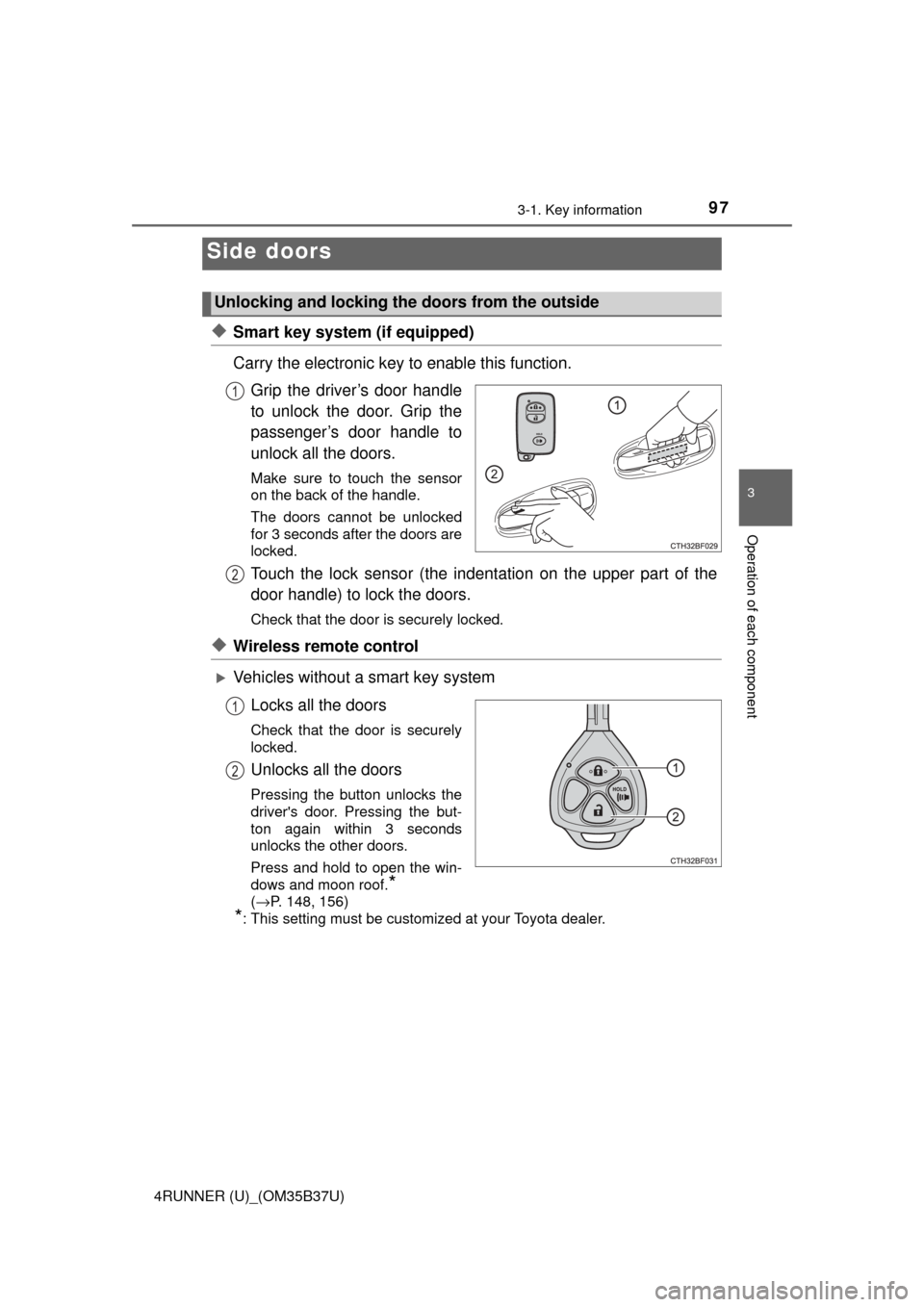
◆Smart key system (if equipped)
Carry the electronic key to enable this function.Grip the driver’s door handle
to unlock the door. Grip the
passenger’s door handle to
unlock all the doors.
Make sure to touch the sensor
on the back of the handle.
The doors cannot be unlocked
for 3 seconds after the doors are
locked.
Touch the lock sensor (the indent ation on the upper part of the
door handle) to lock the doors.
Check that the door is securely locked.
◆Wireless remote control
Vehicles without a smart key system
Locks all the doors
Check that the door is securely
locked.
Unlocks all the doors
Pressing the button unlocks the
driver's door. Pressing the but-
ton again within 3 seconds
unlocks the other doors.
Press and hold to open the win-
dows and moon roof.
*
( →P. 148, 156)
*: This setting must be customized at your Toyota dealer.
Side doors
Unlocking and locking the doors from the outside
1
2
1
2
Page 98 of 528
983-1. Key information
4RUNNER (U)_(OM35B37U)
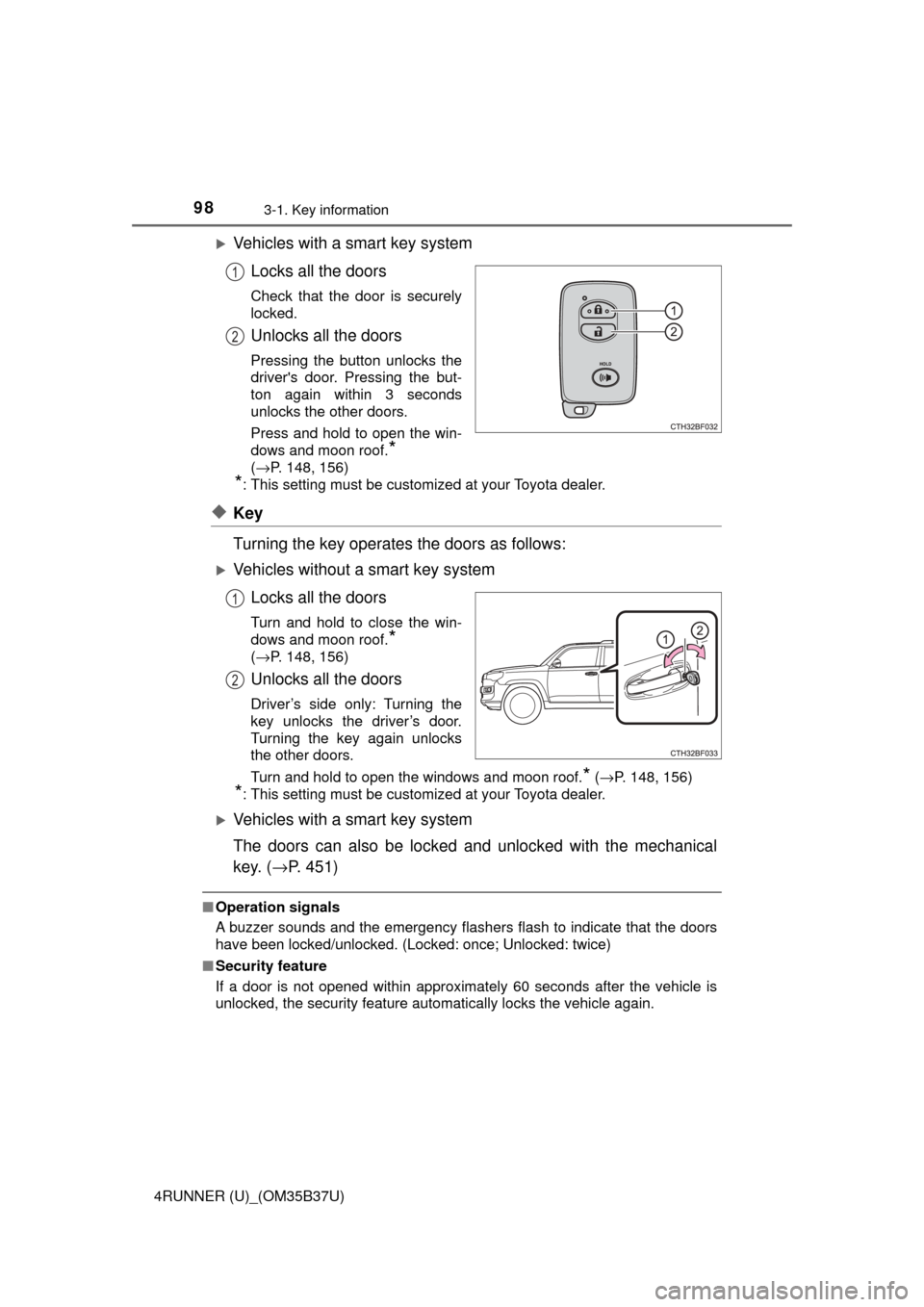
Vehicles with a smart key systemLocks all the doors
Check that the door is securely
locked.
Unlocks all the doors
Pressing the button unlocks the
driver's door. Pressing the but-
ton again within 3 seconds
unlocks the other doors.
Press and hold to open the win-
dows and moon roof.
*
( →P. 148, 156)
*: This setting must be customized at your Toyota dealer.
◆Key
Turning the key operates the doors as follows:
Vehicles without a smart key system
Locks all the doors
Turn and hold to close the win-
dows and moon roof.
*
( →P. 148, 156)
Unlocks all the doors
Driver’s side only: Turning the
key unlocks the driver’s door.
Turning the key again unlocks
the other doors.
Turn and hold to open the windows and moon roof.
* ( →P. 148, 156)
*: This setting must be customized at your Toyota dealer.
Vehicles with a smart key system
The doors can also be locked and unlocked with the mechanical
key. ( →P. 451)
■Operation signals
A buzzer sounds and the emergency flashers flash to indicate that the doors
have been locked/unlocked. (Locked: once; Unlocked: twice)
■ Security feature
If a door is not opened within approximately 60 seconds after the vehicle is
unlocked, the security feature automatically locks the vehicle again.
1
2
1
2
Page 99 of 528

993-1. Key information
3
Operation of each component
4RUNNER (U)_(OM35B37U)■
When the door ca nnot be locked by the lock sen sor on the upper part of
the door handle (vehicles with a smart key system)
■ Door lock buzzer
If an attempt to lock the doors is made when a door is not fully closed, a
buzzer sounds continuously. Fully close the door to stop the buzzer, and lock
the vehicle once more.
■ Alarm
Locking the doors will set the alarm system. ( →P. 72)
■ If the smart key system or the wireless remote control does not operate
properly
Use the mechanical key to lock and unlock the doors. ( →P. 451)
Replace the battery with a new one if it is depleted. ( →P. 383)
◆Door lock switches
Locks all the doors
Unlocks all the doors
◆Inside lock buttonsLocks the door
Unlocks the door
The front doors can be opened
by pulling the inside handle
even if the lock buttons are in
the lock position.
If the door will not lock even when the top-
side sensor area is touched, try touching
both the topside and underside sensor
areas at the same time.
Unlocking and locking the doors from the inside
1
2
1
2