Page 428 of 528
4287-2. Steps to take in an emergency
4RUNNER (U)_(OM35B37U)
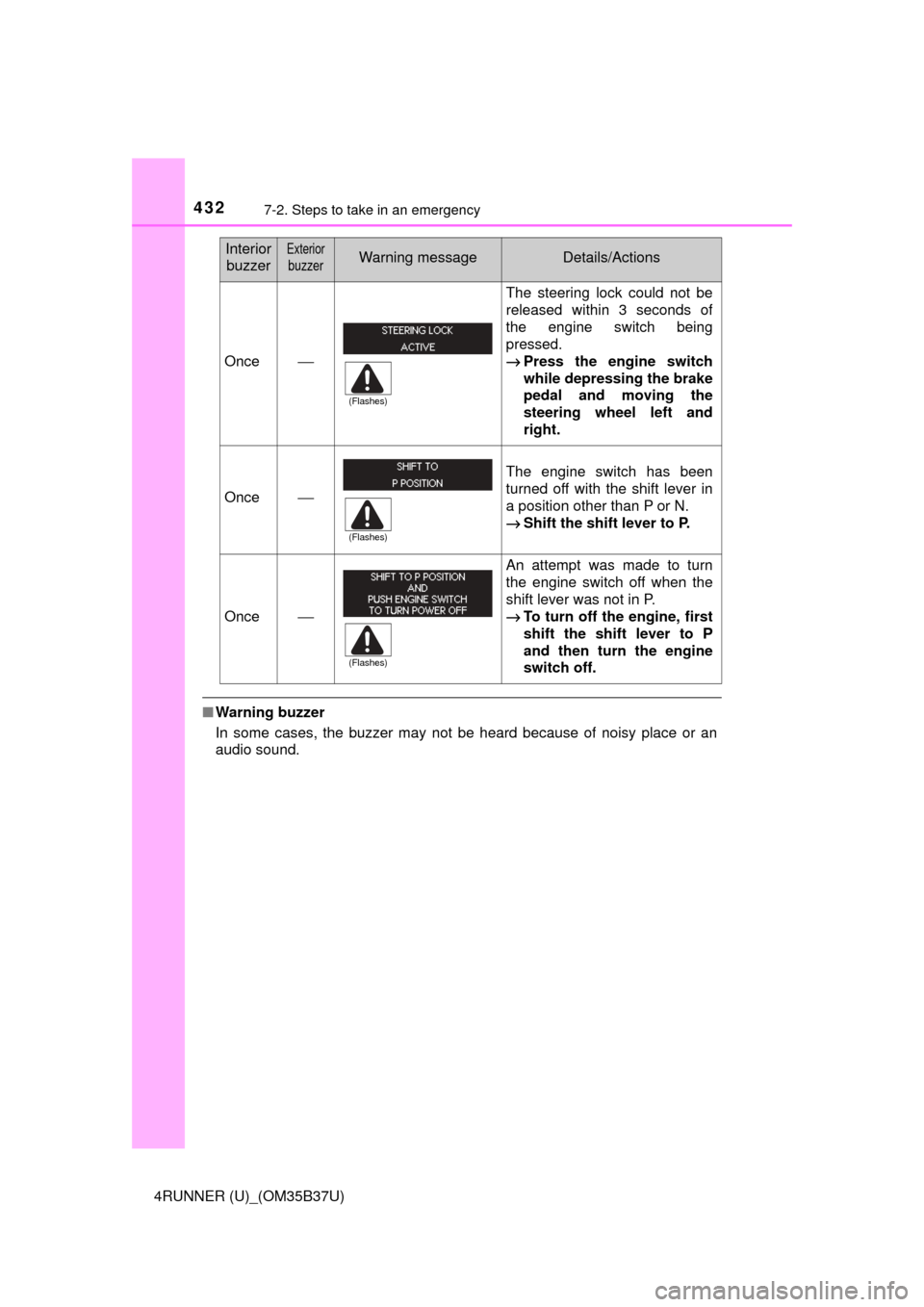
*: Refer to the separate “Scheduled Maintenance Guide” or “Owner’s ManualSupplement” for the maintenance interval applicable to your vehicle.
Indicates that an intuitive parking assist-sensor is
dirty or covered with ice The site of the malfunction flashes and stays
on.
A buzzer will sound for several seconds and
this warning message will disappear after sev-
eral seconds.
If the engine switch is turned to a mode other
than IGNITION ON mode and then back to
IGNITION ON mode, the buzzer will sound and
this message will be displayed again.
→ Clean the sensor.
(U.S.A. only)
Indicates that all maintenance according to the
driven distance on the maintenance schedule
*
should be performed soon.
Comes on approximately 4500 miles (7200 km)
after the message has been reset.
→If necessary, perform maintenance.
(U.S.A. only)
Indicates that all maintenance is required to cor-
respond to the driven distance on the mainte-
nance schedule
*.
Comes on approximately 5000 miles (8000 km)
after the message has been reset.
(The indicator will not work properly unless the
maintenance data has been reset.)
→ Perform the necessary maintenance.
Please reset the message after the mainte-
nance is performed. ( →P. 345)
Warning messageDetails/Actions
Page 429 of 528
4297-2. Steps to take in an emergency
7
When trouble arises
4RUNNER (U)_(OM35B37U)
InteriorbuzzerExterior
buzzerWarning messageDetails/Actions
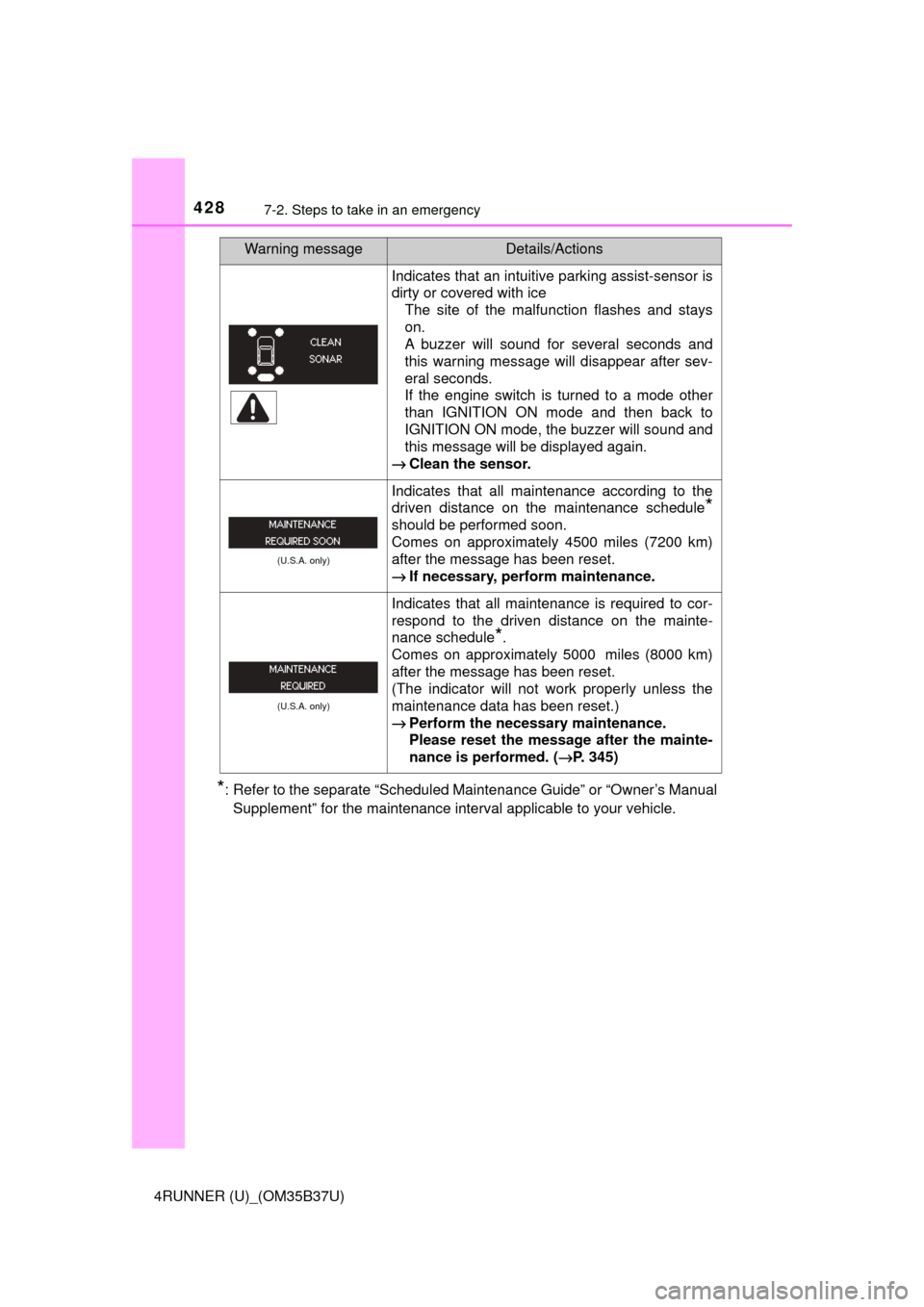
Once ⎯ The electronic key is not
detected when an attempt is
made to start the engine.
→
Start the engine with the
electronic key present.
Once3
times
The electronic key was carried
outside the vehicle and a door
other than the driver’s door was
opened and closed while the
engine switch was in a mode
other than off.
→Bring the electronic key
back into the vehicle.
The driver’s door was opened
and closed while the electronic
key was not in the vehicle, the
shift lever was in P and the
engine switch was not turned
off.
→Turn the engine switch off
or bring the electronic key
back into the vehicle.
Once
Con-
tinu-
ous
(5-
sec-
onds)An attempt was made to exit
the vehicle with the electronic
key and lock the doors without
first turning the engine switch
off when the shift lever was in P.
→Turn the engine switch off
and lock the doors again.
Once⎯
An attempt was made to drive
when the regular key was not
inside the vehicle.
→Confirm that the elec-
tronic key is inside the
vehicle.
Con-
tinu-
ous
⎯
The driver’s door was opened
while any shift lever other than
P was selected without turning
off the engine switch.
→Shift the shift lever to P.
(Flashes)
(Flashes)
(Displayed alternately)
(Flashes)
(Flashes)
(Flashes)
Page 430 of 528
4307-2. Steps to take in an emergency
4RUNNER (U)_(OM35B37U)
Con-
tinu-
ousCon-
tinu-
ous
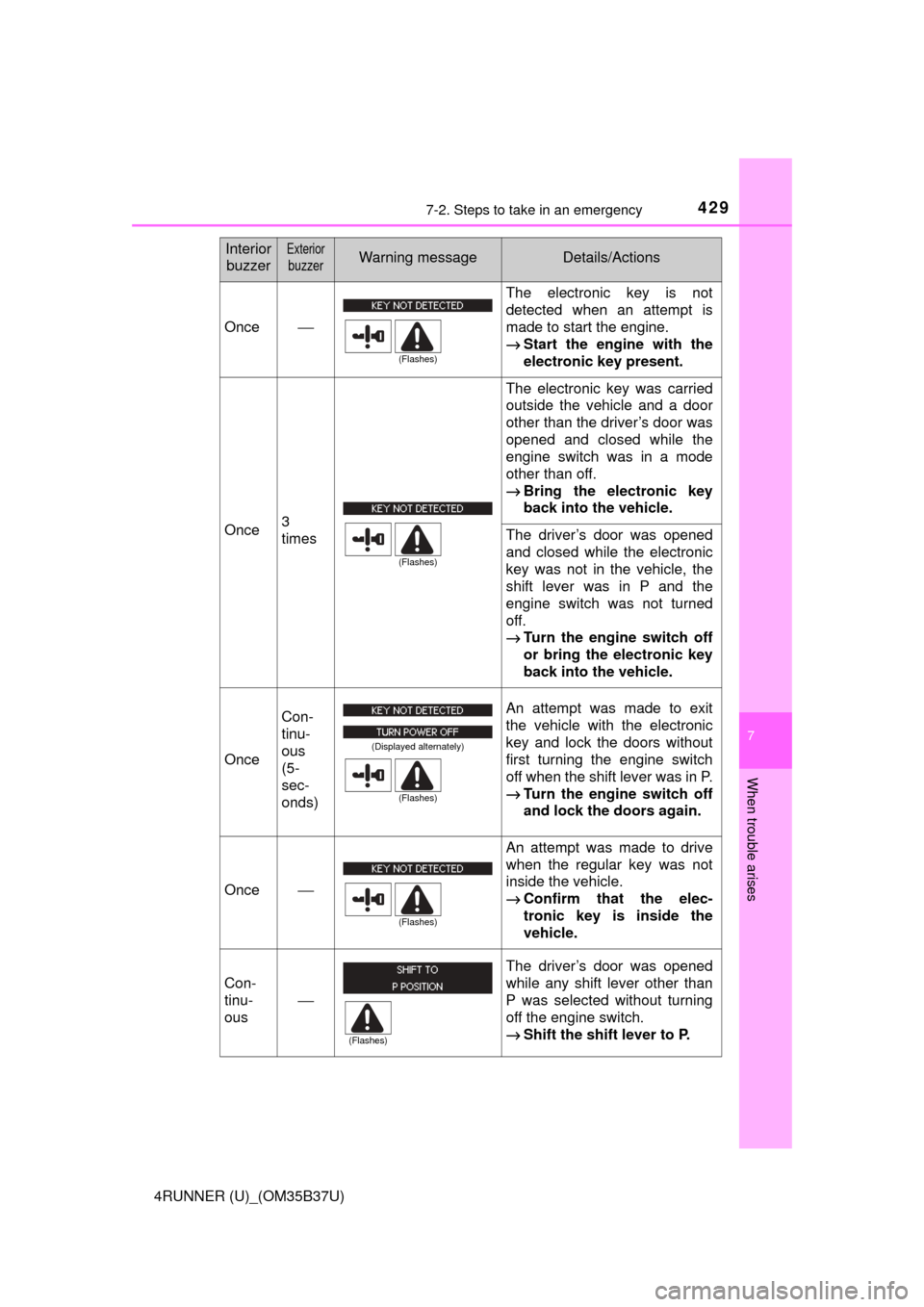
The driver’s door was opened
and closed while the electronic
key was not in the vehicle, the
shift lever was not in P and the
engine switch was not turned
off.
→Shift the shift lever to P.
Bring the electronic key
back into the vehicle.
Once
Con-
tinu-
ous
An attempt was made to lock
the doors using the smart key
system while the electronic key
was still inside the vehicle.
→Retrieve the electronic key
from the vehicle and lock
the doors again.
⎯
Con-
tinu-
ous
An attempt was made to lock
either front door by opening a
door and putting the inside lock
button into the lock position,
then closing the door by pulling
on the outside door handle with
the electronic key still inside the
vehicle.
→Retrieve the electronic key
from the vehicle and lock
the doors again.
Once⎯
• When the doors were
unlocked with the mechani-
cal key and then the engine
switch was pressed, the
electronic key could not be
detected in the vehicle.
• The electronic key could
not be detected in the vehi-
cle even after the engine
switch was pressed two
consecutive times.
→ Touch the electronic key to
the engine switch while
depressing the brake
pedal.
Interior
buzzerExterior
buzzerWarning messageDetails/Actions
(Displayed alternately)
(Flashes)
(Flashes)
(Flashes)
(Flashes)
Page 431 of 528
4317-2. Steps to take in an emergency
7
When trouble arises
4RUNNER (U)_(OM35B37U)
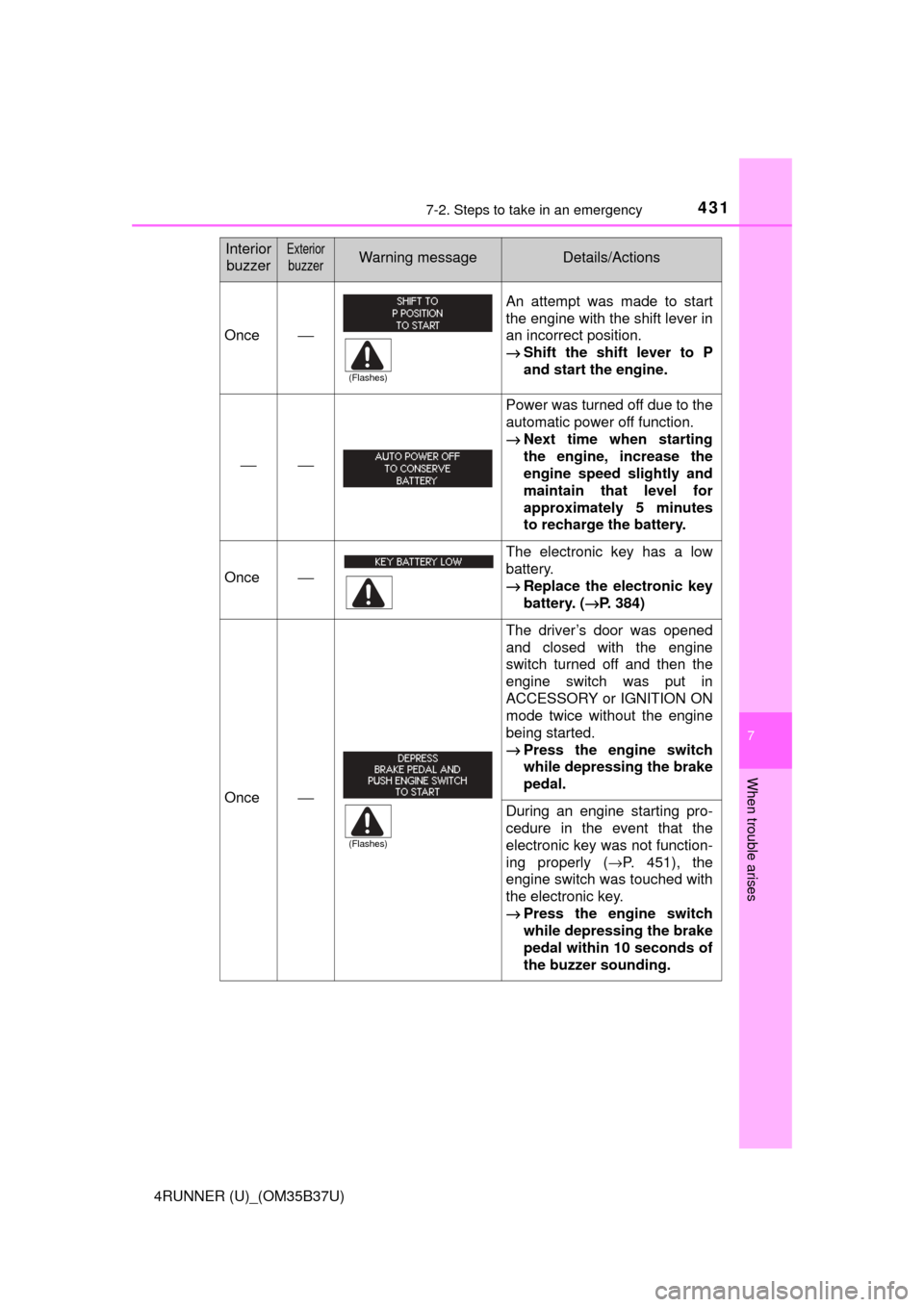
Once⎯
An attempt was made to start
the engine with the shift lever in
an incorrect position.
→Shift the shift lever to P
and start the engine.
⎯⎯
Power was turned off due to the
automatic power off function.
→Next time when starting
the engine, increase the
engine speed slightly and
maintain that level for
approximately 5 minutes
to recharge the battery.
Once⎯
The electronic key has a low
battery.
→Replace the electronic key
battery. ( →P. 384)
Once⎯
The driver’s door was opened
and closed with the engine
switch turned off and then the
engine switch was put in
ACCESSORY or IGNITION ON
mode twice without the engine
being started.
→Press the engine switch
while depressing the brake
pedal.
During an engine starting pro-
cedure in the event that the
electronic key was not function-
ing properly ( →P. 451), the
engine switch was touched with
the electronic key.
→ Press the engine switch
while depressing the brake
pedal within 10 seconds of
the buzzer sounding.
Interior
buzzerExterior
buzzerWarning messageDetails/Actions
(Flashes)
(Flashes)
Page 432 of 528
4327-2. Steps to take in an emergency
4RUNNER (U)_(OM35B37U)
■Warning buzzer
In some cases, the buzzer may not be heard because of noisy place or an
audio sound.
Once⎯
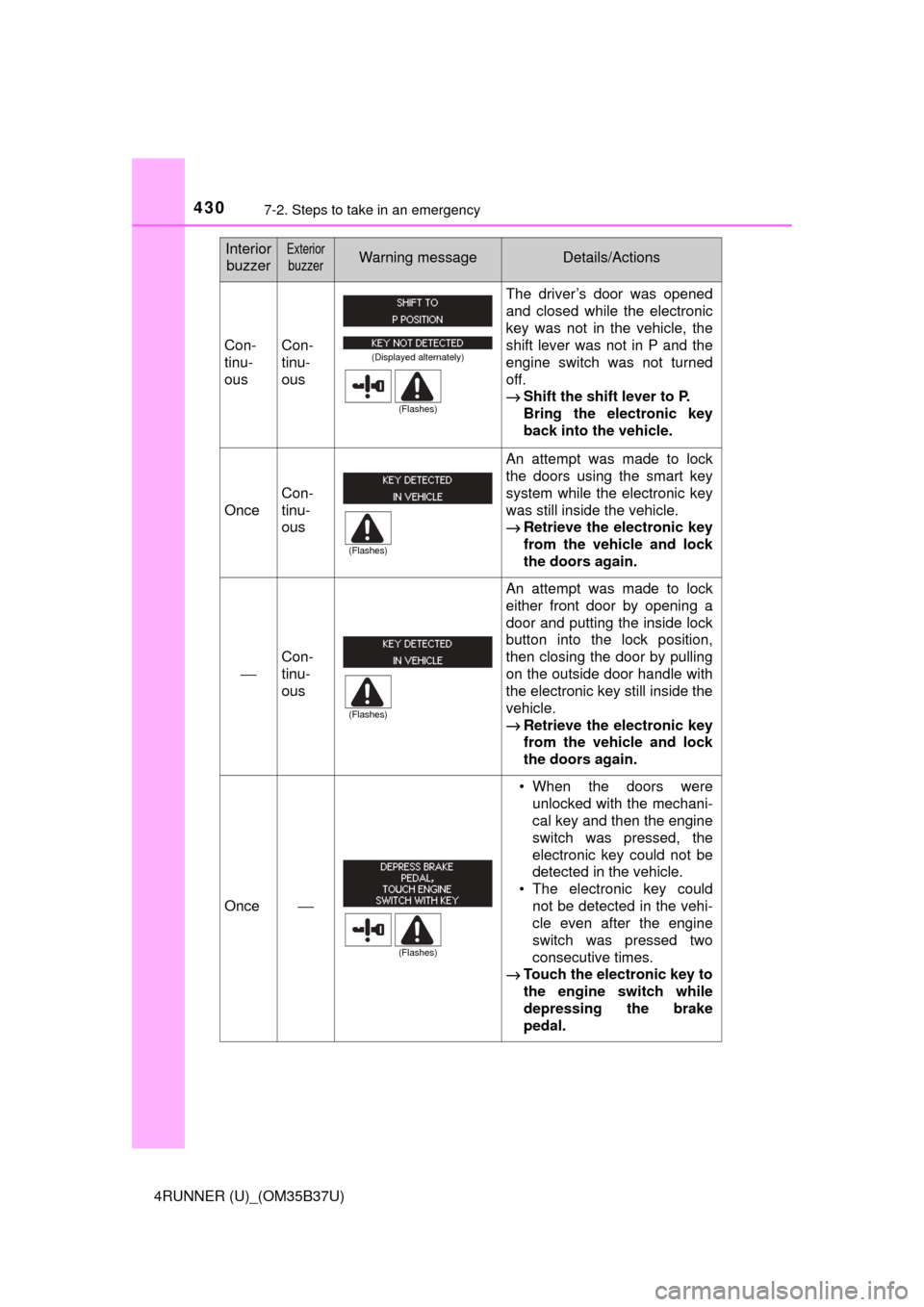
The steering lock could not be
released within 3 seconds of
the engine switch being
pressed.
→ Press the engine switch
while depressing the brake
pedal and moving the
steering wheel left and
right.
Once⎯
The engine switch has been
turned off with the shift lever in
a position other than P or N.
→Shift the shift lever to P.
Once⎯
An attempt was made to turn
the engine switch off when the
shift lever was not in P.
→To turn off the engine, first
shift the shift lever to P
and then turn the engine
switch off.
Interior
buzzerExterior
buzzerWarning messageDetails/Actions
(Flashes)
(Flashes)
(Flashes)
Page 433 of 528
4337-2. Steps to take in an emergency
7
When trouble arises
4RUNNER (U)_(OM35B37U)
●Phillips screwdriver
● Stop the vehicle in a safe place on a hard, flat surface.
● Set the parking brake.
● Shift the shift lever to P.
● Stop the engine.
● Turn on the emergency flashers. ( →P. 406)
If you have a flat tire
Your vehicle is equipped with a spare tire. The flat tire can be
replaced with the spare tire.
For details about tires: →P. 369
CAUTION
■If you have a flat tire
Do not continue driving with a flat tire.
Driving even a short dist ance with a flat tire can damage the tire and the
wheel beyond repair, which could result in an accident.
You will need the following item:
Before jacking up the vehicle
Page 435 of 528

4357-2. Steps to take in an emergency
7
When trouble arises
4RUNNER (U)_(OM35B37U)
CAUTION
■Using the tire jack
Improper use of the tire jack may cause the vehicle to suddenly fall off
the jack, leading to death or serious injury.
●Do not use the tire jack for any purpose other than replacing tires or
installing and removing tire chains.
●Only use the tire jack that comes with this vehicle for replacing a flat
tire.
Do not use it on other vehicles, and do not use other tire jacks for
replacing tires on this vehicle.
●Always check that the tire jack is securely set to the jack point.
●Do not put any part of your body under the vehicle while it is supported
by the jack.
●Do not start or run the engine while your vehicle is supported by the
jack.
●Do not raise the vehicle while someone is inside.
●When raising the vehicle, do not put an object on or under the jack.
●Do not raise the vehicle to a height greater than that required to
replace the tire.
●Use a jack stand if it is necessary to get under the vehicle.
Vehicles with Automatic running boards
●Observe the following precautions. Failu re to do so may result in seri-
ous injury:
• When jacking up the vehicle, always turn the Automatic running boards switch off.
• When jacking up the vehicle, do not use an Automatic running board
as a jack point. The Automatic running board may break, causing
injuries.
Take particular care when lowering the vehicle to ensure that no one
working on or near the vehicle may be injured.
■Using the jack handle
Tighten all the jack handle bolts securely using a Phillips-head screw-
driver, to prevent the extension parts from coming apart unexpectedly.
Page 448 of 528

4487-2. Steps to take in an emergency
4RUNNER (U)_(OM35B37U)
One of the following may be the cause of the problem:
●There may not be sufficient fuel in the vehicle’s tank.
Refuel the vehicle.
● The engine may be flooded.
Try to restart the engine again following correct starting procedures.
(→ P. 193, 196)
● There may be a malfunction in the engine immobilizer system.
(→ P. 70)
One of the following may be the cause of the problem:
● The battery may be discharged. ( →P. 453)
● The battery terminal connections may be loose or corroded.
The engine starting system may be malfunctioning due to an electrical
problem such as an open circuit or a blown fuse. However, an interim
measure is available to start the engine. ( →P. 449)
If the engine w ill not start
If the engine will not start eve n though correct starting proce-
dures are being followed ( →P. 193, 196), consider each of the fol-
lowing points:
The engine will not start even though the starter motor operates
normally.
The starter motor turns over slowly, the interior lights and head-
lights are dim, or the horn does not sound or sounds at a low
volume.
The starter motor does not turn over