2017 SUZUKI SWIFT stop
[x] Cancel search: stopPage 123 of 336

4-6
DRIVING TIPS
67LH3-74E
74LHM0408
Do’s and Dont’s for Safe
DrivingExercise care in handling your vehicle. Be
conscious of not only your own safety but
also the safety of others on the road, and
thus enjoy the best and most comfortable
driving experience.
Following are basic rules for safe driving.
Read them carefully for good understand-
ing of the content so that you can enjoy
safe and pleasant driving in your vehicle.Starting1) Adjust the driver’s seat for the proper driving posture.
2) Adjust the rear view mirror so as to obtain the best po ssible rear view.
74LHM0409
3) Before moving, look around your vehi-
cle to confirm safety.
4) Don’t accelerate suddenly, since it is
dangerous and wastes fuel.General driving1) Be sure to stop before a stop light orstop sign. When moving into an inter-
section without any traffic lights or
signs, drive slowly to confirm safety.
2) Always follow other vehicles at a safe
distance in order to prevent a rear-end
collision, in case the vehicle ahead
makes a sudden stop.
74LHM0410
3) Turn ON the turn signal at least 30meters before making a turn or chang-
ing the lane so as to not be hit.
4) Before entering a corner, decelerate to a safe speed. Don’t apply brakes during
cornering, or skidding may occur.
5) When overtaking other vehicles, watch out for oncoming vehicles and carefully
ensure safety.
6) Don’t attempt zigzag driving as it will hinder your control over the vehicle and
may cause an accident.
7) Avoid reckless high speed driving and try to drive at a safe speed suitable for
the road conditions while maintaining a
constant speed.
8) Higher the speed, narrower the driver’s visual range becomes. In such a state,
it is difficult to anticipate any hazard and
the driver feels fatigued.
EXAMPLE
EXAMPLE
EXAMPLE
Page 125 of 336
4-8
DRIVING TIPS
67LH3-74E
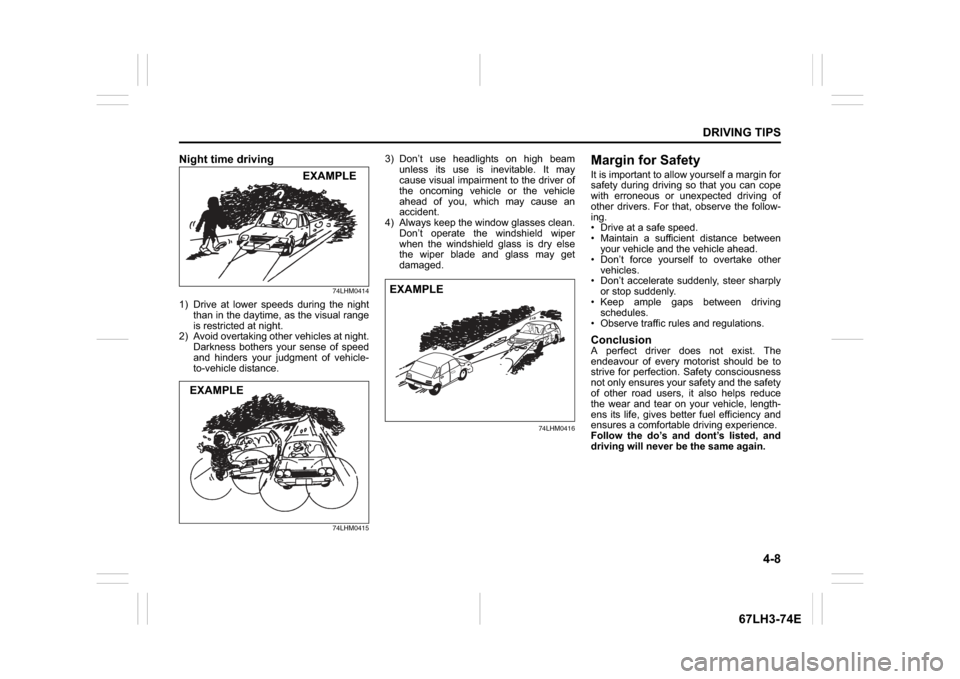
Night time driving
74LHM0414
1) Drive at lower speeds during the nightthan in the daytime, as the visual range
is restricted at night.
2) Avoid overtaking other vehicles at night.
Darkness bothers your sense of speed
and hinders your judgment of vehicle-
to-vehicle distance.
74LHM0415
3) Don’t use headlights on high beamunless its use is inevitable. It may
cause visual impairment to the driver of
the oncoming vehicle or the vehicle
ahead of you, which may cause an
accident.
4) Always keep the window glasses clean.
Don’t operate the windshield wiper
when the windshield glass is dry else
the wiper blade and glass may get
damaged.
74LHM0416
Margin for SafetyIt is important to allow yourself a margin for
safety during driving so that you can cope
with erroneous or unexpected driving of
other drivers. For that, observe the follow-
ing.
Drive at a safe speed.
Maintain a sufficient distance betweenyour vehicle and the vehicle ahead.
Don’t force yourself to overtake other
vehicles.
Don’t accelerate suddenly, steer sharply or stop suddenly.
Keep ample gaps between driving schedules.
Observe traffic rules and regulations.ConclusionA perfect driver does not exist. The
endeavour of every motorist should be to
strive for perfection. Safety consciousness
not only ensures your safety and the safety
of other road users, it also helps reduce
the wear and tear on your vehicle, length-
ens its life, gives better fuel efficiency and
ensures a comfortable driving experience.
Follow the do’s and dont’s listed, and
driving will never be the same again.
EXAMPLE
EXAMPLE
EXAMPLE
Page 140 of 336

5-13OTHER CONTROLS AND EQUIPMENT
74LH0-74E
(if equipped)
The
® word mark and logo are registered
trademarks and are owned by the SIG,
Ink.
Stop using this unit and a
® ready
device whenever requested.
This unit shares the communication fre-
quency with other private or public wireless
communication equipment such as a wire-
less LAN and other wireless communica-
tion radios.
You should stop using this unit whenever
you are notified that your unit disturbs
other wireless communication immediately.
Basic Operations(1) VOL PUSH POWER knob
(2) TUNE FOLDER PUSH SOUND knob
(3) MUTE buttonTurning power on/off
Press the VOL PUSH POWER knob (1).
The unit starts in the function mode it was
in when the power was turned off last.
Adjusting the volume
Turn the VOL PUSH POWER knob (1).
Turning it clockwise increases the volume;
turning it counterclockwise decreases the
volume.
NOTE:
While driving, adjust the volume to an
extent that sound and/or noise coming
from outside the vehicle can be heard.
Mute
Press the MUTE button (3) to mute the
sound. To cancel the mute, press the
MUTE button (3) again.
® Mic (1) (if equipped)Adjusting bass/treble/balance /fader
1) Press the TUNE FOLDER PUSH
SOUND knob (2).
Each time the knob is pressed, sound
adjustment will change as follows:
2) Turn the TUNE FOLDER PUSH
SOUND knob (2) to adjust the sound.
(1) (2)(3)
B
S U
CD
2
3 4 5 6
SEEK/TRACK
AS
AMFM RPT
RDM
DISP
PUSHSOUND
TUNE/FLD
VOLPWRPUSH
11
MENU
1
Preset-EQ(EQ OFF)
Bass adjustment (BASS 0)
Treble adjustment (TREBLE 0)
Balance adjustment (BALANCE 0)
Fader adjustment (FADER 0)
AVC adjustment (AVC LEVEL 2)
Page 141 of 336

5-14
OTHER CONTROLS AND EQUIPMENT
74LH0-74E
Adjusting the AVC (Auto volume con-
trol)The Auto Volume Control (AVC) function
automatically adjusts (increases/decreases)
the sound volume in accordance with vehicle
speed. The AVC control is provided with
three selectable levels (LEVEL OFF, 1, 2, 3).
The range of volume adjustment increases
together with the LEVEL number.1) Press the TUNE FOLDER PUSH
SOUND knob (2) until the AVC adjust-
ment mode is selected.
2) Turn the TUNE FOLDER PUSH
SOUND knob (2) to select the desired
AVC adjustment level. (Initial setting:
LEVEL 2)
Preset-EQ
Preset-EQ calls up various sound types in
accordance with the listening music type.
1) Press the TUNE FOLDER PUSH
SOUND knob (2) several times until
“PRESET-EQ” appears.
2) Turn the TUNE FOLDER PUSH
SOUND knob (2).
Each time the knob is turned, preset
EQ mode will change as follows:
Listening to the RadioDisplay(1) FM button
(2) AM button
(3) Up button
(4) Down button
(5) TUNE FOLDER PUSH SOUND knob
(6) Preset buttons ([1] to [6])
(7) AST button
(A) Band
(B) Frequency
Selecting the FM band
Press the FM button (1).
Each time the button is pressed, the recep-
tion band will change as follows:
Selecting the AM band
Press the AM button (2).
Seek tuning
Press the seek Up button (3) or the seek
Down button (4).
The unit stops searching for a station at a
frequency where a broadcast station is
available.
Manual tuning
Turn the TUNE FOLDER PUSH SOUND
knob (5).
The frequency being received is displayed.
Preset memory
1) Select the desired station. OFF (FLAT)
JAZZ
ROCK
POP
CLASSIC
HIP-HOP(5)
(6)(7)
B S U
CD
2
3 4 5 6
SEEK/TRACK
AS
AMFM RPT
RDM
DISP
PUSHSOUND
TUNE/FLD
VOL PWRPUSH
11
MENU
(1)(2)
(3)
(4)(A)
(B)
FM1 FM2
Page 179 of 336

5-52
OTHER CONTROLS AND EQUIPMENT
74LH0-74E
Bottle holder
Front
74LHT0522
Rear
68LM542
You should hold a bottle with a cap in the
holder.
Front Seat Back Pocket
(if equipped)
74LHT0535
This pocket is provided for holding light
and soft things such as gloves, newspa-
pers or magazines.
Floor Mats (if equipped)
74LHT0534
To prevent the driver’s side floor mat from
sliding forward and possibly interfering with
the operation of the pedals, genuine
MARUTI SUZUKI floor mats are recom-
mended.
Whenever you put the driver’s side floor
mat back in the vehicle after it has been
removed, be sure to hook the floor mat
grommets to the fasteners and position the
floor mat properly in the footwell.
When you replace the floor mats in your
vehicle with a different type such as all-
weather floor mats, we highly recommend
using genuine MARUTI SUZUKI floor mats
for proper fitting.
CAUTION
Do not use the cup holder to hold
cups containing hot liquids, or sharp-
edged, hard or breakable objects.
Objects in the cup holder may be
thrown about during a sudden stop
or impact, and could cause personal
injury.EXAMPLEEXAMPLE
CAUTION
Do not put hard or breakable objects
in the pocket. If an accident occurs,
objects such as bottles, cans, etc.
can injure the occupants in the rear
seat.EXAMPLE
EXAMPLE
Page 186 of 336

6-3VEHICLE LOADING AND TOWING
74LH0-74E
Additional Trailer Towing Warnings
WA R N I N G
Connect trailer lights and hook up
safety chains every time you tow.
NOTICE
Because towing a trailer puts addi-
tional stress on your vehicle, more
frequent maintenance will be
required than under normal driving
conditions.
WA R N I N G
Your vehicle will handle differently
when towing a trailer. For your safety
and the safety of others, you should
observe the following precautions:
Practice turning, stopping, and
reversing before you begin towing
in traffic. Do not tow in traffic until
you are confident that you can han-
dle the vehicle and trailer safely.
Never exceed towing speed limits
or 80 km/h (50 mph), whichever is
lower.
Never drive at a speed that causes
shaking or swaying of the trailer. If
you notice even the slightest sign
of shaking or swaying, slow down.
When roads are wet, slippery or
rough, drive at a slower speed than
you would on dry, smooth roads.
Failure to slow down when road
conditions are bad can result in
loss of control.
Always have someone guide you
when reversing.
Allow adequate stopping distance.
Stopping distance is increased
when you tow a trailer. For each 16
(Continued)
WA R N I N G
(Continued)
km/h (10 mph) of speed, allow at
least one vehicle and trailer length
between you and the vehicle ahead.
Follow at a greater distance if roads
are wet or slippery.
If the trailer has over-run brakes,
apply the brakes gradually to avoid
snatching caused by the trailer
wheels locking.
Slow down before corners and
maintain a steady speed while cor-
nering. Deceleration or accelera-
tion while cornering can result in
loss of control. Remember that a
larger than normal turning radius is
needed because the trailer wheels
will be closer than vehicle wheels
to the inside of the turn.
Avoid sudden acceleration and
stopping of the vehicle. Do not
make quick maneuvers unless they
are necessary.
Slow down in cross winds and be
prepared for gusts of wind from
large passing vehicles.
(Continued)
Page 187 of 336

6-4
VEHICLE LOADING AND TOWING
74LH0-74E
60A186
Towing Your VehicleYour vehicle may be towed behind another
vehicle (such as a motor-home), provided
your vehicle is 2 wheel drive (2WD) and
you use the proper towing method speci-
fied for your vehicle.
Use the towing instruction table to select
the proper towing method for your vehicle,and carefully follow the corresponding
instructions. Be sure to use proper towing
equipment designed for recreational tow-
ing and make sure that towing speed does
not exceed 90 km/h (55 mph)
TOWING INSTRUCTION TABLE
WA R N I N G
Be careful when overtaking other
vehicles. Be sure to allow enough
room for your trailer before you
change lanes, and signal well in
advance. Slow down and change into a lower
gear before you reach long or steep
downhill grades. It is hazardous to
attempt changing down while you
are descending a hill.
Avoid “riding” the brakes. This
could cause the brakes to overheat
resulting in reduced braking effi-
ciency. Use engine braking as
much as possible.
Because of the added trailer
weight, your engine may overheat
on hot days when going up long or
steep hills. Pay attention to your
engine temperature gauge. If it indi-
cates overheating, pull off the road
and stop in a safe place. Refer to “If
the Engine Overheats” in “EMER-
GENCY SERVICE” section.
WA R N I N G
When parking your vehicle and con-
nected trailer, always use the follow-
ing procedure:
1) Apply the vehicle’s brakes firmly.
2) Have another person place wheel
chocks under the wheels of the
vehicle and the trailer while you
are holding the brakes.
3) Slowly release the brakes until the
wheel chocks absorb the load.
4) Fully engage the parking brake.
5) Change the manual transmission
into reverse or first gear and turn
off the engine.
When starting out after parking:
1) Depress the clutch and start the
engine.
2) Change into gear, release the
parking brake, and slowly pull
away from the chocks.
3) Stop, apply the brakes firmly and
hold them.
4) Have another person remove the
chocks.
WA R N I N G
When you tow your vehicle, follow
the instructions below to avoid acci-
dents and damage to your vehicle. In
addition, be sure to observe govern-
ment and local requirements regard-
ing vehicle lighting and trailer hitches
or tow bars.
DRIVE
TRAINTRANS
MISSIONTOWING
METHOD
2WD M/T
(MANUAL)A/B
2WD A/T
(AUTOMATIC)A
2WD AGS
(AUTO GEAR
SHIFT)A/B
Page 198 of 336

7-7INSPECTION AND MAINTENANCE
74LH0-74E
(1) Preferred
Be sure that the engine oil you use comes
under the quality classification of ACEA
A5/B5. The recommended Engine oil is
5W30 A5/B5. Oil Level Check(For Petrol Engine Model)
80G064
52D084
(For Diesel Engine Model)
84E012
(1) MIN
(2) MAX
(3) Engine oil dipstick
It is important to keep the engine oil at the
correct level for proper lubrication of your
vehicle’s engine. Check the oil level with
the vehicle on a level surface. The oil level
indication may be inaccurate if the vehicle
is on a slope. The oil level should be
checked either before starting the engine
or at least 5 minutes after stopping the
engine.
Pull out the oil dipstick, wipe oil off with a
clean cloth, insert the dipstick all the way
into the engine, then remove it again. The
oil on the stick should be between the
upper and lower limits shown on the stick.
If the oil level indication is near the lower
limit, add enough oil to raise the level to the
upper limit.
Refilling
81A147
Remove the oil filler cap and pour oil slowly
through the filler hole to bring the oil level
to the upper limit on the dipstick. Be careful
not to overfill. Too much oil is almost as
bad as too little oil. After refilling, start the
engine and allow it to idle for about a min-
ute. Stop the engine, wait about 5 minutes
and check the oil level again.
Upper
Lower
EXAMPLE
(3)
(2) (1)
NOTICE
Failure to check the oil level regularly
could lead to serious engine trouble
due to insufficient oil.
NOTICE
(For Diesel Engine Model)
Do not top up the oil over the MAX
limit. Too much oil causes serious
engine trouble.
Close Open
EXAMPLE
Engine Oil and Filter: 1, 2