2017 SUZUKI CELERIO Music
[x] Cancel search: MusicPage 101 of 201

5-5
OTHER CONTROLS AND EQUIPMENT
76MH1-74E
76MH1-74E
NOTE: The number of doors involved in the light- ing operation of the interior light dependson the vehicle specific ation. If there is a switch (rubber projection) at the door opening as shown, the door is involved inthe lighting operation. The tailgate is also involved in this operation even without the rubber projection.
Accessory Socket (if
equipped)
76MH0A070
The accessory socket will work when the ignition switch is in the “ACC” or “ON” posi- tion. This socket can be used to provide 12volt/120 watt power for electrical accesso- ries.
AUX/USB Socket (if equipped)
76MH0A071
Connect your portable digital music player,etc. to this socket to enjoy music through the vehicle’s audio system using it as asource. Refer to “Audio System” in this section.
Assist Grips (if equipped)
76MH0A072
Assist grips are provided for convenience.EXAMPLE
NOTICE
Use of inappropriate electrical acces- sories can cause damage to yourvehicle’s electrical system. Make sure that any electrical accessories you use are designed to plug into thistype of socket.
EXAMPLE
NOTICE
Always close the lid when not in use,since entry of foreign material, dust,water, conductive liquids may dam- age the audio system or USB device.
NOTICE
To avoid damaging the assist gripand the molded headlining, do not hang down the assist grip.
90
Page 113 of 201
5-17
OTHER CONTROLS AND EQUIPMENT
76MH1-74E
76MH1-74E
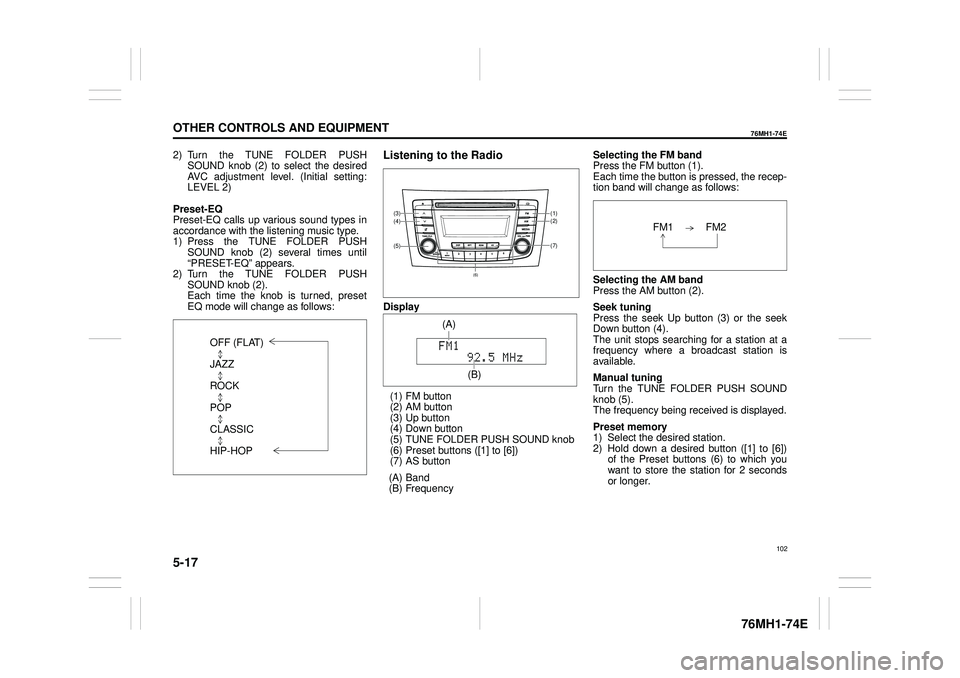
2) Turn the TUNE FOLDER PUSH SOUND knob (2) to select the desired AVC adjustment level. (Initial setting:LEVEL 2)
Preset-EQ Preset-EQ calls up various sound types in accordance with the listening music type. 1) Press the TUNE FOLDER PUSHSOUND knob (2) several times until “PRESET-EQ” appears. 2) Turn the TUNE FOLDER PUSHSOUND knob (2). Each time the knob is turned, preset EQ mode will change as follows:
Listening to the Radio
Display
(1) FM button (2) AM button (3) Up button (4) Down button(5) TUNE FOLDER PUSH SOUND knob (6) Preset buttons ([1] to [6]) (7) AS button
(A) Band (B) Frequency
Selecting the FM band Press the FM button (1). Each time the button is pressed, the recep-tion band will change as follows:
Selecting the AM band Press the AM button (2).
Seek tuning Press the seek Up button (3) or the seekDown button (4). The unit stops searching for a station at a frequency where a broadcast station is available.
Manual tuning Turn the TUNE FOLDER PUSH SOUND knob (5).The frequency being received is displayed.
Preset memory 1) Select the desired station. 2) Hold down a desired button ([1] to [6]) of the Preset buttons (6) to which youwant to store the station for 2 seconds or longer.
OFF (FLAT)
JAZZ
ROCK
POP
CLASSIC
HIP-HOP
(7)
(1)(2)
(5)
(4)(3)
(6)
(A)
(B)
102
Page 117 of 201
5-21
OTHER CONTROLS AND EQUIPMENT
76MH1-74E
76MH1-74E
The tracks in the loaded disc will be played in random order.
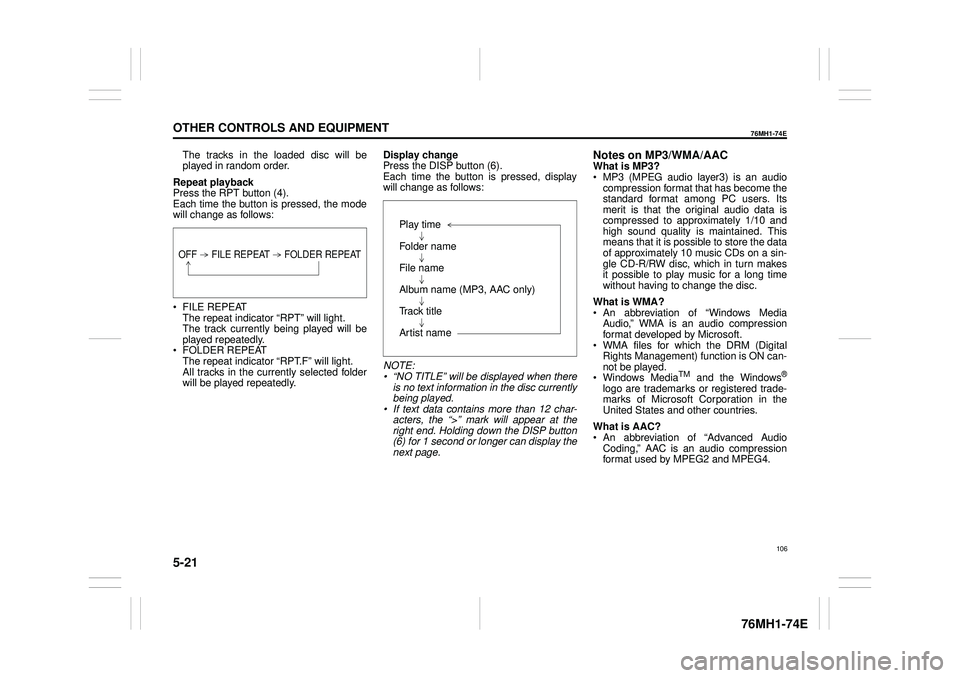
Repeat playback Press the RPT button (4). Each time the button is pressed, the modewill change as follows:
FILE REPEAT The repeat indicator “RPT” will light.The track currently being played will be played repeatedly. FOLDER REPEAT The repeat indicator “RPT.F” will light. All tracks in the currently selected folderwill be played repeatedly.
Display change Press the DISP button (6). Each time the button is pressed, displaywill change as follows:
NOTE: • “NO TITLE” will be displayed when there is no text information in the disc currently being played.• If text data contains more than 12 char- acters, the “>” mark will appear at the right end. Holding down the DISP button(6) for 1 second or longer can display the next page.
Notes on MP3/WMA/AACWhat is MP3? MP3 (MPEG audio layer3) is an audio compression format that has become the standard format among PC users. Itsmerit is that the original audio data is compressed to approximately 1/10 and high sound quality is maintained. Thismeans that it is possible to store the data of approximately 10 music CDs on a sin- gle CD-R/RW disc, which in turn makesit possible to play music for a long time without having to change the disc.
What is WMA? An abbreviation of “Windows Media Audio,” WMA is an audio compressionformat developed by Microsoft. WMA files for which the DRM (Digital Rights Management) function is ON can-not be played. Windows MediaTM and the Windows®
logo are trademarks or registered trade- marks of Microsoft Corporation in the United States and other countries.
What is AAC? An abbreviation of “Advanced Audio Coding,” AAC is an audio compressionformat used by MPEG2 and MPEG4.
OFF FILE REPEAT FOLDER REPEAT
Play time
Folder name
File name
Album name (MP3, AAC only)
Track title
Artist name
106
Page 120 of 201
5-24
OTHER CONTROLS AND EQUIPMENT
76MH1-74E
76MH1-74E
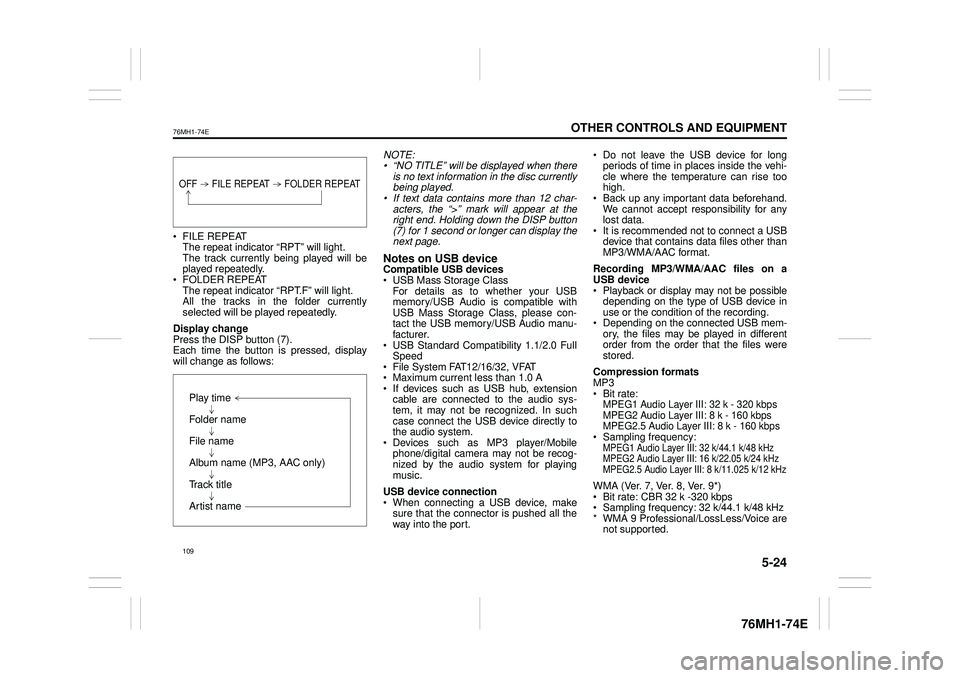
FILE REPEAT The repeat indicator “RPT” will light. The track currently being played will beplayed repeatedly. FOLDER REPEAT The repeat indicator “RPT.F” will light.All the tracks in the folder currently selected will be played repeatedly.
Display change Press the DISP button (7). Each time the button is pressed, display will change as follows:
NOTE: • “NO TITLE” will be displayed when there is no text information in the disc currentlybeing played. • If text data contains more than 12 char- acters, the “>” mark will appear at theright end. Holding down the DISP button (7) for 1 second or longer can display the next page.
Notes on USB deviceCompatible USB devices USB Mass Storage Class For details as to whether your USBmemory/USB Audio is compatible with USB Mass Storage Class, please con- tact the USB memory/USB Audio manu-facturer. USB Standard Compatibility 1.1/2.0 Full Speed File System FAT12/16/32, VFAT Maximum current less than 1.0 A If devices such as USB hub, extensioncable are connected to the audio sys- tem, it may not be recognized. In such case connect the USB device directly tothe audio system. Devices such as MP3 player/Mobile phone/digital camera may not be recog-nized by the audio system for playing music.
USB device connection When connecting a USB device, make sure that the connector is pushed all theway into the port.
Do not leave the USB device for long periods of time in places inside the vehi- cle where the temperature can rise toohigh. Back up any important data beforehand. We cannot accept responsibility for anylost data. It is recommended not to connect a USB device that contains data files other thanMP3/WMA/AAC format.
Recording MP3/WMA/AAC files on a USB device Playback or display may not be possible depending on the type of USB device inuse or the condition of the recording. Depending on the connected USB mem- ory, the files may be played in differentorder from the order that the files were stored.
Compression formats MP3 Bit rate:MPEG1 Audio Layer III: 32 k - 320 kbps MPEG2 Audio Layer III: 8 k - 160 kbps MPEG2.5 Audio Layer III: 8 k - 160 kbps Sampling frequency:MPEG1 Audio Layer III: 32 k/44.1 k/48 kHzMPEG2 Audio Layer III: 16 k/22.05 k/24 kHzMPEG2.5 Audio Layer III: 8 k/11.025 k/12 kHz
WMA (Ver. 7, Ver. 8, Ver. 9*) Bit rate: CBR 32 k -320 kbps Sampling frequency: 32 k/44.1 k/48 kHz * WMA 9 Professional/LossLess/Voice arenot supported.
OFF FILE REPEAT FOLDER REPEAT
Play time
Folder name
File name
Album name (MP3, AAC only)
Track title
Artist name
109