2017 SUBARU LEGACY parking
[x] Cancel search: parkingPage 417 of 610

Starting and operating/Parking your vehicle
Holder function is activated, a chirp
sound is heard, the Hill Holder indica-
tor light turns off and the brake system
warning light turns on.
.When the hill holder activates on a
slope, the electronic parking brake is
engaged. The electronic parking brake
will release when you accelerate from
the stop. If you manually release the
electronic parking brake while the hill
holder is activated, the hill holder
function is canceled and will not re-
engage until the vehicle has moved
some distance. In that case, you will
need to manually engage the electronic
parking brake if needed. !
Hill Holder switch
WARNING
When stopping on an uphill slope
with the Hill Holder function acti-
vated, release the brake pedal after
the electronic parking brake indica-
tor light has illuminated. Otherwise,
the Hill Holder function may not
operate properly and an accident
may occur.
CVT models
MT models
You can activate/deactivate the Hill Holder
function by pressing the Hill Holder switch.
To activate: Press the Hill Holder switch.
To deactivate: Press the Hill Holder
switch again.
Deactivate the Hill Holder function under
the following conditions.
. When towing a trailer (Outback)
. When carrying a heavy load
. When you do not frequently use the
parking brake when stopping on an uphill
slope
NOTE
. If the Hill Holder switch is pressed
for more than 30 seconds, the Hill
Holder indicator light turns off and the
7-46
Page 418 of 610

system ignores any further pressing of
the switch. To activate the switch again,
turn the ignition switch to the“LOCK ”/
“ OFF ”position and restart the engine.
. When the Hill Holder function is
deactivated while the Hill Holder func-
tion has a malfunction, if you press the
Hill Holder switch, a chirp sounds.
!Hill Holder indicator light
When the Hill Holder function is activated,
the Hill Holder indicator light illuminates.
Refer to “Hill Holder indicator light ”F 3-22. !
Emergency brake
CAUTION
Use the emergency brake only in
case of an emergency. If the emer-
gency brake is excessively used,
the brake parts will wear down
faster or the brake may not work
sufficiently due to brake overheat-
ing.
NOTE
.While using the emergency brake,
the electronic parking brake indicator
light and the indicator light on the
parking brake switch illuminate and a
chirp sounds.
. While using the emergency brake, a
sound may be heard from the engine
compartment. This is the operating
sound of the brake that is activated by
the Vehicle Dynamics Control system,
and does not indicate a malfunction.
If the foot brake has a malfunction, you
can stop the vehicle by pulling the parking
brake switch continuously.
While applying the emergency brake, the
electronic parking brake indicator light and
the indicator light on the parking brake
switch illuminate and a chirp sounds. !
Electronic parking brake system
warning
CAUTION
If the brake system warning light
turns on, the electronic parking
brake system may be malfunction-
ing. Immediately stop your vehicle
in the nearest safe location and
contact your SUBARU dealer.
If a malfunction occurs in the electronic
parking brake system, the brake system
warning light turns on. Refer to “Electronic
parking brake system warning ”F 3-21.
& Parking tips
When parking your vehicle, always per-
form the following items.
. Apply the parking brake.
. For MT models, place the shift lever in
the “1”(1st) for upgrade or “R”(Reverse)
for a downgrade.
. For CVT models, place the select lever
in the “P ”(Park) position.
Never rely on the transmission alone to
hold the vehicle.
Starting and operating/Parking your vehicle
–CONTINUED –7-47
Page 419 of 610
Starting and operating/Hill start assist system (MT models)
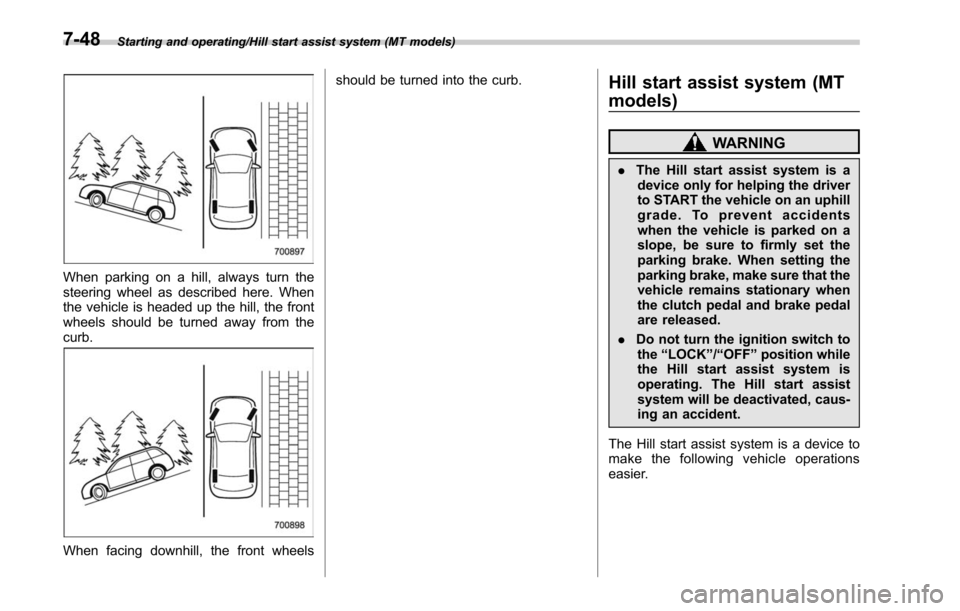
When parking on a hill, always turn the
steering wheel as described here. When
the vehicle is headed up the hill, the front
wheels should be turned away from the
curb.
When facing downhill, the front wheelsshould be turned into the curb.
Hill start assist system (MT
models)
WARNING
.
The Hill start assist system is a
device only for helping the driver
to START the vehicle on an uphill
grade. To prevent accidents
when the vehicle is parked on a
slope, be sure to firmly set the
parking brake. When setting the
parking brake, make sure that the
vehicle remains stationary when
the clutch pedal and brake pedal
are released.
. Do not turn the ignition switch to
the “LOCK ”/“ OFF ”position while
the Hill start assist system is
operating. The Hill start assist
system will be deactivated, caus-
ing an accident.
The Hill start assist system is a device to
make the following vehicle operations
easier.
7-48
Page 420 of 610
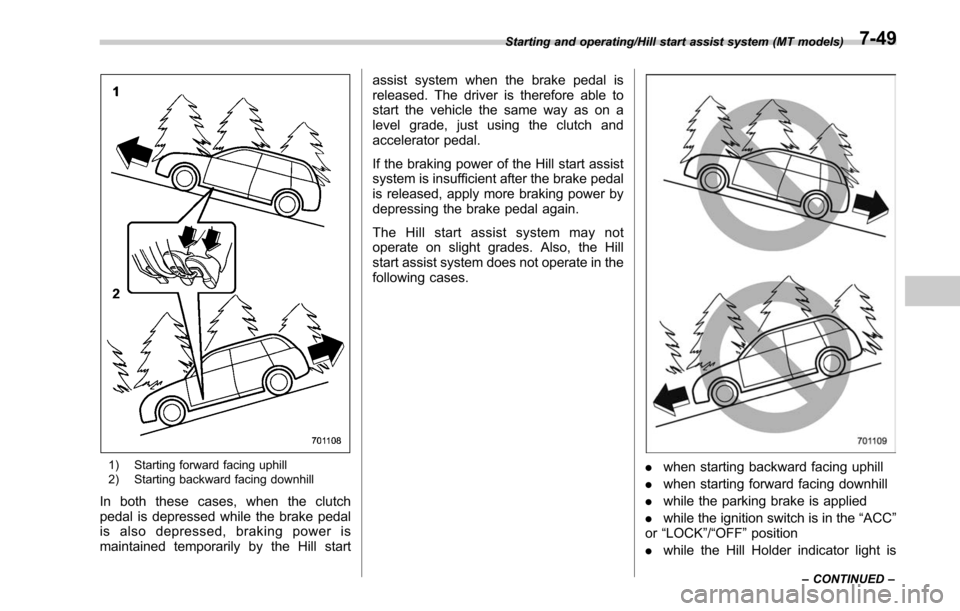
1) Starting forward facing uphill
2) Starting backward facing downhill
In both these cases, when the clutch
pedal is depressed while the brake pedal
is also depressed, braking power is
maintained temporarily by the Hill startassist system when the brake pedal is
released. The driver is therefore able to
start the vehicle the same way as on a
level grade, just using the clutch and
accelerator pedal.
If the braking power of the Hill start assist
system is insufficient after the brake pedal
is released, apply more braking power by
depressing the brake pedal again.
The Hill start assist system may not
operate on slight grades. Also, the Hill
start assist system does not operate in the
following cases.
.
when starting backward facing uphill
. when starting forward facing downhill
. while the parking brake is applied
. while the ignition switch is in the “ACC”
or “LOCK ”/“OFF ”position
. while the Hill Holder indicator light is
Starting and operating/Hill start assist system (MT models)
–CONTINUED –7-49
Page 426 of 610

!Lane Change Assist (LCA)
1) Operating range
The system notifies the driver of vehicles
approaching at a high speed in the
neighboring lanes.
.If the system detects a vehicle ap-
proaching at a high speed in the neighbor-
ing lanes, it warns the driver of dangers by
illuminating the BSD/RCTA approach in-
dicator light(s) on the outside mirror(s).
. If the driver operates the turn signal
lever in the direction where the BSD/
RCTA approach indicator light is illuminat-
ing, the system warns the driver of
dangers by flashing the BSD/RCTA ap-
proach indicator light. !
Rear Cross Traffic Alert (RCTA)
1) Operating range
The system notifies the driver of another
vehicle approaching from either side when
driving in reverse. This feature helps the
driver check the rear and side areas of the
vehicle when moving backward.
If the system detects a vehicle approach-
ing from either side while moving back-
ward, it warns the driver of dangers in the
following way.
.The BSD/RCTA approach indicator
light(s) on the outside mirror(s) flashes.
. A warning buzzer sounds.
. An icon appears on the rear view
camera screen (if equipped) !
Limitations of the detectability of
RCTA
Since the detectability of RCTA is limited,
the RCTA may not operate properly in
parking areas in which the parking spaces
are drawn diagonally to the driving lanes.
Example 1
1) The detection range of the radar sensors
2) Area out of detection range of the radar sensors
A) Vehicle that may not be detected
B) Parked vehicle
WARNING
An approaching vehicle (A) may not
be detected because the detection
range is limited by the parked
vehicle (B). Always be sure to check
Starting and operating/BSD/RCTA
–CONTINUED –7-55
Page 429 of 610

Starting and operating/BSD/RCTA
tected.
The indicator light will
flash to warn the
driver of dangers under the following
conditions.
. While the indicator light is illuminating,
if the turn signal lever is operated toward
the side in which this light turned on
. When reversing the vehicle while the
system detects a vehicle approaching
from either side
! BSD/RCTA approach indicator
light dimming function
When the headlights are turned on, the
brightness of the BSD/RCTA approach
indicator light will be reduced.
NOTE
. You may have difficulty seeing the
BSD/RCTA approach indicator light
under the following conditions.
–When sunlight shines directly on
it
– When the headlight beams from a
vehicle traveling behind shines di-
rectly on it
. While the illumination brightness
control dial is in the fully upward
position, even if the headlights are
turned on, the brightness of the BSD/
RCTA approach indicator light will not
be reduced. For details about the illumination brightness control dial,
refer to
“Illumination brightness con-
trol” F3-55.
! BSD/RCTA approach warning buz-
zer (only when reversing)
A warning buzzer sounds along with
flashing of the BSD/RCTA approach in-
dicator light to warn the driver of dangers.
The setting of the warning buzzer volume
can be changed by operating the multi
information display of the combination
meter. For details, refer to “BSD/RCTA”
F 3-45.
! Safety tips regarding the BSD/RCTA
approach indicator light/warning
buzzer
. In the following cases, operation of the
BSD/RCTA approach indicator light and
the warning buzzer may be delayed or the
system may fail to issue these warnings.
–Whenavehiclemovestothe
neighboring lane from a lane next to
the neighboring lane
– When driving on a steep incline or
on repeated sharp uphill and downhill
grades
– When going beyond a pass
– When both your vehicle and a
vehicle driving on a neighboring lane
are driving on the far side of each lane. –
When several narrowly-spaced ve-
hicles are approaching in a row
– In low radius bends (tight bends or
when making turns at an intersection)
– When there is a difference in height
between your lane and the neighbor-
ing lane
– Immediately after the BSD/RCTA is
activated by pressing the BSD/RCTA
OFF switch
– Immediately after the shift lever/
select lever is shifted to the “R ”
position
– When extremely heavy cargo is
loaded in the trunk or cargo area
. During reversing, operation of the BSD/
RCTA approach indicator light and the
warning buzzer may be delayed or the
system may fail to issue these warnings
under the following conditions.
–When backing out of an angled
parking space
– When a large-sized vehicle is
parked next to your vehicle (That
vehicle prevents the propagation of
radar waves.)
– When reversing on sloped roads
– When reversing at a high speed
7-58
Page 436 of 610

ing condition or modification
– Ice, snow or mud is adhered
to the rear bumper near the
sonar sensor
– The rear bumper is exposed to
strong impact, or the rear
bumper is deformed
. On a steep hill, the system ’s
automatic braking ability will be
reduced.
. The system is designed to avoid
collisions by automatic hard
braking when the vehicle ’s rever-
sing speed is less than approxi-
mately 3 mph (5 km/h). However,
the system does not guarantee
that the vehicle will be able to
avoid collisions in any situation.
. If the vehicle is reversed at an
extremely slow speed, the dri-
ver ’s operation may be priori-
tized. In this case, automatic
braking will not operate.
. The system may not be able to
detect the following objects
– Sharp or thin objects such as
poles, fences and ropes which
may not reflect the sound
wave emitted from the sonar
sensor –
Objects that are too close to
the rear bumper when the
select lever is set to the “R ”
position
– Objects with a surface which
may not reflect the sound
wave emitted from the sonar
sensor such as a chain link
fence
. Objects the system is not de-
signed to detect
– Pedestrians
– Moving objects including
moving vehicles
– Objects which absorbs sound
waves such as cloth or snow
– Objects whose surface has a
diagonal angle
– Objects that are low to the
ground such as parking
blocks
– Objects that are high above
the ground such as objects
hanging from above
. When reversing the vehicle, the
system may not be able to prop-
erly detect objects or may cause
a system malfunction if the fol-
lowing conditions exist
High frequency sound from other sources are nearby
–
Horn sound from another ve-
hicle
– Engine sound from other ve-
hicles
– Sound of an air brake
– Vehicle detection equipment
or a sonar from another vehi-
cle
– A sound wave with a fre-
quency similar to the vehicle ’s
system is transmitted near by
– A vehicle equipped with the
same system is reversing to-
ward your reversing direction
Weather conditions – Extremely high or extremely
low temperatures in which the
area near the sonar sensor
becomes too hot or too cold
to operate
– The rear bumper near the
sonar sensors are exposed
to heavy rain or a significant
amount of water
– Fog, snow or sandstorm, etc.
– Air
is moving rapidly such as
when a strong wind is blowing
Parts attached to the rear bumper
Starting and operating/Reverse Automatic Braking System
–CONTINUED –7-65
Page 438 of 610

Warning message
2)Second braking and warning:
When the system has detected an object,
if the vehicle is further reversed and the
system determines that a collision is
highly likely to occur, a continuous warn-
ing beep will sound and automatic hard
braking will be applied.
Warning message
3) After the vehicle has been stopped
by the system:
Make sure to depress the brake pedal
after the vehicle has been stopped by
automatic braking. Until the brake pedal is
depressed, a message will be displayed
on the audio/navigation monitor and the
continuous beep will remain sounding.
Message
After the brake pedal is depressed, the
Reverse Automatic Braking system OFF
indicator will illuminate and the system will
temporarily stop operating. The Reverse
Automatic Braking system OFF indicator
will turn off when the select lever is shifted
to a position other than the “R”position.
The system will operate again the next
time the select lever is shifted to “R”
position.
NOTE
. In the following cases, after the
vehicle has been stopped by the Re-
verse Automatic Braking system, brake
control is released and the electronic
parking brake operates. For details
about releasing the parking brake, refer
Starting and operating/Reverse Automatic Braking System
–CONTINUED –7-67