2017 SUBARU LEGACY light
[x] Cancel search: lightPage 113 of 610
Keys and doors/Door locks
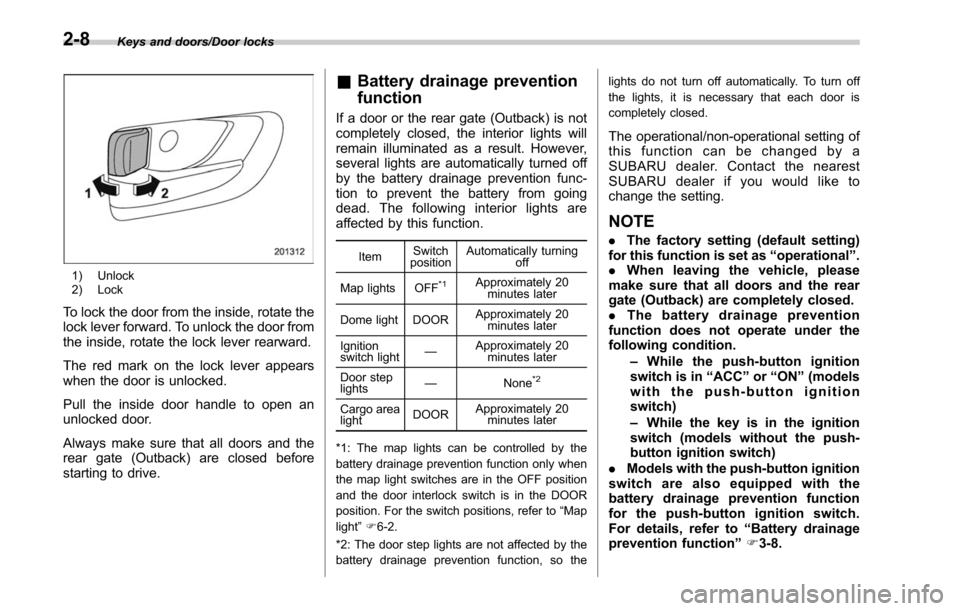
1) Unlock
2) Lock
To lock the door from the inside, rotate the
lock lever forward. To unlock the door from
the inside, rotate the lock lever rearward.
The red mark on the lock lever appears
when the door is unlocked.
Pull the inside door handle to open an
unlocked door.
Always make sure that all doors and the
rear gate (Outback) are closed before
starting to drive.
&Battery drainage prevention
function
If a door or the rear gate (Outback) is not
completely closed, the interior lights will
remain illuminated as a result. However,
several lights are automatically turned off
by the battery drainage prevention func-
tion to prevent the battery from going
dead. The following interior lights are
affected by this function.
Item Switch
position Automatically turning
off
Map lights OFF
*1Approximately 20 minutes later
Dome light DOOR Approximately 20
minutes later
Ignition
switch light —
Approximately 20
minutes later
Door step
lights —
None
*2
Cargo area
lightDOORApproximately 20
minutes later
*1: The map lights can be controlled by the
battery drainage prevention function only when
the map light switches are in the OFF position
and the door interlock switch is in the DOOR
position. For the switch positions, refer to “Map
light ”F 6-2.
*2: The door step lights are not affected by the
battery drainage prevention function, so the lights do not turn off automatically. To turn off
the lights, it is necessary that each door is
completely closed.
The operational/non-operational setting of
this function can be changed by a
SUBARU dealer. Contact the nearest
SUBARU dealer if you would like to
change the setting.
NOTE
.
The factory setting (default setting)
for this function is set as “operational ”.
. When leaving the vehicle, please
make sure that all doors and the rear
gate (Outback) are completely closed.
. The battery drainage prevention
function does not operate under the
following condition.
–While the push-button ignition
switch is in “ACC ”or “ON ”(models
with the push-button ignition
switch)
– While the key is in the ignition
switch (models without the push-
button ignition switch)
. Models with the push-button ignition
switch are also equipped with the
battery drainage prevention function
for the push-button ignition switch.
For details, refer to “Battery drainage
prevention function” F3-8.
2-8
Page 117 of 610
Keys and doors/Keyless access with push–button start system
following precautions to prevent
malfunctions or battery dis-
charge.
– Although you can replace the
battery of the access key by
yourself, it is recommended
that the battery be replaced by
a SUBARU dealer to avoid the
risk of damage at the time of
replacement.
– Do not get the access key wet.
If the access key gets wet,
wipe it off immediately and let
it dry completely.
– Do not apply strong impacts
to the access key.
– Keep the access key away
from magnetic sources.
– Never leave the access key in
direct sunlight or anywhere
that may become hot, such
as on the dashboard. It may
damage the battery or cause
circuit malfunctions.
– Do not wash the access key in
an ultrasonic washer.
– Do not leave the access key in
humid or dusty locations, or
near personal computers or
home electric appliances.NOTE
After the vehicle battery is discharged
or replaced, initialization of the steering
lock system may be required to start
the engine. In this case, perform the
following procedure to initialize the
steering lock.
1) Turn the push-button ignition
switch to the “OFF ”position. For de-
tails, refer to “Switching power status ”
F 3-7.
2) Open and close the driver ’s door.
3) Wait for approximately 10 seconds.
When the steering is locked, the initi-
alization is completed.
! Regarding access key
CAUTION
If the access key is dropped, the
integrated mechanical key inside
may become loose. Be careful not
to lose the mechanical key.
NOTE
.The access key is always commu-
nicating with the vehicle and is con-
tinuously using the battery. Although
the life of the battery varies depending
on the operating conditions, it is ap- proximately 1 to 2 years. If the battery
becomes fully discharged, replace it
with a new one.
.
If an access key is lost, it is
recommended that the access key be
reregistered. For reregistration of an
access key, contact a SUBARU dealer.
. Up to 7 access keys can be regis-
tered for one vehicle. For a spare
access key, contact a SUBARU dealer.
. Carefully store the key number plate
supplied with the access key. It is
necessary for vehicle repair and addi-
tional registration of access keys.
. Do not leave the access key in the
storage spaces inside the vehicle.
Vibrations may damage the key or turn
on the switch, possibly resulting in a
lockout.
! Regarding setting
NOTE
.The operational/non-operational
setting for the keyless access function
can be changed. For the setting proce-
dure, refer to “Disabling keyless ac-
cess function” F2-18. The setting can
also be changed by a SUBARU dealer.
For more details, contact a SUBARU
dealer.
. For detailed information about the
operation method for the push-button
2-12
Page 134 of 610

&System alarm operation
The alarm system will give the following
alarms when triggered.
. The vehicle’ s horn will sound for 30
seconds.
. The hazard warning flashers will flash
for 30 seconds.
If any of the doors (or the rear gate/trunk
lid) remains open after the 30-second
period, the horn will continue to sound
for a maximum of 3 minutes. If the door (or
the rear gate/trunk lid) is closed while the
horn is sounding, the horn will stop
sounding with a delay of up to 30 seconds.
The alarm is triggered by:
. Opening any of the doors, rear gate or
the trunk lid
. Physical impact to the vehicle, such as
forced entry (only models with shock
sensors (dealer option))
NOTE
The alarm system can be set to trigger
the illumination of the following interior
lights.
. Map lights
. Dome light (illuminates only when
the dome light switch is in the “DOOR ”
position)
. Cargo area light (Outback) The notifications regarding the map
lights, dome light and cargo area light
(Outback) are deactivated as the fac-
tory setting. A SUBARU dealer can
activate the system. Contact your
SUBARU dealer for details.
&
Activating and deactivating
the alarm system
To change the setting of your vehicle’ s
alarm system for activation or deactiva-
tion, do the following.
1. Disarm the alarm system. Refer to
“Disarming the system ”F 2-32.
2. Sit in the driver ’s seat and shut all
doors (and the rear gate (Outback)).
3. Turn the ignition switch to the “ON”
position.
4. Hold down the REAR (UNLOCK) side
of the driver ’s power door locking switch,
open the driver ’s door within the following
1 second, and wait 10 seconds without
releasing the switch. The setting will then
be changed as follows:
If the system was previously activated:
The odometer screen displays “ALOF ”
and the horn sounds twice, indicating that
the system is now deactivated. If the system was previously deacti-
vated:
The odometer screen displays
“ALON”
and the horn sounds once, indicating that
the system is now activated.
NOTE
You may have the above setting
change done by your SUBARU dealer.
& If you have accidentally trig-
gered the alarm system
! To stop the alarm
Perform any of the following operations.
. Press any button on the access key/
remote transmitter.
. Turn the ignition switch to the “ON”
position (models without “keyless access
with push-button start system ”).
. Turn the push-button ignition switch to
the “ACC ”position (models with “keyless
access with push-button start system ”).
NOTE
Only registered keys will stop the
alarm. If the key is not registered, the
alarm will not stop.
Keys and doors/Alarm system
–CONTINUED –2-29
Page 135 of 610

Keys and doors/Alarm system
&Arming the system
NOTE
. The system can be armed even if the
engine hood, the windows and/or
moonroof are open. Always make sure
that they are fully closed before arming
the system.
. When arming the system, if any of
the doors or the rear gate/trunk lid is
not fully closed, an electronic chirp
sounds five times, the hazard warning
flashers flash five times to alert you
that the doors (or the rear gate/trunk
lid) are not properly closed. When you
close the door, doors will automatically
lock and the system will automatically
arm in 30 seconds.
. The 30-second standby time can be
eliminated if you prefer. Have it per-
formed by your SUBARU dealer.
. For Legacy, if you open the trunk
using the access key/remote transmit-
ter ’s “
”button in the surveillance
state (or the standby state), the system
will be temporarily placed in a standby
state. The system will go back to the
surveillance state in 30 seconds upon
locking the trunk.
. The system is in the standby state
for a 30-second period before arming
the system. The security indicator light
will flash at short intervals during this period.
.
If any of the following actions is
done during the standby period, the
system will not switch to the surveil-
lance state.
–Doors (including the rear gate/
trunk lid) are unlocked using the
access key/remote transmitter.
– Doors (including the rear gate/
trunk lid) are unlocked using the
keyless access function (models
with “keyless access with push-
button start system ”).
– Any door (including the rear gate/
trunk lid) is opened.
– The ignition switch is turned to
the “ON ”position (models without
“ keyless access with push-button
start system ”).
– Push-button ignition switch is
turned to the “ACC ”position (mod-
els with “keyless access with push-
button start system ”).
! To arm the system using the access
key/remote transmitter
1. Close all windows and the moonroof (if
equipped).
2. Remove the key from the ignition
switch (models without “keyless access
with push-button start system ”)/turn the
push-button ignition switch to the “OFF”position (models with
“keyless access with
push-button start system ”).
3. Open the doors and get out of the
vehicle.
4. Make sure that the engine hood is
locked.
5. Close all doors and the rear gate/trunk
lid.
Access key
1) Arm button: Press to arm the system
2) Disarm button: Press to disarm the system
2-30
Page 136 of 610
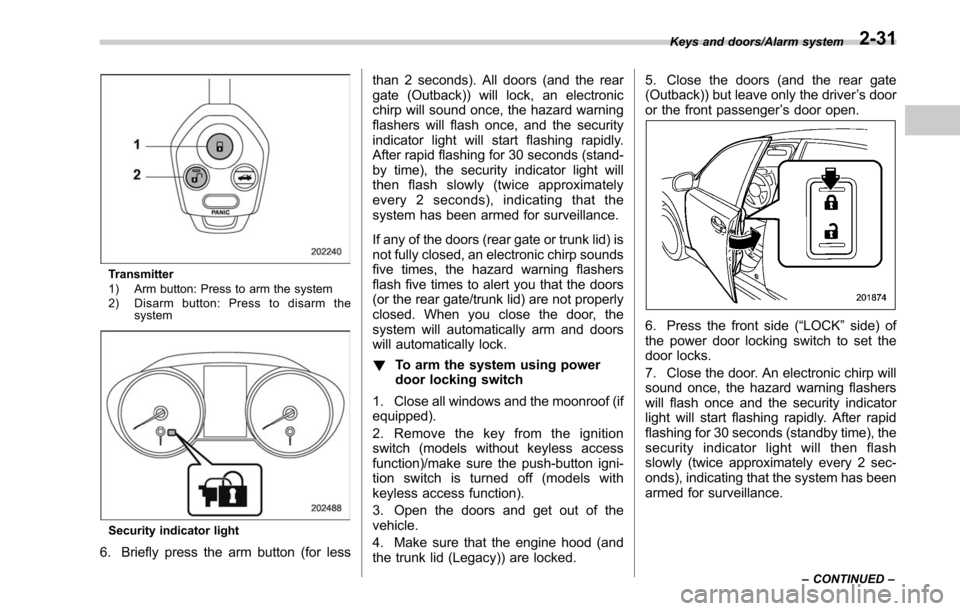
Transmitter
1) Arm button: Press to arm the system
2) Disarm button: Press to disarm thesystem
Security indicator light
6. Briefly press the arm button (for less than 2 seconds). All doors (and the rear
gate (Outback)) will lock, an electronic
chirp will sound once, the hazard warning
flashers will flash once, and the security
indicator light will start flashing rapidly.
After rapid flashing for 30 seconds (stand-
by time), the security indicator light will
then flash slowly (twice approximately
every 2 seconds), indicating that the
system has been armed for surveillance.
If any of the doors (rear gate or trunk lid) is
not fully closed, an electronic chirp sounds
five times, the hazard warning flashers
flash five times to alert you that the doors
(or the rear gate/trunk lid) are not properly
closed. When you close the door, the
system will automatically arm and doors
will automatically lock.
!
To arm the system using power
door locking switch
1. Close all windows and the moonroof (if
equipped).
2. Remove the key from the ignition
switch (models without keyless access
function)/make sure the push-button igni-
tion switch is turned off (models with
keyless access function).
3. Open the doors and get out of the
vehicle.
4. Make sure that the engine hood (and
the trunk lid (Legacy)) are locked. 5. Close the doors (and the rear gate
(Outback)) but leave only the driver
’s door
or the front passenger ’s door open.
6. Press the front side (“LOCK” side) of
the power door locking switch to set the
door locks.
7. Close the door. An electronic chirp will
sound once, the hazard warning flashers
will flash once and the security indicator
light will start flashing rapidly. After rapid
flashing for 30 seconds (standby time), the
security indicator light will then flash
slowly (twice approximately every 2 sec-
onds), indicating that the system has been
armed for surveillance.
Keys and doors/Alarm system
–CONTINUED –2-31
Page 137 of 610

Keys and doors/Alarm system
!To arm the system using the key-
less access function (if equipped)
1. Close all windows and the moonroof (if
equipped)
2. Turn the push-button ignition switch to
the “OFF ”position.
3. Open the doors and get out of the
vehicle.
4. Make sure that the engine hood is
locked.
5. Close all doors and the rear gate/trunk
lid.
1) Door lock sensor
Security indicator light
6. Carry the access key and touch the
door lock sensor. All doors (for Outback,
including the rear gate) will lock, an
electronic chirp will sound once, the
hazard warning flashers will flash once,
and the security indicator light will start
flashing rapidly. After rapid flashing for 30
seconds (standby time), the security in-
dicator light will then flash slowly (twice
approximately every 2 seconds), indicat-
ing that the system has been armed for
surveillance.
If any of the doors or the rear gate is not
fully closed, an electronic chirp sounds
five times, the hazard warning flashers
flash five times to alert you that the doors
(or the rear gate/trunk lid) are not properly
closed. When you close the door, the system will automatically arm and doors
will automatically lock.
&
Disarming the system
Perform either of the following procedures.
. Briefly press the disarm button (for less
than 2 seconds) on the access key/remote
transmitter.
. Carry the access key and perform
either of the following procedures (models
with “keylessaccesswithpush-button
start system ”).
– Grip the front door handle.
– Press the rear gate opener button.
The flashing of the security indicator light
will then change slowly (once approxi-
mately every 3 seconds from twice ap-
proximately every 2 seconds), indicating
that the alarm system has been disarmed.
! Emergency disarming
If you cannot disarm the system using the
transmitter (i.e. the transmitter is lost,
broken or the transmitter battery is too
weak), you can disarm the system without
using the transmitter.
The system can be disarmed if you turn
the ignition switch from the “LOCK”/“OFF”
to the “ON ”position with a registered key/
access key.
2-32
Page 138 of 610

NOTE
For models with“keyless access with
push-button start system ”, if the ac-
cess key battery is discharged, perform
the procedure described in “Switching
power status ”F9-18. In such a case,
replace the battery immediately. Refer
to “Replacing battery of access key ”
F 11-50.
& Valet mode
When you choose the valet mode, the
alarm system does not operate. In valet
mode, the access key/remote transmitter
is used only for locking and unlocking the
doors and rear gate (Outback) and panic
activation.
To enter the valet mode, change the
setting of your vehicle’ s alarm system for
deactivation mode. Refer to “Activating
and deactivating the alarm system ”F 2-
29. The security indicator light will con-
tinue to flash once every 3 seconds
indicating that the system is in the valet
mode.
To exit valet mode, change the setting of
your vehicle’ s alarm system for activation
mode. Refer to “Activating and deactivat-
ing the alarm system ”F 2-29.
& Tripped sensor identification
The security indicator light flashes when
the alarm system has been triggered.
Also, the number of flashes indicates the
location of unauthorized intrusion or the
severity of impact on the vehicle.
When the ignition switch is turned to the
“ON ”position, the indicator light will
illuminate for 1 second and then flash as
follows:
. When a door or rear gate (Outback)
was opened: 5 times
. When the trunk (Legacy) was opened:
4 times
. When a strong impact or multiple
impacts were sensed: twice (only models
with shock sensors (dealer option))
. When a light impact was sensed: once
(only models with shock sensors (dealer
option))
& Shock sensors (dealer op-
tion)
The shock sensors trigger the alarm
system when they sense impacts applied
to the vehicle and when any of their
electric wires is cut. The alarm system
causes the horn to sound and the hazard
warning flashers to flash for a short time
when the sensed impact is weak, but it
warns of a strong impact or multiple impacts by sounding the horn and flashing
the hazard warning flashers, both lasting
approximately 30 seconds.
If you desire, your SUBARU dealer can
connect them and set them for activation
or deactivation.
NOTE
.
The shock sensors are not always
able to sense impacts caused by break-
ing in, and cannot sense an impact that
does not cause vibration (such as
breaking the glass using a rescue
hammer).
. The shock sensors may sense vi-
bration like those shown in the follow-
ing examples and trigger the alarm
system. Select the settings of the alarm
system and shock sensors appropri-
ately depending on where you usually
park your vehicle.
Examples:
–Vibration from construction site
– Vibration in multistory car park
– Vibration from trains
. You can have the sensitivity of the
shock sensors adjusted to your pre-
ference by your SUBARU dealer.
Keys and doors/Alarm system2-33
Page 140 of 610
!Operating the driver ’s/front pas-
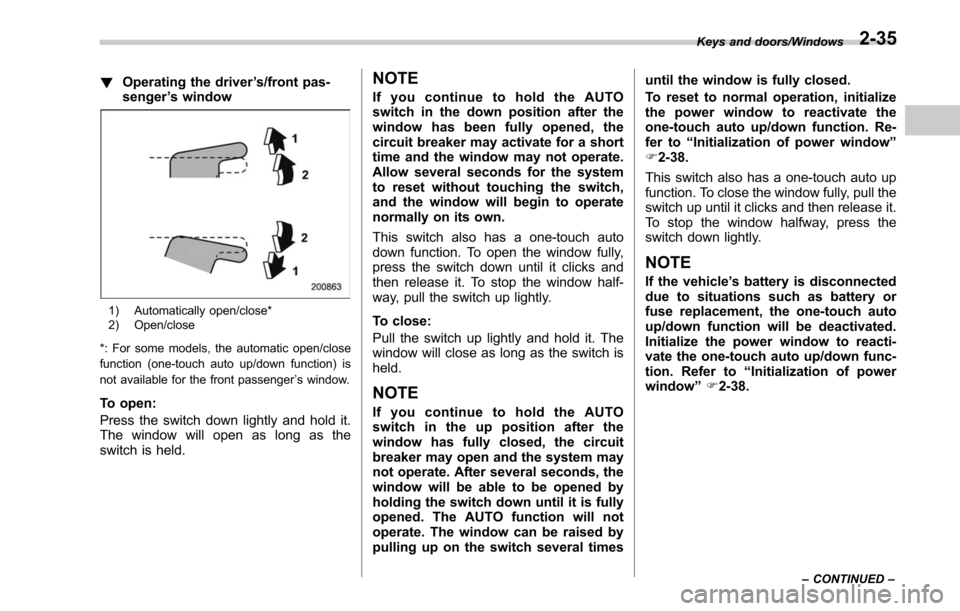
senger ’s window
1) Automatically open/close*
2) Open/close
*: For some models, the automatic open/close
function (one-touch auto up/down function) is
not available for the front passenger ’s window.
To open:
Press the switch down lightly and hold it.
The window will open as long as the
switch is held.
NOTE
If you continue to hold the AUTO
switch in the down position after the
window has been fully opened, the
circuit breaker may activate for a short
time and the window may not operate.
Allow several seconds for the system
to reset without touching the switch,
and the window will begin to operate
normally on its own.
This switch also has a one-touch auto
down function. To open the window fully,
press the switch down until it clicks and
then release it. To stop the window half-
way, pull the switch up lightly.
To close:
Pull the switch up lightly and hold it. The
window will close as long as the switch is
held.
NOTE
If you continue to hold the AUTO
switch in the up position after the
window has fully closed, the circuit
breaker may open and the system may
not operate. After several seconds, the
window will be able to be opened by
holding the switch down until it is fully
opened. The AUTO function will not
operate. The window can be raised by
pulling up on the switch several times until the window is fully closed.
To reset to normal operation, initialize
the power window to reactivate the
one-touch auto up/down function. Re-
fer to
“Initialization of power window ”
F 2-38.
This switch also has a one-touch auto up
function. To close the window fully, pull the
switch up until it clicks and then release it.
To stop the window halfway, press the
switch down lightly.
NOTE
If the vehicle ’s battery is disconnected
due to situations such as battery or
fuse replacement, the one-touch auto
up/down function will be deactivated.
Initialize the power window to reacti-
vate the one-touch auto up/down func-
tion. Refer to “Initialization of power
window ”F 2-38.
Keys and doors/Windows
–CONTINUED –2-35