Page 170 of 224
DESTINATION SEARCH
SEARCH OPERATION
There are several ways to search for a destination.
FunctionPage
Setting home or work as the destination170
Searching on the map171
Searching by entering a search word171
Searching by POI172
Searching from previously set destinations173
Searching from the favorite destinations list174
Searching for gas stations175
Searching by phonebook83
SETTING HOME OR WORK AS THE
DESTINATION
1. Select and hold or .
�
Page 192 of 224
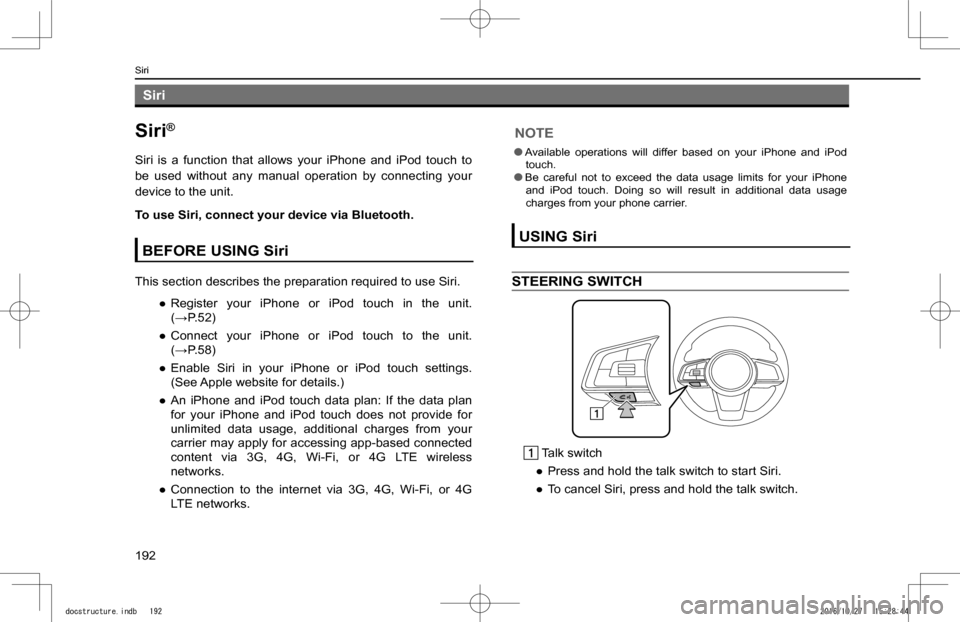
Siri
Siri®
Siri is a function that allows your iPhone and iPod touch to
be used without any manual operation by connecting your
device to the unit.
To use Siri, connect your device via Bluetooth.
BEFORE USING Siri
This section describes the preparation required to use Siri.
�
Page 193 of 224
Page 196 of 224
NOTE
lVoice commands may not be recognized if:• Spoken too quickly.• Spoken at a low or high volume.• Driving with a window open.• Passengers are talking while voice commands are spoken.• The air conditioning speed is set high.• When air from the ventilator blows directly toward the microphone. lIn the following conditions, the system may not recognize the command properly and using voice commands may not be possible:• The command is incorrect or unclear. Note that certain words, accents or speech patterns may be dif
Page 198 of 224
![SUBARU IMPREZA 2017 5.G Navigation Manual Voice commandFunction
Set Fan Speed to [1-7]Sets the fan speed to the spoken fan speed
Set Temperature to [Number]Sets the temperature to the spoken temperature
Change Source to (AM/FM/US](/manual-img/17/7250/w960_7250-197.png "SUBARU IMPREZA 2017 5.G Navigation Manual Voice commandFunction
Set Fan Speed to [1-7]Sets the fan speed to the spoken fan speed
Set Temperature to [Number]Sets the temperature to the spoken temperature
Change Source to (AM/FM/US")
Voice commandFunction
Set Fan Speed to [1-7]Sets the fan speed to the spoken fan speed
Set Temperature to [Number]Sets the temperature to the spoken temperature
Change Source to (AM/FM/USB/ iPod/Bluetooth/ Auxiliary)
Changes source to AM/FM/USB/iPod/Bluetooth/Auxiliary
Go to (Radio/Media/Phone/CarPlay/Android Auto/Home/Settings/Apps)
Changes screen to Radio/Media/Phone/CarPlay/Android Auto/Home/Settings/Apps
HelpChanges to help screen
*: 8-inch with Navi system only
XNavigation commands*
*: 8-inch with Navi system only
Voice commandFunction
Enter an AddressEnables setting a destination by saying the address
Navigate to [House Number, Street, City, State]
Enables setting a destination by saying the address with city and state
Drive HomeDisplays the route to home
Drive to Work Displays the route to work
Find Nearest [POI]Displays a list of POI category near the current position
Find Gas StationDisplays the list of gas station near the current position
Find Parking LotDisplays the list of parking lot near the current position
Show MapDisplays the map screen
Stop RouteCancels route guidance
Where am IDisplays current location on map
Navigation HelpDisplays a list of voice commands related to navigation
VOICE RECOGNITION SYSTEM OPERATION
198
docstructure.indb 1982016/10/27 15:28:45
Page 199 of 224
![SUBARU IMPREZA 2017 5.G Navigation Manual XPhone commands
Voice commandFunction
Send a Text Message to [Name] [Phone Type]
Send the preset message to the spoken contact name and phone type of the contact from th](/manual-img/17/7250/w960_7250-198.png "SUBARU IMPREZA 2017 5.G Navigation Manual XPhone commands
Voice commandFunction
Send a Text Message to [Name] [Phone Type]
Send the preset message to the spoken contact name and phone type of the contact from th")
XPhone commands
Voice commandFunction
Send a Text Message to [Name] [Phone Type]
Send the preset message to the spoken contact name and phone type of the contact from the phonebook
Call [Name] [Phone Type]
Place a call to the spoken contact name and phone type of the contact from the phonebook
Dial [Number]Places a call to the spoken phone number
RedialPlaces a call to the phone number of the latest outgoing call
Paired Phones Displays the phone settings screen
Recent Calls Displays the call history screen
Missed Calls Displays the missed call list screen
Reply to Text MessageReply to text message
View Text MessagesDisplays the message inbox screen
Phone helpDisplays a list of voice commands related to controlling your phone
XMedia commands
Voice commandFunction
Track [Number]Plays the selected track
Play Song [Song Name]Plays the selected song
Play Album [Album Name]Plays tracks from the selected album
Play Artist [Artist Name]Plays tracks from the selected artist
Play Genre [Genre Name]Plays tracks from the selected genre
Play Playlist [Playlist Name]Plays tracks from the selected playlist
Play Podcast [Podcast Name]Plays the selected podcast
Play Audiobook [Book Name]Plays the selected audiobook
Play Composer [Composer Name]Plays tracks from the selected composer
Show (Songs/Albums/Artists/Genres/Playlists/ Podcasts/Audiobooks/Composers)
Displays the list of Songs/Albums/Artists/Genres/Playlists/ Podcasts/Audiobooks/Composers
VOICE RECOGNITION SYSTEM OPERATION
199
Siri/Voice Recognition System
8
docstructure.indb 1992016/10/27 15:28:45
Page 201 of 224
![SUBARU IMPREZA 2017 5.G Navigation Manual XClimate commands*
*: 8-inch with Navi system/8-inch system only
Voice commandFunction
Auto AC OnSwitches on the Auto AC mode on
Set Fan Speed to [1-7]Sets the fan speed to the spoken fan speed](/manual-img/17/7250/w960_7250-200.png "SUBARU IMPREZA 2017 5.G Navigation Manual XClimate commands*
*: 8-inch with Navi system/8-inch system only
Voice commandFunction
Auto AC OnSwitches on the Auto AC mode on
Set Fan Speed to [1-7]Sets the fan speed to the spoken fan speed")
XClimate commands*
*: 8-inch with Navi system/8-inch system only
Voice commandFunction
Auto AC OnSwitches on the Auto AC mode on
Set Fan Speed to [1-7]Sets the fan speed to the spoken fan speed
Set Driver Temperature to [Number]
Sets the driver temperate to the spoken temperature
Set Passenger Temperature to [Number]
Sets the passenger temperature to the spoken temperature
Set Temperature to [Number]Sets the temperature to the spoken temperature
Set Both Temperatures to [Number]
Sets the both temperature to the spoken temperature
XMore commands
Voice commandFunction
Change Source to (AM/FM/USB/ iPod/Bluetooth/ Auxiliary)
Changes source to AM/FM/USB/ iPod/Bluetooth/ Auxiliary
Go to (Radio/Media/Phone/CarPlay/Android Auto/Home/Settings/Apps)
Changes screen to Radio/Media/Phone/CarPlay/Android Auto/Home/Settings/Apps
Gas Prices*1Changes screen to SiriusXM Travel Link Fuel Prices
Sports Scores*1Changes screen to SiriusXM Travel Link Sports Scores
Stocks*1Changes screen to SiriusXM Travel Link Stock Prices
Weather*1Changes screen to SiriusXM Travel Link Weather
Go to AhaChanges screen to Aha
Go to Pandora*2Changes screen to Pandora
Go to CarPlayChanges screen to carplay auto projection mode
Go to Android AutoChanges screen to android auto projection mode
Go to STARLINK*1Changes screen to SUBARU STARLINK
VOICE RECOGNITION SYSTEM OPERATION
201
Siri/Voice Recognition System
8
docstructure.indb 2012016/10/27 15:28:45
Page 203 of 224
203
Appendix/What To
Do If/Index
Certification SiriusXM® Satellite Radio SiriusXM Data Service Radio Wave Communications Gracenote Bluetooth iPod Pandora Google
Troubleshooting SUBARU STARLINK Radio Operation Phone
End User License Agreement
Certification
What To Do If
How To Get The Source CodeUsing The Open Source
Index
204
206
206206206206208209210210210
211
212
212212212214
219
Appendix/What To Do If/Index
docstructure.indb 2032016/10/27 15:28:45