2017 SUBARU FORESTER parking brake
[x] Cancel search: parking brakePage 20 of 634

1) Power windows (page 2-32)
2) Door locks (page 2-5)
3) Glove box (page 6-6)
4) Front power supply socket (page 6-9)
5) Shift lever (MT) (page 7-22)/Select lever(CVT) (page 7-24)
6) Parking brake lever (page 7-47)
7) Cup holder (page 6-7)
8) Center console (page 6-6)
–CONTINUED –
15
Page 36 of 634

&Power seat (driver ’s seat —if
equipped)
1) Seat position forward/backward con-
trol switch
To adjust the seat forward or backward,
move the control switch forward or
backward. During forward/backward ad- justment of the seat, you cannot adjust
the seat cushion angle or seat height.
2) Seat cushion angle control switch
To adjust the seat cushion angle, pull up
or push down the front end of the control
switch.
3) Seat height control switch
To adjust the seat height, pull up or push
down the rear end of the control switch.
4) Seatback angle (reclining) control
switch
To adjust the angle of the seatback,
move the control switch.
5) Lumbar support control switch
To increase lower back support, push the
front side of the switch. To decrease
lower back support, push the rear side of
the switch.
!Memory function (driver ’s seat —if
equipped)
WARNING
. Never adjust the seat while driv-
ing to avoid loss of vehicle con-
trol and personal injury.
. Before adjusting the seat, make
sure that cargo or the hands and
feet of rear seat passengers are
clear of the adjusting mechan-
ism.
. Never retrieve the seat position
while driving to avoid loss of vehicle control and personal in-
jury.
. Perform the seat position retrie-
val before driving. Be sure to
confirm that the select lever is
in the “P ” position, and the
parking brake is applied, when
adjusting the seat position. Do
not drive until the retrieval of the
seat position is complete.
. When retrieving a registered seat
position, make sure the hands,
feet and possessions of rear seat
passengers are clear of the seat
adjusting mechanism.
. When any unusual conditions or
malfunctions occur during the
retrieval of the seat position, stop
the retrieval of the seat position
by performing any of the follow-
ing procedures.
– Operate any of the power seat
switches
– Press the “SET ”button
– Press button “1 ” or “2 ”
Some of your desired seat positions can
be registered. Register the seat position
with button “1 ” or “2 ” or each of the access
keys and retrieve the seat position.
Seat, seatbelt and SRS airbags/Front seats
–CONTINUED –1-5
Page 37 of 634
Seat, seatbelt and SRS airbags/Front seats
The following seat positions can be
registered.
.Forward/backward position of the seat
. Angle of seatback
. Angle of seat cushion
. Height of seat
! Registration of seat position with
button “1 ” or “2”
1. Adjust the seat position under the
following conditions. .The parking brake is applied.
. The select lever is in the “P”posi-
tion.
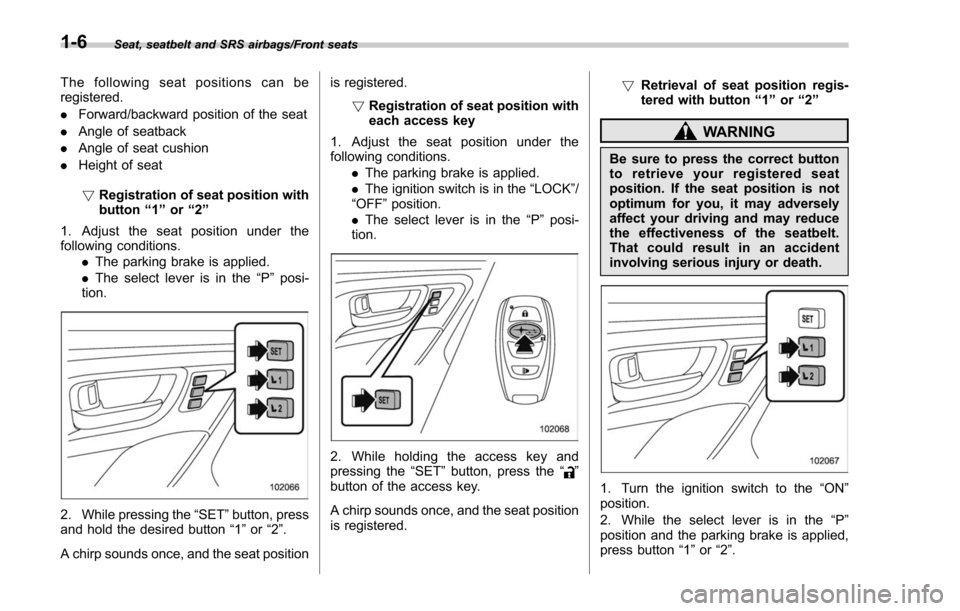
2. While pressing the “SET”button, press
and hold the desired button “1”or “2”.
A chirp sounds once, and the seat position is registered.
!Registration of seat position with
each access key
1. Adjust the seat position under the
following conditions. .The parking brake is applied.
. The ignition switch is in the “LOCK”/
“OFF ”position.
. The select lever is in the “P ” posi-
tion.
2. While holding the access key and
pressing the “SET”button, press the “”
button of the access key.
A chirp sounds once, and the seat position
is registered. !
Retrieval of seat position regis-
tered with button “1 ” or “2 ”
WARNING
Be sure to press the correct button
to retrieve your registered seat
position. If the seat position is not
optimum for you, it may adversely
affect your driving and may reduce
the effectiveness of the seatbelt.
That could result in an accident
involving serious injury or death.
1. Turn the ignition switch to the “ON”
position.
2. While the select lever is in the “P ”
position and the parking brake is applied,
press button “1”or “2”.
1-6
Page 143 of 634

Keys and doors/Rear gate
The power rear gate operates only when
all of the following conditions are satisfied.
.The vehicle is stopped completely.
. The outside temperature is within a
range from −22 8F to 1588 F (from−30 8Cto
70 8C).
. The ignition switch is in the “LOCK”/
“OFF ”or “ACC ”position. Or, the ignition
switch is in the “ON”position and the
parking brake is applied (MT models)/the
select lever is in the “P”position (CVT
models).
NOTE
. If the button is pressed repeatedly
while the power rear gate is operating,
the system may ignore the button
operation in order to avoid being
damaged. Do not press the button
unnecessarily.
. It is not possible to stop the rear
gate temporarily while opening be-
tween the completely closed position
and approximately 12 in (30 cm) open.
If you press one of the power rear gate
buttons briefly during this range, the
rear gate will be closed.
. If the vehicle starts to move while
the power rear gate is operating, the
system sounds a buzzer and closes the
rear gate automatically. At this time, if
the system detects jamming, it will deactivate the power rear gate and the
rear gate will not be closed. If this
occurs, close the rear gate via regular
procedures.
.
If you try to open the rear gate using
the power rear gate function immedi-
ately after closing the rear gate using
the power rear gate function, an elec-
tronic chirp will sound and the rear
gate will not open. Wait for a while
before trying to open the rear gate via
the power rear gate function. If you
wish to open it right away, it can be
opened manually. !
Operation by the button on the
instrument panelPower rear gate button
To open the rear gate:
Press and hold the power rear gate button
when the rear gate is closed. Then an
electronic chirp will sound twice and the
hazard warning flashers will flash twice.
The rear gate will open automatically.
To stop the rear gate midway:
Briefly press the power rear gate button
while the rear gate is being opened. Then
the hazard warning flashers will flash
twice. If the button is pressed again, the
rear gate will close. If the button is briefly
pressed while the gate is closed, the rear
gate can be opened. However, the rear
gate cannot be stopped again while it is
2-40
Page 164 of 634

Warning and indicator lights
Several of the warning and indicator lights
illuminate when the ignition switch is
initially turned to the“ON”position. This
permits checking the operation of the
bulbs.
Apply the parking brake and turn the
ignition switch to the “ON”position. For
the system check, several of the following
lights illuminate and then turn off after
several seconds or after the engine has
started.
: Seatbelt warning light (The seatbelt warning light turns off
only when the driver fastens the
seatbelt.)
: Front passenger ’s seatbelt warning
light
(The seatbelt warning light turns off
only when the front seat passenger
fastens the seatbelt.)
: SRS airbag system warning light
ON /
: Front passenger ’s frontal airbag
ON indicator light
/: Front passenger ’s frontal airbag
OFF indicator light
: CHECK ENGINE warning light/Mal- function indicator light
: Coolant temperature low indicator light/Coolant temperature high warn-
ing light
: Charge warning light
: Oil pressure warning light
: Engine low oil level warning light*
: Windshield washer fluid warning light*
: AT OIL TEMP warning light(CVT models)
: Low tire pressure warning light(U.S.-spec. models)
/: ABS warning light
/: Brake system warning light
: Low fuel warning light
: Hill start assist warning light/Hill startassist OFF indicator light
: Door open warning light
: AWD warning light (CVT models)
: Power steering warning light
: Vehicle Dynamics Control warning light/Vehicle Dynamics Control opera-
tion indicator light
: Vehicle Dynamics Control OFF indica-tor light
: Cruise control indicator light(if equipped)
: Cruise control set indicator light(if equipped)
: Headlight indicator light (if equipped)
: Automatic headlight beam leveler warning light (if equipped)
: Steering Responsive Headlight warn-ing light/Steering Responsive Head-
light OFF indicator light (if equipped)*
: High beam assist indicator light (if equipped)
: Access key warning light
(if equipped)
: X-mode indicator light (if equipped)
: Hill descent control indicator light (if equipped)*
*: Applies to models with type A combina- tion meter.
If any lights fail to illuminate, it indicates a
burned-out bulb or a malfunction of the
corresponding system.
Consult your authorized SUBARU dealer
for repair.
Instruments and controls/Warning and indicator lights
–CONTINUED –3-13
Page 172 of 634

&ABS warning light
CAUTION
.If any of the following conditions
occur, we recommend that you
have the ABS repaired at the first
available opportunity by your
SUBARU dealer.
– The warning light does not
illuminate when the ignition
switch is turned to the “ON ”
position.
– The warning light illuminates
when the ignition switch is
turned to the “ON ”position,
but it does not turn off even
when the vehicle speed ex-
ceeds approximately 25 mph
(40 km/h).
– The warning light illuminates
during driving.
. When the warning light is on (and
the brake system warning light is
off), the ABS function shuts
down. However, the conventional
brake system continues to oper-
ate normally.
The ABS warning light illuminates to-
gether with the brake system warning light if the EBD system malfunctions. For
further details of the EBD system mal-
function warning, refer to
“Electronic
Brake Force Distribution (EBD) system
warning ”F 3-22.
NOTE
If the warning light behavior is as
described in the following conditions,
the ABS may be considered normal.
. The warning light illuminates when
the ignition switch is turned to the
“ ON ”position and turns off approxi-
mately 2 seconds after the engine has
started.
. The warning light illuminates right
after the engine is started but turns off
immediately, remaining off.
. The warning light remains illumi-
nated after the engine has been started,
but it turns off when the vehicle speed
reaches approximately 25 mph (40
km/h).
. The warning light illuminates during
driving, but it turns off immediately and
remains off.
When driving with an insufficient battery
voltage such as when the engine is jump
started, the ABS warning light may illumi-
nate. This is due to the low battery voltage
and does not indicate a malfunction.
When the battery becomes fully charged, the light will turn off.
&Brake system
warning light
The light illuminates with the parking
brake applied while the ignition switch is
in the
“ON”position. It turns off when the
parking brake is fully released.
WARNING
. Driving with the brake system
warning light on is dangerous.
This indicates your brake system
may not be working properly. If
the light remains illuminated,
have the brakes inspected by a
SUBARU dealer immediately.
. If at all in doubt about whether
the brakes are operating prop-
erly, do not drive the vehicle.
Have your vehicle towed to the
nearest SUBARU dealer for re-
pair.
The brake system warning light has the
following functions.
! Brake fluid level warning
This light illuminates when the brake fluid
level has dropped to near the “MIN”level
of the brake fluid reservoir with the ignition
Instruments and controls/Warning and indicator lights
–CONTINUED –3-21
Page 173 of 634

Instruments and controls/Warning and indicator lights
switch in the“ON”position and with the
parking brake fully released.
If the brake system warning light should
illuminate while driving (with the parking
brake fully released and with the ignition
switch positioned in “ON”), it could be an
indication of leaking of brake fluid or worn
brake pads. If this occurs, immediately
stop the vehicle at the nearest safe
location and check the brake fluid level.
If the fluid level is below the “MIN”mark in
the reservoir, do not drive the vehicle.
Have the vehicle towed to the nearest
SUBARU dealer for repair.
! Electronic Brake Force Distribution
(EBD) system warning
The brake system warning light also
illuminates if a malfunction occurs in the
EBD system. In that event, it illuminates
together with the ABS warning light.
The EBD system may be malfunctioning if
the brake system warning light and ABS
warning light illuminate simultaneously
during driving.
Even if the EBD system fails, the conven-
tional braking system will still function.
However, the rear wheels will be more
prone to locking when the brakes are
applied harder than usual and the vehi-
cle ’s motion may therefore become some-
what harder to control. If the brake system warning light and ABS
warning light illuminate simultaneously,
take the following steps.
1. Stop the vehicle in the nearest safe,
flat location.
2. Shut down the engine, apply the
parking brake and then restart it.
3. Release the parking brake. Even if
both warning lights turn off, the EBD
system may be malfunctioning. Drive
carefully to the nearest SUBARU dealer
and have the system inspected.
4. If both warning lights illuminate again
and remain illuminated after the engine
has been restarted, shut down the engine
again, apply the parking brake, and check
the brake fluid level.
5. If the brake fluid level is not below the
“
MIN ”mark, the EBD system may be
malfunctioning. Drive carefully to the
nearest SUBARU dealer and have the
system inspected.
6. If the brake fluid level is below the
“ MIN ”mark, DO NOT drive the vehicle.
Instead, have the vehicle towed to the
nearest SUBARU dealer for repair.
! Vacuum pump system warning
(turbo models)
This light illuminates when a malfunction
is detected in the vacuum pump system.NOTE
The vacuum pump system assists the
boost pressure when driving at high
altitudes while the engine is cold.
&Low fuel warning light
The low fuel warning light illuminates
when the tank is nearly empty, at approxi-
mately 2.6 US gal (10.0 liters, 2.2 Imp gal).
It only operates when the ignition switch is
in the “ON”position.
CAUTION
Promptly put fuel in the tank when-
ever the low fuel warning light
illuminates. Engine misfires as a
result of an empty tank could cause
damage to the engine.
NOTE
This light does not turn off unless the
tank is replenished up to an internal
fuel quantity of approximately 4.5 US
gal (17 liters, 3.7 Imp gal).
3-22
Page 249 of 634
Instruments and controls/Light control switch
.The timing of the change of headlight
mode may differ due to the following
factors.
–Color or brightness of the head-
lights of an oncoming vehicle or the tail
lights of a vehicle ahead
– The headlights of the oncoming
vehicle or the tail lights of the vehicle
ahead are covered with mud, snow,
etc.
– Movement and direction of an on-
coming vehicle or a vehicle ahead
– When the headlights of an oncom-
ing vehicle or the tail lights of a vehicle
ahead illuminate on only one side
– When the oncoming vehicle or
vehicle ahead is a motorcycle
– Conditions of a road (slope, curve,
road surface, etc.)
– Number of passengers and weight
of loaded cargo
– Limitation of the detection ability of
the stereo camera& Headlight flasher
CAUTION
Do not hold the lever in the flashing
position for more than just a few
seconds.
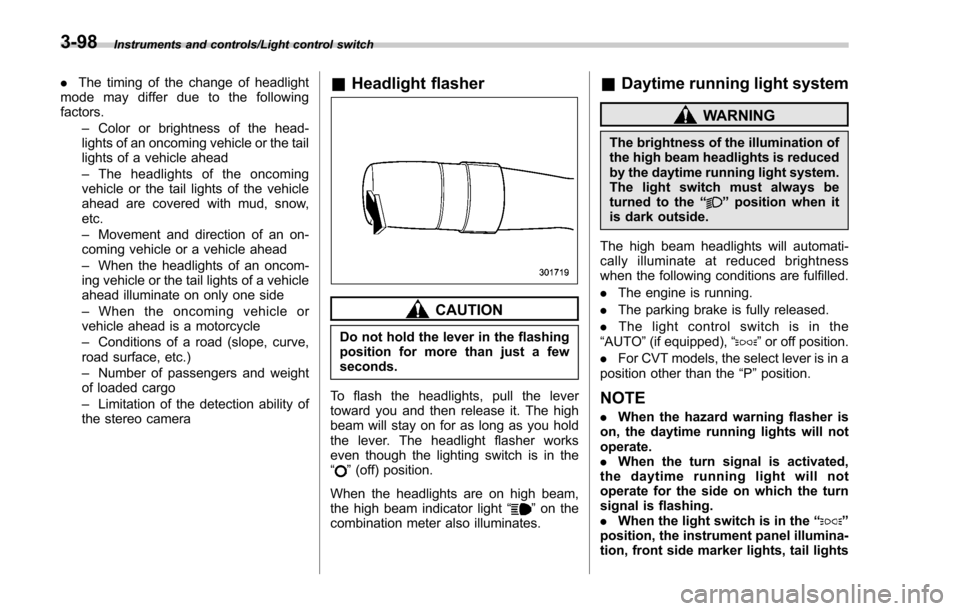
To flash the headlights, pull the lever
toward you and then release it. The high
beam will stay on for as long as you hold
the lever. The headlight flasher works
even though the lighting switch is in the
“
” (off) position.
When the headlights are on high beam,
the high beam indicator light “
”on the
combination meter also illuminates.
& Daytime running light system
WARNING
The brightness of the illumination of
the high beam headlights is reduced
by the daytime running light system.
The light switch must always be
turned to the “
”position when it
is dark outside.
The high beam headlights will automati-
cally illuminate at reduced brightness
when the following conditions are fulfilled.
. The engine is running.
. The parking brake is fully released.
. The light control switch is in the
“AUTO ”(if equipped), “
”or off position.
. For CVT models, the select lever is in a
position other than the “P”position.
NOTE
. When the hazard warning flasher is
on, the daytime running lights will not
operate.
. When the turn signal is activated,
the daytime running light will not
operate for the side on which the turn
signal is flashing.
. When the light switch is in the “
”
position, the instrument panel illumina-
tion, front side marker lights, tail lights
3-98