2017 SUBARU CROSSTREK keyless entry
[x] Cancel search: keyless entryPage 15 of 572

General information
&California proposition 65
warning
WARNING
Engine exhaust, some of its consti-
tuents, and certain vehicle compo-
nents contain or emit chemicals
known to the State of California to
cause cancer and birth defects or
other reproductive harm. In addi-
tion, certain fluids in vehicles and
certain components of product wear
contain or emit chemicals known to
the State of California to cause
cancer and birth defects or other
reproductive harm.
&California Perchlorate Advi-
sory
Certain vehicle components such as air-
bag modules, seatbelt pretensioners and
keyless entry transmitter batteries may
contain perchlorate material. Special
handling may apply for service or vehicle
end of life disposal. See www.dtsc.ca.gov/
hazardouswaste/perchlorate.
&Noise from under the vehicle
NOTE
You may hear a noise from under the
vehicle approximately 5 to 10 hours
after the ignition switch is turned to the
“LOCK”/“OFF”position. However, this
does not indicate a malfunction. This
noise is caused by the operation of the
fuel evaporation leakage checking sys-
tem and the operation is normal. The
noise will stop after approximately 15
minutes.
&Event data recorder
This vehicle is equipped with an event
data recorder (EDR). The main purpose of
an EDR is to record, in certain crash or
near crash-like situations, such as an air
bag deployment or hitting a road obstacle,
data that will assist in understanding how
a vehicle’s systems performed. The EDR
is designed to record data related to
vehicle dynamics and safety systems for
a short period of time, typically 30 seconds
or less. The EDR in this vehicle is
designed to record such data as:
.How various systems in your vehicle
were operating;
.Whether or not the driver and passen-
ger safety belts were buckled/fastened;
.Howfar(ifatall)thedriverwasdepressing the accelerator and/or brake
pedal; and,
.How fast the vehicle was traveling.
These data can help provide a better
understanding of the circumstances in
which crashes and injuries occur. NOTE:
EDR data are recorded by your vehicle
only if a non-trivial crash situation occurs;
no data are recorded by the EDR under
normal driving conditions and no personal
data (e.g., name, gender, age, and crash
location) are recorded. However, other
parties, such as law enforcement, could
combine the EDR data with the type of
personally identifying data routinely ac-
quired during a crash investigation.
To read data recorded by an EDR, special
equipment is required, and access to the
vehicle or the EDR is needed. In addition
to the vehicle manufacturer, other parties,
such as law enforcement, that have the
special equipment, can read the informa-
tion if they have access to the vehicle or
the EDR.
9
Page 31 of 572

Function settings
A SUBARU dealer can change the settings of the functions shown in the following table to meet your personal requirements. Contact
the nearest SUBARU dealer for details. If your vehicle is equipped with a multi function display, the settings for some of these functions
can be changed using the display. For details, refer to“Multi function display”F3-42.
Item Function Possible settings Default setting
Alarm system Alarm system Operation/Non-operation Operation
Monitoring start delay time (after
closure of doors)0 seconds/30 seconds 30 seconds
Impact sensor operation (only
models with shock sensors (dealer
option))Operation/Non-operation Non-operation
Passive arming (models without
“Keyless Access with Push-button
Start system”)Operation/Non-operation Non-operation
Dome light and map lights illumina-
tion (models with moonroof)ON/OFF OFF
Dome light illumination (models
without moonroof)
Keyless Access (if equipped) Hazard warning flasher Operation/Non-operation Operation
Audible signal Operation/Non-operation Operation
Audible signal volume Level 1 to 7 Level 5
Door unlock selection function (dri-
ver’s door unlock)Driver’s door only/All doors Driver’s door only
Door unlock selection function (rear
gate unlock)Rear gate only/All doors Rear gate only
Remote keyless entry system Hazard warning flasher Operation/Non-operation Operation
Audible signal Operation/Non-operation Operation
Audible signal volume Level 1 to 7 Level 5
–CONTINUED–
25
Page 99 of 572

Keys..................................................................... 2-3
Key number plate................................................ 2-3
Immobilizer.......................................................... 2-3Security indicator light........................................ 2-4
Key replacement................................................. 2-4
Certification for immobilizer system..................... 2-4
Door locks........................................................... 2-5Locking and unlocking from the outside .............. 2-5
Locking and unlocking from the inside................ 2-7
Battery drainage prevention function................... 2-7
Power door locking switches............................. 2-8Key lock-in prevention function........................... 2-9
Keyless access with push-button start
system (if equipped)........................................ 2-9
Access key........................................................ 2-10
Safety precautions............................................. 2-10
Locking and unlocking with“keyless access”
entry function................................................... 2-13
Selecting audible signal operation...................... 2-17
Warning chimes and warning indicator............... 2-17
Disabling keyless access function...................... 2-17
When access key does not operate properly....... 2-19
Replacing battery of access key......................... 2-19
Replacing access key......................................... 2-19
Certification for keyless access with push-button
start system..................................................... 2-19
PIN Code Access (models with“keyless
access with push-button start system”)........ 2-20
Registering a PIN code....................................... 2-21
Unlocking.......................................................... 2-22
Remote keyless entry system........................... 2-22
Locking the doors.............................................. 2-23
Unlocking the doors.......................................... 2-24
Unlocking the rear gate...................................... 2-24
Vehicle finder function....................................... 2-24
Sounding a panic alarm..................................... 2-24
Selecting audible signal operation (models
without“keyless access with push-button start
system”).......................................................... 2-24
Replacing the battery......................................... 2-25
Replacing lost transmitters................................ 2-25
Certification for remote keyless entry system..... 2-25
Alarm system..................................................... 2-26System operation............................................... 2-26
Activating and deactivating the alarm system..... 2-27
If you have accidentally triggered the alarm
system............................................................ 2-27
Arming the system............................................ 2-27
Disarming the system........................................ 2-30
Valet mode........................................................ 2-31
Passive arming (models without“keyless access
with push-button start system”) ....................... 2-31
Tripped sensor identification.............................. 2-32
Shock sensors (dealer option)............................ 2-33
Child safety locks.............................................. 2-33
Windows............................................................. 2-34
Power window operation by driver..................... 2-34
Power window operation by passengers............. 2-36
Initialization of power window ............................ 2-37
Keys and doors
2
Page 107 of 572

NOTE
Make sure that you do not leave the key
inside the vehicle before locking the
doors from the outside using the power
door locking switches.
&Key lock-in prevention func-
tion
This function prevents the doors from
being locked under the following condi-
tions.
.The key is still in the ignition switch
(models without“keyless access with
push-button start system”)
.The ignition switch is in the“ON”
position (models with“keyless access with
push-button start system”)
This function’s operational/non-opera-
tional setting can be changed by a
SUBARU dealer. Contact a SUBARU
dealer for details.
NOTE
.The factory setting (default setting)
for this function is set as“operational”.
.When leaving the vehicle, make sure
you are holding the key before locking
the doors.!Behavior with key lock-in preven-
tion function operational
With the driver’s door open, the doors are
automatically kept unlocked even if the
front side of the power door locking switch
is pressed.
!Behavior with key lock-in preven-
tion function non-operational
.If the lock lever is turned to the front
(“LOCK”) position with the driver’s door
open and the driver’s door is then closed
with the lock lever in that position, the
driver’s door is locked.
.If the spare key is used to lock the
driver’s door from the outside of the
vehicle, the door is locked.
Keyless access with push-
button start system (if
equipped)
The keyless access with push-button start
system allows you to perform the following
functions when you are carrying the
access key.
.Locking and unlocking of the doors and
rear gate
.Starting and stopping the engine. For
detailed information, refer to“Starting and
stopping engine (models with push-button
start system)”F7-11.
.Arming and disarming the alarm sys-
tem. For detailed information, refer to
“Alarm system”F2-26.
Locking and unlocking by the remote
keyless entry system can also be con-
trolled with the buttons on the access key.
For detailed information, refer to“Remote
keyless entry system”F2-22.
Keys and doors/Keyless access with push–button start system
–CONTINUED–2-9
Page 111 of 572
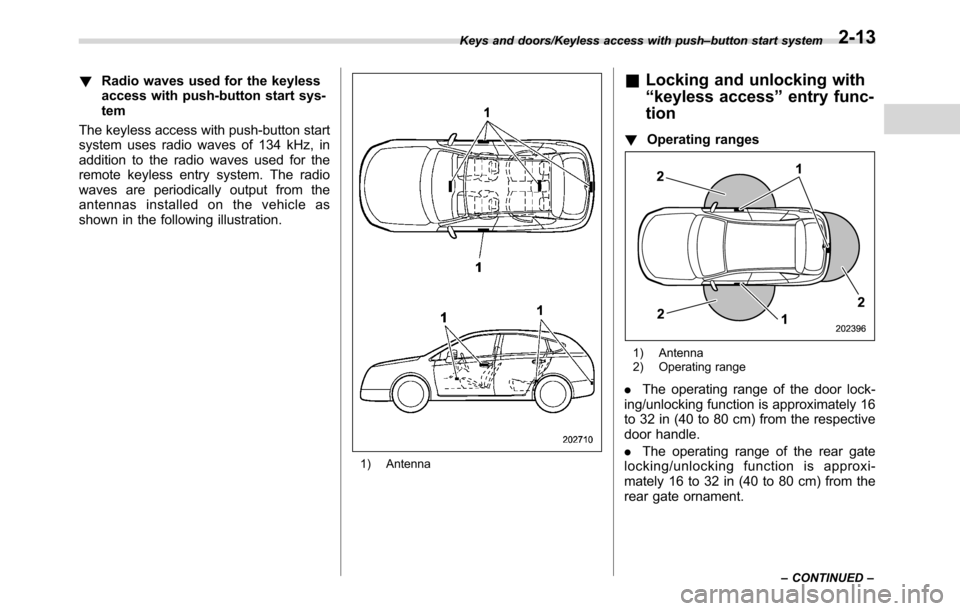
!Radio waves used for the keyless
access with push-button start sys-
tem
The keyless access with push-button start
system uses radio waves of 134 kHz, in
addition to the radio waves used for the
remote keyless entry system. The radio
waves are periodically output from the
antennas installed on the vehicle as
shown in the following illustration.
1) Antenna
&Locking and unlocking with
“keyless access”entry func-
tion
!Operating ranges
1) Antenna
2) Operating range
.The operating range of the door lock-
ing/unlocking function is approximately 16
to 32 in (40 to 80 cm) from the respective
door handle.
.The operating range of the rear gate
locking/unlocking function is approxi-
mately 16 to 32 in (40 to 80 cm) from the
rear gate ornament.
Keys and doors/Keyless access with push–button start system
–CONTINUED–2-13
Page 114 of 572

Keys and doors/Keyless access with push–button start system
!Locking with the door lock
sensor
1) Door lock sensor
Carry the access key, close all doors
(including the rear gate) and touch the
door lock sensor on the door handle. All
doors including the rear gate will be
locked. Also, an electronic chirp will sound
once and the hazard warning flashers will
flash once.
NOTE
After touching the door lock sensor to
lock all of the doors (including the rear
gate), if you touch the door lock sensor
once more to attempt the lock opera-
tion without first unlocking the doors,
nothing will happen, even if the door
lock sensor is touched. In this case,perform the unlocking operation once
first. You can then touch the door lock
sensor to lock the doors.
!Locking with the rear lock button
1) Rear lock button
Carry the access key, close all doors
including the rear gate and press the rear
lock button. The rear gate and all doors
will be locked. Also, an electronic chirp will
sound once and the hazard warning
flashers will flash once.
!Power saving function
The keyless access function will be
disabled in the following cases to protect
the access key battery and the vehicle
battery.
.Case 1: When the keyless accessfunction and the remote keyless entry
system have not been used for 2 weeks
or longer while all doors are locked
To recover the keyless access func-
tion:
Operate one of the following items.
–Unlock the doors by operating any
procedure other than gripping the front
passenger’s door handle
–Lock the doors
–Open a door and then close it
.Case 2: When the access key has
been left in the operating range for 10
minutes or longer while all doors are
locked
To recover the keyless access func-
tion:
Operate one of the following items.
–Unlock the doors by gripping the
door handle
–Unlock the doors by pressing the
rear gate opener button
–Lock the doors by touching the door
lock sensor
–Lock or unlock the doors by using
the remote keyless entry system
–Lock or unlock the doors by using
the power door locking switch
–Open either of the front doors
2-16
Page 116 of 572

Keys and doors/Keyless access with push–button start system
When the vehicle is not going to be used
for a long time, or when you choose not to
use the keyless access function, the
keyless access function can be disabled.
NOTE
.The locking and unlocking function
by the remote keyless entry system is
not disabled.
.The setting can also be changed at
SUBARU dealers. For more details,
contact a SUBARU dealer.
.To start the engine while the func-
tions are disabled, perform the proce-
dure described in“Starting engine”
F9-18.
.We recommend that you disable the
keyless access functions under the
following conditions.
–When the vehicle is not going to
be used for an extended period of
time
–When the keyless access func-
tions are not going to be used
!Disabling functions
!By operating the access key
If you have registered a PIN code for PIN
Code Access, you can disable the keyless
access function by operating the access
key. For details about registering a PIN
code, refer to“Registering a PIN code”F2-21.
1. Open the driver’s door.
2. Rotate the lock lever forward.
3. Press and hold the“”button and
“”button on the access key simulta-
neously for more than 5 seconds.A chirp sound will be heard, and the
function will be disabled.
!By operating the driver’s door
1. Sit in the driver’s seat, and close the
door.
2. Push the rear side (unlock side) of the
power door locking switch.
3. Within 5 seconds after step 2 is
performed, open the driver’s door.
4. Within 5 seconds after step 3 is
performed, push the rear side (unlock
side) of the power door locking switch
twice while the door is open.
5. Within 10 seconds after step 4 is
performed, close and open the driver’s
door twice.
6. Within 10 seconds after step 5 is
performed, push the rear side (unlock
2-18
Page 120 of 572

Keys and doors/Remote keyless entry system
&Unlocking
Perform steps 1 to 5 described in“Regis-
tration”.
NOTE
.You cannot unlock by PIN Code
Access in the following cases.
–when the access key is within the
operating ranges
–when the ignition switch is in the
“ACC”or“ON”position
.If you make an operation error
during the unlocking procedure, start
over with the unlocking procedure after
waiting for 5 seconds or longer.
.To protect your vehicle from theft, a
buzzer will sound if incorrect PIN codes
are entered five times continuously. If
this occurs, you cannot unlock the
doors by PIN Code Access for 5
minutes.
Remote keyless entry system
CAUTION
.Do not expose the remote trans-
mitter to severe shocks, such as
those experienced as a result of
dropping or throwing.
.Do not take the remote transmit-
ter apart except when replacing
the battery.
.Do not get the remote transmitter
wet. If it gets wet, wipe it dry with
a cloth immediately.
.When you carry the remote trans-
mitteronanairplane,donot
press the button of the remote
transmitter while in the airplane.
When any button of the remote
transmitter is pressed, radio
waves are sent and may affect
the operation of the airplane.
When you carry the remote trans-
mitter in a bag on an airplane,
take measures to prevent the
buttons of the remote transmitter
from being pressed.
For models with“keyless access with
push-button start system”, the accesskey is used as the transmitter for the
remote keyless entry system. For models
without“keyless access with push-button
start system”, the transmitter for the
remote keyless entry system is located
inside the key head.
The remote keyless entry system has the
following functions.
.Locking and unlocking the doors (and
rear gate) without a key
.Sounding a panic alarm
.Arming and disarming the alarm sys-
tem. For detailed information, refer to
“Alarm system”F2-26.
The operable distance of the remote
keyless entry system is approximately 30
feet (10 meters). However, this distance
will vary depending on environmental
conditions. The system’s operable dis-
tance will be shorter in areas near a
facility or electronic equipment emitting
strong radio waves such as a power plant,
broadcast station, TV tower, or remote
controller of home electronic appliances.
NOTE
.For models with“keyless access
with push-button start system”,the
remote keyless entry system will not
be activated when the push-button
ignition switch is in any position other
2-22