2017 SUBARU CROSSTREK battery
[x] Cancel search: batteryPage 133 of 572
switch up until it clicks and then release it.
To stop the window halfway, push the
switch down lightly.
NOTE
.If the vehicle’s battery is discon-
nected due to situations such as
battery or fuse replacement, the one-
touch auto up/down function will be
deactivated. Initialize the power win-
dow to reactivate the one-touch auto
up/down function. Refer to“Initializa-
tion of power window”F2-37.
.When the following operations are
performed, the power window breaker
will operate and it may not be possible
to open or close the window.
–After the driver’s window is fully
closed or fully opened, the switch is
continuously operated in the same
direction for a few seconds.
–After the windows for three or
more seats are fully closed or fully
opened, each switch is continu-
ously operated in the same direc-
tion simultaneously for a few sec-
onds.
In this case, after the breaker recovers,
be sure to initialize the power windows.
If they are not initialized, the one-touch
auto up/down function will not operate.
Refer to“Initialization of power win-dow”F2-37.
!Anti-entrapment function
CAUTION
.Never attempt to test this func-
tion using fingers, hands or other
parts of your body.
.The anti-entrapment function
may not operate properly if some
object gets trapped just before
the window fully closes.
NOTE
.If a window detects an impact simi-
lar to that caused by trapping an object
(for example, when the vehicle encoun-
ters a deep pothole), the anti-entrap-
ment function may operate.
.The window cannot be operated for
a few seconds after the anti-entrap-
ment function operates.
.If the vehicle’s battery is discon-
nected due to situations such as
battery or fuse replacement, the anti-
entrapment function is deactivated.
Initialize the power window to reacti-
vate the anti-entrapment function. Re-
fer to“Initialization of power window”
F2-37.While closing the driver’s window auto-
matically, if the window senses a sub-
stantial enough object trapped between
the window and the window frame, it
automatically moves down slightly and
stops.
Keys and doors/Windows
–CONTINUED–2-35
Page 135 of 572

!Operating the windows
To open:
Press the switch down and hold it until the
window reaches the desired position.
To close:
Pull the switch up and hold it until the
window reaches the desired position.
When the lock switch on the power
window switch cluster, located on the
driver’s side door, is in the lock position,
the passengers’windows cannot be oper-
ated with the passengers’switches.
&Initialization of power win-
dow
If the vehicle’s battery is disconnected due
to situations such as battery or fuse
replacement, the following functions are
deactivated.
.One-touch auto up/down function
.Anti-entrapment function
Initialize the power window using the
following procedure to reactivate these
functions.
1. Close the driver’s door.
2. Turn the ignition switch to the“ON”
position.
3. Open the driver’s side window halfway
by pushing down the power window
switch.
4. Pull up the power window switch and
close the window completely. Continue
pulling up the switch for approximately 1
second after the window is closed com-
pletely.
5. Open the driver’s side window com-
pletely by fully pushing down the power
windows switch.
Rear gate
&Lock/unlock
The rear gate can be locked and unlocked
using any of the following systems.
.Power door locking switch: Refer to
“Power door locking switches”F2-8.
.Keyless access with the push-button
start system (if equipped): Refer to“Key-
less access with push-button start system”
F2-9.
.Remote keyless entry system: Refer to
“Remote keyless entry system”F2-22.
NOTE
If the rear gate cannot be unlocked due
to a discharged vehicle battery, a
malfunction in the door locking/unlock-
ing system or other causes, you can
unlock it by manually operating the
rear gate lock release lever.
For the procedure, refer to“Rear gate–
if the rear gate cannot be opened”F9-
18.
Keys and doors/Rear gate
–CONTINUED–2-37
Page 136 of 572
Keys and doors/Rear gate
&Open/close
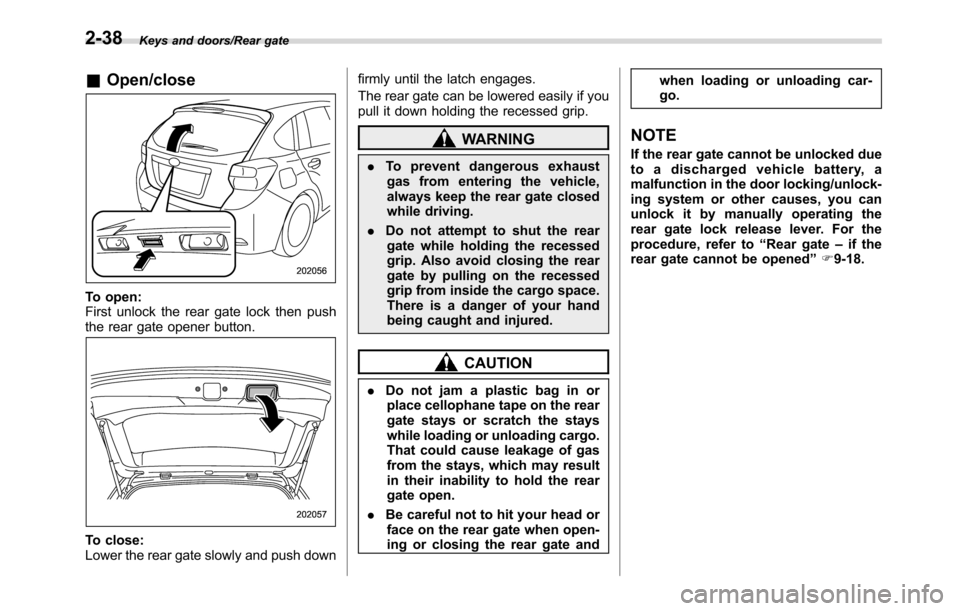
To open:
First unlock the rear gate lock then push
the rear gate opener button.
To close:
Lower the rear gate slowly and push downfirmly until the latch engages.
The rear gate can be lowered easily if you
pull it down holding the recessed grip.
WARNING
.To prevent dangerous exhaust
gas from entering the vehicle,
always keep the rear gate closed
while driving.
.Do not attempt to shut the rear
gate while holding the recessed
grip. Also avoid closing the rear
gate by pulling on the recessed
grip from inside the cargo space.
There is a danger of your hand
being caught and injured.
CAUTION
.Do not jam a plastic bag in or
place cellophane tape on the rear
gate stays or scratch the stays
while loading or unloading cargo.
That could cause leakage of gas
from the stays, which may result
in their inability to hold the rear
gate open.
.Be careful not to hit your head or
face on the rear gate when open-
ing or closing the rear gate andwhen loading or unloading car-
go.
NOTE
If the rear gate cannot be unlocked due
to a discharged vehicle battery, a
malfunction in the door locking/unlock-
ing system or other causes, you can
unlock it by manually operating the
rear gate lock release lever. For the
procedure, refer to“Rear gate–if the
rear gate cannot be opened”F9-18.
2-38
Page 142 of 572

Instruments and controls/Ignition switch (models without“keyless access with push–button start system”)
Ignition switch (models with-
out“keyless access with
push-button start system”)
WARNING
.Never turn the ignition switch to
the“LOCK”position while the
vehicle is being driven or towed
because that will lock the steer-
ing wheel, preventing steering
control. And when the engine is
turned off, it takes a much great-
er effort than usual to steer.
.Before leaving the vehicle, al-
ways remove the key from the
ignition switch for safety and
never allow an unattended child
to remain in the vehicle. Failure
to follow this procedure could
result in injury to a child or
others. Children could operate
the power windows, the moon-
roof or other controls or even
make the vehicle move.
CAUTION
Do not attach a large key holder or
key case to either key. If it banged
against your knees or hands while
you are driving, it could turn the
ignition switch from the“ON”posi-
tion to the“ACC”or“LOCK”posi-
tion, thereby stopping the engine.
Also, if the key is attached to a key
holder or to a large bunch of other
keys, centrifugal force may act on it
as the vehicle moves, resulting in
unwanted turning of the ignition
switch.
The ignition switch has four positions:
LOCK, ACC, ON and START.
NOTE
.Keep the ignition switch in the
“LOCK”position when the engine is
not running.
.Using electrical accessories for a
long time with the ignition switch in the
“ON”or“ACC”position can cause the
battery to go dead.
.If the ignition switch will not move
from the“LOCK”position to the“ACC”
position, turn the steering wheel
slightly to the left and right as you turn
the ignition switch.
&LOCK
The key can only be inserted or removed
in this position. The ignition switch will lock
the steering wheel when you remove the
key.
If turning the key is difficult, turn the
steering wheel slightly to the right and left
as you turn the key.
3-4
Page 144 of 572

Instruments and controls/Push–button ignition switch (models with push–button start system)
&Ignition switch light (if
equipped)
For easy access to the ignition switch in
the dark, the ignition switch light illumi-
nates when the driver’s door is opened or
when the driver’s door is unlocked using
the remote keyless entry transmitter.
The light remains illuminated for several
tens of seconds and then gradually turns
off under the following conditions.
.when the driver’s door is closed
.when the doors are unlocked using the
remote keyless entry transmitter
The light turns off immediately under the
following conditions.
.when the ignition switch is turned to the
“ON”position
.when all doors and the rear gate are
locked using the remote keyless entry
transmitter
Push-button ignition switch
(models with push-button
start system)
&Safety precautions
Refer to“Safety precautions”F2-10.
&Operating range for push-
button start system
1) Antenna
2) Operating range
NOTE
.If the access key is not detected
within the operating range of the an-
tennas inside the vehicle, the push-
button ignition switch and the engine
start cannot be operated..Even when the access key is outside
the vehicle, if it is placed too close to
the glass, it may be possible to switch
the power or to start the engine.
.Do not leave the access key in the
following places. It may become im-
possible to operate the push-button
ignition switch and the engine start. It
may also cause a false warning to
issue although no malfunction actually
occurs, or not to issue a warning when
any malfunction occurs.
–On the instrument panel
–On the floor
–Inside the glove box
–Inside the door trim pocket
–On the rear seat
–In the cargo area
.When operating the push-button
ignition switch or starting the engine,
if the access key battery is discharged,
perform the procedure described in
“Access key–if access key does not
operate properly”F9-17. In such a
case, replace the battery immediately.
Refer to“Replacing battery of access
key”F11-42.
3-6
Page 145 of 572

&Switching power status
1) Operation indicator
2) Push-button ignition switch
The power status is switched every time
the push-button ignition switch is pressed.
1. Carry the access key, and sit in the
driver’s seat.
2. Shift the select lever into the“P”
position.
3. Press the push-button ignition switch
without depressing the brake pedal. Every
time the button is pressed, the power is
switched in the sequence of“OFF”,
“ACC”,“ON”and“OFF”. When the engine
is stopped and the push-button ignition
switch is in“ACC”or“ON”, the operation
indicator on the push-button ignition
switch illuminates in orange.
Power
statusIndicator color Operation
OFF Turned offPower is turned
off.
ACC OrangeThe following
systems can be
used:
audio and ac-
cessory power
outlet.
ONOrange
(while engine is
stopped)All electrical
systems can be
used. Turned off
(while engine is
running)
CAUTION
.To prevent the vehicle battery
from discharging, do not leave
the push-button ignition switch
in the“ON”or“ACC”position for
a long time.
.To avoid a malfunction, observe
the following precautions.
–Do not spill drinks or other
liquids on the push-button
ignition switch.
–Do not touch the push-button
ignition switch with a hand
that is soiled with oil or othercontaminants.
.If the push-button ignition switch
does not operate smoothly, stop
the operation. Contact a
SUBARU dealer immediately.
.If the push-button ignition switch
does not illuminate even when
the instrument panel illumination
is turned on, have the vehicle
inspected at a SUBARU dealer.
.If the vehicle was left in the hot
sun for a long time, the surface of
the push-button ignition switch
may get hot. Be careful not to
burn yourself.
NOTE
.When operating the push-button
ignition switch, firmly press it all the
way.
.If the push-button ignition switch is
pressed quickly, the power may not
turn on or off.
.If the indicator light on the push-
button ignition switch flashes in green
when the push-button ignition switch is
pressed, steering is locked. When this
occurs, press the push-button ignition
switch while turning the steering wheel
left and right.
Instruments and controls/Push–button ignition switch (models with push–button start system)
–CONTINUED–3-7
Page 146 of 572
Instruments and controls/Hazard warning flasher
!Battery drainage prevention func-
tion
When the push-button ignition switch is
left in the“ACC”or“ON”position for
approximately 1 hour, the push-button
ignition switch will be automatically
switched to“OFF”to prevent the battery
from going dead. This function is activated
when the select lever is in the“P”position.
&When access key does not
operate properly
Refer to“Access key–if access key does
not operate properly”F9-17.
Hazard warning flasher
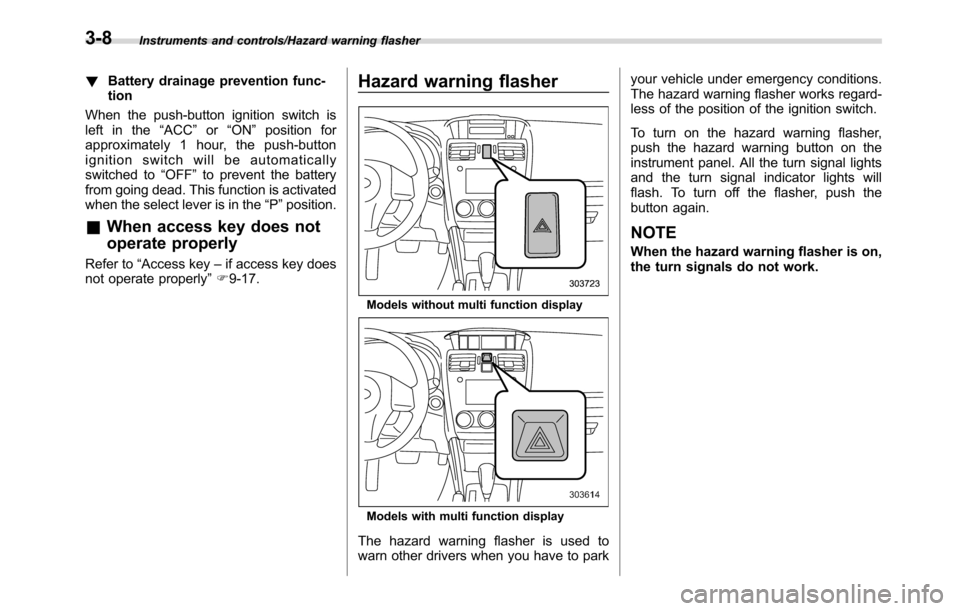
Models without multi function display
Models with multi function display
The hazard warning flasher is used to
warn other drivers when you have to parkyour vehicle under emergency conditions.
The hazard warning flasher works regard-
less of the position of the ignition switch.
To turn on the hazard warning flasher,
push the hazard warning button on the
instrument panel. All the turn signal lights
and the turn signal indicator lights will
flash. To turn off the flasher, push the
button again.
NOTE
When the hazard warning flasher is on,
the turn signals do not work.
3-8
Page 149 of 572

This meter displays the two trip meters
when the ignition switch is in the“ON”
position.
The trip meter shows the distance that the
vehicle has been driven since you last set
it to zero.
If you press the trip knob when the ignition
switch is in the“LOCK”/“OFF”or“ACC”
position, the odometer/trip meter will light
up. It is possible to switch between the A
trip meter and B trip meter indications
while the odometer/trip meter is lit up. If
you do not press the trip knob within 10
seconds of illumination of the odometer/
trip meter, the odometer/trip meter will turn
off.
Also, if you open and close the driver’s
door within 10 seconds of illumination of
the odometer/trip meter, the odometer/trip
meter will turn off.
The display can be switched as shown in
the following sequence by pressing the
trip knob.
*: They cannot be displayed when the
ignition switch is in the“ON”position.
To set the trip meter to zero, select the A
trip or B trip meter by pressing the knob
and keep the knob pressed for more than
2 seconds.
CAUTION
To ensure safety, do not attempt to
change the function of the indicator
during driving, as an accident could
result.
NOTE
If the connection between the combina-
tion meter and battery is broken for any
reason such as vehicle maintenance or
fuse replacement, the data recorded on
the trip meter will be lost.
&Tachometer
The tachometer shows the engine speed
in thousands of revolutions per minute.
CAUTION
Do not operate the engine with the
pointer of the tachometer in the red
zone. In this range, fuel injection will
be cut by the engine control module
to protect the engine from overrev-
ving. The engine will resume run-
ning normally after the engine speed
is reduced below the red zone.
NOTE
To protect the engine/transmission
while the select lever is in the“P”or
“N”position (for CVT models) or the
shift lever is in the neutral position (for
MT models), the engine is controlled so
that the engine speed may not become
too high even if the accelerator pedal is
pressed hard.
Instruments and controls/Meters and gauges
–CONTINUED–3-11