2017 SUBARU CROSSTREK display
[x] Cancel search: displayPage 115 of 572

!Door unlock selection function
The door unlock selection function makes
the following operations possible.
.Unlocking the driver’s door without
unlocking any other doors (including the
rear gate) when gripping the driver’s door
handle
.Opening the rear gate without unlock-
ing any doors when pressing the rear gate
opener button
The operational/non-operational setting
for this function can be changed by a
SUBARU dealer.
Operational:
.Only the driver’s door will be unlocked
when the driver’s door handle is gripped.
.The rear gate will open, but the other
doors will remain locked when the rear
gate opener button is pressed.
Non-operational:
.All doors and the rear gate will be
unlocked when the driver’s door handle is
gripped.
.The rear gate will open and all doors
will be unlocked when the rear gate
opener button is pressed.
The factory setting (default setting) is set
as“operational”.
For further details, consult a SUBARUdealer.
NOTE
The setting can be changed by your
SUBARU dealer. Contact your SUBARU
dealer for details. Also, for models with
the multi function display, the setting
can be changed by operating the multi
function display. For details, refer to
“Keyless access setting (models with
“keyless access with push-button start
system”)”F3-83.
&Selecting audible signal op-
eration
Using an electronic chirp, the system will
give you an audible signal when the doors
lock and unlock. If desired, you may turn
the audible signal off. For more details,
contact a SUBARU dealer.
NOTE
For models with the multi function
display, the setting can be changed by
operating the multi function display.
For details, refer to“Keyless buzzer
volume setting”F3-78.
&Warning chimes and warning
indicator
The warning chime and the access key
warning indicator are used for the follow-
ing purposes.
.Minimizing improper operations when
using the keyless access with push-button
start system
.Helping protect your vehicle from theft
For details, refer to“Warning chimes and
warning indicator of the keyless access
with push-button start system”F3-25.
&Disabling keyless access
function
WARNING
If you wear an implanted pacemaker
or an implanted defibrillator, per-
form the procedure described in
“By operating the driver’sdoor”
F2-18 to disable the keyless access
function. If you perform the proce-
dure described in“By operating the
access key”F2-18, the operation of
an implanted pacemaker or im-
planted defibrillator may be affected
by the radio waves from the trans-
mitter antenna.
Keys and doors/Keyless access with push–button start system
–CONTINUED–2-17
Page 121 of 572

than the“OFF”position.
.For models without“keyless access
with push-button start system”,the
remote keyless entry system will not
be activated when the key is inserted in
the ignition switch.
Access key
1) Lock/arm button
2) Unlock/disarm button
3) Rear gate unlock button
4) PANIC button
Transmitter
1) Lock/arm button
2) Unlock/disarm button
3) Rear gate unlock button
4) PANIC button
NOTE
The hazard warning flashers will flash
once or twice when the access key/
transmitter button is pressed in the
following cases.
–When locking the doors
–When unlocking the doors
–When unlocking the rear gate
Operation of the hazard warning
flashers in the above cases can be set
to“On”or“Off”by a SUBARU dealer.
Consult your SUBARU dealer for de-tails. Also, for models with a multi
function display, the setting can be
changed using the display. For details,
refer to“Hazard warning flasher
setting”F3-78.
&Locking the doors
Press the lock/arm button to lock all doors
and rear gate. An electronic chirp will
sound once and the hazard warning
flashers will flash once.
If any of the doors (or the rear gate) is not
fully closed, the following will occur to alert
you that the doors (or the rear gate) are
not properly closed.
.an electronic chirp sounds five times.
.the hazard warning flashers flash five
times.
When you close the door, it will automa-
tically lock and then the following will
occur.
.an electronic chirp sounds once.
.the hazard warning flashers flash once.
Keys and doors/Remote keyless entry system
–CONTINUED–2-23
Page 123 of 572

the ignition switch at least 6 times within
10 seconds after Step 2.
4. Open and close the driver’s door once
within 10 seconds after Step 3.
5. The hazard warning flashers flash 3
times to indicate completion of the setting.
You may have the above settings done by
your SUBARU dealer. Also, for models
with a multi function display, the setting
can be changed using the display. For
details, refer to“Keyless buzzer volume
setting”F3-78.
&Replacing the battery
Refer to“Replacing key battery”F11-42.
&Replacing lost transmitters
If you lose a transmitter or want to
purchase additional transmitters (up to
four can be programmed), your transmit-
ters should be reprogrammed for security
reasons. For details, contact your
SUBARU dealer and have the transmitters
programmed into the remote keyless entry
system.
&Certification for remote key-
less entry system
!U.S.-spec. models
FCC ID: CWTWB1U811
FCC ID: CWTWD1U781
CAUTION
FCC WARNING
Changes or modifications not ex-
pressly approved by the party re-
sponsible for compliance could void
the user’s authority to operate the
equipment.
NOTE
This device complies with part 15 of the
FCC Rules. Operation is subject to the
following two conditions: (1) This de-
vice may not cause harmful interfer-
ence, and (2) this device must accept
any interference received, including
interference that may cause undesired
operation.!Canada-spec. models
Keys and doors/Remote keyless entry system
–CONTINUED–2-25
Page 125 of 572

when the cargo area light switch is in
the“DOOR”position)
The notifications regarding the map
lights, dome light and cargo area light
are deactivated as the factory setting. A
SUBARU dealer can activate the sys-
tem. Contact your SUBARU dealer for
details.
&Activating and deactivating
the alarm system
To change the setting of your vehicle’s
alarm system for activation or deactiva-
tion, do the following.
1. Disarm the alarm system. Refer to
“Disarming the system”F2-30.
2. Sit in the driver’s seat and shut all
doors and the rear gate.
3. Turn the ignition switch to the“ON”
position.
4. Hold down the REAR (UNLOCK) side
of the driver’s power door locking switch,
open the driver’s door within the following
1 second, and wait 10 seconds without
releasing the switch. The setting will then
be changed as follows.
If the system was previously activated:
The odometer/trip meter screen displays
as follows and the horn sounds twice,
indicating that the system is now deacti-vated.
.“AL oF”(models with type A combina-
tion meter)
.“ALOF”(models with type B combina-
tion meter)
If the system was previously deacti-
vated:
The odometer/trip meter screen displays
as follows and the horn sounds once,
indicating that the system is now acti-
vated.
.“AL on”(models with type A combina-
tion meter)
.“ALON”(models with type B combina-
tion meter)
NOTE
You may have the above setting
change done by your SUBARU dealer.
&If you have accidentally trig-
gered the alarm system
!To stop the alarm
Do any of the following operations:
.Press any button on the access key/
remote transmitter.
.Turn the ignition switch to the“ON”
position (models without“keyless access
with push-button start system”).
.Turn the push-button ignition to the“ACC”position (models with“keyless
access with push-button start system”).
NOTE
Only registered keys will stop the
alarm. If the immobilizer transponder
is not registered, the alarm will not
stop.
&Arming the system
!Tips
.The system can be armed even if the
engine hood, windows and/or moonroof
are open. Always make sure that they are
fully closed before arming the system.
.The 30-second standby time can be
eliminated if you prefer. Have it performed
by your SUBARU dealer.
.The system is in the standby mode for
a 30-second period after locking the doors
with the remote transmitter. The security
indicator light will flash at short intervals
during this period.
.If any of the following actions are done
during the standby period, the system will
not switch to the surveillance state.
–Doors (including the rear gate) are
unlocked using the access key/remote
transmitter.
–Doors (including the rear gate) are
unlocked using the keyless access
Keys and doors/Alarm system
–CONTINUED–2-27
Page 140 of 572

Instruments and controls
Cruise control indicator light (if equipped).......... 3-31
Cruise control set indicator light (if
equipped)......................................................... 3-31
Automatic headlight beam leveler warning light
(models with HID headlights)............................ 3-31
Front fog light indicator light.............................. 3-31
Headlight indicator light..................................... 3-32
Steering responsive fog lights warning indicator/
Steering responsive fog lights OFF indicator
(models with EyeSight system)......................... 3-32
BSD/RCTA warning indicator (if equipped).......... 3-32
BSD/RCTA OFF indicator (if equipped)................ 3-32
Information display (if equipped)...................... 3-32Outside temperature indicator............................ 3-33
Driving information display................................. 3-33
Clock................................................................. 3-37
Multi information display (models with type
B combination meter)..................................... 3-38
Basic operation.................................................. 3-39
Welcome screen and Good-bye screen............... 3-39
Warning screen.................................................. 3-39
Basic screens.................................................... 3-39
Menu screens.................................................... 3-40
Multi function display (if equipped).................. 3-42Models without multi function display................. 3-42
Safety precautions............................................. 3-42
Features............................................................ 3-43
Locations........................................................... 3-43
Basic operation.................................................. 3-43
Welcome screen................................................. 3-44
Date screen........................................................ 3-44Ending screen................................................... 3-44
Self-check screen.............................................. 3-45
Interruption screen............................................ 3-46
Basic screens.................................................... 3-46
Selection screen................................................ 3-53
Date and time settings....................................... 3-56
Image quality and volume settings..................... 3-63
Screen settings.................................................. 3-65
Maintenance settings......................................... 3-73
Driving history registration................................. 3-76
Car settings....................................................... 3-77
Initialize............................................................. 3-85
Light control switch........................................... 3-88Headlights......................................................... 3-89
High/low beam change (dimmer) ........................ 3-90
Headlight flasher............................................... 3-91
Daytime running light system............................. 3-91
Turn signal lever................................................ 3-92One-touch lane changer..................................... 3-92
Illumination brightness control......................... 3-92
Headlight beam leveler (if equipped)............... 3-93
Automatic headlight beam leveler (models with
HID headlights)................................................ 3-93
Fog light switch................................................. 3-93
Steering responsive fog lights system (models
with EyeSight system)..................................... 3-94
Wiper and washer.............................................. 3-95Windshield wiper and washer switches.............. 3-96
Rear window wiper and washer switch............... 3-98
Mirrors................................................................ 3-99Inside mirror...................................................... 3-99
Page 146 of 572
Instruments and controls/Hazard warning flasher
!Battery drainage prevention func-
tion
When the push-button ignition switch is
left in the“ACC”or“ON”position for
approximately 1 hour, the push-button
ignition switch will be automatically
switched to“OFF”to prevent the battery
from going dead. This function is activated
when the select lever is in the“P”position.
&When access key does not
operate properly
Refer to“Access key–if access key does
not operate properly”F9-17.
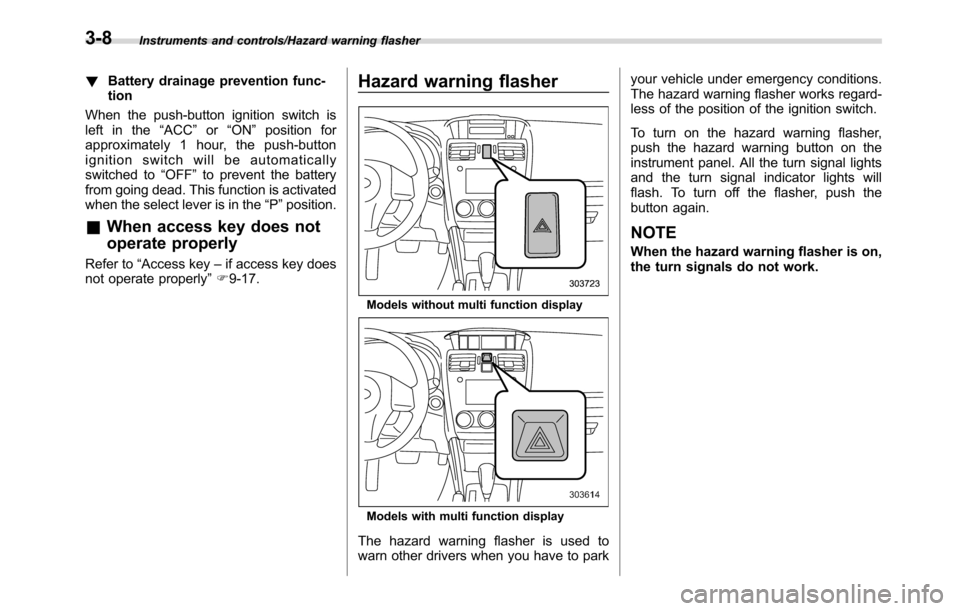
Hazard warning flasher
Models without multi function display
Models with multi function display
The hazard warning flasher is used to
warn other drivers when you have to parkyour vehicle under emergency conditions.
The hazard warning flasher works regard-
less of the position of the ignition switch.
To turn on the hazard warning flasher,
push the hazard warning button on the
instrument panel. All the turn signal lights
and the turn signal indicator lights will
flash. To turn off the flasher, push the
button again.
NOTE
When the hazard warning flasher is on,
the turn signals do not work.
3-8
Page 147 of 572

Meters and gauges
NOTE
Some of the meters and gauges on the
combination meter use liquid-crystal
displays. You will find their indications
hard to see if you wear polarized
glasses.
&Combination meter illumina-
tion
When the ignition switch is turned to the
“ON”position, various parts of the combi-
nation meter will illuminate in the following
sequence.
1. Warning lights, indicator lights, meter
needles, gauge needles and liquid crystal
display illuminate.
2. Meter and gauge indications each
show MAX position.
3. Meter and gauge indications each
show MIN position.
4. Regular illumination (for driving) be-
gins.
&Canceling the function for
meter/gauge needle move-
ment upon turning on the
ignition switch
It is possible to activate or deactivate the
movement of the meter needles and
gauge needles that takes place when the
ignition switch is turned to the“ON”
position.
!Type A combination meter
To change the setting, perform the follow-
ing procedure.
1. Turn the ignition switch to the“LOCK”/
“OFF”or“ACC”position.
1) Trip knob
2. Press the trip knob to show“”or
“”on the trip meter display.The display can be switched as shown in
the following sequence by pressing the
trip knob.
*: They cannot be displayed when the
ignition switch is in the“ON”position.
To change the current setting, press the
trip knob for at least 2 seconds.
: Activated
: Deactivated
NOTE
.Your vehicle’s initial movement
setting of the meter/gauge needles
has been set for activation“
”at
the time of shipment from the factory.
.It is not possible to change the initial
movement setting of the meter/gauge
needles when the ignition switch is in
the“ON”position. Change the setting
when the ignition switch is in the
“LOCK”/“OFF”or“ACC”position.
Instruments and controls/Meters and gauges
–CONTINUED–3-9
Page 148 of 572

Instruments and controls/Meters and gauges
!Type B combination meter
Perform the procedures described in
“Gauge Initial Movement”F3-41.
&Speedometer
The speedometer shows the vehicle
speed.
&Odometer
Type A
1) Trip knob
Type B
1) Trip knob (U.S.-spec. models)
2) Trip knob (except U.S.-spec. models)
This meter displays the odometer when
the ignition switch is in the“ON”position.
The odometer shows the total distance
that the vehicle has been driven.
If you press the trip knob when the ignition
switch is in the“LOCK”/“OFF”or“ACC”
position, the odometer/trip meter will light
up. If you do not press the trip knob within
10 seconds of illumination of the od-
ometer/trip meter, the odometer/trip meter
will turn off.
Also, if you open and close the driver’s
door within 10 seconds of illumination of
the odometer/trip meter, the odometer/trip
meter will turn off.
&Double trip meter
Type A
1) Trip knob
Type B
1) Trip knob (U.S.-spec. models)
2) Trip knob (except U.S.-spec. models)
3-10