2017 SUBARU CROSSTREK audio
[x] Cancel search: audioPage 344 of 572

Audio/What to do if...
When using the phonebook
Symptom Likely cause SolutionPage
Cell
phoneThis
system
Phonebook data cannot be trans-
ferred manually.The profile version of the connected cell
phone may not be compatible with
transferring phonebook data.For USA customers, please visit
www.subaru.com for details. Outside of the
USA customers, contact your local dealer to
arrange a demonstration in order to confirm
whether or not the device can be paired with
the vehicle.*—
Transfer operation on the cell phone has
not completed.Complete transfer operation on the cell phone
(approve transfer operation on the phone).*—
Phonebook data cannot be edited.Editing function is not available on this
system.——5-78
*: For details, refer to the owner’s manual that came with the cell phone.
5-90
Page 345 of 572
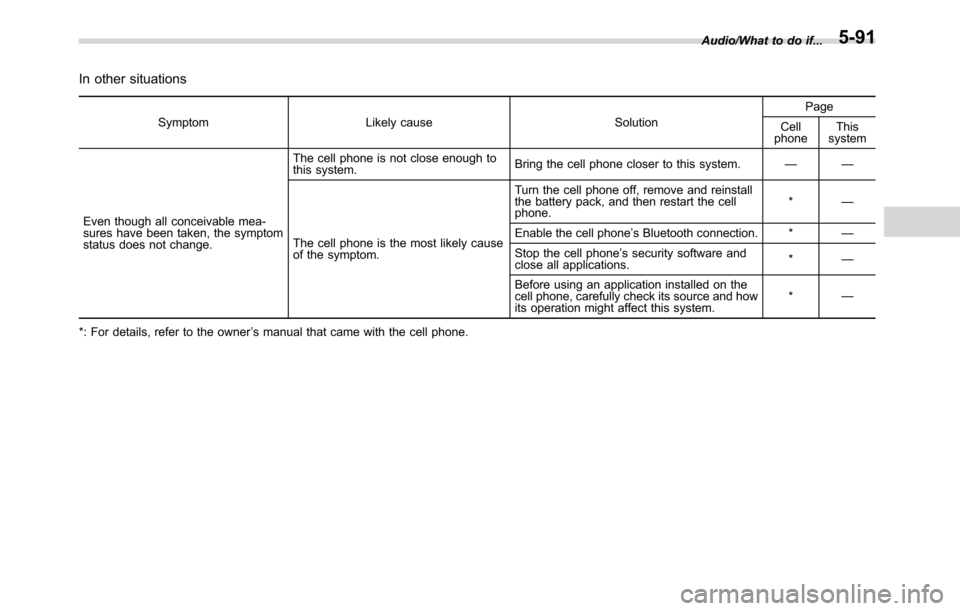
In other situations
Symptom Likely cause SolutionPage
Cell
phoneThis
system
Even though all conceivable mea-
sures have been taken, the symptom
status does not change.The cell phone is not close enough to
this system.Bring the cell phone closer to this system.——
The cell phone is the most likely cause
of the symptom.Turn the cell phone off, remove and reinstall
the battery pack, and then restart the cell
phone.*—
Enable the cell phone’s Bluetooth connection. *—
Stop the cell phone’s security software and
close all applications.*—
Before using an application installed on the
cell phone, carefully check its source and how
its operation might affect this system.*—
*: For details, refer to the owner’s manual that came with the cell phone.Audio/What to do if...
5-91
Page 346 of 572

Audio/Appendix
Appendix
&Certification
.Bluetooth
The Bluetooth word mark and logo are
registered trademarks of Bluetooth SIG,
Inc. and any use of such marks by Clarion
Co., Ltd. is under license.
.SiriusXM Satellite Radio (if
equipped)
SiriusXM
TMand all related marks and
logos are trademarks of SiriusXM Radio
Inc. All rights reserved.
.Pandora (if equipped)
Pandora, the Pandora logo, and other
Pandora marks are trademarks or regis-
tered trademarks of Pandora Media, Inc.,
or its subsidiaries worldwide.
If you have any issues with the Pandora
application on your mobile phone, please
direct them to
[email protected].
.iPod
“Made for iPod”and“Made for iPhone”
mean that an electronic accessory has
been designed to connect specifically to
iPod or iPhone respectively, and has been
certified by the developer to meet Apple
performance standards. Apple is not
responsible for the operation of this device
or its compliance with safety and regula-
tory standards. Please note that the use of
this accessory with iPod or iPhone may
affect wireless performance.
iPhone, iPod, iPod classic, iPod nano,
iPod touch, and iTunes are trademarks of
Apple Inc., registered in the U.S. and other
countries.
.How to get the source code using
the open source
This system implements software using
the open source. For customers who
would like to get the source code of the
software, it is available by downloading it
from the web site of Clarion Co., Ltd.
For details, refer to the following web site.http://www.clarion.com/us/en/support/in-
dex.html
&Certification for the Hands-
free system
This device complies with Part 15 of FCC
Rules and Industry Canada’s licence-
exempt RSSs. Operation is subject to
the following two conditions: (1) This
device may not cause harmful interfer-
ence, and (2) this device must accept any
interference received, including interfer-
ence that may cause undesired operation.
Le présent appareil est conforme à la
partie 15 des règles de la FCC et CNR
d’Industrie Canada applicables aux appa-
reils radio exempts de licence. L’exploita-
tion est autorisée aux deux conditions
suivantes : (1) l’appareil ne doit pas
produire de brouillage; (2) l’utilisateur de
l’appareil doit accepter tout brouillage
radioélectrique subi, même si le brouillage
est susceptible d’en compromettre le
fonctionnement.
This equipment complies with FCC/IC
radiation exposure limits set forth for an
uncontrolled environment and meets the
FCC radio frequency (RF) Exposure
Guidelines in Supplement C to OET65
and RSS-102 of the IC radio frequency
(RF) Exposure rules. This equipment has
5-92
Page 347 of 572

very low levels of RF energy that it
deemed to comply without maximum
permissive exposure evaluation (MPE).
Cet équipement est conforme aux limites
d’exposition aux rayonnements énoncées
pour un environnement non contrôlé et
respecte les lignes directrices d’exposition
aux fréquences radioélectriques de la
FCC dans le Supplément C à OET65 et
d’exposition aux fréquences radioélectri-
ques (RF) CNR-102 de l’IC. Cet équipe-
ment émet une énergie RF très faible qui
est considérée conforme sans évaluation
de l’exposition maximale autorisée.
FCC CAUTION
Changes or modifications not expressly
approved by the party responsible for
compliance could void the user’s authority
to operate the equipment.
This transmitter must not be co-located or
operated in conjunction with any other
antenna or transmitter.&Certification for Mexico mod-
els
.IFETEL RCPCLPF14-253
Clarion PF-3755
.IFETEL RCPCLPF14-253
Clarion PF-3678
Audio/Appendix5-93
Page 363 of 572

Rear view camera
A rear view camera is attached to the rear
gate. When the ignition switch is“ON”and
the shift lever (MT models) or select lever
(CVT models) is set to“R”, the rear view
camera automatically displays the rear
view image behind the vehicle on one of
the following displays.
.Navigation display (if equipped)
.Audio display (if equipped)
WARNING
.Since the rear view camera uses
a wide-angle lens, the image on
the monitor is different from the
actual view in terms of distance.
.Since the range of the image onthe monitor is limited, you should
always check the rear view and
the surrounding area with your
eyes and mirrors, and move
backward at a slow speed. Mov-
ing backward only by checking
the rear view image from the
camera could cause an accident.
.Do not disassemble or modify the
camera, switch or wiring. If
smoke comes out or you smell
a strange odor, stop using the
rear view camera immediately.
Contact your SUBARU dealer
for an inspection. Continued use
may result in accident, fire or
electric shock.
CAUTION
.If your vehicle is washed with a
high-pressure washer, do not
allow water to contact the camera
directly. Entry of water in the
camera lens may result in con-
densation, malfunction, fire or
electric shock.
.Since the camera is a precision
device, do not subject it to strong
impacts. Otherwise, malfunction,
fire or electric shock may occur..If mud or snow sticks to or is
frozen on the camera, you must
be very careful when removing it.
Otherwise, damage to the camera
may cause a fire or electric
shock. Pour water or lukewarm
water over the camera to remove
mud and ice, and wipe it with a
soft, dry cloth.
.Do not put a flame close to the
camera or wiring. Otherwise, da-
mage or fire may occur.
.When replacing the fuse, be sure
to use a fuse with the specified
rating. Use of a fuse with a
different rating may result in a
malfunction.
.If the rear view camera is used for
a long time while the engine is
not operated, the battery may
become completely discharged.
NOTE
.Do not wipe the camera with alcohol,
benzine or paint thinner. Otherwise,
discoloration may occur. To remove
contamination, wipe the camera with a
cloth moistened with a diluted neutral
detergent and then wipe it with a soft,
dry cloth.
.When waxing the vehicle, be careful
Interior equipment/Rear view camera
–CONTINUED–6-15
Page 364 of 572

Interior equipment/Rear view camera
not to apply the wax to the camera. If it
comes in contact with the camera,
moisten a clean cloth with a diluted
neutral detergent to remove the wax.
.The camera lens has a hard coating
to help prevent scratches. However,
when washing the vehicle or cleaning
the camera lens, be careful not to
scratch the camera lens. Do not use a
washing brush directly on the camera
lens. The image quality of the rear view
camera may deteriorate.
.Strong light shined on the camera
lens may develop vertical lines around
the light source. This is not a malfunc-
tion.
.Under fluorescent light, the display
may flicker. However, this is not a
malfunction.
.The image of the rear view camera
may be slightly different from the
actual color of the objects.&How to use the rear view
camera
When the shift lever/select lever is set to
“R”, the rear view camera automatically
displays the rear view image from the
vehicle. When the lever is set to other
positions, the image before setting to“R”
is displayed.
1. Set the ignition switch to“ON”.
2. Set the shift lever/select lever to“R”.
NOTE
.For models with the genuine
SUBARU navigation system or audio
system, while the navigation system is
activated, the image of the rear view
camera will not be displayed. However,
the image of the rear view camera has
priority over other screen displays.
.The image of the rear view camera is
horizontally reversed as is the case
with the vehicle rearview mirror or the
side view mirror.
.It may be difficult to see the rear
view camera image in the following
cases. This is not a malfunction of the
camera.
–The vehicle is used for towing or
a trailer hitch is installed.
–The vehicle is in a dark place (at
night, in a tunnel, etc.).–The vehicle is in an extremely hot
or cold place.
–An object (such as raindrops,
snow, dirt, etc.) that disturbs the
view of the rear view camera sticks
to the lens of the camera.
–Strong light shined directly on
the camera lens (occasionally, there
are vertical lines on the screen).
6-16
Page 473 of 572

Exterior care....................................................... 10-2
Washing............................................................. 10-2
Waxing and polishing......................................... 10-3
Cleaning aluminum wheels................................. 10-3
Corrosion protection.......................................... 10-4
Most common causes of corrosion..................... 10-4
To help prevent corrosion................................... 10-4
Cleaning the interior.......................................... 10-5
Seat fabric......................................................... 10-5
Leather seat materials........................................ 10-5
Synthetic leather upholstery............................... 10-6
Climate control panel, audio panel, instrument
panel, console panel, and switches.................. 10-6
Monitor (if equipped).......................................... 10-6
Appearance care
10
Page 477 of 572

assistance.
Repair chips and scratches in the paint as
soon as you find them.
Check the interior of the vehicle for water
and dirt accumulation under the floor mats
because that could cause corrosion.
Occasionally check under the mats to
make sure the area is dry.
Keep your garage dry. Do not park your
vehicle in a damp, poorly ventilated
garage. In such a garage, corrosion can
be caused by dampness. If you wash the
vehicle in the garage or put the vehicle
into the garage when wet or covered with
snow, that can cause dampness.
If your vehicle is operated in cold weather
and/or in areas where road salts and other
corrosive materials are used, the door
hinges and locks, and hood latch should
be inspected and lubricated periodically.Cleaning the interior
Use a soft, damp cloth to clean the climate
control panel, audio equipment, instru-
ment panel, center console, combination
meter panel, and switches. (Do not use
organic solvents.)
&Seat fabric
Remove loose dirt, dust or debris with a
vacuum cleaner. If the dirt is caked on the
fabric or hard to remove with a vacuum
cleaner, use a soft brush then vacuum it.
Wipe the fabric surface with a tightly
wrung cloth and dry the seat fabric
thoroughly. If the fabric is still dirty, wipe
using a solution of mild soap and luke-
warm water then dry thoroughly.
If the stain does not come out, try a
commercially-available fabric cleaner. Use
the cleaner on a hidden place and make
sure it does not affect the fabric adversely.
Use the cleaner according to its instruc-
tions.
CAUTION
When cleaning the seat, do not use
benzine, paint thinner, or any similar
materials. Doing so could damage
the surface and cause the color todeteriorate.
&Leather seat materials
The leather used by SUBARU is a high
quality natural product which will retain its
distinctive appearance and feel for many
years with proper care.
Allowing dust or road dirt to build up on the
surface can cause the material to become
brittle and to wear prematurely. Regular
cleaning with a soft, moist, natural fiber
cloth should be performed monthly, taking
care not to soak the leather or allow water
to penetrate the stitched seams.
A mild detergent suitable for cleaning
woolen fabrics may be used to remove
difficult dirt spots, rubbing with a soft, dry
cloth afterwards to restore the luster. If
your SUBARU is to be parked for a long
time in bright sunlight, it is recommended
that the seats and head restraints be
covered, or the windows shaded, to
prevent fading or shrinkage. Make sure
to remove the seat covers and head
restraint covers when operating the vehi-
cle.
Minor surface blemishes or bald patches
may be treated with a commercial leather
spray lacquer. You will discover that each
leather seat section will develop soft folds
or wrinkles, which is characteristic of
Appearance care/Cleaning the interior
–CONTINUED–10-5