Page 215 of 572
4. Push thebutton once more to
enter the setting mode.
5. The system will notify you of the place
to be selected for approximately 2 sec-
onds.
6. Select one of the registration lines by
operating the“”or“”switch. Then
push thebutton.
7. To overwrite the previous registration,
push thebutton. When registration is
performed the first time, it is registereddirectly without a notification.
8. The system will notify you that the
registration is complete.
&Car settings
The items in the car settings can be set.
To change the items, operate the“”or
“”switch, and then push thebutton.
!Preparation for car settings
1. Turn the ignition switch to the“ON”
position.
2. Push and hold the
button to show
the selection screen.
3. After the selection screen is displayed,
operate the“”or“”switch to show the
“Car Setting”item. Then, push the
button.
Instruments and controls/Multi function display
–CONTINUED–3-77
Page 216 of 572
Instruments and controls/Multi function display
!Keyless buzzer volume setting
1. Perform the preparation steps accord-
ing to“Preparation for car settings”F3-77.
2. Operate the“”or“”switch to
select the“Keyless Buzzer Volume”item.
Then push the
button.
3. Select a volume level by operating the
“”or“”switch, and confirm the setting
by pushing thebutton.
4. The system will notify you that the
setting is complete.
If the setting is not available, the following
notification will be displayed. In this case,
perform the setting procedure again.
!Hazard warning flasher setting
1. Perform the preparation steps accord-
ing to“Preparation for car settings”F3-77.
2. Operate the“”or“”switch to
select the“Hazard Warning Flasher”item.
3-78
Page 217 of 572
Then push thebutton.
3. The current setting will be displayed.
Push thebutton to enter the selection
mode.
4. Select“On”or“Off”by operating the
“”or“”switch. Then push the
button.
5. Select“Set”by operating the“”
switch, and confirm the setting by pushing
the
button.
6. The system will notify you that the
setting is complete.If the setting is not available, the following
notification will be displayed. In this case,
perform the setting procedure again.
!Defogger setting
1. Perform the preparation steps accord-
ing to“Preparation for car settings”F3-77.
Instruments and controls/Multi function display
–CONTINUED–3-79
Page 218 of 572
Instruments and controls/Multi function display
2. Operate the“”or“”switch to
select the“Defogger”item. Then push the
button.
3. The current setting will be displayed.
Push thebutton to enter the selection
mode.
4. Select the preferred setting by operat-
ing the“”or“”switch. Then push thebutton.
5. Select“Set”by operating the“”
switch, and confirm the setting by pushing
the
button.
6. The system will notify you that the
setting is complete.
If the setting is not available, the following
notification will be displayed. In this case,
perform the setting procedure again.
3-80
Page 219 of 572
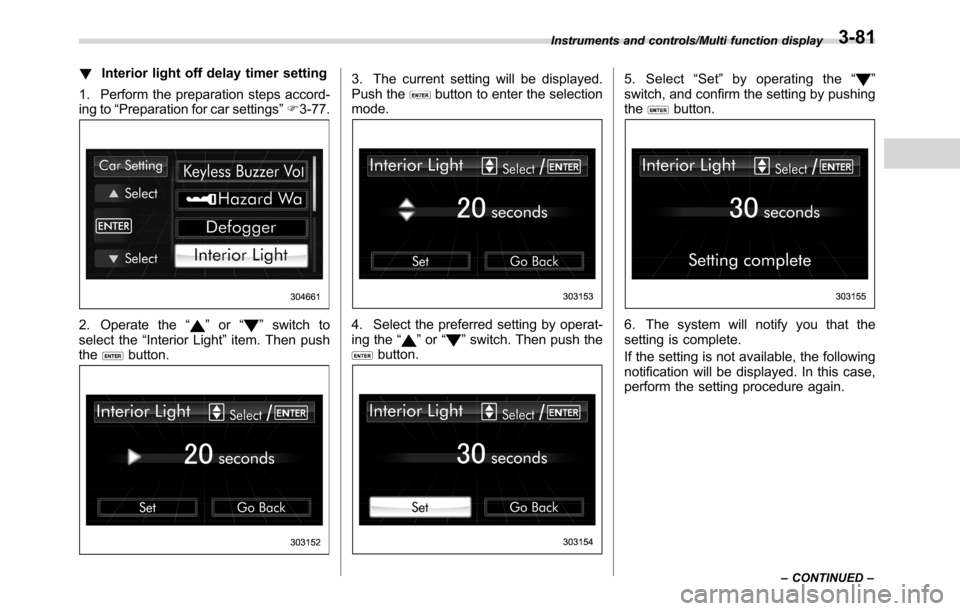
!Interior light off delay timer setting
1. Perform the preparation steps accord-
ing to“Preparation for car settings”F3-77.
2. Operate the“”or“”switch to
select the“Interior Light”item. Then push
the
button.
3. The current setting will be displayed.
Push thebutton to enter the selection
mode.
4. Select the preferred setting by operat-
ing the“”or“”switch. Then push thebutton.
5. Select“Set”by operating the“”
switch, and confirm the setting by pushing
the
button.
6. The system will notify you that the
setting is complete.
If the setting is not available, the following
notification will be displayed. In this case,
perform the setting procedure again.
Instruments and controls/Multi function display
–CONTINUED–3-81
Page 220 of 572
Instruments and controls/Multi function display
!Auto light sensor sensitivity setting
1. Perform the preparation steps accord-
ing to“Preparation for car settings”F3-77.
2. Operate the“”or“”switch to
select the“Auto Light Sensor”item. Thenpush the
button.
3. The current setting will be displayed.
Push thebutton to enter the selection
mode.
4. Select the preferred setting by operat-
ing the“”or“”switch. Then push the
button.
5. Select“Set”by operating the“”
switch, and confirm the setting by pushing
the
button.
6. The system will notify you that the
setting is complete.
3-82
Page 221 of 572
If the setting is not available, the following
notification will be displayed. In this case,
perform the setting procedure again.
!Keyless access setting (models
with“keyless access with push-
button start system”)
!Preparation for keyless access
settings
1. Perform the preparation steps accord-
ing to“Preparation for car settings”F3-77.
2. Operate the“”or“”switch to
select the“Keyless Access Setting”item.
Then push the
button.
!Driver’s door unlock setting
1. Perform the preparation steps accord-
ing to“Preparation for keyless access
settings”F3-83.
2. Operate the“”or“”switch to
select the“Driver’s Door Unlock”item.
Then push the
button.
3. The current setting will be displayed.
Push thebutton to enter the selection
mode.
Instruments and controls/Multi function display
–CONTINUED–3-83
Page 222 of 572
Instruments and controls/Multi function display
4. Select the preferred setting by operat-
ing the“”or“”switch. Then push thebutton.
5. Select“Set”by operating the“”
switch, and confirm the setting by pushing
the
button.
6. The system will notify you that the
setting is complete.
If the setting is not available, the following
notification will be displayed. In this case,
perform the setting procedure again.
!Rear gate unlock setting
1. Perform the preparation steps accord-
ing to“Preparation for keyless access
settings”F3-83.
2. Operate the“”or“”switch to
select the“Rear Gate Unlock”item. Then
push the
button.
3-84