Page 164 of 308
Pandora®
162
Pandora®
Pandora®
Pandora is free personalized radio that offers effortless and
endless music enjoyment and discovery.
To use the Pandora application, connect your iPhone
to the USB port, or connect your Android device via
Bluetooth.
Depending on differences between models or software
version etc., some models might be incompatible with this
system.
This function is not available if the Pandora application has
not been installed on the smartphone.
When using the application, read the precautions indicated
LQ�
Page 168 of 308
USEFUL INFORMATION
166
USEFUL INFORMATION
SiriusXM RADIO DATA SERVICE*
*: SiriusXM U.S. satellite and data services are available only in the 48
contiguous USA and DC. SiriusXM satellite service is also available in
Canada; see www.siriusxm.ca.
'DWD� VHUYLFH� LQIRUPDWLRQ�� ZKLFK� LV� FRPSULVHG� RI� WUDI
Page 173 of 308
USEFUL INFORMATION
171
INFORMATION
6
Display Information
Tropical Storm
Hurricane
Funnel Cloud
Tornado
DISPLAYING STOCKS INFORMATION
Stock information can be received via the SiriusXM®
Satellite Radio Service.
1. 'LVSOD\�WKH�
Page 174 of 308
USEFUL INFORMATION
172
DISPLAYING FUEL INFORMATION
(NOT AVAILABLE IN CANADA)
Fuel information can be received via the SiriusXM® Satellite
Radio Service.
1. 'LVSOD\�WKH�
Page 246 of 308
TIPS FOR THE NAVIGATION SYSTEM
244
TIPS FOR THE NAVIGATION SYSTEM
GPS (GLOBAL POSITIONING
SYSTEM)
REGARDING ERRORS IN CURRENT
POSITION DISPLAY
The system displays the vehicle current position based on
GPS information and data from various sensors and road
maps. However, when the radiowave signals from GPS
satellites are weak or when signals are received from only
two satellites or less, errors may occur in the position.
Modifying or adjusting the system will not prevent these
errors.
LIMITATIONS OF THE NAVIGATION SYSTEM
This navigation system calculates the current position using
satellite signals, various vehicle signals, map data, etc.
However, an accurate position may not be shown depending
RQ� VDWHOOLWH� FRQGLWLRQV�� URDG� FRQ
Page 260 of 308

COMMAND LIST
258 XCommands for changing the audio mode
Voice command Phrase Function
AM mode
changeplay AM, select AMSwitch to AM
mode
FM mode change play FM, select FMSwitch to FM
mode
SiriusXM radio
mode change play XM, select XMSwitch to SiriusXM
mode
CD mode change play CD, select CDSwitch to CD
mode
USB mode
changeplay USB, select USBSwitch to USB
mode
SD mode
change*play microSD, select
microSDSwitch to SD
mode
iPod mode
changeplay iPod, select iPodSwitch to iPod
mode
AUX mode
changeselect AUXSwitch to AUX
mode
Audio off mode
changeaudio off, turn off audio Turn off the Audio
Audio on mode
changeaudio on, turn on audio Turn on the Audio
*: With navigation function
XCommands for changing the mode
Voice command Phrase Function
Hands-free mode
change[go to] phone, phone
screen, phone menuSwitch to HF mode
Audio mode
changego to audioSwitch to audio
mode
aha mode
changego to ahaSwitch to aha
mode
Pandora*
1 mode
changego to PandoraSwitch to Pandora
mode
Navigation mode
change*
2
navigation,
go to navigation,
go to NAV systemSwitch to the voice
command on NAV
system
*1: Pandora is available in the United States, Australia, and New Zealand.
*2: With navigation function
Page 262 of 308

COMMAND LIST
260
Voice command Phrase Function
Dislike on/offdislike/unselect dislike,
thumbs down/unselect
thumbs down0DUN�³'LVOLNH´�ÀDJ�
Unmark it
Go*go there, route,
guidance, take me
thereWhen station
has location
information, user
can say “go” to
navigation.
Map check in, mark locationLocation
information
obtained from
GPS updated to
server
Call call, dial itMaking a call from
a content (with
phone info)
Refresh refresh, reload screenRefresh the
selected station
to get the latest
information
*: With navigation function
XCommands for AM control
Voice command Phrase Function
Direct frequency
tuningtune to AM
Designate the
frequency to
VZLWFK�WR�D�VSHFL¿F�
radio station
Preset number
tuningtune to preset
Select a preset
channel to switch
WR�D�VSHFL¿F�UDGLR�
station
XCommands for FM control
Voice command Phrase Function
Direct frequency
tuningtune to FM
Designate the
frequency to
VZLWFK�WR�D�VSHFL¿F�
radio station
Preset number
tuningtune to preset
Designate the
preset channel to
VZLWFK�WR�VSHFL¿F�
radio station
Page 263 of 308
COMMAND LIST
261
Siri/VOICE RECOGNITION SYSTEM
9
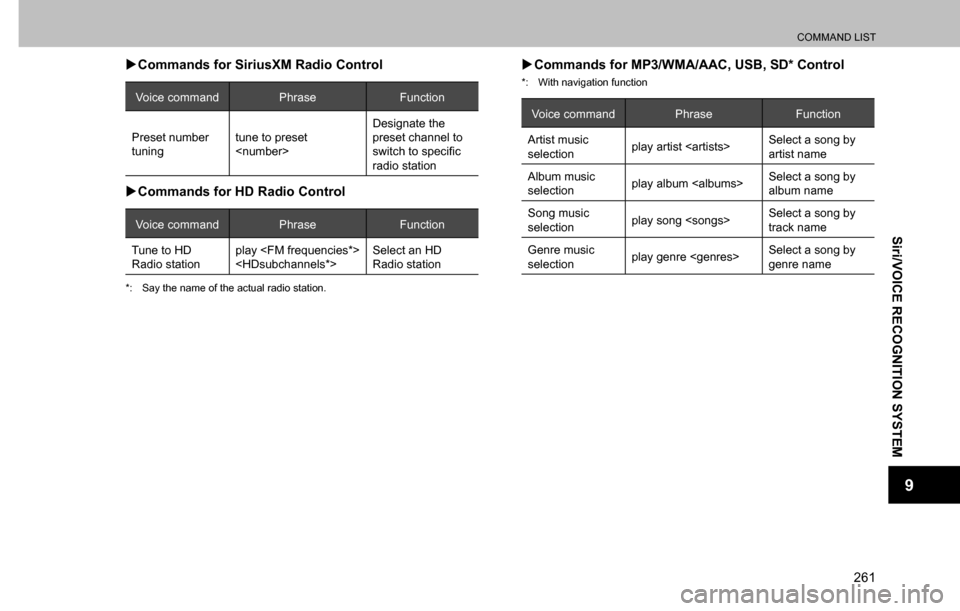
XCommands for SiriusXM Radio Control
Voice command Phrase Function
Preset number
tuningtune to preset
Designate the
preset channel to
VZLWFK�WR�VSHFL¿F�
radio station
XCommands for HD Radio Control
Voice command Phrase Function
Tune to HD
Radio stationplay
Select an HD
Radio station
*: Say the name of the actual radio station.
XCommands for MP3/WMA/AAC, USB, SD* Control
*: With navigation function
Voice command Phrase Function
Artist music
selectionplay artist Select a song by
artist name
Album music
selectionplay album Select a song by
album name
Song music
selectionplay song Select a song by
track name
Genre music
selectionplay genre Select a song by
genre name