2017 Seat Mii instrument panel
[x] Cancel search: instrument panelPage 125 of 232

Transport and practical equipment
CAUTION
At very high or very low temperatures the
smar tphone might
not operate properly, or
the actual device could get damaged.
● Take your smart phone with you when you
get out
of the vehicle to protect it from very
high or very low temperatures, and from in-
tense solar radiation. CAUTION
Humidity can damage the electrical contacts
for the sm ar
tphone on the instrument panel.
● Do not wet the smartphone’s housing when
cle
aning it. Use only a dry cloth. Note
SEAT recommends that you always take your
smar t
phone with you when you get out of
the vehicle to avoid possible thefts. Luggage compartment
Intr oduction Always transport heavy loads in the luggage
c
omp
ar
tment and place the seat backs in a
vertical position. Never overload the vehicle.
Both the carrying capacity as well as the dis-
tribution of the load in the vehicle have ef- fects on the driving behaviour and braking
ability
››› .
WARNING
When the vehicle is not in use or being
wat c
hed, always lock the doors and the rear
lid to reduce the risk of serious injury or
death.
● Do not leave children unwatched, especial-
ly when the boot i
s open. Children could
climb into the luggage compartment, close
the rear lid from inside and be unable to es-
cape themselves. This could lead to serious
injury or death.
● Never allow children to play in or around
the vehic
le.
● Never transport people in the luggage com-
partment
. WARNING
Unsecured or incorrectly secured objects can
cau se seriou
s injury in case of a sudden ma-
noeuvring or breaking or in case of an acci-
dent. This is especially true when objects are
struck by a detonating airbag and fired
through the vehicle interior. To reduce the
risks, please note the following:
● Secure all objects in the vehicle. Always
plac
e equipment and heavy objects in the
boot.
● Always secure objects to the fastening
rings
with suitable rope or straps to prevent
them from being thrown around the interior and moving to the airbag deployment area in
the event
of
sudden movements or accidents.
● While driving, always keep object compart-
ments c
losed.
● Do not place hard, heavy or sharp objects
inside the
vehicle interior, in open storage
compartments, the rear shelf or on the dash
panel.
● Remove hard, heavy and sharp objects from
clothes
and pockets inside the vehicle and
store securely. WARNING
The transport of heavy object changes vehi-
cl e h
andling and increases braking distance.
Heavy loads that have not been stored or se-
cured correctly could cause loss of control
and result in serious injury.
● Vehicle handling changes when transport-
ing heavy
objects due to a change in the cen-
tre of gravity.
● Distribute the load as uniformly and as low
down on the v
ehicle as possible.
● Store heavy objects in the luggage com-
partment
as far from the rear axle as possi-
ble. CAUTION
Hard objects on the rear shelf could chafe
again s
t the wires of the heating element in
the heated rear window and cause damage. » 123
Technical data
Advice
Operation
Emergencies
Safety
Page 137 of 232

Driving
Engaging the steering wheel lock
In v
ehic
les with automatic gearbox, the igni-
tion key can only be removed when the selec-
tor lever is in position N.
– Remove the key from the ignition in posi-
tion 1
› ››
Fig. 145
›
›› .
– Turn the steering wheel until you hear it en-
gag
e.
P
ossible vehicle theft is prevented with the
steering lock engaged. WARNING
Never switch off the engine while the vehicle
is mo
ving. You may lose control of the vehicle
and there is a risk of serious accident.
● The airbags and belt tensioners do not
work when the ignition i
s switched off.
● The brake servo does not work with the en-
gine off. T
o stop, the brake pedal must be
pressed with more force.
● As the power steering does not work if the
engine is
not running, you will need more
strength to steer than normally.
● If the key is removed from the ignition, the
steerin
g may lock and it will not be possible
to steer the vehicle. CAUTION
If the engine has been driven at high speed
for a pr o
longed period of time, it may over-
heat when turned off. To avoid engine dam- age, allow the engine to run for approximate-
ly 2 minut
e
s in neutral before switching it off. Note
After stopping the engine, the engine com-
p ar tment
fan may continue running for a few
minutes, even when the ignition has been
switched off or the key removed. The radiator
fan is automatically switched off. Electronic immobiliser
The gear lock prevents the engine from being
s
t
ar
ted with an unauthorised key and the ve-
hicle being moved.
The vehicle key has a built-in chip. It auto-
matically deactivates the electronic immobil-
iser when the key is inserted into the ignition
lock.
The electronic immobilizer will be activated
again automatically as soon as you remove
the key from the ignition lock.
For this reason, the vehicle can only be used
with a genuine SEAT key with the correct
code. Coded keys can be obtained from SEAT
dealerships ››› page 92.
If an unauthorised key is used, the signal
appears on the instrument panel display. The
vehicle cannot be started in this case Note
The correct operation of the vehicle is only
guarant eed when origin
al SEAT keys are
used. Braking and parking
Introduction The assisted brake systems are the electron-
ic di
stribution of braking force (EBV), the an-
ti-lock brake system (ABS), the brake assist
system (BAS), the electronic differential lock
(EDL), traction control (TC)*, the traction con-
trol system (ASR) and the electronic stability
control (ESC*). WARNING
Driving with worn brake pads or a faulty
brak e sy
stem may lead to serious accident.
● If you believe the brake pads to be worn or
the brake sy
stem to be faulty, immediately
refer to a specialised workshop to check the
brake pads and replace the worn ones. WARNING
Careless parking can cause serious injury.
● Never remove the key from the ignition if
the v ehic
le is in motion. The steering lock » 135
Technical data
Advice
Operation
Emergencies
Safety
Page 144 of 232

Operation
braking distance or even result in the total
fai
lur
e of the brake system.
● Reduce speed or change down a gear when
faced w
ith steep and long slopes. This allows
you to use the engine braking effect and to
reduce the strain on the brake system. Other-
wise, the brakes may overheat and fail. Only
use the brakes to reduce speed or to stop. Note
Make use, when having the front brake pads
c hec k
ed, and have the rear pads checked al-
so. The thickness of the brake pads should be
checked visually and regularly, by looking
through the openings in the wheel rims or
from underneath the vehicle. If necessary, re-
move the wheels to check them thoroughly.
SEAT recommends taking your car in for tech-
nical service. Changing gear
Intr oduction When reverse gear is engaged and the igni-
tion i
s
sw
itched on the following takes place:
● Reverse lights light up.
● The rear wiper blade performs one move-
ment when the wind
screen wiper is activa-
ted. ●
If nece
ssary, connect the parking distance
warning system. WARNING
Rapid acceleration can cause loss of traction
and skid din
g, especially on slippery ground.
This could cause loss of control of the vehicle
resulting in an accident and considerable
damage.
● Use rapid acceleration only when visibility,
weather
, road conditions and traffic permit. WARNING
Do not allow the brakes to “rub” for a pro-
long ed period of
time, or brake frequently or
for long periods of time. Continuous braking
heats up the brakes. This could significantly
reduce braking power, increase braking dis-
tance or even result in the total failure of the
brake system. Control and warning lamps
It lights up red
Fault in the auto-
matic gearbox.
Do not drive on!
Seek professional advice. Failure to
do so could result in considerable
damage to the transmission
››› page 146.
It lights up yellow
In the automatic
gearbox the
gears can en-
gage incorrectly.Switch the ignition on and off.
When the control lamp does not
light up, find the nearest special-
ised workshop and have the auto-
matic gearbox checked.
The automatic
gearbox over-
heats temporari-
ly.Let the transmission cool with the
gearbox lever in the position .
When the control lamp does not
light up, find the nearest special-
ised workshop and have the auto-
matic gearbox checked.
It lights up
Place the automatic
gearbox lever in the
position
and do not
press the brake pedal.
Press the brake pedal to select
a gear range.
Together with the yel-
low control lamp for
the temperature of the
transmission
: the
automatic gearbox
overheats.
Press brake pedal and let the
transmission cool. Avoid
pressing the accelerator. When
the control lamp does not light
up, find the nearest special-
ised workshop and have the
automatic gearbox checked.
Together with the turn
signal display in the
instrument panel dis-
play: the automatic
gearbox lever is not in
the position
, indica-
tion to start the en-
gine.
Move the gearbox lever to the
position and start the en-
gine. 142
Page 145 of 232

Driving
Flashes
An automatic gearbox
in the vehicle does
not guarantee that the
vehicle will not roll
away.Apply the handbrake.
Flashes
In the instrument pan-
el display, in addition
to the control lamp re-
questing the brake
pedal to be pressed
: indicated for start-
ing the engine.
Move the gearbox lever to the
position and start the en-
gine.
On the instrument
panel display: Whilst
driving in a forward di-
rection, try to move
the automatic gearbox
lever to the position
.
Stop the vehicle and move the
gearbox lever to the position in order to subsequently
change to the position .
On the instrument
panel display: The au-
tomatic gearbox lever
was placed in the po-
sition
or , but the
brake pedal was not
pressed.
Press the brake pedal, move
the gearbox lever to the posi-
tion
, and subsequently to
the required position or . When switching on the ignition some warn-
in
g and indic
ation l
amps light up for a short
time to check the operations. They will switch
off after a few seconds. Manual gear change
Fig. 147
Gear shift pattern of a 5-speed man-
ual g
e
arbox Read the additional information carefully
› ›
›
page 26
Shifting down a gear
Shifting down a gear while driving must be
carried out gear by gear, i.e. to the gear im-
mediately preceding the current gear and at
an engine speed that is not excessive ››› .
At high s
peed
s, or high engine speeds, skip-
ping one or various gears when shifting
down a gear can cause damage to the clutch
and the gearbox, even if the clutch is not en-
gaged during the process ››› .
WARNING
When the engine is running, the vehicle will
st ar
t to move as soon as a gear is engaged
and the clutch released. ●
Never en g
age the reverse gear when a vehi-
cle is moving forward. WARNING
As a consequence of shifting down a gear in-
c orr ectly
, you may lose control of the vehicle
and cause an accident with serious conse-
quences. CAUTION
If, at high speeds or high engine speeds, the
ge ar l
ever is shifted down to a gear that is too
low, serious damage can be caused to the
clutch and gearbox. This may also happen if
you press the clutch pedal and it does not en-
gage. CAUTION
To prevent damage and avoid premature
we ar
, please observe the following:
● While driving, do not leave your hand rest-
ing on the ge
ar stick. The pressure applied by
your hand is transmitted to the gearbox se-
lector forks.
● Always ensure that the vehicle is complete-
ly st
opped before engaging the reverse gear.
● When changing gear, always make sure the
clutc
h pedal is pushed right to the floor.
● Never hold the vehicle “on the clutch” on
hill
s with the engine on. 143
Technical data
Advice
Operation
Emergencies
Safety
Page 146 of 232

Operation
Automatic gear change Fig. 148
Automatic gearbox diagram of gears Read the additional information carefully
› ›
›
page 27
Move the selector lever to the N position to:
● Starting up the engine
● Remove the key from the ignition switch
● Engage the steering wheel lock
Move the sel
ector lever to the D or R position
to:
● Park the vehicle
● Repair a puncture
● Changing a wheel
To mov
e the gear selector lever from the posi-
tion N to D or to R, first press and hold the
brake pedal. In the instrument panel display, with the igni-
tion switc
hed on, the selected gear range or
the gear engaged in the gearbox is shown.
- Reverse gear
Reverse gear is selected. Engage only when
the vehicle is stopped.
- Neutral
The gearbox is in neutral. No movement is
transmitted to the wheels and the engine
does not act as a brake.
- Standard driving position
The gears are changed (up and down) auto-
matically. The gear shifts are determined by
the engine load, your individual driving style
and the speed of the vehicle.
- Tiptronic driving position (manual shift
programme)
All gears can be changed (up and down)
manually ››› page 145. This is possible as
long as the system is not changing gear auto-
matically due to a traffic situation. WARNING
Placing the selector lever in an incorrect posi-
tion ma y
cause loss of control of the vehicle
and a serious accident.
● Do not press the accelerator when engag-
ing a ran
ge of gears. ●
With the en gine ru
nning and a gear range
selected, the vehicle will move when the ac-
celerator is pressed.
● Never engage reverse gear while driving.
● Unintentional movements of the vehicle
coul
d cause serious injury.
● As a driver, you should never leave your ve-
hicle if
the engine is running and a gear range
is engaged. If you have to leave your vehicle
while the engine is running, you must always
apply the handbrake and put the selector lev-
er in position N.
● Never engage the R gear range when the
vehicl
e is moving.
● Never leave the vehicle without applying
the handbrak
e. With the engine running the
vehicle moves downhill regardless of the gear
range selected. Note
If, while driving, the selector lever is acciden-
ta l
ly placed in position N, lift your foot off the
accelerator. Wait until the engine is running
at idle speed before selecting a new gear
range. 144
Page 148 of 232

Operation
●
Alw a
ys adapt your driving style to suit the
flow of traffic.
● Only use the kick-down function or rapid
accel
eration if visibility, weather, road and
traffic conditions so permit.
● Never put other road users in danger by ac-
celer
ating or with your driving style. CAUTION
If you stop on a hill with a gear range engag-
ed, do not try
to prevent the vehicle from roll-
ing back by pressing on the accelerator. Oth-
erwise, the automatic gearbox may overheat
causing damage. Automatic gearbox malfunction
Back-up programme
When aut
om
atic
gearbox warning and indica-
tion lamps light up on the instrument panel,
there may be a system malfunction
››› page 142. In the event of some faults the
automatic gearbox functions using a backup
programme. When the programme is activa-
ted, it is possible to drive the vehicle, howev-
er, at low speeds and within a selected range
of gears.
With the manual gearbox, in some cases it is
not possible to drive with all the gears .
In all cases the automatic gearbox must be
checked at a specialised workshop. Automatic gearbox overheating
The automatic
gearbox can overheat with a
prolonged start up, or when stopping and
starting continuously. This overheating is dis-
played with a warning lamp in the instru-
ment panel. Additionally, an audible warning
can be heard. Stop and let the gearbox cool
››› .
The v
ehic
le moves forward or back despite
having selected a gear range
When the vehicle does not move in the re-
quired direction, the system may not have
the gear range correctly engaged. Press the
brake pedal and engage the gear range
again. If the vehicle still does not move in the
required direction, there is a system malfunc-
tion. Seek specialist assistance and have the
system checked. CAUTION
● When the ge arbo
x is displayed as overheat-
ing for the first time, the vehicle must be
parked safely or must be driven at a speed of
more than 20 km/h (12 mph).
● When the warning lamp lights up and the
audible w
arning is heard, the vehicle must be
parked safely and the engine switched off.
Let the gearbox cool down.
● To prevent damage to the gearbox, driving
must
only be continued when the warning
lamps are no longer lit up. While the gearbox is overheated, starting up and driving, even
at a s
lo
w speed should be avoided. Recommended gear display
In some vehicles, the recommended gear for
reduc
in
g fuel consumption is displayed on
the instrument panel:
DisplayMeaning
Optimum gear.
Recommendation to change up a gear.
Recommendation to change down a
gear.
WARNING
The recommended gear display is intended as
a guideline only; it shou
ld never replace the
driver's attention to driving carefully.
● Responsibility for selecting the correct gear
for eac
h situation continues to lie with the
driver, for example when overtaking or climb-
ing a hill. For the sake of the environment
Selecting the most appropriate gear for the
sit uation w
ill help you to save fuel.146
Page 149 of 232
Driving
Note
The recommended gear display is switched
off when the c lut
ch pedal is pressed.Steering
Introduction The power steering* is not hydraulic but elec-
tromec
h
anical. The advantage of this steer-
ing system is that it disposes of hydraulic
tubes, hydraulic oil, the pump, filter and oth-
er components. The electromechanical sys-
tem saves fuel. While a hydraulic system re-
quires oil pressure to be maintained, electro-
mechanical steering only requires energy
when the steering wheel is turned.
With the power steering system, the assisted
steering function automatically adjusts ac-
cording to the vehicle speed, the steering tor-
que and the wheel turning angle. The power
steering only works when the engine is run-
ning. WARNING
If the power steering is not working then the
st eerin
g wheel is much more difficult to turn
and the vehicle more difficult to control.
● The power steering only works when the
engine is
running. ●
Never a l
low the vehicle to move when the
engine is switched off.
● Never remove the key from the ignition if
the vehic
le is in motion. The steering may
lock and it will not be possible to turn the
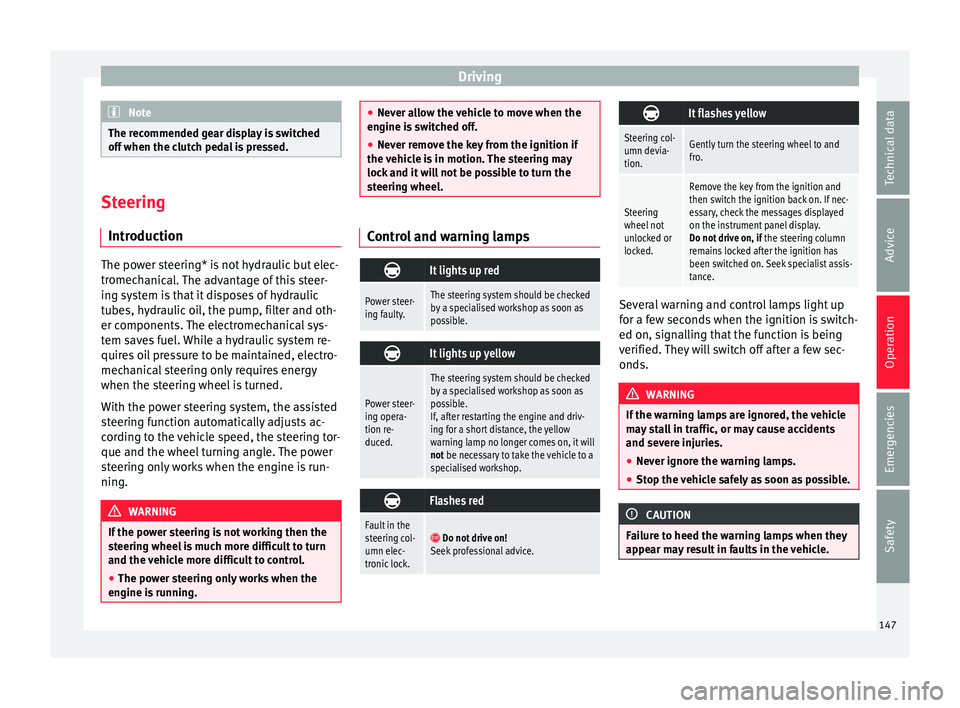
steering wheel. Control and warning lamps
It lights up red
Power steer-
ing faulty.The steering system should be checked
by a specialised workshop as soon as
possible.
It lights up yellow
Power steer-
ing opera-
tion re-
duced.
The steering system should be checked
by a specialised workshop as soon as
possible.
If, after restarting the engine and driv-
ing for a short distance, the yellow
warning lamp no longer comes on, it will
not be necessary to take the vehicle to a
specialised workshop.
Flashes red
Fault in the
steering col-
umn elec-
tronic lock.
Do not drive on!
Seek professional advice.
It flashes yellow
Steering col-
umn devia-
tion.Gently turn the steering wheel to and
fro.
Steering
wheel not
unlocked or
locked.
Remove the key from the ignition and
then switch the ignition back on. If nec-
essary, check the messages displayed
on the instrument panel display.
Do not drive on, if
the steering column
remains locked after the ignition has
been switched on. Seek specialist assis-
tance. Several warning and control lamps light up
f
or a f
ew sec
onds when the ignition is switch-
ed on, signalling that the function is being
verified. They will switch off after a few sec-
onds. WARNING
If the warning lamps are ignored, the vehicle
ma y
stall in traffic, or may cause accidents
and severe injuries.
● Never ignore the warning lamps.
● Stop the vehicle safely as soon as possible. CAUTION
Failure to heed the warning lamps when they
appe ar m
ay result in faults in the vehicle. 147
Technical data
Advice
Operation
Emergencies
Safety
Page 163 of 232

Driver assistance systems
It lights up
The Start-Stop sys-
tem is enabled but
the engine cannot
be automatically
stopped.
Contact a specialised workshop.
It lights up
The Start-Stop sys-
tem cannot start the
engine.Start the engine by hand using
the vehicle's key
››› page 133.
There is a fault in the
alternator.››› page 196
Flashes
The Start-Stop sys-
tem is not available.Contact a specialised workshop.
Some warning and control lamps will light up
briefly
when the ignition i
s
switched on to
check certain functions. They will switch off
after a few seconds. WARNING
Observe the safety warnings ›››
in On the
ins trument
panel on page 26. Start-Stop system
Fig. 158
At the top of the centre console:
St ar
t
-Stop system button. With the Start-Stop system enabled, the en-
gine i
s
aut
omatically stopped when the vehi-
cle is at a standstill. It will start again auto-
matically as required.
This function remains enabled while the igni-
tion is switched on. The instrument panel dis-
play shows information on the current status
››› page 160.
Disconnect the Start-Stop system by hand
whenever crossing water.
Vehicles with a manual gearbox
● When the vehicle is stopped, put it into
neutral and r
elease the clutch pedal. The en-
gine will stop.
● To restart, simply engage the clutch. Vehicles with an automatic gearbox
●
When the vehicle is at a standstill, depress
the brake or k
eep it pressed down. The en-
gine switches off.
● The engine will start again as soon as you
rele
ase the brake pedal.
● With the selector lever set to position N,
the engine wi
ll not start until a range of gears
is selected or the accelerator pedal is de-
pressed.
Important conditions for the engine to stop
automatically
● The driver's seat belt must be fastened.
● The driver door must be closed.
● The bonnet must be closed.
● The engine must have reached a minimum
temperat
ure.
● The vehicle must have moved since the last
time the engine wa
s stopped.
● The vehicle's battery must be sufficiently
char
ged.
● The battery temperature must not be too
low or too high.
● The
vehicle must not be on a very steep
slope. »
161
Technical data
Advice
Operation
Emergencies
Safety