2017 Seat Alhambra warning
[x] Cancel search: warningPage 125 of 320

Opening and closing
Note
At outside temperatures of less than 0°C
(+32°F), the pre s
surised gas struts cannot al-
ways automatically lift the rear lid. In this
case, open the rear lid manually. Closing the rear lid
Fig. 137
Rear lid open: hand grip Closing the rear lid
● Grab the handgrip inside the rear lid
› ›
›
Fig. 137 (arrow).
● Push the rear lid downwards until it locks
into pl
ace in the lock.
● Ensure that it is correctly closed by pulling
on it firmly
.
Locking the rear lid
If you unlock the vehicle without opening any
doors or the rear lid, it will lock again auto- matically after 30 seconds. This function pre-
vents the
vehicle from remaining unlocked if
the unlocking button is pressed by mistake.
Locking is only possible when the rear lid is
correctly and fully closed.
● The rear lid is also locked by a central lock-
ing.
● If the
vehicle rear lid is locked or unlocked
usin
g the button, when it is closed once
mor e it
w
ill lock automatically.
● A closed but not locked rear lid will lock au-
tomatic
ally at a speed above about 9 km/h
(7 mph). WARNING
Unsuitable or careless closing and locking of
the re ar lid c
ould cause serious injuries.
● Never leave the vehicle unattended, or al-
low chi
ldren to play inside or around the vehi-
cle without supervision, especially if the rear
lid is open. Children could enter the luggage
compartment, close the rear lid and become
trapped. A locked vehicle can be subjected to
extremely high and low temperatures, de-
pending on the time of year, thus causing se-
rious injuries/illness and even death. Note
Before closing the rear lid, make sure that the
key h
as not been left inside the luggage com-
partment. Opening the rear lid electronically
Fig. 138
Button with rear lid open Opening the rear lid
● Press and hold the button on the vehi-
c l
e k
ey until the rear lid opens automatically.
● OR: press and hold the button on the
c entr
e c
onsole for approximately 1 second
››› Fig. 6.
● OR: press the ››
›
Fig. 7 boot hatch but-
ton (arrow).
In case of difficulty or obstruction, automatic
opening of the rear lid is interrupted.
Electronically opening the rear lid does not
work when a trailer is electrically connected
and hitched to a factory fitted tow hitch
››› page 234.
The rear lid can be opened manually by ap-
plying more force. »
123
Technical data
Advice
Operation
Emergencies
Safety
Page 126 of 320

Operation
Closing the rear lid
● Press and hold the button on the vehi-
c l
e k
ey for approximately 1 second.
● OR: press and hold the button on the
c entr
e c
onsole for approximately 1 second
››› Fig. 6.
● OR: press the ››
›
Fig. 7 boot hatch but-
ton (arrow).
● Press the button on the open rear lid
› ›
›
Fig. 138 ››› .
● Manually push the rear lid down to close it.
The r e
ar lid w
ill move down to the closed po-
sition to close and lock itself automatically
using the power-close feature ››› .
In c a
se of
difficulty or obstruction, automatic
closing of the rear lid is interrupted and it will
open slightly.
Check why the rear lid could not close.
Attempt to close it once more.
Interrupting the opening and closing process
Rear lid opening and closing can be stopped
by pressing one of the buttons. Each time
one of the buttons is pressed, the rear lid
mo v
e
s to its initial position.
Then, it can be opened or closed by hand. To
do this, apply a little more force. Memorising the opening angle
The rear lid mu
st be at least half open to
memorise an opening angle.
● Stop automatic opening in the opening po-
sition requir
ed ››› page 124.
● Hold down the button ›››
Fig. 138 with the
rear lid open for at least three seconds. The
opening angle is memorised.
Memorisation is confirmed by blinking of the
hazard warning lights and an audible warn-
ing.
To fully open the boot hatch again, the open-
ing angle must be memorised once more.
● Release the rear lid and open it to the
memorised height.
● P
ush the rear lid all the way up. To do this,
apply
a little more force.
● Hold down the button ›››
Fig. 138 with the
rear lid open for at least three seconds.
● The opening angle is reset to the original
factor
y setting. WARNING
Unsuitable or careless closing and locking of
the re ar lid c
ould cause serious injuries.
● Never leave the vehicle unattended, or al-
low chi
ldren to play inside or around the vehi-
cle without supervision, especially if the rear
lid is open. Children could enter the luggage compartment, close the rear lid and become
trap
ped. A loc
ked vehicle can be subjected to
extremely high and low temperatures, de-
pending on the time of year, resulting in seri-
ous injuries/illness or even death. WARNING
It is possible that the rear lid does not open
c omp l
etely or, if it is open, closes alone if a
large amount of snow has built up on it or if a
luggage rack is fitted. In this case, the rear lid
must be supported. CAUTION
● When us in
g a trailer, ensure that there is
sufficient space to open and close the rear
lid.
● Before opening the rear lid, any kind of
equipment carrier shou
ld be removed, for ex-
ample a bicycle carrier. CAUTION
In case of repeated short-term use, the sys-
tem i s
turned off to avoid overheating.
● When it has cooled, it may be used once
again. Durin
g this time, the rear lid may be
manually opened or closed applying a little
more effort.
● If the vehicle battery is disconnected or the
fuse b
lows when the rear lid is open, the rear
lid system must be re-initialised. To do this,
close the rear lid. 124
Page 127 of 320

Opening and closing
Note
Before closing the rear lid, make sure that the
key h
as not been left inside the luggage com-
partment. Electric windows
Electric w
indows: functionsRead the additional information carefully
›› ›
page 11
After turning off the ignition, the windows
can be opened and closed for a short time
using the buttons on the door as long as the
driver door or passenger side door is not
open. When the key is removed from the igni-
tion and the driver door is open, all of the
electric windows can be opened or closed at
the same time keeping the button on the
driver’s door pressed down. After a few sec-
onds, the convenience opening or closing
function will begin ›››
page 125.
One-touch opening and closing
The one-touch automatic opening and clos-
ing is used to open or close the windows
completely. It will not be necessary to hold
the button of the corresponding electric win-
dow. For the one-touch closing function: p
u
l
l the
button for the corresponding window up-
wards until it reaches the second position.
For the one-touch opening function: push the
button for the corresponding window down-
wards until it reaches the second position.
To stop the one touch function: push or pull
on the button of the corresponding window.
Resetting one-touch opening and closing
The one-touch opening and closing function
is not active after the vehicle battery has
been disconnected or is flat and will have to
be reset.
● Close all windows and doors.
● Pull the button of the corresponding win-
dow and hol
d it for one second in this posi-
tion.
● Release the button and pull upwards and
hold ag
ain. The one-touch function is now
ready for operation.
The automatic one-touch electric windows
can be reinitialised individually or several at
a time.
Convenience opening/closing
The electric windows can be opened or
closed from outside using the vehicle key: ●
Keep the v
ehicle unlocking or locking but-
ton pressed. All windows which function elec-
trically will be either opened or closed.
● To interrupt the function, release the lock-
ing or un
locking button.
During convenience closing, first the win-
dows and then the sliding sunroof will be
closed.
In the Configuration - convenience
menu, there are different settings for operat-
ing the windows ›››
page 26. WARNING
Careless use of the electric windows can
cau se seriou
s injury.
● Only operate the electric windows when
nobody i
s in the way.
● Never leave children or disabled people
alone in the v
ehicle if the doors are to be
locked. The windows cannot be opened in
case of an emergency.
● Always take all the keys with you whenever
you le
ave the vehicle. After turning off the ig-
nition, the windows can be opened and
closed for a short time using the buttons on
the door as long as the driver door or passen-
ger side door is not open.
● When transporting children in the rear
seats, a
lways deactivate the rear electric win-
dows with the child safety lock so that they
cannot be opened and closed. » 125
Technical data
Advice
Operation
Emergencies
Safety
Page 128 of 320

Operation
Note
The one-touch function and roll-back function
wi l
l not work if there is a malfunction in the
electric windows. Visit an authorised work-
shop. Roll-back function on electric win-
dow
s The anti-trap function of the electric windows
can r
educ
e the risk of injury when opening
and closing the electric windows ››› . If a
w indo
w i
s not able to close because it is stiff
or because of an obstruction, it will automati-
cally open again.
● Check why the window does not close.
● Attempt to close the window again.
● If you try within the following 10 seconds
and the window c
loses with difficulty or there
is an obstruction once again, the one-touch
closing will stop working for 10 seconds.
● If the window is still obstructed, it will stop
at the corr
esponding position. When the but-
ton is operated within 10 seconds, the win-
dow will close without the anti-trap function
››› . To close windows without the anti-trap func-
tion
●
Attempt to close the corresponding electric
w indo
w w
ithin 10 seconds after by holding
the button. The window is closed without the
anti-trap function, deactivated for a short
time.
● After more than 10 seconds, the anti-trap
function i
s reactivated. The window will stop
once again if there is another difficulty or ob-
stacle.
● If the window will still not close, visit a spe-
ciali
sed workshop. WARNING
Closing the electric windows without the an-
ti-trap f u
nction can cause serious injury.
● Always close the electric windows careful-
ly.
● Nobody
should be in the way of the electric
window
s, especially when the anti-trap func-
tion is deactivated.
● The anti-trap function does not prevent fin-
gers
or other parts of the body getting
pinched against the window frame and caus-
ing injury. Note
The anti-trap function also operates if the
windo w
s are closed from the outside of the
vehicle using the ignition key for convenience
closing ››› page 125. Panoramic sliding sunroof*
P anor
amic
sliding sunroof: operating Read the additional information carefully
›› ›
page 12
The panoramic sliding sunroof will only work
with the ignition on. It can be opened or
closed for a few minutes after the ignition
has been switched off, provided the driver
door and the front passenger door are not
opened.
Convenience open/close function
The panoramic sliding sunroof can be
opened or closed from outside the vehicle
using the vehicle key:
● Keep the vehicle unlocking or locking but-
ton pr e
ssed. The panoramic sliding sunroof
is adjusted or closes.
● Release the unlock or lock button to stop
the function.
D
uring convenience closing, first the win-
dows and then the panoramic sliding sunroof
will be closed. WARNING
Careless or uncontrolled use of the panoram-
ic s lidin
g sunroof can cause serious injuries.126
Page 130 of 320
Operation
● If the p
anor
amic sliding sunroof still cannot
be closed, visit a specialised workshop. WARNING
Closing the panoramic sliding sunroof or sun
blind w ithout
the anti-trap function can cause
serious injuries.
● Always close the panoramic sliding sunroof
caref
ully.
● Nobody should be in the way of the panor-
amic slidin
g sunroof or sun blind, especially
when they are closed without the anti-trap
function.
● The anti-trap function does not prevent fin-
gers
or other parts of the body getting
pinched against the window frame and caus-
ing injury. Note
The anti-trap function is activated if the win-
dow s
and the panoramic sliding sunroof are
closed from the outside of the vehicle using
the ignition key for convenience closing
››› page 125. Lights and visibility
Light s
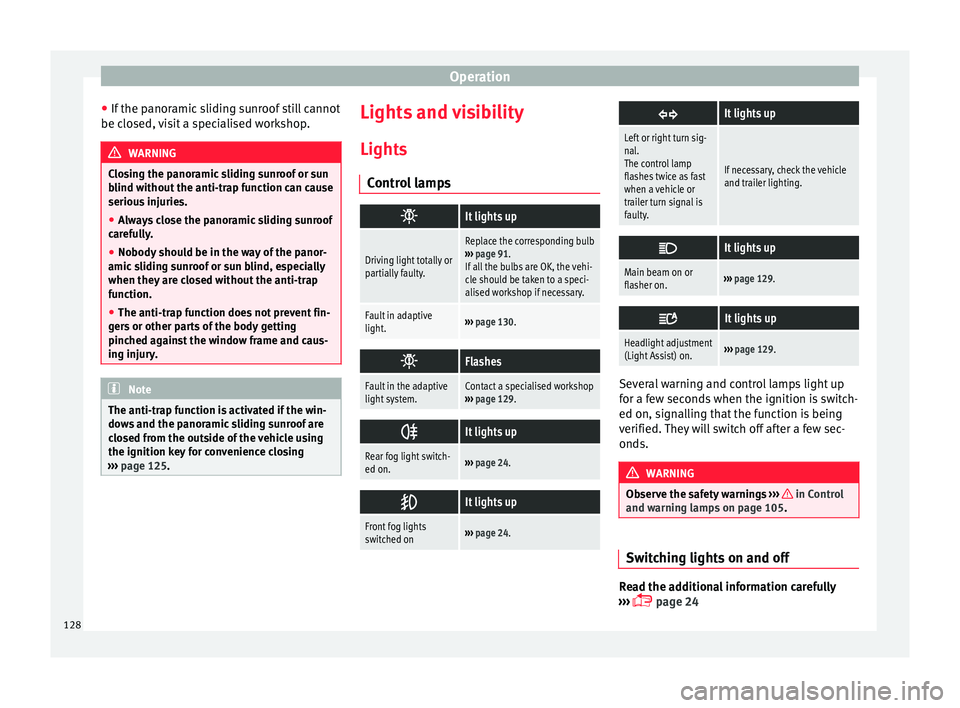
C ontr
ol lamps
It lights up
Driving light totally or
partially faulty.
Replace the corresponding bulb
››› page 91.
If all the bulbs are OK, the vehi-
cle should be taken to a speci-
alised workshop if necessary.
Fault in adaptive
light.››› page 130.
Flashes
Fault in the adaptive
light system.Contact a specialised workshop
››› page 129.
It lights up
Rear fog light switch-
ed on.›››
page 24.
It lights up
Front fog lights
switched on›››
page 24.
It lights up
Left or right turn sig-
nal.
The control lamp
flashes twice as fast
when a vehicle or
trailer turn signal is
faulty.
If necessary, check the vehicle
and trailer lighting.
It lights up
Main beam on or
flasher on.›››
page 129.
It lights up
Headlight adjustment
(Light Assist) on.›››
page 129. Several warning and control lamps light up
f
or a f
ew sec
onds when the ignition is switch-
ed on, signalling that the function is being
verified. They will switch off after a few sec-
onds. WARNING
Observe the safety warnings ›››
in Control
and warnin g l
amps on page 105. Switching lights on and off
Read the additional information carefully
› ›
›
page 24
128
Page 131 of 320

Lights and visibility
The legal requirements regarding the use of
v ehic
l
e lights in each country must be ob-
served.
The driver is personally responsible for the
correct use and adjustment of the lights in all
situations.
In vehicles with tow hitch fitted as standard:
if the trailer is connected electrically and is
fitted with a rear fog light, the vehicle’s fog
light is automatically switched off.
Audible warnings to advise the driver that
the lights have not been switched off
If the key is not in the ignition and the driver
door is open, an audible warning signal is
heard in the following cases: this is a remind-
er to turn off the lights.
● When the parking light is on ›››
page 129.
● When the light switch is in position .WARNING
The side lights or daytime driving lights are
not bright enough t
o illuminate the road
ahead and to ensure that other road users are
able to see you.
● Always use your dipped beam head lights if
it is
raining or if visibility is poor. WARNING
If the headlights are set too high and the
main be am i
s not used correctly, there is a
risk of dazzling or distracting other road
users. This could result in a serious accident.
● Always make sure that the headlights are
correctly
adjusted.
● Never use the main beam or headlight
flasher when it
can dazzle others on the road. Turn signal and main beam lever
Read the additional information carefully
› ›
›
page 25
Convenience turn signals
For the convenience turn signals, move the
lever as far as possible upwards or down-
wards and release the lever. The turn signal
will flash three times.
The control turn signals are switched on and
off from the menu Lights & Visibility
on the instrument panel display
››› page 26. This function can be discon-
nected at a specialised workshop for those
vehicles which do not have the menu
Lights & Visibility . Note
● If the c on
venience turn signals are operat-
ing (three flashes) and the other convenience turn signals are switched on, the active part
st
op
s flashing and only flashes once in the
new part selected.
● The turn signal only works when the igni-
tion is sw
itched on. The hazard warning
lights also work when the ignition is switch-
ed off ››› page 82.
● If a turn signal on the vehicle or trailer is
faulty
, the warning lamp flashes twice as fast
as usual.
● The main beam headligh
ts can only be
switched on if the dipped beam headlights
are already on. Lights and visibility: functions
Parking light
When the p ark
in
g light is switched on, (right
or left turn signal), the front side light and
the rear light on the corresponding side of
the vehicle stay lit. The parking lights will on-
ly work with the ignition off.
Daytime running lights
The daytime running lights reduce the risk of
accidents by increasing the visibility of the
vehicle. These are independent lights that
are built into the headlights and come on
each time the ignition is turned on if the light
switch is in position or 0. »
129
Technical data
Advice
Operation
Emergencies
Safety
Page 132 of 320

Operation
When the light switch is in position
, a
phot o sen
sor automatically turns the instru-
ment and switch lighting on and off.
Automatic dipped beam control
The automatic dipped beam control is merely
intended as an aid and is not able to recog-
nise all driving situations.
When the light switch is in position , the
vehicle lights and the instrument panel and
switch lighting switch on and off automatical-
ly in the following situations ››› :
Automatic switching
onAutomatic switching
off or switch to day-
time running lighting
The photo sensor detects
darkness, for example,
when driving through a
tunnel.When adequate lighting is
detected.
The rain sensor detects
rain and activates the
windscreen wipers.When the windscreen wip-
er has been inactive for a
few minutes.
Adaptive headlights (AFS)
The a
d
aptiv
e headlights only operate when
the dipped beam is on and at speeds of over
10 km/h (6 mph). On bends, the adaptive
headlights automatically improve lighting on
the road ahead.
The adaptive headlights can be switched on
and off from the infotainment system. Static cornering lights
When turning s
lowly to change direction or
going round a tight bend, the static cornering
lights automatically come on. The static cor-
nering lights only work at speeds of less than
40 km/h (25 mph).
The static cornering lights may be incorpora-
ted into the fog lights or the front headlights,
depending upon the equipment. WARNING
If the road is not well lit and other road users
cannot see the
vehicle well enough or at all,
accidents may occur.
● The automatic dipped beam control ( )
only sw
itches on the dipped beam when
there are no changes in brightness, and not,
for example when it is foggy.
● Never drive with daytime lights if the road
is not
well lit due to weather or lighting con-
ditions. Daytime lights do not provide
enough light to illuminate the road properly
or be seen by other road users.
● The rear lights do not come on with the
daytime driv
ing light. A vehicle which does
not have the rear lights on may not be visible
to other drivers in the darkness, if it is rain-
ing or in conditions of poor visibility. Headlight adjustment
Headlight adjustment (Light Assist)
The hea
dlight
adjustment automatically con-
nects and disconnects these lights depend-
ing on the environmental and traffic condi-
tions and on the speed, within the limitations
of the system ››› . This is monitored by a
sensor loc at
ed on the inside of the wind-
screen, above the interior rear vision mirror.
The automatic headlight adjustment auto-
matically switches on the lights depending
on the vehicles travelling in front and in the
opposite direction, and on other environmen-
tal and traffic conditions from an approxi-
mate speed of 60 km/h (37 mph) and turns
them off again at speeds below approximate-
ly 30 km/h (18 mph).
Switching on and off
Action
Switch-
ing on:– With the ignition on, turn the lights control
to the position and put the turn signal
and main beam lever in the main beam posi-
tion ››› page 129. When the headlight adjust-
ment (automatic lights also) is activated, the
warning lamp lights up in the dash panel
display
. 130
Page 133 of 320

Lights and visibilitySwitch-
ing off:– Disconnect the on button.
– OR: turn the lights control to a different po-
sition to
››› page 128.
– OR: place the turn signal and main beam
lever in the headlight flasher or main beam
position ››› page 129. The following conditions can cause the head-
light a
dju
stment to fail to turn off the main
beam or fail to do so in time:
● On roads with insufficient lighting with very
reflectiv
e signs
● If road users are insufficiently lit up, e.g.
pedes tri
ans or cyclists.
● On closed curves, when the traffic in the
oppos
ite direction is partially hidden, on pro-
nounced slopes
● On roads with traffic in the opposite direc-
tion and with a centr
al reservation barrier
where the driver can see through gaps or
over it e.g. lorry drivers.
● If the camera is damaged or if the power
supp
ly has been cut off
● In the event of fog, snow or heavy rain
● In the event of dust or sand storms
● If the windscreen is damaged by the impact
from a st
one in the camera's field of vision
● If the camera's field of vision is misted up,
dirty or c
overed by a sticker, snow or ice. WARNING
The greater comfort that the headlight ad-
jus tment
provides (automatic also) must not
cause you to take risks. The system is not a
replacement for driver awareness.
● Always monitor the lights yourself and ad-
just
them depending on the light, visibility
and traffic conditions.
● The headlight adjustment (automatic also)
may
not correctly detect all situations and in
certain situations may only provide limited
function.
● If the windscreen is damaged or modifica-
tions ar
e made to the vehicle lighting, this
may harm the functioning of the headlight
adjustment (automatic lights also), for exam-
ple, if additional headlight are fitted. Note
Main beam and flashed headlights can be
turned on and off m
anually at any time with
the turn signal and main beam lever
››› page 129. “Coming home” and “Leaving home”
f
u
nction (guid
ance lights) The “Coming home” function should be
sw
it
c
hed on manually. However the “Leav-
ing home” function is automatically control-
led by a photo sensor.
“Coming home”: necessary operations
To switch
system on:
– Switch off the ignition.
– Briefly flash the headlights for approxi-
mately one second ››› page 129.
The “Coming home” lighting comes on
when the driver door is opened. The delay
in switching off the headlights is counted
from when the last door or boot hatch is
closed.
To switch
system off:
– Automatically at the end of the delay pe-
riod.
– Automatically, if 30 seconds after com-
ing on, a vehicle door or the boot hatch re-
mains open.
– When the light switch is turned to posi-
tion
.
– When the ignition is switched on.
“Leaving home”: necessary operations
To switch
system on:– Unlock the vehicle when the light switch
is in position and the photo sensor
detects darkness.
To switch
system off:
– Automatically, at the end of the delay
period.
– When the vehicle is locked.
– When the light switch is turned to posi-
tion
.
– When the ignition is switched on. Lighting around the exterior mirrors
The lightin
g ar
ou
nd the exterior mirrors illu-
minates the door area on entering and leav-
ing the vehicles. It comes on when the vehi-
cle is unlocked, when the vehicle door is »
131
Technical data
Advice
Operation
Emergencies
Safety