2017 Seat Alhambra steering
[x] Cancel search: steeringPage 210 of 320

Operation
● In v
ehic
les with Climatronic: the tempera-
ture inside the vehicle is within the pre-set
temperature range.
● The temperature set is neither very high nor
very
low.
● The air conditioning defrost function is not
switc
hed on.
● In vehicles with Climatronic: the blower has
not been manual
ly set to a high speed.
● The power level of the vehicle's battery is
sufficient
.
● The vehicle's battery temperature is neither
too high nor too lo
w.
● The vehicle is not on a steep gradient or
slope.
● The front
wheels are not overly turned.
● The heated windscreen is not switched on.
● Reverse gear is not engaged.
● The park assist system is not switched on.
Conditions
for automatically restarting the
engine
The engine may automatically restart under
the following conditions:
● If the vehicle interior is too hot or too cold.
● If the vehicle moves.
● If the vehicle's battery voltage drops. Conditions requiring the key to restart the
engine
The engine mu
st be started manually under
the following conditions:
● If the driver unbuckles his/her seat belt.
● If the driver door is opened.
● If the bonnet is opened.
● In vehicles with a manual gearbox: if a gear
has
been selected.
Switching Start-Stop mode on and off man-
ually
● Press the button on the centre console
› ›
›
Fig. 207.
● The button will light up when the Start-Stop
function i
s switched off.
The engine will start immediately if the vehi-
cle is in Stop mode when it is switched off
manually. WARNING
The brake servo and the power steering do
not w ork
when the engine is switched off.
● Never allow the vehicle to move when the
engine is
switched off. CAUTION
Using the Start-Stop function for a long peri-
od at v
ery high outside temperatures could
damage the vehicle's battery. Note
● In some ca se
s, you may have to restart the
vehicle using the key. Observe the corre-
sponding message on the instrument panel
display.
● If the steering wheel is turned more than
270°, Stop w
ill not function; however, the an-
gle of steering wheel turn does not affect
starting the vehicle. Parking distance warning sys-
t
em*
Intr oduction The parking distance warning system assists
the driv
er when p
ark
ing. When the vehicle
approaches an obstacle, forwards or back-
wards, an intermittent audible warning will
be heard, higher or lower depending on the
distance. The shorter the distance, the short-
er the intervals between tones. If the vehicle
is too close to the obstacle, the audible warn-
ing becomes constant.
If you continue to approach an obstacle when
the sound is continuous, this means the sys-
tem can no longer measure the distance.
The sensor system on the bumpers transmit
and receive ultrasound. Using the ultrasound
signal (transmission, reflection from the ob-
stacle and reception), this system
208
Page 215 of 320

Driver assistance systems
Fig. 213
Gap detected: engage the reverse
g e
ar t
o park (parallel or nose/tail to the kerb) Preparing to park
● The Traction control system ASR must be
t urned on ›
›
› page 187.
● Parallel parking: pres
s the button at
s peed
s
up to 50 km/h (31 mph) once. When
the function is enabled, the button
››› Fig. 212 will light up. ●
Perpendicu
lar parking: press the button at speeds up to 50 km/h (31 mph) tw
ic
e .
When the function is enabled, the button
››› Fig. 212 will light up.
● If necessary, press the button once
mor e t
o c
hange parking mode.
● Apply the turn signal for the side on which
a gap is
to be detected for parking. The in-
strument panel displays the side correspond-
ing to the road.
Parking
● Parking parallel to the road: drive next
to
the gap at a speed of no more than 40 km/h
(25 mph) and at a distance of between 0.5 m
and 2 m.
● Parking perpendicular to the road: drive
next
to the gap at a speed of no more than
20 km/h (12 mph) and at a distance of be-
tween 0.5 m and 2 m.
● The best parking results will be achieved if
you pos
ition the vehicle as parallel as possi-
ble to the line of parked cars or the kerb.
● When a suitable parking place is displayed
on the instrument
panel, stop and select re-
verse gear.
● Follow the instructions given on the instru-
ment panel
display
● Then, release the steering wheel when the
warning s
ignal sounds ››› : The system
will move the steering wheel! Ob-
serve the surrounding area. ●
Ob
ser
ve the surrounding area and acceler-
ate carefully at a maximum of 7 km/h
(4 mph).
● The park assist system is only r
esponsible
for moving the steering wheel during the ma-
noeuvre. The driver applies the accelerator,
the clutch, the gears and the brake.
● Follow the instructions given by the park
ass
ist system until the manoeuvre is comple-
ted.
● The park assist system steers the vehicle
forw
ards and backwards until it is in a
straight position in the parking space.
● The manoeuvre is complete when the corre-
sponding indic
ation is given on the instru-
ment panel display.
Stopping the parking manoeuvre
The park assist system stops the manoeuvre
in advance in the event of one of the follow-
ing:
● Press button .
● Driving faster than 7 km/h (4 mph).
● The driver moves the steering wheel.
● The parking manoeuvre has not been com-
p l
et
ed after 6 minutes since the park assist
system was activated.
● A sliding door is opened. To restart the ma-
noeuvr e, c
lose the sliding door and press the
button again.
»
213
Technical data
Advice
Operation
Emergencies
Safety
Page 216 of 320

Operation
● Ther e i
s
a system malfunction (system tem-
porarily unavailable).
● The ASR system is switched off or the ASR
or ESC i
s working. WARNING
The steering wheel turns quickly by itself
when park in
g using the park assist system.
Placing your hand between the steering
wheel spokes could lead to injuries. Note
● The park a
ssist system has its limitations.
For example, it is not possible to park on
tight bends using the park assist system.
● Even if the park assist system recognises
that ther
e is not enough space for parking
the vehicle, the instrument panel display will
still show this place. In this case, the parking
manoeuvre should not be requested.
● Changing gears between forward and re-
verse g
ears before indicated (that is, before
the signal from the parking sensor system)
the parking results may not be ideal.
● For parallel parking (parallel to the road), a
sound wi
ll tell the driver when they must
change from forward gears to reverse; the
signal from the parking sensor system does
not indicate changes of direction.
● The park assist can also be activated after-
ward
s, if you pass close to a parallel parking
space at a maximum of 40 km an hour
(25 mph) or close to be perpendicular parking space at about 20 km an hour (12 mph) then
pre
s
s the button .
● The progress bar on the screen of the in-
strument p
anel shows a display of the rela-
tive distance to be covered.
● When the Park Assist system is turning the
steerin
g wheel of the stopped vehicle the
symbol is also displayed. Press on the
brake pedal so that the steering can turn with
the vehicle at a standstill and thus reduce the
number of manoeuvres.
● A “suitable” parking space length is at
lea
st 1.1 m greater than the length of the ve-
hicle.
● If the results of the park assist system are
not as
good after changing the wheels, the
system must memorise the perimeter of the
new wheels. This process is performed auto-
matically while the vehicle is in motion. To
help this process, turn slowly (at less than
20 km/h [12 mph]), e.g. in an empty car park. Leaving a parking space using the
P
ark
As
sist system Driving off
● Switch on the engine.
● Press button . When the function is ena-
b l
ed, the b
utton ››› Fig. 212 will light up.
● Apply the turn signal for the side on which
you w ant
to leave the parking space.
● Select reverse gear. ●
Fo l
low the instructions given by the park
assist system.
● When the next indication appears, release
the steerin
g wheel ››› in Parking using the
p ark
a
ssist system on page 214: The sys-
tem will move the steering wheel!
Observe the surrounding area.
● Observe the surrounding area and acceler-
ate car
efully at a maximum of 7 km/h
(4 mph).
● The park assist system is only r
esponsible
for moving the steering wheel during the ma-
noeuvre. The driver applies the accelerator,
the clutch, the gears and the brake.
● When it is possible to leave the parking
spac
e, the Park Assist system will stop. Take
control of the steering and when traffic condi-
tions permit, leave the parking space.
Automatic stoppage of the manoeuvre
The park assist system stops the manoeuvre
in the event of one of the following:
● Driving faster than 7 km/h (4 mph).
● The driver moves the steering wheel.
● A sliding door is opened. To restart the ma-
noeuvre, c
lose the sliding door and press the
button again.
● There is a system malfunction (system tem-
por ari
ly
unavailable).
● The ASR system is switched off or the ASR
or ESC i
s working.
214
Page 217 of 320

Driver assistance systems
WARNING
The steering wheel turns quickly automatical-
ly when l e
aving a parking space using the
park assist system. Placing your hand be-
tween the steering wheel spokes could lead
to injuries. Park Assist brake operation
The Park Assist system helps the driver by
brak
in
g automatically. Automatic braking
does not relieve the driver of responsibility
for controlling the accelerator, brake and
clutch ››› .
Br ak
in
g to avoid damage at excess speed
It is possible that the system operates the
brakes to reduce excess speed. The parking
manoeuvre can then continue. The brakes
will intervene during each parking process.
Braking to minimise damage
When approaching an obstacle, the vehicle
may brake automatically. In certain circum-
stances (e.g. storm, detection of ultrasounds,
vehicle status, load, inclination), the Park As-
sist system may stop the vehicle completely
before an object.
● Press the foot brake ››
›
!Following the intervention of the brakes, the
P
ark
As
sist will stop. WARNING
Despite the assistance provided by the park
as s
ist system, do not run any risks when
parking. The system is not a replacement for
driver awareness.
● Always be ready to brake.
● Automatic brake intervention will end after
1.5 seconds
approximately. Following auto-
matic intervention of the brakes, stop the ve-
hicle yourself. Rear assist* (Rear View Cam-
er
a)
Intr oduction The camera fitted to the rear lid helps drivers
durin
g p
ark
ing or reversing manoeuvres. The
camera image and certain orientation points
generated by the system are indicated on the
factory-fitted radio or navigation system
screen.
Two types of location point (modes) can be
selected:
● Mode 1: reverse parking perpendicular to
the ro
ad (e.g. in a car park). ●
Mode 2: rever
se parking parallel to the
curb.
The mode can be changed by pressing the
button on the radio or navigation system
screen. Only the mode to which the points
can be changed will be displayed. WARNING
Use of the camera to calculate the distance
from o b
stacles (people, vehicles, etc.) is inac-
curate and may cause accidents and severe
injuries.
● The camera lens expands and distorts the
field of
vision and displays the objects on the
screen in a different, vague manner.
● Some objects may not be displayed or may
not be v
ery clear (e.g. very thin posts or fen-
ces), due to the resolution of the monitor or if
the light is dim.
● The camera has blind spots in which obsta-
cle
s and people are not detected.
● Keep the camera lens clean and clear of
snow and ic
e. Do not cover it. WARNING
The intelligent technology in the rear assist
sys t
em cannot change the limits imposed by
the laws of physics and by the system itself.
Careless or uncontrolled use of the rear assist
system may result in severe injuries and acci-
dents. The system is not a replacement for
driver awareness. » 215
Technical data
Advice
Operation
Emergencies
Safety
Page 218 of 320
Operation
●
Adjus t
your speed and driving style to visi-
bility, road, traffic and weather conditions.
● Always keep a close eye on the area around
the vehic
le and always look towards where
you are parking. The display shows the path
of the rear end of the vehicle using the cur-
rent steering angle. The front of the vehicle
turns more in comparison with the rear.
● Do not be distracted from the traffic when
looking at
the screen.
● Always observe the area around the vehi-
cle, a
s the cameras do not always detect chil-
dren, animals or objects.
● The system might not show all areas clear-
ly.
● Only
use the rear assist system when the
boot hat
ch is completely closed. CAUTION
● The camer a on
ly displays 2D images on the
screen. Due to the lack of depth, it might be
difficult or impossible to recognise protrud-
ing objects or cracks in the road.
● The cameras may not always be able to de-
tect o
bjects such as thin rails, fences, posts
and trees, etc. This could result in damage to
your car. Instructions for use
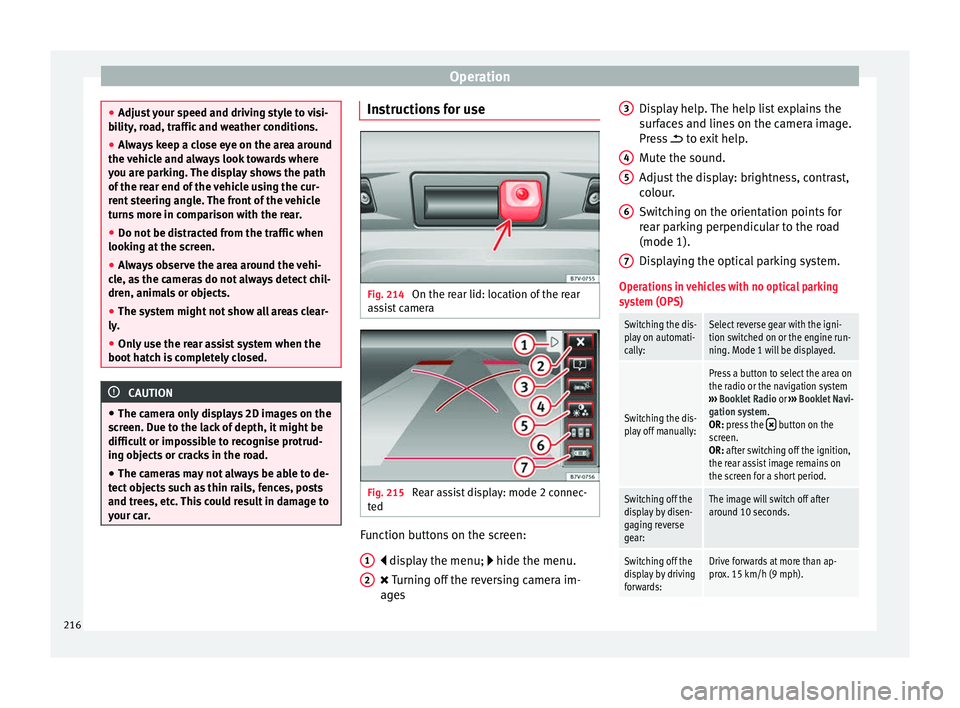
Fig. 214
On the rear lid: location of the rear
a s
s
ist camera Fig. 215
Rear assist display: mode 2 connec-
t ed Function buttons on the screen:
di s
p
lay the menu; hide the menu.
Turning off the reversing camera im-
ages
1 2 Display help. The help list explains the
s
ur
f
aces and lines on the camera image.
Press to exit help.
Mute the sound.
Adjust the display: brightness, contrast,
colour.
Switching on the orientation points for
rear parking perpendicular to the road
(mode 1).
Displaying the optical parking system.
Operations in vehicles with no optical parking
system (OPS)
Switching the dis-
play on automati-
cally:Select reverse gear with the igni-
tion switched on or the engine run-
ning. Mode 1 will be displayed.
Switching the dis-
play off manually:
Press a button to select the area on
the radio or the navigation system
››› Booklet Radio or ››› Booklet Navi-
gation system.
OR: press the
button on the
screen.
OR: after switching off the ignition,
the rear assist image remains on
the screen for a short period.
Switching off the
display by disen-
gaging reverse
gear:The image will switch off after
around 10 seconds.
Switching off the
display by driving
forwards:Drive forwards at more than ap-
prox. 15 km/h (9 mph). 3
4
5
6
7
216
Page 220 of 320

Operation
Parking perpendicular to the road
(mode 1) Fig. 216
Display: orientation lines for the
p ark
in
g space behind the vehicle Summary of the orientation points
M
e
anin
g of orientation lines displayed on the
screen ››› Fig. 216. All of the lengths of the
orientation lines use a vehicle located on a
horizontal surface as reference.
Red: safety distance, i.e. road area loca-
ted up to 40 cm behind the vehicle.
Green: prolongation of the rear of the ve-
hicle (somewhat enlarged). The area dis-
played green ends around 2 metres be-
hind the vehicle, on the road.
Yellow: prolongation of the rear of the ve-
hicle as the steering wheel turns. The
area displayed yellow ends around 3 me-
tres behind the vehicle, on the road.
1 2
3 Parking
●
Stop the vehicle in front of a space and se-
l ect
r
everse gear.
● Reverse slowly and turn the steering wheel
so that the
yellow orientation lines guide you
towards the space ››› Fig. 216 3 .
● Align the vehicle straight in the parking
p l
ac
e using the help of the green orientation
lines.
Parking parallel to the road (mode 2) Fig. 217
Display: orientation lines and surfa-
c e
s
for the space behind the vehicle After applying the turn signal, the lines and
s
ur
f
aces not required are deleted.
Summary of the orientation points
Meaning of orientation lines and surfaces
displayed on the screen ››› Fig. 217. All of the lengths of the orientation lines use a vehicle
located on a horiz
ontal surface as reference.
Safety distance: road area located up to
around 40 cm behind the vehicle.
Vehicle side limit.
Turning point when parking. When the
yellow line touches the curb or another
limit of the parking space, the point for
changing direction (magnifying glass)
will have been reached.
Free space required to parallel park the
vehicle. The surface displayed must com-
pletely fit in the space.
Possible vehicle parked next to the curb.
Parking ● Stop the vehicle 1 m away parallel to the
parkin
g space and select reverse gear.
● Switch on mode 2 on the navigation system
scr
een for parallel parking.
● Slowly reverse and turn the steering wheel
so that the s
urface displayed yellow on the
screen stops in front of any obstacles 5 (e.g. another vehicle).
●
Turn the steering wheel fully towards the
s p
ac
e and reverse slowly.
● When the yellow line 3 touches the side
limit of
the s
pace, e.g. the border or curb
(magnifying glass), turn the steering wheel
fully in the opposite direction. 1 2
3
4
5
218
Page 222 of 320

Operation
●
Never u se the C
CS when driving off-road or
on unpaved roads.
● Always adapt your speed and the distance
to the v
ehicles ahead in line with visibility,
weather conditions, the condition of the road
and the traffic situation.
● To avoid unexpected operation of the cruise
contro
l system, turn it off every time you fin-
ish using it.
● It is dangerous to use a set speed which is
too high for the pr
evailing road, traffic or
weather conditions.
● When travelling down hills, the CCS cannot
maintain a c
onstant speed. The vehicle tends
to accelerate under its own weight. Select a
lower gear or use the foot brake to slow the
vehicle. Lane Assist system*
Intr oduction WARNING
The intelligent technology in the lane assist
sys t
em cannot change the limits imposed by
the laws of physics and by the system itself.
Careless or uncontrolled use of the Lane As-
sist system may cause accidents and injury.
The system is not a replacement for driver
awareness. ●
Alw a
ys adapt your speed and the distance
to the vehicles ahead in line with visibility,
weather conditions, the condition of the road
and the traffic situation.
● Always keep your hands on the steering
wheel so y
ou can turn it at any time.
● The lane assist system does not detect all
roa
d markings. In some circumstances, the
poor state of the road, structures located on
it or certain objects may be mistakenly recog-
nised as road markings by the lane assist
system. In such situations, switch the lane
assist system off immediately.
● Pay attention to the instructions on the in-
strument p
anel display and act accordingly to
its requests.
● Always pay attention to the vehicle's sur-
roundin
gs. Note
The lane assist system has been exclusively
developed f or driv
ing on asphalted roads. Note
If the lane assist system does not work as de-
sc ribed in thi
s chapter, do not use it and con-
tact a specialised workshop. Note
If you observe any system malfunction, have
the sys t
em checked by a specialised work-
shop. Control lamps
Blinks or lights up yellow:
Lane assist sys-
tem connected
but inactive.The system cannot clearly detect the
lane. See
page 221, The lane assist
system is inactive (control lamp lit
in yellow) .
Blinks or lights up green:
Lane assist system connected and active.
Several warning and control lamps light up
f
or a f
ew sec
onds when the ignition is switch-
ed on, signalling that the function is being
verified. They will switch off after a few sec-
onds. WARNING
Observe the safety warnings ›››
in Control
and warnin g l
amps on page 105. 220
Page 223 of 320
Driver assistance systems
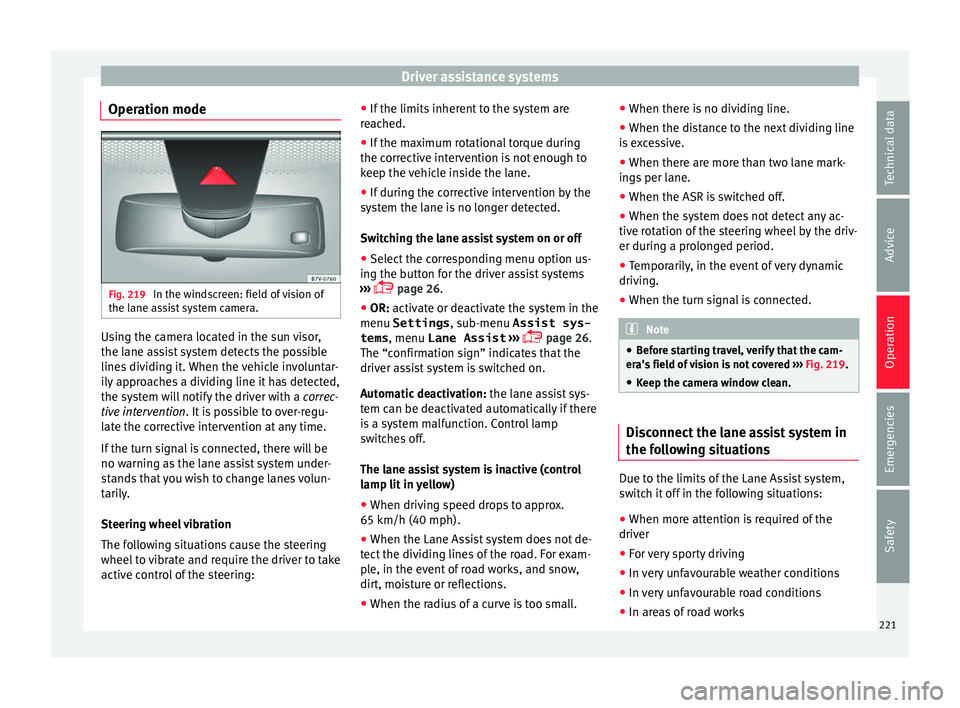
Operation mode Fig. 219
In the windscreen: field of vision of
the l ane a
s
sist system camera. Using the camera located in the sun visor,
the l
ane a
s
sist system detects the possible
lines dividing it. When the vehicle involuntar-
ily approaches a dividing line it has detected,
the system will notify the driver with a correc-
tive intervention. It is possible to over-regu-
late the corrective intervention at any time.
If the turn signal is connected, there will be
no warning as the lane assist system under-
stands that you wish to change lanes volun-
tarily.
Steering wheel vibration
The following situations cause the steering
wheel to vibrate and require the driver to take
active control of the steering: ●
If the limits inher
ent to the system are
reached.
● If the maximum rotational torque during
the correctiv
e intervention is not enough to
keep the vehicle inside the lane.
● If during the corrective intervention by the
syst
em the lane is no longer detected.
Switching the lane assist system on or off
● Select the corresponding menu option us-
ing the butt
on for the driver assist systems
››› page 26.
● OR: activate or deactivate the system in the
menu Settings , sub-menu Assist sys-
tems , menu
Lane Assist ›››
page 26.
The “confirmation sign” indicates that the
driver assist system is switched on.
Automatic deactivation: the lane assist sys-
tem can be deactivated automatically if there
is a system malfunction. Control lamp
switches off.
The lane assist system is inactive (control
lamp lit in yellow)
● When driving speed drops to approx.
65 km/h (40 mph).
● When the Lane Assist system does not de-
tect the div
iding lines of the road. For exam-
ple, in the event of road works, and snow,
dirt, moisture or reflections.
● When the radius of a curve is too small. ●
When there is
no dividing line.
● When the distance to the next dividing line
is e
xcessive.
● When there are more than two lane mark-
ings
per lane.
● When the ASR is switched off.
● When the system does not detect any ac-
tive rot
ation of the steering wheel by the driv-
er during a prolonged period.
● Temporarily, in the event of very dynamic
driving.
● When the t
urn signal is connected. Note
● Bef or
e starting travel, verify that the cam-
era's field of vision is not covered ››› Fig. 219.
● Keep the camera window clean. Disconnect the lane assist system in
the f
o
l
lowing situations Due to the limits of the Lane Assist system,
sw
it
c
h it off in the following situations:
● When more attention is required of the
driver
● For
very sporty driving
● In very unfavourable weather conditions
● In very unfavourable road conditions
● In areas of road works 221
Technical data
Advice
Operation
Emergencies
Safety