2017 Seat Alhambra tow
[x] Cancel search: towPage 202 of 320

Operation
Remove optional equipment and unnecessa-
r y
ac
cessories
The more aerodynamic the vehicle, the lower
the fuel consumption. Optional equipment
and accessories (such as roof racks or bike
carriers) reduce the aerodynamic benefits of
the vehicle.
Therefore, we recommend you remove all op-
tional and unnecessary equipment and racks,
especially if you intend to drive at high
speeds.
Other factors which increase fuel consump-
tion (examples):
● Fault in engine management.
● Driving on hills.
● Trailer towing. WARNING
Always adapt your speed and the distance to
the v ehic
les ahead in line with visibility,
weather conditions, the condition of the road
and the traffic situation. Engine management and ex-
h
au
s
t gas purification system
Introduction WARNING
The components of the exhaust system reach
ver y
high temperatures. This could cause a
fire.
● Always park your vehicle so that no part of
the exhau
st system can come in contact with
flammable materials (such as dried grass).
● Do not apply additional underseal or anti-
corro
sion coatings to the exhaust pipes, cata-
lytic converter, heat shields or the diesel par-
ticulate filter. Control lamps
It lights up
fault in the petrol
engine manage-
ment.Take the vehicle to a specialised
workshop as soon as possible
and have the engine checked.
It lights up
Diesel engine glow
plug system.The engine glow plug system has
been activated. The engine can
be started straight away when
the lamp switches off.
Flashes
Fault in the diesel
engine manage-
ment.If the lamp flashes while you are
driving, have the engine checked
by a specialised workshop as
soon as possible.
It lights up
Fault in the emis-
sion control system.Reduce speed and drive carefully
to the nearest specialised work-
shop to have the engine
checked.
Flashes
Combustion fault
which could dam-
age the catalytic
converter.Reduce speed and drive carefully
to the nearest specialised work-
shop to have the engine
checked.
It lights up
Diesel particulate
filter blocked›››
page 201 Several warning and control lamps light up
f
or a f
ew sec
onds when the ignition is switch-
ed on, signalling that the function is being
verified. They will switch off after a few sec-
onds. WARNING
Observe traffic regulations when cleaning the
diesel p
articulate filter while driving.200
Page 203 of 320

Driving
●
Only c
arry on driving if visibility, weather,
road and traffic conditions so permit.
● Never endanger your safety or that of other
roa
d users. CAUTION
Always pay attention to any lit control lamps
and t o the c orr
esponding descriptions and in-
structions to avoid damage to the vehicle. Note
While the control lamps , , or re-
m ain lit, ther
e may be engine problems, fuel
consumption may increase and the engine
may lose power. Catalytic converter
The catalytic converter permits the subse-
quent
tr
e
atment of the exhaust gases thus
reducing contaminating gas emissions. To
ensure a longer working life for the exhaust
system and catalytic converter in a petrol en-
gine:
● Always use unleaded petrol.
● Never run the fuel tank completely dry.
● Do not top up with too much engine oil
›››
page 271.
● Do not tow-start the vehicle; use the starter
cabl
es ›››
page 51. If you should notice misfiring, uneven run-
ning or los
s of power when the car is moving,
reduce speed immediately. Have the car in-
spected by a specialised workshop. If this
happens, unburnt fuel can enter the exhaust
system and escape into the atmosphere. The
catalytic converter can also be damaged by
overheating. For the sake of the environment
Even when the emission control system is
work in
g perfectly, there may be a smell of
sulphur under certain conditions. This de-
pends on the sulphur content of the fuel be-
ing used. Diesel particulate filter
The diesel particulate filter removes soot par-
tic
u
l
ates from the exhaust gas, retains and
burns them. To assist the combustion proc-
ess, SEAT recommends you avoid frequent
short trips.
● Always use diesel with a low sulphur con-
tent ›
›› page 264.
● Never use petrol or fuel oil.
● Never use biodiesel. However, a blend pre-
pared b
y the diesel manufacturer containing
biodiesel within the limits established by the
EN 590 standard may be used ›››
page 264.
● Never run the fuel tank completely dry. ●
Do not top up w
ith too much engine oil
››› page 271.
● Do not tow-start the vehicle; use the starter
cabl
es ›››
page 51.
In order to reduce blocking of the diesel par-
ticulate filter, some vehicles with an automat-
ic gearbox may increase the engine speed
slightly to start cleaning the filter automati-
cally. The control lamp will not light up in this
case .
Control lamp
If the control lamp lights up you should
help the filter clean itself by driving in the ap-
propriate manner.
To do this, drive about 15 minutes in fourth
or fifth gear (automatic gearbox: S gear
range) at a minimum speed of 60 km/h
(37 mph), with the engine running at approxi-
mately 2,000 rpm. In this way, the soot build
up in the filter is burned. When cleaning is
successful, the control lamp turns off.
If the lamp does not turn off, or the three
lamps turn on (particulate filter , fault in
the emission control system and glow
plugs ), drive the vehicle to a specialised
workshop and have the fault repaired at the
earliest opportunity. »
201
Technical data
Advice
Operation
Emergencies
Safety
Page 209 of 320

Driver assistance systems
Auto Hold turns off automatically under the
f o
l
lowing conditions:
Manual gearboxAutomatic gearbox
1.If one of the conditions mentioned in table on
page 206 changes.
2.If the engine is “not running regularly” or if there is a malfunction.
3.When changing to idle
speed.If the selector lever is
placed in neutral (N).
4.If the engine is turned
off or stalls.If the engine is switch-
ed off.
5.If the driver accelerates
while pressing the
clutch in.If the vehicle is acceler-
ated.
6. When one of the wheels
has minimal contact
with the ground (e.g. on
uneven ground).WARNING
The Auto Hold technology is limited by the
la w
s of physics. The improved comfort provi-
ded by Auto Hold should never prompt you to
take risks.
● Never leave the vehicle running and with
the Auto Hol
d function switched on.
● Auto Hold cannot always stop the vehicle
uphill
and downhill (e.g. if the ground is slip-
pery or frozen). CAUTION
Before entering an automatic car wash, al-
wa y
s switch the Auto Hold function off, as it
could be damaged when the electronic park-
ing brake automatically engages. Start-Stop Function*
Fig. 207
Detailed view of the centre console:
St ar
t
-Stop function button With the Start-Stop system enabled, the en-
gine i
s
aut
omatically stopped when the vehi-
cle is at a standstill. The engine restarts auto-
matically when required.
The function is enabled automatically when-
ever the ignition is switched on. The instru-
ment panel displays information on the cur-
rent status. Vehicles with a manual gearbox
● When the vehicle is at a standstill, leave it
in neutral and t
ake your foot off the clutch.
The engine switches off.
● Simply depress the clutch pedal to move
off again.
V
ehicles with an automatic gearbox
● When the vehicle is at a standstill, depress
the brake or k
eep it pressed down. The en-
gine switches off.
● The engine will start again as soon as you
rele
ase the brake pedal.
● With the selector lever set to position P, the
engine wi
ll not start until a range of gears is
selected or the accelerator pedal is de-
pressed.
Important conditions for the engine to auto-
matically switch off
● The driver seat belt must be buckled.
● The driver door must be closed.
● The bonnet must be closed.
● The factory-fitted towing bracket must not
be electrical
ly connected to a trailer.
● A minimum engine temperature has been
reac
hed.
● The steering wheel must not be turned
more than 270 de
grees.
● The vehicle has moved since the last stop. »
207
Technical data
Advice
Operation
Emergencies
Safety
Page 213 of 320
Driver assistance systemsFunctionNecessary operations
Switching the
display off man-
ually:Press a zone selection button on the
factory-fitted radio or navigation
system
OR: briefly press the function button
or
RVC on the screen.
Switching the
display off man-
ually:
Drive forwards at more than about
10-15 km/h (6-9 mph).
Select the reverse gear on vehicles
with rear assist
››› page 215. The
display changes to the image of the
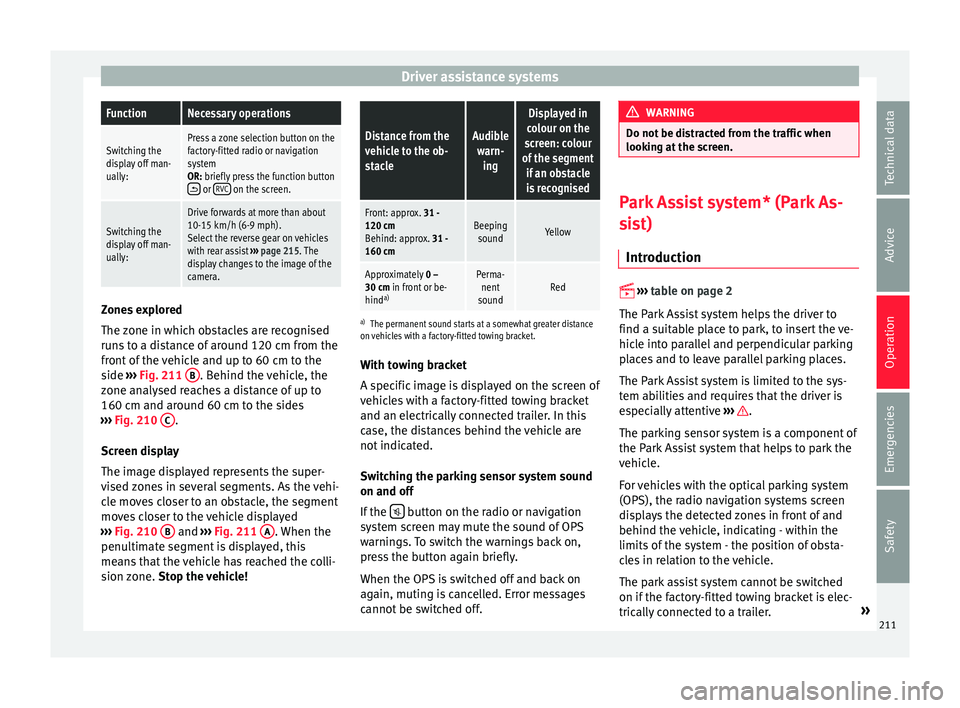
camera. Zones explored
The
z
one in whic
h obstacles are recognised
runs to a distance of around 120 cm from the
front of the vehicle and up to 60 cm to the
side ›››
Fig. 211 B . Behind the vehicle, the
z one an
aly
sed reaches a distance of up to
160 cm and around 60 cm to the sides
››› Fig. 210 C .
Sc r
een di
splay
The image displayed represents the super-
vised zones in several segments. As the vehi-
cle moves closer to an obstacle, the segment
moves closer to the vehicle displayed
››› Fig. 210 B and
››
›
Fig. 211 A . When the
penu ltim
at
e segment is displayed, this
means that the vehicle has reached the colli-
sion zone. Stop the vehicle!
Distance from the
vehicle to the ob-
stacleAudible
warn- ing
Displayed in
colour on the
screen: colour
of the segment if an obstacleis recognised
Front: approx. 31 -120 cm
Behind: approx. 31 -
160 cmBeeping soundYellow
Approximately 0 –
30 cm in front or be-
hind a)Perma-
nent
soundRed
a) The permanent sound starts at a somewhat greater distance
on vehicles with a factory-fitted towing bracket.
With towing bracket
A specific image is displayed on the screen of
vehicles with a factory-fitted towing bracket
and an electrically connected trailer. In this
case, the distances behind the vehicle are
not indicated.
Switching the parking sensor system sound
on and off
If the button on the radio or navigation
sy s
t
em screen may mute the sound of OPS
warnings. To switch the warnings back on,
press the button again briefly.
When the OPS is switched off and back on
again, muting is cancelled. Error messages
cannot be switched off. WARNING
Do not be distracted from the traffic when
lookin g at
the screen. Park Assist system* (Park As-
si
s
t)
Introduction
›› ›
table on page 2
The Park Assist system helps the driver to
find a suitable place to park, to insert the ve-
hicle into parallel and perpendicular parking
places and to leave parallel parking places.
The Park Assist system is limited to the sys-
tem abilities and requires that the driver is
especially attentive ››› .
The p ark
in
g sensor system is a component of
the Park Assist system that helps to park the
vehicle.
For vehicles with the optical parking system
(OPS), the radio navigation systems screen
displays the detected zones in front of and
behind the vehicle, indicating - within the
limits of the system - the position of obsta-
cles in relation to the vehicle.
The park assist system cannot be switched
on if the factory-fitted towing bracket is elec-
trically connected to a trailer. »
211
Technical data
Advice
Operation
Emergencies
Safety
Page 218 of 320
Operation
●
Adjus t
your speed and driving style to visi-
bility, road, traffic and weather conditions.
● Always keep a close eye on the area around
the vehic
le and always look towards where
you are parking. The display shows the path
of the rear end of the vehicle using the cur-
rent steering angle. The front of the vehicle
turns more in comparison with the rear.
● Do not be distracted from the traffic when
looking at
the screen.
● Always observe the area around the vehi-
cle, a
s the cameras do not always detect chil-
dren, animals or objects.
● The system might not show all areas clear-
ly.
● Only
use the rear assist system when the
boot hat
ch is completely closed. CAUTION
● The camer a on
ly displays 2D images on the
screen. Due to the lack of depth, it might be
difficult or impossible to recognise protrud-
ing objects or cracks in the road.
● The cameras may not always be able to de-
tect o
bjects such as thin rails, fences, posts
and trees, etc. This could result in damage to
your car. Instructions for use
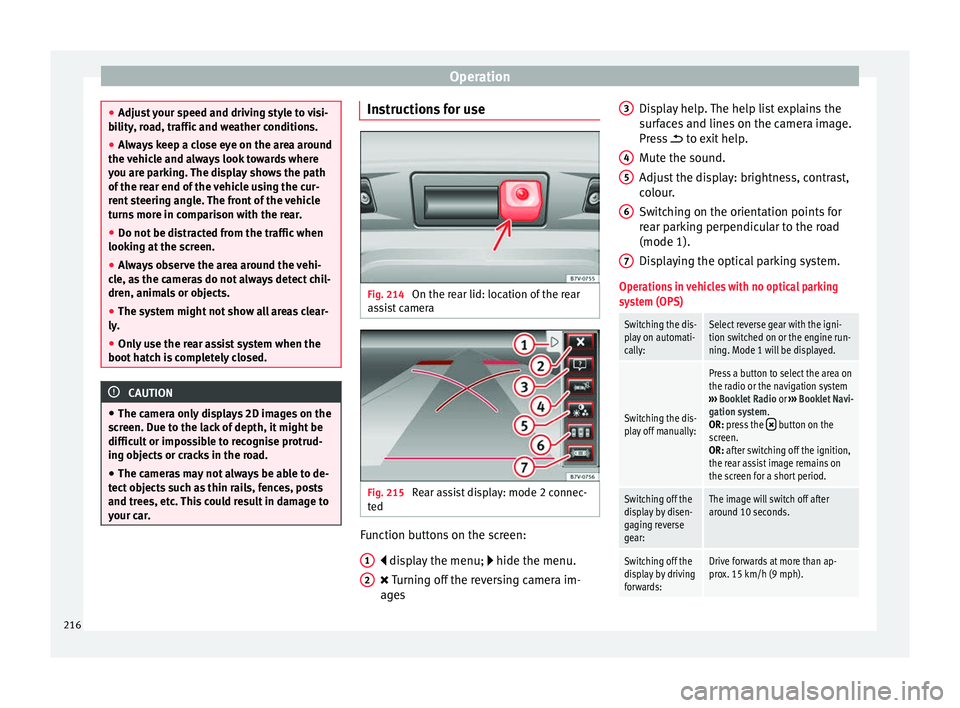
Fig. 214
On the rear lid: location of the rear
a s
s
ist camera Fig. 215
Rear assist display: mode 2 connec-
t ed Function buttons on the screen:
di s
p
lay the menu; hide the menu.
Turning off the reversing camera im-
ages
1 2 Display help. The help list explains the
s
ur
f
aces and lines on the camera image.
Press to exit help.
Mute the sound.
Adjust the display: brightness, contrast,
colour.
Switching on the orientation points for
rear parking perpendicular to the road
(mode 1).
Displaying the optical parking system.
Operations in vehicles with no optical parking
system (OPS)
Switching the dis-
play on automati-
cally:Select reverse gear with the igni-
tion switched on or the engine run-
ning. Mode 1 will be displayed.
Switching the dis-
play off manually:
Press a button to select the area on
the radio or the navigation system
››› Booklet Radio or ››› Booklet Navi-
gation system.
OR: press the
button on the
screen.
OR: after switching off the ignition,
the rear assist image remains on
the screen for a short period.
Switching off the
display by disen-
gaging reverse
gear:The image will switch off after
around 10 seconds.
Switching off the
display by driving
forwards:Drive forwards at more than ap-
prox. 15 km/h (9 mph). 3
4
5
6
7
216
Page 219 of 320

Driver assistance systemsOperations in vehicles with the optical parking
system (OPS)
Switching the dis-
play on automati-
cally:Select reverse gear with the igni-
tion switched on or the engine run-
ning. Mode 1 will be displayed.
Switching the dis-
play off manually:
Press a button to select the area on
the radio or the navigation system
››› Booklet Radio or ››› Booklet Navi-
gation system.
OR: press the
button on the
screen.
OR: after switching off the ignition,
the rear assist image remains on
the screen for a short period.
Press button .
Switching off the
display by disen-
gaging reverse
gear:The OPS display will immediately
be shown.
Switching off the
display by driving
forwards:Drive forwards at more than ap-
prox. 10 km/h (6 mph). Things to note
1) Do not use the rear assist system in the fol-
lowing cases:
– If there is a fault in the dynamic chassis control (DCC).
– If the image displayed is not very clear or reliable (low
visibility or dirty lens).
– If the space behind the vehicle cannot be clearly or
completely recognised.
1) Do not use the rear assist system in the fol-
lowing cases:
– If the vehicle has been overloaded at the rear.
– If the driver is not familiar with the system.
– If the rear lid is open.
– If the position and installation angle of the camera
have been changed, e.g. in a rear-end collision. Have a
specialised workshop check the system.
2) Optical illusions of the camera (examples)
The rear assist camera produces two-dimensional im-
ages. Any cracks in or objects protruding from the
ground or from other vehicles are more difficult to spot
or cannot be seen due to a lack of depth in the image
displayed.
Objects or other vehicles may seem to be closer or fur-
ther away than what they really are:
– On changing from a flat surface to a slope or gradient.
– On changing from a slope or gradient to a flat surface.
– If the vehicle has been overloaded at the rear.
– On approaching protruding objects. These objects
may be outside the angle of vision of the camera when
reversing.
Cleaning the camera lens
K
eep the c
amer
a lens clean and clear of snow
and ice:
● Moisten the lens using a commercially
avail
able, alcohol-based glass cleaning agent and clean the lens with a dry cloth
›››
.
● Remove snow using a small brush.
● Use de-icing spray to remove any ice ››
›
.
CAUTION
● Never u se abr
asive cleaners to clean the
camera lens.
● Never remove snow or ice from the camera
lens
using warm or hot water. This could
damage the lens. Note
● SEA T r
ecommends that you practise park-
ing with the rear assist system in a quiet lo-
cation or in a car park to become familiar with
the system, including the orientation lines
and their function.
● The orientation lines will not be displayed
on the scr
een if the rear lid is open or the fac-
tory-fitted towing bracket is electrically con-
nected to a trailer. 217
Technical data
Advice
Operation
Emergencies
Safety
Page 220 of 320

Operation
Parking perpendicular to the road
(mode 1) Fig. 216
Display: orientation lines for the
p ark
in
g space behind the vehicle Summary of the orientation points
M
e
anin
g of orientation lines displayed on the
screen ››› Fig. 216. All of the lengths of the
orientation lines use a vehicle located on a
horizontal surface as reference.
Red: safety distance, i.e. road area loca-
ted up to 40 cm behind the vehicle.
Green: prolongation of the rear of the ve-
hicle (somewhat enlarged). The area dis-
played green ends around 2 metres be-
hind the vehicle, on the road.
Yellow: prolongation of the rear of the ve-
hicle as the steering wheel turns. The
area displayed yellow ends around 3 me-
tres behind the vehicle, on the road.
1 2
3 Parking
●
Stop the vehicle in front of a space and se-
l ect
r
everse gear.
● Reverse slowly and turn the steering wheel
so that the
yellow orientation lines guide you
towards the space ››› Fig. 216 3 .
● Align the vehicle straight in the parking
p l
ac
e using the help of the green orientation
lines.
Parking parallel to the road (mode 2) Fig. 217
Display: orientation lines and surfa-
c e
s
for the space behind the vehicle After applying the turn signal, the lines and
s
ur
f
aces not required are deleted.
Summary of the orientation points
Meaning of orientation lines and surfaces
displayed on the screen ››› Fig. 217. All of the lengths of the orientation lines use a vehicle
located on a horiz
ontal surface as reference.
Safety distance: road area located up to
around 40 cm behind the vehicle.
Vehicle side limit.
Turning point when parking. When the
yellow line touches the curb or another
limit of the parking space, the point for
changing direction (magnifying glass)
will have been reached.
Free space required to parallel park the
vehicle. The surface displayed must com-
pletely fit in the space.
Possible vehicle parked next to the curb.
Parking ● Stop the vehicle 1 m away parallel to the
parkin
g space and select reverse gear.
● Switch on mode 2 on the navigation system
scr
een for parallel parking.
● Slowly reverse and turn the steering wheel
so that the s
urface displayed yellow on the
screen stops in front of any obstacles 5 (e.g. another vehicle).
●
Turn the steering wheel fully towards the
s p
ac
e and reverse slowly.
● When the yellow line 3 touches the side
limit of
the s
pace, e.g. the border or curb
(magnifying glass), turn the steering wheel
fully in the opposite direction. 1 2
3
4
5
218
Page 229 of 320

Driver assistance systems
Open the Assistants menu.
● BSD
● P arking Assist.
If the
verification box on the control panel is
checked , the functionality will be automat-
ically activated at ignition.
When the blind spot detector is ready to op-
erate, the indications in the external mirrors
will turn on briefly as confirmation.
The control lamp of the instrument panel in-
dicates the system's status.
When the vehicle is restarted, the last adjust-
ment in the system will remain active.
If the blind spot detector was automatically
deactivated, it will only be possible to restart
the system after turning the vehicle off and
restarting it.
Automatic deactivation of the blind spot de-
tector (BSD)
The radar sensors of the blind spot detector
with rear cross traffic alert will be automati-
cally deactivated when, among other rea-
sons, one of the sensors is detected to be
permanently covered. This may be the case if,
for example, there is a layer of snow or ice in
front of one of the sensors.
The relevant text message will appear in the
dash panel display Trailer mode
The Blind spot det
ector and the rear cross
traffic alert will be automatically deactivated
and it will be impossible to activate them if
the tow hitch is electrically connected to a
trailer or other similar object.
As soon as the driver starts to drive with a
trailer connected electrically to the vehicle, a
message will appear on the instrument panel
display indicating that the blind spot detec-
tor and the rear cross traffic alert are deacti-
vated. Once the trailer has been unhitched
from the vehicle, if you want to use the blind
spot detector and the rear cross traffic alert,
you will have to reactivate them in the corre-
sponding menu.
If the towing hitch is not factory equipped,
then the blind spot detector and the rear
cross traffic alert will have to be deactivated
manually when driving with a trailer.
Traffic signal detection
(Sign Assi
st)*
Introduction Sign Assist can help the driver with informa-
tion on s
peed limits
or if
overtaking is pro-
hibited at that moment. The traffic signs and
additional information detected by the sys-
tem is represented in the dash panel display and in the visual presentation of the naviga-
tion syst
em map.
Applicable countries:
Sign Assist is accepted in the following coun-
tries:
Andorra, Belgium, Denmark, Germany, Fin-
land, France, Ireland, Italy, Liechtenstein,
Luxembourg, Monaco, Netherlands, Norway,
Austria, Poland, Portugal, San Marino, Swe-
den, Switzerland, Spain, Czech Republic, Uni-
ted Kingdom, Vatican City. WARNING
The traffic signs and instructions shown by
Sign Ass i
st may differ from the current traffic
situation.
● The signs and highway code rules always
take pr
ecedence over the instructions and
display of Sign Assist.
● Adjust your speed and driving style to visi-
bility
, road, traffic and weather conditions.
● The system cannot always detect or cor-
rectly sho
w all the traffic signs. WARNING
The traffic sign detection is not a replacement
for driv er a
wareness.
● Adverse conditions of visibility, darkness,
snow
, rain and fog can cause the system not
to show the traffic signs or to show them er-
roneously. » 227
Technical data
Advice
Operation
Emergencies
Safety