2017 Seat Alhambra ECO mode
[x] Cancel search: ECO modePage 201 of 320

Driving
accelerator. This eliminates the need for con-
s t
ant
braking and acceleration.
Calm and steady driving
Constancy is more important than speed: The
more you drive at a constant speed, the lower
the fuel consumption.
When driving on the motorway, it is more effi-
cient to drive at a constant and more moder-
ate speed than to be continuously accelerat-
ing and braking. As a general rule, you will
reach your destination just as quickly when
you drive at a constant speed.
The cruise control function helps you to ach-
ieve a constant style of driving.
Moderate use of additional devices
It is important to travel in comfort, but con-
venience systems should be used ecological-
ly.
Some equipment, when connected, increase
fuel consumption considerably, for example:
● Air conditioning cooling system: If the air
conditioning sy
stem is required to cool to
significantly lower temperatures than the true
outside temperature, it will require a large
amount of energy from the engine. Therefore,
we recommend that the selected temperature
for the vehicle is not too different to the out-
side temperature. It is a good idea to air the
vehicle before starting your journey and to drive a short distance with all the windows
open. Only then shou
ld you close all the win-
dows and switch on the air conditioning.
Keep windows closed when travelling at high
speeds. Driving with the windows open in-
creases fuel consumption.
● Switch off the seat heating when the seats
have w
armed up.
● Switch off the heated rear window and the
winds
creen heating when the windows have
demisted and are free of ice.
● Do not leave the auxiliary heater switched
on when the vehic
le is moving ››› page 177.
Avoid short journeys
Fuel consumption is much higher when the
engine is cold, immediately after it has been
started. It takes a few kilometres of driving
for the engine to warm up and to normalise
consumption.
The engine and catalytic converter need to
reach their proper working temperature in or-
der to minimise fuel consumption and emis-
sions. The ambient temperature has a deci-
sive influence.
Therefore, unnecessary short journeys
should be avoided. Try to combine trips.
The vehicle uses more fuel in winter than in
summer, even when other conditions are the
same. The engine takes a long time to warm up
when it is
idling. Mechanical wear and pollu-
tant emissions are also especially high dur-
ing this initial warm-up phase. It is therefore
best to drive off immediately after starting
the engine. Avoid running the engine at high
speed.
Adjusting type pressures.
Having the correct pressure in your tyres
helps to reduce rolling resistance and, as a
result reduces fuel consumption. Increasing
the tyre pressure slightly (+0.2 bar
[2.9 psi/20 kPa]) can help to save fuel.
If you are prepared to accept a slight reduc-
tion in comfort, the tyres may be filled to the
pressures recommended for a fully-loaded
vehicle. This is also valid when driving alone
without luggage.
When you buy new tyres, make sure they are
optimised for minimum rolling resistance.
Avoid carrying unnecessary loads
The lighter the vehicle, the more economical
and ecological the driving style. For example,
an additional weight of 100 kg will increase
fuel consumption up to 0.3 l/100 km.
Remove any unnecessary objects or loads
from the vehicle. »
199
Technical data
Advice
Operation
Emergencies
Safety
Page 210 of 320

Operation
● In v
ehic
les with Climatronic: the tempera-
ture inside the vehicle is within the pre-set
temperature range.
● The temperature set is neither very high nor
very
low.
● The air conditioning defrost function is not
switc
hed on.
● In vehicles with Climatronic: the blower has
not been manual
ly set to a high speed.
● The power level of the vehicle's battery is
sufficient
.
● The vehicle's battery temperature is neither
too high nor too lo
w.
● The vehicle is not on a steep gradient or
slope.
● The front
wheels are not overly turned.
● The heated windscreen is not switched on.
● Reverse gear is not engaged.
● The park assist system is not switched on.
Conditions
for automatically restarting the
engine
The engine may automatically restart under
the following conditions:
● If the vehicle interior is too hot or too cold.
● If the vehicle moves.
● If the vehicle's battery voltage drops. Conditions requiring the key to restart the
engine
The engine mu
st be started manually under
the following conditions:
● If the driver unbuckles his/her seat belt.
● If the driver door is opened.
● If the bonnet is opened.
● In vehicles with a manual gearbox: if a gear
has
been selected.
Switching Start-Stop mode on and off man-
ually
● Press the button on the centre console
› ›
›
Fig. 207.
● The button will light up when the Start-Stop
function i
s switched off.
The engine will start immediately if the vehi-
cle is in Stop mode when it is switched off
manually. WARNING
The brake servo and the power steering do
not w ork
when the engine is switched off.
● Never allow the vehicle to move when the
engine is
switched off. CAUTION
Using the Start-Stop function for a long peri-
od at v
ery high outside temperatures could
damage the vehicle's battery. Note
● In some ca se
s, you may have to restart the
vehicle using the key. Observe the corre-
sponding message on the instrument panel
display.
● If the steering wheel is turned more than
270°, Stop w
ill not function; however, the an-
gle of steering wheel turn does not affect
starting the vehicle. Parking distance warning sys-
t
em*
Intr oduction The parking distance warning system assists
the driv
er when p
ark
ing. When the vehicle
approaches an obstacle, forwards or back-
wards, an intermittent audible warning will
be heard, higher or lower depending on the
distance. The shorter the distance, the short-
er the intervals between tones. If the vehicle
is too close to the obstacle, the audible warn-
ing becomes constant.
If you continue to approach an obstacle when
the sound is continuous, this means the sys-
tem can no longer measure the distance.
The sensor system on the bumpers transmit
and receive ultrasound. Using the ultrasound
signal (transmission, reflection from the ob-
stacle and reception), this system
208
Page 217 of 320

Driver assistance systems
WARNING
The steering wheel turns quickly automatical-
ly when l e
aving a parking space using the
park assist system. Placing your hand be-
tween the steering wheel spokes could lead
to injuries. Park Assist brake operation
The Park Assist system helps the driver by
brak
in
g automatically. Automatic braking
does not relieve the driver of responsibility
for controlling the accelerator, brake and
clutch ››› .
Br ak
in
g to avoid damage at excess speed
It is possible that the system operates the
brakes to reduce excess speed. The parking
manoeuvre can then continue. The brakes
will intervene during each parking process.
Braking to minimise damage
When approaching an obstacle, the vehicle
may brake automatically. In certain circum-
stances (e.g. storm, detection of ultrasounds,
vehicle status, load, inclination), the Park As-
sist system may stop the vehicle completely
before an object.
● Press the foot brake ››
›
!Following the intervention of the brakes, the
P
ark
As
sist will stop. WARNING
Despite the assistance provided by the park
as s
ist system, do not run any risks when
parking. The system is not a replacement for
driver awareness.
● Always be ready to brake.
● Automatic brake intervention will end after
1.5 seconds
approximately. Following auto-
matic intervention of the brakes, stop the ve-
hicle yourself. Rear assist* (Rear View Cam-
er
a)
Intr oduction The camera fitted to the rear lid helps drivers
durin
g p
ark
ing or reversing manoeuvres. The
camera image and certain orientation points
generated by the system are indicated on the
factory-fitted radio or navigation system
screen.
Two types of location point (modes) can be
selected:
● Mode 1: reverse parking perpendicular to
the ro
ad (e.g. in a car park). ●
Mode 2: rever
se parking parallel to the
curb.
The mode can be changed by pressing the
button on the radio or navigation system
screen. Only the mode to which the points
can be changed will be displayed. WARNING
Use of the camera to calculate the distance
from o b
stacles (people, vehicles, etc.) is inac-
curate and may cause accidents and severe
injuries.
● The camera lens expands and distorts the
field of
vision and displays the objects on the
screen in a different, vague manner.
● Some objects may not be displayed or may
not be v
ery clear (e.g. very thin posts or fen-
ces), due to the resolution of the monitor or if
the light is dim.
● The camera has blind spots in which obsta-
cle
s and people are not detected.
● Keep the camera lens clean and clear of
snow and ic
e. Do not cover it. WARNING
The intelligent technology in the rear assist
sys t
em cannot change the limits imposed by
the laws of physics and by the system itself.
Careless or uncontrolled use of the rear assist
system may result in severe injuries and acci-
dents. The system is not a replacement for
driver awareness. » 215
Technical data
Advice
Operation
Emergencies
Safety
Page 218 of 320
Operation
●
Adjus t
your speed and driving style to visi-
bility, road, traffic and weather conditions.
● Always keep a close eye on the area around
the vehic
le and always look towards where
you are parking. The display shows the path
of the rear end of the vehicle using the cur-
rent steering angle. The front of the vehicle
turns more in comparison with the rear.
● Do not be distracted from the traffic when
looking at
the screen.
● Always observe the area around the vehi-
cle, a
s the cameras do not always detect chil-
dren, animals or objects.
● The system might not show all areas clear-
ly.
● Only
use the rear assist system when the
boot hat
ch is completely closed. CAUTION
● The camer a on
ly displays 2D images on the
screen. Due to the lack of depth, it might be
difficult or impossible to recognise protrud-
ing objects or cracks in the road.
● The cameras may not always be able to de-
tect o
bjects such as thin rails, fences, posts
and trees, etc. This could result in damage to
your car. Instructions for use
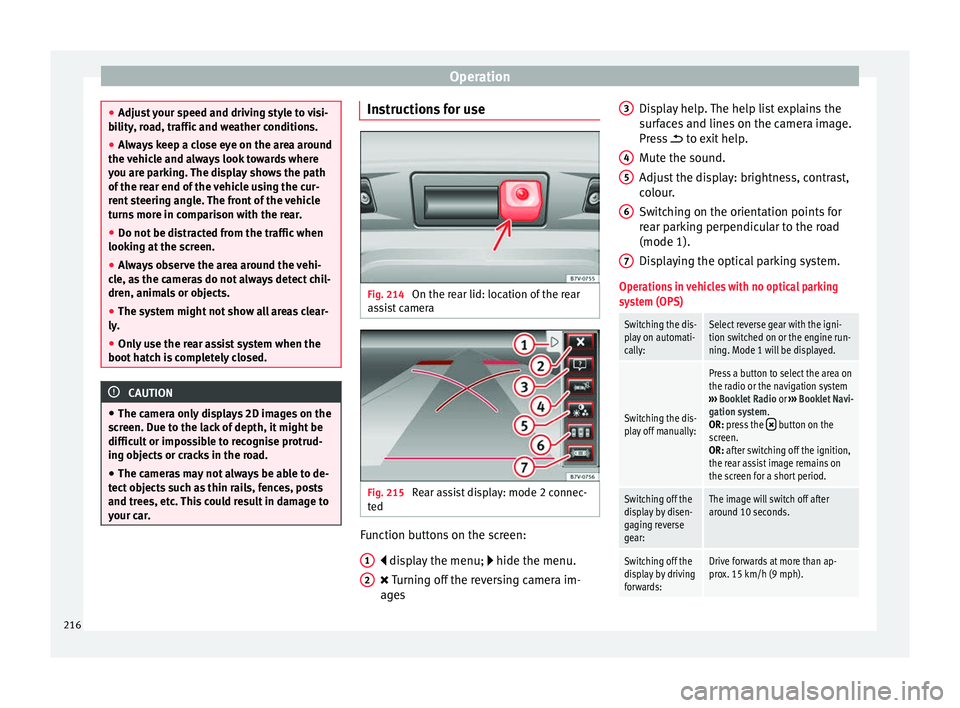
Fig. 214
On the rear lid: location of the rear
a s
s
ist camera Fig. 215
Rear assist display: mode 2 connec-
t ed Function buttons on the screen:
di s
p
lay the menu; hide the menu.
Turning off the reversing camera im-
ages
1 2 Display help. The help list explains the
s
ur
f
aces and lines on the camera image.
Press to exit help.
Mute the sound.
Adjust the display: brightness, contrast,
colour.
Switching on the orientation points for
rear parking perpendicular to the road
(mode 1).
Displaying the optical parking system.
Operations in vehicles with no optical parking
system (OPS)
Switching the dis-
play on automati-
cally:Select reverse gear with the igni-
tion switched on or the engine run-
ning. Mode 1 will be displayed.
Switching the dis-
play off manually:
Press a button to select the area on
the radio or the navigation system
››› Booklet Radio or ››› Booklet Navi-
gation system.
OR: press the
button on the
screen.
OR: after switching off the ignition,
the rear assist image remains on
the screen for a short period.
Switching off the
display by disen-
gaging reverse
gear:The image will switch off after
around 10 seconds.
Switching off the
display by driving
forwards:Drive forwards at more than ap-
prox. 15 km/h (9 mph). 3
4
5
6
7
216
Page 219 of 320

Driver assistance systemsOperations in vehicles with the optical parking
system (OPS)
Switching the dis-
play on automati-
cally:Select reverse gear with the igni-
tion switched on or the engine run-
ning. Mode 1 will be displayed.
Switching the dis-
play off manually:
Press a button to select the area on
the radio or the navigation system
››› Booklet Radio or ››› Booklet Navi-
gation system.
OR: press the
button on the
screen.
OR: after switching off the ignition,
the rear assist image remains on
the screen for a short period.
Press button .
Switching off the
display by disen-
gaging reverse
gear:The OPS display will immediately
be shown.
Switching off the
display by driving
forwards:Drive forwards at more than ap-
prox. 10 km/h (6 mph). Things to note
1) Do not use the rear assist system in the fol-
lowing cases:
– If there is a fault in the dynamic chassis control (DCC).
– If the image displayed is not very clear or reliable (low
visibility or dirty lens).
– If the space behind the vehicle cannot be clearly or
completely recognised.
1) Do not use the rear assist system in the fol-
lowing cases:
– If the vehicle has been overloaded at the rear.
– If the driver is not familiar with the system.
– If the rear lid is open.
– If the position and installation angle of the camera
have been changed, e.g. in a rear-end collision. Have a
specialised workshop check the system.
2) Optical illusions of the camera (examples)
The rear assist camera produces two-dimensional im-
ages. Any cracks in or objects protruding from the
ground or from other vehicles are more difficult to spot
or cannot be seen due to a lack of depth in the image
displayed.
Objects or other vehicles may seem to be closer or fur-
ther away than what they really are:
– On changing from a flat surface to a slope or gradient.
– On changing from a slope or gradient to a flat surface.
– If the vehicle has been overloaded at the rear.
– On approaching protruding objects. These objects
may be outside the angle of vision of the camera when
reversing.
Cleaning the camera lens
K
eep the c
amer
a lens clean and clear of snow
and ice:
● Moisten the lens using a commercially
avail
able, alcohol-based glass cleaning agent and clean the lens with a dry cloth
›››
.
● Remove snow using a small brush.
● Use de-icing spray to remove any ice ››
›
.
CAUTION
● Never u se abr
asive cleaners to clean the
camera lens.
● Never remove snow or ice from the camera
lens
using warm or hot water. This could
damage the lens. Note
● SEA T r
ecommends that you practise park-
ing with the rear assist system in a quiet lo-
cation or in a car park to become familiar with
the system, including the orientation lines
and their function.
● The orientation lines will not be displayed
on the scr
een if the rear lid is open or the fac-
tory-fitted towing bracket is electrically con-
nected to a trailer. 217
Technical data
Advice
Operation
Emergencies
Safety
Page 231 of 320

Driver assistance systems
CAUTION
Failure to heed the control lamps and text
mes s
ages when they appear may result in ve-
hicle faults. Operation mode
Sign Assist does not work in all countries.
This
mu
st be taken into account when travel-
ling abroad.
Display of traffic signs
Speed limits or overtaking prohibitions to-
gether with the corresponding additional
signs are shown on the instrument panel dis-
play ›››
Fig. 225. Depending on the naviga-
tion system installed in the vehicle, traffic
signs will be shown as above and also in the
navigation system's map display.
When Sign Assist is connected, the vehicle
records the traffic signs with a camera in the
base of the interior rear vision mirror. After
checking and evaluating the information
from the camera, the navigation system and
the current vehicle data, up to three valid
traffic signs are displayed in conjunction with
the corresponding additional signs. The traf-
fic sign that is currently valid for the driver is
shown first, in the left side of the screen. A
traffic sign of only limited validity,
e.g. 90 km/h (56 mph) is shown second, to-
gether with the additional sign “if the road is wet”. If the vehicle's rain sensor detects rain
during tr
av
el, the traffic sign valid at this mo-
ment will move to the first position along the
additional sign “if the road is wet”.
The permanent display on the instrument
panel screen is shown as you pass the real
traffic signs. The signs for entering and leav-
ing towns activate the display of the usual
speed limits for that country on roads in
populated areas and national highways, even
if the speed is not limited by an actual traffic
sign.
The end of a prohibition or limitation is not
displayed. If you exceed the speed limits
shown, a warning will not appear. The system
does not detect areas with little traffic. The
current legal provisions apply.
Connection and disconnection
● Connect or disconnect the assist system in
the Settings menu in the SEA
T information
system ›››
page 26.
● OR: press the button for the driver assist
sys
tems on the main beam lever.
Trailer
Connect or disconnect the secondary display
for speed limits and overtaking bans that ap-
ply to trailers (trailer mode) in the Settings
menu in the SEAT information system
››› page 26. Tiredness detection (recom-
mendation to t
ake a break)
Introduction WARNING
Do not let the extra convenience afforded by
the tiredne s
s detection function tempt you
into taking any risks when driving. When
making long trips, conveniently long breaks
must be taken.
● The driver is responsible for determining
their capac
ity to drive.
● Never drive when tired.
● The system does not always detect the
tirednes
s of the driver. Please read the infor-
mation provided in the section ››› page 230,
Limited operation.
● In some situations the system may incor-
rectly int
erpret an intended manoeuvre as a
sign of tiredness of the driver.
● In the event of the an episode called “mi-
cro
sleep” at the wheel, a strong warning is
not in place!
● Observe the indications on the display of
the instrument
panel and act in accordance
with them. » 229
Technical data
Advice
Operation
Emergencies
Safety
Page 235 of 320

Driver assistance systems
●
If the w arnin
g lamp lights up, stop im-
mediately and check the tyres.
● If the tyres are inflated at different pres-
sure
s or if a tyre pressure is too low, this will
increase tyre wear, negatively affecting vehi-
cle stability and increasing braking distan-
ces.
● If tyres are inflated at different pressures or
a tyre pr
essure is too low, a tyre may be dam-
aged and burst resulting in a loss of control
of the vehicle.
● The driver is responsible for ensuring that
all
of the vehicle tyres are correctly inflated
to the right pressure. The recommended tyre
pressure is indicated on the label ››› Fig. 251.
● The tyre monitoring system can only oper-
ate corr
ectly if all of the tyres are inflated to
the correct pressure when cold.
● Driving with tyres at the wrong pressure
can dam
age them and result in an accident.
Ensure that the tyre pressures of all the tyres
correspond to the vehicle load.
● Before starting a journey, always inflate
tyre
s to the correct pressure.
● If tyre pressure is too low then the tyre is
subj
ect to greater forces and it may be heated
to such an extent that the tread can rupture
and the tyre will burst.
● With an overloaded vehicle at high speed,
the tyre
s can overheat and burst resulting in
a loss of vehicle control.
● Tyre pressures which are too high or too
low reduc
e the useful life of the tyre, affect-
ing vehicle performance. ●
If a ty r
e has not been “punctured” and does
not have to be changed immediately, drive to
the nearest specialised workshop at a moder-
ate speed and have the tyre checked and in-
flated to the correct pressure. Tyre monitoring indicator
Fig. 228
Detailed view of the centre console:
b utt
on f
or the tyre pressure monitoring indi-
cator The tyre monitor indicator compares wheel
r
ev
o
lutions and, with this information, the
tread of each wheel using the ABS sensors. If
the tread of a wheel is changed, the tyre
monitoring indicator will indicate as such on
the instrument panel. The wheel tread
changes when:
● Tyre pressure is insufficient
● Tyre structure is damaged ●
The vehic
le is unbalanced because of a
load
● If the wheels on an axle are subject to a
heavier lo
ad (e.g. when towing a trailer).
● The vehicle is fitted with snow chains
● The wheel on one axle is changed
There ma
y be a delay in the reaction of the
tyre monitoring indicator or it may not in-
dicate anything under certain circumstances
(e.g. sports driving, snow-covered or un-
paved roads).
Adaptation of the tyre monitoring indicator
On adjusting tyre pressure or changing one
or more wheels, the ››› Fig. 228 button on the
tyre monitoring indicator must be kept press-
ed down, with the ignition on, until an audi-
ble warning is heard. Do the same, for exam-
ple, when the front and rear wheels are swap-
ped ››› Fig. 250.
If the wheels are subjected to an excessive
load (towing a trailer, heavy load), the tyre
pressure must be increased to the maximum
recommended pressure ››› page 284. Press
the tyre monitoring indicator button to con-
firm the new pressure value. Note
An incorrect warning may be given when
sno w c
hains are in use because the chains in-
crease the tread of the wheel. 233
Technical data
Advice
Operation
Emergencies
Safety
Page 237 of 320

Towing bracket device
Note
● Alw a
ys turn off the anti-theft alarm system
before connecting or disconnecting a trailer
››› page 117. Otherwise, the tilt sensor may
erroneously activate the alarm.
● Never use a trailer with a new engine (for
the first
1,000 km or 600 miles) ››› page 244.
● At SEAT, we recommend folding in the tow
hitch b
all when a trailer is not being used. In
case of a rear collision, the damage caused to
the vehicle with the extended tow hitch ball
could be more extensive.
● In some models, a tow hitch is necessary
for to
wing vehicles. For this reason, you
should store the tow hitch in the vehicle at all
times. Technical requirements
If the car is supplied with a
fact
or
y-fitted tow-
ing bracket it will already have the necessary
technical modifications and meet the statuto-
ry requirements for towing a trailer.
Only use an approved tow hitch for the gross
trailer weight rating. The tow hitch must be
suitable for both the vehicle and trailer and
must be securely fitted to the vehicle chassis.
Only use a tow hitch with a removable ball
joint. Always check and take into account the
tow hitch manufacturer's instructions. Never
fit a trailer tow hitch “that distributes the
load” or “balances the load”. Bumper mounted tow hitch
Never fit a t
ow hitch or its attachments to the
bumper. A tow hitch should never interfere
with the bumper performance. Do not modify
the exhaust system and brake system. Regu-
larly check the tow hitch to ensure it is firmly
fitted.
Engine cooling system
Driving with a trailer increases the load on
the engine and cooling system. The cooling
system should always have sufficient coolant
and to be able to cope with the vehicle and
trailer.
Electric trailer brake
If the trailer has its own braking system,
please note the relevant legal requirements.
The trailer braking system should never be
connected to the vehicle braking system.
Trailer cable
Always use a cable between the vehicle and
the trailer ››› page 237.
Trailer rear lights
The rear lights of a trailer must fulfil the cor-
responding standards ››› page 237.
Never connect the trailer's rear lights directly
to the vehicle electric system. In case of any
doubt about the electrical connection of the trailer, ask a specialised workshop. SEAT rec-
ommends
visiting a technical service.
Wing mirrors
When the field of vision behind the trailer
cannot be seen using the standard wing mir-
rors of the towing vehicle, additional wing
mirrors are required according to the legal re-
quirements of each country. The wing mirrors
must be fitted before driving and must pro-
vide a sufficient field of vision behind.
Trailer electricity consumption
Never exceed the specifications:
DevicesMaximum power
Side lights and rear lights50 Watts
Turn signal (each side)54 Watts
Brake lights (total)84 Watts
Reversing lights (total)42 Watts
Rear fog light42 Watts WARNING
If the tow hitch is badly fitted or unsuitable,
the trai l
er may separate from the vehicle
causing an accident with serious consequen-
ces. » 235
Technical data
Advice
Operation
Emergencies
Safety