2017 Seat Alhambra lock
[x] Cancel search: lockPage 196 of 320

Operation
Only change gears when the vehicle is at a
s t
andstill. To change the position of the se-
lector lever, press the brake pedal and switch
on the ignition.
- Reverse gear
Reverse gear is engaged.
Only put in reverse when the vehicle is at a
standstill. If not it could result in serious
damage.
- Neutral
The gearbox is in neutral. No movement is
transmitted to the wheels and the engine
does not act as a brake.
- Standard forwards driving position (nor-
mal programme)
The gears are changed (up and down) auto-
matically. The gear shifts are determined by
the engine load, your individual driving style
and the speed of the vehicle.
- Standard forwards driving position
(sports programme)
The shift up to a higher gear is automatically
delayed and the shift down is faster with re-
spect to the D range of gears, to take full ad-
vantage of the engine power. The gear shifts
are determined by the engine load, your indi-
vidual driving style and the speed of the ve-
hicle. Selector lever locking
The gear sel
ector lever lock prevents, in P or
N, a gear selection from being inadvertently
engaged and the vehicle moving off acciden-
tally.
To release the gear selector lever lock, press
and hold the brake pedal with the ignition
on. Press simultaneously on the selector lev-
er lock.
The selector lever lock is not engaged if it is
moved quickly through position N (e.g. when
shifting from R to D). This makes it possible,
for instance, to “rock the vehicle backwards
and forwards” if it is stuck in snow or mud.
The selector lever lock engages automatically
if the brake pedal is not pressed and the lev-
er is in position N for more than about one
second at a speed of less than 5 km/h
(3 mph).
In vehicles with a DSG ®
automatic gearbox,
on rare occasions the selector lever lock may
not engage. In this case, the transmission is
locked to prevent the vehicle from moving ac-
cidentally. The green control light flashes
and an information text is displayed. Proceed
as follows to engage the selector lever lock:
● Press the brake pedal and then release. WARNING
Placing the selector lever in an incorrect posi-
tion ma y
cause loss of control of the vehicle
and a serious accident.
● Do not press the accelerator when engag-
ing a ran
ge of gears.
● With the engine running and a range of
gear
s selected, the vehicle will move off
when the brake pedal is released.
● Never select reverse gear or the parking
lock whi
le driving. WARNING
Unintentional movements of the vehicle
cou l
d cause serious injury.
● As a driver, you should never leave your ve-
hicle if
the engine is running and a gear range
is engaged. If you have to leave your vehicle
while the engine is running, you must apply
the electronic parking brake and engage
parking lock P with the selector lever.
● While the engine is running and with the D,
S or R rang
e of gears selected, keep the brake
pressed to keep the vehicle at a standstill.
Transmission is not totally interrupted either
when the vehicle is idling or when the vehicle
“continues moving forwards”.
● Never engage the R or P gear ranges when
the vehic
le is moving.
● Never leave the vehicle with the gear selec-
tor in N. The
vehicle may move downhill re-
gardless of whether the engine is switched
on or not. 194
Page 199 of 320
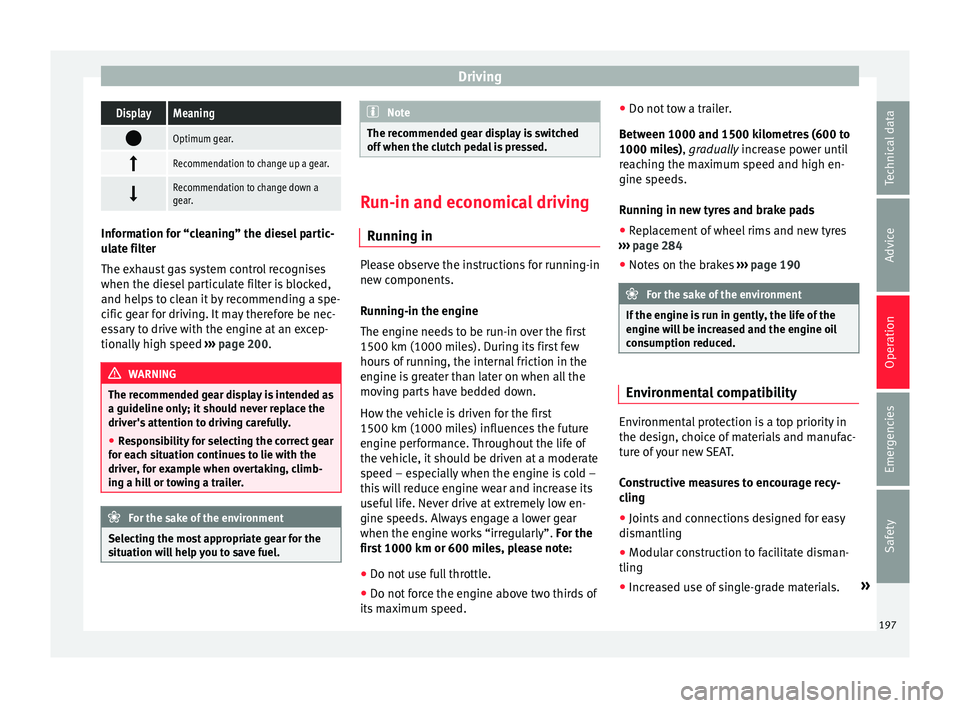
DrivingDisplayMeaning
Optimum gear.
Recommendation to change up a gear.
Recommendation to change down a
gear.
Information for “cleaning” the diesel partic-
ul
at
e filter
The exhaust gas system control recognises
when the diesel particulate filter is blocked,
and helps to clean it by recommending a spe-
cific gear for driving. It may therefore be nec-
essary to drive with the engine at an excep-
tionally high speed ›››
page 200. WARNING
The recommended gear display is intended as
a guideline only; it shou
ld never replace the
driver's attention to driving carefully.
● Responsibility for selecting the correct gear
for eac
h situation continues to lie with the
driver, for example when overtaking, climb-
ing a hill or towing a trailer. For the sake of the environment
Selecting the most appropriate gear for the
sit uation w
ill help you to save fuel. Note
The recommended gear display is switched
off when the c lut
ch pedal is pressed. Run-in and economical driving
Ru nnin
g in Please observe the instructions for running-in
new components.
R u
nning-in the engine
The engine needs to be run-in over the first
1500 km (1000 miles). During its first few
hours of running, the internal friction in the
engine is greater than later on when all the
moving parts have bedded down.
How the vehicle is driven for the first
1500 km (1000 miles) influences the future
engine performance. Throughout the life of
the vehicle, it should be driven at a moderate
speed – especially when the engine is cold –
this will reduce engine wear and increase its
useful life. Never drive at extremely low en-
gine speeds. Always engage a lower gear
when the engine works “irregularly”. For the
first 1000 km or 600 miles, please note:
● Do not use full throttle.
● Do not force the engine above two thirds of
its m ax
imum speed. ●
Do not to
w a trailer.
Between 1000 and 1500 kilometres (600 to
1000 miles), gradually increase power until
reaching the maximum speed and high en-
gine speeds.
Running in new tyres and brake pads ● Replacement of wheel rims and new tyres
›››
page 284
● Notes on the brakes ›››
page 190 For the sake of the environment
If the engine is run in gently, the life of the
engine w i
ll be increased and the engine oil
consumption reduced. Environmental compatibility
Environmental protection is a top priority in
the de
s
ign, c
hoice of materials and manufac-
ture of your new SEAT.
Constructive measures to encourage recy-
cling
● Joints and connections designed for easy
dismantlin
g
● Modular construction to facilitate disman-
tling
● Incr
eased use of single-grade materials. »
197
Technical data
Advice
Operation
Emergencies
Safety
Page 202 of 320

Operation
Remove optional equipment and unnecessa-
r y
ac
cessories
The more aerodynamic the vehicle, the lower
the fuel consumption. Optional equipment
and accessories (such as roof racks or bike
carriers) reduce the aerodynamic benefits of
the vehicle.
Therefore, we recommend you remove all op-
tional and unnecessary equipment and racks,
especially if you intend to drive at high
speeds.
Other factors which increase fuel consump-
tion (examples):
● Fault in engine management.
● Driving on hills.
● Trailer towing. WARNING
Always adapt your speed and the distance to
the v ehic
les ahead in line with visibility,
weather conditions, the condition of the road
and the traffic situation. Engine management and ex-
h
au
s
t gas purification system
Introduction WARNING
The components of the exhaust system reach
ver y
high temperatures. This could cause a
fire.
● Always park your vehicle so that no part of
the exhau
st system can come in contact with
flammable materials (such as dried grass).
● Do not apply additional underseal or anti-
corro
sion coatings to the exhaust pipes, cata-
lytic converter, heat shields or the diesel par-
ticulate filter. Control lamps
It lights up
fault in the petrol
engine manage-
ment.Take the vehicle to a specialised
workshop as soon as possible
and have the engine checked.
It lights up
Diesel engine glow
plug system.The engine glow plug system has
been activated. The engine can
be started straight away when
the lamp switches off.
Flashes
Fault in the diesel
engine manage-
ment.If the lamp flashes while you are
driving, have the engine checked
by a specialised workshop as
soon as possible.
It lights up
Fault in the emis-
sion control system.Reduce speed and drive carefully
to the nearest specialised work-
shop to have the engine
checked.
Flashes
Combustion fault
which could dam-
age the catalytic
converter.Reduce speed and drive carefully
to the nearest specialised work-
shop to have the engine
checked.
It lights up
Diesel particulate
filter blocked›››
page 201 Several warning and control lamps light up
f
or a f
ew sec
onds when the ignition is switch-
ed on, signalling that the function is being
verified. They will switch off after a few sec-
onds. WARNING
Observe traffic regulations when cleaning the
diesel p
articulate filter while driving.200
Page 203 of 320

Driving
●
Only c
arry on driving if visibility, weather,
road and traffic conditions so permit.
● Never endanger your safety or that of other
roa
d users. CAUTION
Always pay attention to any lit control lamps
and t o the c orr
esponding descriptions and in-
structions to avoid damage to the vehicle. Note
While the control lamps , , or re-
m ain lit, ther
e may be engine problems, fuel
consumption may increase and the engine
may lose power. Catalytic converter
The catalytic converter permits the subse-
quent
tr
e
atment of the exhaust gases thus
reducing contaminating gas emissions. To
ensure a longer working life for the exhaust
system and catalytic converter in a petrol en-
gine:
● Always use unleaded petrol.
● Never run the fuel tank completely dry.
● Do not top up with too much engine oil
›››
page 271.
● Do not tow-start the vehicle; use the starter
cabl
es ›››
page 51. If you should notice misfiring, uneven run-
ning or los
s of power when the car is moving,
reduce speed immediately. Have the car in-
spected by a specialised workshop. If this
happens, unburnt fuel can enter the exhaust
system and escape into the atmosphere. The
catalytic converter can also be damaged by
overheating. For the sake of the environment
Even when the emission control system is
work in
g perfectly, there may be a smell of
sulphur under certain conditions. This de-
pends on the sulphur content of the fuel be-
ing used. Diesel particulate filter
The diesel particulate filter removes soot par-
tic
u
l
ates from the exhaust gas, retains and
burns them. To assist the combustion proc-
ess, SEAT recommends you avoid frequent
short trips.
● Always use diesel with a low sulphur con-
tent ›
›› page 264.
● Never use petrol or fuel oil.
● Never use biodiesel. However, a blend pre-
pared b
y the diesel manufacturer containing
biodiesel within the limits established by the
EN 590 standard may be used ›››
page 264.
● Never run the fuel tank completely dry. ●
Do not top up w
ith too much engine oil
››› page 271.
● Do not tow-start the vehicle; use the starter
cabl
es ›››
page 51.
In order to reduce blocking of the diesel par-
ticulate filter, some vehicles with an automat-
ic gearbox may increase the engine speed
slightly to start cleaning the filter automati-
cally. The control lamp will not light up in this
case .
Control lamp
If the control lamp lights up you should
help the filter clean itself by driving in the ap-
propriate manner.
To do this, drive about 15 minutes in fourth
or fifth gear (automatic gearbox: S gear
range) at a minimum speed of 60 km/h
(37 mph), with the engine running at approxi-
mately 2,000 rpm. In this way, the soot build
up in the filter is burned. When cleaning is
successful, the control lamp turns off.
If the lamp does not turn off, or the three
lamps turn on (particulate filter , fault in
the emission control system and glow
plugs ), drive the vehicle to a specialised
workshop and have the fault repaired at the
earliest opportunity. »
201
Technical data
Advice
Operation
Emergencies
Safety
Page 205 of 320

Driver assistance systems
Driver assistance systems
Br ak
in
g and stability systems
Brake assist systems The brake assist systems ESC, ABS, BAS, ASR
and EDL on
ly
operate when the ignition is
switched on. They contribute significantly to
increasing active safety.
Electronic Stability Control (ESC)
ESC reduces the risk of skidding and increa-
ses the vehicle stability by braking individual
wheels under specific driving conditions. ESC
detects critical handling situations, such as
understeer, oversteer and wheelspin on the
driven wheels. The system stabilises the ve-
hicle by braking individual wheels or by re-
ducing the engine torque.
The ESC has limits. It is important to realise
that the ESC is also subject to the laws of
physics. ESC will not be able to deal with all
situations with which drivers may be faced.
For example, if the road surface changes sud-
denly then ESC will not be useful in all cases.
If the vehicle suddenly enters a section cov-
ered by water, mud or snow then ESC will not
provide assistance in the same way as on dry
ground. If the vehicle loses its grip on the
ground and moves on a film of water (“aqua-
planing”), the ESC will not be able to assist the driver to control the vehicle as the loss of
adher
enc
e with the road surface will prevent-
ing braking and steering. If the vehicle is
driven through series of bends at high
speed, the ESC will not always be as effec-
tive: the vehicle reaction to aggressive driv-
ing is not the same as at reduced speeds.
When driving with a trailer, ESC does not pro-
vide the same amount of vehicle control as
without a trailer.
Adjust your speed and driving style to road,
traffic and weather conditions. ESC cannot
push the limits of the laws of physics; im-
prove the transmission available or maintain
the vehicle on the road if a lack of driver at-
tention creates an inevitable situation. Other-
wise, ESC assists in maintaining vehicle con-
trol in extreme situations and uses the move-
ments of the steering made by the driver to
maintain the vehicle moving in the desired
direction. If the vehicle is driven at such a
speed that it will leave the road before ESC
can intervene then the system cannot pro-
vide assistance.
The ABS, BAS, ASR and EDL systems are in-
corporated into the ESC. The ESC is always
on. The ESC should only be turned off using
the ASR button ›››
Fig. 205 when traction is
insufficient. Always remember to turn on the
ASR once more when the vehicle has traction
again. Anti-lock system (ABS)
ABS can pr
event the wheels from locking dur-
ing braking until just before the vehicle stops
thus helping the driver to steer the vehicle
and maintain control. This means that, even
during full braking, the risk of skidding is re-
duced:
● Press and hold the brake pedal fully. Do not
remov
e your foot from the brake pedal or re-
duce braking force!
● Do not “pump” the brake pedal, or reduce
brakin
g force!
● Maintain vehicle direction when braking
ful
ly.
● When the brake pedal is released or when
the brake f
orce is reduced, ABS is turned off.
ABS control can be observed by vibration of
the brake pedal and noise. You should never
expect the ABS to reduce the braking dis-
tance under any circumstances. This distance
will increase when driving on gravel, recent
snow or on icy and slippery ground.
When driving on loose ground, the all-terrain
configuration of the ABS is automatically
turned on. When ABS is activated, the front
wheels may lock briefly. This shortens the
braking distance in off-road situations as the
wheels are prevented from digging into loose
surfaces. All-terrain ABS only intervenes
when driving in a straight line. When the »
203
Technical data
Advice
Operation
Emergencies
Safety
Page 206 of 320

Operation
front wheels are turned, the normal ABS is
activ at
ed.
Br
ake assist system (BAS)
The brake assist system may reduce the re-
quired braking distance. The brake assist
system boosts the braking force if you press
the brake pedal quickly in an emergency. As
a result, the braking pressure increases rap-
idly, the braking force is multiplied and the
braking distance is reduced. This enables the
ABS to be activated more quickly and effec-
tively.
¡Do not lift your foot off the brake pedal!
When the brake pedal is released or when
the brake force is reduced, braking assist au-
tomatically turns off the brake servo.
Traction control when accelerating (ASR)
In the event of wheelspin, the traction control
system reduces the engine torque to match
the amount of grip available. The ASR makes
some situations easier, for example, when
starting, accelerating or going uphill, even in
unfavourable road conditions.
The ASR can be switched on or off manually
››› page 205.
Electronic differential lock system (EDS)
EDL is available when driving in straight lines
under normal conditions. When the EDL de-
tects wheelspin, it brakes the spinning wheel and directs the power to the other drive
wheels. T
o prevent the disc brake of the
braked wheel from overheating, the EDL cuts
out automatically if subjected to excessive
loads. The EDL will switch on again automati-
cally when the brake has cooled down.
Electronic drive torque management (XDS)
When taking a curve, the driveshaft differen-
tial mechanism allows the outer wheel to turn
at a higher speed than the inner wheel. In
this way, the wheel that is turning faster (out-
er wheel) receives less drive torque than the
inner wheel. This may mean that in certain
situations the torque delivered to the inner
wheel is too high, causing the wheels to
spin. On the other hand, the outer wheel is
receiving a lower drive torque than it could
transmit. This causes an overall loss of lateral
grip on the front axle, resulting in understeer
or “lengthening” of the trajectory.
The XDS system can detect and correct this
effect via the sensors and signals of the ESC.
Via the ESC, the XDS will brake the inside
wheel and counter the excess driving torque
of that wheel. This means that the driver's
desired trajectory is much more precise.
The XDS system works in combination with
the ESC and is always active, even when ASR
traction control is disconnected. WARNING
Driving at high speed on icy, slippery wet
grou nd c
an result in loss of vehicle control
and serious injury to the driver and passen-
gers.
● Adjust your speed and driving style to visi-
bility
, road, traffic and weather conditions.
Even though the brake assist systems, ABS,
BAS, EDL, ASR and ESC, provide more securi-
ty, do not take unnecessary risks while driv-
ing.
● Brake assist systems can not overcome the
law
s of physics. Even with ESC and other sys-
tems, slippery and wet roads will always be
dangerous.
● Driving to quickly on wet ground can result
in the wheels lo
sing contact with the ground
in an effect known as “aquaplaning”. Without
adherence, it is impossible to brake, steer or
control the vehicle.
● Brake assist systems cannot avoid acci-
dents if
, for example, the driver does not re-
spect safety distances or drives to quickly in
difficult conditions.
● Even though brake assist systems are ex-
tremely eff
ective and help control the vehicle
in difficult situations, remember that the ve-
hicle stability depends on tyre grip.
● When accelerating on a slippery surface,
for ex
ample on ice or snow, press the acceler-
ator carefully. The wheels can still slip even
with brake assist systems resulting in loss of
vehicle control. 204
Page 238 of 320

Operation
CAUTION
● If the r e
ar lights of the trailer are not cor-
rectly connected, the vehicle electronics may
be damaged.
● If the trailer absorbs excessive electric cur-
rent, the v
ehicle electronics may be dam-
aged.
● Never connect the trailer's electric system
to the electric
al connections of the rear lights
or any other power sources. Only use suitable
connections for providing electric current to
the trailer. Note
● To w
ing a trailer places additional demands
on the vehicle. At SEAT, we recommend addi-
tional services between the normal inspec-
tion intervals if the vehicle is used frequently
for towing a trailer.
● In some countries, an additional fire extin-
guisher is
required if the trailer weight is
more than 2500 kg Electric tow hitch ball*
Fig. 229
Right-hand side of the luggage com-
p ar
tment: b
utton to electrically release the
tow hitch ball The rotation radius of the tow hitch ball
shou
l
d be fr
ee of people, animals and ob-
jects ››› .
The t o
w
ing bracket is located in the bumper.
The electric tow ball is fixed and cannot be
removed.
Releasing and unfolding the tow ball
● Stop the vehicle and apply the electric
parkin
g brake.
● Switch the ignition off.
● Open the rear lid.
● Press the knob briefly ›››
Fig. 229. The tow
ball is released electronically and folds out
automatically; the button indicator will blink. ●
Move the b
all joint until it inserts and the
button control lamp lights.
● Close the rear lid.
● Before hitching the trailer, remove the dust
guard from the b
all.
● The indicator only lights when the boot
hatc
h is open and when a trailer is not hitch-
ed.
Restoring the tow ball to its originally posi-
tion
● Stop the vehicle and apply the electric
parkin
g brake.
● Switch the ignition off.
● Remove the trailer and disconnect the ca-
ble betw
een the vehicle and trailer. If neces-
sary, remove the power socket adapter.
● Place the dust guard over the ball.
● Open the rear lid.
● Press the knob briefly ›››
Fig. 229. The tow
ball is electronically released; the indicator
blinks.
● Push the tow ball into the bumper until it
locks
in position and the button indicator
lights.
● Close the rear lid.
236
Page 240 of 320
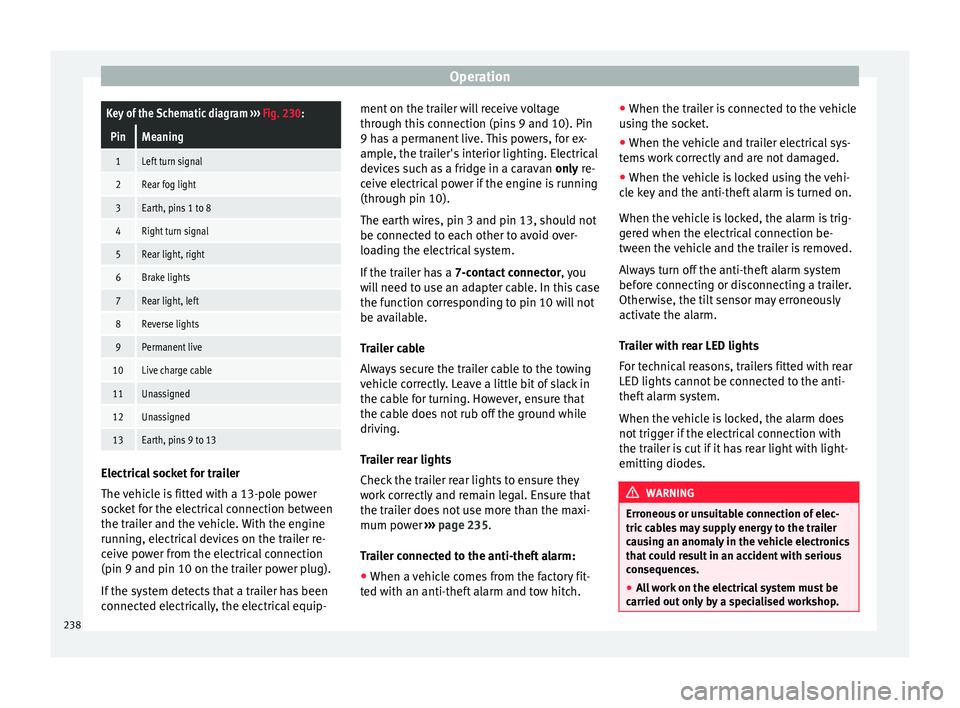
OperationKey of the Schematic diagram
››› Fig. 230:
PinMeaning
1Left turn signal
2Rear fog light
3Earth, pins 1 to 8
4Right turn signal
5Rear light, right
6Brake lights
7Rear light, left
8Reverse lights
9Permanent live
10Live charge cable
11Unassigned
12Unassigned
13Earth, pins 9 to 13 Electrical socket for trailer
The
v
ehic
le is fitted with a 13-pole power
socket for the electrical connection between
the trailer and the vehicle. With the engine
running, electrical devices on the trailer re-
ceive power from the electrical connection
(pin 9 and pin 10 on the trailer power plug).
If the system detects that a trailer has been
connected electrically, the electrical equip- ment on the trailer will receive voltage
through this
connection (pins 9 and 10). Pin
9 has a permanent live. This powers, for ex-
ample, the trailer's interior lighting. Electrical
devices such as a fridge in a caravan only re-
ceive electrical power if the engine is running
(through pin 10).
The earth wires, pin 3 and pin 13, should not
be connected to each other to avoid over-
loading the electrical system.
If the trailer has a 7-contact connector , you
will need to use an adapter cable. In this case
the function corresponding to pin 10 will not
be available.
Trailer cable
Always secure the trailer cable to the towing
vehicle correctly. Leave a little bit of slack in
the cable for turning. However, ensure that
the cable does not rub off the ground while
driving.
Trailer rear lights
Check the trailer rear lights to ensure they
work correctly and remain legal. Ensure that
the trailer does not use more than the maxi-
mum power ››› page 235.
Trailer connected to the anti-theft alarm:
● When a vehicle comes from the factory fit-
ted w ith an anti-thef
t alarm and tow hitch. ●
When the trai l
er is connected to the vehicle
using the socket.
● When the vehicle and trailer electrical sys-
tems w
ork correctly and are not damaged.
● When the vehicle is locked using the vehi-
cle k
ey and the anti-theft alarm is turned on.
When the vehicle is locked, the alarm is trig-
gered when the electrical connection be-
tween the vehicle and the trailer is removed.
Always turn off the anti-theft alarm system
before connecting or disconnecting a trailer.
Otherwise, the tilt sensor may erroneously
activate the alarm.
Trailer with rear LED lights
For technical reasons, trailers fitted with rear
LED lights cannot be connected to the anti-
theft alarm system.
When the vehicle is locked, the alarm does
not trigger if the electrical connection with
the trailer is cut if it has rear light with light-
emitting diodes. WARNING
Erroneous or unsuitable connection of elec-
tric c ab
les may supply energy to the trailer
causing an anomaly in the vehicle electronics
that could result in an accident with serious
consequences.
● All work on the electrical system must be
carried out on
ly by a specialised workshop.238