Page 295 of 358

5.9
TOOLS (1/2)
Do not leave the tools un-
secured inside the vehicle
as they may come loose
under braking. After use,
check that all the tools are correctly
clipped into the tool kit, then posi-
tion it correctly in its housing: risk of
injury.
If wheel bolts are supplied in the tool
kit, you must use these bolts, and
only these, for the emergency spare
wheel: refer to the label affixed to
the emergency spare wheel.
The jack is designed for wheel
changing purposes only. Under no
circumstances should it be used for
carrying out repairs underneath the
vehicle or to gain access to the un-
derside of the vehicle.
The presence of the tools depends on
the vehicle.
Jack 1
Fold it correctly before refitting it in its
housing (ensure that the wheelbrace is
correctly positioned 2).
Hubcap tool 3
This tool is used to remove the wheel
trims.
Screw guide 4
For tightening/loosening wheel bolts on
vehicles fitted with alloy wheels
Towing hitch 5
Refer to the information on “Towing” in
Section 5.
Wheelbrace 6
Locks or unlocks the wheel bolts and
tow eye 5.
Storage bag
This allows you to store a punctured
wheel in the boot.
1
6
3
5
2
4
Page 314 of 358
5.28
FUSES (2/2)
Allocation of fuses
(the presence of certain fuses depends on the vehicle equipment level)\
Symbol Allocation SymbolAllocation
HWindscreen washer“Hybrid Assist” system
ëThird row accessories socket, boot accessories
socketÝTowbar socket
ÆFront cigarette lighter, front and rear second row
accessories socketDiagnostic socket, audio alarm
Not usedÌHorn
Heated door mirrorsInstrument panel, dashboard control lighting
×Brake lights, passenger compartment central unitRear electric windows
\bParking brakefFront windscreen wiper
Additional servoDDirection indicator lights, hazard warning lights
îRadio, multifunction screen, multimedia acces-
sories sockets, parking brake controlRear USB sockets on console
Passenger compartment centre unit, rear wiper,
rear fog light
OLocking the doors and luggage compartment
Page 317 of 358

5.31
Operating faults
If the battery is too weak to ensure cor-
rect operation, you can still start and
lock/unlock the vehicle (please refer to
the information on “Locking/unlocking
the opening elements” in Section 1).
RENAULT CARD: battery
Replacing the battery
When the message “Keycard battery
low” appears on the instrument panel,
replace the battery in the RENAULT
card:
– slide the rear casing 1 downwards
while pressing on zone A;
– remove the battery cover 2;
– remove the battery by pressing on
one side and lifting the other;
– replace it according to the direc-
tion and template shown inside the
cover.
When refitting, proceed in the reverse
order, then press one of the buttons on
the card four times, close to the vehicle:
the message will disappear.
Note: it is not advisable to touch the
electronic circuit or contacts on the
RENAULT card when replacing the bat-
tery.
The batteries are available from ap-
proved Dealers, and their service
life approximately two years. Check
that there is no dye on the battery:
risk of an incorrect electrical con-
tact.
2
A
1
Do not throw away your used bat-
teries; give them to an organisation
responsible for collecting and recy-
cling batteries.
Page 318 of 358
5.32
Operating faults
If the battery is too weak to ensure cor-
rect operation, you can still start and
lock/unlock the vehicle (please refer to
the information on “Locking/unlocking
the opening elements” in Section 1).
Replacing the battery
Open the case at slot 1 using a flat-
blade screwdriver or similar, and re-
place the battery 2 , observing the po-
larity shown on the back of the cover. Note:
It is not advisable to touch the
electronic circuit in the key cover when
replacing the battery.
RADIO FREQUENCY REMOTE CONTROL: batteries
When refitting, ensure that the cover
is correctly clipped on and the screw
tightened.
The batteries are available from ap-
proved Dealers, and their service
life approximately two years.
Check that there is no dye on the
battery: risk of an incorrect electri-
cal contact.
2
1
1
Do not throw away your used bat-
teries; give them to an organisation
responsible for collecting and recy-
cling batteries.
Page 320 of 358

5.34
WINDSCREEN WIPER BLADES: replacement (1/2)
Windscreen wiper blades 1
With the ignition on and the engine
switched off, lower the windscreen
wiper stalk fully: the blades stop slightly
away from the bonnet.
Lift wiper arm 3 , press button 2 to re-
lease the blade.
Refitting
Slide the blade along the arm until
it clips on. Check that it is correctly
locked in place. Lower the windscreen
wiper arm carefully.
1
2
3
With the ignition on, return the wind-
screen wiper stalk to the stop position.
The blade on the driver’s side must
always be above the passenger blade.
If this is not the case, a quick sweep of
the windscreen wipers should be per-
formed once the vehicle is travelling at
over 4 mph (7 km/h).
Note: Before restarting your vehicle,
lower the windscreen wiper blades
onto the windscreen to avoid any risk
of damaging the bonnet or the wipers.
– In frosty weather, make
sure that the wiper blades
are not stuck by ice (to
avoid the risk of the motor
overheating or damaging the
blades).
– Check the condition of the wiper
blades.
Replace the wiper blades as soon
as they begin to lose efficiency
(approximately once a year).
Whilst changing the blade, take care
not to drop the arm onto the window
after it has been removed as this
may break the window.
Page 321 of 358
5.35
WINDSCREEN WIPER BLADES: replacement (2/2)
Check the condition of the wiper
blades.
– clean the blades, windscreen and rear screen regularly with soapy
water;
– do not use them when the wind- screen or rear screen are dry;
– free them from the windscreen or rear screen when they have not
been used for a long time.
4
A
To refit
To refit the wiper blade, proceed in re-
verse order to removal. Make sure that
the blade is correctly locked in position.
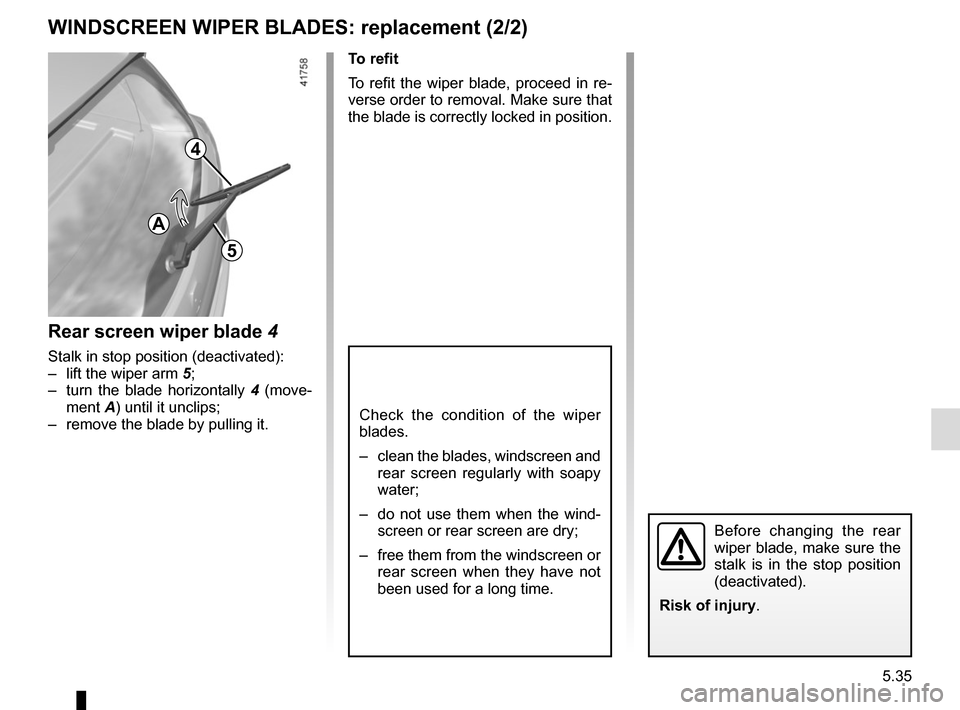
Rear screen wiper blade 4
Stalk in stop position (deactivated):
– lift the wiper arm 5;
– turn the blade horizontally 4 (move-
ment A) until it unclips;
– remove the blade by pulling it.
Before changing the rear
wiper blade, make sure the
stalk is in the stop position
(deactivated).
Risk of injury.
5
Page 322 of 358

5.36
TOWING: breakdown (1/2)
Before towing, put the gearbox in neu-
tral, unlock the steering column and re-
lease the parking brake.
For vehicles fitted with an automatic
gearbox, if it is not possible to put the
gear lever in position N, please consult
an approved dealer.
Steering column unlocking
Insert the key into the ignition or, de-
pending on the vehicle, with the
RENAULT card on you, press the
engine start button for approximately
2 seconds.
Reposition the lever to neutral (posi-
tion N for vehicles fitted with an auto-
matic gearbox).
The steering column unlocks, the ac-
cessory functions are powered: you
can use the vehicle’s lights (direction
indicators, brake lights, etc.). At night
the vehicle must have its lights on.
Depending on the vehicle, once you
have finished towing, press the engine
start button twice (risk of running down
the battery). The speed specified by current legis-
lation for towing must always be ob-
served. If your vehicle is the towing
vehicle, do not exceed the maximum
towing weight for your vehicle (refer to
the information on “Weights” in
Section 6).
Towing a vehicle with an
automatic gearbox
Transport the vehicle on a trailer or tow
it with the front wheels off the ground.
In exceptional circumstances
, you
may tow it with all four wheels on the
ground, only in a forward gear, with the
gear in neutral position N over a maxi-
mum distance of 50 miles and not ex-
ceeding a speed of 15 mph (25 km/h).
When activated, in the event that the
lever is stuck in P , depress the brake
paddle. It is possible to free the lever
manually. To do this, unclip the base of
the lever, then insert a tool (rigid rod)
into the slot 2 (located on the left or
right of the lever depending on the ve-
hicle) and press simultaneously on the
button 1 to unlock the lever.
Contact an authorised dealer as soon
as possible.
2
1
Page 323 of 358
5.37
TOWING : breakdown (2/2)
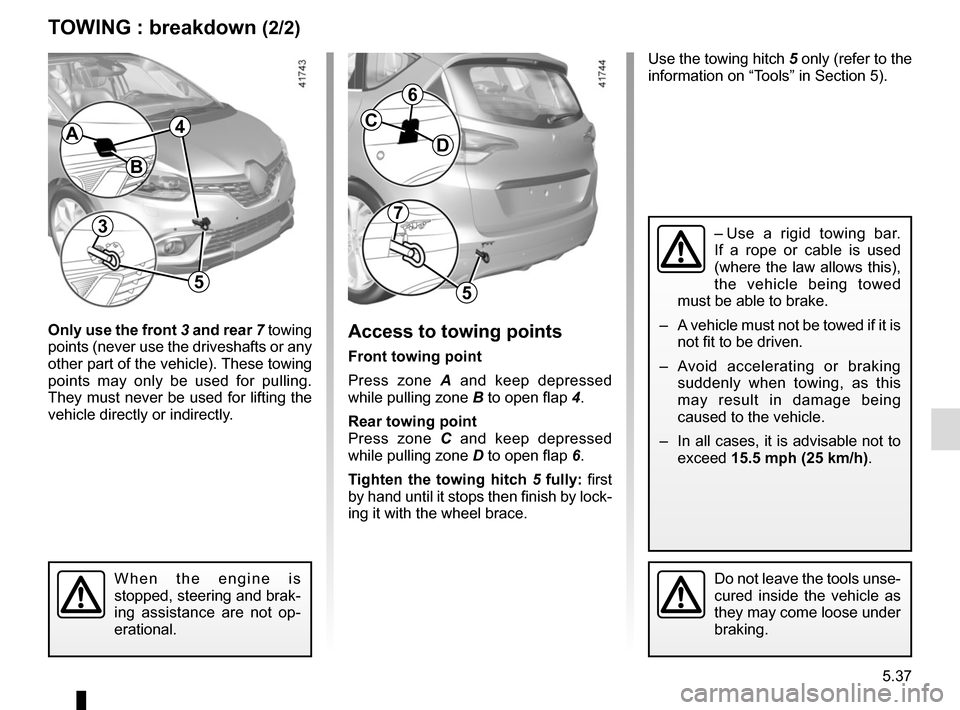
Only use the front 3 and rear 7 towing
points (never use the driveshafts or any
other part of the vehicle). These towing
points may only be used for pulling.
They must never be used for lifting the
vehicle directly or indirectly.Access to towing points
Front towing point
Press zone A and keep depressed
while pulling zone B to open flap 4.
Rear towing point
Press zone C and keep depressed
while pulling zone D to open flap 6.
Tighten the towing hitch 5 fully: first
by hand until it stops then finish by lock-
ing it with the wheel brace.
Do not leave the tools unse-
cured inside the vehicle as
they may come loose under
braking.
Use the towing hitch 5 only (refer to the
information on “Tools” in Section 5).
B
AC
D
– Use a rigid towing bar.
If a rope or cable is used
(where the law allows this),
the vehicle being towed
must be able to brake.
– A vehicle must not be towed if it is not fit to be driven.
– Avoid accelerating or braking suddenly when towing, as this
may result in damage being
caused to the vehicle.
– In all cases, it is advisable not to exceed 15.5 mph (25 km/h).
When the engine is
stopped, steering and brak-
ing assistance are not op-
erational.
37
55
6
4

Allocation of fuses
(the presence of certain fuses depends on the vehicle equipment level)\
Symbol Allocation SymbolAllocation
HWindscreen washer“Hybrid Assist” system
ëThi")