2017 RENAULT MEGANE rear
[x] Cancel search: rearPage 185 of 346

2.73
REVERSING CAMERA (1/2)
111
The 1 rear view camera is located on
the luggage compartment lid.Special feature
Make sure that the 1 camera is not ob-
scured (by dirt, mud, snow, condensa-
tion etc.).
This function is an additional aid. It cannot, therefore, under any circ\
um-
stances replace the vigilance or the responsibility of the driver.
The driver should always be ready for sudden incidents while driving:
always ensure that there are no small, narrow moving obstacles (such
as a child, animal, pushchair, bicycle, stone, post etc.) in the blind spot when ma-
noeuvring.
Page 186 of 346

2.74
4 moving guide line:
This is shown in blue on the multifunc-
tion screen 2. It indicates the vehicle
trajectory according to the position of
the steering wheel.
Activating, deactivating the
reversing camera
From the multifunction screen 2, select
“Vehicle”, “Settings”, “Parking as-
sistance”, then “Rear view camera”.
Activate or deactivate the reversing
camera and confirm your choice.
You can also adjust the camera image
settings (brightness, contrast, etc.)
REVERSING CAMERA (2/2)
C
B
A
43
2
The screen shows a reverse mirror
image.
Objects which appear on the edge
of the screen may be deformed.
In very bright light (snow, vehicle in
sunshine etc.), the camera vision
may be adversely affected.
If the boot is open or poorly closed,
the message “Boot open” appears
and the camera display disappears.
3
4
Fixed clearance gauge 3
The fixed clearance gauge comprises
coloured markers A, B and C , indicat-
ing the distance behind the vehicle:
– A (red) approximately 30 centime-
tres from the vehicle;
– B (yellow) approximately 70 centime-
tres from the vehicle;
– C (green) approximately 150 centi-
metres from the vehicle.
This gauge remains fixed and indicates
the vehicle trajectory if the wheels are
in line with the vehicle.Operation
When reversing, the camera transmits
a view of the surroundings to the rear
of the vehicle to the screen 2 accompa-
nied by one or two clearance gauges 3
et 4 (mobile and fixed). This system
is initially used with the aid of several
gauges (mobile for trajectory and fixed
for distance). When the red zone is
reached, use the bumper image to stop
accurately.
The frames are a representation projected onto flat ground; this informa\
tion must
not be taken into account when superimposed on a vertical object or an o\
bject
on the ground.
Page 195 of 346

3.1
Section 3: Your comfort
multi-Sense . . . . . . . . . . . . . . . . . . . . . . . . . . . . . . . . . . . .\
. . . . . . . . . . . . . . . . . . . . . . . . . . . . . . . . 3.2
Air Vents . . . . . . . . . . . . . . . . . . . . . . . . . . . . . . . . . . . .\
. . . . . . . . . . . . . . . . . . . . . . . . . . . . . . . . . . 3.4
Manual air conditioning/heating system . . . . . . . . . . . . . . . . . . . . . . . . . . . . . . . . . . . .\
. . . . . . . . . . 3.6
Automatic climate control . . . . . . . . . . . . . . . . . . . . . . . . . . . . . . . . . . . .\
. . . . . . . . . . . . . . . . . . . . . 3.9
Air conditioning: information and advice on use . . . . . . . . . . . . . . . . . . . . . . . . . . . . . . . . . . . .\
. . . . 3.19
Outside air quality and deodorisation functions . . . . . . . . . . . . . . . . . . . . . . . . . . . . . . . . . . . . \
. . . . . 3.20
Electric windows . . . . . . . . . . . . . . . . . . . . . . . . . . . . . . . . . . . .\
. . . . . . . . . . . . . . . . . . . . . . . . . . . . 3.21
Electric sunroof . . . . . . . . . . . . . . . . . . . . . . . . . . . . . . . . . . . .\
. . . . . . . . . . . . . . . . . . . . . . . . . . . . . 3.23
Interior lighting . . . . . . . . . . . . . . . . . . . . . . . . . . . . . . . . . . . . \
. . . . . . . . . . . . . . . . . . . . . . . . . . . . . . 3.26
Sun visor/blinds . . . . . . . . . . . . . . . . . . . . . . . . . . . . . . . . . . . . \
. . . . . . . . . . . . . . . . . . . . . . . . . . . . . 3.28
Passenger compartment storage/fittings . . . . . . . . . . . . . . . . . . . . . . . . . . . . . . . . . . . . \
. . . . . . . . . . 3.29
Accessories socket . . . . . . . . . . . . . . . . . . . . . . . . . . . . . . . . . . . .\
. . . . . . . . . . . . . . . . . . . . . . . . . . 3.33
Ashtray . . . . . . . . . . . . . . . . . . . . . . . . . . . . . . . . . . . .\
. . . . . . . . . . . . . . . . . . . . . . . . . . . . . . . . . . . 3.33
Cigarette lighter . . . . . . . . . . . . . . . . . . . . . . . . . . . . . . . . . . . . \
. . . . . . . . . . . . . . . . . . . . . . . . . . . . . 3.33
Rear headrests . . . . . . . . . . . . . . . . . . . . . . . . . . . . . . . . . . . .\
. . . . . . . . . . . . . . . . . . . . . . . . . . . . . 3.35
Rear bench seat . . . . . . . . . . . . . . . . . . . . . . . . . . . . . . . . . . . .\
. . . . . . . . . . . . . . . . . . . . . . . . . . . . 3.37
Luggage compartment. . . . . . . . . . . . . . . . . . . . . . . . . . . . . . . . . . . . \
. . . . . . . . . . . . . . . . . . . . . . . . 3.39
Rear parcel shelf . . . . . . . . . . . . . . . . . . . . . . . . . . . . . . . . . . . . \
. . . . . . . . . . . . . . . . . . . . . . . . . . . . 3.43
Luggage cover . . . . . . . . . . . . . . . . . . . . . . . . . . . . . . . . . . . . \
. . . . . . . . . . . . . . . . . . . . . . . . . . . . . . 3.44
Luggage net. . . . . . . . . . . . . . . . . . . . . . . . . . . . . . . . . . . . \
. . . . . . . . . . . . . . . . . . . . . . . . . . . . . . . . 3.45
Luggage compartment storage space/fittings . . . . . . . . . . . . . . . . . . . . . . . . . . . . . . . . . . . .\
. . . . . . 3.47
Transporting objects in the luggage compartment . . . . . . . . . . . . . . . . . . . . . . . . . . . . . . . . . . . .\
. . 3.52
Transporting objects: towbar . . . . . . . . . . . . . . . . . . . . . . . . . . . . . . . . . . . . \
. . . . . . . . . . . . . . . . . . . 3.53
Roof bars . . . . . . . . . . . . . . . . . . . . . . . . . . . . . . . . . . . . \
. . . . . . . . . . . . . . . . . . . . . . . . . . . . . . . . . . 3.54
Multimedia equipment . . . . . . . . . . . . . . . . . . . . . . . . . . . . . . . . . . . . \
. . . . . . . . . . . . . . . . . . . . . . . . 3.56
Page 196 of 346

3.2
MULTI-SENSE (1/2)
The Multi-Sense system acts, depend-
ing on the mode selected and depend-
ing on the vehicle, on the drive, the
light environment, the comfort and the
engine noise:
– modes Sport, Eco, Neutral and Comfort are preset and associated
with customisable light environments
and engine noise;
– mode Perso is fully customisable.
The drive modes affect the:
– power-assisted steering;
– the rear wheel steering;
– engine and gearbox responsiveness;
– heating level.
They also affect the:
– the light environment and the instru- ment panel lighting;
– instrument panel and multifunction screen information;
– engine noise;
– massage seat.
After each start-up, the vehicle uses the
mode set at the time the engine was
last switched off.Mode Eco
Mode Eco is geared towards saving
energy and the environment. The
steering is smooth, engine and gearbox
management enable fuel consumption
to be lowered. Air conditioning is man-
aged to be used only when necessary.
Please refer to the information on
“Driving advice, Eco-driving” in
Section 2.
Note: for vehicles without ECOmode,
the Comfort mode becomes the most
suitable mode in terms of energy econ-
omy and respect for the environment.
Mode Neutral
Default mode, mode Neutral selects the
vehicle factory settings.
Multi-Sense
Sport Eco
Neutral Comfort Perso
Sport mode
This mode permits an increased re-
sponsiveness from the engine and the
gearbox. The steering is firmer.
Note: depending on the vehicle, this
mode can inhibit the Stop and Start
(refer to the information on the "Stop
and Start Function" in section 2).
In all modes, it is possible to change the colour of the ambient lightin\
g as well as
the format of the information displayed on the instrument panel and mult\
ifunction
display. You can also reset to the default settings.
Please refer to the multimedia equipment instructions.
Page 198 of 346

3.4
AIR VENTS: air outlets (1/2)
1 side window demister outlets
2 side air vents
3 windscreen demister outlet
4 centre air vents
5 footwell heater outlets for front pas-sengers
6 multifunction screen
312
5
5
14
6
8
2
7
7
7 footwell heater outlets for rear pas- sengers
8 centre console air vents
Page 199 of 346
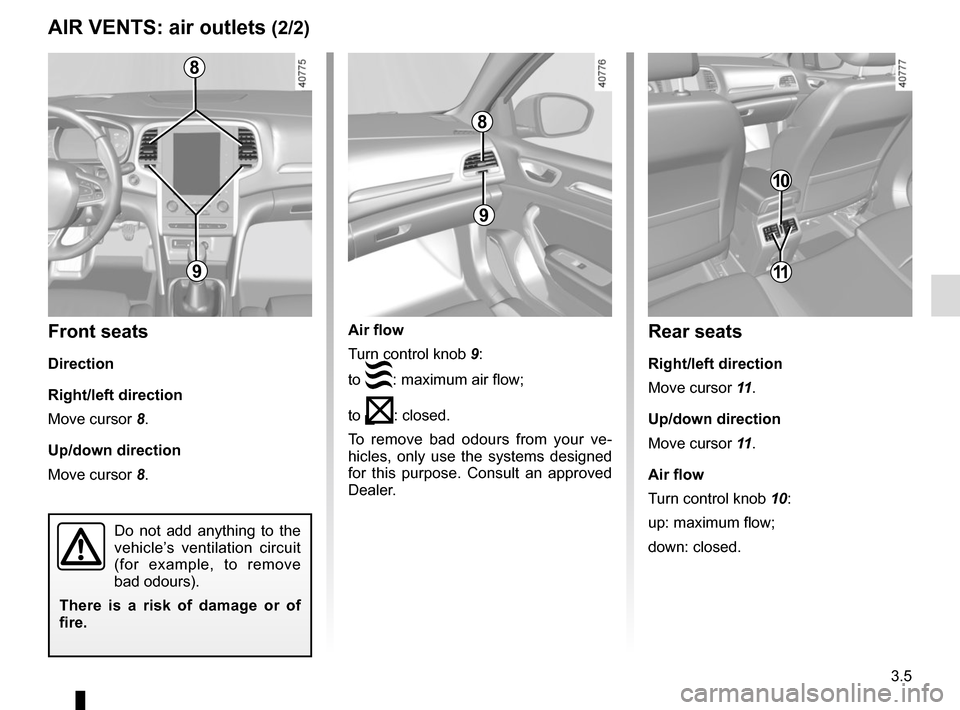
3.5
Air flow
Turn control knob 9:
to
: maximum air flow;
to
: closed.
To remove bad odours from your ve-
hicles, only use the systems designed
for this purpose. Consult an approved
Dealer.
AIR VENTS: air outlets (2/2)
8
9
8
9
Front seats
Direction
Right/left direction
Move cursor 8.
Up/down direction
Move cursor 8.
Do not add anything to the
vehicle’s ventilation circuit
(for example, to remove
bad odours).
There is a risk of damage or of
fire.
10
Rear seats
Right/left direction
Move cursor 11 .
Up/down direction
Move cursor 11 .
Air flow
Turn control knob 10:
up: maximum flow;
down: closed.
11
Page 200 of 346

3.6
The controls
1 Adjusting the air temperature.
2 De-icing/demisting of the rear screen and, depending on the vehicle, the
door mirrors.
3 Air conditioning.
4 Air recirculation.
5 Adjusting air distribution in the pas- senger compartment.
6 Adjusting the ventilation fan speed.
7 Adjusting the ventilation speed and stopping the system.
MANUAL AIR CONDITIONING (1/3)
Switching air conditioning on
or off
The air conditioning is switched on (in-
dicator light on) or off (indicator light off)
using the control 3.
The air conditioning system is used
for:
– lowering the temperature inside the
passenger compartment;
– eliminating condensation more quickly.
Indicators
The following indicators are displayed
on the multimedia screen A:
8 Air temperature.
9 Active mode.
10 Fan speed.
11 Distribution of air in the passenger
compartment.
21
7
34
891011
A5
6
Page 202 of 346

3.8
Varying the ventilation speed
You can adjust the fan speed by press-
ing the controls 6 or 7 to increase or
reduce the fan speed.
The system is deactivated (OFF): the
ventilation speed is zero (vehicle sta-
tionary).
You may, however, feel a slight flow of
air when the vehicle is moving.
MANUAL AIR CONDITIONING (3/3)
Adjusting the air temperature
Turn control 1 to obtain the desired
temperature. The more bars are dis-
played on the multimedia screen, the
higher the temperature.
When the air conditioning system is
used for long periods, it may begin to
feel cold. To increase the temperature,
turn control 1 to the right.
Rear screen de-icing/
demisting
With the engine running, press the
control 2. The operating tell-tale comes
on.
This function permits rapid demisting/
de-icing of the rear screen and de-icing
of the door mirrors (on equipped vehi-
cles).
To exit this function, press the con-
trol 2 again.
Demisting automatically stops.
Stopping the system
To switch off the system, press the
control 7 several times until the mes-
sage “OFF” appears on the multimedia
screen.
You may, however, feel a slight flow of
air when the vehicle is moving.
21
7
5
6