Page 152 of 346

This function is a driving aid in the event of the accidental crossing o\
f
a continuous or broken line in the road. However, the function is not in-
tended to repla")
2.40
LANE DEPARTURE WARNING (1/3)
This function is a driving aid in the event of the accidental crossing o\
f
a continuous or broken line in the road. However, the function is not in-
tended to replace the driver. The function can be disrupted under certain
conditions, including:
– poor visibility (rain, snow, fog, dirty windscreen, glare of the sun, partially ob- scured road lines, etc.);
– roads with tight bends;
– closely following a vehicle in the same lane;
– worn road markings, difficult to distinguish or spaced very widely apart;
– narrow roads;
– ...
In this case, the line visibility indicators remain uncoloured on the in\
strument
panel to indicate that the function will not operate (lines not detecte\
d).
Under no circumstances should this function replace the driver’s care or respon-
sibility whilst performing manoeuvres.
This system notifies the driver when
they accidentally cross a continuous or
broken line.
This function uses a camera attached
to the windscreen, behind the rear-view
mirror.
Page 153 of 346
2.41
LANE DEPARTURE WARNING (2/3)
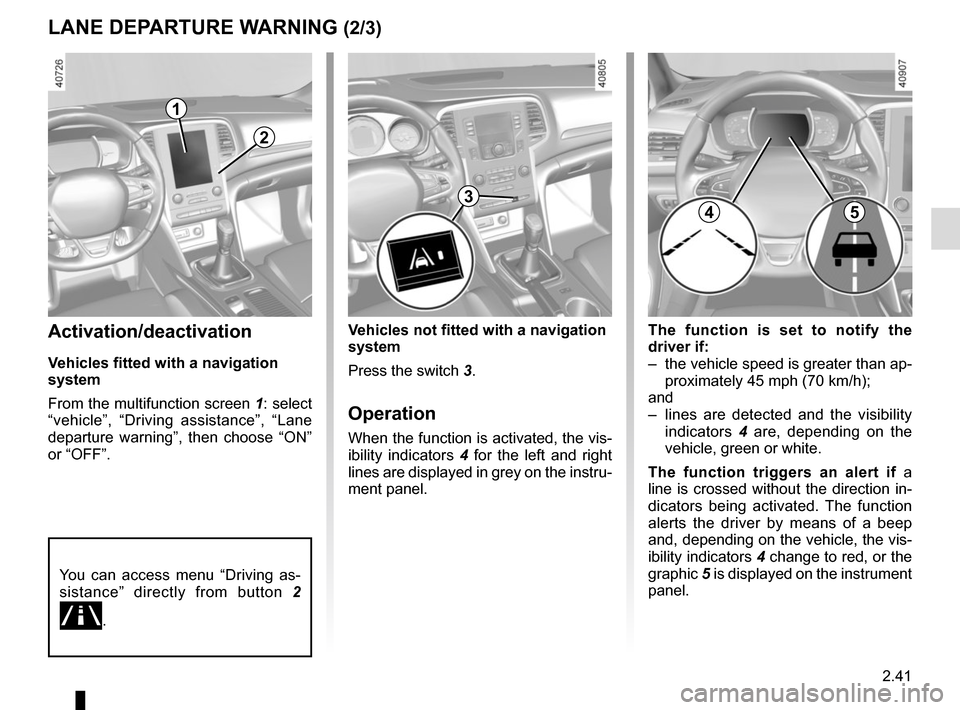
The function is set to notify the
driver if:
– the vehicle speed is greater than ap-proximately 45 mph (70 km/h);
and
– lines are detected and the visibility indicators 4 are, depending on the
vehicle, green or white.
The function triggers an alert if a
line is crossed without the direction in-
dicators being activated. The function
alerts the driver by means of a beep
and, depending on the vehicle, the vis-
ibility indicators 4 change to red, or the
graphic 5 is displayed on the instrument
panel.Activation/deactivation
Vehicles fitted with a navigation
system
From the multifunction screen 1: select
“vehicle”, “Driving assistance”, “Lane
departure warning”, then choose “ON”
or “OFF”.
Vehicles not fitted with a navigation
system
Press the switch 3.
Operation
When the function is activated, the vis-
ibility indicators 4 for the left and right
lines are displayed in grey on the instru-
ment panel.
You can access menu “Driving as-
sistance” directly from button 2
\b.
2
3
1
45
Page 154 of 346

2.42
1
76
Adjustment
Vehicles fitted with a navigation
system
From the multifunction screen 1, select
“Vehicle”, “Driving assistance”, “Lane
departure warning setting”.
– Volume: adjust the alert volume to one of five levels;
– sensitivity: adjust the sensitivity level for line detection. To do this select:
– “Low” line detected upon cross-
ing;
– “Middle” line detected on ap-
proach;
– “High” line detected nearby.
Vehicles not fitted with a navigation
system
– With the vehicle at a standstill, press and hold the switch 6 OK to access
the settings menu;
– repeatedly press the control 7 up or
down until you reach the “Driving as-
sistance” menu. Press the switch 6
OK;
– repeatedly press the control 7 up or
down until you reach the Lane de-
parture warning setting menu, then
press the switch 6 OK.
– Volume: adjust the alert volume to one of three levels;
– “Sensitivity”: adjust the sensitivity level for line detection. To do this,
select:
– “Low” line detected upon cross-
ing;
– “Average” line detected on ap-
proach;
– “high” line detected nearby.
Operating faults
In the event of a malfunction, a mes-
sage “Lane departure warning check” is
displayed on the instrument panel, and
the visibility indicators for the left and
right lines disappear from the instru-
ment panel.
Consult an approved dealer.
LANE DEPARTURE WARNING (3/3)
Conditions for non-activation
of alerts
– Direction indicators activated for less than around 2 seconds prior to de-
parting from the lane;
– very fast lane departure;
– driving continuously on a line;
– on bends, the function allows for slightly cutting the bend;
– hazard warning lights activated;
– ...
Page 155 of 346

2.43
BLIND SPOT WARNING (1/4)
This system alerts the driver to other
vehicles in the detection zone A.
The system is activated when the ve-
hicle’s speed is between approxi-
mately 30 km/h (19 mph) and 140 km/h
(87 mph).
This function uses sensors 1 installed
in the front and rear bumper of both
sides.
1
A
Special featureMake sure that the sensors are not ob-
scured (by dirt, mud, snow, etc.).
If a sensor is obscured, the message
“Blind spotclean sensor” will appear on
the instrument panel. Clean the sen-
sors.
AThis function is an addi-
tional aid which indicates
other vehicles in the blind
spot area.
It can never in any case be a subs-
titute for care nor for the driver’s
responsibility while in charge of his
vehicle.
The driver should always look out
for sudden hazards during driving:
make sure while manoeuvring that
there are no moving or movable ob-
jects (such as a child, an animal, a
pushchair or a bicycle) or small or
narrow obstacles (such as a boulder
or a post) in the blind spot area.
Page 158 of 346

2.46
Operating faults
If the system detects a fault, the mes-
sage “Check blind spot alert” is dis-
played on the instrument panel. Consult
an authorised dealer.
Note: when the engine is started, the
indicator light 6, display B , flashes
three times. It is normal.
– The system’s detection
range operates according
to a standard lane width. If
you are driving in wide traf-
fic lanes, the system might not
be able to detect a vehicle in the
blind spot.
– The system might be disrupted momentarily if it is exposed to
strong electromagnetic waves
(as beneath high-tension power
lines) or to very poor weather
conditions (heavy rain, snow,
etc.). Remain aware of driving
conditions.
There is a risk of accidents.
BLIND SPOT WARNING (4/4)
Because sensors have
been installed in the bump-
ers, any work (repairs, re-
placements, touching up of
paintwork) must be carried out by a
qualified professional.
6
B
C
D
Conditions for non-function
– If the object is not moving;
– if traffic is heavy;
– the road is winding;
– if front and rear sensors both detect objects at the same time (e.g. when
passing an articulated lorry).
– ...
Page 160 of 346

2.48
SAFE DISTANCE ALERT (2/2)
The measurement is dis-
played for information only:
the system performs no
action on the vehicle.
This function is not designed for use
in urban conditions or for a dynamic
driving style (sudden cornering, ac-
celeration, braking, etc.), but rather
for stable driving conditions.
The function does not interact with
the braking system.
The sensor area should be kept
clean and free of any modifications
in order to ensure the proper opera-
tion of the system.
Any work in the area where the
radar is located (repairs, replace-
ments, touching up of paintwork)
must be carried out by a qualified
professional.
– C (orange): the time interval falls
between around 1 and 2 seconds (in-
sufficient distance between the two
vehicles);
– D (red): the time interval is less than
or equal to around one second (very
insufficient distance between the two
vehicles).
If the interval between the two vehicles
is less than around 0.5 seconds, war-
ning light 4 will flash on the instrument
panel. Under certain conditions, the
time interval may not be displayed:
– while cornering;
– when changing lane;
– if the vehicle in front is sufficiently far or outside the range of the sensor.
This function is essential if adaptive
cruise control is activated.
On equipped vehicles, some infor-
mation is given on the head-up dis-
play.
4A
B
C
D
Operation
Upon activating the function, indicator 4
notifies the driver of the distance sepa-
rating them from the vehicle in front.
– A (grey): function not operational;
– A (green): no vehicle detected;
– B (green): the time interval is greater
than or equal to around two seconds
(distance between the two vehicles
adapted to your speed);
Page 162 of 346

2.50
– repeatedly press control 5 up or
down until you reach the “Fatigue de-
tection warn.” menu, then press the
switch 4 OK.
– Press the switch 4 OK again to acti-
vate or deactivate the function.
Operation
The function is set to notify the
driver if:
– the vehicle speed is greater than ap- proximately 37.2 mph (60 km/h);
and
– Approximately 15 minutes have passed since the deletion of the pre-
vious warning.
The function triggers an alert if the
system detects repeated signs of fa-
tigue in the driver at the steering wheel.
When a risk of fatigue is detected,
the message “Fatigue warning have a
break” is displayed on the instrument
panel accompanied by a beep.
Press switch 4 OK to delete the warn-
ing.
It is advisable to stop as soon as pos-
sible for a break.
FATIGUE DETECTION WARNING (2/2)
Note:
– if the warning is not deleted by press- ing switch 4 OK, the beep repeats;
– some driving styles may be inter- preted by the system as a sign of
tiredness (action on the steering
wheel, frequency of activation of the
direction indicators etc.) ;
– the use of the function is also useful on monotonous roads (motorways,
high-speed roads etc).
Operating faults
If the system detects a fault, the mes-
sage “Check fatigue warning” is dis-
played on the instrument panel. Call an
approved Dealer.
4
Vehicles not fitted with a multimedia
system
– With the vehicle at a standstill, press and hold the switch 4 OK to access
the settings menu;
– repeatedly press the control 5 up or
down until you reach the “Driving as-
sistance” menu. Press the switch 4
OK;
5
Page 163 of 346

2.51
SPEED LIMITER (1/3)
Switching on
Press switch 1 on side . Depending
on the vehicle, the warning light
or
is orange and the message
“Speed limiter” appears on the instru-
ment panel accompanied by dashes to
indicate that the speed limiter function
is activated and waiting to memorise a
limit speed.
To store the current speed, press
switch 2 on side a (+): the limited
speed will replace the dashes.
The minimum stored speed is 20 mph
(30 km/h).
Controls
1 Main “On/Off” switch.
2 Controls for:
a speed limiter activation, memory
and increase(+);
b decreasing the speed limiter(-).
3 Activation and recall of memorised limited speed (R).
4 Speed limiter function standby (with limited speed memory) (O).
The speed limiter function helps you
stay within the driving speed limit that
you choose, known as the
limit speed.
If you wish, you can associate the
speed limiter and the “Overspeed
alert” function (please refer to the in-
formation on the “Overspeed alert”
in Section 2).
1
2
a3
4b