2017 RENAULT MEGANE Mph
[x] Cancel search: MphPage 183 of 346
2.71
System sound
Enables the system sound to be
chosen.
Deactivating the system sound
Activate or deactivate the parking dis-
tance control sound.
Note: if you deactivate the sound, you
will no longer be notified with beeps
when approaching an obstacle.
Deactivating the system
Activate or deactivate parking distance
control.
Vehicles not fitted with a multimedia
system
Vehicle stationary:
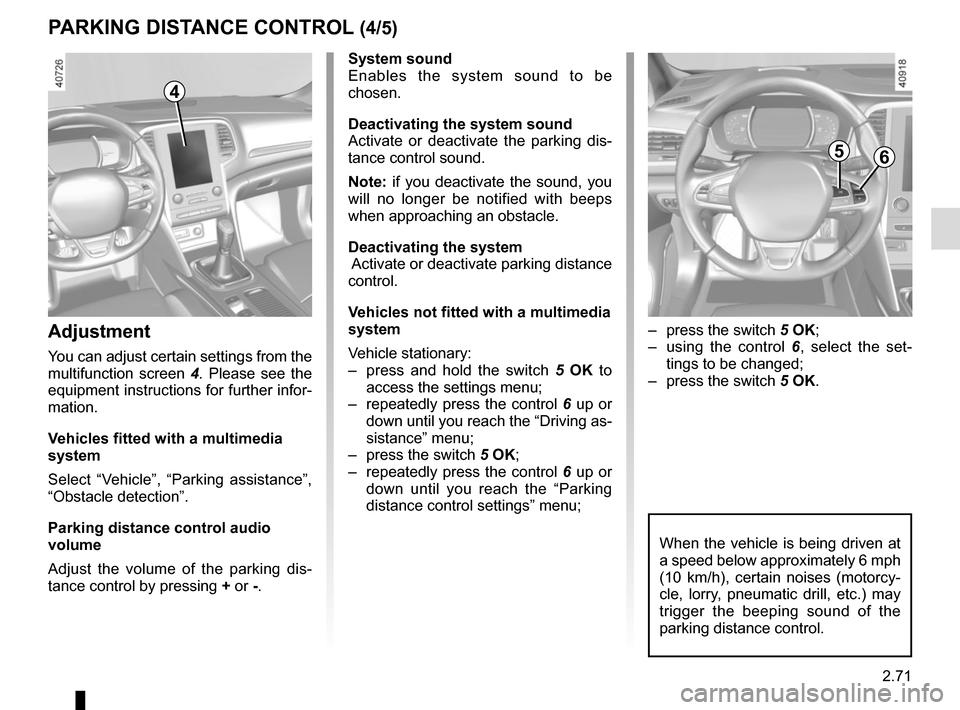
– press and hold the switch 5 OK to
access the settings menu;
– repeatedly press the control 6 up or
down until you reach the “Driving as-
sistance” menu;
– press the switch 5 OK;
– repeatedly press the control 6 up or
down until you reach the “Parking
distance control settings” menu;
PARKING DISTANCE CONTROL (4/5)
When the vehicle is being driven at
a speed below approximately 6 mph
(10 km/h), certain noises (motorcy-
cle, lorry, pneumatic drill, etc.) may
trigger the beeping sound of the
parking distance control.
4
Adjustment
You can adjust certain settings from the
multifunction screen 4. Please see the
equipment instructions for further infor-
mation.
Vehicles fitted with a multimedia
system
Select “Vehicle”, “Parking assistance”,
“Obstacle detection”.
Parking distance control audio
volume
Adjust the volume of the parking dis-
tance control by pressing + or -.
– press the switch 5 OK;
– using the control 6, select the set-
tings to be changed;
– press the switch 5 OK.
56
Page 184 of 346

2.72
Automatic deactivation of the
parking distance control
The system deactivates:
– when the vehicle speed is above ap-proximately 6 mph (10 km/h);
– depending on the model, when the vehicle is stationary for more than
approximately 5 seconds and an ob-
stacle is detected (such as when in a
traffic jam, etc.);
– when the vehicle is in neutral for manual gearboxes, or in position N
or P for automatic gearboxes.
PARKING DISTANCE CONTROL (5/5)
Operating faults
When the system detects an operating
fault, a beep sounds for approximately
3 seconds each time reverse gear is se-
lected and is accompanied by the mes-
sage “Check parking sensor” shown on
the instrument panel. Please consult an
authorised dealer.
Page 187 of 346
2.75
ASSISTED PARKING (1/4)
This function assists with parking ma-
noeuvres.
Take your hands off the steering wheel.
You only control the pedals and the
gear lever.
You can retake control at any time by
operating the steering wheel.Switching on
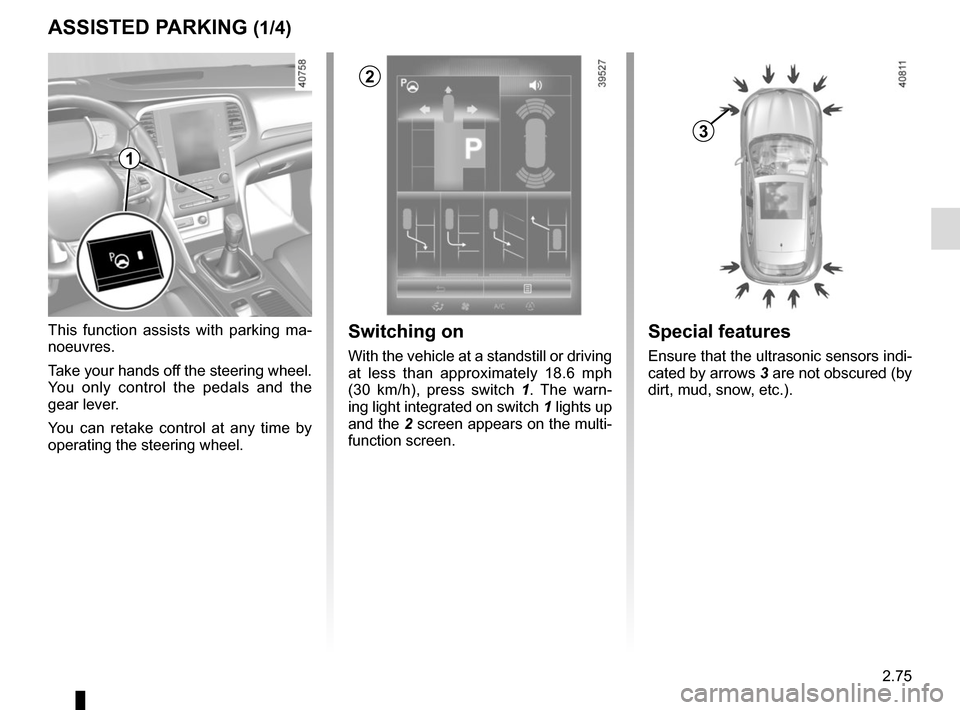
With the vehicle at a standstill or driving
at less than approximately 18.6 mph
(30 km/h), press switch 1. The warn-
ing light integrated on switch 1 lights up
and the 2 screen appears on the multi-
function screen.
1
2
Special features
Ensure that the ultrasonic sensors indi-
cated by arrows 3 are not obscured (by
dirt, mud, snow, etc.).
3
Page 188 of 346

2.76
Choice of manoeuvre
The system can perform four types of
manoeuvres:
– parallel parking;
– perpendicular parking;
– angle parking;
– moving out of a parallel parking space.
From the multifunction screen, select
the manoeuvre to be performed.
Note: When starting the vehicle, or
after successfully completed parallel
parking using the system, the default
manoeuvre proposed by the system is
assistance in exiting a parallel parking
space. In other cases, the default ma-
noeuvre can be set from the multifunc-
tion screen.
ASSISTED PARKING (2/4)
Operation
Parking
As long as the vehicle speed is less
than 20 mph (30 km/h), the system
looks for available parking spaces on
both sides of the vehicle.
Once a space has been found, it is dis-
played on the multifunction screen, indi-
cated by a small letter “P”. Drive slowly,
with the indicators activated on the side
of the space, until the message “Stop”
is displayed, alongside a beep.
The space is then indicated on the mul-
tifunction screen by a capital “P”.
– Stop the vehicle;
– select reverse gear.
Warning light
lights up on the in-
strument panel, along with a beep.
– release the steering wheel;
– follow the system instructions pro- vided on the multifunction screen. Your speed should not exceed around 4
mph (7 km/h).
Once the warning light
on the
instrument panel goes off and a beep
sounds, the manoeuvre has been com-
pleted.
Page 189 of 346

2.77
ASSISTED PARKING (3/4)
Your speed should not exceed around
4 mph (7 km/h).
Once in position to exit the space, the
system will notify you of the end of the
manoeuvre.
Once the warning light
on the
instrument panel goes off and a beep
sounds, the manoeuvre has been com-
pleted.
Suspending the manoeuvreThe manoeuvre is suspended in the fol-
lowing circumstances:
– you take control of the wheel;
– a door or the boot is opened;
– the vehicle is at a standstill for too long;
– an obstacle in the direction of move- ment prevents the manoeuvre from
being completed;
– the engine will stop.
Once the warning light
on the
instrument panel goes off and a beep
sounds, the manoeuvre has been sus-
pended. Then to resume the manoeu-
vre, press and hold the system activa-
tion switch. In this case, the reason for suspending
the manoeuvre will be displayed on the
multifunction screen.
Make sure:
– you have released the steering wheel
and;
– that all doors and the boot are closed, and;
– that no obstacles are in the way of the direction of movement, and;
– that the engine is started.
Cancelling the manoeuvre
The manoeuvre can be stopped in the
following cases:
– by pressing the system activation switch;
– the vehicle speed has exceeded 4 mph (7 km/h);
– You have performed more than ten forwards/backwards movements in
one manoeuvre;
– the parking distance control sensors are dirty or blocked;
– the vehicle wheels have skidded.
Once the warning light
on the
instrument panel goes off and a beep
sounds, the manoeuvre has been com-
pleted.
Exiting a parallel parking space
– Select “exit parallel parking space” mode;
– activate the direction indicator on the side you wish to go out of;
– press and hold switch 1 (around
2 seconds).
Warning light
lights up on the in-
strument panel, along with a beep.
– release the steering wheel;
– go forwards and backwards using the parking distance control system
alerts.
1
Page 265 of 346

4.13
TYRE PRESSURE (1/2)
A
Label A
Open the door to read it.
Tyre pressures should be checked
when the tyres are cold.
If the tyre pressures cannot be checked
when the tyres are cold, increase the
pressures from 0.2 to 0.3 bar (or 3 PSI).
Never deflate a hot tyre. Vehicle fitted with a tyre pressure
monitoring system
If under-inflated (puncture, low pressure
etc.), the warning light
lights up
on the instrument panel; please refer to
«Tyre pressure monitoring system» in
Section 2.
A
C
D
FE
G
B
C
E
E
F
F
B : dimension of the tyres fitted to the
vehicle.
C: intended driving speed.
D : recommended pressure for optimi-
sing fuel consumption.
NB: driving comfort may be altered.
E: front tyre pressure.
F: rear tyre pressure.
G : tyre pressure for the emergency
spare wheel.
Vehicle used fully laden
(Maximum Permissible
All-up Weight) and
towing a trailer
The maximum speed must be limi-
ted to 60 mph (100 km/h) and the
tyre pressure increased by 0.2 bar.
Please refer to the information on
“Weights” in Section 6.
Risk of tyre blowouts.
Page 276 of 346

5.6
TYRE PRESSURE KIT (3/3)
3
If a minimum pressure of 1.8 bar is
not reached after 15 minutes, repair
is not possible; do not drive the ve-
hicle but contact an approved dealer.Once the tyre is correctly inflated,
remove the kit: slowly unscrew the in-
flation end piece
3 to prevent any prod-
uct spatter and store the container in
plastic packaging to prevent product
leaks.
– Affix the driving recommendation label (located under the container) to
the dashboard where the driver can
see it.
– Put the kit away.
– At the end of this initial inflation op- eration, air will still escape from the
tyre. You must drive a short distance
in order to seal the hole.
– Start immediately and drive at be- tween 12 and 40 mph (20 and
60 km/h) in order to distribute the
product evenly in the tyre and, after
driving for 2 miles (3 km), stop and
check the pressure.
– If the pressure is greater than 1.3 bar but less than the recommended
pressure, re-adjust it (refer to the
label affixed to the edge of the driv-
er’s door), otherwise contact an ap-
proved dealer: repair is not possible.
Please be aware that a
poorly tightened or miss-
ing valve cap can make the
tyres less airtight and may
lead to pressure loss.
Always use valve caps identical to
those fitted originally and tighten
them fully.
Following repair with the kit,
do not travel further than
120 miles (200 km). In addi-
tion, reduce your speed and
under no circumstances exceed
48 mph (80 km/h). The sticker,
which you must affix in a prominent
position on the dashboard, reminds
you of this.
Depending on the country or local
legislation, a tyre repaired with the
inflation kit may need to be replaced.
Nothing should be placed
around the driver’s feet
as such objects may slide
under the pedals during
sudden braking manoeuvres and
obstruct their use.
Precautions when using the
kit
The kit should not be operated for more
than 15 consecutive minutes.
Page 307 of 346

5.37
TOWING: breakdown recovery (1/2)
Before towing, put the gearbox in neu-
tral, unlock the steering column and re-
lease the parking brake.
For vehicles fitted with an automatic
gearbox, if it is not possible to put the
gear lever into position N, please con-
sult an authorised dealer.
Steering column unlocking
Insert the key into the ignition or, de-
pending on the vehicle, having the
RENAULT card on you, press the
engine start button for 2 seconds.
Reposition the lever to neutral (posi-
tion N for vehicles fitted with an auto-
matic gearbox).
The column is unlocked, the acces-
sory functions are supplied: the vehi-
cle lights can be used (indicators, brake
lights etc.). At night the vehicle must
have its lights on.
Depending on the vehicle, once you
have finished towing, press the engine
start button twice (risk of running down
the battery). The speed specified by current legis-
lation for towing must always be ob-
served. If your vehicle is the towing
vehicle, do not exceed the maximum
towing weight for your vehicle (refer
to the information on “Weights” in
Section 6).
Towing a vehicle with an
automatic gearbox
Transport the vehicle on a trailer or tow
it with the front wheels off the ground.
In exceptional circumstances
, you
may tow it with all four wheels on the
ground, only in a forward gear, with the
gear in neutral position N over a maxi-
mum distance of 50 miles and not ex-
ceeding a speed of 15 mph (25 km/h).
1
2
Do not remove the key from
the ignition when the vehi-
cle is being towed.
If the lever is stuck in P , even though
you are depressing the brake pedal, the
lever can be released manually.
To do this, unclip the base of the lever,
then insert a tool (with a hard rod to it)
into the slot 1 and press the button 2
at the same time in order to unlock the
lever.
Contact an authorised dealer as soon
as possible.