Page 145 of 260

3.9
Adjusting automatic mode
The system normally operates in auto-
matic mode but you can alter the stan-
dard settings used by the system (air
distribution, etc.). These options are ex-
plained on the following pages.
AUTOMATIC CLIMATE CONTROL (3/8)
Automatic mode is the recom-
mended mode of use
The automatic climate control
system guarantees comfort in the
passenger compartment and good
visibility (except in the event of ex-
treme conditions), while optimising
consumption.
The types of adjustments that can
be made are described in the fol-
lowing pages.
Return to automatic mode as soon
as possible.
The displayed temperature values
show a comfort level.
When starting the engine, in-
creasing or decreasing the value
displayed will not allow the com-
fort level to be reached any more
quickly. The system will always op-
timise the temperature increase or
decrease (the ventilation system
does not start instantly at maximum
speed: it gradually increases). This
may take several minutes.
Generally speaking, unless there is
a particular reason not to, the dash-
board air vents should remain open.
Page 178 of 260
4.4
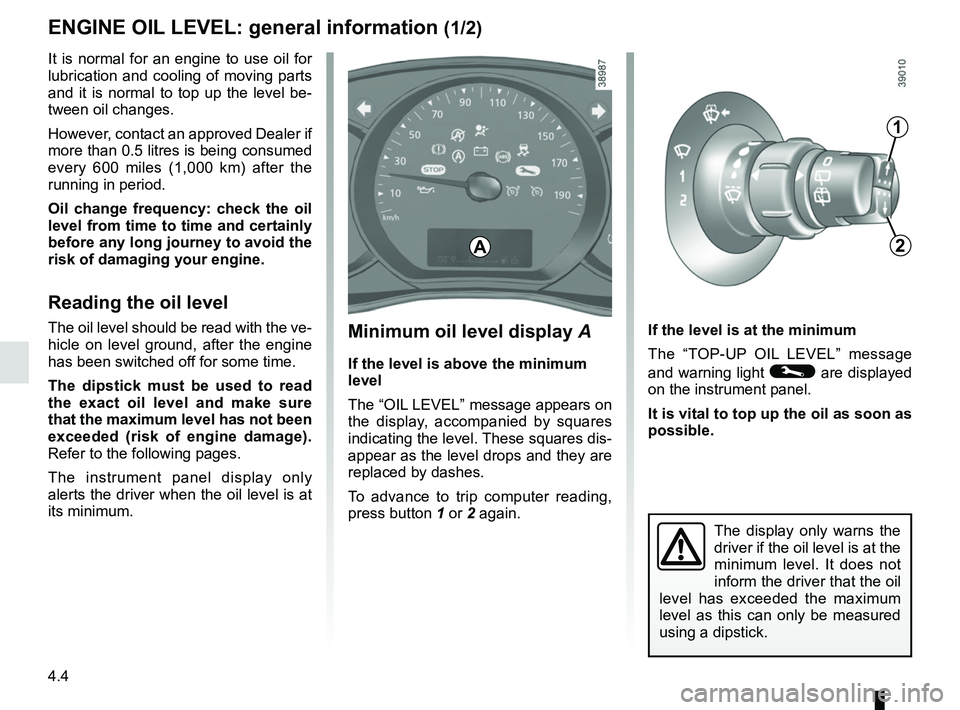
Minimum oil level display A
If the level is above the minimum
level
The “OIL LEVEL” message appears on
the display, accompanied by squares
indicating the level. These squares dis-
appear as the level drops and they are
replaced by dashes.
To advance to trip computer reading,
press button 1 or 2 again. If the level is at the minimum
The “TOP-UP OIL LEVEL” message
and warning light © are displayed
on the instrument panel.
It is vital to top up the oil as soon as
possible.
The display only warns the
driver if the oil level is at the
minimum level. It does not
inform the driver that the oil
level has exceeded the maximum
level as this can only be measured
using a dipstick.
It is normal for an engine to use oil for
lubrication and cooling of moving parts
and it is normal to top up the level be-
tween oil changes.
However, contact an approved Dealer if
more than 0.5 litres is being consumed
every 600 miles (1,000 km) after the
running in period.
Oil change frequency: check the oil
level from time to time and certainly
before any long journey to avoid the
risk of damaging your engine.
Reading the oil level
The oil level should be read with the ve-
hicle on level ground, after the engine
has been switched off for some time.
The dipstick must be used to read
the exact oil level and make sure
that the maximum level has not been
exceeded (risk of engine damage).
Refer to the following pages.
The instrument panel display only
alerts the driver when the oil level is at
its minimum.
1
2A
ENGINE OIL LEVEL: general information (1/2)
Page 194 of 260

5.2
PUNCTURE, EMERGENCY SPARE WHEEL (1/2)
To store the wheel in the cage
– Make sure the wheel is correctly po-sitioned in the cage, valve facing
down.
– Reposition the cage using handle 3
and retighten the nut using span-
ner 1 to refit the assembly.
– Make sure it is correctly locked.
2
3
1
4
In the event of a puncture, there is
either an emergency spare wheel or
tyre inflation kit available, depending on
the vehicle (refer to the information in
the following pages).
Emergency spare wheel 2
This is stored in cage 4 under the floor
at the rear of the vehicle.
To access the emergency spare
wheel
– Open the tailgate.
– Undo the nut with the wheelbrace 1.
– Detach the cage using handle 3.
– Release the emergency spare wheel.
Vehicle fitted with a tyre pressure
loss warning system
If under-inflated (puncture, low pres-
sure, etc.), the warning light
lights up on the instrument panel. See
“Tyre pressure loss warning” in
Section 2.
If the vehicle is parked on
the hard shoulder, you must
warn other road users of
your vehicle’s presence
with a warning triangle or with other
devices as per the legislation apply-
ing to the country you are in.
Page 219 of 260

5.27
To comply with local legislation, or
as a precaution, you can obtain an
emergency kit containing a set of
spare bulbs and fuses from an ap-
proved Dealer.
FUSES (1/2)
Fuse box
If any electrical component does not
work, check the condition of the fuses.
Unclip cover A. To locate the fuses, please see the fol-
lowing page.
It is not advisable to use the free fuse
locations.
Some functions are protected by fuses
located in the engine compartment.
However, because of their reduced ac-
cessibility,
it is recommended to have
these fuses replaced by an autho-
rised dealer.
Check the fuse in question and replace it, if necessary, with a fuse of
the same rating.
If a fuse is fitted where the rating is too high, it may cause the elect\
rical
circuit to overheat (risk of fire) in the event of an item of equipmen\
t using
an excessive amount of current.
A
1
Tweezers 1
Remove the fuse using tweezers 1, lo-
cated at the back of cover A.
To remove the fuse from the tweezers,
slide the fuse to the side.
Page 241 of 260
6.9
Date: Miles (Km): \
Invoice number:Comments/miscellaneous
Type of operation: Stamp
Service □
....................................... □
Anti-corrosion check:
OK □ Not OK* □
*See specific page
Date: Miles (Km): \
Invoice number: Comments/miscellaneous
Type of operation: Stamp
Service □
....................................... □
Anti-corrosion check:
OK □ Not OK* □
*See specific page
Date: Miles (Km): \
Invoice number: Comments/miscellaneous
Type of operation: Stamp
Service □
....................................... □
Anti-corrosion check:
OK □ Not OK* □
*See specific page
VIN: .......................................................................\
...........
SERVICE SHEETS (1/6)
Page 242 of 260
6.10
SERVICE SHEETS (2/6)
VIN: .......................................................................\
...........
Date: Miles (Km): \
Invoice number:Comments/miscellaneous
Type of operation: Stamp
Service □
....................................... □
Anti-corrosion check:
OK □ Not OK* □
*See specific page
Date: Miles (Km): \
Invoice number: Comments/miscellaneous
Type of operation: Stamp
Service □
....................................... □
Anti-corrosion check:
OK □ Not OK* □
*See specific page
Date: Miles (Km): \
Invoice number: Comments/miscellaneous
Type of operation: Stamp
Service □
....................................... □
Anti-corrosion check:
OK □ Not OK* □
*See specific page
Page 243 of 260
6.11
SERVICE SHEETS (3/6)
VIN: .......................................................................\
...........
Date: Miles (Km): \
Invoice number:Comments/miscellaneous
Type of operation: Stamp
Service □
....................................... □
Anti-corrosion check:
OK □ Not OK* □
*See specific page
Date: Miles (Km): \
Invoice number: Comments/miscellaneous
Type of operation: Stamp
Service □
....................................... □
Anti-corrosion check:
OK □ Not OK* □
*See specific page
Date: Miles (Km): \
Invoice number: Comments/miscellaneous
Type of operation: Stamp
Service □
....................................... □
Anti-corrosion check:
OK □ Not OK* □
*See specific page
Page 244 of 260
6.12
SERVICE SHEETS (4/6)
VIN: .......................................................................\
...........
Date: Miles (Km): \
Invoice number:Comments/miscellaneous
Type of operation: Stamp
Service □
....................................... □
Anti-corrosion check:
OK □ Not OK* □
*See specific page
Date: Miles (Km): \
Invoice number: Comments/miscellaneous
Type of operation: Stamp
Service □
....................................... □
Anti-corrosion check:
OK □ Not OK* □
*See specific page
Date: Miles (Km): \
Invoice number: Comments/miscellaneous
Type of operation: Stamp
Service □
....................................... □
Anti-corrosion check:
OK □ Not OK* □
*See specific page
: \
Invoice number:Comments/miscellaneous
Type of operation: Stamp
Service □
...........")

VIN: .......................................................................\
...........
Date: Miles (Km): \
Invoic")

VIN: .......................................................................\
...........
Date: Miles (Km): \
Invoic")

VIN: .......................................................................\
...........
Date: Miles (Km): \
Invoic")