2017 RENAULT KADJAR eco
[x] Cancel search: ecoPage 105 of 300

Running in . . . . . . . . . . . . . . . . . . . . . . . . . . . . . . . . . . . . \
. . . . . . . . . . . . . . . .")
2.1
Section 2: Driving
(Advice on use relating to fuel economy and the environment)
Running in . . . . . . . . . . . . . . . . . . . . . . . . . . . . . . . . . . . . \
. . . . . . . . . . . . . . . . . . . . . . . . . . . . . . . . . 2.2
Ignition switch . . . . . . . . . . . . . . . . . . . . . . . . . . . . . . . . . . . .\
. . . . . . . . . . . . . . . . . . . . . . . . . . . . . . 2.3
Starting, stopping the engine: vehicle with key/remote control unit . . . . . . . . . . . . . . . . . . . . . . . . . . 2.4
Starting, stopping the engine: vehicle with RENAULT card . . . . . . . . . . . . . . . . . . . . . . . . . . . . . . . . 2.5
Stop and Start Function . . . . . . . . . . . . . . . . . . . . . . . . . . . . . . . . . . . . \
. . . . . . . . . . . . . . . . . . . . . . . 2.8
Special features of petrol versions . . . . . . . . . . . . . . . . . . . . . . . . . . . . . . . . . . . .\
. . . . . . . . . . . . . . 2.12
Special features of diesel versions . . . . . . . . . . . . . . . . . . . . . . . . . . . . . . . . . . . .\
. . . . . . . . . . . . . . 2.13
Gear lever . . . . . . . . . . . . . . . . . . . . . . . . . . . . . . . . . . . .\
. . . . . . . . . . . . . . . . . . . . . . . . . . . . . . . . . 2.14
Handbrake . . . . . . . . . . . . . . . . . . . . . . . . . . . . . . . . . . . . \
. . . . . . . . . . . . . . . . . . . . . . . . . . . . . . . . . 2.15
Electronic parking brake . . . . . . . . . . . . . . . . . . . . . . . . . . . . . . . . . . . .\
. . . . . . . . . . . . . . . . . . . . . . 2.16
ECO driving . . . . . . . . . . . . . . . . . . . . . . . . . . . . . . . . . . . . \
. . . . . . . . . . . . . . . . . . . . . . . . . . . . . . . . 2.19
Maintenance and antipollution advice . . . . . . . . . . . . . . . . . . . . . . . . . . . . . . . . . . . . \
. . . . . . . . . . . . 2.24
Environment . . . . . . . . . . . . . . . . . . . . . . . . . . . . . . . . . . . .\
. . . . . . . . . . . . . . . . . . . . . . . . . . . . . . . 2.25
Tyre pressure loss warning . . . . . . . . . . . . . . . . . . . . . . . . . . . . . . . . . . . .\
. . . . . . . . . . . . . . . . . . . . 2.26
Driver correction devices/aids . . . . . . . . . . . . . . . . . . . . . . . . . . . . . . . . . . . . \
. . . . . . . . . . . . . . . . . . 2.29
Transmission: 4-wheel drive (4WD) . . . . . . . . . . . . . . . . . . . . . . . . . . . . . . . . . . . .\
. . . . . . . . . . . . . 2.39
Lane departure warning. . . . . . . . . . . . . . . . . . . . . . . . . . . . . . . . . . . . \
. . . . . . . . . . . . . . . . . . . . . . . 2.43
Blind spot warning . . . . . . . . . . . . . . . . . . . . . . . . . . . . . . . . . . . . \
. . . . . . . . . . . . . . . . . . . . . . . . . . . 2.46
Speed limiter . . . . . . . . . . . . . . . . . . . . . . . . . . . . . . . . . . . .\
. . . . . . . . . . . . . . . . . . . . . . . . . . . . . . . 2.50
Speeding alert . . . . . . . . . . . . . . . . . . . . . . . . . . . . . . . . . . . . \
. . . . . . . . . . . . . . . . . . . . . . . . . . . . . . 2.53
Cruise control . . . . . . . . . . . . . . . . . . . . . . . . . . . . . . . . . . . .\
. . . . . . . . . . . . . . . . . . . . . . . . . . . . . . 2.56
Parking distance control . . . . . . . . . . . . . . . . . . . . . . . . . . . . . . . . . . . .\
. . . . . . . . . . . . . . . . . . . . . . 2.60
Reversing camera . . . . . . . . . . . . . . . . . . . . . . . . . . . . . . . . . . . . \
. . . . . . . . . . . . . . . . . . . . . . . . . . . 2.65
Assisted parking . . . . . . . . . . . . . . . . . . . . . . . . . . . . . . . . . . . .\
. . . . . . . . . . . . . . . . . . . . . . . . . . . . 2.67
Automatic gearbox. . . . . . . . . . . . . . . . . . . . . . . . . . . . . . . . . . . . \
. . . . . . . . . . . . . . . . . . . . . . . . . . . 2.71
Page 110 of 300
2.6
STARTING, STOPPING THE ENGINE: vehicle with RENAULT CARD (2/3)
Operating faults
In certain cases, the RENAULT “hands-
free” card may not work:
– when the RENAULT card battery is drained, etc.;
– near to appliances operating on the same frequency as the card (moni-
tor, mobile phone, video game, etc.);
– vehicle located in a high electromag- netic radiation zone.
The message “Place card close START
and push” appears on the instrument
panel.
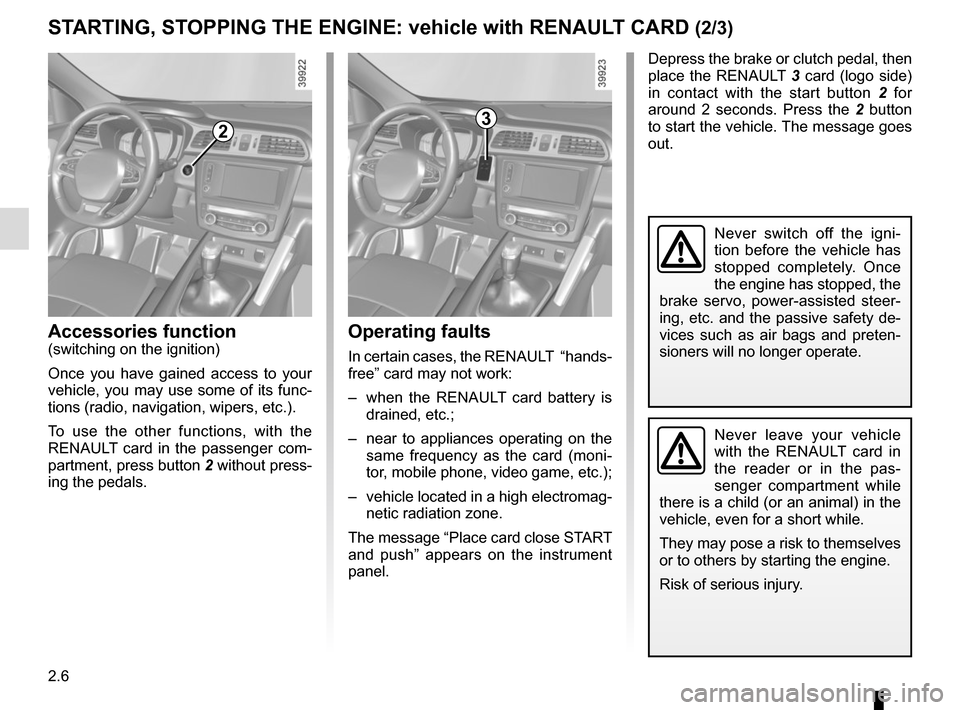
2
Accessories function(switching on the ignition)
Once you have gained access to your
vehicle, you may use some of its func-
tions (radio, navigation, wipers, etc.).
To use the other functions, with the
RENAULT card in the passenger com-
partment, press button 2 without press-
ing the pedals.
Depress the brake or clutch pedal, then
place the RENAULT 3 card (logo side)
in contact with the start button 2 for
around 2 seconds. Press the 2 button
to start the vehicle. The message goes
out.
3
Never leave your vehicle
with the RENAULT card in
the reader or in the pas-
senger compartment while
there is a child (or an animal) in the
vehicle, even for a short while.
They may pose a risk to themselves
or to others by starting the engine.
Risk of serious injury.
Never switch off the igni-
tion before the vehicle has
stopped completely. Once
the engine has stopped, the
brake servo, power-assisted steer-
ing, etc. and the passive safety de-
vices such as air bags and preten-
sioners will no longer operate.
Page 111 of 300
2.7
STARTING, STOPPING THE ENGINE: vehicle with RENAULT CARD (3/3)
If the RENAULT card is no longer in the
passenger compartment or if the card
battery is low when you try to switch
the engine off, the message “No key-
card Press and hold” appears on the in-
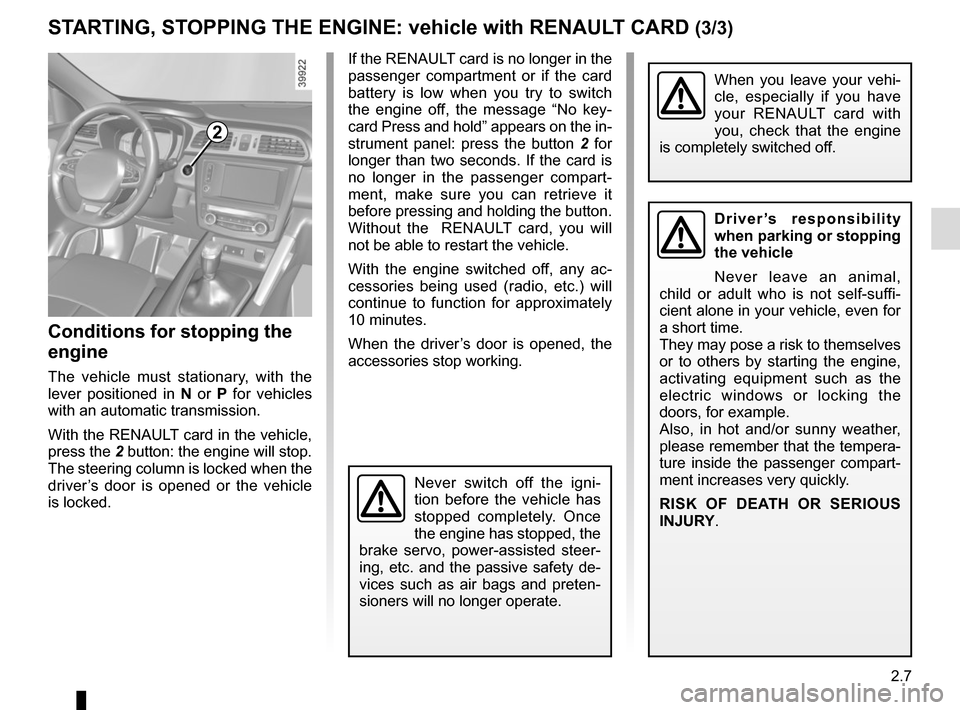
strument panel: press the button 2 for
longer than two seconds. If the card is
no longer in the passenger compart-
ment, make sure you can retrieve it
before pressing and holding the button.
Without the RENAULT card, you will
not be able to restart the vehicle.
With the engine switched off, any ac-
cessories being used (radio, etc.) will
continue to function for approximately
10 minutes.
When the driver’s door is opened, the
accessories stop working.
Conditions for stopping the
engine
The vehicle must stationary, with the
lever positioned in N or P for vehicles
with an automatic transmission.
With the RENAULT card in the vehicle,
press the 2 button: the engine will stop. The steering column is locked when the
driver’s door is opened or the vehicle
is locked.
When you leave your vehi-
cle, especially if you have
your RENAULT card with
you, check that the engine
is completely switched off.
2
Driver’s responsibility
when parking or stopping
the vehicle
Never leave an animal,
child or adult who is not self-suffi-
cient alone in your vehicle, even for
a short time.
They may pose a risk to themselves
or to others by starting the engine,
activating equipment such as the
electric windows or locking the
doors, for example.
Also, in hot and/or sunny weather,
please remember that the tempera-
ture inside the passenger compart-
ment increases very quickly.
RISK OF DEATH OR SERIOUS
INJURY.
Never switch off the igni-
tion before the vehicle has
stopped completely. Once
the engine has stopped, the
brake servo, power-assisted steer-
ing, etc. and the passive safety de-
vices such as air bags and preten-
sioners will no longer operate.
Page 112 of 300
2.8
For manual gearboxes:
– the gearbox is in neutral;
and
– the clutch pedal is released. If the warning light
flashes, this
means that the clutch pedal is not
sufficiently released;
and
– the vehicle speed is less than ap- proximately 7 mph (3 km/h).
For all vehicles:
Warning light
on the instru-
ment panel is lit when the engine is on
standby.
The vehicle equipment remain opera-
tional while the engine is stopped.
STOP AND START FUNCTION (1/4)
This system enables a reduced fuel
consumption and lower greenhouse
gas emissions.
The system is activated automatically
when the vehicle is started.
While driving, the system stops the
engine (standby) when the vehicle is
at a standstill (traffic jam, traffic lights,
etc).
Conditions for engine
standby
The vehicle has set off from where it
was parked;
For automatic gearboxes:
– the gearbox is in position D, M or N;
and
– the brake pedal is depressed (suffi- ciently hard);
and
– the accelerator pedal is not de- pressed;
and
– the speed is zero for around 1 second.
The engine remains on standby if posi-
tion P is selected, or if position N is se-
lected with the handbrake engaged and
the brake pedal released.
If the engine is put in
standby, the electronic par-
king brake (depending on
the vehicle) is not applied
automatically.
Engine on standby - braking
assistance is no longer ope-
rational.
If the engine stalls while the system
is in operation, pressing the clutch
pedal right down will start it again.
Keep your vehicle station-
ary when the engine is
on standby (shown by the
warning light
on the
instrument panel).
Before getting out of the
vehicle, you must switch
off the ignition (please see
section on “Starting, stop-
ping the engine”).
Page 121 of 300
2.17
ELECTRONIC PARKING BRAKE (2/3)Special cases
To park on a slope or while towing a
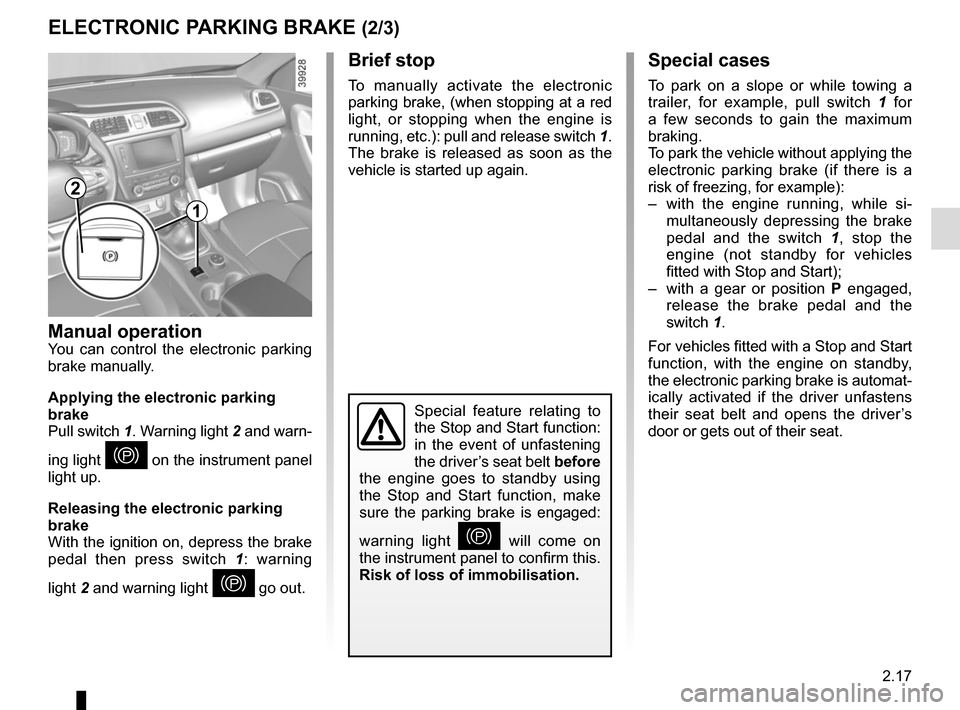
trailer, for example, pull switch 1 for
a few seconds to gain the maximum
braking.
To park the vehicle without applying the
electronic parking brake (if there is a
risk of freezing, for example):
– with the engine running, while si- multaneously depressing the brake
pedal and the switch 1, stop the
engine (not standby for vehicles
fitted with Stop and Start);
– with a gear or position P engaged,
release the brake pedal and the
switch 1.
For vehicles fitted with a Stop and Start
function, with the engine on standby,
the electronic parking brake is automat-
ically activated if the driver unfastens
their seat belt and opens the driver’s
door or gets out of their seat.
Brief stop
To manually activate the electronic
parking brake, (when stopping at a red
light, or stopping when the engine is
running, etc.): pull and release switch 1.
The brake is released as soon as the
vehicle is started up again.
Manual operationYou can control the electronic parking
brake manually.
Applying the electronic parking
brake
Pull switch 1. Warning light 2 and warn-
ing light
} on the instrument panel
light up.
Releasing the electronic parking
brake
With the ignition on, depress the brake
pedal then press switch 1: warning
light 2 and warning light
} go out.
Special feature relating to
the Stop and Start function:
in the event of unfastening
the driver’s seat belt before
the engine goes to standby using
the Stop and Start function, make
sure the parking brake is engaged:
warning light
} will come on
the instrument panel to confirm this.
Risk of loss of immobilisation.
2
1
Page 123 of 300
2.19
DRIVING ADVICE, ECO-DRIVING (1/5)
1
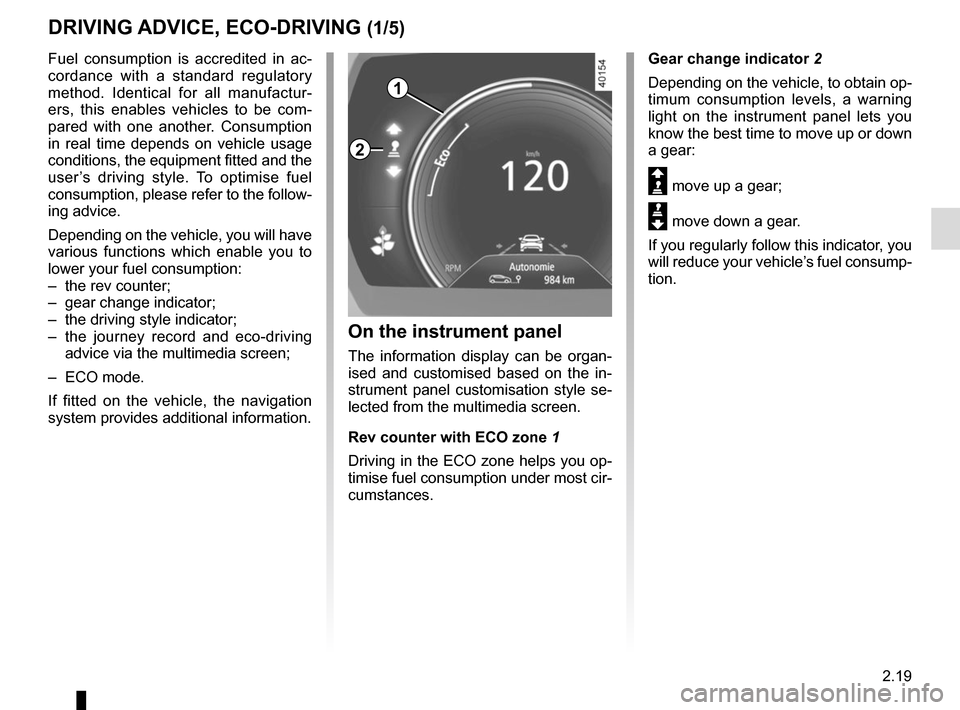
Gear change indicator 2
Depending on the vehicle, to obtain op-
timum consumption levels, a warning
light on the instrument panel lets you
know the best time to move up or down
a gear:
Š move up a gear;
‰ move down a gear.
If you regularly follow this indicator, you
will reduce your vehicle’s fuel consump-
tion.
Fuel consumption is accredited in ac-
cordance with a standard regulatory
method. Identical for all manufactur-
ers, this enables vehicles to be com-
pared with one another. Consumption
in real time depends on vehicle usage
conditions, the equipment fitted and the
user’s driving style. To optimise fuel
consumption, please refer to the follow-
ing advice.
Depending on the vehicle, you will have
various functions which enable you to
lower your fuel consumption:
– the rev counter;
– gear change indicator;
– the driving style indicator;
– the journey record and eco-driving
advice via the multimedia screen;
– ECO mode.
If fitted on the vehicle, the navigation
system provides additional information.
On the instrument panel
The information display can be organ-
ised and customised based on the in-
strument panel customisation style se-
lected from the multimedia screen.
Rev counter with ECO zone 1
Driving in the ECO zone helps you op-
timise fuel consumption under most cir-
cumstances.
2
Page 124 of 300
2.20
DRIVING ADVICE, ECO-DRIVING (2/5)
4
3
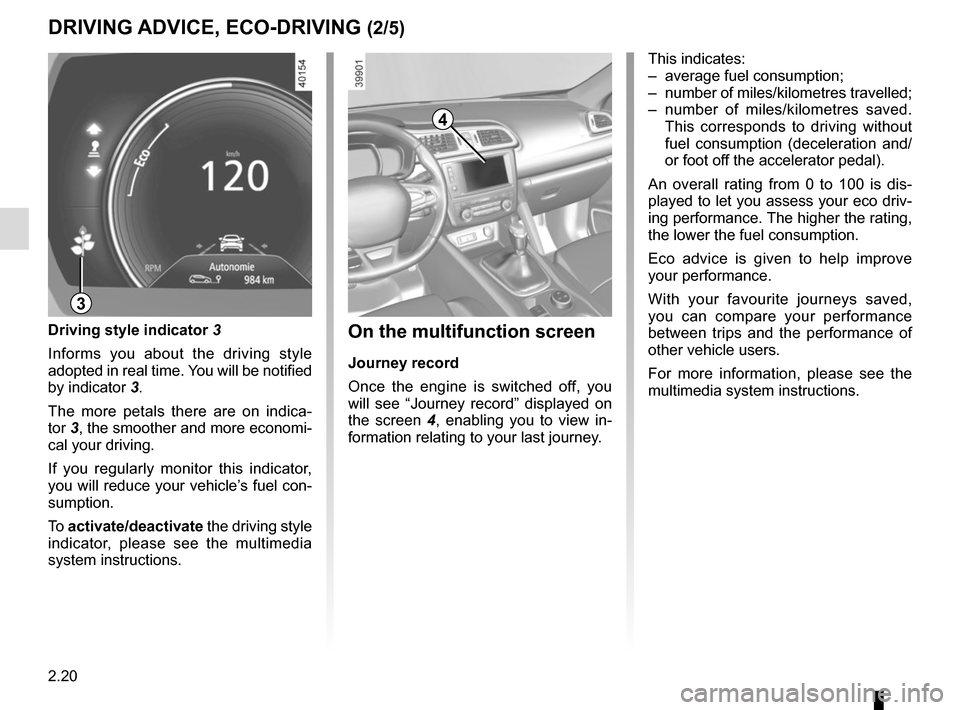
On the multifunction screen
Journey record
Once the engine is switched off, you
will see “Journey record” displayed on
the screen 4, enabling you to view in-
formation relating to your last journey.
This indicates:
– average fuel consumption;
– number of miles/kilometres travelled;
– number of miles/kilometres saved. This corresponds to driving without
fuel consumption (deceleration and/
or foot off the accelerator pedal).
An overall rating from 0 to 100 is dis-
played to let you assess your eco driv-
ing performance. The higher the rating,
the lower the fuel consumption.
Eco advice is given to help improve
your performance.
With your favourite journeys saved,
you can compare your performance
between trips and the performance of
other vehicle users.
For more information, please see the
multimedia system instructions.
Driving style indicator 3
Informs you about the driving style
adopted in real time. You will be notified
by indicator 3.
The more petals there are on indica-
tor 3, the smoother and more economi-
cal your driving.
If you regularly monitor this indicator,
you will reduce your vehicle’s fuel con-
sumption.
To activate/deactivate the driving style
indicator, please see the multimedia
system instructions.
Page 125 of 300
2.21
DRIVING ADVICE, ECO-DRIVING (3/5)
ECO mode
ECO mode is a function which opti-
mises fuel consumption. It acts upon
certain power consuming systems in
the vehicle (heating, air conditioning,
power-assisted steering etc.) and on
certain driving actions (acceleration,
gear changing, cruise control, deceler-
ation etc.).
Limiting acceleration enables low fuel
consumption in urban and surrounding
areas. Reduced usage of the air condi-
tioning reduces fuel consumption with-
out affecting heating comfort.
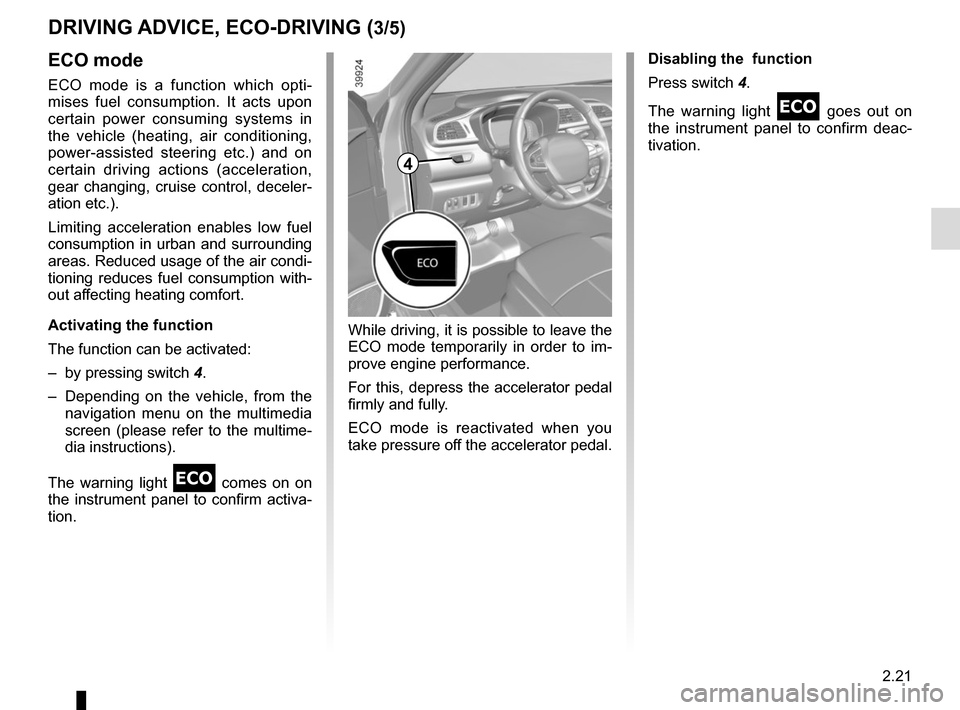
Activating the function
The function can be activated:
– by pressing switch 4.
– Depending on the vehicle, from the navigation menu on the multimedia
screen (please refer to the multime-
dia instructions).
The warning light
comes on on
the instrument panel to confirm activa-
tion. Disabling the function
Press switch 4.
The warning light
goes out on
the instrument panel to confirm deac-
tivation.
While driving, it is possible to leave the
ECO mode temporarily in order to im-
prove engine performance.
For this, depress the accelerator pedal
firmly and fully.
ECO mode is reactivated when you
take pressure off the accelerator pedal.
4