2017 RENAULT KADJAR ESP
[x] Cancel search: ESPPage 130 of 300

2.26
TYRE PRESSURE MONITORING SYSTEM (1/3)
Resetting the standard level
for the tyre pressures
This should be done:
– when the standard tyre pressure needs to be changed to adapt to
usage conditions (empty, carrying a
load, motorway driving, etc.);
– after swapping a wheel (however this practice is not recommended);
– after changing a wheel.
It should always be done after checking
the tyre pressure of all four tyres when
cold.
Tyre pressures must correspond to the
current usage of the vehicle (empty,
carrying a load, motorway driving, etc.).213
Resetting can also be done from the
multifunction screen 3 if your vehi-
cle is fitted with a navigation system.
Select the menu “Vehicle”, “Tyre
pressure”.
If the vehicle is equipped with the func-
tion, this system monitors the tyre pres-
sure.
Operating principle
Each wheel (except for the emergency
spare wheel) has a sensor in the infla-
tion valve which periodically measures
the tyre pressure.
The system displays the current pres-
sures on the instrument panel 1 and
alerts the driver in the event of insuffi-
cient pressure. Resetting procedure
With the ignition on:
– repeatedly and briefly press con-
trol 2 to select the tyre pressure dis-
play and the “Tyre pressure” func-
tion;
– press and hold (around 3 seconds) the button 2 to launch the reset. The
flashing tyres followed by the mes-
sages “Learning TP initiated” and
then “Tyres location in progress” in-
dicates that the reset request for the
tyre pressure reference value has
been acknowledged.
Reset can take several minutes of driv-
ing.
If the resetting is followed by short
trips, the message “Tyres location in
progress” can remain displayed after
successive restarts.
Note
The standard tyre pressure cannot be
less than that recommended and indi-
cated on the door frame.
Page 132 of 300

2.28
Replacing wheels/tyres
This system requires specific equip-
ment (wheels, tyres, hubcaps, etc.).
Please see the information on “Tyres”
in Section 5.
Contact an approved Dealer to fit new
tyres and to find out about available ac-
cessories compatible with the system
and available from your dealer net-
work: the use of any other accessory
could affect the correct operation of the
system or damage a sensor.
Emergency spare wheel
If the vehicle is equipped with an emer- -
gency spare wheel, it will not have a
sensor.
TYRE PRESSURE MONITORING SYSTEM (3/3)
“Tyres location failure”
This message “Tyres location failure”
appears when driving if one or more
wheels have been fitted with sensors
not recognised by Renault.
Consult an approved dealer
Readjustment of tyre
pressures
The tyre pressures should be ad-
justed when cold (please refer to the
label located on the edge of the driver’s
door). If the tyre pressures cannot be
checked when the tyres are cold, the
recommended pressures should be in-
creased by 0.2 to 0.3 bar (3 PSI).
Never deflate a hot tyre.
Tyre repair product and
inflation kit
Because the valves are specially de-
signed, only use equipment approved
by the approved network. Please refer
to “Tyre inflation kit” in Section 5.
Changing a wheel
The system may take sev-
eral minutes depending on
use for the new wheel po-
sitions and pressures to be recog-
nised; check the tyre pressures after
all operations.
This function is an addi-
tional driving aid.
However, the function is
not intended to replace the
driver. It cannot, therefore, under
any circumstances replace the vig-
ilance or the responsibility of the
driver. Check the tyre pressures, in-
cluding the emergency spare wheel,
once a month.
Page 133 of 300

2.29
DRIVING CORRECTION DEVICES AND AIDS (1/10)ABS (anti-lock braking
system)
Under heavy braking, the ABS prevents
the wheels from locking, allowing the
stopping distance to be managed and
keeping control of the vehicle.
Under these circumstances, the vehi-
cle can be steered to avoid an obstacle
whilst braking. In addition, this system
can increase stopping distances, par-
ticularly on roads with low surface grip
(wet ground etc.).
You will feel a pulsation through the
brake pedal each time the system is
activated. The ABS does not in any way
improve the vehicle's physical perform-
ance relating to the road surface and
roadholding. It is still essential to follow
the rules of good driving practice (such
as driving at a safe distance from the
vehicle in front etc.).
Depending on the vehicle, they will con-
sist of:
– ABS (anti-lock braking system) ;
– ESC
(electronic stability control)
with understeer control and trac-
tion control;
– emergency brake assist;
– advanced traction control;
– active emergency braking;
– hill start assistance.
In an emergency, apply firm and
continuous pressure to the brake
pedal. There is no need to pump
it repeatedly. The ABS will modu-
late the force applied in the braking
system.
These functions are an ad-
ditional aid in the event of
critical driving conditions,
enabling the vehicle behav-
iour to be adapted to suit the driving
conditions.
However, the functions do not take
the place of the driver. They do
not increase the vehicle’s limits
and should not encourage you
to drive more quickly. Therefore,
they can under no circumstances
replace the vigilance or responsibil-
ity of the driver when manoeuvring
the vehicle (the driver must always
be ready for sudden incidents which
may occur when driving).
Page 136 of 300

2.32
DRIVING CORRECTION DEVICES AND AIDS (4/10)
The traction control system offers ad-
ditional safety. It is recommended that
you do not drive with the function di-
sabled. Correct this as soon as pos-
sible by pressing the switch 1 again.
Note: The function is reactivated auto-
matically when the ignition is switched
on or when a speed of approximately
24 mph (40 km/h) is exceeded.
Emergency brake assistThis system supplements the ABS
and helps reduce vehicle stopping dis-
tances.
Operating principle
The system detects an emergency
braking situation. In this case, the brak-
ing assistance immediately develops
maximum power and may trigger ABS
regulation. ABS braking is maintained
as long as the brake pedal is not re-
leased.
Hazard warning lights illumination
Depending on the vehicle, these may
light up in the event of sudden decel-
eration.
These functions are an ad-
ditional aid in the event of
critical driving conditions,
enabling the vehicle behav-
iour to be adapted to suit the driving
conditions.
However, the functions do not take
the place of the driver. They do
not increase the vehicle’s limits
and should not encourage you
to drive more quickly. Therefore,
they can under no circumstances
replace the vigilance or responsibil-
ity of the driver when manoeuvring
the vehicle (the driver must always
be ready for sudden incidents which
may occur when driving).
Deactivating the function
(depending on vehicle)
In some situations (driving on very wet
ground: snow, mud, etc. or driving with
snow chains fitted), the system may
reduce the engine output to limit wheel-
spin. If this is not required, it is possible
to deactivate the function by pressing
switch 1.
The message “TRACTION CONTROL
OFF” is displayed on the instrument
panel to inform you.
1
Page 141 of 300

Active emergency braking
Limitation of the system operation
– The system will only respond to vehicles which are moving or which have \
been sensed as")
2.37
DRIVING CORRECTION DEVICES AND AIDS (9/10)
Active emergency braking
Limitation of the system operation
– The system will only respond to vehicles which are moving or which have \
been sensed as moving.
– A vehicle travelling in the opposite direction will not trigger any alert\
or any action on the system operation.
– The sensor area should be kept clean and free of any modifications in or\
der to ensure the proper operation of the system.
– The system cannot respond to small vehicles such as motorbikes or bicycl\
es as effectively as to other vehicles.
Deactivating the function
The function should be deactivated if:
– the brake lights are not functioning;
– the front of the vehicle has undergone an impact or been damaged;
– the vehicle is being towed (breakdowns).
Halting the function
You can halt the active braking function at any time by tapping the accel\
erator pedal.
If the driver notices any unusual behaviour in the system, please consul\
t an authorised dealer.
Page 143 of 300
2.39
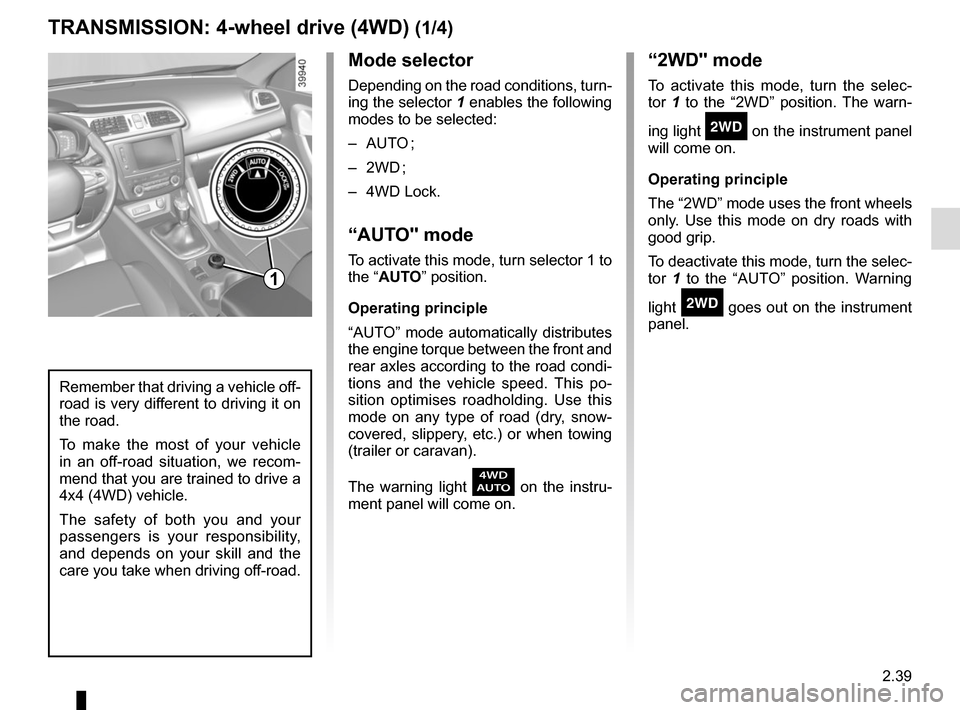
Mode selector
Depending on the road conditions, turn-
ing the selector 1 enables the following
modes to be selected:
– AUTO ;
– 2WD ;
– 4WD Lock.
“AUTO" mode
To activate this mode, turn selector 1 to
the “AUTO” position.
Operating principle
“AUTO” mode automatically distributes
the engine torque between the front and
rear axles according to the road condi-
tions and the vehicle speed. This po-
sition optimises roadholding. Use this
mode on any type of road (dry, snow-
covered, slippery, etc.) or when towing
(trailer or caravan).
The warning light
\f on the instru-
ment panel will come on.
TRANSMISSION: 4-wheel drive (4WD) (1/4)
“2WD" mode
To activate this mode, turn the selec-
tor 1 to the “2WD” position. The warn-
ing light
‘ on the instrument panel
will come on.
Operating principle
The “2WD” mode uses the front wheels
only. Use this mode on dry roads with
good grip.
To deactivate this mode, turn the selec-
tor 1 to the “AUTO” position. Warning
light
‘ goes out on the instrument
panel.
Remember that driving a vehicle off-
road is very different to driving it on
the road.
To make the most of your vehicle
in an off-road situation, we recom-
mend that you are trained to drive a
4x4 (4WD) vehicle.
The safety of both you and your
passengers is your responsibility,
and depends on your skill and the
care you take when driving off-road.
1
Page 146 of 300
 (4/4)
All-wheel drive system
– Irrespective of the mode selected, do not start the engine if one or mor\
e wheels are not in contact with the ground
(eg. when")
2.42
TRANSMISSION: 4-wheel drive (4WD) (4/4)
All-wheel drive system
– Irrespective of the mode selected, do not start the engine if one or mor\
e wheels are not in contact with the ground
(eg. when the vehicle is on a jack or roller bench).
– Do not turn the mode selector when cornering, reversing or if the wheels\
are spinning excessively. Only select the
“2WD”, “AUTO” or “4WD Lock” mode when the vehicle is being driven in a str\
aight line.
– Only use tyres which meet the required specifications.
– “4WD Lock” mode is exclusively reserved for driving off-road. The use of this mode in any other conditions may adversely
affect the vehicle’s manoeuvrability and damage its mechanical components.
– Always ensure tyres with identical specifications are fitted to all four\
wheels (brand, size, structure, wear etc.). Fitting tyres
of different sizes to the front and rear wheels and/or left and right wheels m\
ay have serious consequences for the tyres,
gearbox, transfer gearbox and the rear differential pinions.
Page 147 of 300

This function is a driving aid in the event of the accidental crossing o\
f
a continuous or broken line in the road. However, the function is not in-
tended to repla")
2.43
LANE DEPARTURE WARNING (1/3)
This function is a driving aid in the event of the accidental crossing o\
f
a continuous or broken line in the road. However, the function is not in-
tended to replace the driver. The function can be disrupted under certain
conditions, including:
– poor visibility (rain, snow, fog, dirty windscreen, glare of the sun, partially ob- scured road lines, etc.);
– roads with tight bends;
– closely following a vehicle in the same lane;
– worn road markings, difficult to distinguish or spaced very widely apart;
– narrow roads;
– ...
In this case, the line visibility indicators remain uncoloured on the in\
strument
panel to indicate that the function will not operate (lines not detecte\
d).
Under no circumstances should this function replace the driver’s care or respon-
sibility whilst performing manoeuvres.
This system notifies the driver when
they accidentally cross a continuous or
broken line.
This function uses a camera attached
to the windscreen, behind the rear-view
mirror.