Page 64 of 300

The display of information shown below DEPENDS ON THE VEHICLE EQUIPMENT \
AND COUNTRY.
Assisted parking brake fault
light
Please refer to the information on the
“Assis")
1.58
WARNING LIGHTS (5/6)
The display of information shown below DEPENDS ON THE VEHICLE EQUIPMENT \
AND COUNTRY.
Assisted parking brake fault
light
Please refer to the information on the
“Assisted parking brake” in Section 2.
Emergency active brake
assist
Refer to the information on “Driving cor-
rection devices and aids” in Section 2.
\bElectronic Stability Program
(ESP) and traction control
system warning light
It lights up when the ignition or the
engine is switched on and goes off after
a few seconds.
There are several reasons for the warn-
ing light to come on: please refer to the
information on “Driver correction de-
vices and aids” in Section 2.
A
ΦSpeed limiter and cruise
control indicator lights
See the information on the “Speed lim-
iter” and “Cruise control” in Section 2.
Tyre pressure monitoring
system
Refer to the information on the “Tyre
pressure monitoring system” in
Section 2.
ECO mode warning light
This comes on when ECO
mode is activated.
Please refer to the information on “Eco-
driving” in Section 2.
Engine standby warning
light
Please see information in the para-
graph on “Stop and Start Function” in
Section 2.
\fUnavailability of engine
standby warning light
Please see information in the para-
graph on “Stop and Start Function” in
Section 2.
Page 69 of 300
1.63
3
ON-BOARD COMPUTER: general information (2/2)
Interpreting some of the
values displayed after
resetting
The values showing average fuel con-
sumption and average speed will
become more stable and reliable the
further you have travelled since the last
time the Reset button was pressed.
The average fuel consumption may de-
crease when:
– the vehicle stops accelerating;
– the engine reaches its operating
temperature (if the engine was cold
when the reset key was pressed);
– when driving from an urban area
onto the open road.
Automatic resetting of the
journey parameters
Resetting occurs automatically when
the maximum value of any of the pa-
rameters is exceeded.
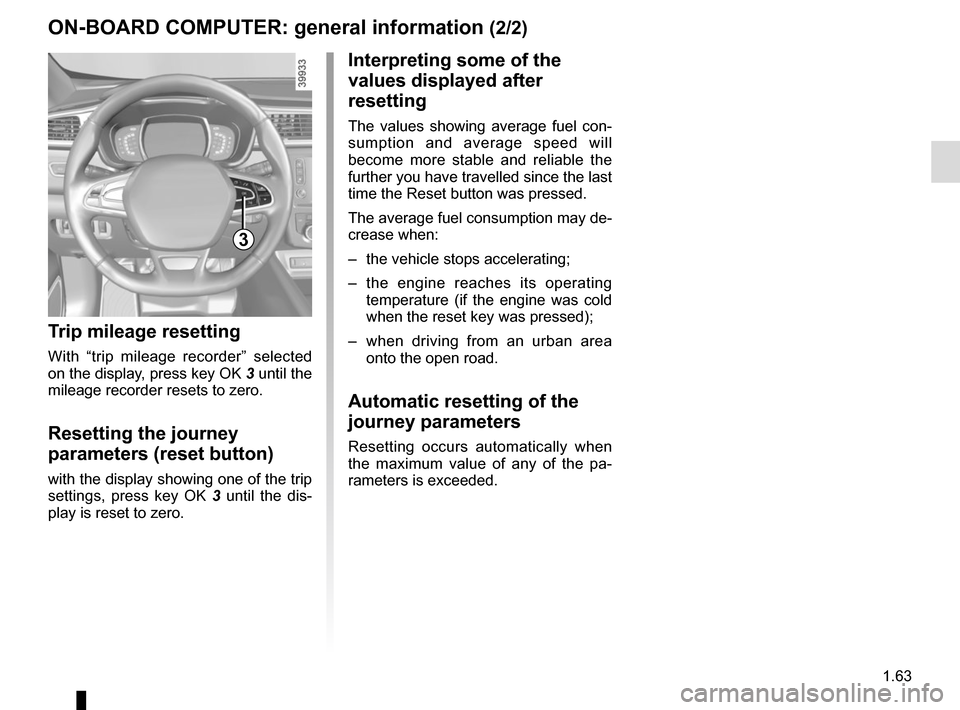
Trip mileage resetting
With “trip mileage recorder” selected
on the display, press key OK 3 until the
mileage recorder resets to zero.
Resetting the journey
parameters (reset button)
with the display showing one of the trip
settings, press key OK 3 until the dis-
play is reset to zero.
Page 77 of 300

1.71
TRIP COMPUTER AND WARNING SYSTEM: warning message
These appear with the ® warning light and require you to stop immediately, for your own safety, as soon as traf-
fic conditions allow. Stop your engine and do not restart it. Contact an approved Dealer.
Some examples of warning messages are given below. Note: the messages appear on the display either individually or al-
ternately (when there are several messages to be displayed), and may b\
e accompanied by a warning light and/or a beep.
Examples of messages Interpreting the display selected
« Engine failure hazard » Indicates an injection fault, the vehicle’s engine has overheated or there is a
serious engine fault.
« Power steering fault » Indicates a fault in the steering or a problem with the four-wheel drive\
.
“Braking system fault” or ”Stop vehicle” Indicates a fault in the braking system. Apply the electronic parking brake ma-
nually and ensure that the vehicle is immobilised using a chock.
« Electric failure DANGER » Indicates a fault in the vehicle battery charging circuit (alternator e\
tc.).
« Puncture » Indicates a puncture on the tyre displayed on the instrument panel.
Page 83 of 300

1.77
REAR-VIEW MIRRORS (2/3)
Rear view mirrors which tilt
in reverse gear
For vehicles equipped with the driver’s
seat with position memory, you can
enter a specific setting for the door mir-
rors when reversing and store the po-
sition.
With the vehicle stationary and reverse
gear engaged, select the door mirror
using the switch 2, then, with the con-
trol 3, adjust it to the required position.
Recalling the memorised
position
From the multifunction screen, select
menu “Vehicle”, “Seats”, “Settings” then
“Position” and select “Recall”.
The positions of the door mirrors in
forward gear, reverse and of the front
seats are recalled.
Returning to the driving position
Moving from reverse gear to a forward
gear is done:
– approximately 9 seconds after re- verse gear has been disengaged
when the speed is lower than 6 mph
(10 km/h);
– forward gear engaged when the speed is greater than 6 mph
(10 km/h);
– when the engine is stopped;
– when switch 2 is in neutral position.
Position memory
– Adjust the door mirrors (see previous
paragraphs);
– from the multifunction screen, select menu “Vehicle”, “Seats”, “Settings”
then “Position” and select “Save”.
The positions of the door mirrors in a
forward gear, reverse and of the front
seats are simultaneously saved.
For safety reasons, carry
out any adjustments when
the vehicle is not being
driven.
2
3
Page 91 of 300
1.85
AUDIBLE AND VISUAL SIGNALS
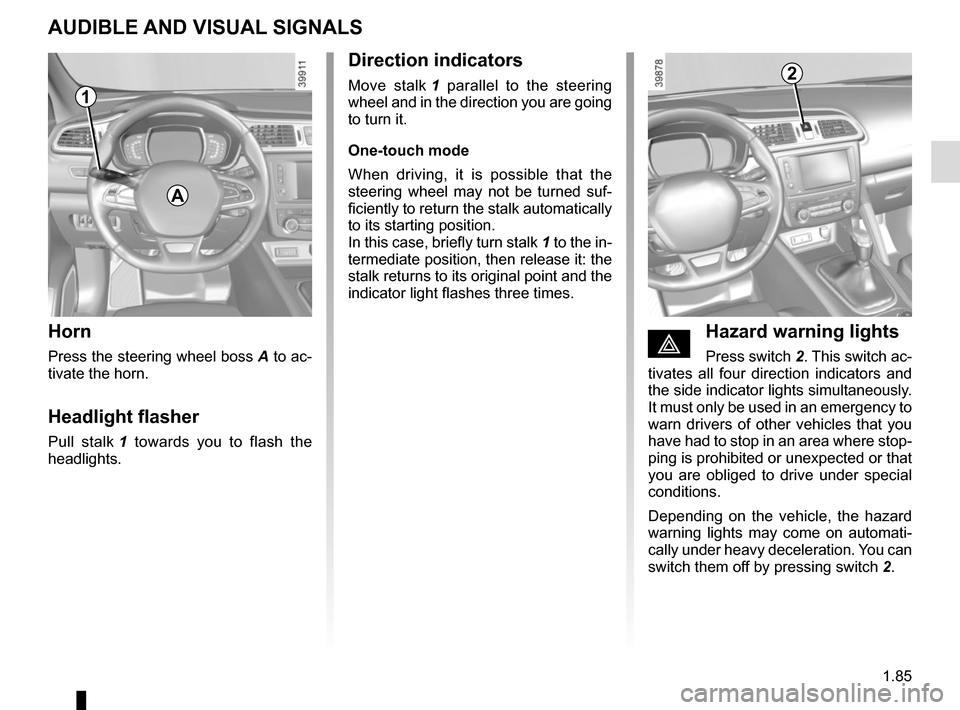
Horn
Press the steering wheel boss A to ac-
tivate the horn.
Headlight flasher
Pull stalk 1 towards you to flash the
headlights.
éHazard warning lights
Press switch 2. This switch ac-
tivates all four direction indicators and
the side indicator lights simultaneously.
It must only be used in an emergency to
warn drivers of other vehicles that you
have had to stop in an area where stop-
ping is prohibited or unexpected or that
you are obliged to drive under special
conditions.
Depending on the vehicle, the hazard
warning lights may come on automati-
cally under heavy deceleration. You can
switch them off by pressing switch 2.
Direction indicators
Move stalk 1 parallel to the steering
wheel and in the direction you are going
to turn it.
One-touch mode
When driving, it is possible that the
steering wheel may not be turned suf-
ficiently to return the stalk automatically
to its starting position.
In this case, briefly turn stalk 1 to the in-
termediate position, then release it: the
stalk returns to its original point and the
indicator light flashes three times.2
A
1
Page 94 of 300
1.88
Special note
When driving the vehicle, the wiping
speed slows down whenever the ve-
hicle stops. For example, fast wiping
speed will slow to normal wiping speed.
As soon as the vehicle moves off,
wiping will return to the speed originally
selected.
If stalk 1 is operated, it overrides and
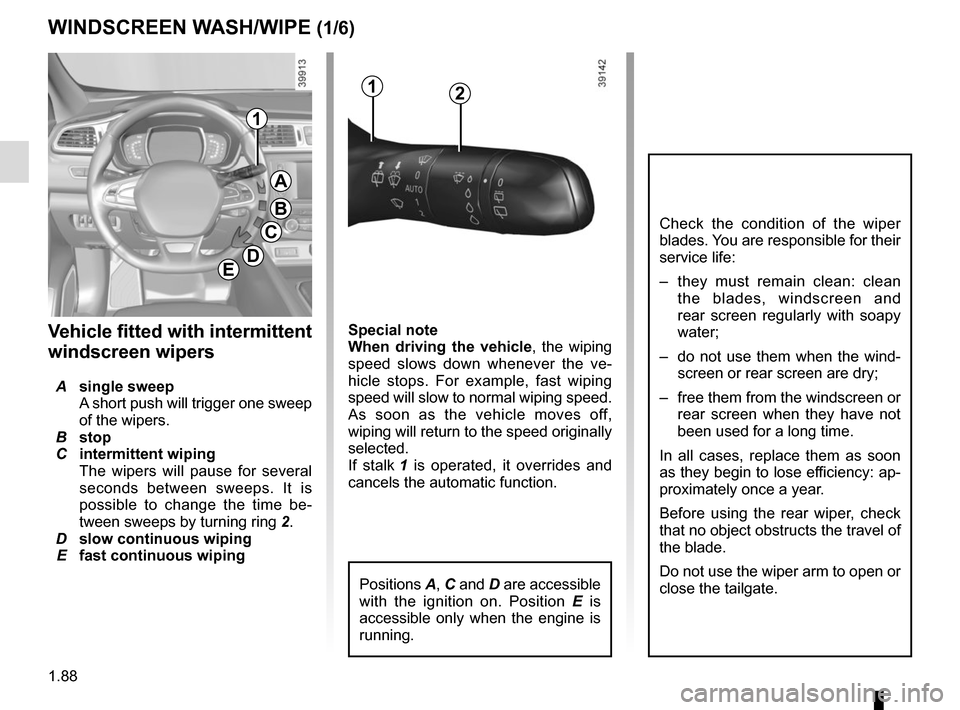
cancels the automatic function.Vehicle fitted with intermittent
windscreen wipers
A single sweep
A short push will trigger one sweep
of the wipers.
B stop
C intermittent wiping
The wipers will pause for several
seconds between sweeps. It is
possible to change the time be-
tween sweeps by turning ring 2.
D slow continuous wiping
E fast continuous wiping
Positions A, C and D are accessible
with the ignition on. Position E is
accessible only when the engine is
running.
1
A
B
C
D
WINDSCREEN WASH/WIPE (1/6)
E
Check the condition of the wiper
blades. You are responsible for their
service life:
– they must remain clean: clean the blades, windscreen and
rear screen regularly with soapy
water;
– do not use them when the wind- screen or rear screen are dry;
– free them from the windscreen or rear screen when they have not
been used for a long time.
In all cases, replace them as soon
as they begin to lose efficiency: ap-
proximately once a year.
Before using the rear wiper, check
that no object obstructs the travel of
the blade.
Do not use the wiper arm to open or
close the tailgate.
12
Page 95 of 300

1.89
Vehicle fitted with front
windscreen wiper rain sensor
The rain sensor is located on the winds-
creen, in front of the interior rear-view
mirror.
A single sweep
A short push will trigger one sweep
of the wipers.
B stop
When activating automatic wiping
or when increasing sensitivity, one
sweep of the blades is performed.
Note:
– the rain sensor is only intended
as a driving aid. In the event of re-
duced visibility, the driver should
manually activate the wipers;
– In foggy weather or during snow-
falls, wiping is not automatically
triggered and remains under the
driver’s control;
– in the event of temperatures
below zero, automatic wiping is
not activated when the vehicle
is started. It is automatically acti-
vated as soon as the vehicle ex-
ceeds a certain speed (approxi-
mately 5 mph (8 km/h));
– do not activate automatic wiping
in dry weather;
– fully de-ice the windscreen before
activating automatic wiping.
1
A
B
C
DG
F
1
E
WINDSCREEN WASH/WIPE (2/6)
C automatic wiper function
When this position is selected, the
system detects water on the wind-
screen and triggers the wipers at a
suitable wiping speed. It is possi-
ble to change the triggering thresh-
old and the time sweeps by turning
ring 2:
– F : minimum sensitivity
– G : maximum sensitivity
The higher the sensitivity, the quic-
ker the wipers will react and the
faster the wipe.
2
Page 96 of 300

1.90
D slow continuous wiping
E fast continuous wiping
Positions A and D are accessible
with the ignition on. Positions C
and E are accessible only with the
engine running.
Operating fault
In the event of a malfunction of the
automatic wiping, the wiper is set to
intermittent wiping. Contact an au-
thorised dealer.
The operation of the rain sensor can
be disturbed in the event of:
– damaged wiper blades; a screen
of water or traces left by a blade in
the sensor’s detection zone may
increase the response time of the
automatic wiper, or increase the
wiping frequency;
– a windscreen with any chip or
crack level with the sensor, or a
windscreen covered in dust, dirt,
insects, ice, the use of washing
wax and water-repellent chemi-
cals; the automatic wiping will
be less sensitive, or even unres-
ponsive.
1
A
B
C
DE
WINDSCREEN WASH/WIPE (3/6)
Special note
When driving the vehicle, the wiping
speed slows down whenever the ve-
hicle stops. For example, fast wiping
speed will slow to normal wiping speed.
As soon as the vehicle moves off,
wiping will return to the speed originally
selected.
If stalk 1 is operated, it overrides and
cancels the automatic function.
Precautions
– In the event of ice, check whether the
blades are stuck to the windscreen
before operating the wiping mecha-
nism. If you activate the wipers while
the blades are stuck down with ice,
you may risk damaging both the
blade and the wiper motor.
– Do not activate the wipers on a dry
screen. This will lead to the prema-
ture wear or damage to the blades.