Page 59 of 300

1.53
DRIVING POSITION: RIGHT-HAND DRIVE (2/2)
The equipment fitted, described below, DEPENDS ON THE VERSION AND COUNTRY.
16 Unlocking controls:
– bonnet,
– fuel filler flap.
17 Ignition switch (vehicles with key).
18 Control for adjusting steering
wheel height and reach.
19 Engine start/stop button (vehicle
with RENAULT card).
20 Accessories and multimedia
socket.
21 Two and four-wheel drive mode
selector or, depending on the vehi-
cle, traction control.
22 Cruise control/speed limiter main
control.
23 Assisted parking or handbrake
control.
24 Gear lever.
25 Glovebox.
1 Air vent.
2 Demister outlet.
3 Passenger Airbag location.
4 Heating or air conditioning con-
trols.
5 Multifunction screen.
6 Controls for:
– access the main menu,
– access the Driving assistance
menu or, depending on the vehi-
cle, the user preferences menu,
– assisted parking.
7 Hazard warning light switch, cen-
tral door locking warning light.
8 Stalk for:
– direction indicator lights;
– exterior lights;
– fog lights.
9 Cruise control/speed limiter con-
trols.
10 Instrument panel.
11 Driver Airbag and horn location.
12 Controls for:
– on-board computer information
read-out and vehicle settings cus-
tomisation menu,
– remote radio and navigation
system.
13 Steering column stalk for wind-
screen and rear screen wash/
wiper.
14 Controls for:
– ECO mode,
– activation/deactivation of the Stop
and Start function.
15 Controls for:
– electric headlight beam adjust-
ment;
– lighting dimmer for control instru-
ments;
– lane departure warning,
– ESP and
Traction Control system.
Page 60 of 300

1.54
šSide light warning light
áMain beam headlight tell-
tale
kDipped beam headlight tell-
tale
gFront fog light tell-tale
fRear fog light telltale
Automatic main beam head-
light indicator light
Please refer to the information
on “External signals and lights” in
Section 1.
cLeft-hand direction indicator
tell-tale
bRight-hand direction indica-
tor tell-tale
MLow fuel level warning light
It lights up orange when the ig-
nition or the engine is switched on and
goes off after a few seconds.
If it comes on orange while driving and
is accompanied by a beep, fill up with
fuel as soon as possible. There is only
approximately 30 miles (50 km) worth
of fuel left.A
If no lights or sounds are ap-
parent, this indicates a fault
in the instrument panel. This
indicates that it is essential
to stop immediately (as soon as traf-
fic conditions allow). Ensure that the
vehicle is correctly immobilised and
contact an approved Dealer.
Instrument panelA: lights up when the
driver’s door is opened.
In some cases, the appearance of a
warning light is accompanied by a mes-
sage.
The © warning light means
you should drive very carefully to
an approved dealer as soon as pos-
sible. If you fail to follow this recom-
mendation, you risk damaging your
vehicle.
Warning light ® re-
quires you to stop immedi-
ately, for your own safety,
as soon as traffic conditions
allow. Switch off the engine and do
not restart it. Contact an approved
Dealer.
The display of information shown below DEPENDS ON THE VEHICLE EQUIPMENT \
AND COUNTRY.
WARNING LIGHTS (1/6)
Page 63 of 300

1.57
WARNING LIGHTS (4/6)
ÉPreheating warning light
(diesel version)
This should come on when the igni-
tion is switched on. It indicates that the
heater plugs are in operation.
It goes out when preheating is com-
plete. The engine can be started.
2 Door(s) open warning light
A
The display of information shown below DEPENDS ON THE VEHICLE EQUIPMENT \
AND COUNTRY.
åAir bag warning light
This warning light will be dis-
played on the instrument panel when
the ignition is switched on or the engine
is started, and will then go out after a
few seconds.
If it does not come on when the igni-
tion is switched on, or comes on when
the engine is running, there is a fault in
the system.
Contact your approved Dealer as soon
as possible.
ÓBrake pedal warning light
This lights up when the brake
pedal should be depressed. Refer to
the information on the “Automatic gear-
box” in Section 2.
Please refer to the information on
“Driving advice, Eco-driving” in
Section 2.
}Handbrake or electronic
parking brake warning light
Refer to the information on the “Assisted
parking brake” in Section 2.
Rear seat belt reminder
(depending
on vehicle)
Warning light
ß comes on, accom-
panied (depending on the vehicle) by
a message indicating the number of
fastened seat belts on the instrument
panel for approximately 30 seconds,
each time the vehicle is started, a door
is opened or a rear seat belt is fas-
tened/unfastened. Check that the rear
passengers are wearing seat belts and
that the number of seat belts shown as
fastened corresponds to the number of
rear seat places occupied.
Š ‰Gear change indicator
This lights up to advise you to
change to a higher gear (up arrow) or
lower gear (down arrow).
Please refer to the information on
“Driving advice, Eco-driving” in
Section 2.
Page 66 of 300
1.60
DISPLAYS AND INDICATORS (1/2)
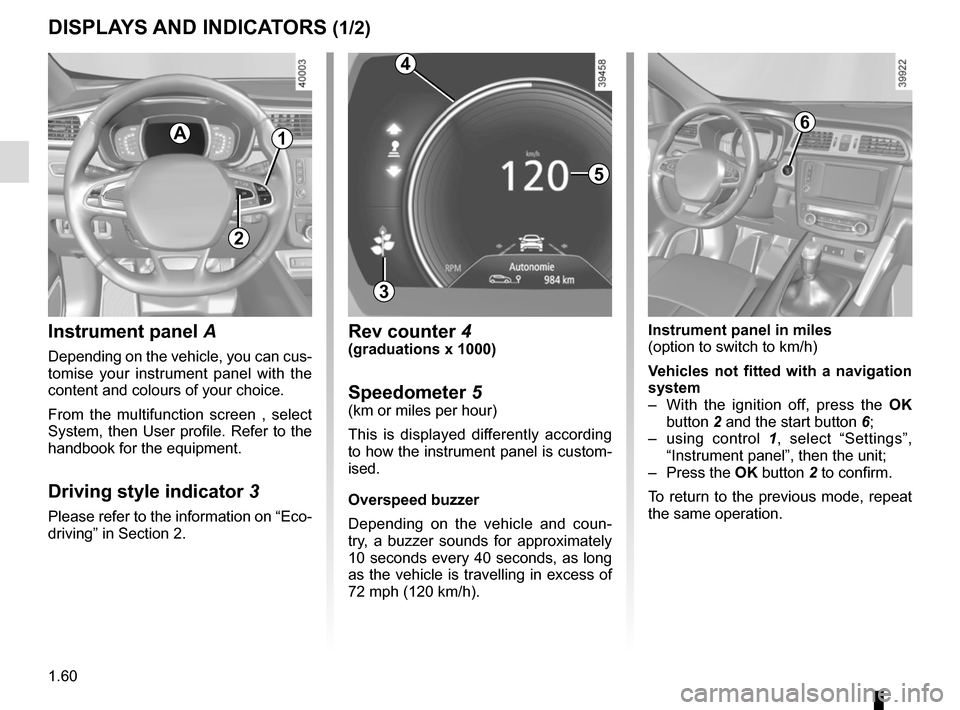
Instrument panel A
Depending on the vehicle, you can cus-
tomise your instrument panel with the
content and colours of your choice.
From the multifunction screen , select
System, then User profile. Refer to the
handbook for the equipment.
Driving style indicator 3
Please refer to the information on “Eco-
driving” in Section 2.
A
5
3
Rev counter 4(graduations x 1000)
Speedometer 5(km or miles per hour)
This is displayed differently according
to how the instrument panel is custom-
ised.
Overspeed buzzer
Depending on the vehicle and coun-
try, a buzzer sounds for approximately
10 seconds every 40 seconds, as long
as the vehicle is travelling in excess of
72 mph (120 km/h).
6
Instrument panel in miles
(option to switch to km/h)
Vehicles not fitted with a navigation
system
– With the ignition off, press the OK
button 2 and the start button 6;
– using control 1, select “Settings”,
“Instrument panel”, then the unit;
– Press the OK button 2 to confirm.
To return to the previous mode, repeat
the same operation.
4
1
2
Page 77 of 300

1.71
TRIP COMPUTER AND WARNING SYSTEM: warning message
These appear with the ® warning light and require you to stop immediately, for your own safety, as soon as traf-
fic conditions allow. Stop your engine and do not restart it. Contact an approved Dealer.
Some examples of warning messages are given below. Note: the messages appear on the display either individually or al-
ternately (when there are several messages to be displayed), and may b\
e accompanied by a warning light and/or a beep.
Examples of messages Interpreting the display selected
« Engine failure hazard » Indicates an injection fault, the vehicle’s engine has overheated or there is a
serious engine fault.
« Power steering fault » Indicates a fault in the steering or a problem with the four-wheel drive\
.
“Braking system fault” or ”Stop vehicle” Indicates a fault in the braking system. Apply the electronic parking brake ma-
nually and ensure that the vehicle is immobilised using a chock.
« Electric failure DANGER » Indicates a fault in the vehicle battery charging circuit (alternator e\
tc.).
« Puncture » Indicates a puncture on the tyre displayed on the instrument panel.
Page 79 of 300
1.73
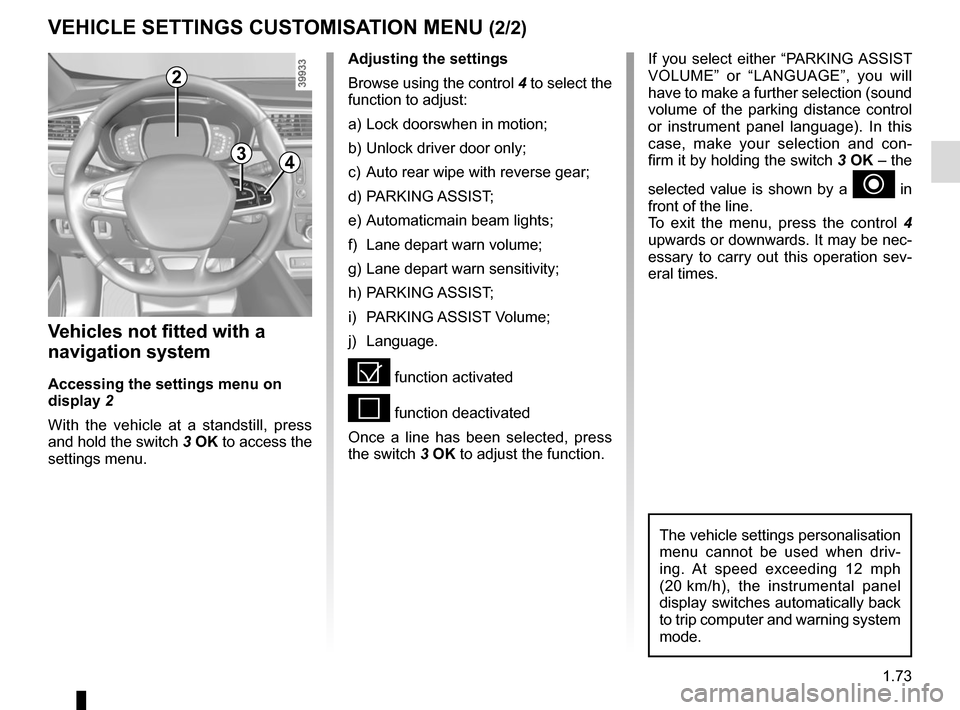
VEHICLE SETTINGS CUSTOMISATION MENU (2/2)
34
If you select either “PARKING ASSIST
VOLUME” or “LANGUAGE”, you will
have to make a further selection (sound
volume of the parking distance control
or instrument panel language). In this
case, make your selection and con-
firm it by holding the switch 3 OK – the
selected value is shown by a
~ in
front of the line.
To exit the menu, press the control 4
upwards or downwards. It may be nec-
essary to carry out this operation sev-
eral times.
Vehicles not fitted with a
navigation system
Accessing the settings menu on
display 2
With the vehicle at a standstill, press
and hold the switch 3 OK to access the
settings menu.
Adjusting the settings
Browse using the control 4 to select the
function to adjust:
a) Lock doorswhen in motion;
b) Unlock driver door only;
c) Auto rear wipe with reverse gear;
d) PARKING ASSIST;
e) Automaticmain beam lights;
f) Lane depart warn volume;
g) Lane depart warn sensitivity;
h) PARKING ASSIST;
i) PARKING ASSIST Volume;
j) Language.
= function activated
< function deactivated
Once a line has been selected, press
the switch 3 OK to adjust the function.
The vehicle settings personalisation
menu cannot be used when driv-
ing. At speed exceeding 12 mph
(20 km/h), the instrumental panel
display switches automatically back
to trip computer and warning system
mode.
2
Page 85 of 300

1.79
áMain beam headlights
With the dipped beam
headlights lit, push stalk 1. This indica-
tor light on the instrument panel comes
on.
To return to the dipped headlight posi-
tion, pull the stalk 1 towards you again.
EXTERIOR LIGHTING AND SIGNALS (1/6)
šSide lights
Turn ring 3 until the symbol is
opposite mark 2. This indicator light on
the instrument panel comes on.
kDipped beam
headlights
Manual operation
Turn ring 3 until the symbol is opposite
mark 2 . This indicator light on the in-
strument panel comes on.
Automatic operation
Turn ring 3 until the AUTO symbol is op-
posite mark 2: with the engine running,
the dipped beam headlights switch on
or off automatically depending on the
brightness of the light outside, without
any action on stalk 1.
Before driving at night:
check that the electrical
equipment is operating cor-
rectly. As a general precau-
tion, check that the lights are not
obscured (by dirt, mud, snow or ob-
jects being transported).
1
3
2
When driving on the left in a left-
hand drive vehicle (or vice versa),
drivers must readjust their lights
throughout their stay (see “Adjusting
headlight beams” in Section 1).
1
Page 87 of 300

1.81
Using the portable naviga-
tion system at night in the
windscreen area below the
camera may disturb the op-
eration of the “automatic main beam
headlights” system (risk of reflection
on the windscreen).
Activation/deactivation
To activate the automatic main beam
headlights:
– turn ring 3 until the AUTO symbol is
opposite mark 2;
– push stalk 1.
Warning light
comes on the in-
strument panel.
To deactivate the automatic main
beam headlights:
– pull stalk 1;
– or turn ring 3 to a position other than AUTO.
Warning light
goes out on the
instrument panel.
Note: make sure the windscreen is not
obscured (dirt, mud, snow, condensa-
tion etc.).
EXTERIOR LIGHTING AND SIGNALS (3/6)
56
– repeatedly press the control 6 up or
down until you reach the “Automatic
main beam headlights” menu, then
press the switch 5 OK;
– press the 5 OK switch again to acti-
vate or deactivate the function.
Vehicles not fitted with a navigation
system
– With the vehicle at a standstill, press
and hold the switch 5 OK to access
the settings menu;
– repeatedly press the control 6 up or
down until you reach the “Aides à la
conduite” menu. Press the switch 5
OK;
3
12