Page 134 of 260
2.40
ASSISTED PARKING (1/4)
This function assists with parking ma-
noeuvres.
Take your hands off the steering wheel.
You only control the pedals and the
gear lever.
You can retake control at any time by
operating the steering wheel.Switching on
With the vehicle at a standstill or driving
at less than approximately 18.6 mph
(30 km/h), press switch 1. The warn-
ing light integrated on switch 1 lights up
and the 2 screen appears on the multi-
function screen.
1
2
Special features
Ensure that the ultrasonic sensors indi-
cated by arrows 3 are not obscured (by
dirt, mud, snow, etc.).
3
Select which side (indicator light)
Look all around
Page 135 of 260

2.41
ASSISTED PARKING (2/4)
Choice of manoeuvre
The system can perform four types of
manoeuvres:
– parallel parking;
– perpendicular parking;
– angle parking;
– moving out of a parallel parking space.
From the multifunction screen, select
the manoeuvre to be performed.
Note: when starting the vehicle, or after
having successfully completed parallel
parking using the system, the default
manoeuvre proposed by the system is
assistance in exiting a parallel parking
space. In other cases, the default ma-
noeuvre can be set from the multifunc-
tion screen.
Operation
Parking
As long as the vehicle speed is less
than 20 mph (30 km/h), the system
looks for available parking spaces on
both sides of the vehicle.
Once a space has been found, it is dis-
played on the multifunction screen, in-
dicated by a small letter “P”. So that
the vehicle can detect a space, drive
slowly, with the indicators activated on
the same side as the space, until the
message "Stop” is displayed, along
with a beep.
The space is then indicated on the mul-
tifunction screen by a capital “P”.
– Stop the vehicle;
– select reverse gear.
The
indicator light lights up
on the instrument panel and a beep
sounds;
– release the steering wheel;
– follow the system instructions pro- vided on the multifunction screen. Your speed should not exceed around
4 mph (7 km/h).
Once the warning light
on the
instrument panel goes off and a beep
sounds, the manoeuvre has been com-
pleted.
Page 136 of 260

2.42
ASSISTED PARKING (3/4)
Your speed should not exceed around
4 mph (7 km/h).
Once in position to exit the space, the
system will notify you of the end of the
manoeuvre.
Once the warning light
on the
instrument panel goes off and a beep
sounds, the manoeuvre has been com-
pleted.
Suspending the manoeuvreThe manoeuvre is suspended in the fol-
lowing circumstances:
– you take control of the wheel;
– a door or the boot is opened;
– the vehicle is at a standstill for too long;
– an obstacle in the direction of move- ment prevents the manoeuvre from
being completed;
– the engine will stop.
Once the warning light
on the
instrument panel goes off and a beep
sounds, the manoeuvre has been sus-
pended. To resume the manoeuvre,
press and hold the system activation
switch. In this case, the reason for suspending
the manoeuvre will be displayed on the
multifunction screen.
Make sure:
– you have released the steering wheel
and;
– that all doors and the boot are closed, and;
– that no obstacles are in the way of the direction of movement, and;
– that the engine is started.
Cancelling the manoeuvre
The manoeuvre can be stopped in the
following cases:
– by pressing the system activation switch;
– the vehicle speed has exceeded 4 mph (7 km/h);
– you have performed more than ten forwards/backwards movements in
one manoeuvre;
– the parking distance control sensors are dirty or blocked;
– the vehicle wheels have skidded.
Once the warning light
on the
instrument panel goes off and a beep
sounds, the manoeuvre has been com-
pleted.
Exiting a parallel parking space
– Select “Exit parallel parking space”
mode;
– activate the direction indicator on the side you wish to go out of;
– press and hold switch 1 (around
2 seconds).
The
indicator light lights up
on the instrument panel and a beep
sounds;
– release the steering wheel;
– go forwards and backwards using the parking distance control system
alerts.
1
Page 137 of 260

This function is an additional driving aid. This function is not under any circumstances intended to replace the due\
care
and attention of the driver, who should at all")
2.43
ASSISTED PARKING (4/4)
This function is an additional driving aid. This function is not under any circumstances intended to replace the due\
care
and attention of the driver, who should at all times be in control of the vehicle.
Make sure that the manoeuvre complies with the applicable traffic regulations at your location.
– The driver should always be ready for sudden incidents while driving: al\
ways ensure that there are no small, narrow moving obstacles (such as a child, animal, pushchair, bicycle, stone, post etc.) in the blind spot when manoeuvring.
– The system cannot detect objects located in the sensor blind spots.
– When manoeuvring, the steering wheel may turn quickly: do not put your h\
ands inside, and make sure that nothing is caught inside.
– Always visually check that the parking space proposed by the system is s\
till available and contains no obstacles.
– The system should only be used when towing a trailer or when there is a \
towing or load carrying system on the vehicle.
Page 172 of 260
3.32
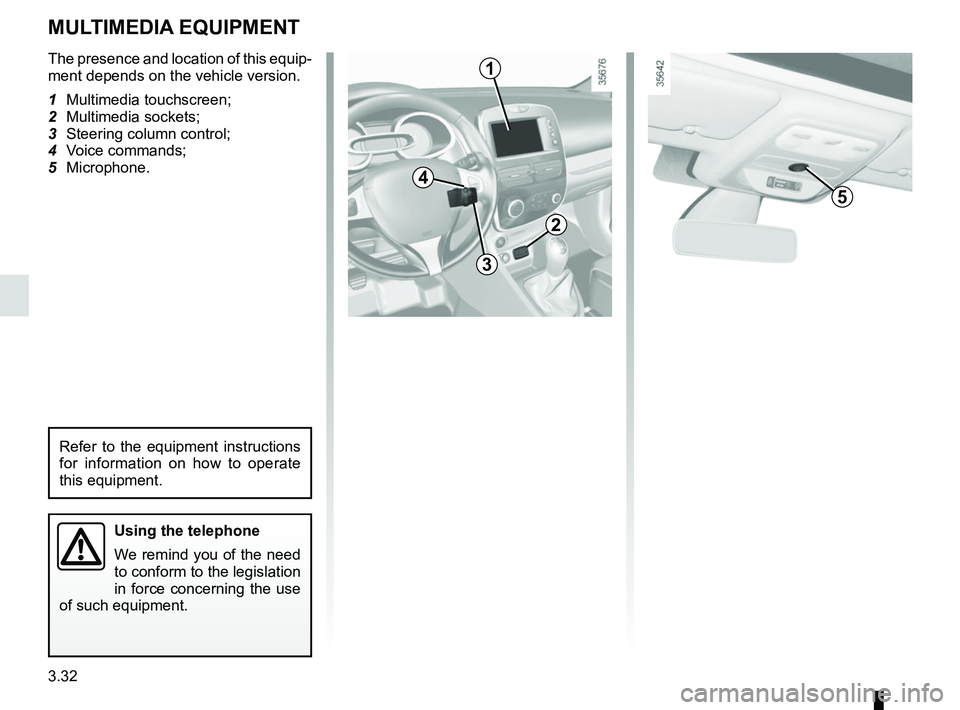
The presence and location of this equip-
ment depends on the vehicle version.
1 Multimedia touchscreen;
2 Multimedia sockets;
3 Steering column control;
4 Voice commands;
5 Microphone.
Using the telephone
We remind you of the need
to conform to the legislation
in force concerning the use
of such equipment.
MULTIMEDIA EQUIPMENT
1
5
3
2
4
Refer to the equipment instructions
for information on how to operate
this equipment.
Page 203 of 260

5.15
Emergency spare wheel
Refer to the information on the
“Emergency spare wheel” and in-
structions on “Changing a wheel” in
Section 5.
Changing wheels around
This practice is not recommended.
Fitting new tyres
TYRES (3/3)
Snow or Winter tyres
We would recommend that these be
fitted to all four wheels to ensure that
your vehicle retains maximum adhe-
sion.
Warning : These tyres sometimes have
a specific direction of rotation and a
maximum speed index which may be
lower than the maximum speed of your
vehicle.
Studded tyres
This type of equipment may only be
used for a limited period and as laid
down by local legislation. It is neces-
sary to observe the speed specified by
current legislation.
These tyres must, at a minimum, be
fitted to the two front wheels.
Chains may only be fitted
to tyres of the same size
as those originally fitted to
your vehicle.
In all cases, we would recommend
that you contact an approved dealer
who will be able to advise you on
the choice of equipment which is
most suitable for your vehicle.
18” wheels cannot be
fitted with chains.
If you wish to fit snow
chains, you must use spe-
cial equipment .
Consult an approved Dealer.
Use in winter
Chains
For safety reasons, fitting snow
chains to the rear axle is strictly for-
bidden.
Chains cannot be fitted to tyres which
are larger than those originally fitted to
the vehicle.
For safety reasons, this op-
eration must be carried out
by a specialist.
Fitting different tyres may
change your vehicle as follows:
– it may mean that your vehicle no longer conforms to current regu-
lations;
– it may change the way it handles when cornering;
– it may cause the steering to be heavy;
– it may affect the use of snow chains.
Page 215 of 260

5.27
Number Allocation
1 Front windscreen wiper,
controls under steering
wheel
2 Front left-hand daytime
running lights,
right-hand side lights,
left-hand main beam
headlight,
right-hand dipped beam
headlight,
front fog lights
3 Interior lighting,
registration plate lighting,
fog lights
4 Right-hand side lights,
rear side lights
5 Left-hand side lights,
front side lights
6 Dipped beams,
front right-hand daytime
running light,
left-hand side lights,
right-hand main beam
headlight
FUSES (3/5)
Number Allocation
7 Left-hand dipped beam
headlight
8 Right-hand main beam
headlight
9 Left-hand main beam
headlight,
steering column controls
10 Steering column controls,
speed limiter/cruise control,
interior rear-view mirror,
belt warning module,
Parking sensor,
additional heating,
electric headlight beam
adjustment,
rear screen de-icer
11 Central door locking,
rain and light sensor,
steering wheel angle
sensor,
vehicle start button,
electric rear windowsNumber Allocation
12 Courtesy light,
luggage compartment light,
air conditioning,
electric windows
13 ABS-ESC,
brake switch
14 Steering column controls,
brake switch
15 Horn
16 Rear fog lights
17 Cigarette lighter
18 Radio and multimedia,
diagnostic socket
19 Power-assisted steering
20 GPL
Page 217 of 260
5.29
Number Allocation
21 Airbag,
electric locking of steering
column
22 Injection,
starting,
fuel pump
23 Brake switch,
rear screen wiper,
passenger compartment
ECU
24 Daytime running lights
25 Electric headlight beam
adjustment,
rear screen,
heating,
parking sensor,
cruise control,
radio,
heated seat,
seat belt warning
26 Automatic gearbox
FUSES (5/5)
Number Allocation
27 Reversing lights, rear wiper,
passenger compartment
ECU, automatic gearbox
28 Instrument panel
29 Steering column controls,
Alarm
30 Air conditioning,
steering column controls,
energy ECU
31 Wipers,
rear reversing lights,
energy ECU
32 Central locking of opening
elements
33 Direction indicator lights
34 Passenger compartment
ECU,
hands-free accessNumber Allocation
35 interior lighting, electric
windows, air conditioning,
electric door mirrors, brake
lights,
ABS,
passenger compartment
ECU
36 Towbar socket
37 Heated seats
38 Heated rear screen
39 Electric door mirror